
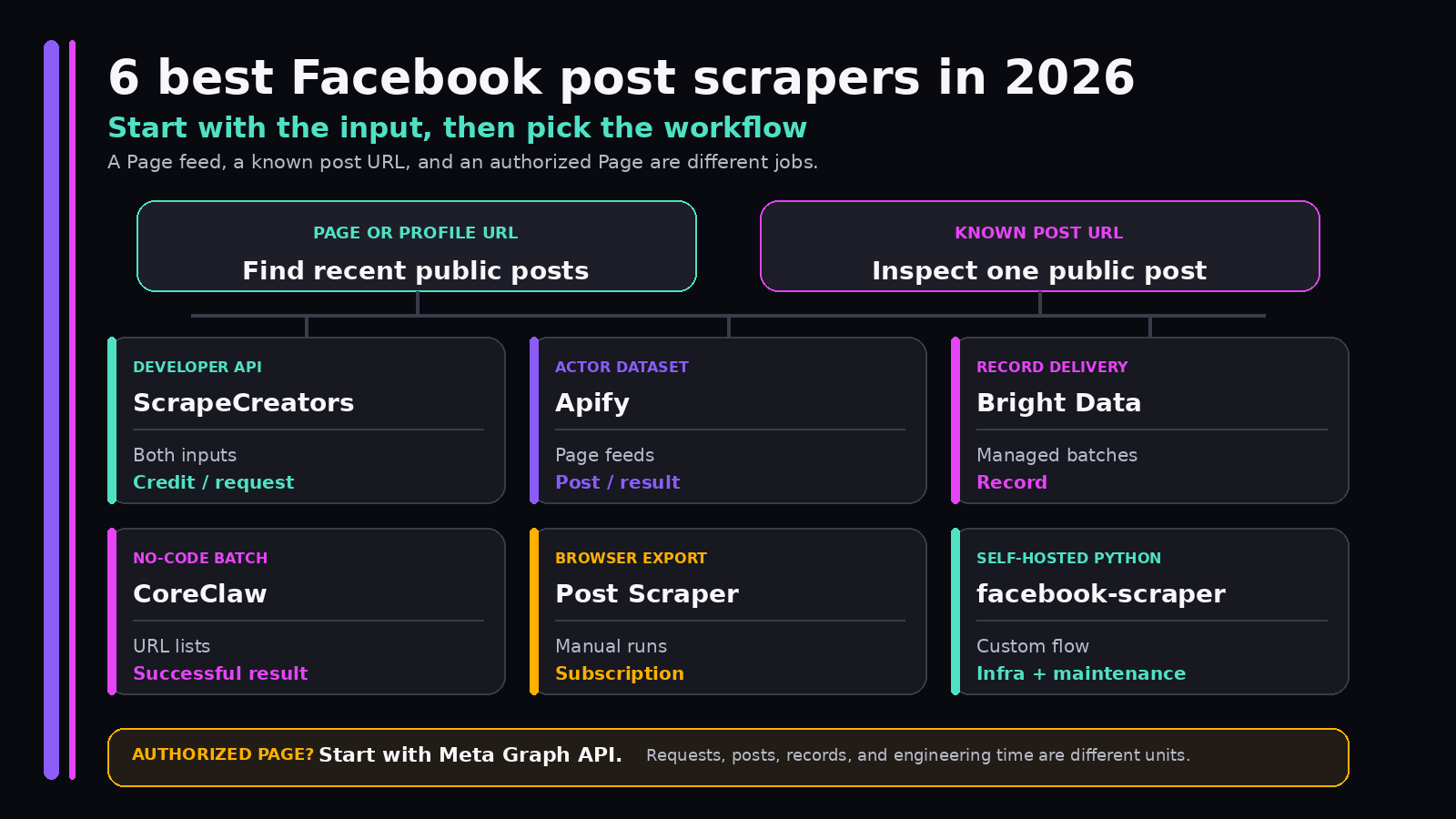
ScrapeCreators is my pick for developers who need public Facebook Page posts and individual post details through a focused REST API. Choose Apify for Actor runs and datasets, Bright Data for managed record delivery, CoreClaw for no-code batches, Post Scraper for a manual browser export, or facebook-scraper when your team wants to maintain Python code. If you manage the Page, check Meta’s Graph API before using any scraper.
I run ScrapeCreators, so my first-place recommendation comes with an obvious bias. I checked product pages, prices, docs, and limits against primary sources on September 20, 2026. I ran seven live ScrapeCreators requests, but I did not run a controlled reliability benchmark across all six tools.
Quick comparison
| Rank | Facebook post scraper | Choose it if | Published starting point checked September 20, 2026 | Main limitation |
|---|---|---|---|---|
| 1 | ScrapeCreators | You want Page-post feeds and single-post details through normal REST requests | 500 credits for $10; both tested endpoints used 1 credit per request | It returns supported public data, not a browser you can program freely |
| 2 | Apify Facebook Posts Scraper | You want Actor runs, schedules, datasets, exports, and integrations | From $2 per 1,000 posts | An Actor run and dataset are different plumbing from a synchronous endpoint |
| 3 | Bright Data Facebook Posts Scraper API | You want larger managed jobs and record delivery | 5,000 records per month free; Scraper APIs advertise rates from $0.75 per 1,000 records | A delivered record is not the same billing unit as one API request |
| 4 | CoreClaw Facebook Post Scraper | You want no-code batches and CSV or JSON downloads | From $0.60 per 1,000 successful results | The page mixes Page, profile, group, and individual-URL language, so test your exact input |
| 5 | Post Scraper | A person wants a one-off browser export | Freemium; the public listing says the paid tier exports up to 3,000 items at once | The exact subscription price only appears inside the extension, and it is not a backend API |
| 6 | facebook-scraper | You want free Python code and accept the maintenance work | MIT-licensed code; you pay for infrastructure and engineering | Its latest visible repository commit was three years old and the repo had 437 open issues |
These prices are not normalized. ScrapeCreators bills endpoint requests. Apify bills posts returned by an Actor. Bright Data bills records. CoreClaw bills successful results. A browser extension sells a subscription. Open-source code moves the cost into hosting, cookies, proxies, monitoring, and developer time.
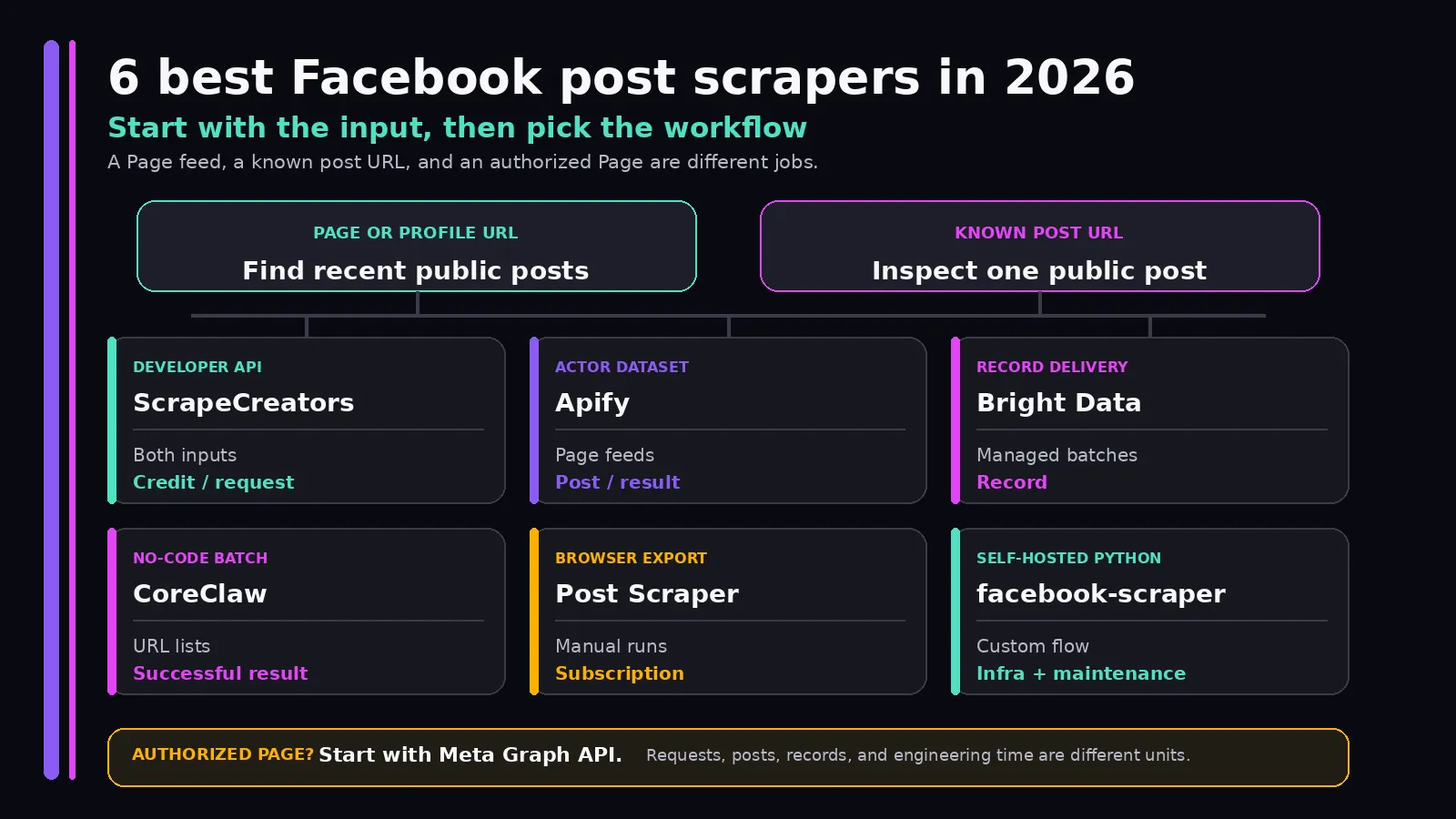
What Facebook post scraper means here
The query sounds precise, but the results mix several jobs:
- Start with a Page or public profile URL and retrieve a feed of recent posts.
- Start with one post or Reel URL and retrieve its text, author, media, and engagement fields.
- Export what a person can see in a browser to CSV or Excel.
- Run a hosted batch job that writes records into a dataset.
- Maintain your own scraper and decide how it handles sessions, blocks, parsing, and storage.
This guide covers the first two jobs most closely. It excludes private posts, private groups, account actions, publishing, and hidden personal data.
That gives this article separate ownership from the existing Facebook profile scraper comparison, which covers top-level profile and Page fields, and the Facebook Reels scraper guide, which focuses on short-form video feeds. Public group posts have their own Facebook Group API workflow. The new question here is simpler: which tool should you use to collect ordinary public Page posts or inspect one known post URL?
The search results support that split. In the live US results for facebook post scraper, Apify, a Chrome extension, Bright Data, CoreClaw, and facebook-scraper all ranked in the top six. ScrapeCreators had no top-ten result. For facebook post scraper api, the existing group-specific ScrapeCreators article ranked eighth, but it does not answer the broader Page-post buyer question. A dedicated post-scraper comparison can own that uncovered intent without retitling or weakening the group, profile, Reels, comments, or product pages.
The six best Facebook post scrapers
1. ScrapeCreators for a focused post API
ScrapeCreators’ Facebook API has separate endpoints for the two input shapes.
The Profile Posts endpoint accepts a public Page or profile URL and returns a small page of posts plus a cursor. Observed post fields included id, text, url, author, creation_time, reactionCount, commentCount, topComments, image fields, and video details.
The Facebook Post endpoint accepts an individual public post or Reel URL. The three live detail responses included stable post and author fields, description, creation time, reaction counts, comment count, share count, media fields, and video details when Facebook exposed them. The regular NASA post also returned 10 preview comments.
Choose ScrapeCreators when these calls sit inside an application and you want a direct JSON response. The same account can expand a post through separate comments and comment-replies endpoints, then cover other public social platforms without learning a different job runner for each one.
Current pricing starts at 500 credits for $10. The larger public packs shown on September 20 were 2,500 credits for $47, 20,000 for $297, 100,000 for $1,337, and 1,000,000 for $11,337. The site says cached responses cost zero credits when the same result is actually in cache. All seven fresh requests in my check charged one credit each.
Choose another tool if you need a visual export, a programmable browser, private content, account actions, or a guaranteed full historical archive. ScrapeCreators exposes supported public-data endpoints. It is not a Facebook account automation product.
2. Apify for Actors, schedules, and datasets
Apify’s maintained Facebook Posts Scraper accepts Facebook Page and profile URLs. Its page lists captions, timestamps, reactions, comments, shares, images, links, video fields, and transcripts among the possible output.
The Actor model is the reason to pick it. You can configure a run in the console, schedule it, call it through the API, send webhooks, keep results in an Apify dataset, and export JSON, CSV, Excel, XML, or HTML. It also accepts multiple Pages in one run and exposes time-frame filters.
Pricing on the live product card started at $2 per 1,000 posts. The page also said you can get 500 posts free. Check the estimate shown for your input because Apify platform usage, Actor pricing, optional fields, and total returned posts can all affect the final run.
Apify is the strongest competitor for this query. It ranked first in both the September 9 Ahrefs US snapshot and the September 20 live US results. A useful comparison has to beat that page on buyer clarity, not pretend it does not exist. Apify is the better choice when you want the Actor ecosystem. ScrapeCreators is simpler when your application wants a focused request and response.
3. Bright Data for managed record delivery
Bright Data’s Facebook Posts Scraper API lists post URL, ID, content, date, hashtags, comment count, likes, shares, user fields, attached media, and group details among its output. The product family includes separate Facebook collectors for Page posts, comments, profiles, Reels, Marketplace, and other objects.
Choose Bright Data when Facebook posts are one source inside a larger managed data pipeline. Its platform is built around scraper jobs, delivered records, batch inputs, webhooks, and storage destinations rather than one small endpoint.
The Page advertised 5,000 free records per month without a credit card. Bright Data’s current pricing navigation listed Scraper APIs from $0.75 per 1,000 records. Keep the word records attached to that rate. If one input yields 100 posts, that can be 100 billable records. It cannot be compared directly with a provider that charges once for a paginated response.
Bright Data is likely more platform than a small integration needs. It makes more sense when your team also needs enterprise delivery controls, several web data sources, or procurement support.
4. CoreClaw for no-code batches
CoreClaw’s Facebook Post Scraper is a hosted worker with no-code input and CSV or JSON output. The product page lists post text, post and Page links, ad status, engagement counts, top comments, author fields, external links, and reaction breakdowns.
Its page says you can add one or more Page or profile URLs, while the input section shows an individual post URL. That may be useful flexibility, but it is also a reason to test both shapes before buying. Confirm whether your run discovers posts from a Page, enriches known URLs, or does both with the depth you expect.
The public card listed rates from $0.60 per 1,000 successful results and said the worker was last updated April 10, 2026. CoreClaw fits a person who wants a hosted batch and downloadable table without building an API client. A production application should verify callback, pagination, failure, and schema behavior with representative inputs first.
5. Post Scraper for a manual browser export
The Post Scraper Chrome extension exports visible Facebook posts to CSV, Excel, or JSON. Its listing says it can capture post IDs, text, HTML, actor information, attachments, engagement counts, video views, URLs, and timestamps.
This is the most approachable option for a researcher who occasionally needs a spreadsheet. Visit a profile, run the extension, and download the result. There is no server integration to write.
The tradeoff is operational. It runs in a person’s browser, so it is a poor fit for an unattended backend. The store page called it freemium and said a paid subscription can export up to 3,000 items per run, but it did not publish the exact subscription price. The listing showed 2,000 users, a 3.3 rating from eight reviews, version 1.0.7, and a September 1, 2026 update date.
The privacy section also says the extension handles personally identifiable information. Review its requested permissions and privacy policy before installing it into a browser that has an active Facebook session.
6. facebook-scraper for self-hosted Python
Kevin Zakka’s facebook-scraper is an MIT-licensed Python package for public Pages, profiles, groups, and individual post URLs. The README documents get_posts(), get_profile(), get_group_info(), comment extraction, optional reaction requests, cookies, proxies, and media-related fields.
Choose it when local control matters more than support. You can inspect each request, own the storage layer, fork the parser, and decide exactly how retries work. There is no per-record software bill.
There is plenty of maintenance risk. The repository’s latest visible commit was three years old on September 20, 2026, and GitHub showed 437 open issues. The README also documents optional credentials and cookies, notes that some fields can be missing, and includes knobs such as pages, timeout, extra_info, and options because the simple call is not the whole production job.
This can be a good experiment or a useful code reference. I would not choose it for an unattended production feed unless someone on the team owns Facebook breakage, session handling, proxy behavior, tests, and alerts.
A live Facebook post API check
I tested both ScrapeCreators endpoints on September 20, 2026 with public NASA, Meta, and Pace Morby Pages. The Page-post requests all returned HTTP 200, three posts, a cursor, and credits_charged: 1. Response times were 2.63, 3.14, and 3.31 seconds.
This request fetches recent public posts from NASA:
curl --get 'https://api.scrapecreators.com/v1/facebook/profile/posts' \
  --header "x-api-key: $SCRAPE_CREATORS_API_KEY" \
  --data-urlencode 'url=https://www.facebook.com/NASA/'
A shortened shape from that response looked like this:
{
  "success": true,
  "credits_charged": 1,
  "posts": [
    {
      "id": "...",
      "text": "...",
      "url": "https://www.facebook.com/NASA/posts/...",
      "creation_time": "...",
      "reactionCount": 0,
      "commentCount": 0,
      "author": { "name": "NASA" },
      "topComments": []
    }
  ],
  "cursor": "..."
}
I sent the NASA cursor into a second request. It returned HTTP 200 in 2.73 seconds with three more posts, another cursor, and no post-ID overlap with the first page.
The single-post request uses a public post URL:
curl --get 'https://api.scrapecreators.com/v1/facebook/post' \
  --header "x-api-key: $SCRAPE_CREATORS_API_KEY" \
  --data-urlencode 'url=https://www.facebook.com/NASA/posts/PUBLIC_POST_ID'
The three individual detail calls returned HTTP 200 in 2.31 to 4.29 seconds and charged one credit each. The regular NASA post exposed fields for description, author, creation time, reactions, comments, shares, images, link attachment, and video metadata. The two Reel URLs exposed video and music objects when available.
This is a fixture check, not an uptime claim. It proves that those public inputs and endpoint shapes worked on the stated date. Counts, comments, media fields, and URLs can change.
What builders actually ask for
I searched YouTube in a US context for facebook post scraper, facebook posts scraper, facebook post scraper api, and best facebook post scraper. The four searches returned 80 rows across 42 unique videos. I read six available English transcripts totaling 677 segments, including four substantive walkthroughs about Page-post exports, Apify datasets, tool selection, and API automation.
I also reviewed 22 unique top or newest YouTube comments and fetched 19 reply rows. The practical questions were consistent:
- Can the scraper start from a list of Pages, or does it need known post URLs?
- Can the output go to Google Sheets, Make, n8n, CSV, or a backend API?
- Does it handle video posts and preserve useful media fields?
- Can it fetch full-resolution images rather than thumbnails?
- Does it work on public Pages, public groups, private groups, or only content visible to the current session?
- What happens when a dataset mapping or engagement field changes?
Those questions changed this guide. Input shape, delivery method, public/private boundaries, media behavior, and maintenance now sit ahead of long field lists.
Reddit added the less polished production concerns. Four searches returned 28 rows across 10 unique posts plus 27 unique matching comment rows. I fetched five relevant threads and read 23 top-level comments plus four nested replies. People discussed scraper reliability, current Page-post extraction, media archives, n8n jobs, and recurring monitoring. Several replies pointed back to official API limitations, cookies, Playwright or Selenium, reverse-engineered requests, and the fact that Facebook changes faster than one-off scripts age.
TikTok and LinkedIn were noisier. Four TikTok searches returned 120 rows across 55 unique videos, but the region=US requests still surfaced results marked with other regions and many generic scraping clips. Four LinkedIn searches returned 40 rows across 24 unique posts, mostly vendor demos and automation examples. I treated both as audience research, not product proof or ranking evidence.
The useful conclusion is not that everyone needs the same tool. People want three different outputs: a one-off spreadsheet, a recurring dataset, or an application response. Pick that first.
Compare the whole workflow, not one price
Use a fixed workload before comparing cost. For example:
100 public Pages
x 4 feed pages per Page
+ 300 individual post-detail lookups
+ retries and failed inputs
Then map each provider’s billing unit:
| Provider | Published unit | What to count in the sample job |
|---|---|---|
| ScrapeCreators | Credits per endpoint request | Feed pages, detail calls, comment calls, and cache behavior |
| Apify | Posts returned by an Actor | Returned posts, platform usage, optional fields, and run frequency |
| Bright Data | Delivered records | Records produced by each target and delivery mode |
| CoreClaw | Successful results | Input URLs, successful rows, and any separate discovery work |
| Post Scraper | Subscription and manual runs | Operator time, export limit, and browser/session risk |
| facebook-scraper | Infrastructure and engineering | Compute, proxies, cookies, failed retries, maintenance, and monitoring |
Do not divide a per-request number by a per-record number and call it a price comparison. First run the same fixture set. Count complete usable posts, missing required fields, duplicates across pages, retry rates, and time to a clean stored row.
When Meta’s Graph API is the better answer
Use Meta’s Page Feed endpoint first when you manage the Page and can obtain the required token and permissions.
Meta’s current v26.0 documentation says Page Feed can read posts from a Facebook Page. It lists pages_read_engagement and pages_read_user_content as required permissions. The requesting person must also be able to create content, manage, or moderate the Page. For a Page you do not own or manage, Meta says you need the Page Public Content Access feature and recommends a system user access token for that feature.
That route is better for authorized Page workflows because permission and ownership are explicit. The docs also list real limits. Expired posts are unavailable, shared posts can disappear when the original is not visible to the token, some user information depends on a Page access token, and the endpoint returns approximately 600 ranked published posts per year.
A public-data scraper solves a different job: start with a public URL that your app does not manage and return supported fields visible on public surfaces. Do not blur those access models.
Limits to plan for
No Facebook post scraper can turn Facebook into a stable database export.
Build for these cases:
- a Page can be public while an individual post is deleted, age-gated, region-limited, or otherwise unavailable
- a feed may rank or omit posts rather than return a perfect chronological archive
- post text, author fields, images, comments, shares, reactions, and video data can be null or missing
- media and thumbnail URLs can expire
- engagement counts can differ across feed, permalink, video, and cached surfaces
- cursors can expire, repeat items, or stop before the historical depth you expected
- a successful HTTP response still needs schema and minimum-useful-data checks
- browser and self-hosted tools can break when Facebook changes HTML, GraphQL operations, login behavior, or anti-automation checks
Deduplicate by stable post ID, retain the public source URL, cap pagination, store fetch time, and separate not available from a real zero. Alert on missing required fields rather than accepting every HTTP 200 as useful data.
Public visibility also does not remove copyright, privacy, contract, or data-protection obligations. Review Meta’s Automated Data Collection Terms, collect only what the use case needs, set retention and deletion rules, and get legal advice for sensitive or regulated work. Do not use these tools to promise private content or bypass access controls.
Sources checked
I checked these primary sources on September 20, 2026:
- ScrapeCreators Facebook API, Profile Posts docs, Facebook Post docs, pricing, current backend source, and seven live public requests
- Apify Facebook Posts Scraper, including its README, input, output, pricing, and API tabs
- Bright Data Facebook Posts Scraper API
- CoreClaw Facebook Post Scraper
- Post Scraper in the Chrome Web Store
facebook-scraperrepository and README- Meta Page Feed documentation and Automated Data Collection Terms
- Audience research from a Page-post and Google Sheets workflow, an Apify Page-post walkthrough, a Facebook scraper comparison, and an API automation walkthrough
- Reddit discussions about current Page scraping, post media archives, and scheduled n8n monitoring
Prices, fields, permissions, and provider behavior change. Recheck the live source with the Pages and posts you actually need before committing a production budget. You can create a ScrapeCreators account, read the Facebook API docs, or compare the broader Facebook comments API workflow next.


