
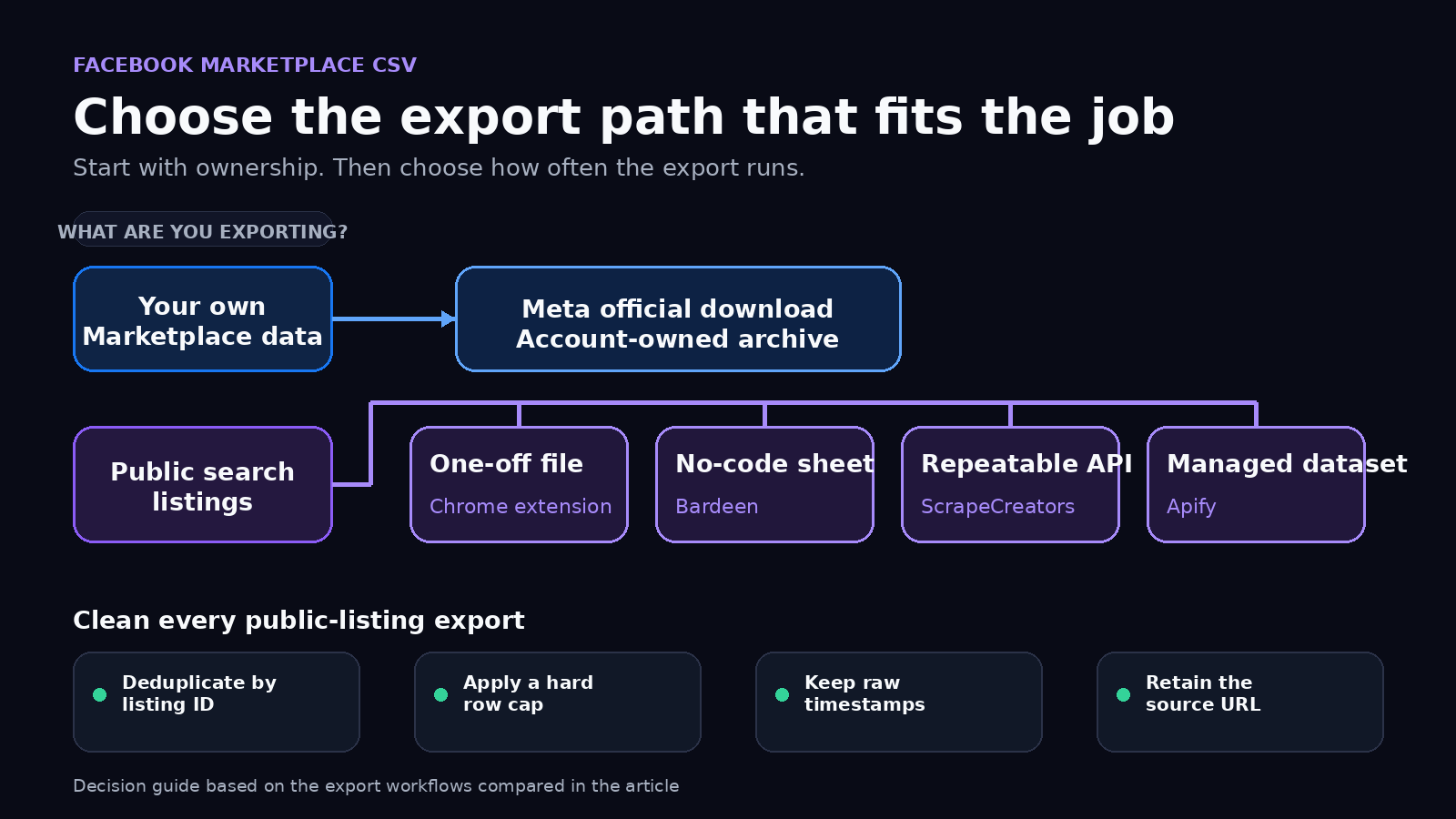
If you need your own Marketplace records, start with Meta’s official data download. If you need public search listings in a CSV, use a browser extension for one small job, Bardeen for a no-code Google Sheets flow, ScrapeCreators for a repeatable API export, or Apify for Actor datasets. My pick for developer workflows is ScrapeCreators, which I run. For a quick one-off export, an extension is easier.
Facebook does not provide one native button that exports arbitrary public Marketplace search results. That distinction matters because “my listings” and “listings matching this search” are two different jobs.
I checked every product page and ran a two-page Marketplace export on September 15, 2026. I did not test every paid plan or use a private Facebook account.
Quick comparison
| Rank | Method | Best for | Cost checked September 15, 2026 | Main limitation |
|---|---|---|---|---|
| 1 | Meta’s own-data download | Data connected to your own Marketplace use | No separate export price stated | Not an arbitrary public-search export |
| 2 | Listing Scraper Chrome extension | A small, one-time CSV or Excel file | Free tier; limits and one-time upgrade shown in the extension | Runs inside your browser and depends on the loaded page |
| 3 | Bardeen to Google Sheets | A no-code sheet workflow | Uses Bardeen plan credits by action | Browser workflow with more moving parts than a download |
| 4 | ScrapeCreators Marketplace API | Repeatable exports inside code or an app | Four live requests each charged 1 credit; 100 free credits | Returns JSON, so you create the CSV |
| 5 | Apify Facebook Marketplace Scraper | Actor runs, datasets, schedules, and built-in export formats | Product page showed conflicting $2.60 and $5 per 1,000-listing figures | Actor and platform costs both need checking |
The billing units do not line up cleanly. A free account export, a browser extension limit, an automation action, an API request, and an Actor result are different things. Price the full job, including detail lookups, pagination, storage, and reruns.
First decide what you are exporting
There are three common requests hiding inside the same search phrase:
- “I want a copy of my own Marketplace data.”
- “I want the public listings visible for a search and location.”
- “I want to upload or manage many listings from a spreadsheet.”
For the first job, use Meta’s official route. Meta has a help flow titled Access or download your data when using Marketplace. The exact archive categories can change, but this is the right starting point for information tied to your use of the product.
For the second job, you need a tool that reads public search results and turns them into structured rows. That is what the extension, Bardeen workflow, ScrapeCreators API, and Apify Actor below do in different ways.
The third job is outside this article. Meta separately documents how to use a spreadsheet for multiple listings. That is an upload or listing-management workflow, not proof that Facebook offers a native public-search export.
This split is missing from most ranking pages. It also showed up in the audience research. One Reddit result asked about exporting a seller’s own listings, while YouTube tutorials focused on public search URLs, scraper datasets, CSV files, and Google Sheets. TikTok searches for the same phrases were much noisier and mostly returned seller tips or app-download videos. A useful answer has to define the dataset before naming a tool.
Five ways to export Facebook Marketplace listings
1. Use Meta for data tied to your own account
Choose Meta’s own download tools when the noun “my” is doing the work. You are trying to access your own Marketplace information, not build a feed of public listings in Austin, Chicago, or another location.
This route has the clearest ownership boundary. It does not require a scraping extension, an API key, or a third-party dataset. Start here for an account archive, compliance request, or personal backup.
Do not assume the archive will look like a polished competitive-research table. Check the available Marketplace category, date range, format, and fields inside Meta’s current flow before promising a downstream schema.
Choose this if:
- the export belongs to your own account;
- you can wait for Meta to prepare it;
- you do not need a live public-search feed.
Choose something else if the job starts with a query, coordinates, radius, price filter, or public item URL.
2. Use a Chrome extension for one visible search
The Listing Scraper Chrome Web Store page says it exports Marketplace listings to CSV, XLSX, JSON, HTML, or raw JSON. The listing says processing happens locally, includes a free tier, and offers a one-time upgrade for unlimited exports and batch processing. It displayed 230 users when checked.
This is the shortest path from a search page to a file. Load Marketplace, scroll until enough rows appear, run the extension, and download the result.
The tradeoff is that the browser page becomes part of your data pipeline. The extension can only work with what the current session loads. Facebook UI changes can break extraction, and browser permissions deserve a real review. The store’s version notes said its extraction engine had already needed a fix after Facebook changes.
Choose this if you need 50 rows once and want to open them in Excel immediately. Do not choose it as the hidden backend for a product that must run every hour.
3. Use Bardeen when Google Sheets is the destination
Bardeen’s Marketplace workflow scrapes listings from the current page and appends them to a selected Google Sheets tab. Its page also says the output can go to Airtable or a CRM.
That is useful for an operator who thinks in sheets rather than APIs. It removes the file-download step and can connect the rows to a larger no-code workflow.
It also creates data-cleaning questions that a simple demo can hide. Under a public YouTube tutorial about sending Marketplace data to Sheets, viewers asked how to clean bracketed location values, show an image instead of its URL, avoid duplicate rows, sort by newest, and feed the result into an app. Those are not edge cases. They are the actual export job.
Use a stable listing ID as your sheet key. Put image URLs in their own column. Keep the raw price amount separate from its formatted currency string. Upsert rows rather than blindly appending every run.
Choose Bardeen when a person will work from the sheet and no-code automation is the point. An API is cleaner when the sheet is only an intermediate stop.
4. Use ScrapeCreators for a repeatable CSV job
The Marketplace Search endpoint returns structured listing JSON for a query, latitude, longitude, and radius. It supports filters such as price, condition, availability, category, sort order, and date listed. The response includes a cursor for pagination.
The Marketplace Item endpoint adds item-level fields when Facebook exposes them. Use it selectively. Calling one detail endpoint for every search row changes both the cost and runtime of the export.
ScrapeCreators does not pretend JSON is a spreadsheet. You decide the columns and write the file. That small amount of code gives you control over duplicate IDs, nullable fields, row limits, and schema changes.
Current pricing listed 100 free credits, then $47 for 25,000 credits or $1.88 per 1,000 one-credit requests. The four live Marketplace calls for this guide each reported credits_charged: 1. Credits are pay as you go and do not expire. Check the current pricing section and endpoint response before budgeting because prices and endpoint costs can change.
Choose this when the export runs in a backend, scheduled job, internal tool, or AI agent. Choose an extension if writing and operating code would cost more than the file is worth.
5. Use Apify when you want a managed Actor dataset
Apify’s maintained Facebook Marketplace Scraper accepts location, category, search, and item URLs. Its page says results can be downloaded as JSON, XML, CSV, Excel, or HTML. It supports scheduled Actor runs, APIs, datasets, and integrations such as Google Sheets and Make.
That makes Apify a good fit for a team that already uses Actors and wants the platform to own run history and dataset exports.
Read the live price in the console before committing to a budget. When checked, the same public product page showed “from $2.60 / 1,000 listings” near the top and later said $5 per 1,000 items in its README text. Apify’s platform pricing page listed a $0 plan with $5 of monthly usage and a $19 Starter plan. Those figures describe different layers, and the conflicting Actor copy makes a live run estimate more reliable than one copied number.
Choose Apify for managed datasets and Actor integrations. Choose ScrapeCreators when you want a narrower REST endpoint and would rather own the CSV step than the Actor lifecycle.
Disclosure: I run ScrapeCreators. Apify has a broader automation platform, and the Chrome extension is faster for a one-off file. Pick the operating model you actually want.
Turn two API pages into one clean CSV
This Node.js example fetches up to two pages, removes duplicate listing IDs, flattens nested values, and writes a real CSV file. Set SCRAPE_CREATORS_API_KEY in your environment before running it.
import { writeFile } from "node:fs/promises";

const endpoint = "https://api.scrapecreators.com/v1/facebook/marketplace/search";
const params = new URLSearchParams({
  query: "standing desk",
  lat: "30.2677",
  lng: "-97.7475",
  radius_km: "65",
  count: "12",
  sort_by: "creation_time_descend",
  availability: "available",
});

const listingsById = new Map();
let cursor;

for (let page = 0; page < 2; page += 1) {
  if (cursor) params.set("cursor", cursor);

  const response = await fetch(`${endpoint}?${params}`, {
    headers: { "x-api-key": process.env.SCRAPE_CREATORS_API_KEY },
  });

  if (!response.ok) {
    throw new Error(`Marketplace request failed: ${response.status}`);
  }

  const body = await response.json();

  for (const listing of body.listings ?? []) {
    listingsById.set(String(listing.id), {
      id: listing.id,
      title: listing.title,
      price: listing.price?.amount ?? "",
      currency: listing.price?.currency ?? "",
      city: listing.location?.city ?? "",
      state: listing.location?.state ?? "",
      listed_at: listing.creation_time ?? "",
      listed_text: listing.listing_date_text ?? "",
      image_url: listing.primary_photo?.url ?? "",
      listing_url: listing.url,
    });
  }

  cursor = body.cursor;
  if (!cursor || !body.has_next_page) break;
}

const rows = [...listingsById.values()];
const columns = Object.keys(rows[0] ?? {});
const csvCell = (value) => `"${String(value ?? "").replaceAll('"', '""')}"`;
const csv = [
  columns.join(","),
  ...rows.map((row) => columns.map((column) => csvCell(row[column])).join(",")),
].join("\n");

await writeFile("facebook-marketplace-listings.csv", csv);
console.log(`Wrote ${rows.length} unique listings`);
For a strict maximum, stop adding rows after your desired count. Do not assume an upstream count parameter is a perfect output cap.
What the live export test exposed
I ran that search pattern against the production API on September 15, 2026. The query was standing desk around Austin, Texas, with a 65 km radius, newest-first sorting, available listings, and count=12.
| Observation | Page 1 | Page 2 | Export implication |
|---|---|---|---|
| Rows returned | 24 | 12 | Apply your own hard row cap |
| Cursor returned | Yes | Yes | Store the cursor only if the next run should continue |
| IDs duplicated across pages | 2 | 2 | Deduplicate on listing ID |
| Unique rows after two pages | 34 total | 34 total | Count after deduplication, not before |
| Credits charged | 1 | 1 | Search cost followed requests, not rows |
The first page also included a San Antonio result even though the search center and radius were set around Austin. Treat Marketplace location fields and radius as useful filters, not a guarantee that every upstream row fits your intended boundary. Validate city, coordinates when present, or your own distance calculation if geography is strict.
I sent the first result URL to the item endpoint. It returned the same listing ID and added item-level fields, including a description and one photo in that response. That proves the two endpoints can be joined by ID. It does not prove every item will expose every field.
This test changed the script in three ways: it deduplicates IDs, keeps nullable values empty, and enforces output rules on the client rather than trusting a requested count.
Fields worth keeping
A useful export is smaller than the raw response. Start with:
| Column | Why keep it | Cleanup rule |
|---|---|---|
id | Stable join and dedupe key | Store as text so spreadsheets do not round it |
title | Human review and keyword analysis | Preserve raw text; normalize in a separate column |
price.amount | Sorting and calculations | Keep numeric amount separate from formatted text |
location.city and state | Geographic grouping | Do not flatten the whole location object into one messy cell |
creation_time | New-listing logic when present | Keep the ISO value and the human label separately |
listing_date_text | Useful fallback and audit clue | Expect null on some rows |
primary_photo.url | Image reference | Keep the URL; do not embed binary images in CSV |
url | Review and item-detail lookup | Preserve the canonical item URL |
Add seller information only when the use case needs it and the source exposes it. A larger dataset is not automatically a better one. Personal data increases storage, security, and compliance work.
For scheduled exports, save the raw response outside the analyst-facing CSV only if you have a real retention reason. Version your selected columns. If a field disappears, the job should leave the cell empty and log the change rather than shifting every column to the left.
The YouTube and Reddit research for this guide kept circling back to the same practical issues: duplicates, location drift, Excel or Sheets output, app integration, newest-first runs, and whether a browser or account could be detected. That is why the decision table focuses on the operating model, not a long list of features.
Limits, privacy, and terms
Facebook does not offer a general public Marketplace search API. Third-party tools depend on public web data and can break when Facebook changes the product.
Read Facebook’s current Terms before collecting data. Public visibility does not remove contractual, privacy, intellectual-property, or local-law obligations. Collect the minimum fields needed, secure stored files, set a retention period, and honor applicable deletion or access requests.
Keep read access separate from account automation. The ScrapeCreators Marketplace routes used here search public listings and retrieve item details. They do not publish listings, send cold messages, make purchases, or control a Facebook session. A Reddit discussion about connecting Marketplace scraping to cold DMs drew the predictable warning: the read step and the messaging step have different risk profiles.
CSV also has a small security trap. Spreadsheet programs can evaluate cells beginning with =, +, -, or @ as formulas. If untrusted text will be opened in Excel, escape potential formula cells before distribution. The code above quotes CSV syntax correctly, but production exports should add formula-injection protection based on how the file will be used.
Finally, public listings change. Prices, availability, titles, and images can disappear between export and review. Store the collection timestamp and treat the CSV as a dated snapshot, not a permanent catalog.
Sources checked
Product capabilities and changing prices were checked on September 15, 2026:
- Meta: Access or download your Marketplace data
- Meta: Use a spreadsheet for multiple Marketplace listings
- Listing Scraper Chrome Web Store page
- Bardeen Marketplace to Google Sheets workflow
- Apify Facebook Marketplace Scraper and Apify pricing
- ScrapeCreators Marketplace Search docs, Item docs, and pricing
- Apify’s Marketplace export walkthrough, a Chrome-extension export demo, and a Sheets automation tutorial
- Reddit discussion about exporting a seller’s own Marketplace listings and a public-data automation discussion
For a broader tool comparison, read the five best Facebook Marketplace APIs and scrapers. If the real goal is repeated monitoring rather than a file, use the Facebook Marketplace alerts guide. You can also create a free account and run the API example before paying.


