
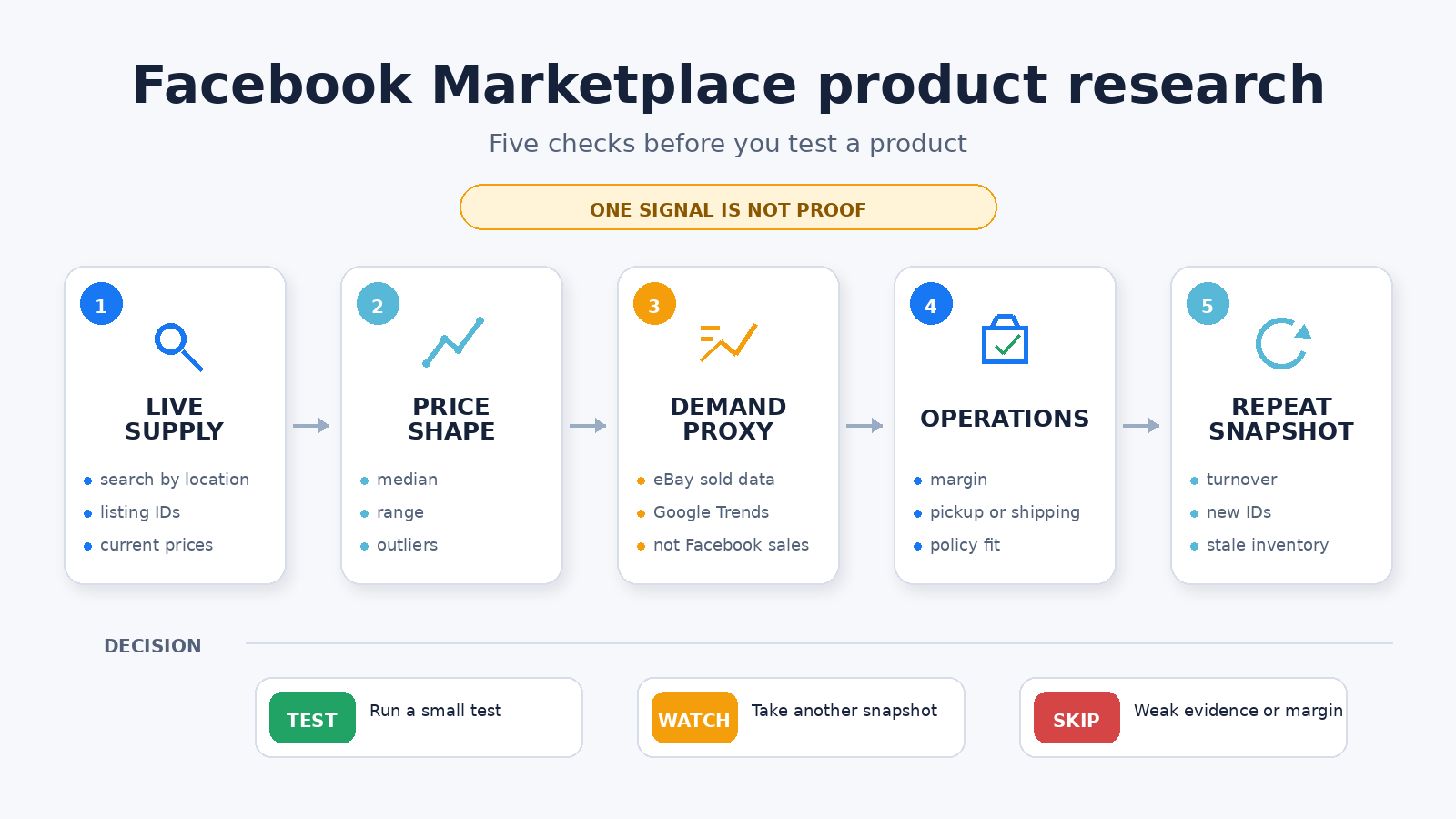
The best Facebook Marketplace product research combines several imperfect signals. Start with Facebook’s own search for one manual check. Use a Marketplace API when you need repeatable local listing and price snapshots. Add eBay sold data and Google Trends as clearly labeled demand proxies. Use Apify if you prefer scheduled Actor datasets. None of these proves Facebook demand by itself.
I run ScrapeCreators, one of the API options below. I checked the current sources and ran three live Marketplace searches plus three item lookups on September 14, 2026. I did not test every product here or measure sales from anyone’s private account.
Quick comparison
| Rank | Method | Best for | Cost checked September 14, 2026 | What it does not prove |
|---|---|---|---|---|
| 1 | Facebook Marketplace search | A quick check in one city | Free with a Facebook account | Sales, sell-through, or stable inventory |
| 2 | ScrapeCreators Marketplace API | Repeatable location, price, condition, and listing snapshots | 1 credit per successful search or item request; 100 free credits | Category-wide demand or historical sales |
| 3 | eBay Product Research | Sold-price and sell-through evidence from eBay | Available through eBay Seller Hub; the help page lists no separate per-query price | That the same item will sell on Facebook locally |
| 4 | Google Trends | Directional interest by time and place | Free | Search volume, profit, or Marketplace sales |
| 5 | Apify Facebook Marketplace Scraper | Actor runs, datasets, schedules, and exports | Page headline said from $2.60 per 1,000 listings | A synchronous research verdict or sold demand |
The units are different on purpose. A Facebook account, an API request, an eBay seller tool, a normalized interest index, and an Actor dataset do not become comparable because they share a row. Price the workflow you will actually run.
What product research needs to prove
A viral list of “winning products” is easy to publish and hard to use. Useful research answers five narrower questions:
- How much visible supply exists in the location where you plan to sell?
- What does the current price distribution look like after obvious outliers are removed?
- Is there any demand evidence outside one active-listing page?
- Can the item survive fees, sourcing cost, storage, pickup or shipping, returns, and your time?
- Does the picture still look similar on another day?
That framing came up repeatedly in the audience research for this guide. A YouTube walkthrough that sends eBay research into Google Sheets focused on sold price, sell-through, and automation rather than a static product list. A Marketplace data video drew practical questions about URLs, filters, and location coverage. In public Reddit discussions, sellers pushed back on universal “fastest selling” lists and described results that changed by city, item, condition, and price (thread one, thread two).
The practical lesson is boring but useful: choose a specific item, market, and time window before choosing a tool.
Five Facebook Marketplace product research methods
1. Start with a manual Marketplace search
Facebook’s own search is the right first method when you are considering one item in one city. Search the exact item name, set the location and radius, narrow the condition, then record the first 20 to 30 relevant listings.
Do not just write down the cheapest price. Capture:
- listing ID or URL;
- title and condition;
- asking price;
- city or neighborhood;
- listed date when Facebook exposes it;
- whether the result is a duplicate, bundle, damaged item, wanted ad, or obvious outlier.
Run the same search in two nearby markets if pickup distance is realistic. A product with ten listings at similar prices tells a different story from one with ten listings spread from $20 to $800.
Choose this method if you are testing one idea and can review the records yourself. Move to an API when copying, cleaning, and repeating the search becomes the slow part.
2. Take repeatable snapshots with the ScrapeCreators API
ScrapeCreators’ Facebook Marketplace API is built for public listing search and item details. Its three Marketplace endpoints cover:
- location lookup for place names and coordinates;
- listing search by keyword, coordinates, radius, category, price, condition, availability, date, sort order, and cursor;
- item details by listing ID or URL.
A successful search or item request costs one credit. The current pricing section shows 25,000 credits for $47 and 500,000 for $497. Credits do not expire. Those are request units, not listing units, and the endpoint can return many records in one search response.
The API is useful when you need the same research table for several locations or a second snapshot tomorrow. Store listing IDs, prices, query parameters, and observation time. A new ID means new to your dataset, not necessarily new to Facebook. A missing ID might mean sold, deleted, reordered, or simply absent from that response.
Choose ScrapeCreators if you want a normal JSON request and will build your own analysis. Choose another method if you need private account data, listing creation, seller messaging, or confirmed sales. The API does none of those.
3. Check eBay Product Research for a sold-data proxy
Facebook’s public listing results show asking prices and listing status, not a dependable category-wide sales ledger. eBay Product Research fills a different part of the research job with actual eBay transaction data.
eBay’s current help page says the tool covers up to three years of sales data. It reports sales trends, average sold price, sold-price range, shipping costs, seller counts, and selling format. Sell-through is available for searches of items sold within the previous 90 days.
Use the same specific phrase you searched on Facebook. Match condition and model number when possible. If eBay shows frequent sales in a tight price band while Facebook has little local supply, the item may deserve a small test. Product Research runs inside eBay Seller Hub; the current help page does not list a separate per-query price.
It is still a proxy. eBay has different buyers, shipping expectations, fees, and geography. Label the evidence “eBay sold data,” not “Facebook Marketplace demand.”
Choose this if sold-price evidence matters more than another active-listing scrape.
4. Use Google Trends without turning the index into fake volume
Google Trends can show whether interest in a product is rising, seasonal, regional, or too small to interpret. Compare a product topic with a close substitute over 12 months, then inspect the states or metro areas you might serve.
Google’s own Trends FAQ says the data is sampled and normalized to the selected time and location. The result is scaled from 0 to 100. A score of 100 means peak relative interest in that comparison. It does not mean 100 searches.
This distinction matters because the current top-ranking product-research article describes a Trends value around 100 as “around 100 keyword searches.” That is not how Google defines the metric.
Choose Trends for timing and regional direction. Do not use it to estimate Marketplace inventory, completed sales, or exact search volume.
5. Use Apify when you want Actor datasets and schedules
Apify’s maintained Facebook Marketplace Scraper accepts Marketplace location, category, search, and item URLs. Its page says the Actor can extract prices, locations, seller details, status, photos, and video, then export results as JSON, CSV, Excel, XML, or HTML. It also supports API runs and schedules.
That workflow is useful if your team already uses Apify datasets and integrations. You start an Actor run, wait for it, then analyze or export the dataset.
The current page needs a pricing caveat. Its headline displayed “from $2.60 / 1,000 listings” on September 14, while explanatory copy lower on the same page still said $5 per 1,000 items and recommended a $49 monthly plan for regular extraction. Check the live calculator and your expected result count before budgeting.
Choose Apify if Actor scheduling and dataset exports are the product you want. Choose a synchronous API when you would rather receive a search response directly.
If your actual job is dropshipping supplier discovery and one-click product imports, a suite such as AutoDS may fit better than either data API. That is a different workflow from measuring current local Marketplace supply.
An original live Marketplace snapshot
I ran three searches through ScrapeCreators on September 14, 2026. Each requested count=12, newest-first results, available listings, and a 65 km radius. Every response returned HTTP 200, 24 unique listing IDs, and a pagination cursor.
| Query and location | Rows returned | Observed price range | Median asking price | What this proves |
|---|---|---|---|---|
| standing desk, Austin | 24 | $10 to $425 | $67.50 | One live page had a wide local price spread |
| cordless drill, Chicago | 24 | $5 to $250 | $50 | Condition and bundles need manual review |
| sectional sofa, Phoenix | 24 | $150 to $1,399 | $424.50 | Large-item pricing is highly local |
I also fetched the first item from each search. All three item requests returned HTTP 200 and a matching listing ID. Search rows included creation_time in these checks, while listing_date_text was null. Item details varied: photo counts were 2, 8, and 5; seller data was present in two of the three responses.
This is an endpoint and field check, not a market study. One response page does not measure total inventory, demand, conversion, or average time to sell. The fact that count=12 returned 24 rows also means you should not assume that parameter is a hard cap. Inspect the response and deduplicate by ID.
Turn a listing search into a research table
This Node.js example fetches one local search, removes duplicate IDs, and reports the current median asking price. It deliberately stops short of calling that median a market value.
const params = new URLSearchParams({
  query: "standing desk",
  lat: "30.2672",
  lng: "-97.7431",
  radius_km: "65",
  condition: "used_good",
  availability: "available",
  sort_by: "creation_time_descend",
});

const response = await fetch(
  `https://api.scrapecreators.com/v1/facebook/marketplace/search?${params}`,
  { headers: { "x-api-key": process.env.SCRAPE_CREATORS_API_KEY } },
);
if (!response.ok) throw new Error(`Marketplace search failed: ${response.status}`);

const body = await response.json();
const listings = [...new Map(
  (body.listings ?? []).map((listing) => [listing.id, listing]),
).values()];

const prices = listings
  .map((listing) => listing.price?.amount)
  .filter(Number.isFinite)
  .sort((a, b) => a - b);

const middle = Math.floor(prices.length / 2);
const median = prices.length % 2
  ? prices[middle]
  : (prices[middle - 1] + prices[middle]) / 2;

console.log({
  observedAt: new Date().toISOString(),
  query: Object.fromEntries(params),
  uniqueListings: listings.length,
  medianAskingPrice: median,
  cursor: body.cursor ?? null,
});
Save the raw rows too. A median without the titles and condition notes can hide bundles, damaged items, and irrelevant matches.
A 20-minute research sequence
- Search one exact product manually in your target city. Remove irrelevant results and note the price spread.
- Pull the same phrase for two or three locations through an API. Save the parameters, IDs, prices, and observation time.
- Check the exact item in eBay Product Research. Record sold-price range, seller count, and sell-through where available.
- Compare the product and one substitute in Google Trends. Treat the score as relative interest, not volume.
- Calculate your real margin after sourcing, fees, storage, transport, shipping, returns, and time.
- Repeat the Marketplace snapshot before buying inventory. New IDs, missing IDs, and price changes are more useful than one static screenshot.
A small test is reasonable when several signals agree and the economics still work. Keep watching when the price or supply picture is noisy. Skip when the thesis depends on one viral video, one unusually cheap listing, or a demand number the source never provided.
Limits and safety
Facebook Marketplace changes by location, session, category, and time. Public records can disappear. Optional fields can be null. Search ordering can change between identical requests.
- Asking price is not sold price.
is_soldon one item is not category sell-through.- A missing listing is not proof of a sale.
- eBay transactions are a cross-market proxy.
- Google Trends is relative interest, not purchase intent.
- Public visibility does not remove privacy, copyright, contract, or consumer-protection obligations.
Review Meta’s Automated Data Collection Terms and get legal advice for regulated or high-risk collection. ScrapeCreators reads public Marketplace data. It does not post listings, message sellers, buy items, or automate a Facebook account.
If you need to choose a collection provider, read the Facebook Marketplace API and scraper comparison. If you want recurring new-listing or price-change notifications, the Facebook Marketplace alerts guide covers the state and polling workflow. Create an account if the API method fits your project.
Sources checked
I checked these pages and live endpoints on September 14, 2026:
- ScrapeCreators Facebook Marketplace API, location docs, search docs, item docs, and public pricing
- eBay Product Research help
- Google Trends data FAQ
- Apify Facebook Marketplace Scraper
- AutoDS Facebook Marketplace product research guide
- Meta Automated Data Collection Terms
Prices, fields, access rules, and source pages can change. Recheck the primary page before buying a plan or promising data to a customer.


