
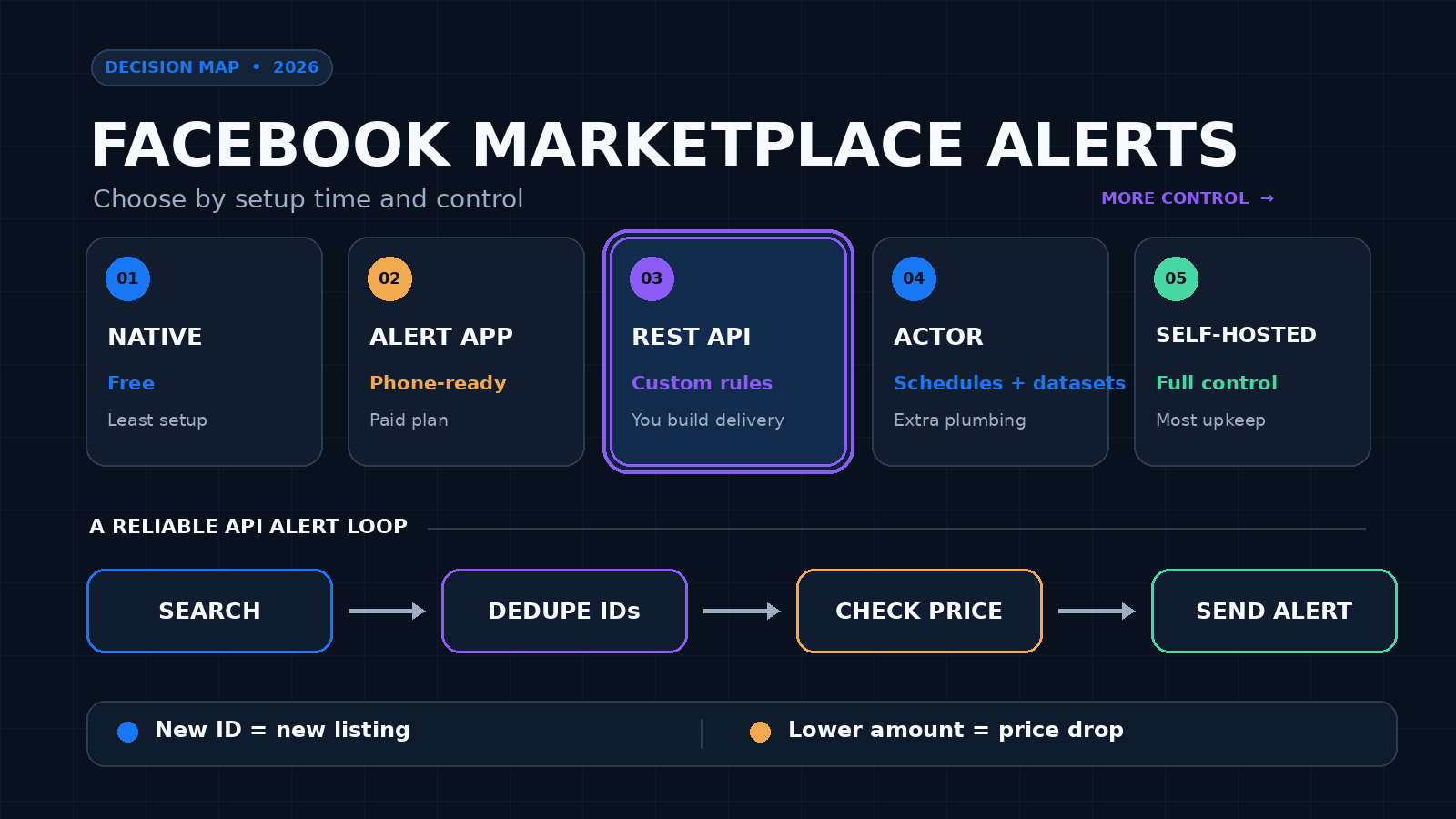
Facebook’s saved-search notifications are the simplest free way to get Marketplace alerts. Use a dedicated app if you want ready-made phone alerts. Use an API if you need exact filters, your own polling schedule, price-drop logic, or alerts inside a product. No option can promise every listing the second it appears, so test the method in the city and category you care about.
I run ScrapeCreators, which is one of the API options below. I checked each provider’s current product and pricing pages on September 13, 2026. I also ran the ScrapeCreators Marketplace search and item endpoints. I did not run a controlled speed test across all five options.
Quick comparison
| Rank | Method | Best for | Cost checked September 13, 2026 | Main tradeoff |
|---|---|---|---|---|
| 1 | Facebook notifications | A free personal saved search | Free with a Facebook account | Little control over timing, state, or delivery |
| 2 | ScrapeCreators API | Custom alerts inside an app or workflow | 1 credit per successful search or item request | You build the scheduler, storage, and notification |
| 3 | Swoopa | A ready-made alert app, especially for vehicles | 7-day trial; basic Go plan starts at $47 month to month | Fixed product and subscription rather than an API |
| 4 | Apify Marketplace Scraper | Scheduled Actor runs and datasets | Actor page lists pricing from $2.60 per 1,000 listings | More run and dataset plumbing |
| 5 | AI Marketplace Monitor | A self-hosted hobby project | Open-source software; hosting, proxy, and AI costs vary | You maintain Python, Playwright, login, and CAPTCHA handling |
These numbers use different units. ScrapeCreators charges per request, Swoopa sells plans, Apify quotes a listing-based Actor rate, and self-hosting shifts the bill to infrastructure and your own time. Estimate the whole alert loop, not the smallest number in one pricing box.
What a useful alert system needs
A Marketplace alert is only useful when it answers four questions:
- Is this listing actually new to me?
- Does it match my location, price, condition, and category rules?
- Has its price changed since I last saw it?
- Can I open the original listing before it disappears?
Speed matters, but bad matching creates noise. The stronger design is usually a narrow search, a stored set of listing IDs, and a clear delivery rule. If a search returns the same 24 listings every minute, your system should send zero new alerts after the first baseline run.
Audience research pointed to the same problem. In one public Reddit thread, the original poster said Facebook’s built-in alert was too slow and good deals were sold before the notification arrived. Replies suggested constant refreshing, paid alert apps, and a DIY Python job. Other users asked for Android support, cheaper plans, reliable location filters, and price-drop alerts. A YouTube tutorial about newest-first Marketplace URLs drew comments from resellers who cared about seeing recent items rather than Facebook’s suggested feed.
That is why this list includes both simple consumer options and developer tools. They solve different versions of the job.
Five ways to get Facebook Marketplace alerts
1. Start with Facebook’s own notifications
Facebook has a Marketplace notification category for saved searches. Its Help Center instructions point users to Marketplace profile, Settings, Notifications, then the category they want to enable or disable.
This is the right first step for one or two personal searches. It costs nothing, lives in the Facebook app, and does not require another account or service.
The limitation is control. You do not choose a polling interval, inspect raw result IDs, keep your own price history, or route events into a business workflow. Public user reports also complain about delayed or inconsistent saved-search alerts. Those reports are anecdotes, not a measured platform-wide failure rate, but they explain why alert apps exist.
Choose this if you are a casual buyer and can tolerate checking Marketplace manually too.
2. Build the alert around a Marketplace search API
A search API is the best fit when an alert is part of software rather than a personal shopping habit. ScrapeCreators’ Facebook Marketplace API exposes three relevant read endpoints:
- Location search turns a place name into coordinates.
- Marketplace search accepts a keyword, latitude, longitude, radius, price range, sort order, condition, date listed, availability, category, and pagination cursor.
- Marketplace item fetches a known listing by ID or URL for fields such as description, photos, attributes, location, price, and status when Facebook exposes them.
The search docs are unusually direct about alerting: even with sort_by=creation_time_descend, identical requests can return slightly different ordering. Scrape multiple pages when coverage matters and deduplicate by listing ID. Do not decide that the first array element is always the newest record.
ScrapeCreators returns JSON. It does not send the final notification. That is deliberate. You control whether a new listing goes to email, SMS, Slack, Discord, a mobile push service, or a queue inside your own product.
Each successful search costs one credit. An item detail lookup costs another credit. The current public pricing shows 25,000 credits for $47 and 500,000 for $497, with 100 free credits for a new account. A cheap design runs one search per interval and fetches details only for new candidates.
Choose this if you need custom rules, state, multiple delivery channels, or an alert feature for your users.
3. Use Swoopa for a ready-made phone app
Swoopa is built around private-party deal alerts. Its current site says it monitors Facebook Marketplace plus Craigslist, OfferUp, Kijiji, Gumtree, Nextdoor, and eBay. Users configure keywords, price, distance, and condition, then receive app or email notifications.
The product now leans heavily toward vehicle sourcing. Its filters include make, model, year, mileage, and location. Higher plans add faster alert tiers, price-drop alerts, and AI deal evaluation.
The pricing page showed a 7-day trial on September 13, 2026. The basic Swoopa Go plan was $47 month to month or $28 per month with a 12-month commitment. Turbo and Nitro were more expensive, and the page placed price-drop alerts on Nitro. Recheck the plan before buying because the feature and commitment matter more than the headline monthly number.
This is easier than writing a worker and database. It is also less flexible. You use the filters, alert speeds, supported marketplaces, and delivery experience the app provides.
Choose Swoopa if you want a no-code mobile product and its vehicle focus matches your work.
4. Schedule the Apify Marketplace Actor
Apify’s maintained Facebook Marketplace Scraper accepts Marketplace location, category, search, or item URLs. The Actor page says it can collect titles, URLs, prices, location, photos, seller details, videos, status, and delivery type. It can run through an API, export datasets, and use Apify schedules and integrations.
That makes it a reasonable alert source for a team already using Actors. Schedule the run, read the resulting dataset, compare listing IDs with the prior dataset, then send notifications from an integration or webhook step.
The Actor page displayed pricing from $2.60 per 1,000 listings when checked. It also showed a 3.9 rating from 31 reviews, 736 monthly active users, and a one-day issue response time. Those storefront numbers can move, so treat them as a dated snapshot.
The tradeoff is workflow shape. An Actor run and dataset are useful for batch collection, but they are not the same as one synchronous search response. Your alert latency includes the schedule, run time, dataset read, and notification step.
Choose Apify if you already want its Actor, dataset, and integration model.
5. Self-host AI Marketplace Monitor
AI Marketplace Monitor is an open-source Python project that opens a browser, searches Facebook Marketplace, evaluates listings, and sends notifications through services including Pushbullet, Pushover, Telegram, Ntfy, and email.
The project supports keyword, price, location, and exclusion rules. Its README also documents multiple AI providers and local Ollama models. On September 13, 2026, the GitHub repository showed 336 stars, 88 forks, 149 commits, 12 open issues, and 6 open pull requests.
This route gives you the code and the most local control. It also gives you the maintenance. The current quick start requires Python 3.10 or newer and Playwright. The Docker instructions include an interactive browser path for Facebook login or CAPTCHA. The project’s own legal notice says Facebook’s EULA prohibits unauthorized automated collection and that users are responsible for compliance.
Choose it for a technical hobby project where self-hosting and browser maintenance are acceptable. Do not pick it because the software has no license fee and then ignore server, proxy, AI, and engineering costs.
Build a custom alert with the API
A dependable custom alert has two stages. Search first. Fetch item details only after a listing passes the cheap rules.
This Node.js example stores a listing’s last seen price in a JSON file. In production, use a database with a unique key on the listing ID and a transaction around each update.
import { readFile, writeFile } from "node:fs/promises";

const endpoint = new URL(
  "https://api.scrapecreators.com/v1/facebook/marketplace/search",
);
endpoint.search = new URLSearchParams({
  query: "electric bike",
  lat: "30.2677",
  lng: "-97.7475",
  radius_km: "65",
  max_price: "900",
  sort_by: "creation_time_descend",
  date_listed: "1",
  availability: "available",
}).toString();

const response = await fetch(endpoint, {
  headers: { "x-api-key": process.env.SCRAPE_CREATORS_API_KEY },
});
if (!response.ok) throw new Error(`Marketplace search failed: ${response.status}`);

const body = await response.json();
const previous = JSON.parse(
  await readFile("marketplace-state.json", "utf8").catch(() => "{}"),
);
const next = { ...previous };
const alerts = [];

for (const listing of body.listings ?? []) {
  const price = listing.price?.amount ?? null;
  const oldPrice = previous[listing.id]?.price ?? null;

  if (!previous[listing.id]) {
    alerts.push({ type: "new", listing });
  } else if (price !== null && oldPrice !== null && price < oldPrice) {
    alerts.push({ type: "price_drop", oldPrice, listing });
  }

  next[listing.id] = {
    price,
    lastSeenAt: new Date().toISOString(),
    url: listing.url,
  };
}

await writeFile("marketplace-state.json", JSON.stringify(next, null, 2));
console.log(alerts);
Run the first request as a baseline without sending anything. On later runs, notify only for a new ID or a lower stored price. This avoids blasting yourself with every existing result when the worker first starts.
A production version should also:
- lock overlapping jobs so two polls do not send the same alert;
- expire old state after a reasonable retention period;
- follow pagination when missing a listing would be costly;
- handle null prices and missing dates;
- retry temporary failures without treating an empty response as a real market event;
- fetch item details only after the search result passes your first filter.
Do not use one universal polling interval. A collector buying vehicles may accept a paid frequent schedule. A rental research dashboard might run every few hours. More polling means more requests, more duplicates to process, and more exposure to upstream changes.
What I verified in a live request
I ran one Marketplace search on September 13, 2026 with these parameters:
query=bike
lat=30.2677
lng=-97.7475
radius_km=65
count=5
sort_by=creation_time_descend
date_listed=1
availability=available
The endpoint returned HTTP 200, 24 listing rows, and a pagination cursor. The first result included a stable listing ID, URL, title, a $650 price, creation_time, listing_date_text, Austin location data, and a category ID. The returned page was larger than the requested count=5, so do not assume count is a hard cap.
I then sent that listing URL to the item endpoint. It returned HTTP 200 with the same ID and title plus description, exact coordinates, currency, condition, four photos, delivery type, messaging availability, and live/sold status fields. The seller field was null on this item. That is a useful reminder that optional fields really are optional.
This was a two-request field and contract check, not a claim about average speed or uptime.
Limits and safety
Facebook Marketplace is a moving source. Listings disappear, prices change, fields are absent, and the same search can shift between requests. Build the alert as a fallible observation system, not a perfect inventory feed.
- A newest-first sort is a preference, not a guarantee of stable ordering.
- A null date does not prove a listing is old.
- A missing seller does not make an item invalid.
- A price drop requires your own earlier observation. One current price is not price history.
- Public listing access does not grant permission to republish personal data without limits.
- Monitoring listings is not the same as automating messages, purchases, or account actions.
Review Meta’s Automated Data Collection Terms and get legal advice for regulated, high-risk, or large-scale collection. Our web scraping legal guide is a practical starting point, not legal advice.
If your actual goal is broad data collection rather than alerts, read the Facebook Marketplace API and scraper comparison. For monitoring across several social platforms, the social media scraping API guide covers a wider set of tools.
Sources checked
I checked these primary pages on September 13, 2026:
- Facebook Help Center: turn Marketplace notifications on or off
- Meta Automated Data Collection Terms
- ScrapeCreators Facebook Marketplace API, search docs, item docs, and the public pricing section
- Swoopa product page and pricing
- Apify Facebook Marketplace Scraper
- AI Marketplace Monitor repository
Prices, alert speeds, storefront statistics, fields, and access rules can change. Recheck the source before committing to a plan or promising a field to a customer.


