
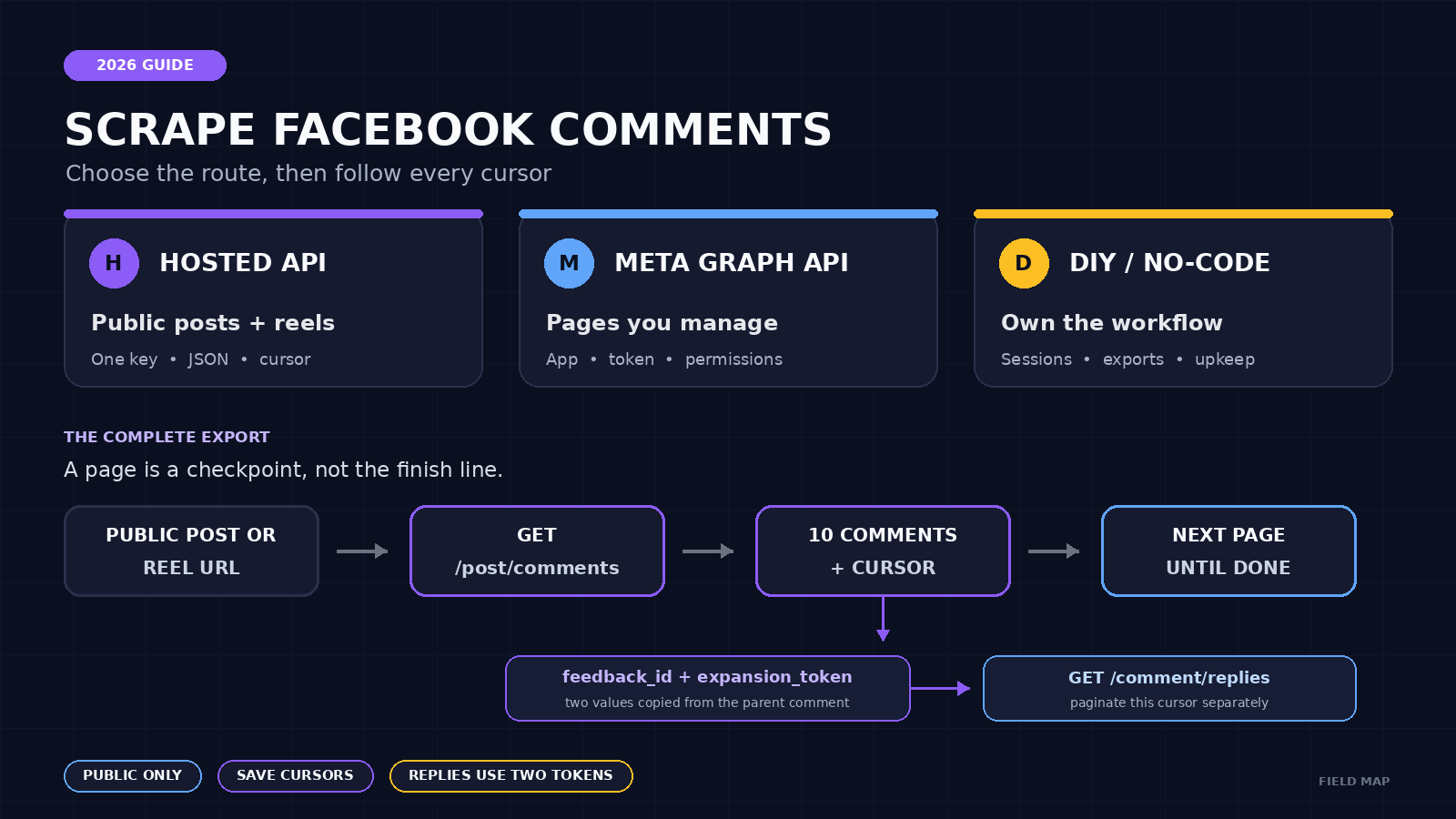
To scrape Facebook comments, send a public post or reel URL to a comments API, save the returned JSON, and follow the cursor until no next page remains. Use Meta’s Graph API for Pages and assets your app is authorized to manage. Use a hosted scraper when you need publicly visible comments without maintaining Facebook sessions, selectors, and retries.
ScrapeCreators’ Facebook comments endpoint returns comment text, creation time, reaction and reply counts, public author fields, and tokens for reply threads. I run ScrapeCreators, so this guide is not a neutral review of my own API. It includes the live requests I made, current alternatives, pricing units, and the cases where you should use Meta or another tool instead.
Choose the right way to scrape Facebook comments
The search results for this job mix four different products: Meta’s official API, hosted scraper APIs, no-code exporters, and do-it-yourself browser scripts. Pick the route based on whose post you need and where the data must go.
| Your job | Best route | Setup | Output | Main limitation |
|---|---|---|---|---|
| Read public comments from a post or reel in an application | ScrapeCreators Facebook API or another hosted scraper | One service API key | Paginated JSON | Public data only and a paid service after free credits |
| Read or manage comments on a Page your app can access | Meta Graph API | Meta app, access token, permissions, and review where required | Official Graph API data | Authorization and Page ownership rules |
| Export one post to a spreadsheet without code | A maintained no-code exporter | Account or browser extension | CSV or Excel | Manual runs, product-specific limits, and less control |
| Own the entire collection stack | Python plus a maintained Facebook client or browser workflow | Code, sessions, proxies, retries, storage, and monitoring | Whatever you build | Frequent breakage and account/session risk |
Choose ScrapeCreators if you need a simple read-only API for public posts and reels, especially when the same application also collects data from YouTube, Instagram, TikTok, or Reddit. Choose Meta if you control the Page and need an official source, webhooks, moderation, or the ability to publish and reply. Choose Apify if you prefer its Actor marketplace and dataset workflow. Bright Data is built for larger data pipelines and bulk URL jobs.
A local Python scraper can look cheaper on day one. It stops looking cheap when a cookie expires, an extension disappears, or Facebook changes the response that your parser expects. The YouTube tutorials and comment threads I reviewed were full of those exact failures: empty outputs, only ten comments, missing comments_full fields, and questions about whether it was safe to paste account cookies into a script.
What the comments API returns
The current ScrapeCreators response includes these fields when Facebook exposes them:
idandtextcreated_atreply_countandreaction_count- a reaction breakdown such as like, love, care, haha, wow, sad, and anger
- public author fields such as
id,name, andshort_name feedback_idandexpansion_tokenfor requesting replies- a page-level
cursorandhas_next_page
That is enough for support research, brand monitoring, comment classification, lead review, or a CSV export. It is not a private profile database. Public identity fields can be absent or change, and a comment deleted before collection will not be available later.
Posts and reels use the same comments route. Private posts, closed groups, audience-restricted content, login-only comments, and data Facebook does not expose publicly are outside the promise. The related Facebook Groups API guide explains how group discovery, posts, comments, and privacy boundaries fit together.
Make the first comments request
Send either a public Facebook url or the post’s feedback_id. Start with the URL because it is easy to obtain and verify.
curl --request GET \
  --url 'https://api.scrapecreators.com/v1/facebook/post/comments?url=https%3A%2F%2Fwww.facebook.com%2Freel%2F753347914167361' \
  --header "x-api-key: $SCRAPE_CREATORS_API_KEY"
A shortened live response from September 7, 2026 looked like this:
{
  "success": true,
  "credits_charged": 1,
  "comments": [
    {
      "id": "comment-id",
      "text": "Public comment text",
      "created_at": "2025-09-09T20:48:37.000Z",
      "reply_count": 0,
      "reaction_count": 0,
      "feedback_id": "comment-feedback-id",
      "expansion_token": "reply-expansion-token",
      "author": {
        "id": "public-author-id",
        "name": "Public author name"
      }
    }
  ],
  "cursor": "next-page-cursor",
  "has_next_page": true
}
I replaced the real public comment and author values in this excerpt. The field names, status, page shape, and credit charge come from the live response.
If you already called GET /v1/facebook/post, reuse its post-level feedback_id instead of resolving the URL again:
curl --get 'https://api.scrapecreators.com/v1/facebook/post/comments' \
  --data-urlencode 'feedback_id=POST_FEEDBACK_ID' \
  --header "x-api-key: $SCRAPE_CREATORS_API_KEY"
On the one public reel I checked, the URL request took 5.50 seconds and the request with the known feedback_id took 1.69 seconds. That is one spot check, not a benchmark, but it shows why the faster input exists.
Paginate without losing or duplicating comments
A successful first page is not a complete export. The current endpoint returned ten comments per page in my live check. Keep sending the opaque cursor until has_next_page is false or no cursor is returned.
async function getFacebookComments(postUrl, maxPages = 100) {
  const commentsById = new Map();
  let cursor = null;

  for (let page = 1; page <= maxPages; page += 1) {
    const endpoint = new URL(
      'https://api.scrapecreators.com/v1/facebook/post/comments'
    );
    endpoint.searchParams.set('url', postUrl);
    if (cursor) endpoint.searchParams.set('cursor', cursor);

    const response = await fetch(endpoint, {
      headers: { 'x-api-key': process.env.SCRAPE_CREATORS_API_KEY }
    });
    if (!response.ok) {
      throw new Error(`Comments page ${page} failed: ${response.status}`);
    }

    const body = await response.json();
    for (const comment of body.comments ?? []) {
      if (comment.id) commentsById.set(comment.id, comment);
    }

    cursor = body.cursor ?? null;
    console.log({
      page,
      received: body.comments?.length ?? 0,
      unique: commentsById.size,
      hasNextPage: body.has_next_page === true
    });

    if (!cursor || body.has_next_page === false) {
      return [...commentsById.values()];
    }
  }

  throw new Error(`Stopped after ${maxPages} pages with a cursor remaining`);
}

const comments = await getFacebookComments(
  'https://www.facebook.com/reel/753347914167361'
);
console.log(`Saved ${comments.length} unique public comments`);
Save the cursor after every successful page if the job matters. A retry should restart from the failed page, not page one. Deduplicate by comment ID because public feeds can change while a long collection job is running.
Fetch replies as a separate thread
Many comment scrapers quietly stop at top-level comments. That was the most repeated question in the YouTube discussions I reviewed.
With ScrapeCreators, select a comment that has a positive reply_count, then send its feedback_id and expansion_token to the replies route:
curl --get 'https://api.scrapecreators.com/v1/facebook/post/comment/replies' \
  --data-urlencode 'feedback_id=COMMENT_FEEDBACK_ID' \
  --data-urlencode 'expansion_token=FULL_EXPANSION_TOKEN' \
  --header "x-api-key: $SCRAPE_CREATORS_API_KEY"
The reply endpoint has its own cursor. Paginate it independently for each parent comment. Keep the full expansion token exactly as returned. A truncated token is not a shorter form of the same request.
Treat reply_count as a hint, not a guarantee. In my September 7 spot check, one selected comment declared a reply, but the reply endpoint returned HTTP 200 with an empty comments array. Facebook’s visible thread state can differ from the expansion data available to the scraper at that moment.
A live two-page check
I tested the documented reel fixture on September 7, 2026. These were real API calls with a ScrapeCreators key.
| Check | HTTP | Comments | Next cursor | Credits | Result |
|---|---|---|---|---|---|
| Post details | 200 | Post reported 1,432 public comments | Not applicable | 1 | Returned post metadata and a post-level feedback_id |
| First comments page by URL | 200 | 10 | Yes | 1 | Returned the documented comment fields |
| Second comments page by cursor | 200 | 10 | Yes | 1 | Zero comment-ID overlap with page one |
First comments page by feedback_id | 200 | 10 | Yes | 1 | Same route without URL resolution |
| One reply-thread request | 200 | 0 | No | 1 | Valid request, but no reply row was available |
This proves that the post, first-page, cursor, and feedback_id paths worked for one public reel on the verification date. It is not a reliability claim for every Facebook URL or region.
Compare pricing and operational cost
The pricing below was checked against each vendor’s public page on September 7, 2026. The units are not interchangeable.
| Option | Public price shown | Billing unit | Good fit |
|---|---|---|---|
| ScrapeCreators | 100 starting credits; $47 for 25,000; $497 for 500,000 | Requests for most endpoints; my comments calls charged 1 credit each | Developers who want one API for public social data |
| Apify Facebook Comments Scraper | From $1.40 per 1,000 comments | Comment records | Teams that want an Actor, datasets, webhooks, and no-code runs |
| Bright Data Facebook Comments Scraper | 5,000 records per month advertised free; paid plan depends on the selected scraper plan | Successfully delivered records | Bulk data pipelines and larger URL batches |
| Meta Graph API | No per-comment price shown in the reference | Platform access and rate limits | Authorized Page data and official write or moderation workflows |
| DIY Python or browser automation | No vendor fee | Your servers, proxies, sessions, and maintenance | Teams with a reason to own the scraper and people available to repair it |
ScrapeCreators pricing is pay as you go, not a monthly subscription. The public page listed $1.88 per 1,000 requests in the 25,000-credit pack and $0.99 per 1,000 requests in the 500,000-credit pack. A cache hit can cost zero credits, while a live miss uses the endpoint’s normal charge. Check the current pricing section before buying because prices can change.
Do not compare $1.40 per 1,000 comments with $1.88 per 1,000 requests as though they buy the same amount of data. First measure comments per page for the posts you care about, reply depth, failed calls, and how much engineering the workflow needs.
Common Facebook comment scraping failures
The strongest tutorial comments and Reddit threads repeated the same problems.
Only ten comments came back
That is a page, not the whole thread. Follow the returned cursor. Do not add an invented limit parameter when the docs do not offer one.
Replies are missing
Top-level comments and replies are separate requests. Save each comment’s feedback_id and full expansion_token, then paginate the replies route. Even then, a declared reply count may not produce a row in every live request.
A private group returns nothing
That is an access boundary, not a pagination bug. Do not try to work around it by pasting personal Facebook cookies into a random extension or hosted script. ScrapeCreators supports publicly available data, not private group access.
A Python library suddenly returns an empty object
Unofficial libraries depend on Facebook responses they do not control. In one YouTube thread, the tutorial author later confirmed that Meta had changed something and the demonstrated code no longer worked. Pinning the package does not pin Facebook.
Public author IDs or names are missing
Meta decides which identity fields are available for a given viewer, app, and surface. Build your schema so public author fields can be null. Do not turn a missing name into a guessed identity.
Reels behave differently from normal posts
Use an endpoint that explicitly documents reel support and test your exact URL shape. The ScrapeCreators comments route accepts a post or reel URL. A tool that only says “Facebook posts” may handle reels differently or not at all.
Use the data without crossing the line
Public does not mean consequence-free. Collect the minimum fields needed for a clear purpose. Set retention limits. Restrict access to exports. Avoid sensitive profiling, harassment, or building dossiers on ordinary people.
Follow Facebook’s Automated Data Collection Terms, the service terms of whichever tool you use, and the privacy laws that apply to your users and location. If the project affects hiring, housing, credit, health, children, or another regulated area, get legal review before collecting comments at scale.
For a first implementation, test one known public post, save two cursor pages, inspect null fields, and confirm the reply behavior before scheduling a large job. You can start with free credits, read the comments endpoint documentation, or compare broader options in the social media APIs guide.


