
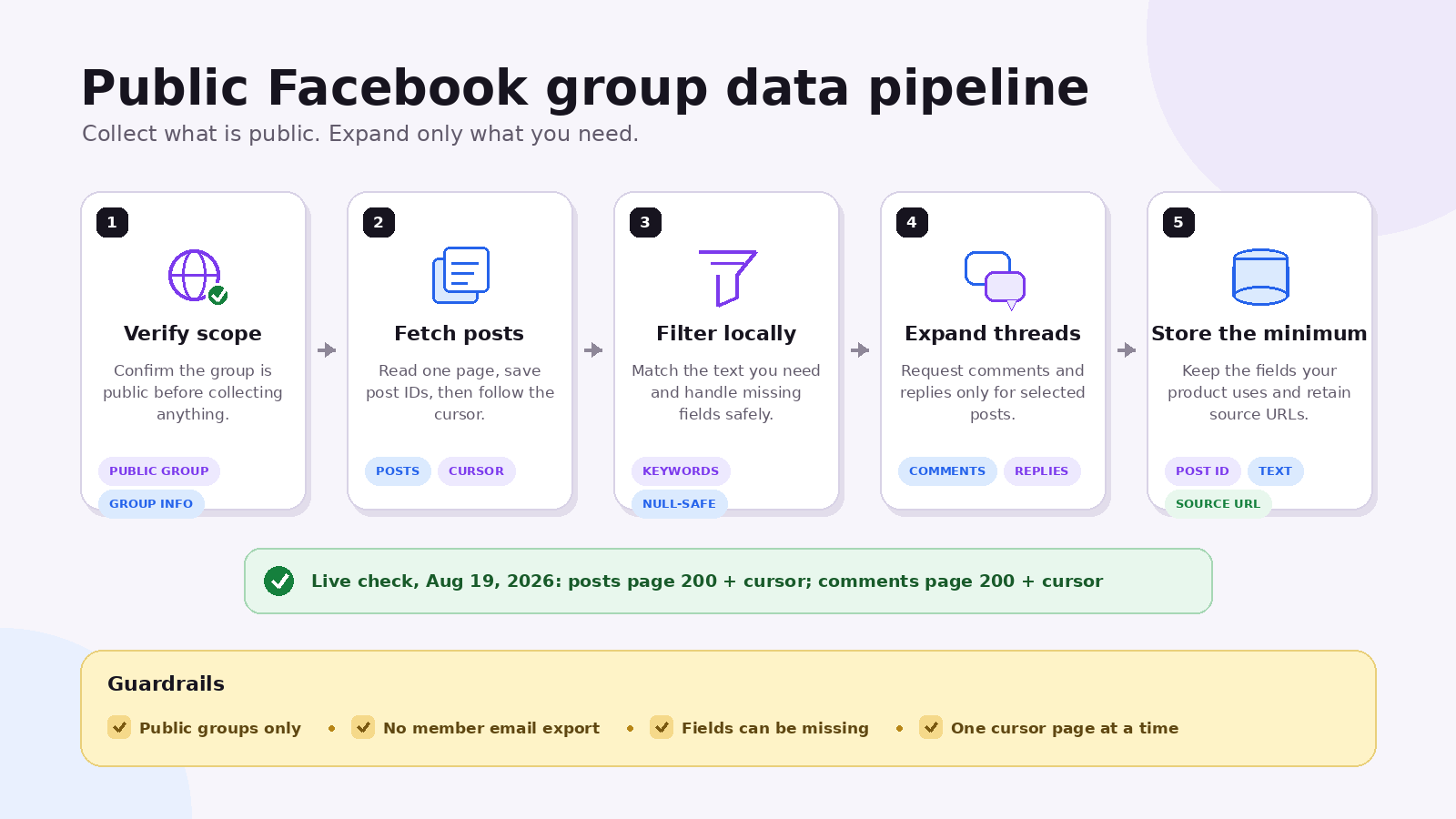
A Facebook group scraper API is the cleanest option when your app needs structured public group posts, comments, and metadata without maintaining a logged-in browser. ScrapeCreators’ Facebook API is the best fit for developers who want a REST request and JSON response. Choose Apify’s Facebook Groups Scraper if scheduled Actor runs and file exports matter more. Eligible researchers should check Meta’s official Content Library API first.
The important limit is simple: this guide is about public groups. It is not a method for reading private groups, exporting member emails, or bypassing access controls.
I run ScrapeCreators, so treat the product recommendation with that disclosure. Prices, endpoint behavior, and primary-source claims below were checked on August 19, 2026.
The short answer
Use this four-step flow:
- Call the group info endpoint to confirm the group is public and collect its metadata.
- Call the group posts endpoint with the public group URL and your preferred sort order.
- Follow the returned
cursoruntil you have enough posts, then filter the text in your own code. - Send an individual post URL to the post comments endpoint when the preview comments are not enough.
That split matters. Group discovery, post collection, and comment expansion are separate jobs. Keeping them separate makes the pipeline easier to debug and cheaper to control.
Choose the right Facebook group data path
There is no single “Facebook Groups API” that fits every buyer. The right choice depends on what you are building.
| Option | Best for | What you get | Main tradeoff |
|---|---|---|---|
| ScrapeCreators | A product or internal workflow that needs public group data over REST | Public group metadata, posts, engagement fields, preview comments, full comments, and cursors | It does not support private groups or member email exports |
| Apify Facebook Groups Scraper | Scheduled jobs, datasets, and CSV or Excel exports | Public group posts and comments through an Actor | You work with Actor runs and datasets instead of one narrow REST flow |
| Meta Content Library API | Qualified academic and public-interest research | Official Facebook group search and research fields | Access requires an application and institutional eligibility |
| Your own browser scraper | A narrow experiment where you need full control | Whatever your browser session can legitimately see | You own login state, breakage, proxy behavior, retries, and maintenance |
Meta’s access page says applicants must be affiliated with a qualified academic or research institution. That makes Content Library useful for approved research, but it is not a drop-in commercial data API.
Apify’s actor page displayed pricing from $2.60 per 1,000 posts when checked. It also advertises multi-group inputs and downloads in JSON, CSV, and Excel. That is a good fit for batch exports. If you are building the results into an app, a direct endpoint is usually less plumbing.
What the API returns
The ScrapeCreators flow has two starting points.
GET /v1/facebook/group returns About-page data that Facebook exposes publicly, including:
- Group ID, URL, name, description, and categories
- Public or private label and visibility
- Member and recent activity counts when available
- Administrators, moderators, rules, and group history when available
GET /v1/facebook/group/posts returns a page of posts with fields such as:
- Post ID, text, post URL, and author fields
- Reaction count, comment count, and publish time
- Video details and media fields when Facebook returns them
- A small set of top comments
- A cursor for the next page
Do not design your database as if every field is guaranteed. Public Facebook payloads vary by post type. A text post may have no video details. A media post can have text: null. A deleted profile or restricted field may leave part of the author object empty.
The loudest questions under current Facebook scraper videos were about private groups, email addresses, keyword filters, missing post text, media limits, and broken no-code dataset mappings. Those questions appeared repeatedly under Apify’s product walkthrough and a Make.com workflow tutorial. A useful API guide needs to answer those limits, not hide them after the code sample.
Request public group posts
Set your key in an environment variable, then make a GET request. This example asks for the newest public posts in chronological order.
curl --get 'https://api.scrapecreators.com/v1/facebook/group/posts' \
  --header "x-api-key: $SCRAPE_CREATORS_API_KEY" \
  --data-urlencode 'url=https://www.facebook.com/groups/742354120555345/' \
  --data-urlencode 'sort_by=CHRONOLOGICAL'
The documented sort values are:
TOP_POSTSRECENT_ACTIVITYCHRONOLOGICALCHRONOLOGICAL_LISTINGS
A response has this shape:
{
  "success": true,
  "credits_charged": 1,
  "posts": [
    {
      "id": "1647862853337796",
      "text": null,
      "url": "https://www.facebook.com/groups/742354120555345/permalink/1647862853337796/",
      "reactionCount": 42,
      "commentCount": 2,
      "publishTime": 1787059846,
      "topComments": []
    }
  ],
  "cursor": "NEXT_PAGE_CURSOR"
}
I called that exact request on August 19, 2026. It returned HTTP 200 with four posts and a cursor in 14.78 seconds. The next cursor request returned three different posts in 2.30 seconds with no ID overlap. That is a two-request smoke test, not a reliability benchmark.
An older version of this article said Facebook always returned three posts per page. The live first page returned four, so your code should read the array it receives instead of hard-coding a page size.
Paginate and filter by keyword
People often ask for a server-side keyword parameter. The group posts endpoint does not provide one. Fetch the pages you need and filter them locally.
const API = "https://api.scrapecreators.com/v1/facebook/group/posts";

async function getPage(groupUrl, cursor) {
  const params = new URLSearchParams({
    url: groupUrl,
    sort_by: "CHRONOLOGICAL",
  });

  if (cursor) params.set("cursor", cursor);

  const response = await fetch(`${API}?${params}`, {
    headers: { "x-api-key": process.env.SCRAPE_CREATORS_API_KEY },
  });

  if (!response.ok) {
    throw new Error(`Facebook group request failed: ${response.status}`);
  }

  return response.json();
}

async function findPosts(groupUrl, phrases, maxPages = 5) {
  const matches = [];
  let cursor;

  for (let page = 0; page < maxPages; page += 1) {
    const result = await getPage(groupUrl, cursor);

    for (const post of result.posts ?? []) {
      const text = (post.text ?? "").toLowerCase();
      if (phrases.some((phrase) => text.includes(phrase.toLowerCase()))) {
        matches.push(post);
      }
    }

    cursor = result.cursor;
    if (!cursor) break;
  }

  return matches;
}
This is deliberately boring code. It caps the number of pages, handles missing text, stops when there is no cursor, and throws on a bad HTTP response. Add deduplication by post ID before you write results to a database.
For semantic matching, store the post text first and classify it in a second step. Do not send every author field to an LLM when the task only needs the text.
Fetch full comment threads
The group posts response includes preview comments, not necessarily the whole discussion. Pass the public post URL to the comments endpoint when you need the thread.
curl --get 'https://api.scrapecreators.com/v1/facebook/post/comments' \
  --header "x-api-key: $SCRAPE_CREATORS_API_KEY" \
  --data-urlencode 'url=https://www.facebook.com/groups/742354120555345/permalink/1647862853337796/'
The response can include comment text, timestamps, reply and reaction counts, author fields, and another cursor. The comment replies endpoint expands a thread when the comment response contains the required feedback_id and expansion_token.
I called the comments request above on August 19. It returned HTTP 200 with two comments and a cursor in 3.95 seconds. Again, that proves the request worked for one public post. It does not promise the same latency or field completeness for every group.
Keep comment collection selective. If you only need posts containing a support issue or product name, filter posts first and expand comments second. That avoids spending requests on discussions you will discard.
What it does not do
A public Facebook group scraper has hard boundaries:
- It does not read private or hidden groups.
- It does not use your Facebook login, browser cookie, or account session.
- It does not export a group’s member list or private contact details.
- It does not turn a public profile name into a verified email address.
- It cannot force Facebook to return a field that is absent from the public response.
- It is not legal advice or permission to ignore a group’s rules.
This distinction gets blurred in lead-generation tutorials. Several popular videos start with group data, then enrich names through other services and present the result as if the Facebook scraper found the emails. It did not. Treat enrichment as a separate process with its own accuracy, consent, and compliance questions.
A recent Reddit discussion about Facebook group scraping also showed a less invasive use case: monitoring public housing groups for spam and relevant rental posts. Another thread involved preserving the history of a small private community whose members had agreed to an archive. That second case still falls outside this public API. A legitimate purpose does not change the access boundary.
Review Meta’s Automated Data Collection Terms, the group’s rules, and the laws that apply to your project. Store only the fields you need, set a retention period, and give people a way to correct or remove data where appropriate.
Practical workflows
Community research
Collect public posts from a defined set of groups, strip unneeded identity fields, and categorize recurring questions. Keep source URLs so a researcher can check the context behind a summary.
Support and product feedback
Filter for product names, error messages, or phrases such as “does anyone know” and “how do I.” Expand comments only on matching posts. The result is a research inbox, not an automatic outreach list.
Trend monitoring
Run the same group set on a schedule and compare new post IDs. Track topic frequency and engagement as separate signals. A post with many reactions is not automatically a market trend, but it can tell you what deserves a closer look.
Group due diligence
Use the group info endpoint to compare member count, visibility, activity, history, rules, and categories before investing time in a community. This is useful when a brand or research team needs to maintain a vetted group list.
Data pipelines
Write raw responses to a short-lived staging table, normalize only the fields your application uses, and upsert by group and post ID. Send failed pages to a retry queue instead of restarting the entire job.
Groups are only one Facebook data surface. The Facebook Marketplace API tools guide covers listing workflows, while the Meta Ad Library scraping guide covers public advertising research. Keep those jobs separate so each dataset has a clear purpose and retention policy.
Pricing and credits
ScrapeCreators uses pay-as-you-go credit packs. The live pricing section showed these terms on August 19, 2026:
| Pack | Price | Credits | Displayed rate for one-credit requests |
|---|---|---|---|
| Free | $0 | 100 | Trial allocation |
| Freelance | $47 | 25,000 | $1.88 per 1,000 requests |
| Business | $497 | 500,000 | $0.99 per 1,000 requests |
Credits do not expire, and every pack includes the full API catalog. Most endpoints cost one credit per request, but some cost more. Check the cost displayed in the docs for every endpoint in your workflow.
For the example pipeline, one page of group posts is one request. A second page is another request. Expanding comments on five matching posts adds five more requests when each returns comments. Estimate the job from pages and expansions, not from the number of records in the final table.
A sensible production checklist
Before you schedule a large collection job:
- Confirm the group is public with the group info endpoint.
- Save the group ID and canonical URL.
- Pick a sort order deliberately.
- Cap pages per run and persist the last cursor when that fits your workflow.
- Deduplicate by post ID before storage.
- Treat text, author, media, and counts as nullable fields.
- Filter posts before expanding comments.
- Log status, request time, result count, and cursor presence without logging your API key.
- Remove identity fields your analysis does not need.
- Recheck Meta’s terms, group rules, and your retention policy.
That gives you a useful Facebook group data pipeline without pretending public scraping can or should unlock everything inside a community.


