
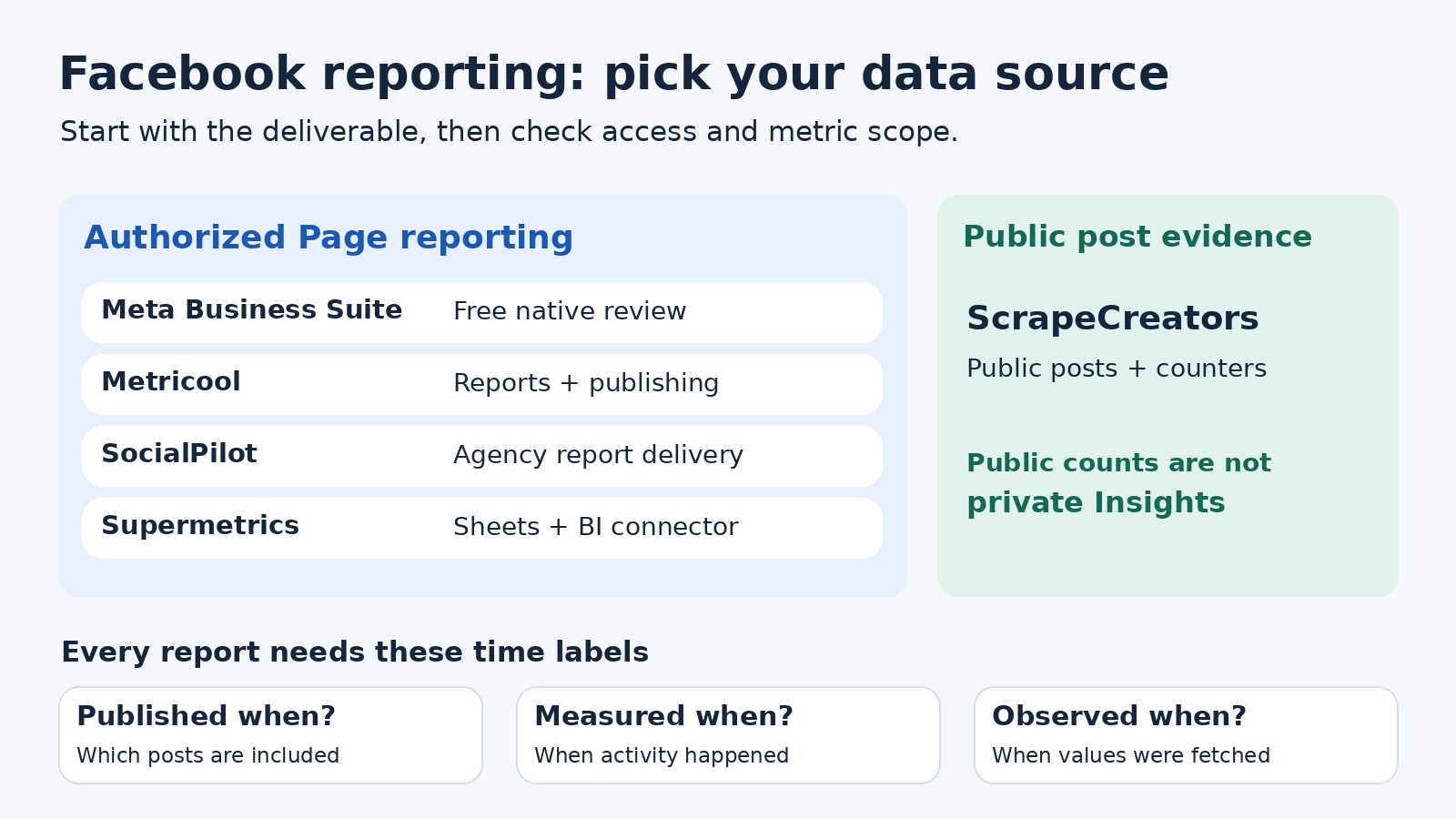
For Facebook analytics tools, start with Meta Business Suite if you manage your own Page and need a free performance check. Choose Metricool for affordable reports alongside publishing, SocialPilot for an agency reporting workflow, or Supermetrics when the data belongs in a spreadsheet or BI dashboard. ScrapeCreators is a developer option for adding public post evidence to custom reports, not a replacement for authorized Page Insights.
The first buying question is what you need to deliver: an answer for yourself, a client-ready report, or data for software. Those are different purchases.
I build ScrapeCreators. If you need private audience or performance metrics, I would use an authorized connection rather than try to reconstruct them from public counters.
Prices, plan gates, documentation, and the API observations below were checked on November 7, 2026. Prices are USD unless stated otherwise. I reviewed provider documentation and ran the ScrapeCreators example. I did not benchmark paid dashboards or verify their report delivery inside a connected account.
Compare the five options
| Tool | Choose it for | Price or unit checked | Check before buying |
|---|---|---|---|
| Meta Business Suite | Your own Page’s native performance and content review | Free to use | Correct Page permissions, metric scope, and export contents |
| Metricool | Reporting plus publishing for a small brand portfolio | Free for one brand; Starter from $25/month on monthly billing | Free keeps 30 days of analytics; reports and API access have different gates |
| SocialPilot | Agency publishing and recurring client reports | Standard $40/month; Premium $100/month, monthly billing | Standard has PDF/scheduled reports; CSV, combined custom reports, and white-label reports require Premium or Ultimate |
| Supermetrics | Authorized Facebook data in Sheets, Looker Studio, or another supported destination | Starter from $55/month, billed monthly | Destination, source, account, and field allowances; old metrics may be retired |
| ScrapeCreators | Public post records inside your own reporting application | $47 buys 25,000 credits; each post-page request here charged one credit | You build the report; public records do not contain private Page Insights |
A reporting subscription, a connector package, and a credit purchase do not buy the same result. Include setup and maintenance when comparing them. A cheap request is not a cheap finished reporting system.
This guide is about Pages you manage. For other brands’ public activity, use the separate Facebook competitor tool comparison. Ad attribution and return on ad spend are another job again; do not buy an organic Page reporting tool assuming it solves them.
Check the data contract before the dashboard
Ask a vendor to produce one report for a Page you actually manage. Use a completed calendar month, one post published inside that month, and one older post that still receives interactions.
Then distinguish these three dates:
- Publication window: which posts the report includes.
- Measurement period: when the reported activity happened.
- Observation time: when the tool collected the values.
Selecting October posts does not, by itself, turn their current cumulative reaction counts into reactions received during October. A date picker can filter the content list without changing every metric’s time basis.
A public discussion about Business Suite exports describes exactly that confusion: the author reports different totals between a content export and the Insights overview. That is a useful question to test, not proof that every current Meta export behaves identically.
For your trial, keep a small metric dictionary next to the report:
| Question | Evidence to request | Do not substitute |
|---|---|---|
| How many people did our content reach? | The available authorized metric, its current definition, dates, and aggregation | Public video views or a sum of per-post unique counts |
| Which posts earned interactions? | Post IDs, source fields, publication dates, and measurement basis | A chart with no supporting rows |
| Did Facebook drive leads or sales? | Tracked links and the relevant website, booking, or CRM records | Reactions, followers, or profile visits |
| Can we compare last year? | Populated historical records and a field-change note | A plan’s retention headline alone |
An engagement rate also needs a written numerator and denominator. Interactions divided by followers and engaged people divided by reached people are different measures. Do not label both simply “engagement” and compare them as if they were interchangeable.
1. Meta Business Suite for a free native starting point
Meta Business Suite is my starting point for a Page owner. Meta says it is free on desktop and mobile, and its Insights cover business performance, content activity, and audience information.
The current Insights overview instructions require permission to view the relevant asset. The overview focuses on the past 28 days and includes views and follows. That overview period is not a universal history limit for every report.
If Facebook and Instagram appear together, select the right asset before interpreting a total. Check one individual post as well as the account overview. That catches simple problems before you pay for a prettier version of the wrong report.
Meta’s analysis guidance also describes downloading reports through the Export menu. I would start by saving the file, reading its column definitions, and checking what changes when you change the date range.
The catch is the work around the numbers. If you need a repeated multi-client delivery process, test whether the native workflow is manageable for your team. Do not assume that access to metrics includes the exact branded file, automation, or historical series you need.
Choose Meta Business Suite if you want to understand your own Page before buying anything. Move to a paid tool when you can name the missing deliverable, rather than because a roundup put a subscription first.
2. Metricool for reporting alongside publishing
Metricool’s Facebook analytics combines connected-account measurement with publishing and reports. It fits a small team that would otherwise maintain a scheduler and a separate reporting routine.
The current pricing page lists one brand and 30 days of analytics on Free. A brand can hold one profile per supported network, so several Facebook Pages need separate brand capacity.
Starter starts at $25 per month for up to five brands on monthly USD billing. The annual option displays a $20 monthly equivalent. Starter includes PDF/PPT reports and longer metric storage. It does not include every reporting or integration feature.
Advanced starts at $67 per month for up to 15 brands, or a $53 monthly equivalent on annual billing. It adds customizable report templates, the Data Studio connector, and API access. Those are separate reasons to upgrade; a downloadable report is not an API entitlement.
Metricool also lists an Advanced Analytics add-on for expanded Studio and campaign-dashboard access. Do not assume a standard report plan includes unlimited use of every newer analytics feature. Its plan explanation is worth checking alongside the price card.
For a trial, connect your Page, generate the intended monthly report, and inspect its earliest populated dates. Unlimited storage does not mean every metric has unlimited backfilled history. Ask what happens to a report when Meta removes a field.
Choose Metricool if publishing and ordinary reports belong in the same affordable workspace. Choose a connector instead if you already have a reporting destination and mainly need dependable data transfer.
3. SocialPilot for agency reports with publishing
SocialPilot is a reasonable shortlist when your reporting job includes managing multiple client accounts and getting a report out on a schedule.
Its live USD plan matrix makes an important distinction. Standard is $40 per month for 10 social accounts and three users on monthly billing. It includes PDF reports and scheduled reports. Premium is $100 per month for 20 accounts and six users, and adds CSV reports, combined custom reports, and white-label reports.
The annual equivalents shown during this review were $34 for Standard and $85 for Premium. Those require annual billing, not a one-month purchase at those prices.
Essentials is cheaper, but its matrix excludes PDF and scheduled reports. I would not use the lowest headline price to budget an automated client-reporting workflow. Nor would I assume Standard’s PDF feature includes Premium’s CSV and combined report builder.
The history row lists up to three months for Standard, 12 months for Premium, and 24 months for Ultimate. Treat those as stated plan allowances. Confirm the exact Facebook data populated after connection, rather than promising a client that every old field will be recoverable.
A marketer’s request for monthly auto-sent reports captures the practical buying test: connect the actual accounts and send the actual file. Recommendations in the replies include promotion, so I would not treat them as an accuracy ranking.
Choose SocialPilot if agency publishing and report delivery justify the account/user package. Price the tier that produces your deliverable, not the tier that merely displays analytics.
4. Supermetrics for an existing spreadsheet or BI workflow
Supermetrics’ Facebook Insights connector fits a team that wants authorized Page data in an existing reporting environment. Its connection guide requires the appropriate Page access and Facebook authorization. The ability to share an authentication link can help when a client must authorize access themselves.
The current Starter package starts at $55 per month billed monthly, or a displayed $44 monthly equivalent billed yearly. It lists one core destination, three data sources, one user, and three accounts per data source. Extras and destination-specific features can change the purchase.
Pick Facebook Insights for Page reporting. Do not assume the separate Facebook Ads connector is the same dataset. If you need both, check the selected sources and account allowances.
Field continuity is the caution I would put above the price. The current Facebook field-change notice says deprecations took effect on June 15, 2026, earlier than the original June 30 timeline. It documents replacements for some reach-related fields, removals without replacements, and warns that backfills can overwrite historical values with empty data.
Before changing a working report, preserve its old data and test the replacement definitions. A new field with a similar label does not prove an uninterrupted historical series. Do not interpret a retired field’s blank value as zero performance.
Choose Supermetrics if your team already knows where the data should go and can own metric definitions and report design. Choose a finished reporting workspace if nobody wants to maintain the spreadsheet or dashboard.
5. ScrapeCreators for public evidence in a custom report
Use the ScrapeCreators Facebook API for a public post list, source URLs, available reaction/comment/share counts, and other returned fields inside your own software. It is not an authorized Page Insights connector.
The Page-post endpoint accepts a Page URL or pageId, then a returned cursor for more posts. Current documentation describes three posts per page. The live responses used here flatten the post collection under posts.
For this review, NASA’s first two pages returned three posts each with no repeated post IDs; another cursor remained. A separate Spurs first page returned three posts. Each call charged one credit. These are bounded collection observations, not a completeness or reliability benchmark.
The samples also show why public data needs its own labels. Some videoViewCount values were null. One Spurs post had is_paid_partnership: true, while others returned null. A partnership disclosure does not tell you how many views were paid, and null does not prove that a post had no sponsorship.
The pricing section offers 25,000 credits for $47, without a subscription. Successful post-page collection costs a credit, including successful empty results under the current handler. Budget for pagination and your own storage and reporting work.
If scheduled datasets suit your stack better, Apify’s Facebook Posts Scraper is an adjacent collection option. It is not a substitute for private Page Insights either. Our Facebook post scraper guide covers that collection purchase separately.
Choose ScrapeCreators if public records are the missing part of your application. Choose one of the authorized options above if the missing part is your Page’s reach, audience, or private content-performance report.
A working public-evidence packet
This standard-library Python example saves two pages of public posts and a small reporting packet. It does not fetch private Insights or assert monthly coverage. Keep the raw response files private; you usually do not need commenter metadata in a client report.
Set SCRAPE_CREATORS_API_KEY in your environment before running it. Replace NASA’s URL with your own Page when you integrate it.
import json
import os
from datetime import datetime, timezone
from pathlib import Path
from urllib.parse import urlencode
from urllib.request import Request, urlopen

page_url = "https://www.facebook.com/NASA"  # Replace with your Page.
observed_at = datetime.now(timezone.utc).isoformat()
rows, seen, requests_used, credits = [], set(), 0, 0
cursor = None

for page_no in range(2):  # A bounded sample, not a full monthly export.
    params = {"url": page_url}
    if cursor:
        params["cursor"] = cursor
    request = Request(
        "https://api.scrapecreators.com/v1/facebook/profile/posts?"
        + urlencode(params),
        headers={"x-api-key": os.environ["SCRAPE_CREATORS_API_KEY"]},
    )
    with urlopen(request, timeout=45) as response:
        body = json.load(response)
    if body.get("success") is not True or not isinstance(body.get("posts"), list):
        raise RuntimeError("The response has no usable post collection")
    Path(f"facebook-source-{page_no}.json").write_text(json.dumps(body))
    requests_used += 1
    credits += body.get("credits_charged", 0)
    for post in body["posts"]:
        post_id = post.get("id")
        if not post_id or post_id in seen:
            continue
        seen.add(post_id)
        rows.append({
            "post_id": post_id,
            "post_url": post.get("permalink") or post.get("url"),
            "author_id": post.get("author", {}).get("id"),
            "published_at": post.get("creation_time"),
            "public_reactions": post.get("reactionCount"),
            "public_comments": post.get("commentCount"),
            "public_shares": post.get("share_count"),
            "public_video_views": post.get("videoViewCount"),
            "paid_partnership_label": post.get("is_paid_partnership"),
        })
    cursor = body.get("cursor")
    if not cursor:
        break

packet = {
    "requested_page": page_url,
    "observed_at": observed_at,
    "access_scope": "public_posts_not_authorized_insights",
    "requests_used": requests_used,
    "credits_charged": credits,
    "more_pages": bool(cursor),
    "monthly_coverage_verified": False,
    "requires_authorized_source": ["reach", "link_clicks", "saves", "watch_time"],
    "posts": rows,
}
Path("facebook-report-evidence.json").write_text(json.dumps(packet, indent=2))
print("Saved", len(rows), "posts; requests:", requests_used,
      "credits:", credits, "more pages:", bool(cursor))
I ran this exact example separately on November 7. It saved six unique post rows using two requests and two credits, with more pages remaining. The returned publication dates ranged from November 3 to November 6. Three rows had null public video counts. Those are unknown or inapplicable values, not zeros.
The packet’s access_scope, monthly_coverage_verified, and requires_authorized_source are fields created by the example, not fields returned by the API. They make the limitation hard to lose when someone passes the JSON to a dashboard or an AI assistant.
For an authorized-data join, keep the requested Page, returned author ID, post ID, source URL, and observation time. Verify the ID mapping rather than assuming a feed post ID always equals the ID in a Reel permalink. Preserve old snapshots if you want to measure count changes; today’s cumulative values do not recreate last month’s measurements.
Run one reporting trial before committing
I would give each shortlisted tool the same job: produce the report you intend to send next month for one real Page.
Check that it names the correct asset, includes supporting post rows, states the time basis, preserves missing values, and exports on the intended tier. Verify that a teammate or client can open the delivered file. Save the source definitions and note any field changes that break comparisons.
YouTube research reinforced the need for this check. Juhli Selby’s walkthrough distinguishes post types and mobile/desktop views; its comment thread includes a viewer whose column controls did not match the demonstration, even after trying other browsers. That is a reason to test your own account, not a reason to promise an old tutorial’s interface or metric catalog still exists.
Start with native Insights. Pay for the reporting workflow you actually need. If you build, you can create a ScrapeCreators account and verify the relevant records against the API documentation before committing to the pipeline.
Questions before choosing
What is the best free Facebook analytics tool?
For a Page you manage, start with Meta Business Suite. Metricool also has a free one-brand plan, but its current free analytics window is 30 days. Check export and reporting entitlements before treating a free dashboard as a free reporting service.
Can I get private Page analytics without connecting Facebook?
Public posts and counters do not establish access to private Page Insights. Use the Page’s authorized native tools or a connector with the appropriate permissions. An API that returns public reactions is not secretly providing private reach.
Which Facebook analytics tool is best for agencies?
Try the exact reporting workflow in SocialPilot or Metricool. SocialPilot’s Standard/Premium export distinction matters; Metricool’s reports, templates, connector, and API also have separate gates. Use Supermetrics when the agency already owns its spreadsheet or BI reporting process.
Why do my Facebook reports show different totals?
First compare asset, metric definition, aggregation, dates, timezone, and observation time. A publication-filtered list with cumulative counts is not a period-activity report. Also check whether a source field was retired or renamed before treating a blank as zero or declaring a vendor inaccurate.