
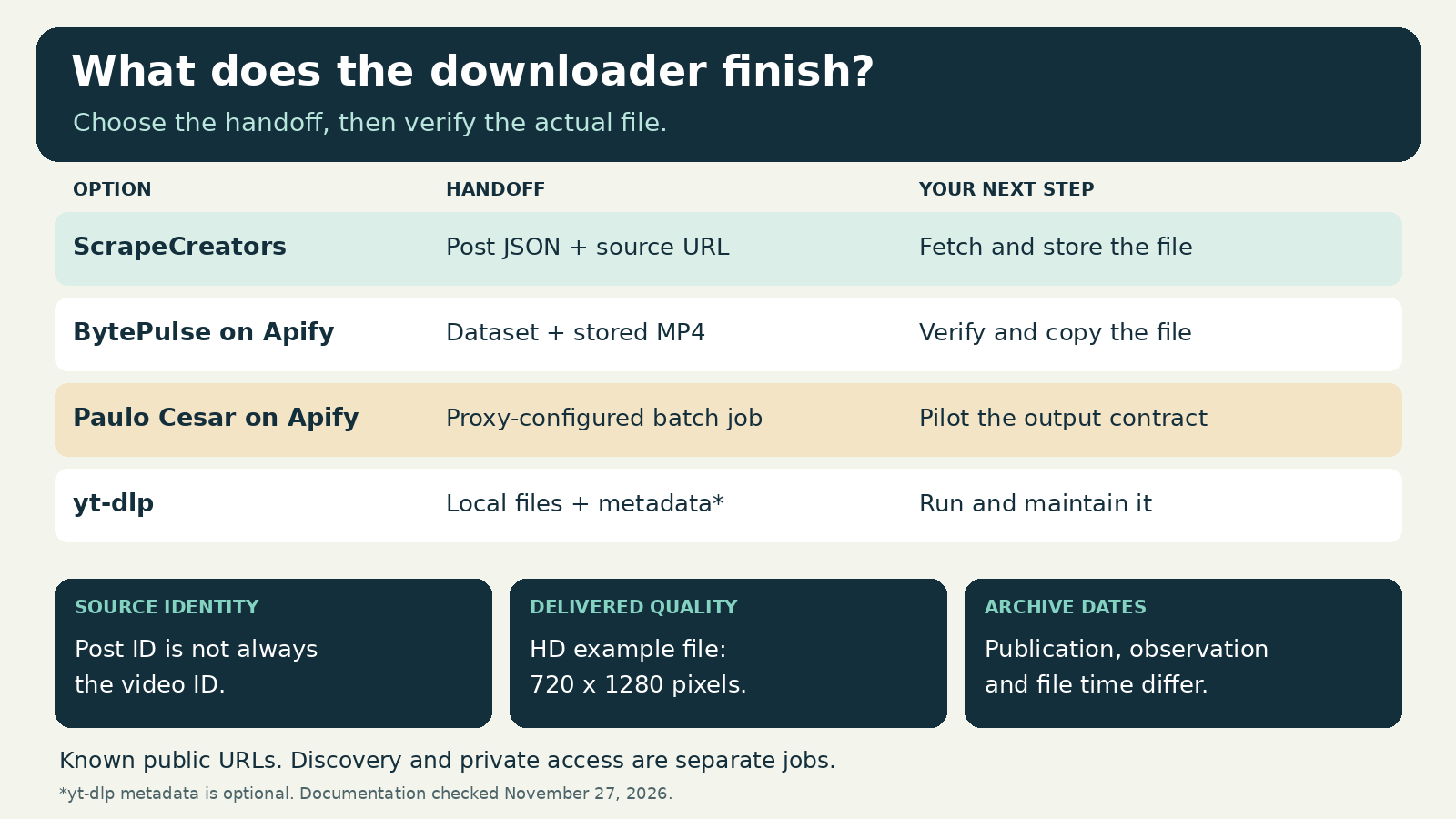
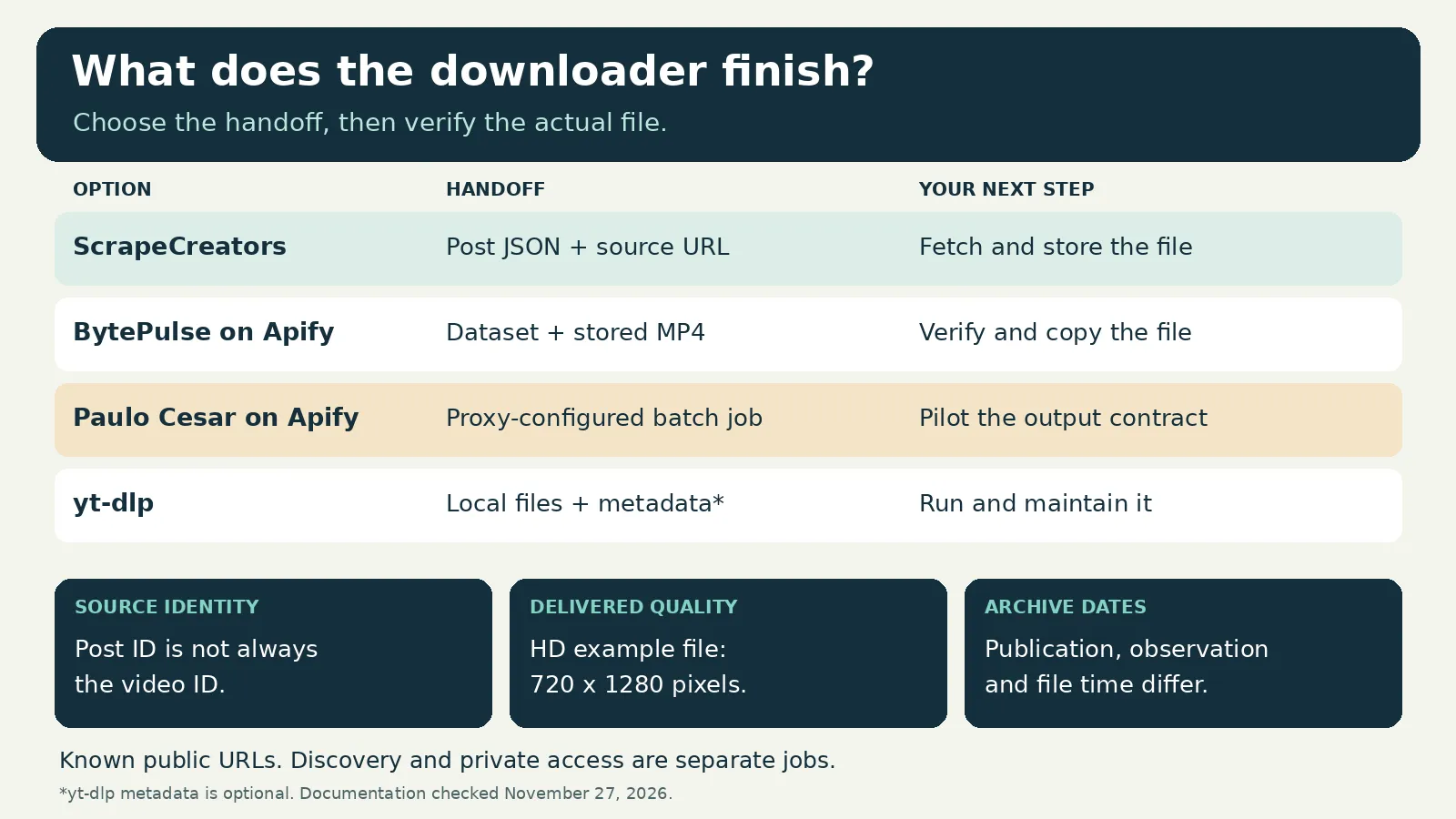
For a Facebook video downloader API, use ScrapeCreators when your app needs public-post metadata and an available source video URL, and can handle the file transfer. Use BytePulse Labs on Apify when you want an Actor that documents downloaded MP4 files in storage. Consider Paulo Cesar’s Apify downloader for an existing proxy-configured batch workflow, but verify its output in a pilot. Choose yt-dlp when you want local files and are willing to maintain the downloader yourself.
The useful dividing line is who delivers the actual file. Returning JSON, completing an Actor run and saving a playable video are separate outcomes.
I run ScrapeCreators. I checked the linked documentation and pricing on November 27, 2026, and executed the Python download below. I did not run either competing Actor or benchmark yt-dlp.
Choose by the job you want completed
| Option | What you receive or operate | Cost unit | Best fit |
|---|---|---|---|
| ScrapeCreators | Public post JSON with available video.hd_url and video.sd_url; your app downloads the file | Normally 1 credit for live post details, plus your transfer and storage | An app that needs the source record alongside the video |
| BytePulse Labs on Apify | A run, Dataset records and an MP4 link in the run’s Key-Value Store | An Actor-start event plus downloaded-MB events; rates depend on plan | A supplied-URL queue with provider-side file storage |
| Paulo Cesar on Apify | A configurable public-post download job; confirm the final output contract in a pilot | Platform usage, including applicable residential proxies | An existing Apify workflow that needs request-level custom data |
| yt-dlp | Downloaded files and optional metadata on your infrastructure | Open-source software; your hosting, transfer and maintenance | A local archive or a downloader service you build |
This is a known-URL download comparison. If you first need to discover videos across a Page, use the Facebook Reels scraper comparison. For Page feeds and individual-post collection, see the Facebook post scraper guide. Those are different buying decisions from moving a specific video’s bytes into storage.
For a one-off manual save, the free Facebook video downloader is a simpler starting point than building an API pipeline.
1. ScrapeCreators for a video URL with its source record
The Facebook API is useful when the video belongs inside a larger application: a research record, an editor’s intake queue or a public-content archive. Its post endpoint accepts one public post or Reel URL. For available video media, it returns a video object with source download links, duration and other metadata.
This endpoint returns JSON, not an MP4 response body. Your application retrieves video.hd_url or video.sd_url separately. It also decides when to retry, where the file lives and whether the downloaded media meets its needs. A saved CDN URL alone is not an archive you control.
Keep the post and video identities separate. In the example below, post_id is 25118307061088489, while video.id is 1535656380759655, the ID in the requested Reel URL. Rejecting the response because those two IDs differ would reject a valid result. Match the requested media against the appropriate media identity.
The current docs also expose nullable shared_post_id and shared_post_url for a referenced shared post. They do not automatically fetch the original. If the content you need belongs to that original post, retrieving it is a separate request, not evidence that the wrapper’s identity is wrong.
Ordinary live details cost 1 credit. Requests actually served from cache cost zero. The current prepaid packages start at $47 for 25,000 credits, without a subscription. That is a credit purchase, not a promise of 25,000 verified files. Your transfer and storage costs remain yours. Optional transcription has its own behavior and pricing; this example does not request it.
Choose ScrapeCreators if you want a public source record and media URLs without operating the Facebook retrieval code. Choose a stored-file workflow instead if you need the provider to finish the download and hold the MP4. This route is not a format-conversion service, a selectable-resolution guarantee or access to private videos. You can get an API key and run the example with an environment variable.
2. BytePulse Labs on Apify for stored-file batch jobs
BytePulse Labs’ Facebook Video Downloader documents a more complete file handoff. You supply video URLs, run the Actor, and retrieve Dataset records. Its example record includes id, the source url and a videoUrl pointing to an MP4 in the run’s Key-Value Store.
That distinction matters: downloading a Dataset as CSV gives you records containing file links. The CSV is not a folder of video files. Decide whether Apify storage is the final destination or whether your worker must copy each MP4 into your own storage and confirm it arrived.
The current input page lists a required urls array, an optional quality string and optional proxy configuration. Quality choices run from 360 through 2160. They are requested settings, not proof that every Facebook source has a 2160p rendition or that a successful run delivered that resolution.
Billing is tied to bytes, not just completed videos. The current pricing table lists $0.006 per 1 MB download event and $0.006 per start on the Free tier. Starter lists $0.0054 for each event; Business lists $0.0042. This Actor’s table marks platform costs included.
Its README still describes $0.06 per 10 MB. That has the same nominal per-MB rate, but a different event size. Use the current event table for budgeting and check partial-MB rounding in a pilot. The headline’s lowest rate is not the Free-tier rate, and a 2 MB clip and a 200 MB video are not interchangeable billable results.
Choose this Actor if you want Apify’s run and storage workflow and prefer a download-specific billing object. I would test your actual URL forms, selected quality and file-copy step before committing a large queue. I did not execute this Actor, so the documented file handoff is not a measured success-rate claim.
3. Paulo Cesar on Apify for a proxy-configured queue
Paulo Cesar’s Facebook video downloader is another Actor, with a different input and cost model. Do not swap it into a BytePulse integration by changing only the Actor name.
Its README describes public post, group-post, watch and Page-video URL formats. The input contract uses startUrls, not BytePulse’s urls, and requires a proxy configuration. The README specifically says Facebook access needs the residential proxy group. It also allows userData on individual requests so a supplied source can carry your own reference into the output.
That makes it worth considering when you already maintain Apify queues and need to reconcile each source with an internal job ID. It does not establish access to private groups. Publicly available input is the documented scope.
The current pricing page says pay per usage. Budget the platform resources the run consumes rather than assuming a fixed per-video charge. Apify’s pricing FAQ explains that this model can include compute, transfer, storage operations and applicable proxies. The exact cost depends on the run.
I would put this option behind a pilot gate. Its README is explicit about input formats and proxy needs, but does not provide the same concrete stored-file example as BytePulse’s page. Confirm the actual output records, file location, quality and failure handling before treating it as a drop-in archive service. A strong search ranking is not an executed compatibility test.
For either Actor, distinguish the platform’s account paths too. Apify offers a Free allowance, ordinary paid-account overage and a separate accountless agent-payment route. It is inaccurate to say every way of using Apify requires the same subscription, or that every Actor adds compute charges on top of event prices. Check the exact Actor and purchase path you will use.
4. yt-dlp for files you operate yourself
yt-dlp is open-source download software, not a hosted Facebook REST API. Its supported-sites list includes Facebook, and its documentation covers command-line use and Python embedding. You can build a worker or HTTP service around it, but then you own that service.
The project documents --batch-file for a supplied URL list, --download-archive for recording downloaded IDs, and --write-info-json for metadata sidecars. Those features are useful for a repeatable local archive. They do not prove that pasting a Page URL will discover every Reel, that every source is currently retrievable, or that a metadata file contains every field you wanted.
Timestamp handling deserves special attention. A public archiving discussion describes confusion around bulk downloads and original dates. yt-dlp’s own documentation says --mtime uses the HTTP Last-Modified header for the file’s modification time. That is not a promise to preserve the Facebook publication date.
Store publication metadata, retrieval time and local file time separately. If you need a trustworthy archive index, write those fields into an explicit record rather than inferring the publication date from the file browser.
Choose yt-dlp if you want local control and can handle updates, job isolation, disk space and failed downloads. It has no hosted API subscription to buy, but its infrastructure and upkeep are not free. I did not run a Facebook collection through yt-dlp for this article.
An executed download with a source receipt
I ran this standard-library Python example on November 27, 2026. It makes one details request, checks the returned video ID, then saves an available HD URL, falling back to SD only when the HD field is absent. It does not silently downgrade after an HD transfer failure.
import hashlib
import json
import os
from datetime import datetime, timezone
from pathlib import Path
from urllib.parse import urlencode, urlparse
from urllib.request import Request, urlopen

source = "https://www.facebook.com/reel/1535656380759655"
query = urlencode({"url": source})
request = Request(
    "https://api.scrapecreators.com/v1/facebook/post?" + query,
    headers={"x-api-key": os.environ["SCRAPE_CREATORS_API_KEY"]},
)
with urlopen(request, timeout=40) as response:
    result = json.load(response)
if result.get("success") is not True:
    raise RuntimeError("The API did not return a successful result")
video = result.get("video") or {}
video_id = str(video.get("id") or "")
if video_id != source.rstrip("/").split("/")[-1]:
    raise RuntimeError("The returned video does not match the source")
field = "hd_url" if video.get("hd_url") else "sd_url"
media_url = video.get(field)
if not media_url or urlparse(media_url).scheme != "https":
    raise RuntimeError("No HTTPS video URL was returned")

# This 50 MiB cap belongs to this example, not to the API.
cap = 50 * 1024 * 1024
output = Path(video_id + ".mp4")
partial = output.with_suffix(".part")
size = 0
checksum = hashlib.sha256()
try:
    # A separate request keeps the API key off Facebook's CDN.
    with urlopen(Request(media_url), timeout=40) as response:
        content_type = response.headers.get_content_type()
        if not content_type.startswith("video/"):
            raise RuntimeError("The CDN did not return video content")
        with partial.open("wb") as file:
            while chunk := response.read(1024 * 1024):
                size += len(chunk)
                if size > cap:
                    raise RuntimeError("The file exceeded the example's cap")
                checksum.update(chunk)
                file.write(chunk)
    if size == 0:
        raise RuntimeError("The video file was empty")
    partial.replace(output)
except Exception:
    partial.unlink(missing_ok=True)
    raise

receipt = {
    "source_url": source,
    "post_id": result.get("post_id"),
    "video_id": video_id,
    "selected_field": field,
    "source_created_at": result.get("creation_time"),
    "observed_at": datetime.now(timezone.utc).isoformat(),
    "credits_charged": result.get("credits_charged"),
    "content_type": content_type,
    "bytes": size,
    "sha256": checksum.hexdigest(),
    "file": str(output),
}
Path(video_id + ".receipt.json").write_text(json.dumps(receipt, indent=2))
print(json.dumps(receipt, indent=2))
The actual run charged 1 credit and saved 3,188,246 bytes as video/mp4. Independent ffprobe inspection found 720 by 1280 H.264 video, an AAC audio stream and a 23.4-second container duration.
Here is the important quality boundary: the source metadata reported width 1080 and height 1920 in the separate details fixture, while the file obtained from hd_url was 720 by 1280. Neither the field name nor the source’s dimensions establish the downloaded file’s dimensions. This was one Reel, not a quality or reliability benchmark. Audio-stream presence also does not prove every second is audible.
The receipt keeps source_created_at separate from observed_at, and records a content hash and byte count without persisting the signed media URL. The sample’s 50 MiB cap is a local safeguard, not an API limit. It leaves a failed transfer as an error and removes its partial file; it does not turn missing media into an empty success.
The earlier details-only check also succeeded for the same public Reel and charged one credit. Across that check and the exact script, I made two product-verification API requests and downloaded one file. I did not test private access, every URL form, long-video coverage or link expiration.
What to check before running a batch
A YouTube downloader tutorial’s comments ask what happens when a video is not public. Another tutorial’s comments ask whether the saved file is HD. These are useful acceptance questions, not evidence that one current provider wins.
I would use this checklist:
| Check | Evidence to retain | What it prevents |
|---|---|---|
| Source identity | Requested URL, returned video ID, and any separate post ID | Attaching the wrong media to a job |
| Real file | Nonempty saved bytes, content type and hash | Calling a JSON response or HTML error a downloaded video |
| Delivered media | Actual resolution, duration and audio streams | Treating an HD label as a measured format |
| Archive time | Publication value, observation time and local file time separately | Replacing an original date with today’s filesystem timestamp |
| Batch coverage | Submitted IDs, completed files and explicit failures | Counting a finished run or CSV rows as complete media coverage |
Start with a small set of your own representative public URLs. Include a Reel and any other post shapes your application accepts. Review missing outputs and charges before increasing the queue. If you need profile discovery, add and validate that stage separately; a list downloader should not quietly become an unverified whole-Page archive.
Frequently asked questions
What is the best Facebook video downloader API?
Choose ScrapeCreators for public-post metadata and source video URLs when you handle ingestion. Choose BytePulse Labs on Apify for its documented stored-MP4 handoff. Consider Paulo Cesar’s Actor for a proxy-configured queue after a pilot. Choose yt-dlp for a local archive you maintain. The best fit depends on the completed output, not the number of URLs an input box accepts.
Does an HD download URL guarantee a 1080p Facebook video?
No. The executed ScrapeCreators example selected hd_url but saved a 720 by 1280 file. Source metadata and requested quality are different from measured output. Inspect the saved media’s dimensions, duration and audio streams before accepting it.
Can a Facebook downloader API access private videos?
Do not assume it. ScrapeCreators’ example and the reviewed Actors target public content. A browser session that can watch a video does not establish that an anonymous API can retrieve it. Test the intended access model rather than interpreting a failed lookup as proof that the source was deleted.
Does downloading a Reel preserve its original timestamp?
Not automatically. Keep Facebook’s returned publication value separate from the time you observed the post and saved the file. yt-dlp documents --mtime as using the HTTP Last-Modified header, which is not a guaranteed Facebook publication timestamp. Use an explicit receipt or metadata record for archive dates.