
If you need Facebook Ad Library data inside an app, use an API-first scraper. I run ScrapeCreators, so I have a stake in this: for a direct REST API, I would use ScrapeCreators. For a marketer-facing swipe file and competitor tracking, choose Foreplay. If your team already works in Apify or Gumloop, their scraper options fit those workflows better. For a one-off browser export, an extension may be enough. Meta’s official API is the right starting point for supported transparency research, but it is not a general replacement for every commercial-ad search.
I verified the prices, documented capabilities, and limits below on August 22, 2026. I also ran one live ScrapeCreators search. I did not sign up for or runtime-test the other five products, so those entries rely on their current primary documentation and listings.
Quick verdict
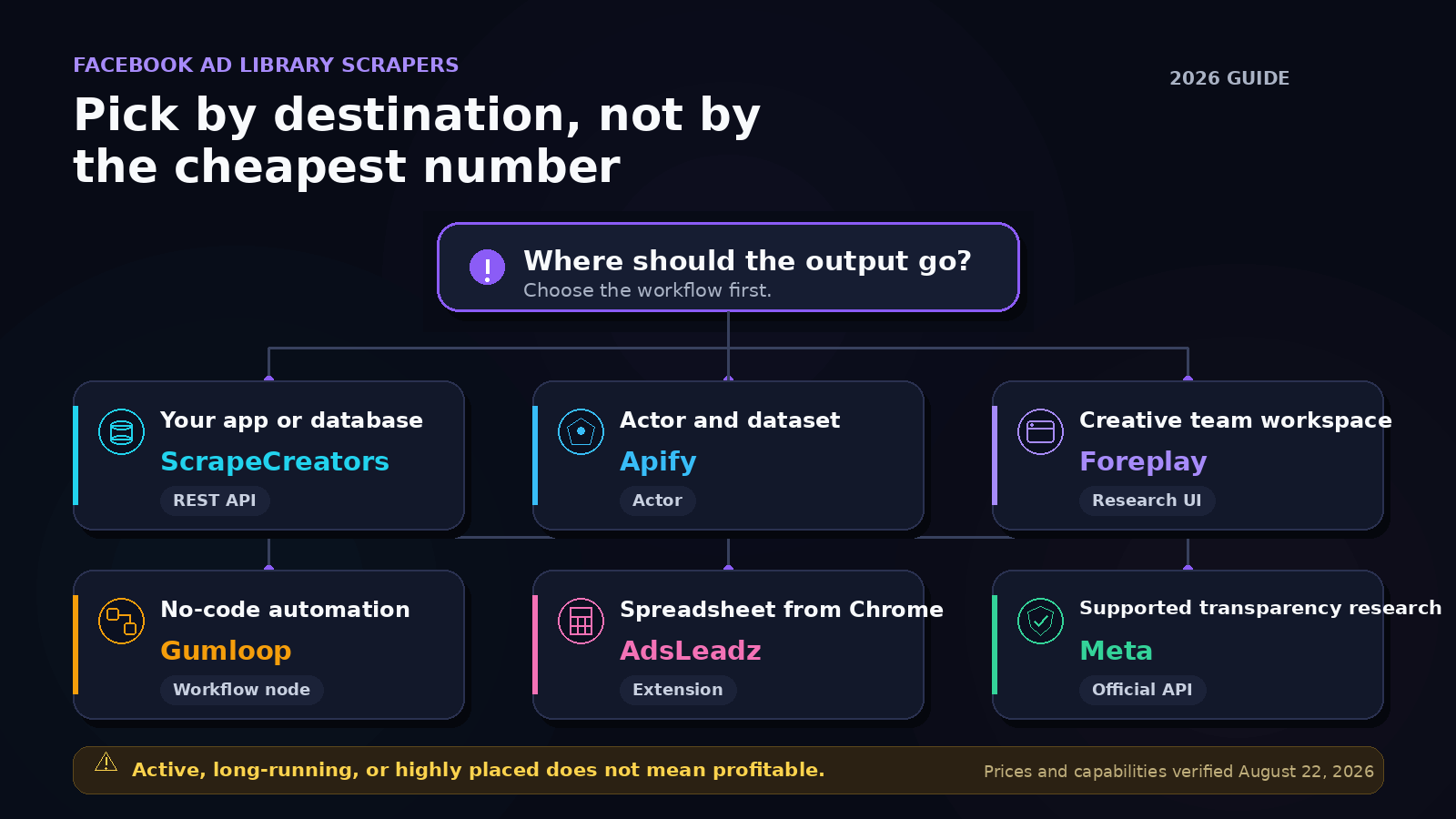
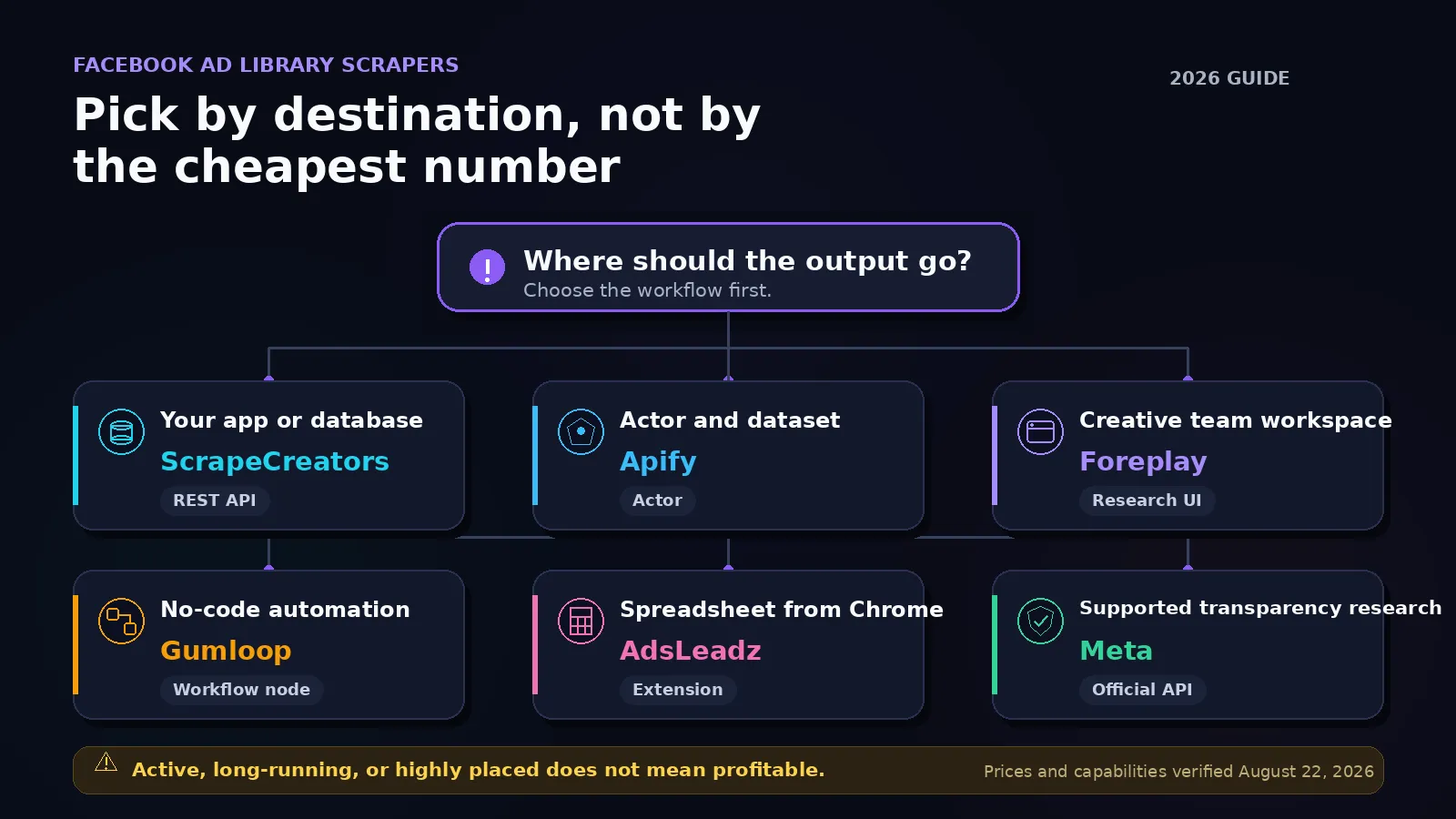
Pick the tool based on where the results need to go:
- Choose ScrapeCreators’ Facebook Ad Library API for JSON in your own app, database, or agent.
- Choose Apify’s Facebook Ad Library Scraper if you want an Actor, datasets, and Apify integrations.
- Choose Foreplay if a creative team wants a visual research library and ongoing competitor tracking.
- Choose Gumloop for a no-code workflow that continues into Airtable, Slack, or another automation step.
- Choose Ads Library Downloader for a manual browser session and spreadsheet export.
- Choose Meta’s Ads Archive API when its official coverage matches your research question and you can handle Meta’s access flow.
Facebook Ad Library scraper comparison
| Tool | Best for | Current price | Automation | Main limitation |
|---|---|---|---|---|
| ScrapeCreators | Developers who want a direct REST API | $47 for 25,000 credits; this search endpoint charged 1 credit in my live check | REST GET or POST, cursor pagination | It returns data, not a visual swipe-file workflow |
| Apify Curious Coder Actor | Teams already using Actors and datasets | Actor card says from $0.75 per 1,000 ads; its FAQ also estimates $0.20 per 1,000 ads in platform usage credits | Actor API, schedules, datasets, integrations | It is a community Actor, so maintenance and behavior depend on its author |
| Foreplay | Creative research, saving ads, and competitor monitoring | Workflow is $175/month monthly or $149/month billed annually | Built-in Spyder tracking plus API access on paid plans | Expensive if you only need raw JSON |
| Gumloop | No-code data pipelines | Pro starts at $37/month with 20,000 credits; the node charges 2 credits per requested ad | Visual workflow builder | Other nodes also consume credits, and its docs disagree about inactive-ad support |
| Ads Library Downloader | Manual creative downloads and CSV or Excel exports | Chrome listing says in-app purchases; no public amount shown | Runs in an open Chrome Ad Library session | Poor fit for a server-side scheduled pipeline |
| Meta Ads Archive API | Official political, issue, and supported transparency research | No per-request price shown in the reference | Graph API | Token setup and narrower coverage than many commercial-research teams expect |
Pricing is not perfectly comparable. ScrapeCreators charges per request, Apify’s Actor charges by returned ads plus stated usage, Gumloop charges credits per requested ad, and Foreplay sells a broader research product. Compare the whole workflow, not the smallest number in the table.
How I compared these tools
The obvious checklist is export format, filters, pagination, price, and maintenance. The less obvious questions came from public discussions around the topic.
I reviewed five relevant YouTube transcripts, 41 unique YouTube comments after deduplicating the overlapping top and newest pulls, 11 returned YouTube reply rows, 71 returned TikTok comment rows, 12 TikTok reply rows, and 31 returned Reddit comment rows. The recurring questions were practical:
- Can I search a market category instead of checking one competitor at a time?
- Can I save ads before they disappear and detect new creatives on a schedule?
- Do I get a file for manual analysis or an API response for an application?
- Why pay when Meta’s website is free?
- Does a long run time or high impression label prove that an ad performs well?
Those questions changed this comparison. It separates visual research tools from data infrastructure, includes monitoring rather than treating scraping as a one-time download, and calls out the performance-data trap.
Useful source discussions included Jake Alexander’s scraper and AI workflow, AdsRepo’s Ad Library API walkthrough, and threads in r/FacebookAds about spy-tool workflows and r/n8n about automating Meta Ad Library collection. These are qualitative sources, not a representative survey.
Scrapers reviewed
1. ScrapeCreators for a direct API
ScrapeCreators exposes a normal REST endpoint at GET /v1/facebook/adLibrary/search/ads. The same endpoint accepts POST requests when a pagination cursor becomes too large for a convenient query string.
The documented filters include:
- keyword query and exact-phrase search
- country and language
- active, inactive, or all statuses
- image, video, meme, or all media
- start and end dates
- impression or recent sorting
- cursor pagination
- a trimmed response option
On August 22, 2026, I queried running shoes for active US video ads, sorted by total impressions, with trim=true. The API returned HTTP 200, 30 ads, a total result count, and a cursor. The response reported credits_charged: 1.
The returned records included ad_archive_id, page name, active status, start date, publisher platforms, creative data, and a public Ad Library URL. See the current endpoint documentation for the full response.
The current Freelance pack is $47 for 25,000 credits, or $1.88 per 1,000 ordinary one-credit requests. Credits do not expire. There is no subscription requirement.
Choose ScrapeCreators if you are building a dashboard, lead-research workflow, archive, or AI agent that needs structured JSON. Choose something else if your main need is a polished swipe file where marketers can tag and discuss creative.
2. Apify for Actor-based collection
Apify is a marketplace of Actors. The Curious Coder Facebook Ad Library Scraper accepts Ad Library search URLs and can run through Apify’s API and integrations.
Its current Actor card says pricing starts at $0.75 per 1,000 ads. The FAQ on the same page separately estimates $0.20 per 1,000 ads in platform usage credits. Treat both as inputs to a run estimate rather than quoting only the cheaper number.
Apify makes sense when you already want datasets, scheduled Actor runs, Make integration, or several export paths. It also gives you multiple Facebook Ad Library Actors to compare.
That marketplace model is also the caveat. The scraper is maintained by its Actor author, not by Facebook or by Apify’s core product team. Review the update date, issue history, sample output, and a small paid run before committing a production pipeline.
3. Foreplay for creative teams
Foreplay is not just a scraper. It combines a swipe file, a large searchable ad collection, creative research, and a product called Spyder for competitor tracking.
The current pricing page lists Workflow at $175 per month on monthly billing or $149 per month on annual billing. The comparison table lists 15 Spyder brands on monthly Workflow and unlimited Spyder on annual Workflow. The same plan includes API access and 10,000 monthly credits on monthly billing or 20,000 on annual billing.
This is the strongest choice in the list for an agency or paid-social team that wants to browse, save, organize, and revisit ads without building a UI. The subscription buys a research workspace, not merely rows of JSON.
Skip it if you only need to feed a data warehouse. Paying for a full creative workflow makes little sense when an API response is the actual destination.
4. Gumloop for no-code workflows
Gumloop’s Facebook Ad Library Scraper is a node inside its visual automation product. It can search by a Facebook Page URL or keywords, then pass library IDs, creative URLs, platform labels, start dates, and body text into later nodes.
The node’s documentation says it charges 2 credits for every ad requested, with a minimum request of 10 ads. Gumloop Pro starts at $37 per month and includes 20,000 credits. If those credits were used only by this node, they would cover 10,000 requested ads. In a real workflow, later AI, enrichment, and output nodes can use more credits.
There is one documentation conflict worth checking before purchase. The parameter section offers Active, Inactive, and All status options. The limitations section says the node only retrieves currently active ads. If historical ads matter, confirm the behavior with a small workflow first.
Gumloop is useful when the job ends in a Sheet, Slack alert, or no-code enrichment flow. It is less attractive for a high-volume backend where every visual orchestration step adds cost and another dependency.
5. Ads Library Downloader for browser exports
The AdsLeadz Chrome extension runs while you browse Meta’s Ad Library. Its listing says it can download image and video creatives, export CSV or Excel, extract ad text and links, and transcribe video ads.
As of August 22, 2026, the Chrome Web Store showed version 2.5.6, updated August 13, 2026, with 3,000 users and three ratings. The listing says it offers in-app purchases but does not publish the amount. That is not enough review volume to make a strong reliability claim.
A browser extension is a sensible answer for a marketer who needs a one-time file and wants to see the page while collecting it. It is the wrong shape for a scheduled server job. It also requires browser permissions and works inside your browsing session, so review the extension’s privacy disclosures and requested access before installing it.
6. Meta’s official API for supported research
Meta’s Ads Archive Graph API reference is the official source. It supports status, date, country, page, search term, and publisher-platform parameters.
Coverage is the important limit. Meta’s current reference says ads that did not reach any location in the EU are returned only when they concern social issues, elections, or politics. That makes the API useful for supported transparency and political-ad research, but it does not satisfy every US commercial competitor-research query.
You also need a Meta access token and the relevant access setup. The API reference does not show a per-request price.
If you want a Python starting point, Max Woolf’s MIT-licensed facebook-ad-library-scraper wraps the official API and cleans its output. It is explicitly aimed at political-ad research and was last pushed in November 2019. Read it as a small reference implementation, not a current general-purpose commercial scraper.
What the data can and cannot prove
A scraper makes public Ad Library fields easier to collect. It does not turn transparency data into Ads Manager performance data.
is_active means an ad was eligible to run when the source was checked. It does not prove the ad spent heavily that day. A long total_active_time can make a creative worth reviewing, but it does not prove profitability. Reach, spend, and impression fields are available only in certain contexts and can be null for ordinary commercial ads.
This matters because public comments around scraper tutorials repeatedly asked for the “best-performing” ads. A scraper can help you build hypotheses from longevity, creative repetition, offer changes, and the number of related ads. It cannot see another advertiser’s conversions, customer acquisition cost, margin, or return on ad spend.
Use the Ad Library to answer questions it can support:
- Which messages and offers is a competitor running now?
- Which creatives are new since yesterday or last week?
- Which pages are advertising around a market category?
- Which platforms and landing pages appear in the public record?
- Which ads disappeared, changed status, or reappeared under a related variant?
Do not label an ad a winner unless you have separate performance evidence.
A practical monitoring workflow
A useful competitor monitor is small. It does not need an AI summary before it has reliable change detection.
- Start with one question, such as “Which US video ads for running shoes appeared this week?”
- Save the query, country, status, media type, sort, and collection time with each run.
- Paginate until you reach your chosen limit. Store the raw
ad_archive_idandcollation_idbefore transforming anything. - Deduplicate by ad ID. Group related variants by collation ID when it is present.
- Compare the current ID set with the last run. Mark first seen, still active, and no longer returned.
- Alert only on meaningful changes. A daily digest of five new creatives is more useful than one Slack message per row.
- Keep the original public Ad Library URL so a person can inspect the source.
If you want this as a reusable agent workflow, the Meta Ad Library monitoring skill shows how to define the inputs, storage, and schedule. For a shorter implementation example, see the one-call Facebook ad research walkthrough.
Tested API example
This is the request I ran on August 22, 2026. Put your key in an environment variable rather than hardcoding it.
curl --get 'https://api.scrapecreators.com/v1/facebook/adLibrary/search/ads' \
  --header "x-api-key: $SCRAPE_CREATORS_API_KEY" \
  --data-urlencode 'query=running shoes' \
  --data-urlencode 'country=US' \
  --data-urlencode 'status=ACTIVE' \
  --data-urlencode 'media_type=VIDEO' \
  --data-urlencode 'sort_by=total_impressions' \
  --data-urlencode 'trim=true'
The live response returned 30 records and a cursor. This is a shortened excerpt from one public result:
{
  "success": true,
  "credits_charged": 1,
  "searchResults": [
    {
      "ad_archive_id": "1339489931715040",
      "page_name": "KURU Footwear",
      "is_active": true,
      "publisher_platform": ["FACEBOOK", "INSTAGRAM", "AUDIENCE_NETWORK"],
      "url": "https://www.facebook.com/ads/library?id=1339489931715040"
    }
  ],
  "searchResultsCount": 22116,
  "cursor": "..."
}
Result counts and specific ads change as Meta’s library changes. The useful contract is the structured record plus a cursor, not this particular count.
You can start with 100 free credits or inspect the search endpoint fields and examples first.
Frequently asked questions
What is the best Facebook Ad Library scraper?
For a REST API, ScrapeCreators is the most direct option in this comparison. For a creative team, Foreplay is a better product shape. For Actor-based automation, use Apify. For a quick manual export, a Chrome extension may be enough.
Can I scrape all Facebook ads for free?
You can search Meta’s public Ad Library manually without paying a scraper. Repeatable exports, historical snapshots, and scheduled monitoring take software and maintenance. Meta’s official API has its own access and coverage limits, so it is not a free universal commercial-ad feed.
Does the Meta Ad Library show ad spend?
Not for every ordinary commercial ad. Spend, reach, and impression data may be missing or null. Never infer return on ad spend from an ad’s active status or longevity alone.
How do I monitor a competitor’s Facebook ads?
Run the same advertiser or keyword search on a schedule, store ad_archive_id, and compare each new snapshot with the last one. Record when an ad first appeared, its status, creative, copy, platforms, and destination URL.
Is it legal to scrape the Facebook Ad Library?
The library contains public transparency data, but you still need to follow Meta’s terms, applicable privacy law, and the rules governing your downstream use. Collect only what you need. If the project involves personal data, regulated advertising, or resale, ask a lawyer rather than relying on a blog post.
Is ScrapeCreators or Apify better?
Use ScrapeCreators when you want one API, one set of docs, and pay-as-you-go credits. Use Apify when you want its Actor ecosystem, datasets, schedules, and integrations. Apify gives you more marketplace choices; ScrapeCreators gives you a simpler direct contract.


