
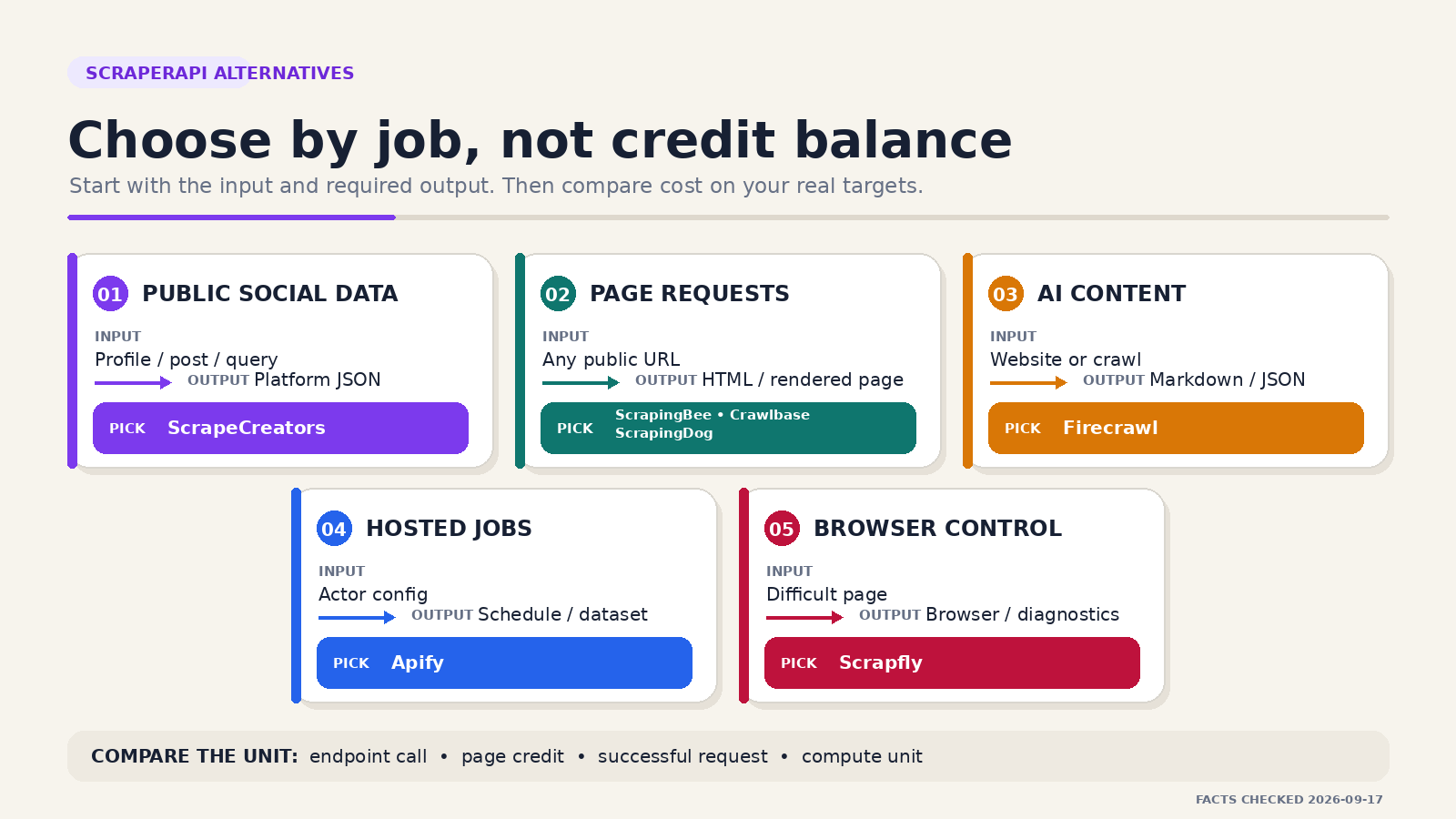
The best ScraperAPI alternative depends on what you need back. For arbitrary page requests, start with ScrapingBee or Crawlbase. Pick ScrapeCreators for supported public social data, Firecrawl for LLM-ready website content, Apify for hosted Actors, Scrapfly for deeper browser control, or ScrapingDog for a lower-priced general API shortlist. ScrapeCreators is not a direct replacement when you need arbitrary URLs.
I run ScrapeCreators, so my recommendation comes with an obvious bias. Product and pricing facts below were checked against official sources on September 17, 2026. I ran one live ScrapeCreators request for this guide. I did not run a shared benchmark across all seven vendors.
Quick comparison
| Rank | ScraperAPI alternative | Choose it for | Public starting point checked September 17, 2026 | Main limitation |
|---|---|---|---|---|
| 1 | ScrapeCreators | Structured data from supported public social platforms | 100 free credits; $47 for 25,000 credits | Not an arbitrary-URL scraper or proxy service |
| 2 | ScrapingBee | Familiar page requests with browser rendering and extraction | 1,000 free credits; Hobby is $19/month for 75,000 credits | Rendering, proxies, and special targets can consume more credits |
| 3 | Crawlbase | Success-only page scraping with pay as you go | Up to 5,000 requests free; $0 monthly pay-as-you-go fee | Site difficulty and JavaScript apply multipliers |
| 4 | Firecrawl | Markdown, structured extraction, maps, and crawls for AI apps | 1,000 free monthly credits; Hobby is $19 monthly or $16/month billed yearly | Built for website content, not platform-native social objects |
| 5 | Apify | Ready Actors, custom jobs, schedules, storage, and datasets | Free plan includes $5 of usage; Starter is $19/month plus usage | Actor schemas, maintenance, and prices vary by author |
| 6 | Scrapfly | Page scraping plus cloud browsers, screenshots, extraction, and diagnostics | 1,000 free signup credits; Discovery is $30/month for 200,000 credits | Browser, unblocker, residential, and screenshot work use different credit amounts |
| 7 | ScrapingDog | Budget general scraping and dedicated search or ecommerce APIs | 200 free credits; Lite is $40/month for 200,000 credits | JavaScript, premium proxies, geo, and parsers multiply credit use |
These starting points are not a normalized price ranking. One ScrapeCreators endpoint call, one browser-rendered page, one Firecrawl page, one Apify compute unit, and one Actor result buy different work.
Decide what you are replacing
ScraperAPI accepts a URL and handles much of the network work behind that request. Its current feature list includes rotating proxy pools, JavaScript rendering, premium proxies, custom headers, sessions, structured endpoints, an asynchronous service, and a crawler. The public Hobby plan lists 100,000 API credits and 20 concurrent threads for $49 per month.
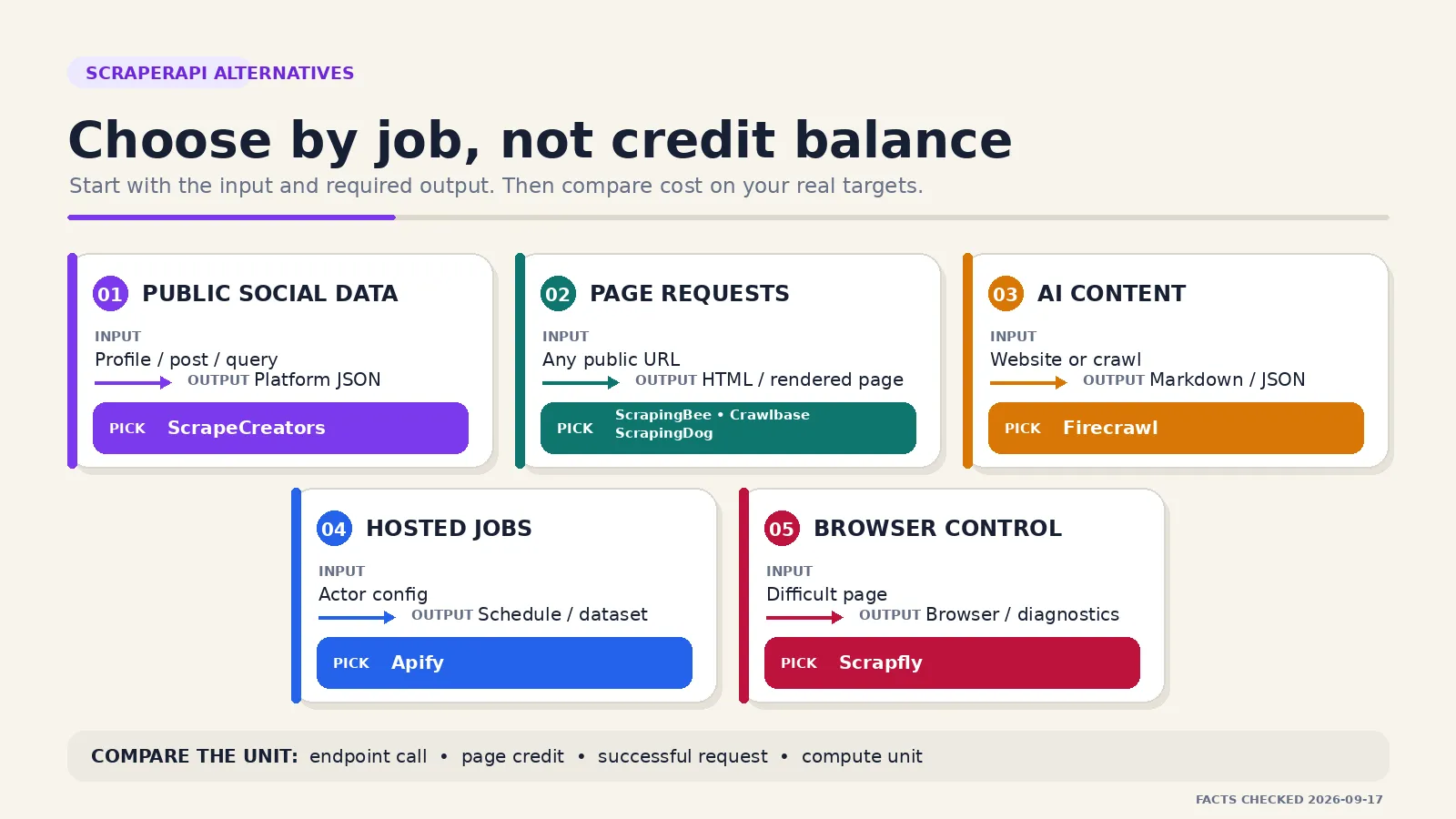
That does not mean everyone searching for an alternative wants the same product. Usually they want one of five things:
- A similar URL-in, page-out API with a different price or billing model.
- Clean content for an LLM instead of raw page HTML.
- A ready scraper, schedule, and dataset rather than another request primitive.
- Direct browser control and enough diagnostics to debug difficult pages.
- Structured public social data without maintaining social-site parsers.
The last job is where ScrapeCreators belongs. The first is where ScrapingBee, Crawlbase, Scrapfly, and ScrapingDog are closer replacements. Firecrawl and Apify change the abstraction instead of copying ScraperAPI’s contract.
The current ranking pages rarely make this split clear. Crawlbase publishes a thoughtful two-product comparison, Firecrawl lists five alternatives from an AI-content angle, and Spider compares its own product directly with ScraperAPI. Apify explains why its wider platform is different. Each vendor naturally centers its own product. This guide starts with the workload, states where ScrapeCreators does not fit, and keeps unlike billing units separate.
1. ScrapeCreators for public social data
Choose ScrapeCreators if: your inputs are supported public social profiles, posts, videos, comments, transcripts, searches, ads, or metrics, and you want normalized JSON.
Choose another tool if: you need arbitrary web pages, browser automation, raw proxy traffic, private account actions, or a custom selector against any URL.
ScrapeCreators is the specialist option on this list. Instead of sending a generic page URL, you call an endpoint that models a real platform object and its pagination. The same API key covers public data across Instagram, TikTok, YouTube, Facebook, X, LinkedIn, Reddit, Threads, Pinterest, Snapchat, and other supported platforms.
Public pricing listed 100 free credits, $47 for 25,000 credits, and $497 for 500,000 credits when checked. Credits are pay as you go and do not expire. Most endpoints cost one credit, some cost more, and supported cache hits cost zero credits. Check the current pricing section and the response’s credits_charged field before budgeting.
I ran this request against production while researching the article:
curl --get "https://api.scrapecreators.com/v1/youtube/search" \
  -H "x-api-key: $SCRAPE_CREATORS_API_KEY" \
  --data-urlencode "query=web scraping api" \
  --data "type=videos" \
  --data "region=US" \
  --data "trim=true"
It returned HTTP 200, 20 video rows, and credits_charged: 1. The response included this abbreviated object:
{
  "success": true,
  "credits_charged": 1,
  "videos": [
    {
      "type": "video",
      "id": "DqtlR0y0suo",
      "url": "https://www.youtube.com/watch?v=DqtlR0y0suo",
      "title": "Always Check for the Hidden API when Web Scraping",
      "channel": {
        "id": "UC8tgRQ7DOzAbn9L7zDL8mLg",
        "title": "John Watson Rooney"
      },
      "viewCountInt": 719539,
      "lengthSeconds": 710
    }
  ]
}
The YouTube Search docs cover the request fields and response. The YouTube API overview shows the wider endpoint set.
That output is useful when your product needs video IDs, channel fields, engagement, and pagination. A general page API can fetch a YouTube page, but you still have to find the right page, parse changing markup, normalize fields, and maintain the result.
This is a narrow advantage, not a claim that ScrapeCreators replaces ScraperAPI everywhere. It does not fetch your customer’s pricing page, control a browser, or crawl an arbitrary documentation site. If your workflow combines public social data with general websites, use two tools.
2. ScrapingBee for browser-backed page requests
Choose ScrapingBee if: you want a close ScraperAPI-style request model with JavaScript rendering, proxies, screenshots, extraction rules, or browser scenarios.
Choose another tool if: your real output is a platform-native social object, a full hosted job, or a site crawl already cleaned for an LLM.
ScrapingBee is one of the closest replacements in this list. You make an API request for a target page and enable the browser, proxy, geography, extraction, or screenshot features you need. Its product surface is familiar enough that a team can compare the same fixture set without redesigning the whole pipeline first.
The pricing page listed 1,000 free API credits. Hobby was $19 per month for 75,000 credits and 25 concurrent requests. Freelance was $49 for 250,000 credits and 50 concurrent requests. ScrapingBee says it charges only successful requests.
Credits still need inspection. A plain request and a rendered request do not necessarily have the same cost. The existing best web scraping API comparison explains why headline balances can mislead when features multiply consumption.
ScrapingBee is the practical first trial when the application should keep thinking in pages. It is less suitable when you want a saved dataset, an Actor marketplace, or stable public-social schemas.
3. Crawlbase for success-only pay as you go
Choose Crawlbase if: you want no required monthly subscription, billing tied to successful requests, and a rate card that gets cheaper as volume grows.
Choose another tool if: you need a fixed social schema, LLM-ready markdown by default, or one simple flat rate regardless of target difficulty.
Crawlbase currently starts with up to 5,000 requests free. Its pay-as-you-go option has a $0 monthly fee, bills in arrears, and charges only for successful requests. The published rate card starts at $3 per 1,000 for the first bracket and falls across larger volume brackets. An optional Starter subscription is $99 per month for 200,000 credits.
Read the multiplier table before comparing that with ScraperAPI. Crawlbase marks standard sites at 1x, moderate sites at 1.5x, complex sites at 2x, and JavaScript requests at 2x. Its calculator applies those factors to the graduated rate.
This model is appealing when traffic is uneven and failed requests are expensive. It also exposes the question every buyer should ask: what did the vendor classify as a success? A 200 response with a challenge page or an empty parser result may still be useless to your application. Put a content contract after the HTTP status check.
Crawlbase is a good direct shortlist candidate for URL-based scraping. It is not the same product as a structured social endpoint or an LLM content service.
4. Firecrawl for LLM-ready website content
Choose Firecrawl if: your application needs pages turned into markdown, structured JSON, screenshots, maps, or crawl output for search, RAG, or an agent.
Choose another tool if: you need platform-native social fields, direct browser control, or a general page response without the content layer.
Firecrawl starts from the output many AI applications actually want. A basic scrape, crawl, or map costs one credit per page under the current table. Search costs two credits per 10 results. JSON, question, and highlight formats add credits per page.
The free tier lists 1,000 monthly credits. Hobby is $19 when billed monthly or $16 per month when billed annually for 5,000 credits. Firecrawl says a scrape with no result is not charged, but an error page such as a returned 403 or 404 can still cost one credit.
That definition matters. Your evaluation should distinguish a network failure, a returned error page, a complete article, and a clean structured record. They are not equal outcomes even if the provider can bill them consistently.
Firecrawl is a strong alternative when ScraperAPI is only the first half of your pipeline and you spend the second half cleaning page content for an LLM. It is not a social-media API. The Firecrawl vs ScrapeCreators guide covers the cases where using both is cleaner than forcing either one outside its job.
5. Apify for Actors, schedules, and datasets
Choose Apify if: you want an existing Actor, a runtime for custom code, schedules, webhooks, storage, queues, and exportable datasets.
Choose another tool if: you want one stable endpoint catalog and one response contract across targets.
Apify is a platform rather than one page API. Its Store currently lists tens of thousands of Actors. Each Actor is a hosted program with its own input, output, author, maintenance history, and pricing model.
The free plan included $5 to spend on Store Actors or your own Actors. Starter was $19 per month plus usage and included $19 of prepaid spend. Compute cost $0.20 per compute unit on Free and Starter when checked. Store Actors can add per-result, per-event, rental, proxy, storage, or other charges.
The benefit is speed when someone already maintains the exact scraper. You can configure it, schedule it, save a dataset, and connect a webhook without building the runtime. The tradeoff is variation. Two Actors for the same target can have different schemas, quality, prices, and update histories.
Apify’s ScraperAPI alternative page was the strongest relevant Apify result in the live US checks for this article. It ranked second for scraperapi alternative apify on September 17. It did not rank in the top 10 returned organic results for the four primary query variants, where ScrapeCreators was also absent.
Choose Apify when you want a hosted job and dataset. Choose ScrapeCreators when the target is a supported public social object and you would rather call one documented REST endpoint. The Apify vs ScrapeCreators comparison goes deeper on that narrower choice.
6. Scrapfly for debugging and browser control
Choose Scrapfly if: you need page scraping plus cloud browser sessions, screenshots, structured extraction, crawler jobs, and request-level diagnostics under one account.
Choose another tool if: you only need a small plain-HTML request volume or a platform-specific social schema.
Scrapfly exposes more of the operating surface than a basic URL proxy. Its current catalog includes a Web Scraping API, Cloud Browser API, Crawler API, Data Extraction API, and Screenshot API. That is useful when a page request needs to become a managed browser session or a debugging trace without moving to another vendor.
The free tier included 1,000 signup credits. Discovery was $30 per month for 200,000 credits and five concurrent requests. The public matrix listed a basic HTTP scrape on a datacenter IP at one credit, JavaScript rendering or its Unblocker at five credits, residential proxies at 25 credits, and a full-page screenshot at 60 credits. Failed requests were listed as free.
This is why credit balances should not be compared in isolation. A 200,000-credit plan can mean 200,000 simple requests, 40,000 rendered requests, or 8,000 residential requests before other work.
Scrapfly belongs on the shortlist when observability and browser control matter more than the smallest API surface. If all you need is one stable social object, that wider toolset is unnecessary.
7. ScrapingDog for a budget general API shortlist
Choose ScrapingDog if: you want a lower entry price, a general web scraper, and dedicated APIs for search or ecommerce targets under the same plan.
Choose another tool if: you need hosted job orchestration, an Actor marketplace, or one credit per logical result regardless of features.
ScrapingDog listed 200 free credits and a Lite plan at $40 per month for 200,000 request credits with five concurrent requests. Every plan unlocks its APIs, including the general scraper and dedicated endpoints.
The detailed table is more important than the headline total. A rotating-proxy request costs one credit, JavaScript rendering five, a premium proxy or geography 10, and JavaScript plus premium proxy 25. Failed requests are not charged according to the page.
That makes ScrapingDog worth testing for price-sensitive page workloads and supported dedicated targets. Do not assume the lowest cost in the table will be your cost. Run the exact domain, geography, rendering setting, and parser mode you plan to use.
The company also publishes a broad best-web-scraping-APIs article with small target tests. That is useful context, but it is still vendor content. Reproduce any consequential success-rate or speed claim against your own fixture set.
What public buyer questions changed
I used public social results to find the questions that pricing pages tend to skip. This was audience research, not ranking evidence or a vendor benchmark.
Four themes kept appearing:
- Cost per usable result beats cost per credit. A detailed Reddit discussion about proxy APIs for different targets argued that the right vendor changes with the domain and volume. That is more useful than declaring one universal winner.
- Reliability includes maintenance. In a build-versus-buy thread, people discussed moving to an API after selector repair, proxy work, and breakage consumed too much time. Others preferred a hybrid setup for easy versus difficult targets.
- Social data is its own job. One API recommendation thread asked specifically about scheduled Instagram and TikTok collection with manual cleanup after failed runs. A generic page response does not solve field normalization or platform pagination by itself.
- Output format changes the shortlist. YouTube videos about tools people actually use and Firecrawl for AI workflows focused on the difference between raw browser work, ready scrapers, and clean markdown. Comments asked about scale, local deployment, protected sites, and whether a tool was overkill for a small job.
The searches were noisy. TikTok mixed relevant scraping demos with unrelated uses of the word “scraper,” and some YouTube results were obvious vendor promotion. I did not use raw engagement as proof that a product works. The useful signal was the repeated buyer question: “What will I have to maintain after the API call?”
That question changed this article in three ways. It separates target types before naming products, shows the billing multipliers instead of only plan totals, and recommends a fixture test that checks content quality rather than HTTP status alone.
How to run a useful evaluation
A fair ScraperAPI alternative test does not start with 10 copies of the same easy page.
Build a fixture set with:
- ten normal pages from your real domains;
- five JavaScript-heavy pages;
- five pages with the geography you need;
- five known difficult or protected pages;
- at least one paginated collection;
- missing, deleted, and private examples where your product must classify the result.
For a social workflow, replace those page buckets with public profiles, posts, comments, search queries, and cursors from every supported platform you need.
Record these fields for every run:
usable success = response satisfies your required data contract
cost per usable result = total billed cost / usable results
maintenance cost = engineering hours for retries, parsers, and exceptions
Then track p50 and p95 latency, empty 200 responses, hard failures, retries, credits consumed, required enrichment calls, and missing required fields. Keep optional fields separate from record failures.
Run the test again after a week. A scraping product is an operational dependency. One good afternoon does not show how it handles target changes or a bad proxy period.
Use the free allowance to answer concrete questions:
- Does JavaScript or a premium route multiply the charge?
- Is an error page billable?
- Does a successful response contain the fields you require?
- Can you see why a request failed?
- Is pagination stable and documented?
- Can you cap spending and concurrency?
- Who fixes a broken target: your team, the vendor, or an Actor author?
If you are evaluating ScrapeCreators for the social portion, create an account, start with the matching API docs, and compare the endpoint response with your existing parser. Do not replace a general page scraper until you have mapped every non-social URL to another tool.
Limitations and honest fit boundaries
No product in this guide wins every category.
ScrapeCreators is the wrong choice for arbitrary URLs, authenticated account actions, browser automation, or raw proxy access. ScrapingBee and Crawlbase are closer to ScraperAPI for page requests, but they do not remove the need to define your data contract. Firecrawl cleans website content for AI systems, but it is not a platform-native social API. Apify gives you much more job infrastructure, while Actor quality and cost vary. Scrapfly provides deep controls that a small project may not need. ScrapingDog’s low headline cost depends on the features each request uses.
Legal and policy review still belongs to you. Use public data you have a legitimate reason to collect, respect applicable terms and privacy rules, and avoid private, authenticated, or access-controlled data unless you have authorization.
My shortlist would be:
- For public social data, try ScrapeCreators first.
- For the closest arbitrary-page replacement, test ScrapingBee and Crawlbase on the same domains.
- For RAG or agent content, test Firecrawl.
- For a maintained ready scraper and scheduled dataset, inspect Apify Actors.
- For browser control and debugging, test Scrapfly.
- For a price-sensitive general API, add ScrapingDog to the same fixture run.
That is less satisfying than naming one winner, but it is the answer that survives contact with a real workload.
Sources checked
Product capabilities, pricing, and limits were checked on September 17, 2026 against these primary sources:
- ScraperAPI pricing and documentation
- ScrapeCreators pricing, API docs, and YouTube Search docs
- ScrapingBee pricing and web scraping API
- Crawlbase pricing and Crawling API
- Firecrawl pricing and documentation
- Apify pricing, web scraping tools, and ScraperAPI alternative page
- Scrapfly pricing and Web Scraping API
- ScrapingDog pricing and product overview
Prices and product limits change. Check the linked pages and run your own fixture set before buying a plan.


