
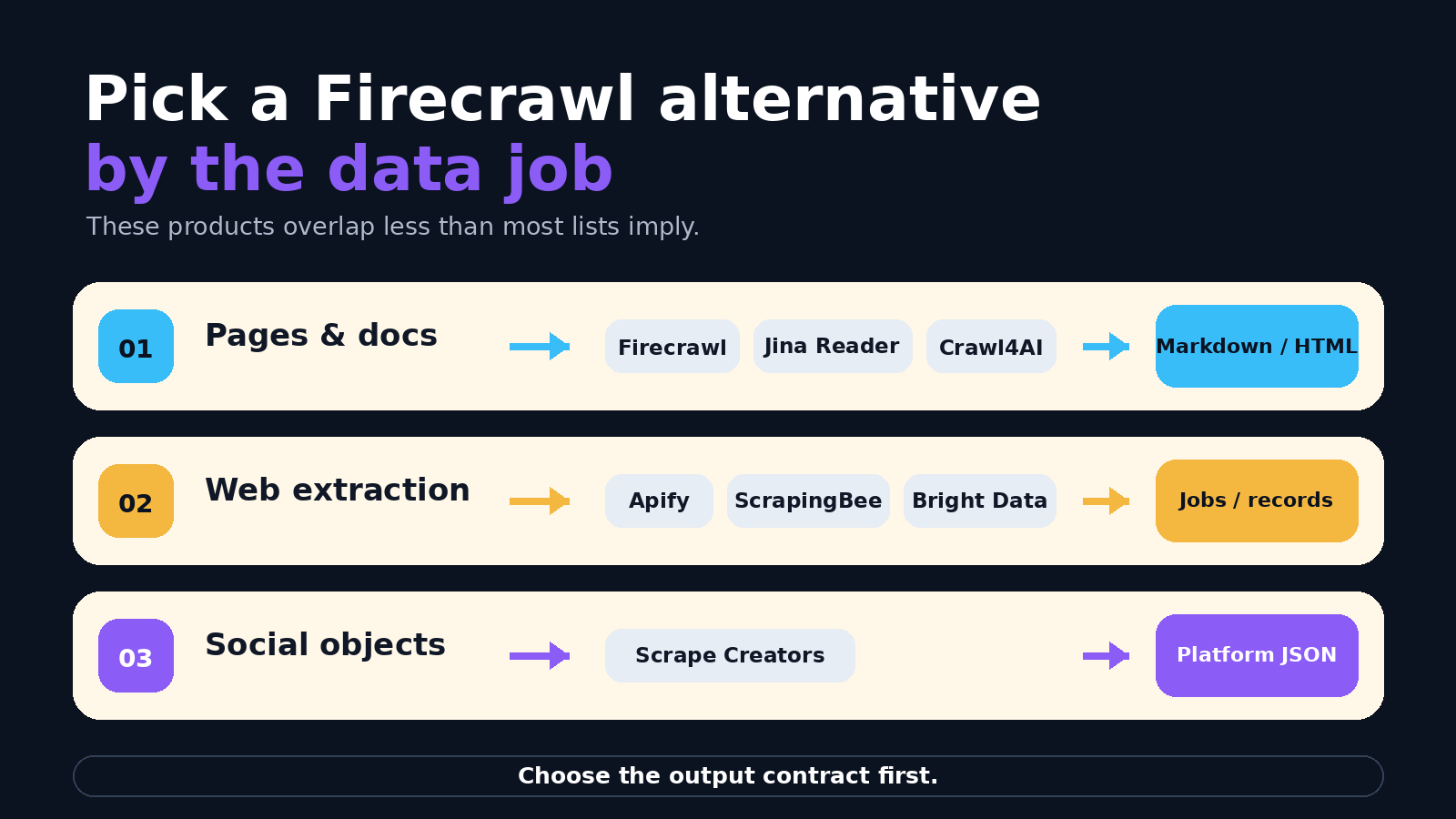
Choose Firecrawl when you need to crawl arbitrary websites into markdown, HTML, screenshots, or schema-driven JSON. Choose ScrapeCreators when you need public social profiles, posts, comments, transcripts, search, ads, or metrics as platform-native JSON. Neither product is a direct replacement for the other.
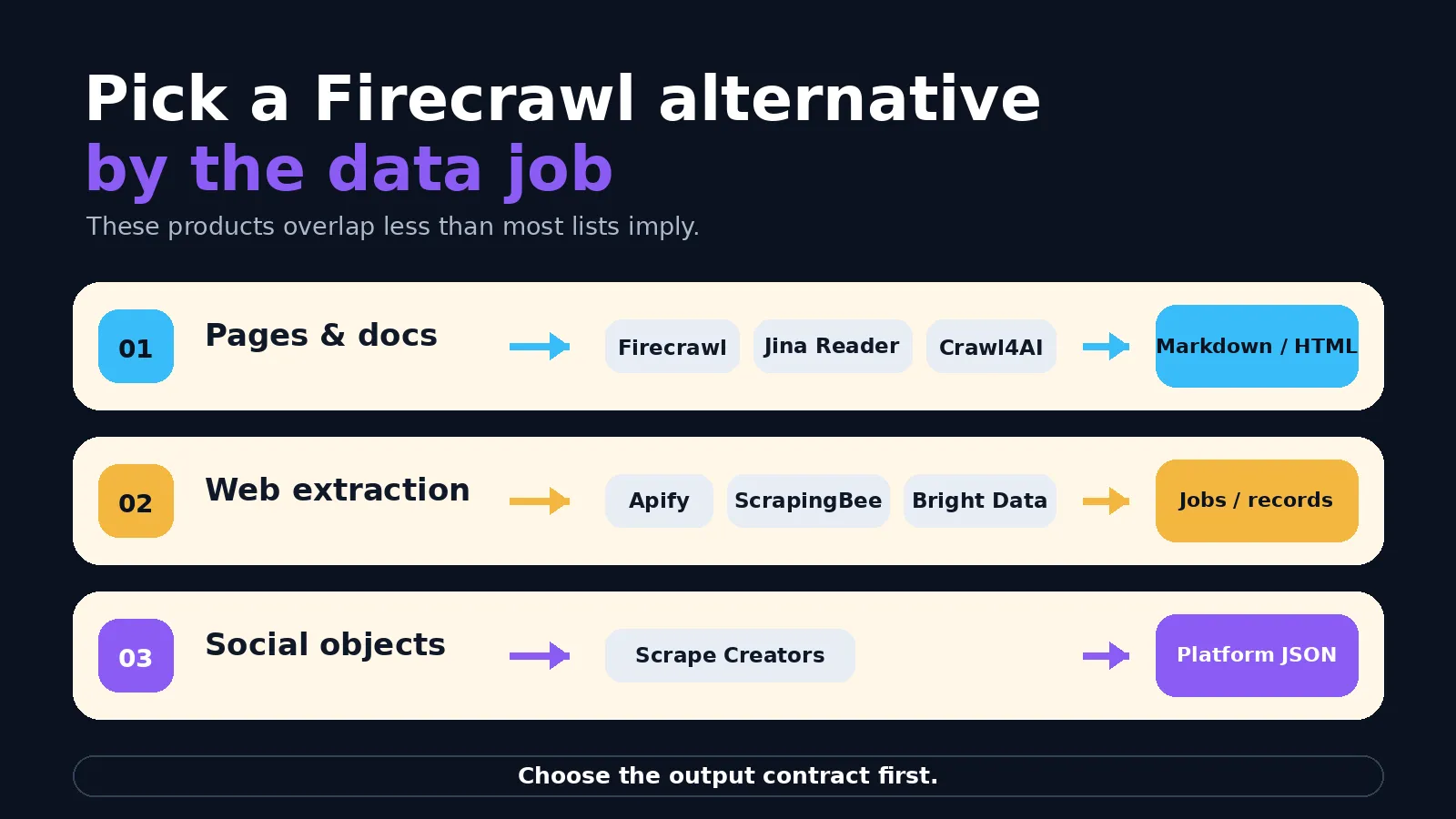
If Firecrawl is the wrong fit for a different reason, the best alternative depends on the data job. Crawl4AI and ScrapeGraphAI fit self-hosted control, Jina Reader fits straightforward URL-to-markdown, Apify fits actors and scheduled jobs, and ScrapingBee or Bright Data fit managed web extraction.
Disclosure: I run ScrapeCreators, so I have an obvious stake in this comparison. I included cases where another product is the better fit. Product and pricing facts were checked against official sources on August 28, 2026. I did not run all eight products through a shared benchmark.
Firecrawl vs ScrapeCreators at a glance
| Question | Firecrawl | ScrapeCreators |
|---|---|---|
| What is the source? | Arbitrary websites and documents | Supported public social platforms |
| What do you request? | A scrape, crawl, map, search, extraction, or browser job | A profile, post, video, comment page, transcript, search, ad, or metric endpoint |
| What comes back? | Markdown, HTML, screenshots, media, metadata, or schema-driven JSON | Platform-native JSON with target fields and pagination |
| How is it billed? | Monthly credits; no self-serve pay-per-use plan | One-time credit packs; credits do not expire |
| When is it the wrong choice? | When you need a normalized social object instead of page content | When you need to crawl a random website or control a browser |
Firecrawl already handles far more than raw HTML. ScrapeCreators does not crawl every website. A research agent can reasonably use ScrapeCreators for YouTube comments and transcripts, then Firecrawl for the websites linked from those videos.
Firecrawl alternatives by data job
| Product | Pick it when | Primary output | Starting point checked August 28, 2026 | Main tradeoff |
|---|---|---|---|---|
| Firecrawl | You need a managed website scrape, map, crawl, search, or extraction API | Markdown, HTML, screenshots, media, or structured JSON | 1,000 free credits monthly; Hobby is $16/month billed yearly for 5,000 credits | Self-serve credits expire and plans cap concurrency |
| ScrapeCreators | You need public social profiles, posts, videos, comments, search, transcripts, ads, or metrics | Platform-native JSON | 100 free credits; $47 for 25,000; credits never expire | Not an arbitrary-URL crawler or browser |
| Crawl4AI | You want an open-source Python crawler you control | Markdown plus CSS, XPath, or LLM extraction | Open source; hosted Cloud API is still listed as closed beta | You operate the browser and infrastructure |
| Jina Reader | You want the simplest path from one URL to LLM-friendly text | Clean text or markdown | Reader API is advertised as free; an API key raises limits | Narrower workflow than a full crawl platform |
| ScrapeGraphAI | You want prompt-driven extraction with your choice of LLM | Structured dictionaries or generated scraping pipelines | Open source uses your infrastructure and LLM; managed API uses pay-as-you-go credits | LLM cost and output guardrails remain your problem when self-hosted |
| Apify | You want ready-made Actors, custom code, schedules, datasets, and webhooks | Actor-specific structured datasets | $5 monthly free usage; Starter is $29/month plus usage | Inputs, output, quality, and price vary by Actor |
| ScrapingBee | You want a simple HTTP API for browsers, proxies, screenshots, and extraction rules | HTML, screenshots, or extracted fields | $49/month for 250,000 API credits | Feature choices change credit use, and you still own target-specific parsing |
| Bright Data | You need a broad scraper catalog, proxy infrastructure, or enterprise data delivery | JSON or CSV records, HTML, or browser sessions | 5,000 records/month free; pay as you go at $1.50 per 1,000 records | Broad product surface and unlike billing units take time to map |
These numbers are shortlisting inputs, not a normalized price ranking. A Firecrawl page, a Bright Data record, an Apify compute unit, and a ScrapeCreators endpoint call are different units.
Start with the reason you are leaving Firecrawl
Firecrawl already covers a lot. Its current Scrape documentation says it handles proxies, caching, rate limits, JavaScript-rendered pages, PDFs, and images. It can return markdown, structured data, screenshots, HTML, and supported audio or video. Its Crawl endpoint discovers subpages and can deliver results by polling, WebSocket, or webhook.
That matters because an alternative should fix a specific mismatch. Common reasons fall into four lanes:
- You want to self-host. Crawl4AI or ScrapeGraphAI gives you source-level control, but you inherit browser operation, proxies, queues, observability, retries, and upgrades.
- You only need readable page content. Jina Reader removes much of the platform surface. Prepend
r.jina.aito a URL and get LLM-friendly text. - You need a different operating model. Apify gives you executable Actors and schedules. ScrapingBee gives you a straightforward page API. Bright Data combines scraping products with a larger proxy and data-delivery stack.
- You are targeting social platforms, not arbitrary pages. ScrapeCreators exposes named endpoints and normalized objects for public social data. That avoids rebuilding profile, post, comment, search, transcript, and pagination parsers from page HTML.
Do not switch because one landing page shows a lower headline price. Name the target, required fields, expected volume, latency budget, failure behavior, and maintenance owner first.
What builders actually ask about
For this update, I searched YouTube, Reddit, and TikTok for firecrawl alternatives, firecrawl alternative, firecrawl competitors, and firecrawl vs scrape creators. I read five available YouTube transcripts, 45 unique YouTube comments, 37 fetched replies, 97 returned Reddit comments and nested replies, 50 TikTok comments, and 12 fetched TikTok replies.
The useful questions were consistent even though the sources were not a representative survey:
- Will self-hosting actually save money after proxies and operations? Several Reddit threads moved quickly from “free” to Docker stability, IP blocks, logs, and debugging.
- What happens at production volume? Builders cared about retries, monitoring, session consistency, anti-bot behavior, and output drift more than a polished demo.
- Are credits pages, requests, records, or something else? People repeatedly asked about unused credits, credit multipliers, and cost at large page counts.
- Where is the real demo? Comments under long sponsored or conceptual videos asked for a concrete request, output, and disclosure rather than another feature list.
- When should an API replace page scraping? Viewers raised terms, robots, and the practical advantage of a documented API when one exists.
That feedback changed this guide. It separates managed from self-hosted tools, shows unlike billing units, includes a real API request, and does not claim a benchmark winner. The strongest public discussions included a Firecrawl, Jina, and ScrapeGraphAI walkthrough, a production scraping critique, and Reddit threads about current scraper choices and production reliability.
1. ScrapeCreators for public social data
Choose ScrapeCreators if: your source is a supported social platform and you want stable JSON for a profile, post, video, comment thread, transcript, search result, ad, or metric.
Choose another tool if: you need to crawl arbitrary websites, control a browser, fill forms, or extract a custom schema from any URL.
ScrapeCreators is the specialist in this list. Its current API documentation covers public data across TikTok, Instagram, YouTube, Facebook, X, Reddit, LinkedIn, Threads, Pinterest, Snapchat, and other platforms. Endpoints model the platform object and its pagination instead of returning a page for you to parse.
Pricing is pay as you go. The public pricing section listed 100 free credits, $47 for 25,000 credits, and $497 for 500,000 credits on August 28. Credits never expire. Most endpoint calls cost one credit, some cost more, and the exact charge belongs to the endpoint contract. A cache hit costs zero credits; a cache miss uses the normal endpoint price.
This request was run during the research for this article:
curl --get "https://api.scrapecreators.com/v1/youtube/search" \
  -H "x-api-key: $SCRAPE_CREATORS_API_KEY" \
  --data-urlencode "query=firecrawl alternatives" \
  --data "region=US" \
  --data "sortBy=relevance" \
  --data "type=videos"
An abbreviated item from the live response looked like this:
{
  "id": "QxHE4af5BQE",
  "url": "https://www.youtube.com/watch?v=QxHE4af5BQE",
  "title": "How to scrape the web for LLM in 2024: Jina AI (Reader API), Mendable (firecrawl) and Scrapegraph-ai",
  "channel": { "title": "LLMs for Devs" },
  "viewCountInt": 206043
}
The response also returned publish data, duration, thumbnails, badges, and a continuation token. See the YouTube Search endpoint, then compare it with the broader social media scraping API guide.
ScrapeCreators does not replace Firecrawl for a documentation crawl or a random pricing page. It replaces the work of fetching and normalizing supported public social objects. That narrower promise is the point.
2. Crawl4AI for self-hosted Python control
Choose Crawl4AI if: open-source Python control matters more than a hosted service, and your team is willing to own the crawler.
Choose another tool if: you do not want to manage browsers, queues, proxies, deployment, monitoring, and fixes.
Crawl4AI is an open-source, LLM-friendly crawler. Its docs cover asynchronous crawling, browser configuration, clean markdown, structured extraction with CSS or XPath, LLM extraction, page interaction, screenshots, PDFs, and multi-URL runs.
It is the clearest Firecrawl alternative for a team that wants to inspect and change the implementation. You can run it locally or in your own infrastructure and choose the extraction strategy. That can lower vendor spend at volume, but “open source” is not the same as “free to operate.” Compute, browsers, proxy traffic, observability, and engineering time still count.
The official site currently labels Crawl4AI Cloud API as closed beta. Treat the public project as self-hosted unless that status changes. This is also where community discussions were most useful: people liked the control and no hosted page fee, then immediately discussed Docker behavior, memory, Cloudflare, and maintenance.
Choose it when the crawler itself is part of your product advantage or your team already knows how to run browser workloads. Do not choose it only because a hosted credit looks expensive.
3. Jina Reader for simple URL-to-markdown
Choose Jina Reader if: your job is “turn this URL into readable LLM input” and you want a smaller surface than a crawler platform.
Choose another tool if: you need site-wide crawl orchestration, scheduled jobs, complex browser interaction, or platform-native social records.
Jina Reader has a wonderfully small interface: prepend r.jina.ai to a URL. The service extracts the core page content and returns LLM-friendly text. It also supports request headers for selectors, token budgets, timeouts, images, and higher-quality ReaderLM conversion.
The official Reader page called the API free on August 28. It showed 20 requests per minute without a key and higher limits with a key, subject to both request and token limits. ReaderLM-v2 costs three times the token budget, so even a free entry point needs usage controls.
This is not a full Firecrawl clone. It is a good alternative when Firecrawl feels like too much product for one-page reading. It also makes a useful fallback or preprocessing step inside a research agent. If you need to map a domain, preserve job state, run webhooks, or interact with a browser, move back to Firecrawl or another fuller platform.
4. ScrapeGraphAI for prompt-driven extraction
Choose ScrapeGraphAI if: you want a Python library that combines scraping pipelines with prompts, schemas, and your choice of LLM.
Choose another tool if: deterministic selectors and low token use matter more than flexible prompt-driven extraction.
ScrapeGraphAI is available as an open-source library and a managed cloud API. The library can run single-page or multi-page graphs, generate structured dictionaries, create scraper scripts, and use hosted or local models. You can bring OpenAI, Gemini, Groq, Azure, or a local model through Ollama.
The split matters. In the open-source version, you configure Playwright, proxies, anti-bot handling, scaling, and the LLM. Your cost is infrastructure plus model usage. The managed API handles that layer and bills with pay-as-you-go credits.
This product fits teams that want extraction intent to live in prompts and graph steps. It is less attractive when a stable CSS or XPath parser already does the job cheaply. One of the recurring social-research objections was that the LLM is usually the last extraction layer, not the part that gets through a block or keeps a session stable. Plan for both halves.
5. Apify for actors, schedules, and custom jobs
Choose Apify if: you want a marketplace of ready-made scrapers, a runtime for your own code, schedules, datasets, and webhooks in one platform.
Choose another tool if: you want one consistent endpoint catalog and response schema across every target.
Apify’s core unit is an Actor: a serverless cloud program with structured JSON input and optional structured output. Actors can run manually, through an API or CLI, or on a schedule. They also get storage for datasets, key-value records, request queues, and files.
The marketplace is the advantage. If an Actor already covers your target, you can ship faster than building the crawler. If it does not, you can write your own. The tradeoff is that Actors have different authors, inputs, outputs, release histories, and pricing models. Review the exact Actor rather than treating Apify as one scraper.
The public plan listed $5 of monthly usage on Free, then $29 per month plus usage on Starter. Platform compute was shown at $0.20 per compute unit on those plans, but an Actor can add per-result or per-event charges, proxy traffic, storage, and add-ons.
Apify is a better fit than Firecrawl when the unit of work is a runnable job or marketplace Actor. Firecrawl is simpler when you want one managed API for website content.
6. ScrapingBee for a managed page API
Choose ScrapingBee if: your application already understands pages and needs a managed API for proxy rotation, JavaScript rendering, screenshots, and extraction rules.
Choose another tool if: you need a self-hosted crawler, a job marketplace, or normalized social objects.
ScrapingBee uses a familiar request model. Send the target URL and options, then receive the page response or extracted fields. The product also exposes JavaScript scenarios, geotargeting, screenshots, CSS or XPath extraction, and dedicated search and commerce APIs.
Its public Freelance plan was $49 per month for 250,000 API credits and 50 concurrent requests on August 28. Startup was $99 for 1,000,000 credits and 100 concurrent requests. The credit number is not a page guarantee because rendering, proxy choice, and other features can change consumption.
ScrapingBee is a practical Firecrawl alternative when you want more direct control over the page request. Firecrawl has the stronger LLM-content and crawl framing. ScrapingBee feels closer to outsourcing the browser and proxy layer while keeping parsing decisions in your application.
7. Bright Data for broad web data infrastructure
Choose Bright Data if: you need ready scraper products plus browser, unlocker, SERP, proxy, dataset, and delivery options from one large vendor.
Choose another tool if: your project needs a small product surface and one straightforward API contract.
Bright Data spans more layers than Firecrawl. Its Web Scraper API product handles browser rendering, CAPTCHA solving, proxy management, batch and scheduled collection, job APIs, validation, and JSON or CSV delivery. The same company also sells browser access, unlockers, SERP APIs, datasets, and proxy networks.
The Web Scraper pricing page listed 5,000 free records each month and $1.50 per 1,000 records on pay as you go. Its $499 monthly Scale plan included 384,000 records and $1.30 per 1,000 additional records. The page also advertised pay-only-for-success billing and unlimited concurrency for that product.
A delivered record is not the same as a Firecrawl page or ScrapingBee API credit. Bright Data is worth shortlisting when procurement, broad target coverage, high volume, or data delivery matter. It can be too much platform when you only need clean markdown from a handful of URLs.
Firecrawl vs ScrapeCreators
This pair causes the most confusion because both use scraping in their positioning.
| Question | Firecrawl | ScrapeCreators |
|---|---|---|
| What is the source? | Arbitrary websites and documents | Supported public social platforms |
| What do I request? | Scrape, crawl, map, search, interact, parse, or agent job | A profile, post, video, comment page, transcript, search, ad, or metric endpoint |
| What comes back? | Markdown, HTML, screenshots, media, metadata, or schema-driven JSON | Platform-native JSON with target fields and pagination |
| What should I still build? | The product-specific data model and validation for your use case | Any non-social website collection and cross-source business logic |
| Billing model | Monthly credits; no self-serve pay-per-use plan | One-time credit packs; credits do not expire |
| Best fit | LLM context, research, site crawling, document extraction | Social listening, creator research, content analysis, ad research, social-data agents |
Firecrawl does support more than raw HTML. Its docs explicitly list markdown and structured JSON, so the old version of this article was wrong on that point. ScrapeCreators also does not support every website. If your workflow needs both public social data and arbitrary pages, using both can be cleaner than forcing one product outside its contract.
For more detail on the target boundary, read what Firecrawl can and cannot return from social pages. If you are comparing the wider market rather than one Firecrawl use case, the web scraping API comparison covers more general providers.
Compare cost per usable result
Do not divide plan price by the biggest number on the card and call that cost per request. Use the unit the job actually consumes.
cost per usable result = total vendor cost / complete results accepted by your application
Include these costs:
- Base pages, records, endpoint calls, compute units, or Actor charges
- JavaScript rendering, premium proxy, geolocation, schema extraction, or model tokens
- Pagination and enrichment calls needed to complete one logical record
- Retries and successful responses that are still empty or incomplete
- Storage, egress, browser compute, and monitoring for self-hosted tools
- Engineering time spent fixing selectors, sessions, schemas, and deployments
A self-hosted library can win at sustained volume when the team already owns the infrastructure. A managed API can win at lower volume because two days of debugging cost more than the bill. A specialist API can win when one endpoint replaces page access, parsing, pagination, and enrichment calls.
A test plan before you switch
Run the same fixture set through every finalist. Twenty to fifty real inputs is enough to expose more than a homepage comparison.
- Include easy pages, JavaScript-heavy pages, pagination, missing records, and the regions you need.
- Define required fields before testing. A HTTP 200 with an empty payload is not a usable success.
- Record p50 and p95 latency, useful success rate, credit or record consumption, and every manual retry.
- Re-run the fixture after a week. One good afternoon does not measure parser stability.
- Test the failure path. You need clear status codes, retry guidance, and enough logging to explain gaps.
- Check terms, privacy obligations, data retention, and source restrictions for your actual use case.
I would also keep one fallback for a critical production source. That might be a second provider, a narrow internal parser, or a manual recovery path. Reliability is an architecture decision, not a badge one vendor can promise forever.
Frequently asked questions
What is the best Firecrawl alternative?
There is no single replacement for every Firecrawl feature. Crawl4AI is the strongest self-hosted shortlist entry. Jina Reader is the simplest one-page reader. Apify fits job and Actor workflows. ScrapingBee and Bright Data fit managed web access. ScrapeGraphAI fits prompt-driven pipelines. ScrapeCreators fits public social data.
What is the best free Firecrawl alternative?
Crawl4AI and ScrapeGraphAI are open source, so you can run them without a hosted API subscription. You still pay for compute, browsers, proxies, and model calls. Jina Reader advertises a free API with lower limits when you do not provide an API key.
Is ScrapeCreators a direct Firecrawl replacement?
No. Use ScrapeCreators when the source is a supported public social platform and you want a platform-native response. Use Firecrawl or another page crawler when the source is an arbitrary website or document.
Does Firecrawl return JSON?
Yes. Firecrawl can return schema-driven structured JSON as well as markdown, HTML, screenshots, and other formats. Calling it a raw-HTML-only service is outdated.
Should I choose Firecrawl or Crawl4AI?
Choose Firecrawl for a managed service with crawl jobs, proxies, caching, JavaScript handling, billing, and support. Choose Crawl4AI when open-source control is worth operating those layers yourself.
Which Firecrawl alternative is best for social media?
ScrapeCreators is the specialist option here. It provides public social endpoints for profiles, posts, videos, search, comments, transcripts, ads, and metrics. It is not a general browser or arbitrary website crawler.
The practical next step is small: pick two tools that match your lane, run the same fixture set, and compare complete results rather than plan-card credits. If public social data is that lane, inspect the ScrapeCreators docs or start with 100 free credits. If arbitrary websites are the lane, keep Firecrawl on the shortlist and compare it against the page or self-hosted option that solves your specific mismatch.


