
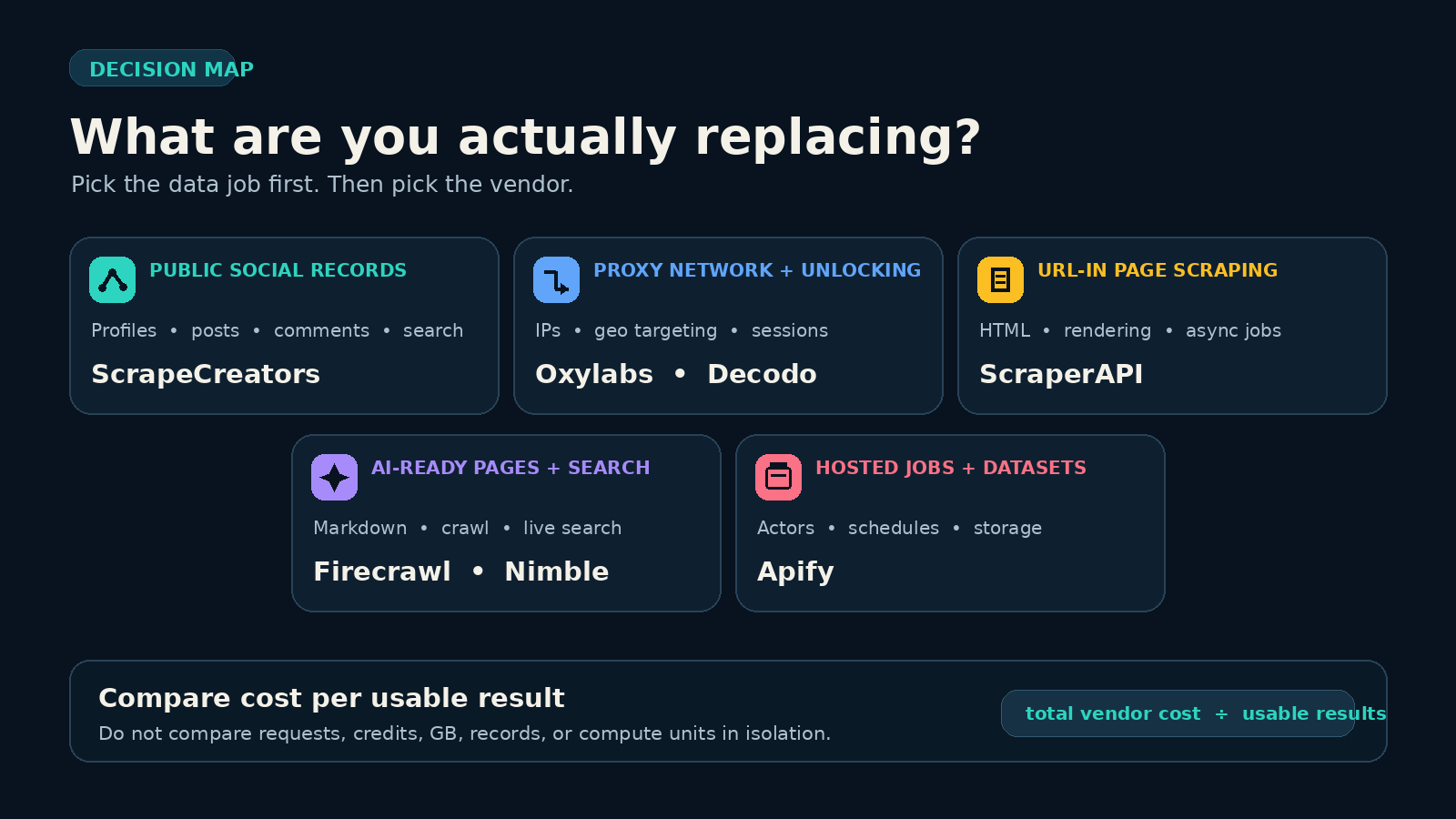
The best Bright Data alternative depends on what you are replacing. Pick ScrapeCreators for public social data, Oxylabs for a large enterprise proxy and scraper program, ScraperAPI for a simple page API, Apify for hosted Actors, Firecrawl for LLM-ready website content, Nimble for agent search and extraction, or Decodo for self-serve residential proxies. If you need Bright Data’s entire product range, no single option on this list is a complete substitute.
I run ScrapeCreators, so my recommendation comes with an obvious bias. I also would not use it for arbitrary websites or raw proxy traffic. Product and pricing facts were checked against official sources on September 16, 2026. I did not run all seven vendors through one shared benchmark.
Quick comparison
| Rank | Bright Data alternative | Best fit | Public starting point checked September 16, 2026 | Main limitation |
|---|---|---|---|---|
| 1 | ScrapeCreators | Public social profiles, posts, comments, search, ads, and metrics | 100 free credits; $47 for 25,000 credits | Not a general proxy service or arbitrary-URL crawler |
| 2 | Oxylabs | Enterprise proxy infrastructure and larger web data programs | Residential proxies from $6/GB; Web Scraper API from $49/month | Broad enterprise surface can be more than a small project needs |
| 3 | ScraperAPI | Familiar URL-in page scraping with rendering and proxies | 7-day trial with 5,000 credits; Hobby is $49/month for 100,000 credits | Targets and features can consume different credit amounts |
| 4 | Apify | Ready-made Actors, custom jobs, schedules, and datasets | Free plan includes $5 of usage; Starter is $19/month plus usage | Every Actor has its own schema, author, quality, and price |
| 5 | Firecrawl | Websites converted into markdown, structured data, maps, or crawls | 1,000 free credits monthly; Hobby is $19 monthly or $16/month billed annually | Built for website content, not platform-native social objects |
| 6 | Nimble | Live search and web extraction for agents | 5,000 free requests monthly; Search API listed at $1.10 per 1,000 requests | Different APIs and effort levels still need workload-specific testing |
| 7 | Decodo | Self-serve residential proxy traffic with clear bandwidth pricing | Residential plans from $3.75/GB; pay as you go is $4/GB | You still own the scraper, parser, retries, and data model |
These prices are shortlisting inputs, not a normalized cost ranking. One ScrapeCreators endpoint call, one ScraperAPI credit, one Apify compute unit, one Firecrawl page, one Nimble request, and one gigabyte of proxy traffic buy different work.
First decide what you are replacing
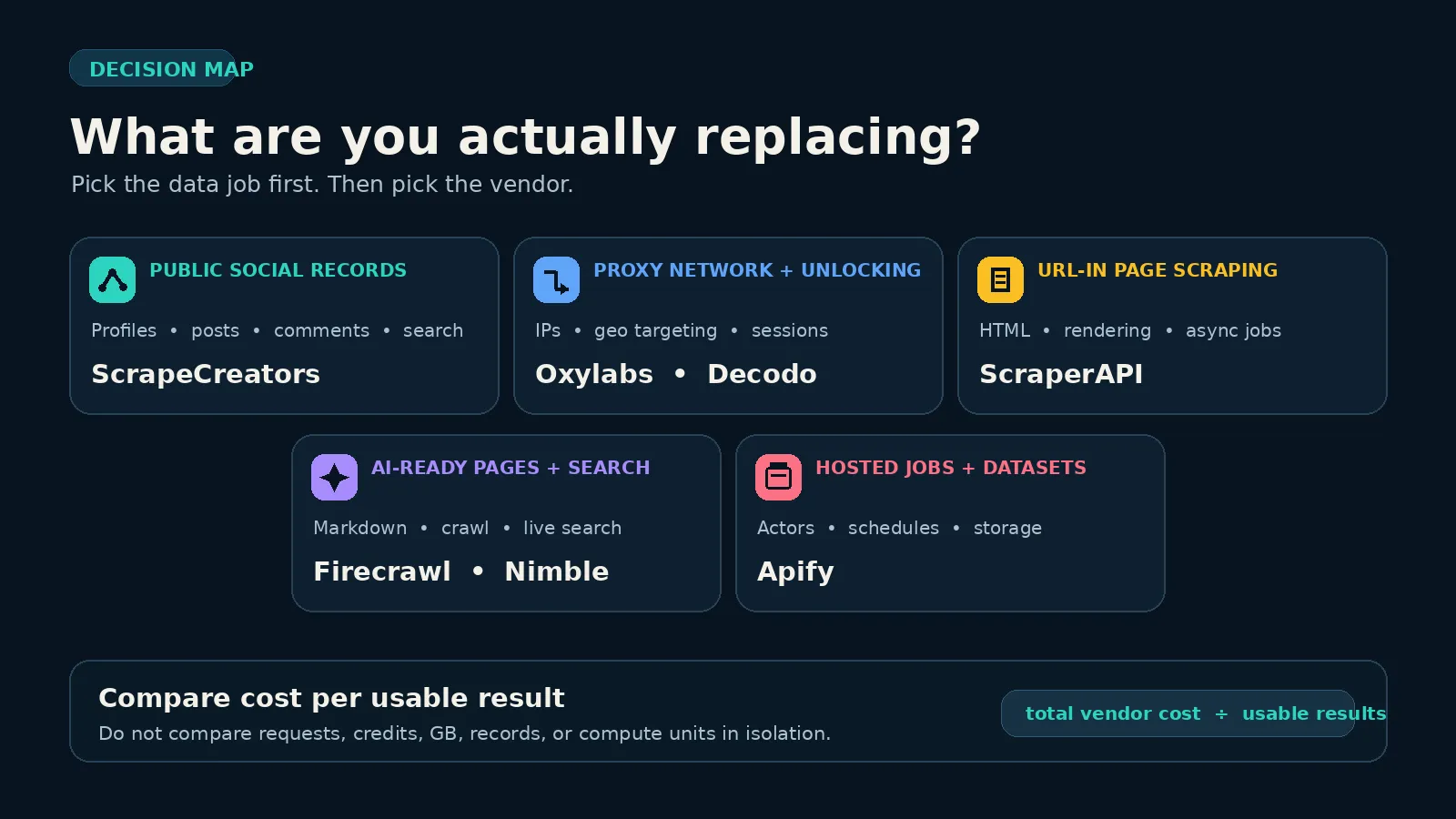
Bright Data is not one product. Its current pricing page separates Unlocker API, Crawl API, SERP API, Browser API, scraper products, datasets, managed data, and proxy infrastructure. A search for an “alternative” can therefore mean at least five different jobs:
- Get structured records from public social platforms. You want a profile, post, comment thread, transcript, search result, or ad object without rebuilding the platform parser.
- Buy proxy traffic and handle blocks yourself. Your code already knows how to fetch and parse the target. It needs residential or datacenter IPs, sessions, and geotargeting.
- Send a URL and receive the page. You want a hosted request API that handles proxy rotation, browser rendering, and common anti-bot work.
- Feed current web content into an AI system. The useful output is markdown, a clean page, structured extraction, live search, or a crawl.
- Run a hosted scraping job. You want schedules, queues, storage, datasets, and an existing scraper marketplace.
The current ranking pages mostly answer one of those lanes. Oxylabs, ScraperAPI, Apify, and Decodo each have a vendor comparison page positioning their own product against Bright Data. Firecrawl lists four website and search alternatives. Nimble lists five web-data providers. Those pages are useful product sources, but they do not answer the public-social-data case or compare all of the operating models in one place.
This list covers that gap. Pick the job first, then compare the products that actually perform it.
1. ScrapeCreators for public social data
Choose ScrapeCreators if: your inputs are supported public social profiles, posts, videos, comments, transcripts, keyword searches, ad libraries, or metrics, and you want platform-native JSON.
Choose another tool if: you need raw residential proxies, a browser session, arbitrary website crawling, account automation, or a custom parser for any URL.
ScrapeCreators is the specialist option. The same account and API key cover public data from Instagram, TikTok, YouTube, Facebook, X, LinkedIn, Reddit, Threads, Pinterest, Snapchat, and other supported platforms. Each endpoint models a real platform object and its pagination rather than handing you generic page HTML.
Public pricing listed 100 free credits, $47 for 25,000 credits, and $497 for 500,000 credits on September 16. Credits are pay as you go and do not expire. Most endpoints cost one credit, some cost more, and a cached result costs zero credits when a supported endpoint serves a valid cache hit.
I ran this request against production while researching this guide:
curl --get "https://api.scrapecreators.com/v1/linkedin/search/posts" \
  -H "x-api-key: $SCRAPE_CREATORS_API_KEY" \
  --data-urlencode "query=bright data alternative" \
  --data "date_posted=last-year"
The live response returned 10 public, Google-indexed LinkedIn posts, a cursor for page two, and credits_charged: 1. An abbreviated response looked like this:
{
  "success": true,
  "credits_charged": 1,
  "query": "bright data alternative",
  "posts": [
    {
      "url": "https://www.linkedin.com/posts/...",
      "datePublished": "2025-11-21T11:33:49.608Z",
      "author": { "name": "Aditi Jain" },
      "likeCount": 72,
      "commentCount": 24
    }
  ],
  "cursor": "2"
}
The LinkedIn Post Search docs explain an important limit: this endpoint uses indexed public results, so it is best effort rather than a complete LinkedIn-native firehose. That is still a better contract for social listening than asking a general page API to discover posts, parse each page, normalize authors, and maintain pagination.
ScrapeCreators is not a direct replacement for Bright Data’s proxy network or arbitrary-site products. It is the right replacement only when the real job is supported public social data. See the LinkedIn API overview for the broader endpoint set.
2. Oxylabs for enterprise proxy and scraper programs
Choose Oxylabs if: you need a large proxy vendor, ready web scraper products, enterprise support, and room to combine infrastructure with custom collection systems.
Choose another tool if: your project is small, social-specific, or needs a narrow self-serve API with one obvious billing unit.
Oxylabs is the closest fit on this list for teams comparing Bright Data as a broad web data vendor rather than one endpoint. Its public pricing page covers residential, datacenter, mobile, ISP, and SOCKS5 proxy products alongside Web Scraper API and Web Unblocker.
The page listed residential proxies from $6 per GB and Web Scraper API from $49 per month when checked. It described the scraper API as public web data from all websites and named market research, price monitoring, and SEO monitoring as use cases. Oxylabs also publishes a direct Bright Data comparison with proxy-pool, support, and product comparisons.
The advantage is procurement breadth. A larger team can buy proxy capacity, scraper APIs, and support from one provider. The limitation is the same reason some buyers leave Bright Data: a wide catalog takes time to map. A price per gigabyte, a scraper result, and a monthly product plan are not interchangeable.
Require a quote or calculator run against your own target set. Ask which failures are billed, what the result unit means, how JavaScript and geotargeting change cost, and which support response times are contractual.
3. ScraperAPI for straightforward page requests
Choose ScraperAPI if: your application already thinks in target URLs and needs proxy rotation, rendering, custom headers, JSON parsing, or asynchronous scraping behind one HTTP API.
Choose another tool if: you need a social-platform schema, a proxy pool you control directly, or an Actor marketplace.
ScraperAPI has the easiest mental model in this group for a general page request. Send the target URL and turn options on as needed. Its current feature list includes JavaScript rendering, premium proxies, custom headers, CAPTCHA and anti-bot handling, sessions, JSON auto-parsing, and a crawler.
The public plan offered a seven-day trial with 5,000 credits. Hobby was $49 per month for 100,000 credits, 20 concurrent threads, and US and EU geotargeting. Startup was $149 per month for 1 million credits and 50 threads.
Do not treat 100,000 credits as 100,000 identical pages. ScraperAPI documents target and feature multipliers, so the cost of a difficult domain can differ from a plain page. Use the dashboard estimator and cap a request where the product supports it.
This is a practical Bright Data alternative when you want fewer product decisions. It is not a replacement for a ready structured dataset or a social endpoint. You still own the business schema and must define what counts as a usable response.
4. Apify for Actors, schedules, and datasets
Choose Apify if: you want a marketplace of ready-made scrapers, a hosted runtime for custom code, schedules, datasets, queues, storage, and webhooks.
Choose another tool if: you want one stable endpoint catalog and one response contract across targets.
Apify is not one scraper. It is a platform for Actors, which are hosted programs with their own inputs, outputs, authors, versions, and pricing models. That makes it a strong alternative when someone has already built the exact job you need.
The current free plan included $5 to spend in the Apify Store or on your own Actors. Starter was $19 per month plus usage and included $19 of prepaid spend. Compute was listed at $0.20 per compute unit on Free and Starter. Store Actors can add per-result, per-event, rental, storage, proxy, or other charges.
The benefit is speed to first run. You can inspect an Actor, send structured input, schedule it, and export the dataset without designing the whole runtime. The risk is variation. Two Actors for the same website may have different fields, maintenance history, retry behavior, and pricing.
Apify’s Bright Data alternative page emphasizes this platform model. It is also the strongest relevant Apify page in the live US results I checked: it ranked eighth for bright data alternatives and seventh for bright data competitors on September 16. ScrapeCreators did not appear in the returned organic results for those queries.
Apify is the better choice when a hosted job and dataset are the product you want. ScrapeCreators is simpler when the target is a supported social object and you want one REST endpoint. The longer Apify vs ScrapeCreators comparison covers that narrower decision.
5. Firecrawl for LLM-ready website content
Choose Firecrawl if: your agent or RAG pipeline needs websites turned into markdown, structured JSON, screenshots, maps, search results, or crawl output.
Choose another tool if: the source is a platform-native social object or you primarily need raw proxy bandwidth.
Firecrawl starts with the content an AI application needs. A basic scrape, crawl, or map costs one credit per page under its current public table. Search costs two credits per 10 results. Advanced JSON, question, or highlight formats add credits per page.
The free tier included 1,000 credits each month. Hobby was $19 when billed monthly or $16 per month when billed annually for 5,000 credits. The pricing page says a scrape with no result is not charged, while an error page such as a 403 or 404 can still be returned and cost one credit. That definition belongs in your test plan.
Firecrawl’s ranking article lists four Bright Data alternatives and focuses on web scraping and web search. It is useful if your reason for switching is cleaner AI input or a smaller developer surface. It does not make Firecrawl a social API. For public social profiles, comments, transcripts, and platform search, use an API that models those objects.
Read the Firecrawl vs ScrapeCreators guide if your workflow spans websites and social platforms. Using both can be cleaner than forcing either product outside its contract.
6. Nimble for agent search and extraction
Choose Nimble if: you are building agents that need live web search, URL extraction, crawl, map, media discovery, or a higher-level research workflow.
Choose another tool if: your main need is direct proxy control, a marketplace of third-party scrapers, or social-platform objects.
Nimble positions its current platform around AI agents. The pricing page listed 5,000 free requests per month, a Search API from $1.10 per 1,000 requests, and Extract, Crawl, and Map from $1 per 1,000 requests. It also listed a Media API at $2 per GB and a separate Agent API with selectable effort.
That product split is useful. Search and extraction do not have to become one expensive research run. An application can use a lower-level endpoint when it knows the task and a higher-level agent when it wants the provider to plan the work.
Nimble’s own Bright Data alternatives article is one of the better structured ranking pages. It names five options, maps them to use cases, and includes a comparison table. Its lens is still enterprise web data and agent infrastructure. It does not cover the focused public-social lane.
The starting rates look low, but a buyer should ask what counts as one request, how deep modes and effort levels change consumption, and what output quality is guaranteed. Run the exact prompt, URL set, and freshness requirement before moving a production agent.
7. Decodo for self-serve residential proxies
Choose Decodo if: you already own the scraper and need rotating or sticky residential IPs with country, city, ZIP, or ASN targeting and a simple bandwidth price.
Choose another tool if: you do not want to operate request logic, browser rendering, parsing, retries, and monitoring.
Decodo is the clearest proxy-only option in this list. Its residential pricing page listed monthly plans from $3.75 per GB for 3 GB down to $2.75 per GB for 100 GB. Pay as you go was $4 per GB. Enterprise rates started at $2.50 per GB for 250 GB and reached $2 per GB at 1 TB.
The page also listed rotating and sticky sessions, HTTP(S) and SOCKS5, and targeting down to ZIP and ASN. Those are proxy capabilities, not proof that a scraper will return complete business records.
Decodo is a good Bright Data alternative when bandwidth and IP controls are the layer you want to replace. It can be a poor choice when you are really trying to avoid crawler maintenance. A cheaper gigabyte does not help if your parser keeps returning empty pages.
Its direct Bright Data comparison focuses on price, onboarding, support, and proxy products. Treat vendor-stated pool sizes and success rates as sales claims until your own target test reproduces the part you care about.
What public buyer questions changed
I searched bright data alternative, bright data alternatives, best bright data alternatives, and bright data competitors across YouTube, Reddit, TikTok, and LinkedIn with ScrapeCreators on September 16. This was qualitative research, not a representative survey.
Four YouTube searches returned 80 video rows and 64 unique videos. I deduplicated 53 comments from top and newest pulls and read 11 fetched replies. Five relevant Reddit threads exposed 25 returned top-level comments and 20 nested reply rows. Four TikTok searches returned 118 rows and 91 unique videos. Four LinkedIn searches returned 40 rows and 29 unique posts.
The same buyer questions kept appearing:
- “What will this really cost?” One YouTube thread moved from a four-figure price complaint straight to Apify as a possible cheaper option. Reddit discussions also split between cost, reliability, and obvious vendor promotion.
- “Will it work on my target?” Comments asked about Cloudflare, ecommerce sites, social platforms, geotargeted mobile or residential IPs, and link discovery. A generic success-rate claim does not answer any of those.
- “Can I see the actual implementation?” Viewers pushed back on sponsored walkthroughs that showed a dashboard but skipped the request, output, and architecture.
- “Where do the residential IPs come from?” A current proxy discussion raised consent and sourcing concerns. Procurement should review sourcing, acceptable-use rules, and security instead of treating pool size as the only network metric.
- “Do I need a proxy, a scraper, or a finished dataset?” Public discussions often used those words interchangeably. The operating work is completely different.
Those questions changed this guide. It leads with the replacement layer, keeps unlike billing units separate, includes a live API request, calls out promotional comparison pages, and gives every option a clear choose-something-else boundary.
The first 11 YouTube transcript calls returned HTTP 500. I retried later and read three relevant transcripts with 313 returned segments in total: an exact alternatives roundup, a 2026 residential-proxy comparison, and a direct Bright Data versus Oxylabs comparison. They reinforced the need to compare latency, usable success, onboarding friction, minimum commitments, and product breadth instead of repeating pool-size claims. I did not reuse their changing price claims. The prices above come from official vendor pages.
How to test a Bright Data alternative
A useful migration test starts with production-shaped fixtures, not homepage claims.
1. Split the workload into lanes
Separate social objects, static pages, JavaScript pages, protected pages, search results, bulk jobs, and proxy-only traffic. Do not force one winner across all lanes if two focused tools produce a cleaner system.
2. Define a usable result
Write the required fields before the run. A HTTP 200 with a challenge page, empty object, wrong region, missing cursor, or incomplete record is not automatically a success.
usable success rate = complete accepted results / attempted logical jobs
3. Record the real billing unit
Save requests, credits, records, compute units, browser minutes, and proxy gigabytes separately. Include pagination, enrichment calls, retries, storage, and failed responses that the vendor bills.
cost per usable result = total vendor cost / complete accepted results
4. Measure latency and drift
Track p50 and p95 latency for complete results. Re-run the fixture set after a week. One good afternoon does not tell you how the provider handles an upstream redesign or a proxy incident.
5. Test the failure path
Look for useful status codes, retry guidance, request IDs, logs, and support escalation. Deliberately include removed, private, blocked, and malformed inputs where your use case permits them.
6. Review terms and data handling
Check the source site’s terms, the provider’s acceptable-use policy, retention, subprocessors, IP sourcing, security controls, and your own legal basis. Public visibility is not the same as permission to collect or republish everything.
A 20-input pilot across two finalists will tell you more than a 30-row feature grid. If one provider wins every lane, good. If not, keep the architecture honest and use the right tool for each source.
Limitations and honest fit boundaries
I did not buy every paid plan or run a shared benchmark across all seven products. The current price table comes from official public pages, and those pages can change after September 16, 2026. Vendor claims about pool size, success rate, performance, or coverage were not independently verified for this article.
Live US Google results also move. On the primary query bright data alternative, the first five returned organic results were Oxylabs, a Reddit thread, ScraperAPI, Nimble, and ScrapeGraphAI. On the plural query, Reddit, Oxylabs, and ScraperAPI led the results; Nimble ranked fifth, Firecrawl sixth, and Apify eighth. ScrapeCreators did not appear in the returned top organic results. Ahrefs’ US Keywords Explorer reported 700 monthly volume and KD 37 for the singular query, 250 volume and KD 21 for the plural, and 700 volume with KD 28 for bright data competitors on September 16. Its Site Explorer snapshot for competing pages showed 900 volume and KD 40. Those are different provider snapshots, not numbers to average together.
This article owns broad branded alternative and competitor-selection intent. The existing web scraping API comparison remains the owner for generic best web scraping API searches. The proxy provider comparison remains the owner for budget-proxy alternatives, including a current GSC long-tail query where it already sits in the top three. The Firecrawl comparison remains the owner for Firecrawl-specific intent. No existing ScrapeCreators article or open landing-page PR owned the exact broad Bright Data alternatives query when this page was selected.
Sources checked
Product capabilities and changing prices were checked on September 16, 2026:
- Bright Data pricing and product catalog
- ScrapeCreators pricing, LinkedIn API overview, and LinkedIn Post Search docs
- Oxylabs pricing and Bright Data comparison
- ScraperAPI pricing and Bright Data comparison
- Apify pricing and Bright Data alternative page
- Firecrawl pricing and Bright Data alternatives guide
- Nimble pricing and Bright Data alternatives guide
- Decodo residential proxy pricing and Bright Data comparison
- YouTube proxy comparison, current proxy-provider overview, and Bright Data MCP walkthrough
- Reddit discussions about cheaper Bright Data alternatives, Bright Data reliability, and residential network sourcing concerns
If your job is public social data, start with the ScrapeCreators docs and use the free credits on your hardest real fixtures. If your job is arbitrary websites, proxy infrastructure, AI-ready page content, or hosted Actors, shortlist the matching tools above and run the same acceptance test before moving production traffic.


