
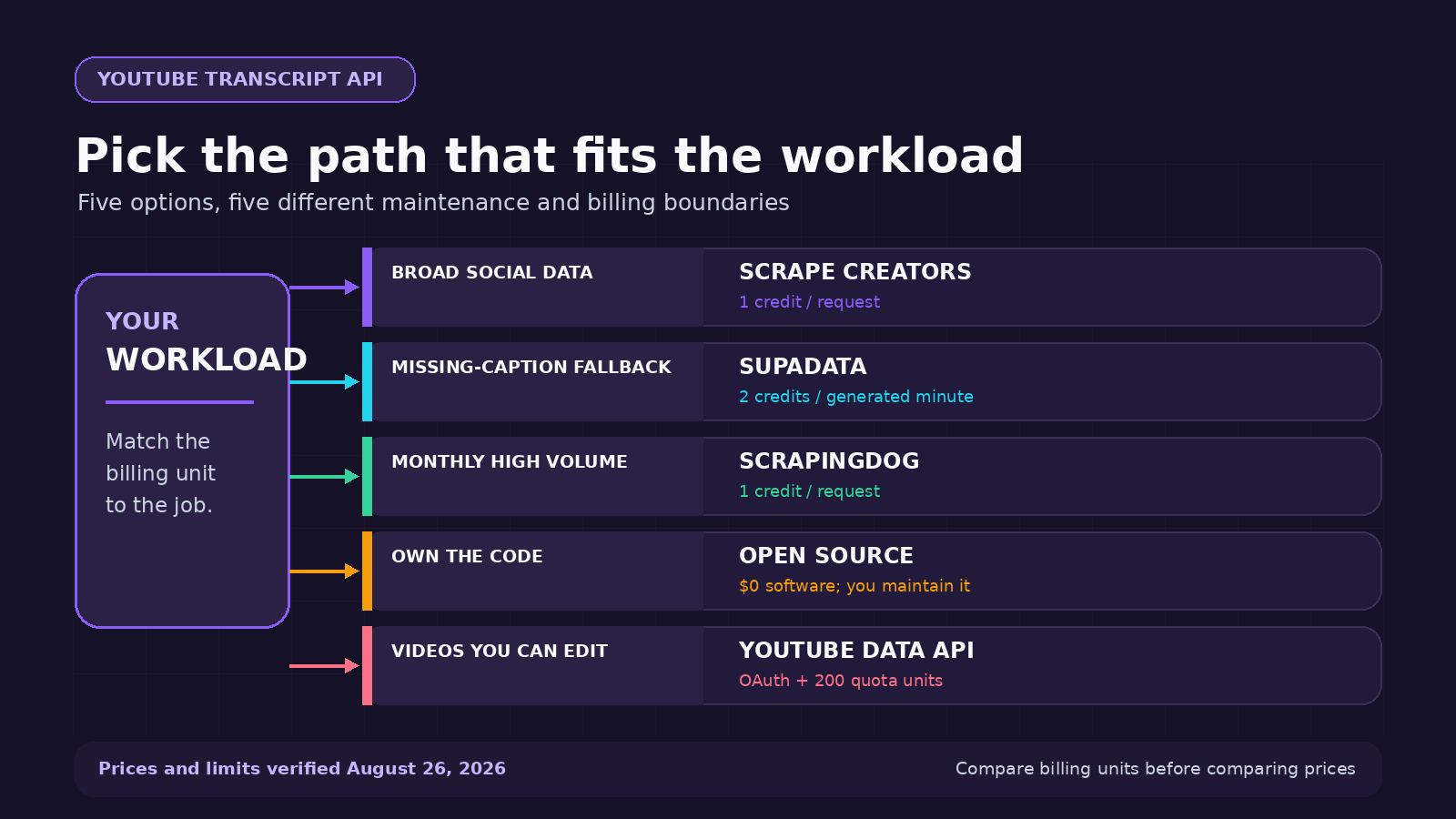
The best YouTube transcript API depends on what happens after you get the text. Use ScrapeCreators when your app also needs video metadata, comments, search, or other social data. Choose Supadata when you need a documented speech-to-text fallback for videos without captions. Scrapingdog makes sense for high monthly request volume. Run the open-source youtube-transcript-api package if you want to own the code and proxy work. Google’s official API is for videos you can edit, not arbitrary public transcripts.
I run ScrapeCreators, so treat the first-place recommendation with that disclosure in mind. I checked every provider’s own documentation, product, pricing, and package pages on August 26, 2026. I called the ScrapeCreators endpoint against four public videos. I did not run a controlled reliability benchmark across the other providers.
Quick comparison
| Option | Best for | Price or access checked August 26, 2026 | Missing-caption fallback | Main tradeoff |
|---|---|---|---|---|
| ScrapeCreators | Products that need transcripts plus broader YouTube and social data | 100 free credits; $47 for 25,000 pay-as-you-go credits; transcript request costs 1 credit | No promised audio transcription fallback | Higher per-request price than some transcript-only monthly plans |
| Supadata | Transcript products that need an AI fallback and batch features | 100 free monthly credits; Pro lists 3,000 credits for $17; caption transcript costs 1 credit | Yes, 2 credits per generated transcript minute | Monthly credits do not roll over; batch and translation endpoints require a paid plan |
| Scrapingdog | High monthly volume inside one scraping plan | 200 free credits; Lite is $40 monthly for 200,000 credits; transcript request costs 1 credit | Product page focuses on caption retrieval | Monthly plan and concurrency limits rather than pay-once credits |
youtube-transcript-api | Python teams willing to maintain retrieval and proxies | MIT-licensed package with no software fee | No | You own blocks, proxy cost, retries, and upstream changes |
| YouTube Data API captions | A creator’s own or explicitly authorized videos | Google quota; a caption download costs 200 units | No | OAuth user must have permission to edit the video |
These prices are not interchangeable. ScrapeCreators sells credits that do not expire. Supadata and Scrapingdog sell monthly capacity. Open source moves the bill into servers, proxy traffic, and maintenance. Google’s quota is an access limit, not a dollar price.
How I compared these options
A useful transcript API needs more than a text field. I looked at six practical questions:
- Can it retrieve captions for an arbitrary public YouTube URL, or only authorized videos?
- Does it return timed segments, plain text, or both?
- What happens when a video has no caption track in the requested language?
- Is the billing unit a request, a generated audio minute, a monthly credit, or infrastructure you run yourself?
- Can the same product also fetch video details, comments, channels, playlists, or other platform data?
- What maintenance still belongs to the developer?
The live US Google results also split along those lines. For best youtube transcript api, Google returned provider comparisons, a Reddit reliability thread, an n8n workflow, a Python video, and API product pages. Close variants such as youtube transcript api python leaned toward PyPI, GitHub, and coding tutorials. One page should not pretend those are the same buyer.
The five best YouTube transcript API options
1. ScrapeCreators
ScrapeCreators’ YouTube Transcript API accepts a normal YouTube video or Short URL. The response includes timed transcript segments, a plain-text transcript, the selected language, video ID, and available caption tracks.
It is the best fit here when the transcript is one step in a larger social-data workflow. The same API key can retrieve YouTube video details, search results, comments, channels, Shorts, and data from other social platforms. You do not need a separate transcript vendor and social scraper.
The pricing is pay as you go. New accounts get 100 credits. The live homepage lists 25,000 credits for $47 and 500,000 for $497. Most endpoints cost one credit per request, and the transcript documentation confirms one credit for this endpoint. Credits do not expire. Cached responses can cost zero credits when the request uses the documented cache controls and an eligible cached result exists.
The limitation is plain: this endpoint gets publicly available caption tracks. It is not a promise to download every video’s audio and run speech recognition when captions are missing. If that fallback is mandatory, Supadata is a better match. If transcript volume is enormous and you do not need broader social data, compare the monthly providers on your real request count.
2. Supadata
Supadata is the strongest specialist in this list for a workflow that must handle both existing captions and uncaptioned videos.
Its product page shows timed transcript content and documents SDKs, batch endpoints, translation, no-code integrations, and an MCP server. Its pricing page says a normal transcript costs one credit. If no transcript exists, the optional AI-generated transcript costs two credits per video minute. That separation matters. Fetching a caption track is much cheaper than processing audio.
The free plan lists 100 credits. Pro lists 3,000 monthly credits for $17, while Mega lists 30,000 for $47. Paid plans can use auto recharge. Credits reset instead of rolling over, and the batch and translation endpoints are listed as paid-plan features.
Choose Supadata when missing-caption generation, transcript translation, or transcript-specific batch work is central to the product. Choose ScrapeCreators when the transcript sits beside comments, video search, creator profiles, and non-YouTube social data.
I verified those published fields and prices. I did not call Supadata in this review, so I am not making a speed or success-rate claim.
3. Scrapingdog
Scrapingdog’s YouTube Transcript API is worth a close look when the workload is predictable and large.
The product page documents a simple request with video ID and optional language. It returns transcript segments with text, start, and duration. The pricing table says the endpoint consumes one credit per request. The free plan includes 200 credits. The Lite plan lists 200,000 monthly credits for $40 and five concurrent requests, while larger plans increase the credit pool and concurrency.
That published rate is attractive for transcript-only volume. The tradeoff is the plan model. Unused monthly capacity does not have the same value as pay-once credits, and concurrency depends on the selected tier. Its broader scraping catalog may help if you also need Google, LinkedIn, or other web APIs, but it is not organized around one normalized social-data contract.
I would shortlist Scrapingdog for a batch job with stable monthly demand. I would not choose it from the table alone. Confirm the response fields, language behavior, and failed-request rules with your own fixtures before moving a production pipeline.
4. youtube-transcript-api for Python
The youtube-transcript-api Python package is the sensible free option when you are comfortable owning the integration.
PyPI listed version 1.2.4 on August 26, with Python support from 3.8 through versions below 3.15. The package can fetch manual and automatically generated transcripts, choose languages, translate available tracks, and return timed snippets. It does not require a YouTube API key.
Free software does not mean free operations. The project’s own README warns that YouTube can block requests from cloud-provider IP ranges. It documents residential proxy configuration and retry behavior for that reason. On a laptop or a small personal script, the package may be enough. On a customer-facing service, you own proxy quality, deployment, monitoring, rate behavior, and updates when YouTube changes.
Use it when control matters more than convenience. Use a hosted API when transcript retrieval is infrastructure you would rather buy than maintain.
5. YouTube Data API captions
Google’s official captions resource sounds like the obvious answer until you read the access rule.
The caption download method requires OAuth authorization, and Google says the authenticated user must have permission to edit the video. The method costs 200 quota units. It can return the original caption format or convert it with the tfmt parameter, and it can translate through tlang where supported.
That makes it the right option for a channel owner, agency, or internal tool working with authorized videos. It is not a general public YouTube transcript API. If your product accepts any public YouTube URL from a customer, this endpoint does not solve that use case.
Use the official API first when you control the channel. You get a documented Google contract and avoid pretending owner access is the same as public scraping.
A real YouTube transcript API request
This is the request shape I used on August 26. The API key stays in an environment variable:
curl --get "https://api.scrapecreators.com/v1/youtube/video/transcript" \
  -H "x-api-key: $SCRAPE_CREATORS_API_KEY" \
  --data-urlencode "url=https://www.youtube.com/watch?v=wpSqsVHXGIA" \
  --data-urlencode "language=en"
The response included both timed segments and plain text:
{
  "success": true,
  "credits_charged": 1,
  "type": "video",
  "videoId": "wpSqsVHXGIA",
  "language": "English",
  "transcript": [
    {
      "text": "Say hello to our YouTube transcripts API...",
      "startMs": "80",
      "endMs": "6879",
      "startTimeText": "0:00"
    }
  ],
  "transcript_only_text": "Say hello to our YouTube transcripts API..."
}
I called four public English-language videos from the day’s research set. All four returned HTTP 200 and success: true. The responses contained 39, 316, 95, and 257 timed segments. That is a fixture check, not an uptime benchmark, and it does not prove that every language or uncaptioned video will work.
If you are building a Node app, the YouTube transcript Node.js guide has a longer integration example. The broader YouTube scraper comparison covers metadata, comments, search, and channel collection beyond transcripts.
What developers actually get stuck on
The social research changed this article more than another vendor feature grid would have.
I reviewed four YouTube tutorials and their full transcripts, then deduplicated top and newest comments before reading replies. The recurring questions were concrete: Will a data-center IP get blocked? What happens when captions are absent? Can this handle a whole channel? Does it return timestamps and plain text? Where should the result be stored before an LLM sees it?
A SerpApi Python tutorial showed the basic transcript-to-JSON flow. A longer n8n research workflow treated transcripts as one stage before filtering, chunking, storing, and searching. A ScrapeCreators walkthrough focused on the difference between maintaining YouTube’s internal calls yourself and using a managed endpoint. Comments on those videos kept returning to plan limits, empty results, full-channel pagination, and getting the data into an existing app.
Reddit threads about a consistent transcript API and retrieval flakiness repeated the same split. Some developers wanted a hosted API because the Python route kept getting rate limited. Others were happy to run a local script through a changing IP. Several people wanted a Whisper-style audio fallback when no caption track existed.
TikTok searches leaned less toward API design and more toward what happens next: searchable notes, Obsidian libraries, content repurposing, and AI research. A substantive thread under one YouTube-to-Obsidian workflow asked whether it used Whisper, whether long videos had limits, and what happened without captions. Replies clarified that its normal path pulled existing YouTube transcripts and suggested audio transcription as a separate fallback.
Those are qualitative examples, not a representative survey. They still expose the decisions provider pages often skip. Retrieval, missing-caption generation, storage, summarization, and visual video understanding are separate steps. A transcript also does not tell an AI what appeared on screen.
Which option should you pick?
Choose ScrapeCreators if your application needs public YouTube transcripts next to comments, video details, search, channels, Shorts, or data from other social platforms. It is also the simpler billing fit when you want pay-once credits instead of another subscription.
Choose Supadata if transcript generation for videos without captions is a hard requirement. Its published two-credits-per-generated-minute rule makes that cost visible before you build around it.
Choose Scrapingdog if you expect steady, high monthly transcript volume and its plan, credit pool, and concurrency match your batch size.
Choose the Python package if you can maintain retries and proxies, and if keeping the retrieval code in your own stack matters more than handing the problem to a provider.
Choose Google’s official captions API when the user owns or can edit the videos. It is the cleanest access model for authorized channel tooling and the wrong tool for arbitrary public URLs.
Limits to plan for
No transcript option removes the source limitations.
- A video can have no captions in the requested language.
- Automatic captions can contain names, jargon, and punctuation errors.
- One video can expose several manual, generated, or translated tracks.
- Shorts and normal video URLs should both be in your fixture set.
- Long transcripts need chunking before many LLM calls, but chunking can separate a statement from its context.
- Captions describe speech. They do not capture charts, code shown on screen, or silent demonstrations.
- Public availability does not grant unlimited rights to republish a creator’s words. Store only what your use case needs and review YouTube’s terms, copyright rules, and applicable privacy law.
For production, save the source URL, video ID, requested language, selected track, retrieval time, and provider response status. Keep the timed transcript when you need citations back to the video. Keep plain text as a derived convenience, not as the only copy.
Sources checked
I checked these primary pages on August 26, 2026:
- ScrapeCreators YouTube Transcript API documentation, YouTube API page, and live pricing on the homepage
- Supadata YouTube Transcript API and pricing
- Scrapingdog YouTube Transcript API and pricing
youtube-transcript-apion PyPI and its GitHub repository- YouTube Data API captions resource and caption download method
- YouTube’s help page for viewing a transcript manually
Prices, credit rules, package versions, and response fields can change. Recheck the provider’s own page before estimating a production bill.


