
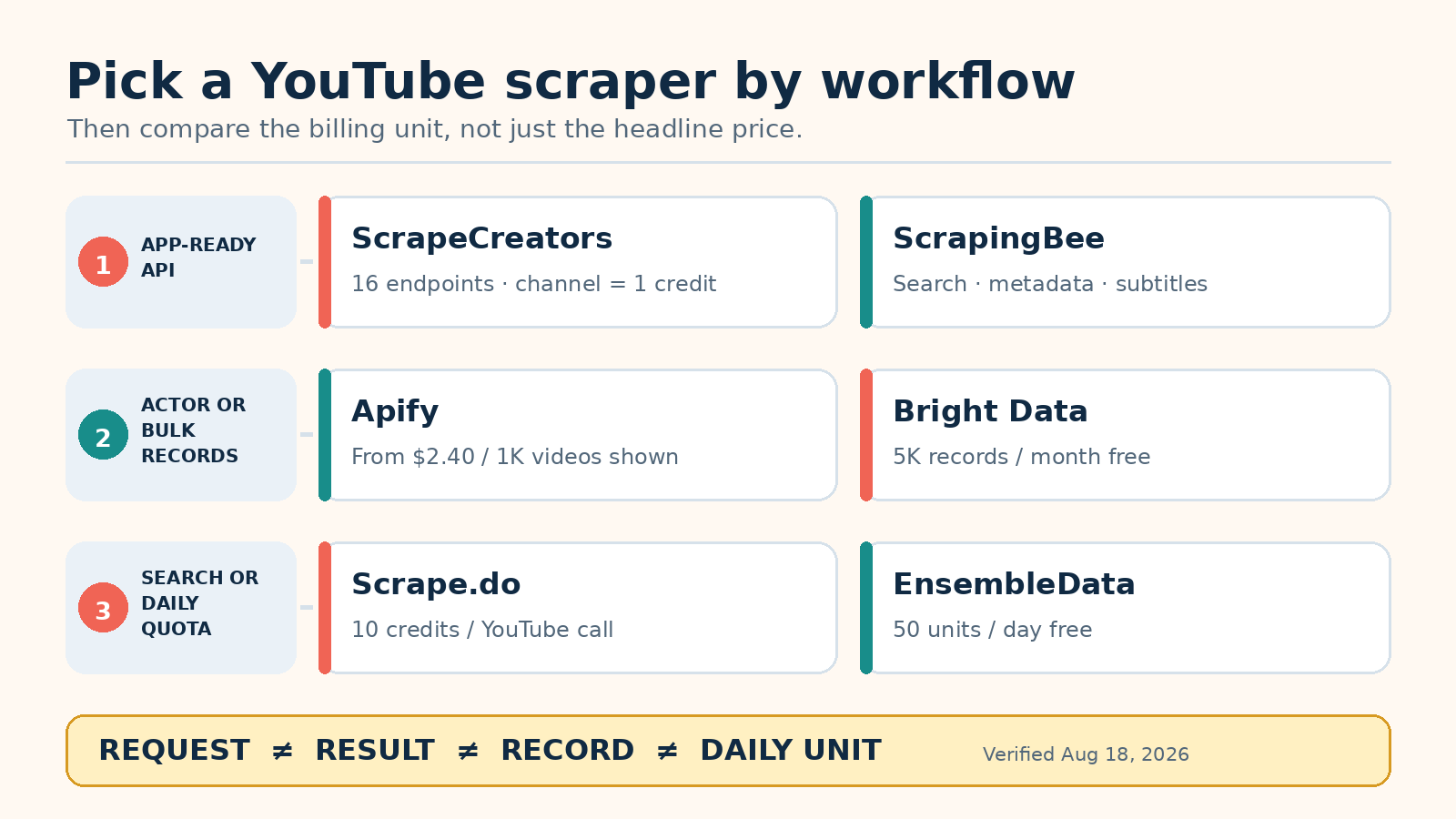
The best YouTube scraper depends on the output you need. ScrapeCreators is my pick for developers who want search, channels, videos, Shorts, comments, and transcripts through one REST API. Apify is better for Actor runs and exports. Bright Data is built for bulk records. ScrapingBee fits broader scraping stacks, Scrape.do is strong for YouTube search, and EnsembleData suits steady daily usage.
I run ScrapeCreators, so take the ranking with that disclosure. I checked each provider’s own YouTube and pricing pages on August 18, 2026. I also called one ScrapeCreators endpoint with a public channel. I did not run a controlled reliability test across all six services, and I will not pretend a pricing-page review is one.
Quick comparison
| Rank | YouTube scraper | Best for | Price basis checked August 18, 2026 | Main tradeoff |
|---|---|---|---|---|
| 1 | ScrapeCreators | App-ready YouTube and social data | 100 free credits; $47 for 25,000 credits; channel details cost 1 credit | Fixed public-data endpoints, not a custom browser |
| 2 | Apify | Actor runs, schedules, exports, and configurable jobs | Actor page displays pricing from $2.40 per 1,000 videos | Actor inputs, runs, and datasets add more moving parts |
| 3 | Bright Data | Bulk records and enterprise delivery | 5,000 records monthly free; $1.50 per 1,000 records pay as you go | Record pricing does not equal API-request pricing |
| 4 | ScrapingBee | YouTube plus a broader web-scraping stack | $49 monthly page lists 50,000 YouTube API requests and 50 concurrent requests | Monthly plan and a narrower dedicated YouTube catalog |
| 5 | Scrape.do | YouTube search results as JSON | Free plan includes 100 YouTube calls; $29 plan lists 25,000 calls | Search feed, not a full comments or transcript API |
| 6 | EnsembleData | Steady daily usage across social platforms | 50 units daily free; $100 monthly for 1,500 units daily | Daily units reset instead of rolling over |
These numbers are not interchangeable. A request can return one channel, a page of search results, or hundreds of records. Apify prices results, Bright Data prices delivered records, Scrape.do prices a search call, and EnsembleData assigns units by endpoint. Model one real workflow before deciding which number is cheapest.
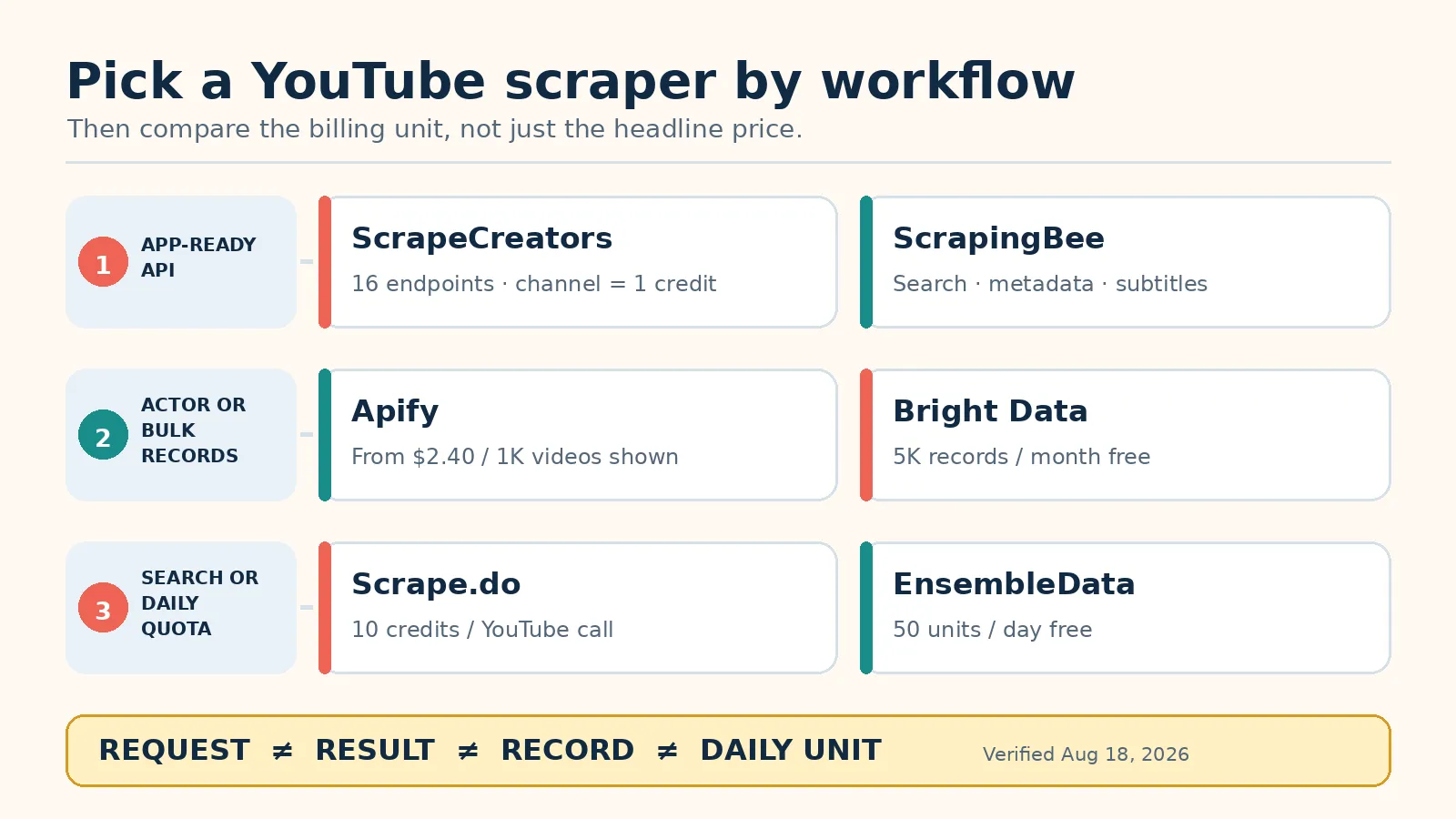
How I ranked these YouTube scrapers
I used five practical questions:
- Does the service return useful YouTube JSON, or does the buyer still need to parse a page?
- Can it cover more than one job, such as search, channel details, videos, Shorts, comments, or transcripts?
- Is the price basis clear enough to estimate a real workload?
- How much infrastructure remains after signup?
- When is another service the better choice?
The live US results for best youtube scraper and its close variants split into two lanes. Listicles rank for the best query. Product pages from Apify, Scrape.do, Bright Data, ScraperAPI, EnsembleData, and ScrapingBee rank for youtube scraper api. This page compares choices while the existing ScrapeCreators YouTube API page keeps product and endpoint intent.
The six best YouTube scrapers
1. ScrapeCreators
ScrapeCreators’ YouTube API is the simplest fit when an application needs several kinds of public YouTube data and may later add Instagram, TikTok, Facebook, or another social platform.
The current YouTube page lists 16 endpoints. They cover channel details, channel videos and Shorts, search, hashtags, transcripts, comments, community posts, and other public-data jobs. Responses are JSON. The channel details documentation accepts a handle, channel ID, or URL and lists a cost of one credit per live request. A valid cache hit can cost zero credits when the endpoint supports caching and the request meets the cache rule.
New accounts get 100 free credits. The $47 pack has 25,000 credits, or $1.88 per 1,000 one-credit requests. The $497 pack has 500,000 credits, or about $0.99 per 1,000 one-credit requests. Credits do not expire, and every package unlocks the same API catalog.
Do not choose it for an arbitrary custom browser flow or private account data. It reads supported public data. It does not log into a user’s account, upload videos, manage a channel, or replace every official YouTube API action.
2. Apify
Apify’s YouTube Scraper is a maintained Actor that runs on Apify’s cloud platform. You provide URLs or search inputs, start a run, and read the resulting dataset through the dashboard, API, SDK, webhook, or an export.
The Actor page lists channel and video fields, search results, playlists, streams, subtitles, engagement counts, and exports to JSON, CSV, Excel, XML, or HTML. It says the Actor can extract up to 20,000 videos per URL, with the warning that actual results vary by input and YouTube behavior.
Pricing needs a careful read. The page header displayed “from $2.40 per 1,000 videos” when checked, while a FAQ lower on the same page said $5 per 1,000 videos. That conflict is exactly why I would run a small job and inspect the Actor’s pricing tab before forecasting a large bill. Apify’s platform also has a free plan with $5 of usage and a $29 monthly Starter plan, but Actor charges and platform usage are separate details to check.
Choose Apify when schedules, datasets, integrations, and configurable Actor inputs are part of the job. Skip it when your application wants one synchronous endpoint with a fixed response contract and no run lifecycle.
3. Bright Data
Bright Data’s YouTube Scraper API is the bulk-data option in this list. The product page lists video, channel, comment, and other YouTube collectors, with API or no-code access, batch requests, and structured delivery.
The free tier includes 5,000 records per month. Pay-as-you-go pricing was $1.50 per 1,000 successful records. The $499 Scale plan included 384,000 records, then $1.30 per 1,000 additional records. Both displayed unlimited concurrency. Bright Data says it charges for successfully delivered results.
That works when one job collects hundreds of thousands of records and the team needs spend controls and delivery options. It can be too much platform for a small app that needs one channel object.
One ScrapeCreators request and one Bright Data record do not represent the same amount of data. Bright Data is better when records and batch delivery are the product unit.
4. ScrapingBee
ScrapingBee’s dedicated YouTube API advertises YouTube search results, video metadata, and subtitles as structured JSON. This is different from its classic page-rendering API. It gives a buyer a YouTube-specific route without giving up ScrapingBee’s wider website, search, and extraction products.
The YouTube page listed a Freelance plan at $49 per month with 50,000 YouTube API requests, 250,000 general API credits, and 50 concurrent requests. If your endpoint mix can use the full YouTube allowance, that is about $0.98 per 1,000 requests. Confirm the endpoint rules before treating it as a guaranteed rate.
Choose ScrapingBee when YouTube search, metadata, or subtitles sit beside arbitrary web pages in the same system. It is a sensible middle ground for a team that wants one vendor for dedicated and general scraping APIs.
Choose another provider for comments, community posts, or a broader set of channel-content routes. Test the response shape instead of assuming every feature uses the same credits and limits.
5. Scrape.do
Scrape.do’s YouTube Scraper API is focused on search. One request returns separate arrays for videos, channels, playlists, and Shorts. It also exposes filters for duration, quality, location, and result type, plus a continuation token for the next page.
Every YouTube call costs 10 Scrape.do credits. The free plan includes 1,000 credits, or 100 YouTube calls. The $29 Hobby plan includes 250,000 credits and lists 25,000 YouTube calls. That is about $1.16 per 1,000 calls if you use the full monthly allowance.
This is a strong fit for a search-driven product: video discovery, keyword monitoring, channel directories, playlist research, or a Shorts feed. The response already turns view and subscriber counts into integers.
It is not presented as a complete YouTube transcript or comments service. If the workflow starts with search and then needs transcripts or comments for every video, count the second provider or second endpoint in the architecture before choosing on search price alone.
6. EnsembleData
EnsembleData’s YouTube API covers channel analytics, channel videos, Shorts, keyword search, hashtag search, and other public-data routes. It returns JSON and sits beside the company’s APIs for TikTok, Instagram, Threads, Reddit, Twitch, X, and Snapchat.
Pricing is based on daily units. The free plan includes 50 units per day. The $100 monthly Wood plan includes 1,500 units per day. Bronze is $200 for 5,000 units per day, with larger plans above that. The pricing page says unit costs vary by endpoint and failed requests caused by internal errors are not charged.
A daily allowance works for a pipeline that runs at a similar volume every day. It is less convenient when a launch needs a large burst on Monday and almost nothing for the rest of the month. Unused capacity does not become a permanent credit balance.
Choose EnsembleData if its endpoint shapes match your product and the daily unit model fits your traffic.
What the pricing numbers actually mean
A normalized price table can still mislead if the denominator changes.
| Provider | Published unit | Useful question before buying |
|---|---|---|
| ScrapeCreators | Credits per endpoint request | How many credits does each route cost, and can a cache hit cost zero? |
| Apify | Results or videos from an Actor run | Does the input need one run or many, and which displayed Actor rate applies? |
| Bright Data | Successfully delivered records | How many records will each target URL or collector produce? |
| ScrapingBee | YouTube API requests plus general API credits | Which allowance does the chosen endpoint consume? |
| Scrape.do | 10 credits per YouTube search call | How many results come back per page, and how many continuation calls are needed? |
| EnsembleData | Units that reset daily | What is the endpoint’s unit cost, and can the workload use the daily allowance evenly? |
For a channel-monitoring app, calculate the cost to refresh 10,000 channels and then fetch new videos only for channels that changed. For a transcript product, calculate search, video selection, transcript calls, retries, and missing-caption responses together. For a data warehouse, calculate delivered rows and storage.
The lowest number in a provider table is not automatically the lowest bill.
A tested YouTube API request
I ran this request against ScrapeCreators on August 18, 2026. The secret is read from an environment variable:
curl --get "https://api.scrapecreators.com/v1/youtube/channel" \
  -H "x-api-key: $SCRAPE_CREATORS_API_KEY" \
  --data-urlencode "handle=mrbeast"
The call returned HTTP 200 in 1.16 seconds and charged one credit. The observed response included this shape:
{
  "success": true,
  "credits_charged": 1,
  "channelId": "UCX6OQ3DkcsbYNE6H8uQQuVA",
  "handle": "@MrBeast",
  "name": "MrBeast",
  "subscriberCount": 513000000,
  "videoCount": 997,
  "country": "United States"
}
Counts change, so do not copy this object into a permanent fixture and assume it stays current. The useful observation is the contract: one public handle returned a channel ID, name, counts, country, links, and other channel fields as JSON. One successful call is not a reliability benchmark.
If you need the implementation details for more routes, the existing YouTube scraping API guide covers search, channel videos, transcripts, and comments. The YouTube transcript developer guide explains the transcript-specific workflow.
Scraper API vs official YouTube Data API
A scraper should not be the automatic first choice for every YouTube job.
Use the official YouTube Data API when you manage an authorized user’s channel, upload or modify resources, or need an official supported integration. Google’s current quota page says newly enabled projects receive 100 search.list calls, 100 videos.insert calls, and 10,000 units per day combined for other endpoints by default. Google says the allocation is subject to change and provides a quota extension process.
The official caption flow has different boundaries. The captions list method costs 50 units, requires authorization, and lists caption tracks without returning the caption text itself. Downloading a track is a separate method with permission rules.
Use a managed scraper when the product needs public channels, search, comments, or transcripts without asking every target channel to authorize your app. That wider public-data access comes with a maintenance and policy tradeoff. The scraper provider, not YouTube, defines the response contract.
If the official API covers the job, start there. If it does not, write down the exact missing field or access pattern before buying a scraper.
Which YouTube scraper should you choose?
Choose ScrapeCreators if you want a normal REST API for several public YouTube jobs, expect to add other social platforms, and prefer credits that do not expire. Start with the free credits and test the exact endpoints your product needs.
Choose Apify if the job belongs in an Actor with schedules, datasets, exports, webhooks, and configurable run inputs.
Choose Bright Data if the workload is measured in large batches of delivered records and enterprise controls matter.
Choose ScrapingBee if YouTube search, metadata, and subtitles are one part of a broader web-scraping system.
Choose Scrape.do if YouTube search is the product and one clean response containing videos, channels, playlists, and Shorts saves you from joining several feeds.
Choose EnsembleData if usage is steady each day and its YouTube endpoint catalog already matches your application.
For a wider vendor shortlist, the social media scraping API comparison covers products that span more than YouTube.
Limits to plan for
YouTube data is not a fixed database. Videos disappear, channels rename themselves, counts change, comments are disabled, and transcripts may be missing or available only in some languages.
A production integration should handle:
- missing captions without turning every null into an outage
- continuation tokens and deduplication across pages
- deleted, private, age-restricted, or region-limited videos
- count fields that update on a different schedule than metadata
- retries that stop before your own request timeout
- schema changes and nullable fields
- source URLs so a user can verify the record
Scrapers also do not grant usage rights. A public transcript can still contain copyrighted speech. A channel description can contain personal contact details. Store only what the product needs, set a retention policy, and give customers a way to correct or remove data when the law or your use case requires it.
Sources checked
I checked these primary pages on August 18, 2026:
- ScrapeCreators YouTube API, pricing, and channel endpoint documentation
- Apify YouTube Scraper and Apify pricing
- Bright Data YouTube Scraper API
- ScrapingBee YouTube API and ScrapingBee pricing
- Scrape.do YouTube Scraper API and Scrape.do pricing
- EnsembleData YouTube API and EnsembleData pricing
- YouTube Data API quota overview and captions list documentation
Prices, quotas, endpoint costs, and output fields can change. Recheck the provider page with your real inputs before committing a production budget.


