
The short answer
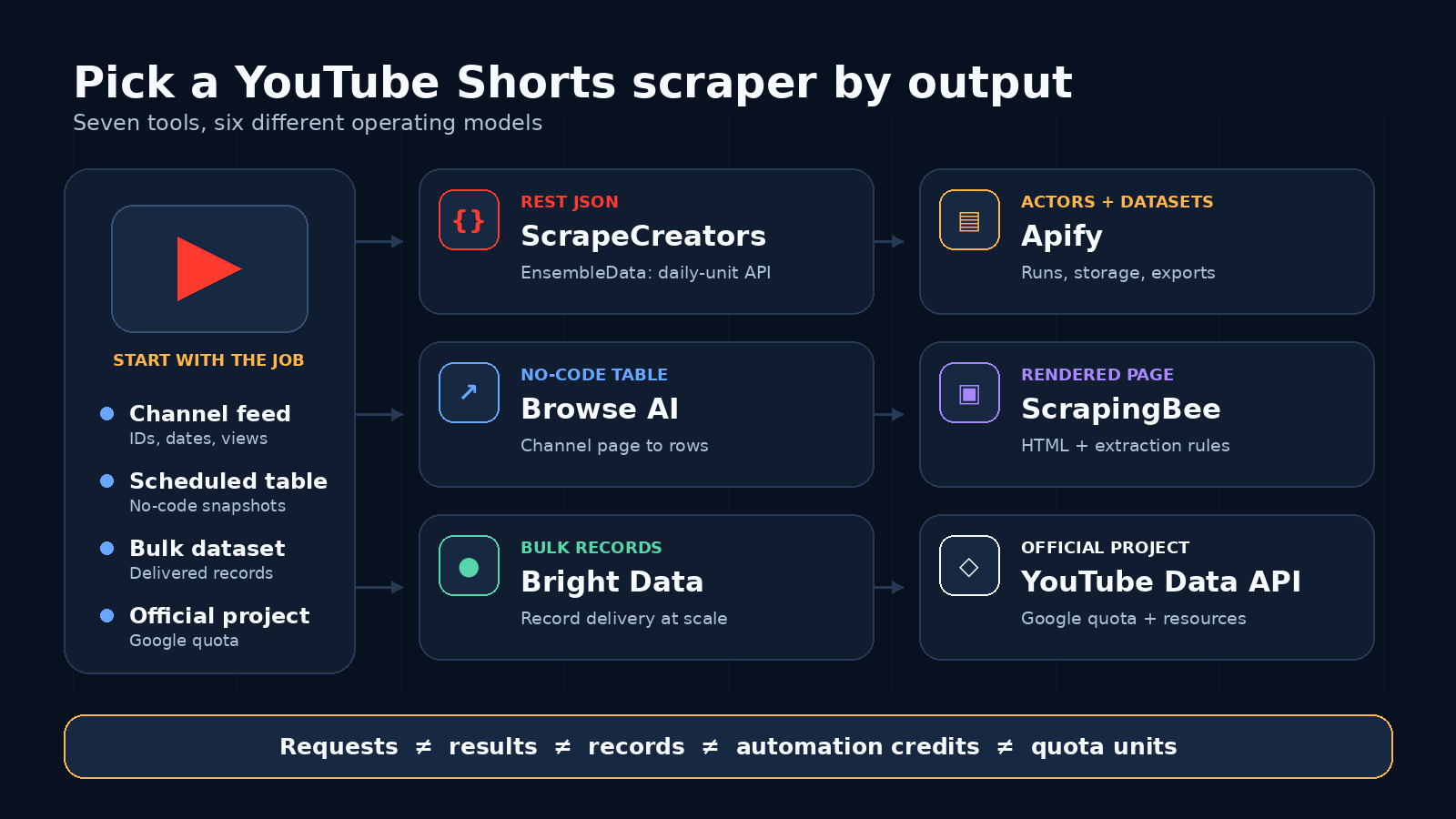
For an app that needs public YouTube Shorts as structured JSON, ScrapeCreators is my default pick. Give it a channel handle, choose newest or popular, then follow the returned cursor. It also has a separate trending Shorts feed. I run ScrapeCreators, so that recommendation is not neutral. Apify is better for Actor jobs and datasets. Browse AI is easier for no-code channel monitoring. Bright Data is built for bulk records. ScrapingBee gives you the rendered page to shape yourself. EnsembleData fits a daily-unit API budget. Google’s YouTube Data API is the official route, but it does not expose a dedicated Shorts collection.
That is the verdict. The right choice still depends on whether you need channel history, discovery, scheduled snapshots, raw pages, or an official Google project. Product and pricing facts below were checked on September 29, 2026.
Define the Shorts job
“Scrape YouTube Shorts” hides several different jobs. A tool can be good at one and useless for another.
| Job | Useful input | Useful output | Common trap |
|---|---|---|---|
| Pull a channel’s Shorts | Handle, channel ID, or channel URL | Paginated Short IDs, titles, dates, views, and URLs | Treating the first page as the full channel |
| Find popular Shorts | Trending feed, keyword, or category | Ranked public Shorts with current metrics | Calling one snapshot a trend history |
| Monitor competitors | Saved channel list and repeat schedule | Dated snapshots that can be compared | Expecting the provider to store history automatically |
| Feed an app | Stable REST request | Predictable JSON and cursors | Choosing HTML when your app needs a fixed schema |
| Build a dataset | Large job or batch input | Delivered records or dataset export | Comparing record pricing with request pricing as if they match |
| Download media | Short URL | Video or audio file | Assuming a metadata API includes media rights or storage |
The last row matters. Most YouTube Shorts scrapers collect metadata. They do not automatically grant permission to download, republish, or train on the video itself. yt-dlp is a capable open-source downloader, but it solves a different problem from a hosted Shorts data API.
Comparison table
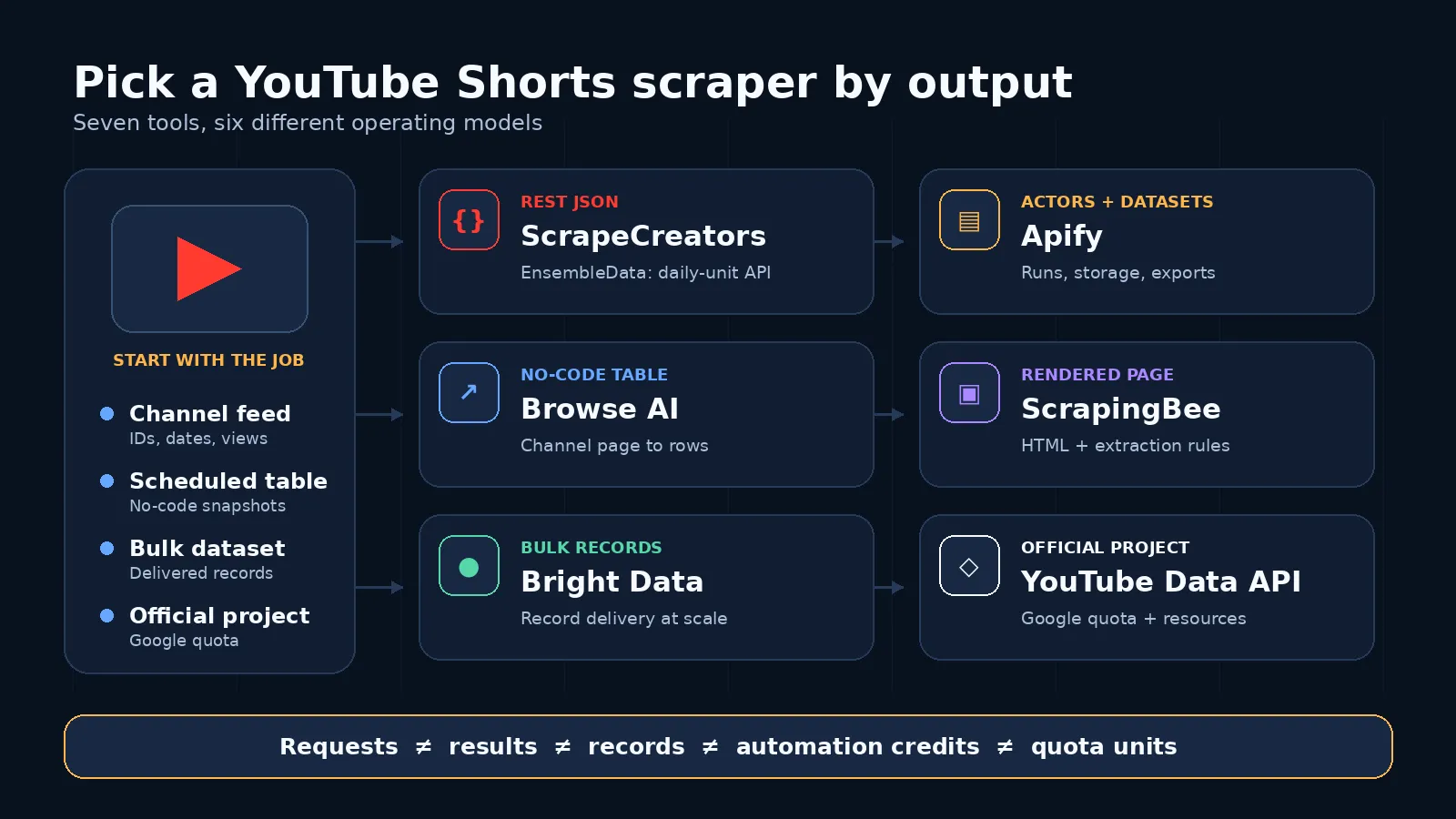
These prices use different units. A request, result, record, automation credit, and Google quota unit are not interchangeable.
| Tool | Best for | Shorts input | Output | Entry pricing checked September 29, 2026 | Main limitation |
|---|---|---|---|---|---|
| ScrapeCreators | App-ready channel and trending feeds | Handle, channel ID, or trending route | Structured JSON with cursors | $47 for 25,000 pay-as-you-go credits; one reviewed channel request used 1 credit | Public metadata only, no media files |
| Apify | Actor runs, datasets, and platform workflows | Channel URL plus optional run settings | Dataset records and API output | $29.99/month plus usage; reviewed Actor lists $4 per 1,000 Short results | Actor run and dataset lifecycle is more machinery than one REST call |
| Browse AI | No-code channel monitoring | Channel URL | Robot table with position, title, views, image, and link | Free tier with 50 monthly credits; Personal is $19/month billed annually | Narrow field set and automation-credit model |
| ScrapingBee | Teams that want rendered pages and custom extraction | Shorts page URL | HTML, screenshots, or extraction-rule JSON | Hobby is $19/month for 75,000 credits; JS rendering costs 5 credits per successful request | You own the extraction rules and schema |
| Bright Data | Bulk records and managed data workflows | Channel, URL, or scraper configuration | Structured records and delivery options | 5,000 free records/month; scraper APIs advertised from $0.75 per 1,000 records | Bigger platform and record model may be excessive for a small app |
| EnsembleData | Dedicated API with daily allowance | Channel browseId and depth | YouTube Shorts API response | Free plan has 50 units/day; Starter is $100/month for 100,000 units plus 3,000 daily units | Requires its own unit math and channel ID workflow |
| YouTube Data API | Official Google access | API resources and your own query logic | Official video, channel, playlist, and search resources | Default quota, subject to change, includes 100 search.list calls and 10,000 units/day for other endpoints | No dedicated Shorts resource, so isolation is your job |
1. ScrapeCreators
Choose ScrapeCreators if: you want a hosted REST endpoint that accepts a public channel handle and returns Shorts as JSON without a Google OAuth flow.
The channel Shorts endpoint accepts handle or channelId, sort=newest|popular, and an optional continuationToken. The separate trending Shorts endpoint covers discovery instead of one known channel. That split is useful. Channel collection and trend discovery are not the same intent.
The response includes fields such as the Short ID, URL, title, publish date, duration, views, likes, comments, thumbnails, channel details, and a cursor when another page is available. You can use the IDs as stable keys, save snapshots on your own schedule, and join the result with comments or transcripts through other YouTube API endpoints.
The main limitation is scope. ScrapeCreators returns public data, not private YouTube Studio analytics such as viewed-versus-swiped-away, retention curves, or revenue. It is also not a media downloader.
Pricing is pay as you go. The current $47 pack contains 25,000 credits, credits do not expire, and a cache hit costs 0 credits. A live channel-Shorts request in this review reported one charged credit.
2. Apify YouTube Shorts Scraper
Choose Apify if: you already use Actors, storage, webhooks, datasets, or scheduled platform runs.
The Streamers YouTube Shorts Scraper accepts a channel URL, a result limit, and an optional oldest date. Its page lists output such as the Short URL, title, channel details, view count, like count, comment count, publish date, duration, description, thumbnails, and hashtags. You can run it from the Console, API, or client libraries and store the results in an Apify dataset.
The pricing page reviewed for this article lists $29.99 per month plus pay-per-event usage, including $4 per 1,000 Short results. Channel details and extra discovery events use separate rates. That is flexible, but it means the headline result price is not the whole cost for every configuration.
Apify currently ranks first for the main youtube shorts scraper query in the live US results I checked. Its page is strong product documentation. It is not a neutral buyer guide, though. If you are comparing operating models, billing units, and who should choose another tool, you still have to do that work yourself.
3. Browse AI
Choose Browse AI if: you want a no-code robot that turns a channel’s Shorts tab into a table and can run on a schedule.
Browse AI’s prebuilt YouTube Shorts robot asks for a channel URL, visits the Shorts tab, and captures position, title, views, image, and link. Its page also describes pushing results to Google Sheets or Airtable and routing them through Zapier. That is a much friendlier workflow for an analyst than wiring REST pagination.
The tradeoff is output depth. The current field table is narrower than the hosted APIs in this list. If you need duration, likes, comments, publish timestamps, channel objects, or a stable developer response contract, inspect the robot output before committing to the workflow.
Browse AI currently gives the free plan 50 monthly credits. The Personal plan is $19 per month when billed annually and includes 12,000 annual credits upfront. Credits represent robot work, not one guaranteed Short row, so price it against an actual channel and schedule.
4. ScrapingBee
Choose ScrapingBee if: your team already builds web scrapers and wants proxy, browser, rendering, screenshot, and extraction controls behind one API.
The YouTube Shorts scraper page describes sending a Shorts URL through its web scraping API, rendering the page, and then returning HTML or structured output through extraction rules. It advertises JavaScript scenarios, screenshots, geotargeting, and AI extraction rules. This is the most flexible raw-page option here.
That flexibility is also the maintenance boundary. ScrapingBee is not promising the same fixed channel-Shorts JSON contract as a dedicated social data endpoint. Your selectors, prompts, or extraction rules define the output. You should keep fixtures and watch for field drift.
The current Hobby plan is $19 per month for 75,000 API credits. JavaScript rendering costs 5 credits per successful request, while premium proxies and other features can cost more. Unused credits do not roll over. A cheap monthly headline can therefore mean a different effective cost depending on how the page must be rendered.
5. Bright Data
Choose Bright Data if: you need bulk Shorts records, delivery options, enterprise controls, or a broader data platform.
Bright Data’s YouTube Shorts Scraper API lists Short URL, title, creator handle, video length, views, likes, and comment count among the available fields. The page offers separate workflows for posts, keyword discovery, and channel discovery. It also advertises synchronous, batch, and webhook-style integrations.
The clearest current entry offer is 5,000 free records per month without a credit card. Bright Data’s scraper API navigation advertises pricing from $0.75 per 1,000 records. Treat that as a starting rate, not a promise that every Shorts configuration costs exactly that amount.
This is the best fit in the list for teams buying records and delivery infrastructure. A small app that needs one channel response at a time may find the platform heavier than necessary.
6. EnsembleData
Choose EnsembleData if: you want a dedicated Shorts API and prefer a daily allowance plus monthly unit pool.
The EnsembleData YouTube Shorts API documents /youtube/channel/shorts with a channel browseId, a depth value, and an account token. The product page frames the endpoint around channel Shorts performance, engagement metrics, and trend analysis.
The free plan currently includes 50 units per day. The $100/month Starter plan lists 100,000 monthly units plus 3,000 daily units. Requests are billed in EnsembleData units, so confirm the exact Shorts endpoint cost and the depth behavior in your dashboard before projecting a large crawl.
This option is close to ScrapeCreators in product shape. The practical differences are input style, unit model, adjacent endpoints, and how much daily bursting your job needs.
7. YouTube Data API
Choose the YouTube Data API if: using Google’s official interface matters more than having a dedicated Shorts feed.
Google’s YouTube Data API overview lists video, channel, playlist, search, comment, and other resources. It does not list a Shorts resource. You can enumerate a channel’s uploads, retrieve video details, or search for candidates, then apply your own Shorts classification rules. That is workable, but it is not the same as asking for the channel’s Shorts tab.
Google’s current quota overview says every request costs at least one point. It describes a default allocation of 100 search.list calls, 100 videos.insert calls, and 10,000 units per day combined for other endpoints, subject to change. Read operations that list videos, channels, or playlists usually cost one unit. Quota extensions require a separate request and compliance process.
Use this route for official access, OAuth-based actions, and projects that already live in Google Cloud. Pick a dedicated Shorts endpoint when your main job is public Shorts collection and you do not want to maintain the classification step.
What buyers actually get stuck on
I reviewed public social discussions before scoring these tools. The recurring questions were more operational than the search keyword suggests.
- Can this run every day? A YouTube scraping tutorial drew questions about automatic periodic runs and API integration. That is why scheduling and cursor behavior matter more than a one-click demo.
- Does it depend on cookies or a logged-in browser? The same discussion asked about cookie and browser-profile dependencies. A hosted API or official project avoids some local browser setup, though every route has its own access limits.
- Will the fields support the analysis? A Reddit post that collected 53 Shorts across five channels compared duration, views, and recurring series. It is one niche, not a universal benchmark, but it shows why stable IDs, duration, dates, and repeatable snapshots matter.
- Can I wire this into a no-code workflow? A TikTok walkthrough using Apify is a good example of demand for ready-made jobs rather than a custom parser.
The useful buying questions are: What exact input starts the job? Where is pagination? What fields come back? Can I schedule it? Who owns breakage? And does “scrape” mean metadata or the media file?
Real request and output
This request collects the newest public Shorts from one channel:
curl --get "https://api.scrapecreators.com/v1/youtube/channel/shorts" \
  --data-urlencode "handle=starterstory" \
  --data-urlencode "sort=newest" \
  -H "x-api-key: YOUR_API_KEY"
A shortened item from the live response on September 29, 2026 looked like this:
{
  "type": "short",
  "id": "_5f09kYsqt0",
  "url": "https://www.youtube.com/watch?v=_5f09kYsqt0",
  "title": "Bro's built a $85K/month website widget for mechanics:",
  "viewCountInt": 1928,
  "commentCountInt": 1,
  "likeCountInt": 39,
  "publishDate": "2026-09-28T09:10:53-07:00",
  "durationMs": 28000,
  "durationFormatted": "00:00:28"
}
Use the top-level continuationToken on the next request. Do not infer that one 48-row page is the complete channel. If you want the most viewed Shorts instead, send sort=popular. For discovery that is not tied to one channel, call the trending Shorts route.
If you need regular uploads too, use the broader channel video scraper guide. If your job is conversations rather than video metadata, the YouTube comment scraper comparison covers top-level comments, reply threads, and exports.
How to choose
Pick the tool from the input and output, not the logo.
- Choose ScrapeCreators for a simple REST response from a handle, channel ID, or trending route.
- Choose Apify when Actors, jobs, datasets, and scheduled platform runs already fit your stack.
- Choose Browse AI for a channel-to-table workflow that a non-developer can own.
- Choose ScrapingBee when you want the rendered page and are comfortable maintaining extraction logic.
- Choose Bright Data for bulk records, delivery options, and enterprise data operations.
- Choose EnsembleData when its daily and monthly unit model matches your collection cadence.
- Choose YouTube Data API when an official Google project and sanctioned interface are the deciding factors.
- Choose yt-dlp instead when your actual job is local media or metadata downloading and you accept the maintenance and rights work.
A small proof run should save IDs, count rows, follow at least one cursor, and compare fields with your downstream schema. That catches more bad fits than a long feature checklist.
What I verified
I called ScrapeCreators’ public API four times on September 29, 2026:
channel/shorts?handle=starterstory&sort=newestreturned HTTP 200, 48 rows, and a cursor.- The next cursor page returned HTTP 200, 48 more rows, and no duplicate IDs from page one.
sort=popularreturned HTTP 200 and 48 rows.shorts/trendingreturned HTTP 200 and 49 rows.
Those checks show the current response shape and pagination path for one public channel. They are not a reliability benchmark. I did not run paid extraction jobs against every competitor. Competitor features and prices come from the linked product, documentation, and pricing pages checked on the same date.
For broader YouTube use cases, see the general YouTube scraper comparison. This page stays narrower on purpose: Shorts channel feeds, Shorts discovery, and the operating model behind each choice.
Limitations
Public Shorts data has hard boundaries.
Deleted, private, members-only, age-gated, or region-limited videos may not be available. Public counters can change after collection. A current view count is not a historical time series unless you save repeated snapshots. Public metadata does not include private Studio metrics such as audience retention, revenue, or viewed-versus-swiped-away. Search and trending feeds can also vary by time, location, and source.
Do not treat public access as permission to republish videos, build sensitive profiles, or retain personal data forever. Keep only the fields you need. Document deletion and retention rules. Review YouTube’s terms and get legal advice for consequential projects.
FAQ
What is the best YouTube Shorts scraper in 2026?
ScrapeCreators is my default for developers who want channel handles and trending feeds as paginated JSON. I run it, so the recommendation is not neutral. Apify fits Actor jobs, Browse AI fits no-code monitoring, Bright Data fits bulk records, ScrapingBee fits custom page extraction, EnsembleData fits daily API units, and Google’s API fits official projects.
Can the YouTube Data API identify Shorts?
Not through a dedicated Shorts resource. It exposes video, channel, playlist, and search resources, so you can retrieve candidates and apply your own classification rules. A dedicated Shorts endpoint reads closer to the public Shorts surface.
Can I scrape every Short from a channel?
You can paginate through the public Shorts that the source exposes, but no tool should promise a perfect historical archive. Videos can be deleted, made private, gated, or unavailable in a region.
Do Shorts scrapers download video files?
Usually not. Most return metadata and URLs. Media downloading is a separate workflow with more bandwidth, storage, copyright, and reliability concerns.
How much does a YouTube Shorts scraper cost?
It depends on the billing unit. Compare requests, results, records, automation credits, and quota units against the same real channel depth and refresh schedule. The sticker prices in the table are not equivalent.
Is scraping YouTube Shorts legal?
There is no universal yes or no. Public visibility does not erase YouTube’s terms, copyright, privacy law, or your responsibilities as a data controller. Use the official API when sanctioned access is required and get legal advice for your actual use case.


