
The short answer
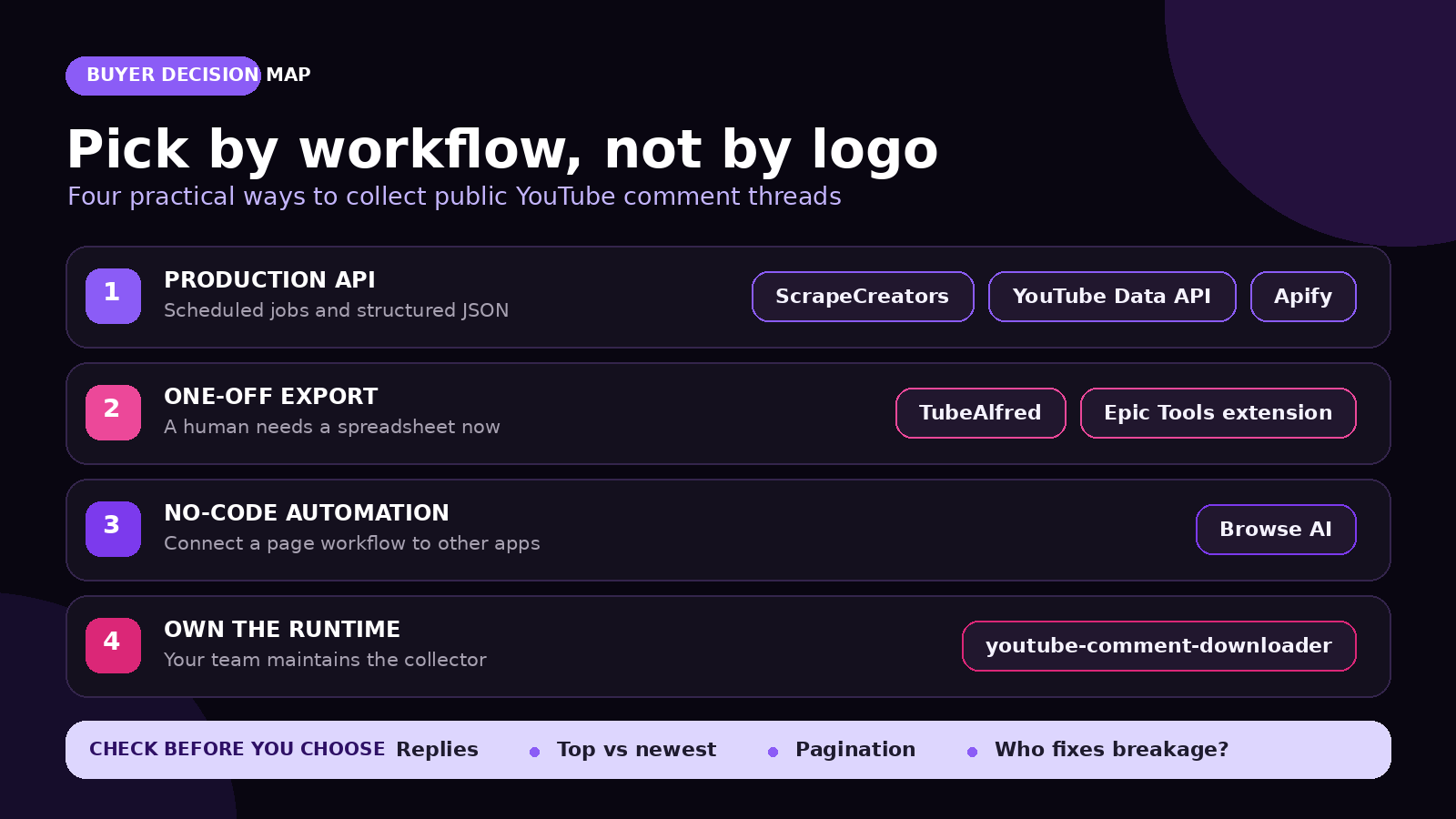
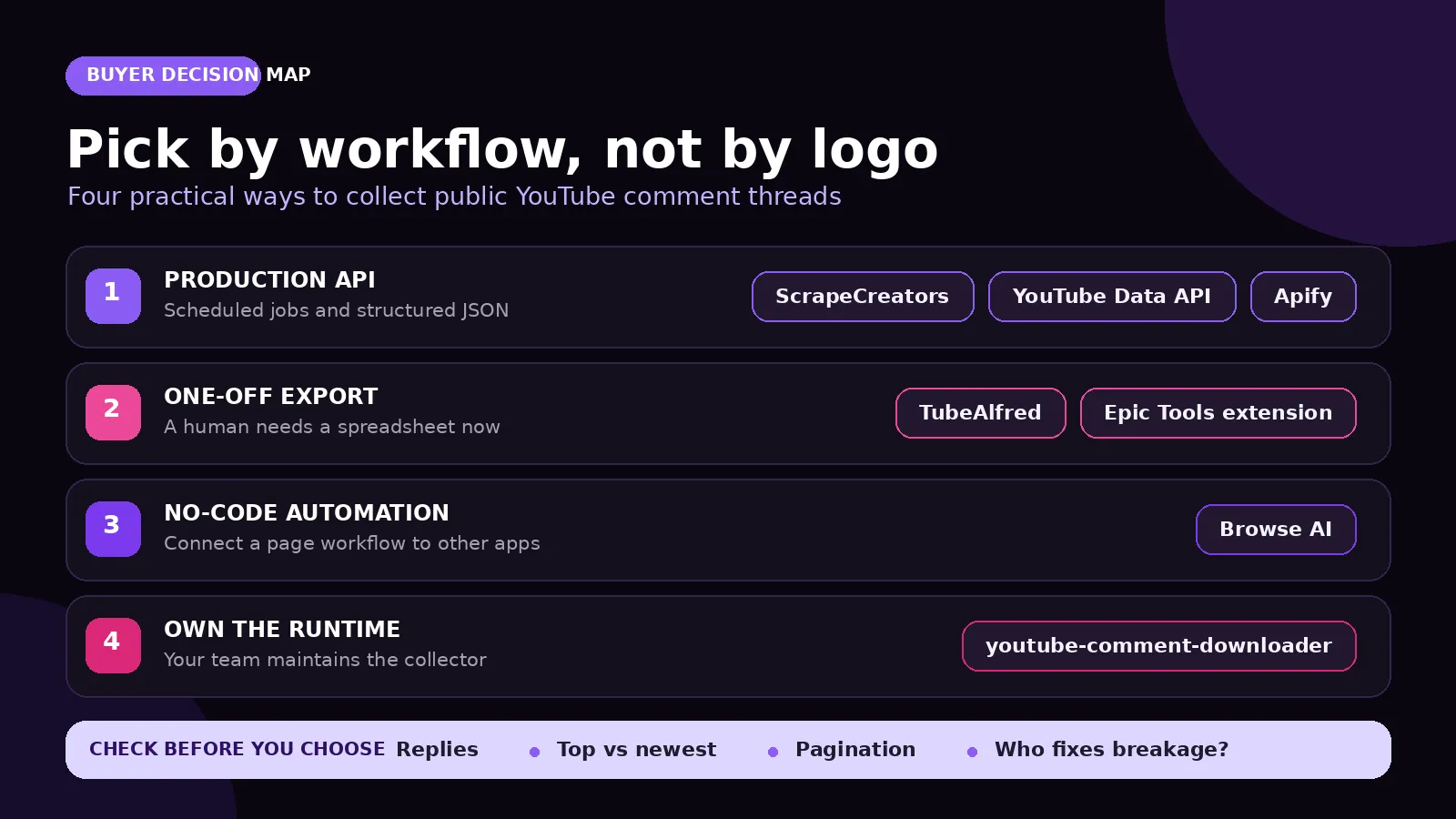
For a production app that needs public YouTube comments and reply threads as JSON, ScrapeCreators is my default pick. I run ScrapeCreators, so that recommendation is not neutral. The official YouTube Data API is better when sanctioned access matters most. TubeAlfred and the Epic Tools extension are easier for one-off spreadsheets. Apify fits teams already using Actors and datasets. Browse AI fits no-code workflows. youtube-comment-downloader is the strongest self-hosted option here.
The practical test is not who promises “all comments.” Ask whether you need top or newest order, full reply threads, repeatable pagination, scheduled API access, or one file. Product and price claims below were checked on September 28, 2026.
Define the job first
A YouTube comment scraper can mean at least four different products.
| Job | Useful input and output | What usually breaks the plan |
|---|---|---|
| Pull comments into an app | Video URL in, paginated JSON out | Stopping after the first page |
| Analyze conversations | Top-level comments plus every available reply | Treating reply counts as reply rows |
| Export a spreadsheet | Video or Short URL to CSV/XLSX | Losing thread relationships when flattening |
| Monitor audience feedback | Repeated dated collections | Mistaking one snapshot for a history |
| Moderate your own channel | Authorized channel and account actions | Using public scraping where OAuth is required |
| Build a research dataset | Text, author, date, likes, thread context | Collecting personal data without a retention plan |
The broad YouTube scraper guide compares channel, video, search, transcript, and comment products. This guide is narrower. It is for buyers whose primary object is the comment thread.
Comparison table
The price units below are deliberately not converted into one fake number. A request page, returned comment, monthly automation credit, and self-hosted run buy different things.
| Option | Best for | Reply handling | Published starting point | Main catch |
|---|---|---|---|---|
| ScrapeCreators | Hosted REST API and scheduled pipelines | Separate cursor-based reply endpoint | $47 for 25,000 pay-as-you-go credits; each live comments or replies request below charged 1 credit | One call returns a page, not the whole video |
| YouTube Data API | Official, sanctioned integrations | comments.list can page replies by parentId | No public per-call fee; default project quota includes 10,000 units per day for most endpoints | Google Cloud setup, quota accounting, and API-policy obligations |
| Apify | Actor runs, batch video URLs, and datasets | Actor advertises comments plus reply data | From $0.90 per 1,000 comments | Actor billing and Apify platform usage need to be modeled separately |
| TubeAlfred | Quick hosted export, API, or MCP workflow | Paid hosted runs can include replies | 50 credits for 14 days, then $5/month for 3,500 credits; hosted comments cost 1 credit per 5 | Subscription credits expire, and the free preview is limited |
| Epic Tools extension | A person exporting from the current video page | Expands replies and preserves parent links | Chrome listing shows no public price | Interactive browser workflow, not a backend contract |
| Browse AI | No-code collection plus Sheets, Airtable, or Zapier | Advertises reply counts; verify whether your workflow needs reply text | Free plan has 50 monthly credits; Personal starts at $19/month billed annually | General browser automation, so run cost and page behavior matter |
| youtube-comment-downloader | Python, CLI, local files, and runtime ownership | Output depends on the library’s current public-page parser | MIT-licensed software with no vendor fee | Your team owns breakage, retries, hosting, and policy review |
1. ScrapeCreators
ScrapeCreators’ YouTube API is my pick when comments are going into a product, scheduled job, research pipeline, or agent. The current comment flow has two routes:
GET /v1/youtube/video/commentsaccepts a video URL,order=top|newest, and an optional pagecontinuationToken;GET /v1/youtube/video/comment/repliesaccepts therepliesContinuationTokenreturned on a top-level comment.
A comment row includes id, content, relative and normalized publish times, replyLevel, author fields, likes, and a declared reply count. The first route returns a page cursor when more top-level comments are available. Reply threads have their own cursor because a popular comment can have hundreds of replies.
That separation is useful. Your application can collect the top-level sample first, inspect engagement.replies, and fetch only the conversations it needs. It can also keep page and thread checkpoints independently.
The current docs state a practical ceiling of about 1,000 top comments and 7,000 newest comments. Those are not promises that every visible counter becomes a row. Hidden, deleted, moderated, and unavailable comments remain source limitations.
The pricing section lists 25,000 non-expiring credits for $47 and 500,000 for $497. Each production request I ran for this article charged one credit, including a reply-page request. Check the docs before assuming that every ScrapeCreators route has the same price.
Choose ScrapeCreators when you want one API key, named JSON fields, explicit reply pagination, and no account-level rate limit. Choose another option if you need official OAuth moderation actions, a free local script, or a person-facing browser export.
2. YouTube Data API
YouTube’s official Data API is the first option to assess when policy clarity and sanctioned access matter more than setup speed.
commentThreads.list returns threads for a video ID. Google documents a quota cost of one unit per call, a default page size of 20, and a maximum of 100. It supports order=time or order=relevance. A thread response can include replies, but Google warns that the embedded reply set may be incomplete. Use comments.list with the top-level comment’s parentId to retrieve the available replies page by page.
New projects need Google Cloud credentials and quota management. Google’s current quota page says projects get a default daily allocation of 10,000 units combined for most endpoints, while some methods have separate buckets. The API can also return disabled-comments and forbidden errors that your job must handle deliberately.
Choose the official API for an approved product, authorized channel workflow, or research process that needs Google’s documented contract. It is not automatically the simplest path for a small public-data pipeline.
3. Apify
The strongest relevant Apify result is the maintained YouTube Comments Scraper from Streamers. It was second in both the final Ahrefs snapshot and the live US result for the primary query.
The Actor accepts one or many YouTube video URLs. Its page advertises comment text, author, posting date, likes, reply counts, creator-heart status, video metadata, and exports to JSON, CSV, Excel, XML, or HTML. That is a good fit when your team already schedules Actors and consumes Apify datasets.
The live page listed pricing from $0.90 per 1,000 comments, a 4.9 rating from 43 reviews, and 2,200 monthly active users when checked. Those figures can change. The product page also says residential proxies are included with Apify’s monthly Starter plan for successful YouTube scraping, so do not treat the Actor’s per-comment price as the complete platform bill without running your own workload.
Choose Apify if Actor inputs, datasets, integrations, and batch video URLs match your stack. Choose ScrapeCreators if you want a conventional REST endpoint and one credit system across many social platforms. I reviewed the current Actor page and its tutorial transcript. I did not run the paid Actor.
4. TubeAlfred
TubeAlfred’s free YouTube comment scraper is the easiest option here for someone who wants to paste a URL and download a file. It advertises CSV, JSON, and Excel output with author, text, likes, timestamps, reply depth, verification flags, and channel URLs. Its hosted product can also process channel and playlist batches.
The current free tool previews one video per day. The page says a signup gets 50 credits for 14 days, enough for up to 250 hosted comments under the published one-credit-per-five-comments rule. The paid plan is $5 per month for 3,500 credits. Subscription credits expire at the end of the billing period. Paid runs can include replies when available.
Choose TubeAlfred for a quick file, small MCP workflow, or a YouTube-only API on a low monthly plan. It is less attractive if you want pay-as-you-go credits that never expire or one API covering other social networks.
5. Epic Tools extension
The Epic Tools YouTube Comment Scraper was first in the final live US result for youtube comment scraper.
The extension runs from a YouTube watch page or Short, expands available replies, preserves parent-child relationships, normalizes dates, and exports an Excel-ready XLSX file. Its configurable columns include author, text, likes, reply count, parent, creator and verification flags, author channel ID, and avatar URL.
The Chrome Web Store showed version 1.0.0, an April 8, 2026 update date, 3,000 users, five ratings, and no public price in the listing text when checked. The developer declares that the extension does not collect or use user data. That is a store declaration, not an independent security audit.
Choose this extension when a human can open the target video and needs a structured spreadsheet. Do not make a browser side panel the dependency behind a queue worker or customer-facing API.
6. Browse AI
Browse AI’s YouTube comments robot is the no-code choice in this list. You paste a public video URL, run the robot, and send the resulting rows to a spreadsheet or an integration such as Airtable or Zapier.
The advertised fields are comment text, author, likes, reply count, timestamp, and author channel URL. The page says it captures comments in the order displayed and notes that moderation can change the available rows between runs. That caveat is more honest than treating a scrape as an immutable archive.
Browse AI’s pricing page lists 50 credits per month on the free plan. Personal starts at $19 per month when billed annually and includes 12,000 credits per year. A credit does not necessarily equal one YouTube comment. Runs, detail pages, premium proxies, and file volume can change consumption, so test one large video before estimating cost.
Choose Browse AI when the real requirement is “send this page workflow into my no-code stack.” Choose a comments-specific API when thread completeness, cursor state, and stable JSON fields matter more.
7. youtube-comment-downloader
egbertbouman/youtube-comment-downloader is the strongest self-hosted option in this list. Bellingcat’s older scraper now says it is archived and no longer functional, and points users to this project instead.
The maintained project installs from PyPI, works as a CLI or Python library, and writes JSONL, JSON, CSV, or semicolon-separated CSV. It accepts a video ID or URL, a row limit, language, and popular or recent ordering. Its public repository showed an MIT license, 1,257 stars, 263 forks, and a code push on July 30, 2026 when checked.
No vendor fee does not mean free operation. You own the runtime, dependency pinning, retries, tests, source changes, monitoring, privacy review, and any proxy or infrastructure cost. A public-page parser can break even when the package itself has not changed.
Choose it when local control and Python integration are worth that ownership. Choose a hosted service when comment retrieval is plumbing rather than the product your team wants to maintain.
What users actually ask for
I searched YouTube in a US context for the primary keyword and three close variants. Each search returned 20 video rows. Five recurring tutorials had available English transcripts, so I read all five. They covered Apify, a hosted social-data API, an Actor with sentiment output, the official YouTube Data API, and a Python/yt-dlp workflow.
I also pulled top and newest comments from three of those videos. The two orders returned 40 rows in total but only 20 unique top-level comment IDs. The public total was not present in the search payload, so I recorded it as unavailable rather than zero. Those 20 unique comments declared three replies across two threads, and both reply calls returned all three reply rows.
The useful questions were consistent:
- Does the tool fetch nested replies, or only expose a reply count?
- How do I paginate through thousands of comments?
- Can I choose top versus newest?
- Do I need an API key, OAuth, proxies, or a browser?
- Can I export CSV without writing code?
- How do I filter spam before sentiment analysis?
A current API tutorial showed the Actor and dataset workflow. An official-API walkthrough showed the Google Cloud setup that simple comparison pages often skip. Another reply-and-sentiment tutorial treated nested conversations as part of the dataset rather than an optional count.
Two other social platforms reinforced the same choices. Three relevant TikTok videos had a public total of 13 comments; I read seven returned top-level rows, six declared replies, and five fetched reply rows. The practical question in the most useful thread was not technical. It was what comment data is actually good for. Replies pointed to creator feedback, topic validation, sentiment, and competitor complaints.
On Reddit, three of four searches succeeded and returned 21 rows; the API-specific variant returned a 500. Three relevant posts reported 135 public comments in their search metadata. I read 36 returned top-level rows and 14 nested reply rows from the first comment pages. One web scraping thread debated the official API, yt-dlp, and Selenium. Another tool discussion raised spam, moderation, feedback summaries, and the difference between a useful audience signal and noisy text.
That research changed this comparison in three ways. Reply depth is a primary buying criterion. Top and newest are separate samples, not cosmetic sort buttons. Spam filtering belongs after collection and should not be confused with retrieval completeness.
How to choose
Use these questions in order.
1. Is this an official integration or public-data collection?
Start with the YouTube Data API if your application acts for a channel owner, needs Google’s sanctioned contract, or performs moderation actions. Use a public-data tool only for the public collection job it actually documents.
2. Do you need reply text?
A top-level row with replies: 963 is not a 964-row conversation. Verify that the tool returns a reply token or actual nested rows, then price and test the extra pages.
3. Is the consumer code or a person?
Use ScrapeCreators, the official API, or Apify for a backend. Use TubeAlfred or Epic Tools when a person wants a file. Use Browse AI when the workflow belongs in a no-code automation. Use the open-source library when your team deliberately wants to own the collector.
4. Which order represents the question?
Top comments overrepresent comments favored by YouTube’s ranking and engagement systems. Newest comments emphasize recency and can be noisier. For research, save the order, collection time, video ID, and cursor with the data.
5. Who fixes source changes?
A hosted API owns more retrieval maintenance. An Actor has its own release and billing lifecycle. A browser extension relies on a person and page UI. An open-source package puts the next source change on your team.
If your project needs channel search, video metadata, transcripts, or Shorts alongside comments, compare the wider options in the YouTube API guide. If comments are the only object, keep the contract narrow.
Real request and output
This request returns the first page of top comments for a public video:
curl --get "https://api.scrapecreators.com/v1/youtube/video/comments" \
  --data-urlencode "url=https://www.youtube.com/watch?v=dQw4w9WgXcQ" \
  --data-urlencode "order=top" \
  -H "x-api-key: $SCRAPE_CREATORS_API_KEY"
A shortened response from the September 28 production check looked like this:
{
  "success": true,
  "credits_charged": 1,
  "comments": [
    {
      "id": "Ugzge340dBgB75hWBm54AaABAg",
      "content": "can confirm: he never gave us up",
      "author": {
        "name": "@YouTube",
        "isVerified": true,
        "isCreator": false
      },
      "engagement": {
        "likes": 321000,
        "replies": 963
      },
      "repliesContinuationToken": "..."
    }
  ],
  "continuationToken": "..."
}
Likes and reply counts move. Do not copy those values into a permanent product claim. Store the comment ID, video ID, and observation time if you need snapshots.
Keep top-level and reply pagination separate:
const headers = { "x-api-key": process.env.SCRAPE_CREATORS_API_KEY };
const videoUrl = "https://www.youtube.com/watch?v=dQw4w9WgXcQ";
let pageToken;

for (let page = 0; page < 3; page += 1) {
  const params = new URLSearchParams({ url: videoUrl, order: "top" });
  if (pageToken) params.set("continuationToken", pageToken);

  const data = await fetch(
    `https://api.scrapecreators.com/v1/youtube/video/comments?${params}`,
    { headers },
  ).then((response) => response.json());

  for (const comment of data.comments ?? []) {
    console.log(comment.id, comment.content);

    if (comment.repliesContinuationToken) {
      const replyParams = new URLSearchParams({
        continuationToken: comment.repliesContinuationToken,
      });
      const thread = await fetch(
        `https://api.scrapecreators.com/v1/youtube/video/comment/replies?${replyParams}`,
        { headers },
      ).then((response) => response.json());

      console.log("reply rows", thread.comments?.length ?? 0);
    }
  }

  pageToken = data.continuationToken;
  if (!pageToken) break;
}
That example caps top-level pagination at three pages on purpose. Production code should set an explicit budget for videos, pages, reply threads, storage, and retries rather than following every cursor without a limit.
What I verified
On September 28, 2026, I checked:
- the live ScrapeCreators YouTube product page, comments docs, replies docs, and current backend route source from
origin/master; - top and newest production calls for the same public video, one second top-comments page, and one reply page;
- 20 rows on each comments page, no ID overlap between the first two top pages, and ten reply rows from a thread that declared 963 replies;
- the official YouTube
commentThreads.list,comments.list, and quota documentation; - the Apify Actor page, current pricing unit, output claims, and tutorial transcript;
- TubeAlfred’s scraper and pricing pages;
- the live Chrome Web Store listing for Epic Tools;
- Browse AI’s robot and pricing pages;
- current GitHub metadata and README for
youtube-comment-downloader; - Ahrefs US metrics and ranking snapshots plus live US results for the primary query and three close variants;
- 80 YouTube search rows, five transcripts, 20 unique YouTube comment rows, three YouTube reply rows, 120 TikTok search rows, seven TikTok comment rows, five TikTok reply rows, 21 Reddit search rows from three successful requests, 36 Reddit top-level comment rows, and 14 nested Reddit reply rows.
I did not run Apify, TubeAlfred, Epic Tools, Browse AI, Google’s API, or the open-source package. Their descriptions come from current primary pages and repository metadata, not a paid-tool performance benchmark.
Limitations
No option here can promise a perfect historical archive.
- YouTube can hide, delete, hold, reorder, or disable comments.
- A displayed public count may not equal the rows available to a collector.
- Top and newest produce different samples.
- Reply counts are not reply bodies.
- Relative dates can be approximate when converted into timestamps.
- Comment text, handles, avatars, and channel links can be personal data.
- Spam, bots, copied comments, and promotions can distort sentiment or audience research.
- Prices, quotas, APIs, extensions, and page behavior can change after the verification date.
Collect the minimum fields you need. Keep the video ID, comment ID, order, and observation time. Set retention and deletion rules before building a large dataset. If you plan to profile people, train a model, resell data, or monitor individuals, get legal and ethics review for that use case.
The API can retrieve public rows. It cannot tell you that every row came from a real person, that missing comments are neutral, or that a sentiment score represents the audience.
FAQ
What is the best YouTube comment scraper in 2026?
ScrapeCreators is my default for a hosted comments API with top or newest ordering, cursor pagination, and a separate reply-thread route. Use the official YouTube Data API for sanctioned integrations, TubeAlfred or Epic Tools for a quick export, Browse AI for no-code automation, and youtube-comment-downloader when your team wants to own the runtime.
Can I scrape all comments from a YouTube video?
No tool can guarantee every comment represented by YouTube’s public counter. Moderated, hidden, deleted, held, or unavailable comments may not be retrievable. ScrapeCreators currently documents about 1,000 top comments or 7,000 newest comments, subject to what the source exposes.
Can a YouTube comment scraper collect replies?
Yes, but verify actual reply rows. ScrapeCreators returns a reply token on available top-level threads and uses a separate paginated endpoint. Other products may return full reply text, only a reply count, or replies behind a paid mode.
Is scraping YouTube comments legal?
There is no universal yes or no for every project. Public visibility does not erase YouTube’s terms, privacy law, research ethics, database rights, or retention duties. The official API is the clearest sanctioned route. Get legal advice for the way you plan to collect and use the data.
Does YouTube have an official comments API?
Yes. commentThreads.list returns top-level comment threads, costs one quota unit per call, and supports up to 100 items per page. Use comments.list with parentId when you need the available replies under one top-level comment.
How much does a YouTube comment scraper cost?
ScrapeCreators lists $47 for 25,000 non-expiring credits. The reviewed Apify Actor starts at $0.90 per 1,000 comments. TubeAlfred lists $5 per month for 3,500 credits and charges one credit per five hosted comments. Browse AI has 50 free monthly credits and paid automation plans. The open-source option replaces vendor fees with your own infrastructure and maintenance. Verify the unit against your own videos before budgeting.
If the REST approach fits, create an account, start with the current free credits, and test one ordinary video plus one large reply thread before you scale.


