
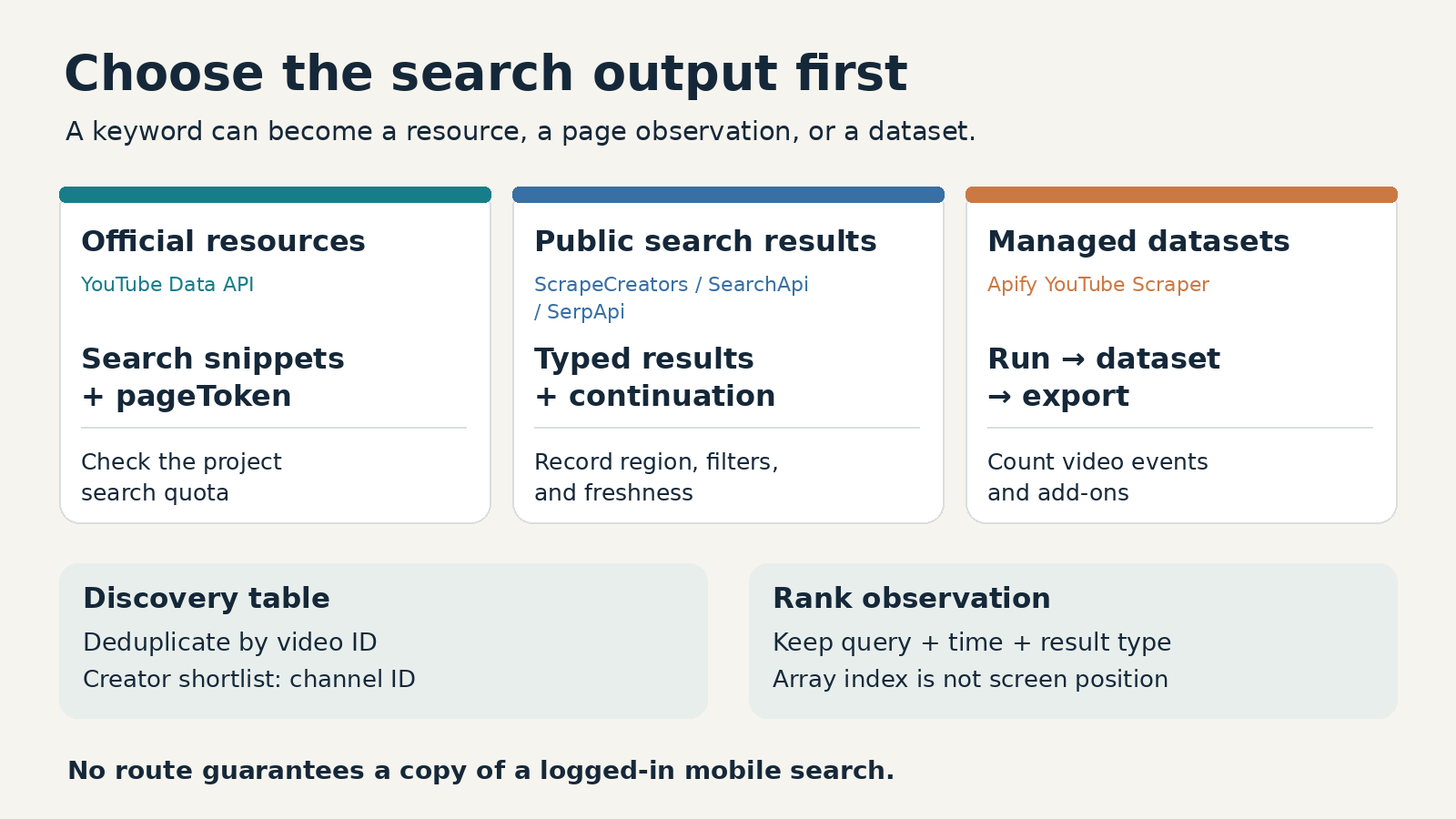
The best YouTube search scraper depends on the search experience you need. I’d choose ScrapeCreators for public keyword results inside an app, Apify for scheduled datasets and exports, and SearchApi or SerpApi for search-page modules with language controls. Choose Google’s YouTube Data API when official access and its search quota fit your project. None of these should be sold as an exact copy of a logged-in person’s mobile results.
I run ScrapeCreators, so this is a founder’s recommendation, not an independent ranking. I checked the linked documentation and pricing on October 9, 2026. I called our search endpoint and read public walkthroughs and discussions. I did not run the other vendors’ paid extraction tools.
Quick comparison
This shortlist covers keyword-based video discovery. It is not a channel archive, a comment exporter, an autocomplete tool, or a video downloader. Those jobs can start with search, but they need different collection steps.
| Option | Choose it if | Search workflow | Cost basis checked October 9, 2026 | Main limitation |
|---|---|---|---|---|
| ScrapeCreators | You want a REST response to store in your own app | Query, US-region request, typed result arrays, continuation token | $47 for 25,000 credits; our live search checks charged 1 credit per request | You own scheduling and export; page size is not fixed |
| Apify YouTube Scraper | You want saved runs, schedules, and downloadable datasets | Search terms or URLs into an Actor, then dataset export | Video event: $4/1,000 on Free, $3 on Starter, $2.60 on Scale, $2.40 on Business | Plan commitments and optional events change the total |
| SearchApi | You want structured search-page modules and explicit interface language | engine=youtube, q, gl, hl, and sp pagination | Developer: $40/month for 10,000 searches | A search response is not a complete video-detail record |
| SerpApi | You want YouTube alongside other search engines and cache controls | YouTube engine, search query, locale parameters, next-page token | Starter: $25/month for 1,000 searches; Free: 250/month | Check freshness and parse each module’s actual shape |
| YouTube Data API | You need the official search resource | search.list, snippet, filters, and pageToken | Current docs: default 100 search calls/day in a separate quota bucket | Official API results are not a promise of website or mobile rank parity |
Don’t compare 1,000 returned videos with 1,000 search requests as though they were the same purchase. One request can return several videos, and a second page is another request.
For broader collection across videos, channels, and comments, use our general YouTube scraper comparison. This page is narrower: choosing a tool to turn a keyword into a repeatable search-result dataset.
Decide what a search result means
Write down your intended output before choosing a provider. A practical search record has a query, collection timestamp, provider, region, filters, result type, stable video ID, source URL, and position within the returned collection. Add channel identity when you want to build a creator shortlist.
A search page can contain videos, Shorts shelves, playlists, channels, and ads. Position 4 in a provider’s videos array is not necessarily the fourth visible module on YouTube. Flattening every module into one list without recording its type makes comparisons hard to trust.
There’s also a difference between finding new IDs and tracking rankings. For discovery, deduplicate video IDs and keep the first and last time you saw them. For ranking research, keep each query’s observation separately. The same video appearing for two queries is useful evidence, not automatically a duplicate to delete.
A public n8n discussion started with a request to reproduce mobile search results. That is a useful buying question, but a public US search request does not reproduce a particular account’s history, device, and session. Ask providers what their result actually represents before promising rank tracking to a customer.
1. ScrapeCreators for public search JSON
Our YouTube search endpoint accepts query. You can request type=videos, shorts, channels, or playlists; choose sortBy=relevance or popular; and pass a two-letter region such as US.
The response separates collections into videos, channels, playlists, shorts, shelves, and lives. Video rows can include an ID, URL, title, channel identity, view count, displayed publication age, and duration. Don’t assume every collection contains the same fields.
This works well for a keyword-discovery app, a research script, or the first step of a content-monitoring pipeline. You get JSON directly rather than starting an Actor run and retrieving its dataset afterward. You still need to store observations, deduplicate IDs, and decide when to run the query again.
The documented uploadDate values are today, this_week, this_month, and this_year. They are preset windows, not arbitrary start and end dates. In our October 9 check, coffee brewing with uploadDate=this_week returned 18 video rows. Their displayed publication ages fell within that window. That supports this fixture; it does not establish that every query’s source filters always behave perfectly.
The includeExtras option adds likes, comment count, and description, and the docs warn that it slows the response. Start with search discovery and fetch full details only for videos you plan to use. Search does not automatically provide their transcripts or comments.
Our pricing is pay as you go. Credits do not expire, and the $47 pack has 25,000 credits. Every successful live search fixture in this article charged one credit. These checks did not request cached results. Do not assume every endpoint or cached/live request has the same cost.
Choose ScrapeCreators if you want one public-data API and will build the surrounding workflow. Choose Apify if a ready-made run, schedule, and export flow matters more. Choose an official API if your access requirements call for it.
2. Apify for saved runs and exports
The strongest relevant Apify option in the search results I reviewed was Streamers’ YouTube Scraper. This is a specific Actor, not a promise that every YouTube tool in Apify’s marketplace behaves the same way.
Its current README supports search results, channel and video inputs, structured output, and exports including JSON, CSV, and Excel. Apify’s public walkthrough shows entering a search term, saving a task, running it, and exporting the dataset. That is a better fit than a bare REST response when a teammate needs a scheduled spreadsheet without writing the collection layer.
Read the rendered pricing table, not just the headline. On October 9, the video event cost $4 per 1,000 on Free, $3 on Starter, $2.60 on Scale, and $2.40 on Business. Starter was $19/month plus pay as you go. The $2.40 headline was the Business event rate, not the rate available on every plan.
Platform costs were listed as included for this Actor, but optional events had their own prices. Transcript minutes, AI descriptions, and AI summaries were separate rows. Compare the exact configuration you intend to run, especially if you only need search discovery.
Public comments on the walkthrough asked about recently uploaded results and repeated channel names. Those questions changed the checks below: test freshness, and deduplicate creators by channel ID rather than assuming each video belongs to a different creator. A dataset with 100 video rows may represent far fewer than 100 channels.
Choose Apify when its task-and-dataset workflow saves you work. If you already own scheduling, storage, and exports, compare the extra orchestration with a direct API before adopting it.
3. SearchApi for localized search-page modules
SearchApi’s YouTube documentation describes ads, videos, Shorts, suggestions, channels, and playlists. It exposes q for the query, gl for country, and hl for interface language. Its documented defaults are us and en.
That explicit language setting matters when you collect snapshots for several markets. Region and language are different choices. A US-region request is not an instruction to include only English videos, and an English interface is not proof that every creator is American.
SearchApi uses sp for native filters and pagination. Its docs say to replace the current sp value with pagination.next_page_token from the response when continuing. Keep your query and locale context with the token rather than treating it as a portable page number.
The pricing page showed Developer at $40/month for 10,000 searches. That is a request allowance, not 10,000 video records. Requests for more pages consume part of the job’s search budget too.
Choose SearchApi when structured search-page modules and explicit locale controls are central to your product. If your downstream task needs full video details, transcripts, or comments, inspect the separate resources you will need rather than expecting search snippets to contain them.
4. SerpApi for search-engine workflows and freshness controls
SerpApi’s YouTube search API uses engine=youtube and search_query. Its documentation includes gl, hl, native sp filters, and a continuation token in serpapi_pagination.next_page_token.
Its Python walkthrough is useful for seeing the output distinction: regular video results and nested Shorts results need different parsing. Don’t copy a loop over one collection and assume it captures everything on the page.
SerpApi also documents a one-hour cache for identical queries and parameters. Cached searches are free, while no_cache=true requests fresh retrieval. A saved monitoring job should record whether it allows cached responses. A lower request bill is not helpful if you tell users that an old observation is live.
The current pricing showed Starter at $25/month for 1,000 searches and Free at 250 searches/month. Its pricing FAQ says only successful searches count; cached, failed, and errored searches do not. Those are SerpApi’s documented billing rules, not an independent availability measurement.
Choose SerpApi if YouTube sits inside a broader search-engine integration and you want explicit cache controls. Choose a simpler social-data API if you mainly need video discovery followed by other public social resources. In either case, test module coverage and continuation behavior against your own queries.
5. YouTube Data API for official search resources
Google’s official search.list reference is the right place to start when you need authorized platform access rather than a scraped page. It returns search resources and snippets, with parameters such as q, type, order, publishedAfter, publishedBefore, and pageToken.
Do not buy around an old quota explanation. Both the current method reference and Google’s quota calculator, checked October 9, describe a separate Search Queries quota bucket: default 100 search calls per day, costing one unit per call in that bucket. The calculator was updated October 8. Additional pages are additional calls. Check your actual project’s quotas before planning a polling schedule.
The documented maxResults range is 0 to 50, and the API can return fewer rows than requested. nextPageToken is the pagination signal. The regionCode parameter restricts results to videos viewable in the country; it is not a promise to recreate the website’s regional ranking.
Search snippets are also not full statistics records. Plan a separate video-details step if your application needs counts or other fields outside the search resource. Keep official API storage and use policies in your design; moving data through an API does not remove your compliance obligations.
Choose this route when its official resource model and quotas meet your needs. Choose a managed public-search provider when you specifically need its page-oriented output and have reviewed the terms, privacy, and operating risks.
A checked two-page request
This is the request shape used for our coffee brewing fixture. Keep the key in an environment variable; don’t paste it into a shared URL or notebook.
curl --get 'https://api.scrapecreators.com/v1/youtube/search' \
  -H "x-api-key: $SCRAPE_CREATORS_API_KEY" \
  --data-urlencode 'query=coffee brewing' \
  --data-urlencode 'region=US' \
  --data-urlencode 'type=videos' \
  --data-urlencode 'sortBy=relevance'
On October 9, the first page returned 20 video rows, a continuation token, and one charged credit. The second page returned 20 more rows and one charged credit. There were no overlapping video IDs between those two pages. Separate python tutorial and intitle:"Foursquare Swarm" requests also returned 20 video rows each. These are spot checks, not a guarantee of fixed page size, complete coverage, or long-run reliability.
The first response contained the following fields. This is a reduced excerpt from the saved live result, not invented sample data:
{
  "id": "5KMLWU_P95w",
  "url": "https://www.youtube.com/watch?v=5KMLWU_P95w",
  "title": "Every Coffee Brewing Method Explained (PART 1)",
  "viewCountInt": 107519,
  "publishedTimeText": "2 months ago",
  "lengthSeconds": 971
}
To continue, send the same request with continuationToken from the preceding response. Preserve the original query, region, type, and sorting. Stop when no token remains, when a token repeats, or when you reach your own page and spending cap. Deduplicate stable IDs across the entire run rather than trusting this one clean two-page sample.
An invalid uploadDate=all request returned HTTP 400, a failed response, and zero charged credits. Omit the date parameter when you don’t want a date window. Don’t invent enum values from how the website labels its filters.
Store publishedTimeText with the observation. A relative label such as “2 months ago” is not an exact upload timestamp. If exact publication time matters, verify it through the video’s detail resource rather than turning a relative-age estimate into a precise date.
Compare the complete job
Make a small fixture list before spending on a large collection. Include a broad query, a narrow quoted or intitle: query, a date-filtered query, and a second page. Inspect both successful responses and empty or failed ones.
For discovery, count unique video IDs. For a creator shortlist, count unique channel IDs. For a ranking report, retain the query, filter state, collection time, and module context. These denominators answer different questions.
Budget search, pagination, and enrichment separately. At the $47 pack’s unit price, 1,000 one-credit live search requests cost $1.88 in consumed credits. That is arithmetic, not a guaranteed number of videos. Twenty videos per page was our observed fixture size, not a pricing contract. Apify bills the Actor’s result events; SearchApi and SerpApi sell search allowances; Google imposes a search quota. None is a direct substitute for the others’ billing unit.
If search results become an AI research corpus, add transcripts only after selecting relevant videos. Search titles alone do not establish what someone said. For the later transcript step, our YouTube transcript guide explains collection and use cases. A result’s public URL is a source link, not permission to download, redistribute, or reuse all of its content.
For a recurring job, track failures, observed row counts, repeated cursors, stale snapshots, and IDs first seen. A successful HTTP status with the wrong collection is not a successful research run. Check your collection against the downstream question instead of measuring only request count.
Questions to settle before buying
What is the best YouTube search scraper for an app?
I’d use ScrapeCreators for a direct public-search JSON integration. Apify is a better fit if you want run management and downloadable datasets. SearchApi and SerpApi fit search-page integrations with explicit language controls. Use YouTube’s official API when its access model and quota work for you.
Can I reproduce the search results on my phone?
Not reliably just by passing a keyword and country. Your phone’s logged-in session can differ from a public collection request. Define whether you need discovery, official search resources, or a particular visible search experience, then ask the provider to demonstrate that exact requirement.
Can I scrape all videos for a keyword?
Don’t promise exhaustive coverage. A paginated search stream is not a census of YouTube. Use tokens, deduplicate IDs, record filters, and state your stopping condition. A large export still does not prove that no matching videos were missed.
Does YouTube search include transcripts or private contact details?
Search discovery is separate from transcript retrieval and channel enrichment. A public search scraper does not grant private analytics or CAPTCHA-gated business emails. Check the exact endpoint and access rights instead of treating a channel name as a complete lead record.
Should I choose the cheapest request price?
Only after the outputs match. Compare the whole job’s pages, unique rows, enrichment calls, freshness, and operational work. If our direct JSON path fits, create a ScrapeCreators account and try the documented search request with your real queries before buying credits.


