
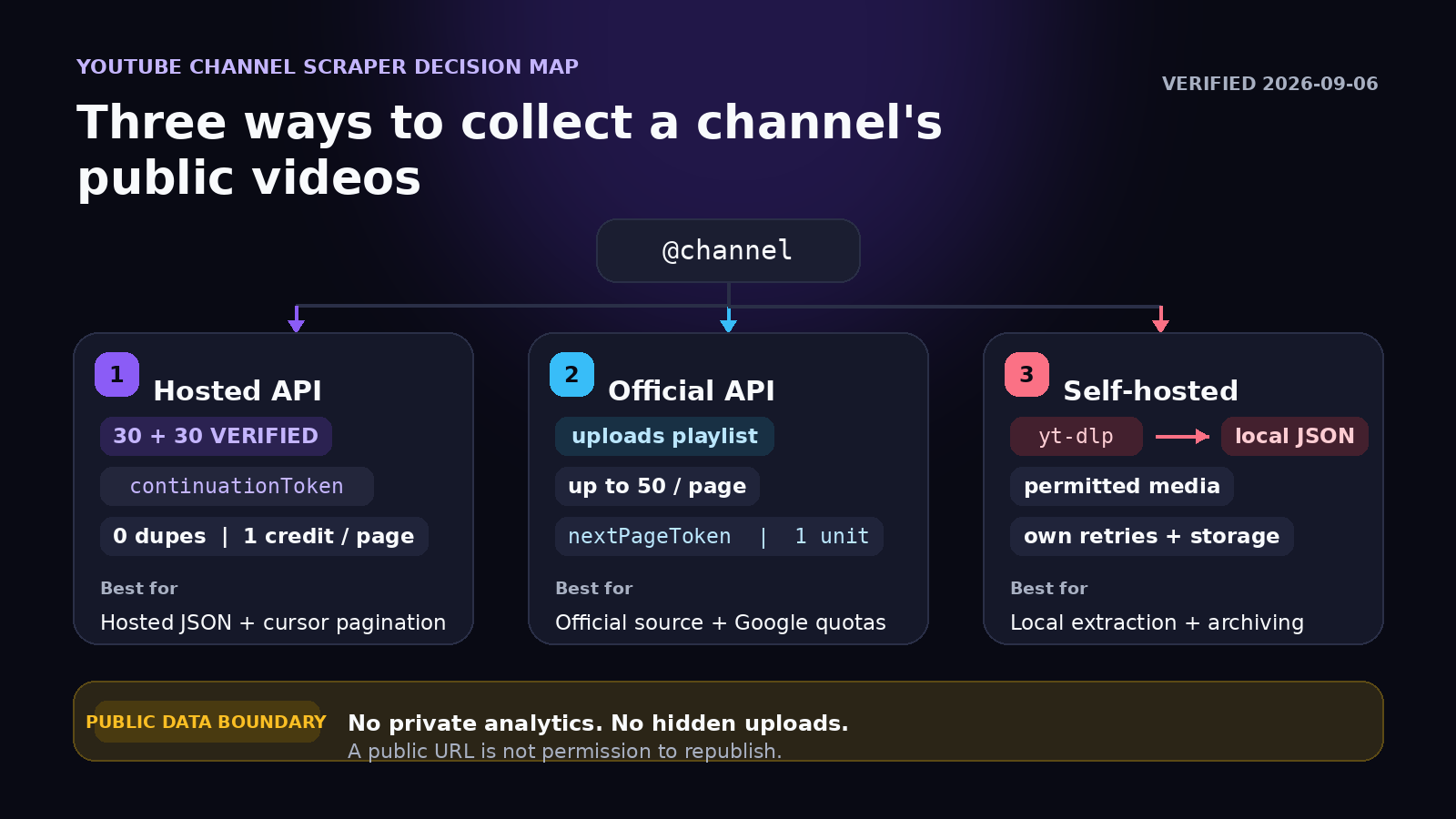
A YouTube channel scraper should turn a public channel handle into a paginated list of video IDs, titles, URLs, publish dates, durations, thumbnails, and view counts. The quickest hosted route is GET /v1/youtube/channel-videos with a handle, followed by the returned continuationToken until there is no next page.
Use the official YouTube Data API if you already run a Google Cloud project and want an official source. Use yt-dlp when you need a local command-line workflow or have permission to archive media. I run ScrapeCreators, so this guide is not a neutral review of my own API. It shows the live response I checked, the official alternative, the limits, and where a hosted API is the wrong choice.
Choose the right YouTube channel scraper
Google’s current results mix hosted scrapers, no-code exporters, the official API, open-source tools, and coding tutorials. They solve different jobs.
| What you need | Best route | Setup | Pagination | Main tradeoff |
|---|---|---|---|---|
| Public video metadata as JSON in an app | ScrapeCreators YouTube API | One API key | continuationToken | Hosted service and credit cost |
| An official public-data source | YouTube Data API | Google Cloud project and API key | nextPageToken | You manage quotas, request composition, and storage |
| A one-off spreadsheet export | A no-code channel scraper | Account and browser UI | Usually handled by the tool | Less control over repeatable production jobs |
| Local extraction or permitted media archiving | yt-dlp | Python or a release binary, plus your infrastructure | Tool-specific | You own breakage, retries, storage, and compliance |
Choose ScrapeCreators if you want one hosted API for YouTube and other public social data, do not want a Google Cloud setup, and prefer cursor-based JSON. Choose the official API if official sourcing matters more than setup time, or you already have quota monitoring in place. Choose yt-dlp if a command-line downloader is the actual requirement. A metadata API is not a disguised video downloader.
If you are comparing vendors rather than implementation paths, the YouTube scraper roundup covers that separate buyer intent.
What a channel video response contains
The base channel-videos route is an inventory endpoint. Each returned item can include:
idand a public YouTubeurltitle,description, and thumbnail URL- integer and display versions of the view count
- relative and ISO-style publish times
- duration as text and seconds
- badges and basic channel data when YouTube exposes them
The response also returns a continuationToken when another page is available. Treat that token as opaque. Store it exactly as returned and send it back unchanged.
Do not assume the route includes every possible YouTube field. The current docs make includeExtras optional for like count, comment count, and descriptions, and warn that it has a higher error rate. For large channel jobs, start with the base list and enrich only the videos that need more detail.
Public also means publicly available at collection time. Private videos, deleted videos, members-only uploads, regional restrictions, age gates, and videos hidden from the channel surface can change what you receive. “All videos” means all videos the selected public source can enumerate, not a private archive of the account.
Make the first API request
The endpoint accepts either handle or channelId. It also supports sort=latest or sort=popular.
curl --request GET \
  --url 'https://api.scrapecreators.com/v1/youtube/channel-videos?handle=MrBeast&sort=latest' \
  --header "x-api-key: $SCRAPE_CREATORS_API_KEY"
A shortened live response checked on September 6, 2026 looked like this:
{
  "success": true,
  "credits_charged": 1,
  "videos": [
    {
      "type": "video",
      "id": "gTKS8SAwUzE",
      "url": "https://www.youtube.com/watch?v=gTKS8SAwUzE",
      "title": "We Survived The Most Extreme Places On Earth",
      "viewCountInt": 30937606,
      "publishedTime": "2026-09-05T16:14:45.458Z",
      "lengthSeconds": 1408
    }
  ],
  "continuationToken": "..."
}
The title and counts are dated examples, not fixed fixtures. Save the raw collection time beside changing fields if you need reproducible analysis.
Paginate until the channel is finished
A common mistake is to call page one and label it a complete channel export. The real job ends only when the API stops returning a continuation token.
This Node.js example saves every page in memory, deduplicates by video ID, and caps the loop so a bad token cannot run forever:
async function getAllChannelVideos(handle, maxPages = 100) {
  const endpoint = new URL(
    'https://api.scrapecreators.com/v1/youtube/channel-videos'
  );
  endpoint.searchParams.set('handle', handle);
  endpoint.searchParams.set('sort', 'latest');

  const videosById = new Map();
  let continuationToken = null;

  for (let page = 1; page <= maxPages; page += 1) {
    if (continuationToken) {
      endpoint.searchParams.set('continuationToken', continuationToken);
    }

    const response = await fetch(endpoint, {
      headers: { 'x-api-key': process.env.SCRAPE_CREATORS_API_KEY }
    });

    if (!response.ok) {
      throw new Error(`Channel page ${page} failed: ${response.status}`);
    }

    const body = await response.json();

    for (const video of body.videos ?? []) {
      if (video.id) videosById.set(video.id, video);
    }

    continuationToken = body.continuationToken ?? null;
    console.log({ page, videos: body.videos?.length ?? 0 });

    if (!continuationToken) {
      return [...videosById.values()];
    }
  }

  throw new Error(`Stopped after ${maxPages} pages with a cursor remaining`);
}

const videos = await getAllChannelVideos('MrBeast');
console.log(`Collected ${videos.length} unique public videos`);
For a production job, checkpoint the next token and the last successful page in durable storage. If page 37 fails, retry page 37. Do not restart at page one and create a pile of duplicates.
The request order also matters. sort=latest is useful for ongoing monitoring and incremental collection. sort=popular answers a different question and should not overwrite a latest-first checkpoint.
A two-page live check
I made two real requests to the channel-videos endpoint on September 6, 2026 using handle=MrBeast and sort=latest.
| Check | HTTP status | Videos returned | Next token | Overlap with the other page | Credits charged |
|---|---|---|---|---|---|
| First page | 200 | 30 | Yes | 0 IDs | 1 |
| Second page | 200 | 30 | Yes | 0 IDs | 1 |
This proves the request, fields, and pagination path worked for that public channel on the verification date. It is not a broad reliability benchmark. Two successful pages do not guarantee every channel, geography, or future YouTube response will behave the same way.
Use the official YouTube Data API
The official route is a good choice when you can own the Google Cloud setup and quota model.
For a public channel, the efficient pattern is:
- Call
channels.listwithpart=contentDetailsand the channel ID or handle. - Read the uploads playlist ID from
contentDetails.relatedPlaylists.uploads. - Call
playlistItems.listwith that playlist ID andmaxResults=50. - Follow
nextPageTokenuntil it disappears. - Call
videos.listin batches when you need video statistics or extra metadata not present in the playlist item.
Google’s playlistItems.list reference documents a maximum of 50 items per request and a cost of one quota unit per call. channels.list and videos.list also cost one unit in the quota calculator checked on September 6, 2026.
The quota page had just changed. It was updated September 4, 2026 and listed a separate default allowance of 100 search.list calls per day, 100 videos.insert calls per day, and 10,000 units per day combined for the other endpoints. Do not copy an older tutorial that still says every search request costs 100 units. Check Google’s live table when you design the job.
You do not need search.list to enumerate one known channel’s uploads. The uploads-playlist path is clearer and avoids spending a separate search allowance on a task that is not search.
Keep metadata, transcripts, comments, and media separate
Public questions about YouTube scraping often collapse four jobs into one:
| Job | Correct route | Why it stays separate |
|---|---|---|
| Inventory a channel’s public videos | /v1/youtube/channel-videos | Fast list and cursor pagination |
| Get one video’s fuller public metadata | /v1/youtube/video | Avoids hydrating every item in a large channel |
| Read an available transcript | /v1/youtube/video/transcript | Captions can be absent, disabled, or language-specific |
| Read public comments | /v1/youtube/video/comments | Comments have their own pagination and availability |
| Download media | A permitted downloader or owner export | Different rights, bandwidth, storage, and infrastructure problem |
This separation came up repeatedly in the public material reviewed for this update. YouTube viewers asked whether a channel scraper also returned transcripts, whether they could sort by newest, how to avoid duplicate results, and whether “scraping” meant downloading the actual file. Reddit discussions split between researchers who only needed metadata and archivists who wanted videos, community posts, chat, comments, and thumbnails.
Build the smallest pipeline that answers your job. If you need titles and view counts for 20,000 videos, do not download 20,000 media files. If you need transcripts for 50 selected videos, collect the inventory first, choose the 50, then call the transcript route for those URLs. The YouTube transcript API comparison goes deeper on that second stage.
Pricing and practical limits
ScrapeCreators pricing and endpoint behavior were checked on September 6, 2026:
- A free account included 100 credits.
- The Freelance pack listed 25,000 credits for $47, or $1.88 per 1,000 one-credit requests.
- The Business pack listed 500,000 credits for $497, or $0.99 per 1,000 one-credit requests.
- Credits did not expire, and the pricing page described the service as pay as you go rather than a subscription.
- Each live channel-videos page in the two-page check charged one credit.
See the current pricing section before budgeting a long run. Page size, channel size, retries, and any later transcript, comment, or detail calls determine the real job cost. Do not multiply a displayed channel video count by a made-up one-video-per-credit rule.
The official YouTube API does not charge a posted dollar amount per request. It meters quota. Self-hosted tools have no vendor credit line, but they still cost engineering time, compute, bandwidth, storage, monitoring, and maintenance. Those units are different, so a clean dollar comparison needs your actual workload.
Common failures in channel scraping jobs
Stopping after one page
A successful first page is not the whole channel. Continue until the token is absent, then store that completion state.
Treating an empty field as zero
A missing view count is not necessarily zero views. Preserve null or the absent field and store the response status. The same rule applies to hidden subscriber counts and unavailable comments.
Turning on every extra field
Bulk enrichment creates more upstream work and more ways for one slow item to hold up the page. Start with the base inventory. Fetch deeper data only where it changes your decision.
Mixing snapshots collected at different times
Views and titles can change while a large crawl is running. Store collectedAt for every page or job. If you compare channels, use a consistent collection window.
Promising private or owner-only data
Public channel metadata does not include a viewer’s private history, a creator’s watch-time analytics, private uploads, or a hidden email address. One useful correction in the discussions reviewed for this guide was that per-video watch time belongs to the channel owner through YouTube Analytics. Do not present a public scraper as a way around account authorization.
Ignoring rights because a URL is public
A public page is not blanket permission to republish video files or personal data. Match collection and retention to your legitimate use, review YouTube’s terms and applicable law, and get permission when the workflow archives or republishes media.
The practical starting point is simple: choose one public channel, fetch two pages, verify the fields, test your checkpoint logic, and estimate the complete run before scaling. If the hosted route fits, read the channel-videos endpoint documentation and start with the free credits. If official sourcing or local media handling matters more, use the path built for that job.