
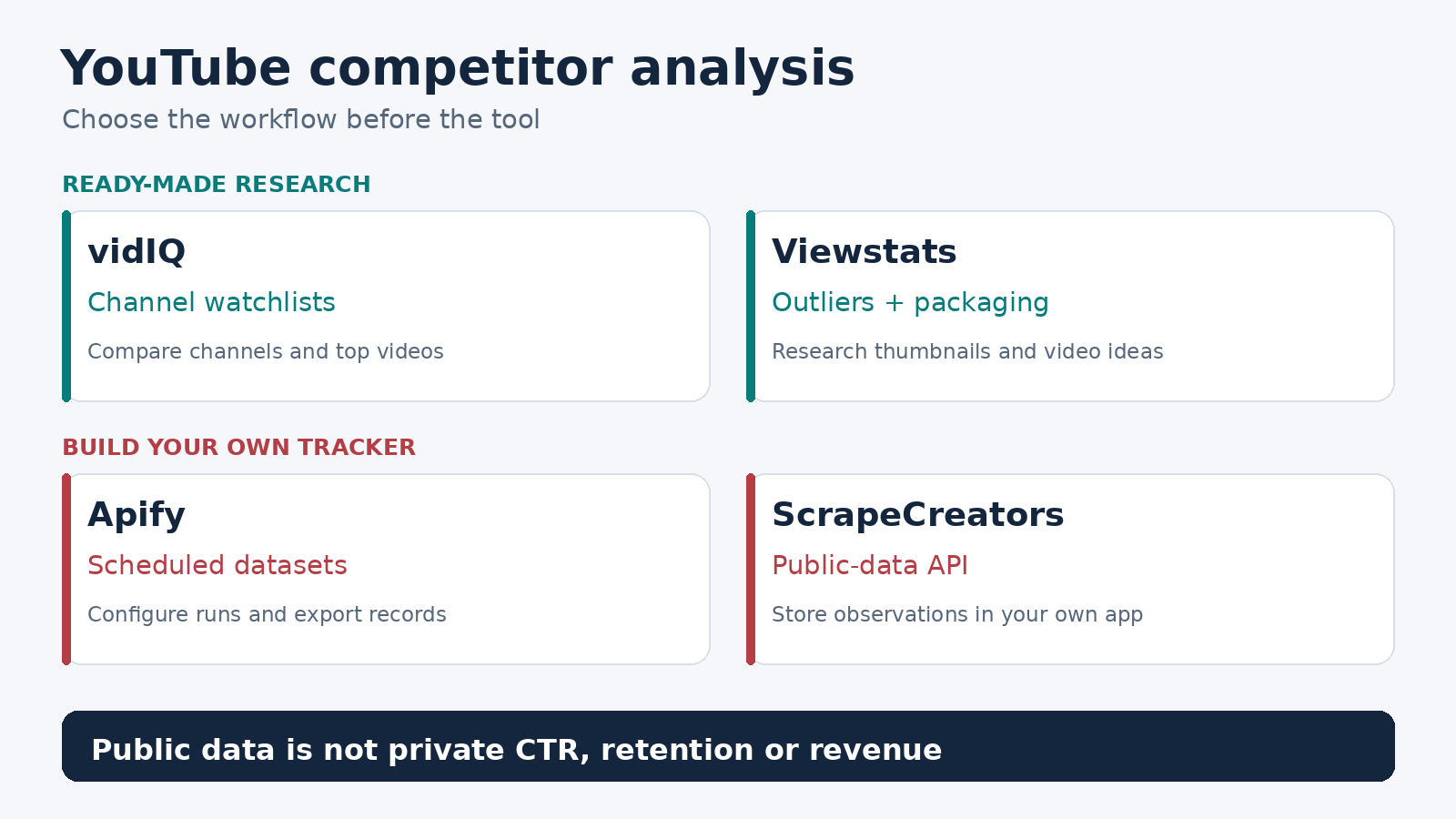
For most creators, vidIQ is the best starting point for YouTube competitor analysis: it gives you a small free watchlist and ready-made comparisons. Choose Viewstats when your work centers on outlier videos and thumbnail research. Choose Apify for scheduled scraping jobs and exportable datasets, or ScrapeCreators when you want public channel and video data inside your own application. The last two supply collection infrastructure. You still build the analysis.
I build ScrapeCreators, so I have a stake in this list. If you want a finished research dashboard rather than an API, I would start with vidIQ or Viewstats.
Prices, plan limits, documentation, and the live API observations below were checked on October 24, 2026. I reviewed the other tools’ primary pages; I did not run a paid head-to-head test or measure which tool grows channels faster.
Quick comparison
| Tool | Choose it for | Cost or commitment checked today | What you still need to check or build |
|---|---|---|---|
| vidIQ | A creator watchlist with channel comparisons and top competitor videos | Free tier; one-channel Boost $19/month or $199/year | The plan’s tracked-channel limit and which web/mobile features you need |
| Viewstats | Outlier discovery, thumbnail research, collections, and alerts | Pro $49.99/month on the rendered pricing page | Historical coverage for your exact channels and videos |
| Apify YouTube Scraper | Scheduled collection with a downloadable dataset | Free-plan video event $4/1,000; lower unit rates on paid plans | Run inputs, add-on events, deduplication, and your reporting layer |
| ScrapeCreators | Public-data collection for a custom competitor tracker | $47 buys 25,000 credits; the channel and feed requests checked here charged one credit each | Storage, repeat observations, charts, alerts, and editorial judgment |
A monthly dashboard subscription, a charge per returned video, and credits per API request buy different things. A cheaper collection rate does not automatically make a cheaper finished competitor-research system.
Decide what you actually need to learn
A good tool should help you answer a specific question: which nearby creators are finding topics that your intended viewers care about?
Start with channels serving a similar viewer need. Then separate long videos, Shorts, and live content. A large general-entertainment channel is a poor baseline for a small software-tutorial channel, even if both uploaded a video about the same AI tool.
If you already publish, check YouTube Studio before buying anything. YouTube’s Audience documentation describes a report of other channels your viewers watched over the past 28 days and another report of content they watched over the past seven days. Those are signals about your own audience, not access to somebody else’s private analytics.
The distinction matters. A public competitor tool can show observable publishing and engagement signals. It does not thereby know that competitor’s impressions click-through rate, audience-retention curve, or actual revenue. YouTube’s Analytics API requires authorization and scopes channel reports to the authenticated channel or authorized content owner.
My buying checklist would be:
- Can I track the channels I care about, rather than only search a popular-video database?
- Does the tool already have history for those videos? When does coverage start?
- Can I compare videos at a similar age and within the same format?
- Can I export the underlying records, or only view a proprietary score?
- Will I use the answer to make a different video, or just stare at a bigger channel’s numbers?
1. vidIQ for a ready-made competitor watchlist
vidIQ’s Competitors tool is my first recommendation for a creator who wants to research without maintaining a data pipeline.
Its current help page documents top competitor videos sorted by views, views per hour, or publication date. The web app also compares channel views, subscribers, public videos, and daily averages across different time windows. Its mobile filters differ from the web app, so do not assume every screenshot applies to your phone.
You can use that to keep a small watchlist, inspect a breakout video, and turn the observation into an editorial question. Why did this topic work repeatedly across comparable channels? What could you contribute that those videos missed?
The current features-by-plan matrix lists up to three tracked competitors on Free, 20 on Boost, and 50 on Max. The older Competitors help article still describes paid plans more broadly as allowing 20. I would use the more specific matrix for planning and confirm the limit in the account before upgrading.
The pricing page lists one-channel US prices of $19 per month or $199 per year for Boost, and $49 per month or $468 per year for Max. Annual pricing is an annual purchase, not a monthly cancel-anytime bill at the displayed monthly equivalent. Local prices can differ.
Also keep AI credits separate from watchlist capacity. vidIQ says competitor tracking uses plan-based access, while resource-intensive AI tools draw from a shared credit balance. Buying more AI activity is not the same as adding more competitors.
Choose vidIQ if you need a finished workflow for a modest channel set. Choose another route if you need a dataset and collection logic that you control, rather than mainly working inside its research interface.
2. Viewstats for outliers and packaging research
Viewstats puts outlier videos, thumbnail search, competitor tracking, alerts, and research collections together. That makes it worth a look when your next decision is about a video’s angle or packaging rather than your database schema.
An outlier is useful as a research lead. It is not proof that copying the title structure will reproduce the result. Open the video, look at its channel context, and check whether its topic, timing, or audience is unusual.
Viewstats Pro displayed $49.99 per month on its live pricing page after the page loaded in a browser. The initial HTML showed a placeholder instead of that amount. Business started at $249 per month and listed a separate business offering, including an API on the product page. Do not assume a creator Pro purchase includes business API access.
I would ask about the exact history you need before subscribing. A product offering analytics does not establish that it has every smaller channel’s first-day video views or every past thumbnail change. Ask for a representative channel and video, a history start date, the observation cadence, and the export options available on your plan.
That question came up directly in a creator discussion about competitor tracking: the buyer wanted historical video views and changes, not just today’s totals. That is a useful purchasing requirement, not evidence that any named tool meets it.
Choose Viewstats if your main job is finding promising examples and organizing visual research. If you mainly need periodic JSON for a private analytics product, compare its business terms with the collection options below.
3. Apify for scheduled datasets and exports
The Streamers YouTube Scraper on Apify takes channel or video URLs and search inputs, then returns structured video records. Its input schema includes separate maximums for videos, Shorts, and streams. That is useful when the research job deliberately covers more than one format.
Apify also has schedules, so an Actor can run repeatedly without your laptop being open. Its documented dataset export options include JSON and CSV. This is a good fit when you want a configurable collection job before deciding how to analyze the results.
Be specific about the Actor. Apify is a marketplace, and a price or field list from one YouTube Actor does not describe every other YouTube Actor.
For this Actor, the current pricing tab lists a video event at $4 per 1,000 on Free, $3 on Starter, $2.60 on Scale, and $2.40 on Business. The lower unit prices accompany platform plans listed at $19, $199, and $999 per month respectively. The headline “from $2.40” is not the Free-plan rate.
The table also lists separate events for channel date ranges, AI descriptions, AI summaries, and transcript minutes. On Free, the date-range add-on is $1.30 per 1,000 and the transcript-minute event is $48 per 1,000. Inspect which events your chosen inputs trigger. One thousand videos with optional transcription is a different purchase from one thousand basic video results.
Choose Apify if you want hosted jobs and downloadable datasets. The limit is responsibility: a scheduled scraper does not automatically become a complete competitor dashboard. You still need to identify repeated video IDs across runs, preserve observations over time, and decide what to report. I did not execute this Actor in this review.
4. ScrapeCreators for a custom research application
ScrapeCreators’ YouTube API fits developers who want public channel details, video feeds, search, comments, or transcripts through REST requests. For competitor analysis, I would start with channel identity and video observations, then add qualitative research only where it helps a decision.
The two starting resources are channel details and channel videos. The feed supports latest or popular ordering and returns a continuation token. It is a collection source, not a ready-made retention, audience-overlap, or revenue dashboard.
On October 24, I requested public channel details for MKBHD and LinusTechTips, then two latest-video pages for MKBHD. All four requests returned HTTP 200 and charged one credit each. The feed pages contained 30 videos each, with 60 unique IDs across the two pages and a continuation token still present after page two. That checks those requests, not every channel or complete archive coverage.
There were useful limitations in the results:
- The second page’s nested channel IDs were null. Keep the channel identity from the resolved profile and the cursor chain; do not drop the relationship just because a later row omits it.
publishedTimeand the enrichedpublishDatedisagreed for some videos. Keep the original fields and verify a precise source date before putting a video into an exact 24-hour cohort.- The feed returned likes and comment counts in this sample despite omitting
includeExtras. Do not infer that setting the option to false guarantees a lightweight fetch. The docs also warn that requesting extras is more error-prone.
At the current credit price, $47 buys 25,000 credits. These observations are priced per request, not per video returned. A successful empty collection can still cost a credit; check the endpoint and returned credits_charged rather than assuming empty means free.
Choose ScrapeCreators if you want to build your own tracker or connect records to an existing application. Choose vidIQ or Viewstats if maintaining storage, schedules, and visual reports would slow you down. For collection-specific comparisons, the YouTube scraper roundup and channel collection guide cover those separate jobs.
Save an observation before generating an insight
This Python example collects one latest-video page and appends public observations to a CSV. It resolves the channel ID first, preserves missing publication dates, and refuses to turn an unusable collection into zero views. Set SCRAPE_CREATORS_API_KEY in your environment and run it from a folder where you want the CSV.
import csv, json, os, urllib.parse, urllib.request
from datetime import datetime, timezone
from pathlib import Path

key = os.environ['SCRAPE_CREATORS_API_KEY']

def get(path, params):
    url = 'https://api.scrapecreators.com' + path
    request = urllib.request.Request(
        url + '?' + urllib.parse.urlencode(params),
        headers={'x-api-key': key},
    )
    with urllib.request.urlopen(request, timeout=60) as response:
        body = json.load(response)
    if body.get('success') is not True:
        raise RuntimeError('Collection failed; do not save a zero snapshot')
    return body

profile = get('/v1/youtube/channel', {'handle': 'MKBHD'})
channel_id = profile.get('channelId')
if not channel_id:
    raise RuntimeError('Channel identity is missing')
page = get('/v1/youtube/channel-videos', {
    'channelId': channel_id, 'sort': 'latest',
})
if not isinstance(page.get('videos'), list) or not page['videos']:
    raise RuntimeError('No usable video rows; investigate before appending')
observed_at = datetime.now(timezone.utc).isoformat()
rows, seen = [], set()
for video in page['videos']:
    video_id, views = video.get('id'), video.get('viewCountInt')
    if not video_id or video_id in seen:
        continue
    if type(views) is not int or views < 0:
        raise RuntimeError('Missing or invalid views; preserve the failed run')
    seen.add(video_id)
    rows.append({
        'observed_at': observed_at, 'channel_id': channel_id,
        'video_id': video_id, 'title': video.get('title'),
        'views': views, 'publish_date': video.get('publishDate'),
    })
output = Path('youtube-observations.csv')
needs_header = not output.exists() or output.stat().st_size == 0
with output.open('a', newline='', encoding='utf-8') as file:
    writer = csv.DictWriter(file, fieldnames=list(rows[0]))
    if needs_header:
        writer.writeheader()
    writer.writerows(rows)
print(json.dumps({
    'saved_rows': len(rows),
    'credits_charged': profile.get('credits_charged', 0)
        + page.get('credits_charged', 0),
    'more_pages': bool(page.get('continuationToken')),
}))
The exact script ran separately on October 24 and saved 30 unique video rows for two credits, with more pages available. It is deliberately a bounded sample, not a full archive, a scheduler, or a historical backfill. Change the handle in the profile request to use your selected channel.
For additional pages, send the returned continuationToken with the same channel input and sort=latest. Repeat any behavior options you intentionally use on every request. A cursor does not carry your whole request configuration forward.
For an actual tracker, store a unique observation key such as (channel_id, video_id, observed_at). Compare a video’s view count with its earlier observation, using the elapsed time between those observations. Do not call lifetime views divided by video age a measured recent views-per-hour rate.
Ten channels, one profile request and one feed request per day, over 30 days would be 600 requests at these endpoint costs. At the $47/25,000-credit package ratio, that allocates about $1.13 of credits. You still purchase the credit package, and storage, scheduling, extra pages, transcripts, and your time are additional costs. This model does not promise a fixed number of videos per page.
Turn the comparison into a better video
A useful weekly review can be small. Pick a few comparable channels and keep the same video formats separate. Note the topic, viewer promise, opening, and packaging of a handful of strong videos. Compare performance at similar observation ages where you actually have those observations.
Then write down what you would do differently. A faster tutorial, a missing example, a better explanation of a failure, or a different buyer question is more actionable than a spreadsheet saying a large channel has more views.
The creator questions reviewed for this article asked about audience motivations and content gaps, not just keyword tags. A competitor-analysis automation tutorial also illustrated how quickly a report can drift from collected metrics into generated hooks and titles. Treat those generated suggestions as editorial hypotheses, not measured audience preferences.
Keep these distinctions in the report:
- A public comment is one person’s feedback, not a representative survey of viewers.
- A title or thumbnail change followed by more views does not prove the change caused the increase.
- A snapshot collected today does not reveal how many views a video had in its first hour last year.
- A combined Shorts-and-long-form score can hide unlike formats. YouTube changed Shorts view counting on March 31, 2025, counting starts and replays without a minimum watch time, while keeping engaged views separately in Analytics.
Do not let a report invent private analytics to fill those gaps. Give an AI model the source rows, collection times, and explicit unknowns. Ask for a small set of ideas with links back to the supporting videos, then review those ideas yourself.
Questions to ask before paying
What is the best free YouTube competitor analysis tool?
I would start with vidIQ’s Free plan for up to three tracked competitors, plus the Audience reports available in your own YouTube Studio. Check the current plan matrix rather than a years-old tutorial’s limits.
Can I see a competitor’s retention, CTR, or actual revenue?
Not from ordinary public channel and video records. Those are different from authorized channel-owner analytics. A third-party estimate or score should be labeled as an estimate, not presented as access to the competitor’s YouTube Studio.
Should I buy a dashboard or build with an API?
Buy the dashboard if your next action is watching examples and planning videos. Use an API or scheduled dataset if you need persistent records, custom reporting, or integration into your own product. The collection bill is only part of the build cost.
Can I get historical views for every competitor video?
Do not assume that. Ask a dashboard provider to demonstrate the specific video’s coverage and earliest observation. A collector you start today needs repeated snapshots before it has its own history.
If that last option fits your team, create a ScrapeCreators account and try the two documented requests on a small channel set before building the rest of the tracker.


