
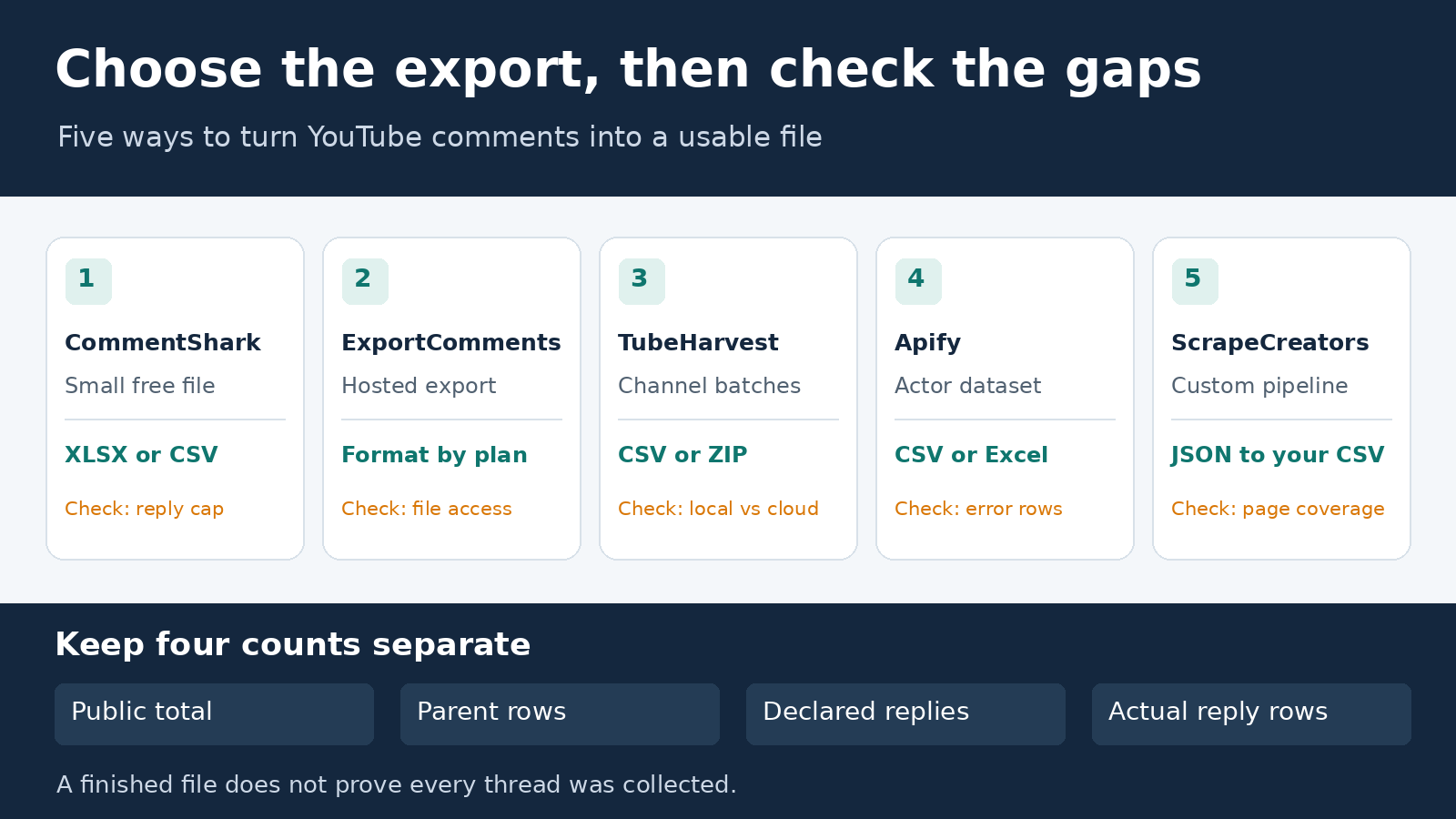
For a quick YouTube comment spreadsheet, start with CommentShark. Choose ExportComments for larger hosted exports, TubeHarvest by TubeAlfred for selected-video channel batches, or Apify when you want an Actor dataset you can download. ScrapeCreators fits developers who need a repeatable CSV pipeline, not someone who just wants a Download button.
I run ScrapeCreators. It is one option below, and it would not be my first recommendation for a one-off no-code file.
The purchase decision comes down to the file you receive, which replies it includes, and what remains unfinished. Product pages, pricing, and documentation were checked on November 20, 2026. Only the ScrapeCreators example was executed for this guide; the other products were reviewed from current primary sources.
Choose the file workflow first
A YouTube comment exporter should leave you with something you can use outside its dashboard. A JSON response, an analysis summary, a dataset preview, and a downloadable spreadsheet are different handoffs.
| Tool | Choose it for | File or handoff | Current purchase or usage unit | Check before committing |
|---|---|---|---|---|
| CommentShark | A small free spreadsheet | CSV or XLSX | Free; account-free and free-login limits differ | Up to five replies per thread; size cap can stop the export earlier |
| ExportComments | Larger hosted files across video URLs | XLSX; paid CSV; Business JSON | Personal is $30 for three days; Premium is $50/month | A free XLSX export does not unlock CSV or JSON |
| TubeHarvest | Browser work or selected videos from saved channels | CSV; multi-video ZIP | Extension Pro is $19 once; hosted export uses credits | Local entitlement and hosted credit spending are separate |
| Apify, Streamers Actor | A batch dataset and downloadable formats | CSV, Excel, JSON and others | Comment event prices depend on plan | Set the per-video limit and reject error items |
| ScrapeCreators | Your own export job and schema | Paginated JSON, converted by your code | $47 for 25,000 prepaid credits; reviewed routes cost one credit per live request | Fetch parent pages and reply pages separately |
These are not five equivalent prices per comment. A three-day pass, local extension unlock, monthly wallet, result event, and API page buy different work.
If the actual job is selecting collection infrastructure, use the broader YouTube comment scraper comparison. If you need a finished interpretation rather than rows, see the separate comment-analysis tools guide. This page is about getting a usable file and knowing its boundaries.
1. CommentShark for a small free spreadsheet
CommentShark’s exporter is the simplest starting point here for a creator or researcher who needs a file from one video. Its current page offers CSV and Excel downloads with comment text, author details, dates, likes, and comment links. It supports regular videos and Shorts.
The published allowance is up to 1,000 recent comments without an account, or 5,000 with a free login. A separate size limit can end an export sooner on videos with long comments. Replies are included, but the page explicitly caps them at five per thread.
That caveat matters more than the headline allowance. A file with many top-level comments can still miss most of the conversation under a popular parent. Choose this for a bounded feedback review. Choose another workflow if your work depends on collecting longer reply threads.
Keep the free exporter separate from CommentShark’s connected-channel management product. You do not need to buy automatic replies just to assess whether the free file fits your research.
2. ExportComments for larger hosted files
ExportComments’ YouTube page documents the output fields and, unusually helpfully, the format gates. XLSX is available on the free tier, which has up to 100 results per video. CSV starts with Personal, and JSON requires Business. Its JSON format preserves nested replies; its spreadsheet description uses reply_to to identify the parent’s author.
The current pricing page, with Monthly billing selected, lists:
- Free: up to 100 results per export and 50 exports per month.
- Personal: $30 for three days, up to 5,000 results per export, with no recurring payment.
- Premium: $50/month, up to 50,000 results per export, with scheduled exports and API access.
- Business: $220/month, up to 250,000 results per export.
Download promptly. The page lists one-day retention for Free, three days for Personal, and five days for Premium and Business. Retention is not an archive you control.
Choose this when you want a hosted file and a larger published export allowance. Confirm that your plan buys the format you actually need. Do not turn the vendor’s “every comment” wording into a guarantee: its own page excludes hidden or moderated comments. Also check stable parent IDs in the delivered file if thread reconstruction matters; a parent’s display name alone is not a unique thread key.
3. TubeHarvest for browser exports and channel batches
TubeHarvest is TubeAlfred’s file-oriented product. It has three workflows: Extension Pro on the current YouTube page, Cloud from a video URL, and Cloud Pro for saving research channels and selecting videos to scrape. Individual exports are CSV; multi-video work can produce a ZIP containing a CSV per selected video.
The local extension is advertised at $19 once. Hosted exports spend one TubeAlfred Credit per five fetched comments. Fetching the channel-video inventory is free according to the product page; collecting selected comments is not.
The wallet pricing lists 50 free credits each month, Creator Plus at $15/month for 5,000 credits, and Creator Pro at $29/month for 12,000. Subscription credits expire at period end. Active subscribers can buy top-ups. The product page’s general invitation to add credits is not evidence that a free account can buy them without a subscription.
Do not budget the hosted file with its API rate. The pricing page separately lists API/MCP comments at one credit per 20 comments with a five-credit minimum. That is a different operation.
Choose TubeHarvest when your unit of work is a set of videos from saved channels. Check reply coverage on a representative thread before treating the ZIP as a complete conversation archive. I did not run a paid batch or verify a specific reply-depth guarantee.
4. Apify for a downloadable batch dataset
The maintained Streamers YouTube Comments Scraper accepts video URLs and offers datasets downloadable as CSV, Excel, JSON, XML, or HTML. It is useful when you want collection and export inside Apify rather than building a local CSV writer.
Its input schema requires startUrls. Set maxComments explicitly: the current schema defaults to one comment per video. It supports TOP_COMMENTS and NEWEST_FIRST; setting oldestCommentDate automatically switches the sort to newest first. A date setting and a row limit both affect what reaches the file.
The current Actor API lists pay-per-event comment pricing of $2 per 1,000 on Free, $1.50 on Starter, $1.20 on Scale, and $0.90 on Business. The advertised “from $0.90” is not the Free price. Apify’s plan page lists Starter at $19/month with $19 of spend and Business at $999/month with $999 of spend. Free includes $5 of monthly usage. Included monthly spend expires rather than accumulating indefinitely.
The README still describes residential proxies via Starter, while the pricing API uses a comment event. Check the run’s current pricing before starting; I have not resolved that wording through a paid execution. Apify’s billing documentation says many event prices include platform usage, some bill it separately, and post-run dataset interactions can add usage. Do not automatically add compute and proxy fees to every event, or assume the headline rate is your entire bill.
One useful detail: unavailable videos or missing comments can produce error items in the dataset. Filter those out of your comment-row count, but keep a separate failure list. A successful Actor run is not proof that every input produced usable comments.
5. ScrapeCreators for a CSV you control
ScrapeCreators’ YouTube API is for a developer who wants to define the columns, save source pages, and rerun the job. It is not a hosted spreadsheet exporter.
The comments endpoint takes url, order=top|newest, and an optional continuationToken. A parent can carry a repliesContinuationToken; send that string to the separate replies endpoint. A reply page can return another continuation token. A comment ID is not a reply token.
The docs currently describe approximate source ceilings of 1,000 top comments or 7,000 newest comments. Those are retrieval boundaries, not all-comments promises. Repeat url and order on every parent-page request; the cursor does not replace stateless request options.
Pricing starts at $47 for 25,000 non-expiring credits. Each live parent or reply request in the example below charged one credit. That is a page price, not a fixed number of comments. Successful empty pages can still be billable; do not keep requesting an exhausted chain. If this is the workflow you need, create an account and keep the key in an environment variable.
A bounded export you can inspect
This standard-library Python example requests at most two parent pages and one reply page from each of the first two available threads. It deliberately does not export the entire video. It writes a UTF-8 CSV, source bodies, and coverage state. Run it in a private working directory with SCRAPE_CREATORS_API_KEY set.
import csv
import json
import os
from datetime import datetime, timezone
from pathlib import Path
from urllib.parse import urlencode
from urllib.request import Request, urlopen

VIDEO = 'https://www.youtube.com/watch?v=TuSnbhW6fiE'
ORDER = 'newest'
assert ORDER in {'top', 'newest'}
OUT = Path('youtube-export')
OUT.mkdir(exist_ok=True)
captures, parents, exported, reply_state = [], {}, {}, []

def get(path, params):
    request = Request('https://api.scrapecreators.com' + path + '?' +
                      urlencode(params), headers={
                          'x-api-key': os.environ['SCRAPE_CREATORS_API_KEY']})
    with urlopen(request, timeout=45) as response:
        body = json.load(response)
    if body.get('success') is not True or not isinstance(body.get('comments'), list):
        raise RuntimeError('No successful comment-page body')
    captures.append({'path': path, 'params': params, 'body': body})
    return body

def add(comment, parent_id=''):
    key = comment['id']
    exported.setdefault(key, {
        'video_url': VIDEO, 'comment_id': key, 'parent_id': parent_id,
        'content': comment.get('content'),
        'author': (comment.get('author') or {}).get('name'),
        'likes': (comment.get('engagement') or {}).get('likes'),
        'published_label': comment.get('publishedTimeText'),
        'published_time': comment.get('publishedTime'),
        'observed_at': observed_at})

observed_at = datetime.now(timezone.utc).isoformat()
cursor = None
for page in range(2):  # A bounded sample, not a full-video export.
    params = {'url': VIDEO, 'order': ORDER}
    if cursor:
        params['continuationToken'] = cursor
    body = get('/v1/youtube/video/comments', params)
    for comment in body['comments']:
        parents.setdefault(comment['id'], comment)
        add(comment)
    cursor = body.get('continuationToken')
    if not cursor:
        break
threads = [c for c in parents.values() if c.get('repliesContinuationToken')]
for parent in threads[:2]:  # One reply page from each of two threads.
    body = get('/v1/youtube/video/comment/replies', {
        'continuationToken': parent['repliesContinuationToken']})
    for reply in body['comments']:
        add(reply, parent['id'])
    reply_state.append({'parent_id': parent['id'],
                        'next_token': body.get('continuationToken')})
with (OUT / 'comments.csv').open('w', encoding='utf-8-sig', newline='') as f:
    fields = ['video_url', 'comment_id', 'parent_id', 'content', 'author',
              'likes', 'published_label', 'published_time', 'observed_at']
    writer = csv.DictWriter(f, fieldnames=fields)
    writer.writeheader()
    writer.writerows(exported.values())
state = {'order': ORDER, 'parent_rows': len(parents),
         'declared_replies': sum(c.get('engagement', {}).get('replies', 0)
                                 for c in parents.values()),
         'reply_rows': sum(bool(r['parent_id']) for r in exported.values()),
         'csv_rows': len(exported), 'next_parent_token': cursor,
         'reply_pages': reply_state, 'unvisited_reply_threads': len(threads[2:]),
         'credits_charged': sum(c['body']['credits_charged'] for c in captures)}
(OUT / 'source-pages.json').write_text(json.dumps(captures, ensure_ascii=False))
(OUT / 'coverage.json').write_text(json.dumps(state, indent=2))
print(json.dumps({k: state[k] for k in ['parent_rows', 'declared_replies',
      'reply_rows', 'csv_rows', 'credits_charged']}, indent=2))
The exact script was run on November 20, 2026. It made three successful requests, each costing one credit, and wrote 23 unique CSV rows: 16 parents and seven replies. Those parents declared eight replies. The parent cursor and the two visited reply cursors were terminal, but one other reply thread was deliberately unvisited. The public video-wide comment counter was not collected.
A separate earlier audience-research pull returned six replies from the two substantive threads. The later script returned seven. Those are different captures, not evidence of a complete or immutable archive. I reopened the CSV and matched IDs, raw text, parent links, likes, and date fields to its saved source bodies. This verifies this bounded example, not export reliability across YouTube.
Import text columns as text in Excel or Sheets. Keep IDs as strings, preserve line breaks and emoji, and do not execute formulas found in untrusted comment text. published_time is the API’s normalized value; the code keeps the original relative label too. Do not present a time inferred from “two weeks ago” as an independently verified exact publication instant.
Check the file before using it
In Renat Gabitov’s export walkthrough, the useful discussion beneath the video asks about row limits, newest versus arbitrary selection, and missing replies. A creator reply discusses adding replies later. That historical conversation shaped this checklist; it is not a current test of the tool in the video.
Ask for four separate counts: the public comment total, unique top-level rows fetched, declared replies on those parents, and actual reply rows fetched. An exporter can reach its top-level limit while leaving many threads partially collected.
Before paying for a large job, inspect a small file:
- Match the video URL to the intended video or Short, not a channel summary or live-chat replay.
- Open a parent with many replies and check the actual child rows, not just a reply-count column.
- Confirm the sort and any date filter. A “newest” sample is not a random audience sample.
- Check whether the purchased format is XLSX, CSV, nested JSON, or a ZIP of several files.
- Preserve stable comment IDs, parent IDs, and an observation time. Display names can repeat or change.
- Separate unavailable-input errors, duplicate IDs, and filtered rows from successful comment rows.
- Save the source and coverage note with the export. Record remaining cursors, row caps, and skipped threads.
An export also is not a giveaway entry list. You still have to apply the giveaway’s stated rules about replies, repeated entries, and eligible comments. Nor is a CSV a sentiment report: analysis happens after collection. Missing a long disagreement thread can change the interpretation even when the spreadsheet contains thousands of rows.
Choose the smallest workflow that meets that handoff. Use a ready-made file when the job is occasional. Use a dataset or API when you need repeatability, source records, and control over what gets exported.
FAQ
What is the best free YouTube comment exporter?
CommentShark is my first choice for a small no-code file. Its current page offers CSV and XLSX for up to 1,000 recent comments without an account, or 5,000 with a free login, with up to five replies per thread and an additional size limit. That is not a promise of every reply.
Can I export YouTube comments to Excel without coding?
Yes. CommentShark offers XLSX and CSV. ExportComments offers XLSX on its free tier, while CSV starts with Personal and JSON requires Business. TubeHarvest exports CSV, with ZIP bundles for multi-video work. Check format access before paying.
Does a YouTube comment export include every reply?
Not necessarily. A reply count can exist without the corresponding reply rows, and some exporters cap reply depth. Check actual parent IDs, reply rows, and continuation state. A finished file or terminal top-level cursor does not prove that every thread was exhausted.
Is a YouTube comment CSV the same as a live-chat export?
No. Comments beneath a video and messages in a livestream’s chat are different datasets. ExportComments directs live-chat users to a separate exporter. Choose the correct surface before comparing tools or counting rows.