
For TikTok analytics tools, start with TikTok Studio when you need to understand your own account. Choose Metricool when you want reports alongside publishing, or SocialPilot when recurring client reports are the main job. ScrapeCreators is the developer option for public post evidence in custom software. It does not replace authorized watch-time, retention, or account-performance reporting.
Buy the output you actually need. A monthly PDF, an account dashboard, and a page of public video records are different products, even when all three get called analytics.
I build ScrapeCreators. If your question is why viewers leave your videos, I would start with your authorized TikTok data, not our public counters.
Prices, plan details, documentation, and the API observations below were checked on November 8, 2026. Prices are USD before applicable taxes. I ran the ScrapeCreators example and reviewed current primary sources. I did not connect paid reporting accounts or test report delivery.
Four tools for four reporting jobs
| Tool | Choose it when | Current purchase or unit | Main boundary |
|---|---|---|---|
| TikTok Studio | You want native account and post performance | Native creator tools; start here before buying software | You need access to the account; availability varies by experience and region |
| Metricool | You publish for several brands and need repeatable reports | Free for one brand; Starter from $25/month on monthly billing | Personal versus Business connection changes the metrics; reports and API access have different gates |
| SocialPilot | You manage client accounts and want scheduled reports | Standard $40/month; Premium $100/month, billed monthly | Standard includes PDF and scheduling; CSV, custom, and white-label reports need Premium or Ultimate |
| ScrapeCreators | You need public post records inside your own application | $47 buys 25,000 credits; the example request charged one credit | You build the storage and reporting; it is not private account Insights |
This guide is for accounts you manage. For someone else’s activity, use our separate TikTok competitor-tool comparison. For collection providers rather than reporting workspaces, see the TikTok scraper comparison. TikTok Shop revenue and paid campaign attribution are separate purchases again.
Decide what the month actually means
Before comparing dashboards, write down the question your report must answer:
- How did all our content perform during October?
- How are the posts published in October performing now?
- Which videos brought followers, qualified visits, or sales?
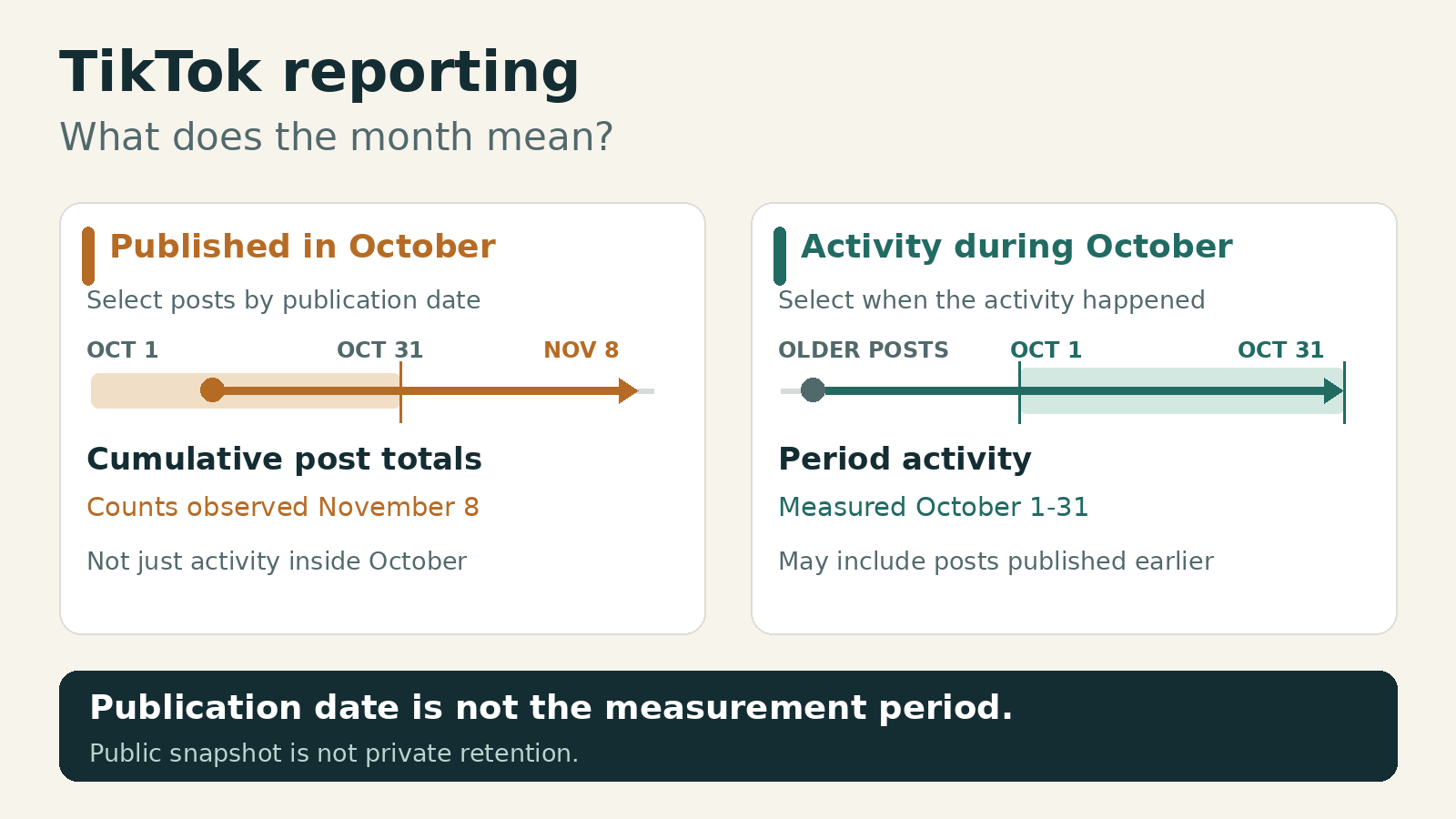
Those are not interchangeable. Filtering a list to October publication dates does not turn today’s accumulated view counts into views earned during October.
Metricool’s current TikTok metric definitions make this distinction unusually clear. Its posts-viewed-in-period section includes activity on posts regardless of publication date. Its posts-published-in-period section filters publication dates, but shows cumulative post performance through yesterday.
That is a reason to inspect the definition, not a reason to call one of the views wrong.
A social media manager’s public question asks for a calendar-month report by username after encountering incomplete date options. It captures a useful buying test: ask the vendor to show the exact month and underlying rows before assuming a username lookup can reconstruct period activity.
For a trial, select one post published before the month and one inside it. Check whether both belong in the activity report, what the date filter controls, and which timezone the export uses. Keep the original metric label next to every number.
1. TikTok Studio for understanding your own content
TikTok’s creator-tools documentation says Studio is available to both Personal and Business Accounts. On mobile, open Profile, then the menu, then TikTok Studio. On the web, sign in at TikTok Studio.
The official documentation separates account-level key metrics, content performance, and follower information. The dedicated Studio help page also describes viewer demographics and activity times, individual-post analytics, and engagement insights. Features can differ between the app and browser, by region, and by eligibility.
Choose Studio if you want to decide which content to make next and can work directly in your account. Check the source before paying someone to repackage it.
Do not switch your TikTok account type just because an old tutorial says analytics requires a Business Account. The current creator-tools page explicitly includes both types. Account type, a vendor’s connection method, and the reporting plan are three separate settings.
What I would inspect first:
- Whether the selected account and reporting dates are correct.
- Which metrics exist for an individual post versus the entire account.
- Whether unavailable values are blank, suppressed, or genuinely zero.
- Whether the desktop experience exposes the detail missing from the mobile view.
Choose another tool if the work is mostly assembling reports for several clients, adding commentary, and delivering the same file every month. Studio is the native reference; that does not make every agency workflow convenient. I have not verified a universal Studio export window, so I would not promise one here.
2. Metricool for reports alongside publishing
Metricool is my shortlist option for a small portfolio that needs publishing and reporting in the same workspace.
The current USD prices are:
- Free: one brand and 30 days of analytics.
- Starter: from $25/month for five brands, billed monthly, or a $20/month equivalent billed annually.
- Advanced: from $67/month for 15 brands, billed monthly, or a $53/month equivalent billed annually.
Starter includes PDF/PPT reports and analytics history without the Free plan’s 30-day limit. Advanced adds customizable report templates, the Data Studio connector, and API access. The plan documentation distinguishes those from the optional Advanced Analytics add-on, which starts at $12/month on Starter. Unlimited retained history is not a promise that every metric can be backfilled to any date.
Check the connection before the plan
The current TikTok connection guide says the personal or Business connection selected inside Metricool determines the available features and metrics, regardless of the account type in TikTok. It says you do not need to change the TikTok account itself.
That is more useful than a generic instruction to upgrade your TikTok account.
Its metric guide documents limited personal-connection data, with demographics and the account section associated with Business access. It also says demographics require at least 100 followers. Confirm the populated fields in your actual connection before buying a report around them.
Changing the connection type also has consequences. Metricool says TikTok assigns the types different IDs, and only the active connection’s data is visible. It retains the other connection’s data, but changing the connection is not a harmless display toggle.
Choose Metricool if you want a report plus a manageable publishing workflow. During the trial, verify your account type, the exact retention/watch-time fields you need, and whether your report uses period activity or cumulative post totals.
Choose another tool if you need only a native spot check, or if you need a custom client-report layout but cannot justify the relevant plan or add-on. Free MCP access is also not the same entitlement as Metricool’s Advanced/Custom API access.
3. SocialPilot for scheduled client reports
SocialPilot’s TikTok product page documents account performance, post metrics, custom reporting periods, and reports delivered by email. Its reporting workflow is the reason I would consider it here, rather than assuming every analytics subscription includes the same exports.
The current pricing grid matters more than the cheapest headline:
| Plan | Monthly billing | Annual-billing monthly equivalent | Reporting distinction |
|---|---|---|---|
| Essentials | $20 | $17 | Analytics, but not PDF reports or report scheduling in the checked grid |
| Standard | $40 | $34 | Ten social accounts, three users, PDF reports, and scheduled reports |
| Premium | $100 | $85 | Twenty social accounts, six users, plus CSV, custom reports, and white-label reports |
The grid lists up to three months of historic data for Standard and 12 months for Premium. Treat those as plan allowances, not proof that every TikTok field is instantly populated for that entire period after connection.
Choose SocialPilot if the recurring deliverable is a client report and your team also needs publishing. Standard may cover a straightforward PDF. A client asking for a branded, editable, combined report can turn that into a Premium purchase.
Choose another tool if you only need one creator’s native metrics, or if your system needs raw data through an API and you have budgeted only for Standard. The pricing page puts API access under Enterprise; report downloads do not establish API access.
I would test a scheduled report to an internal address before promising client delivery. I have not run that paid-account test, and a product-page feature list does not prove it worked for your account.
4. ScrapeCreators for public evidence in custom software
ScrapeCreators’ TikTok API is for developers who want public profile and post data without connecting the creator’s TikTok account. It is useful when your report needs the underlying public records, not just a chart someone else designed.
The profile-video endpoint returns post IDs, publication timestamps, authors, and available public statistics. You own the database, repeated observations, metric definitions, and final report.
That scope has hard limits:
- A public play count is not an authorized watch-time or retention curve.
- A post’s current totals are not its activity during a past calendar month.
- Public ad/partnership flags do not split views into paid and organic traffic or prove sales attribution.
- A current snapshot cannot reconstruct follower growth you never recorded.
- TikTok can omit posts even after pagination. A selected region does not guarantee complete coverage.
In three representative calls on November 8, NASA’s first two pages returned nine and ten records; Duolingo’s first page returned nine. All three succeeded and charged one credit each. The NASA pages had no overlapping post IDs and still indicated more pages. One NASA-feed record identified google as its media author. Keep the requested handle and returned author separate rather than rewriting authorship to match the request. This is a bounded collection check, not a complete export or reliability benchmark.
Our pricing is prepaid: $47 for 25,000 credits, with no subscription. The homepage currently offers 100 starter credits. Successful profile-feed pages normally cost one credit, including empty results; an actual cache hit is free. A page is not a fixed number of records, so do not compare a per-page credit with a vendor’s per-result price as if the units match.
If you prefer hosted collection jobs and datasets, Apify’s maintained TikTok Scraper is another collection option. It is a different operating model from an authorized reporting workspace. Neither a scheduled dataset nor our public feed should be sold as private TikTok account analytics.
A runnable public-evidence packet
This Python example saves one page, preserves source IDs and missing values, and records when the observation happened. It intentionally does not label the totals monthly performance.
Set SCRAPE_CREATORS_API_KEY in your environment. You can create an account, then run the script with Python 3. It uses only the standard library.
import json
import os
from datetime import datetime, timezone
from pathlib import Path
from urllib.parse import urlencode
from urllib.request import Request, urlopen

params = {
    'handle': 'nasa',
    'sort_by': 'latest',
    'region': 'US',
    'include_pinned': 'false',
    'trim': 'true',
}
request = Request(
    'https://api.scrapecreators.com/v3/tiktok/profile/videos?'
    + urlencode(params),
    headers={'x-api-key': os.environ['SCRAPE_CREATORS_API_KEY']},
)
with urlopen(request, timeout=40) as response:
    data = json.load(response)
if data.get('success') is not True:
    raise RuntimeError('The API did not return a successful collection')
if not isinstance(data.get('aweme_list'), list):
    raise RuntimeError('Expected an aweme_list array')

# These packet fields are our format, not the API response schema.
packet = {
    'scope': 'one page of public post observations, not account Insights',
    'requested_handle': params['handle'],
    'observed_at': datetime.now(timezone.utc).isoformat(),
    'credits_charged': data.get('credits_charged'),
    'more_pages': bool(data.get('has_more')),
    'posts': [],
}
seen = set()
for post in data['aweme_list']:
    post_id = post.get('aweme_id')
    if not isinstance(post_id, str) or not post_id or post_id in seen:
        continue
    seen.add(post_id)
    packet['posts'].append({
        'post_id': post_id,
        'author_handle': (post.get('author') or {}).get('unique_id'),
        'published_at': post.get('create_time_utc'),
        'public_counts_at_observation': post.get('statistics'),
        'is_ad': post.get('is_ad'),
        'is_paid_partnership': post.get('is_paid_partnership'),
    })
Path('tiktok-public-evidence.json').write_text(
    json.dumps(packet, indent=2), encoding='utf-8'
)
print(json.dumps({
    'rows_saved': len(packet['posts']),
    'more_pages': packet['more_pages'],
    'credits_charged': packet['credits_charged'],
}))
The exact script ran on November 8 and saved nine unique post rows, charged one credit, and reported more pages. The packet’s names, including public_counts_at_observation, are this example’s format, not additional API response fields.
To continue, pass the response’s exact max_cursor and repeat handle, region, sort_by, include_pinned, and trim unchanged on every request. A cursor does not carry those settings for you. Deduplicate IDs, keep observation timestamps, bound the number of requests, and do not stop merely because one filtered page is short or empty. Follow has_more and a usable cursor.
To build an activity trend from public observations, collect repeatedly and label the differences as observed counter changes. Missing posts, changing counts, and delayed observations can affect them. They are not a verified substitute for TikTok’s authorized period metrics.
Give the trial a pass or fail
Before paying annually, ask each shortlisted tool to produce the same small deliverable. This is a proposed trial checklist, not a benchmark I ran against the vendors.
| Test | Evidence that passes | Reason to pause |
|---|---|---|
| Account access | Correct account, connection type, and populated required fields | A username lookup presented as private watch-time access |
| Month and timezone | Written activity/publication basis, dates, and timezone | A date selector with unexplained totals |
| Export | The actual PDF, CSV, or API result on the intended tier | An upgrade prompt after you already purchased |
| History | Earliest populated dates and an explanation of backfill | A retention headline with no historical rows |
| Interpretation | Metric names, denominators, and source records retained | An AI narrative inventing retention or revenue from likes |
That last check matters. In a public technical discussion, the author initially describes an unofficial-data pipeline, then clarifies in a reply that the actual version uses manual user input. Read the correction before treating a product story as evidence of automated access.
My buying order is simple: confirm the native answer, trial the report workflow, then build a custom pipeline only when owning the data actually helps. Pay for a useful reporting process, not a larger collection of unlabeled numbers.
Questions before choosing
What is the best free TikTok analytics starting point?
Start with TikTok Studio for an account you manage. Metricool also has a free one-brand option with 30 days of analytics, but free dashboard access does not mean every export, template, or API integration is included.
Can a username lookup show my private TikTok analytics?
The public-data example here does not return private watch-time or retention analytics. Use an authorized native or connected-account source for those fields. Public counts and content labels answer different questions.
Do I need to switch to a TikTok Business Account?
TikTok says its creator tools are available to Personal and Business Accounts. Separately, Metricool’s current guide says the connection type selected inside Metricool determines its available metrics without requiring a TikTok account-type change. Verify the exact connection rather than treating these as the same setting.
Why do two TikTok reports show different monthly views?
Check whether they measure activity during the month or cumulative totals on posts published that month. Then compare connection, account, timezone, metric definition, history coverage, and observation time. A difference alone does not establish that either provider is inaccurate.