
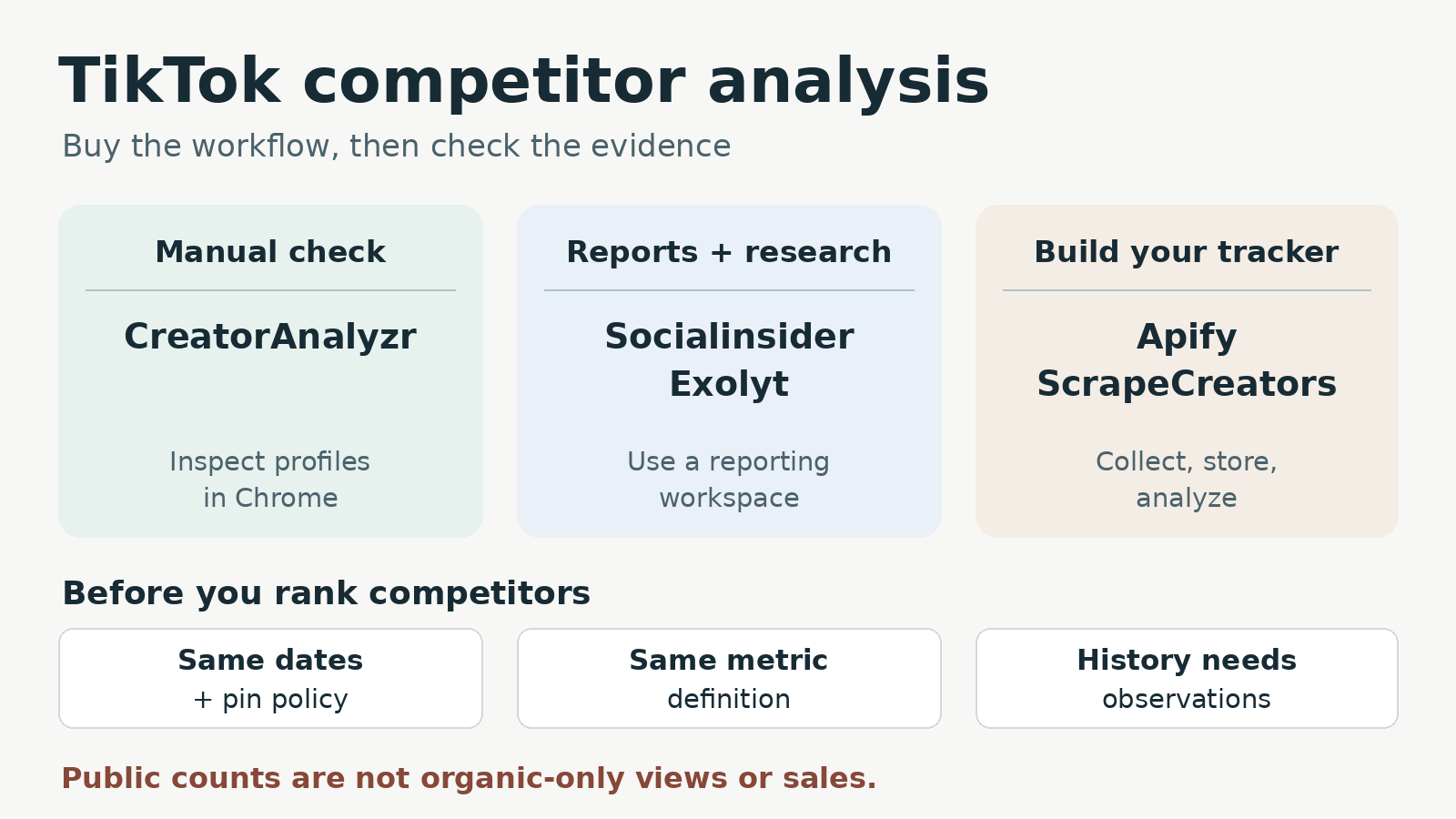
The best TikTok competitor analysis tools depend on the work you want to avoid. Choose CreatorAnalyzr for a browser spot check, Socialinsider for recurring competitor reports, or Exolyt for a TikTok-focused research workspace. Choose Apify for scheduled datasets you will analyze yourself. Choose ScrapeCreators for public profile and video records inside your own tracker. Neither data collector replaces a finished reporting dashboard.
I build ScrapeCreators. For a marketer who needs a report this week, I would start with a reporting tool, not an API project.
We checked prices, plan gates, documentation, and our API examples on October 27, 2026. We did not buy every subscription or run a vendor accuracy benchmark.
Compare the five options
| Tool | Best fit | Price or billing unit checked today | Main tradeoff |
|---|---|---|---|
| CreatorAnalyzr | Manually inspect a few public profiles in Chrome | Free: three profile analyses daily; Pro: $9/month or $49/year | Full Excel export and engagement trends are paid features |
| Socialinsider | Recurring competitor comparisons and reports | Adapt: $99/month, 20 social accounts, one seat | Three-month post-history allowance; check exact account support |
| Exolyt | TikTok account, hashtag, and listening research | Essentials: $400/month, 50 tracked accounts | Sentiment analysis belongs to Advanced, not Essentials |
| Apify’s Clockworks TikTok Scraper | Scheduled collection with dataset exports | Free-plan result event: $3.70/1,000 results, plus applicable events | You still define the comparisons, history, and alerts |
| ScrapeCreators | A custom tracker using REST responses | $47 buys 25,000 prepaid credits | You build storage, scheduling, and reporting; feeds can omit posts |
These prices buy different things. A seat in an analytics workspace, a returned Actor result, and an API page request are not interchangeable units.
Decide what you need to compare
Start with one deliverable: a quick account review, a recurring client report, or a dataset for software you maintain. Then name the accounts and date range.
A marketer in this public TikTok analytics discussion wanted keyword discovery, video outliers, comment analysis, and performance alerts together. Those are separate jobs. Buying a tool that displays a profile’s current totals does not establish that it can monitor changes or search every conversation.
For this list, competitor analysis means comparing public account content and available engagement. It does not mean discovering a rival’s private watch time, conversion rate, ad spend, or TikTok Shop revenue. Keep ads research separate too: our TikTok ads scraper comparison covers that different buying decision.
Before a trial, write down:
- The exact competitor handles, including a smaller creator if that matters to your work.
- The required output: a report, spreadsheet, dataset, or API response.
- Whether you need published posts from the past or observations of how their metrics changed over time.
- Which action follows a finding: review a creative, send an alert, or brief the content team.
A tool can be good at one of these and a poor fit for another.
1. CreatorAnalyzr for manual profile checks
CreatorAnalyzr is a Chrome extension for inspecting public TikTok profiles on the page. Its workflow is manual: visit a profile, examine its video grid and analytics, then move to another account.
The free plan lists three profile analyses per day, basic statistics for the top three videos, and time ranges up to three months. Engagement trends, per-video engagement rates, and the full video list with Excel export are not included in Free. Those items remain visible in the pricing grid, but their icons mark them as unavailable.
Pro costs $9 on monthly billing. The annual option is $49 billed for the year, not a $4 monthly purchase. It adds unlimited profile analyses, more time-range options, trend views, and Excel exports, according to the current page.
CreatorAnalyzr defines its view-based engagement calculation using likes, comments, shares, and saves divided by views. That definition matters when another tool uses likes plus comments divided by followers. Two percentages with different denominators should not sit in the same ranking column.
Choose it if you want a low-commitment way to review individual profiles while browsing. The vendor says a TikTok login is unnecessary for public profiles; we reviewed that claim, not an installed-extension test.
Choose something else if you need an unattended watchlist or client-report delivery. Its advertised all-time range is also not proof of a complete archive. Ask how many posts loaded for your exact account and inspect the exported rows before trusting a period total.
2. Socialinsider for recurring competitor reports
Socialinsider’s TikTok product centers on comparisons, posting patterns, top content, and reporting. Its current copy specifically describes TikTok business profiles. If your watchlist includes personal creators, verify those exact handles during the trial rather than assuming every profile type behaves the same.
The current monthly plans are Adapt at $99, Optimize at $149, and Predict at $239. Adapt lists 20 social accounts, one seat, ten monthly profile replacements, and three months of historical post metrics. Higher plans list six and twelve months respectively.
Socialinsider counts social accounts across networks. One company’s TikTok and Instagram accounts are two accounts, not one company slot. Price your real watchlist, including your own accounts.
The page lists competitor benchmarking, automated reports, and unlimited exports across plans. API access is a separate $100/month add-on. Do not buy the dashboard expecting its subscription to include that integration automatically.
Choose it if your deliverable is a recurring comparison that colleagues or clients can read without opening raw JSON. This is my default shortlist option for reporting, subject to account coverage.
Check before paying: export one competitor’s posts, compare the dates with the chosen window, and ask what historical follower data actually exists. A three-month allowance for post metrics does not by itself explain when daily follower observations began. Annual billing also changes the displayed monthly equivalent; compare the actual commitment, not the smaller headline alone.
3. Exolyt for a TikTok research workspace
Exolyt’s brand-comparison feature covers side-by-side TikTok accounts, industry context, and competitor videos. It makes more sense when TikTok itself is a substantial research channel, rather than one line in a multi-network client report.
The pricing page separates three levels:
- Basic is free, with one tracked account, seven days of chart history, and one data update daily.
- Essentials is $400/month, with 50 tracked accounts, 90 days of chart history, three social-listening projects, and two updates daily.
- Advanced is $950/month, with 300 tracked accounts, at least one year of chart history, 15 listening projects, and six updates daily.
Annual billing advertises lower monthly equivalents, $330 for Essentials and $790 for Advanced. The monthly prices above do not require that annual comparison.
Essentials includes video comments, but sentiment analysis and video transcriptions are listed under Advanced. The comparison grid marks basic CSV and historical CSV exports as available on paid plans, not Basic. The page also shows CSV credits for Basic despite those export exclusions, so confirm the exact export entitlement rather than treating the credit number as access permission.
Choose it if your team needs TikTok account comparisons alongside hashtags, comments, and listening projects. Its larger allowance and research scope may justify the price when several people use the workspace.
Choose something cheaper if you only need to inspect a couple of profiles. Also distinguish update cadence from real-time alerts. Two scheduled data updates per day do not promise an immediate notification when a video takes off.
4. Apify for scheduled competitor datasets
Clockworks’ TikTok Scraper on Apify accepts profiles as one of its input paths and exports structured results. Apify provides the run and dataset workflow; you decide how those rows become a competitor report.
That division is useful for a team already working with spreadsheets, integrations, or a warehouse. You can retain repeated collections and build comparisons without maintaining the TikTok scraper yourself. It is not the same purchase as a dashboard with a ready-made performance interpretation.
Read the Actor’s pricing tab, not just its lowest advertised rate. The result event costs $3.70 per 1,000 on Free, $3.00 on Starter, $2.30 on Scale, and $1.70 on Business. Paid plans start at $19, $199, and $999 per month respectively, with spend included in the plan.
A run also has a $0.001 Actor-start event. Date filters, popularity filters, country selection, comments, and other options have separate listed events. Check the input schema and selected billing events together before enabling extras. A narrow date filter can change the bill rather than merely reduce it.
Choose it if you want scheduled collection and downloadable datasets, and someone on your team owns the analysis layer.
Choose a dashboard instead if nobody will maintain account identity, deduplication, repeated observations, and alert rules. Ask for a sample collection from your watchlist; neither a result cap nor a completed run proves every relevant post was retrieved.
5. ScrapeCreators for a custom public-data tracker
ScrapeCreators’ TikTok API fits developers who want public records through a consistent REST interface. The profile endpoint returns account information and current counts. The profile-video endpoint returns video IDs, captions, publication dates, available engagement statistics, and pagination fields.
On October 27, we requested Duolingo’s profile, two pages of its videos, and one Ryanair video page. All four requests succeeded and each charged one credit. The Duolingo pages returned nine and ten videos, with no overlapping IDs. Ryanair returned seven. Every video page still indicated more results.
Those are bounded observations, not an archive-completeness or reliability benchmark. The feed’s documented availability limits are important: posts can be missing even after full pagination, and changing region does not guarantee completeness. Keep known campaign post URLs separately instead of depending on feed rediscovery.
We requested include_pinned=false to avoid injecting pinned posts into a latest-feed comparison. Filtering pins can shorten a page or leave it empty. Successful pages still cost one credit, including empty ones. Follow has_more and the returned max_cursor; do not assume a short page is the end.
Repeat region, sort_by, include_pinned, and trim on subsequent requests. A cursor does not carry those options forward. Restart the cursor chain if you change the region or sorting context.
The prepaid pricing starts at $47 for 25,000 credits. That buys API usage, not a report subscription. You provide the scheduler, storage, historical observations, alert delivery, and analysis. If that is your plan, create an account and start with a small watchlist. If you only need public account enrichment, the TikTok profile-scraper comparison is the narrower guide.
Export a bounded competitor snapshot
This Python example requests one page for each of two accounts and writes a CSV. It preserves missing counts as blank cells and keeps collection time separate from publication time. It does not install a monitor, fetch a complete date window, or calculate historical growth.
import json,csv,os,urllib.parse,urllib.request
from datetime import datetime,timezone
from pathlib import Path

rows=[]
seen=set()
for handle in ['duolingo','ryanair']:
    params={'handle':handle,'region':'US','sort_by':'latest',
            'include_pinned':'false','trim':'true'}
    request=urllib.request.Request(
        'https://api.scrapecreators.com/v3/tiktok/profile/videos?'
        +urllib.parse.urlencode(params),
        headers={'x-api-key':os.environ['SCRAPE_CREATORS_API_KEY']})
    with urllib.request.urlopen(request,timeout=45) as response:
        data=json.load(response)
    if data.get('success') is not True or not isinstance(data.get('aweme_list'),list):
        raise RuntimeError('No usable video page for '+handle)
    observed_at=datetime.now(timezone.utc).isoformat()
    Path(handle+'-response.json').write_text(json.dumps(data,indent=2))
    for video in data['aweme_list']:
        video_id=video.get('aweme_id')
        if not video_id or (handle,video_id) in seen:
            continue
        seen.add((handle,video_id))
        stats=video.get('statistics') or {}
        row={'handle':handle,'video_id':str(video_id),
             'url':video.get('url'),'caption':video.get('desc'),
             'published_at':video.get('create_time_utc'),
             'observed_at':observed_at}
        for field in ['play_count','digg_count','comment_count','share_count','collect_count']:
            row[field]=stats.get(field)
        row['is_ad']=video.get('is_ad')
        rows.append(row)
    print(handle,'rows',len(data['aweme_list']),'credits',data.get('credits_charged'),
          'more_pages',bool(data.get('has_more')))
if not rows:
    raise RuntimeError('No rows to export')
with open('tiktok-competitor-snapshot.csv','w',newline='') as file:
    writer=csv.DictWriter(file,fieldnames=list(rows[0]))
    writer.writeheader()
    writer.writerows(rows)
print('Saved',len(rows),'unique handle/video rows. This is not a complete export.')
We executed this exact example separately from the fixture checks: it saved 16 unique handle/video rows across two successful requests, costing two credits. Both responses had more pages. Do not compare those first-page row counts as each brand’s total posting frequency.
For a recurring system, retain each observation instead of overwriting yesterday’s counts. A video published last month with a count collected today is not a record of its views last month.
Five checks before ranking competitors
| Check | What to require | What to reject |
|---|---|---|
| Same cohort | The same publication window, content types, and pin policy | One account’s first page against another’s full archive |
| Same metric | The exact numerator, denominator, and missing-value rule | Comparing view-based engagement with follower-based engagement |
| Same observation age | Comparable time since publication and collection timestamps | Calling a new video’s lower lifetime views a creative failure |
| Traceable history | Saved observations or a clearly described historical source | Inferring follower growth from today’s count |
| Honest attribution | Public observations, estimates, and paid signals kept distinct | Labeling all visible views organic or converting them into sales |
For creative research, I would inspect an account’s typical posts as well as its biggest hit. Keep the sample size visible, compare posts of similar age, and read the actual creative before proposing an explanation.
One Duolingo page in our check included videos with is_ad=true. That field is a reason to investigate distribution, not a breakdown of paid versus organic views. Our response did not provide a competitor’s spend or conversions. Treat an absent or false flag cautiously too; it does not establish that every view was unpaid.
The same discipline applies to AI summaries. Give the model the source rows, collection times, and missing-data notes. Ask it to separate observations from explanations. If it says a hook caused better results, require evidence beyond a correlation in public counters.
Questions before you commit
What is the best free TikTok competitor analysis tool?
CreatorAnalyzr is a practical manual starting point if three daily profile analyses and limited video statistics are enough. Free does not include its full Excel export or engagement-trend features. A free spot check is different from continuous monitoring.
Can I track a competitor’s historical follower growth?
Only if the provider has historical observations or a disclosed alternative source. A current profile count cannot reconstruct previous daily counts. Ask for the earliest populated observation date, not just the maximum selectable chart range.
Can I see a competitor’s TikTok watch time or conversion rate?
Our public-data workflow does not return those private performance metrics. Do not infer them from views, likes, or shares. A dashboard claiming additional metrics should explain the source and whether they are authorized, estimated, or observed publicly.
Should I use an API or a TikTok competitor dashboard?
Buy a dashboard when you need comparisons and recurring reports without maintaining software. Choose an Actor or API when you need the underlying records and can own collection, storage, and analysis. An older TikTok-to-Sheets monitoring walkthrough makes that extra workflow visible; its old provider links and prices should not guide a current purchase.


