
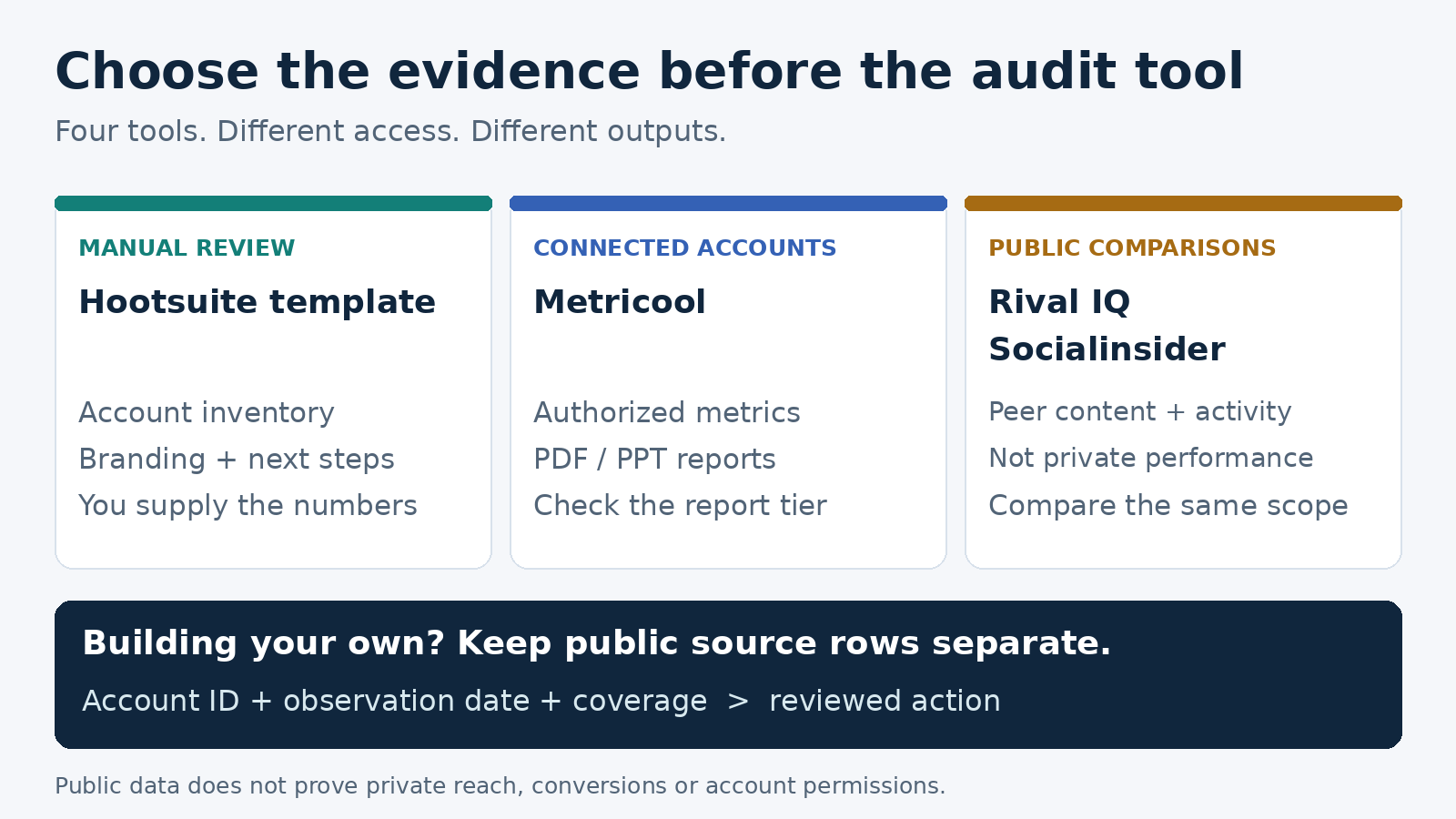
For a first social media audit, use Hootsuite’s free template if you already have the numbers, Metricool if you manage the accounts and need a report, Socialinsider if competitor benchmarking is central, or Rival IQ for a free public head-to-head check. These solve different parts of the job. A public profile report cannot tell you private reach, saves, conversions, or who controls an account.
I run ScrapeCreators. It can supply public evidence for a custom audit, but it is not a finished audit dashboard. I keep that builder option separate below. Product details and prices were checked on November 15, 2026.
Pick the tool by the evidence you need
A social media audit should leave you with a decision: what to fix, what to keep, and what to measure next. Before buying software, write down whether you have permission to connect the accounts, the period you need to review, and who will use the result.
| Tool | Choose it for | Price and purchase unit checked November 15, 2026 | Important boundary |
|---|---|---|---|
| Hootsuite audit template | A one-off account inventory and action plan | Free resource, with a contact form | You collect the evidence; the template does not connect accounts |
| Metricool | An audit of accounts you manage, with a downloadable report | Free dashboard; Starter from USD 25/month for up to 5 brands on monthly billing | PDF/PPT downloads start on Starter; customizable report templates start on Advanced |
| Socialinsider | Comparing your content with a defined group of competitors | Adapt USD 99/month on monthly billing, 20 social accounts | Three months of historical post metrics on Adapt is not three months of every metric |
| Rival IQ free reports | A public account-versus-competitor spot check | Free head-to-head reports | A narrow public comparison, not private account analytics or an access audit |
A brand and a social account are different billing objects. Metricool groups a business’s connected profiles into a brand. Socialinsider counts social accounts. Neither is directly comparable with the API requests used in a custom collection job.
1. Hootsuite audit template for a manual first pass
The Hootsuite social media audit template is where I would start for a small business that has never documented its accounts. Its current audit guide covers account discovery, branding, performance, competitors, audience, and governance. That is a wider job than ranking posts by likes.
Use the template as the place where evidence comes together. List each profile’s URL, purpose, responsible person, current access, and the next decision. Review bios, banners, campaign links, and old accounts manually. Add authorized native exports when you need private performance data.
The resource is free, but not an anonymous direct download. On the verification date, the form asked for a business email, name, company, company size, industry, country, and role. Its notice also describes marketing communications. I inspected that gate without submitting contact details or downloading the gated file.
Choose this if the audit is a one-off handover, you already have native reports, or the main problem is neglected profiles and unclear ownership. Choose a connected tool if you would otherwise spend the whole day copying metrics.
Do not confuse the free resource with a free Hootsuite software subscription. The template also cannot confirm account permissions, enforce approvals, or archive content simply because you added a governance column. Someone still has to check those systems.
2. Metricool for accounts you manage
Metricool is the practical pick when you can connect the business’s accounts and want the data collection and report in one workspace. Its pricing page makes an important distinction between viewing analytics and handing someone a finished report.
Free includes one brand and 30 days of analytics access. The comparison grid marks PDF/PPT report downloads as unavailable on Free and available on Starter. Customizable report templates require Advanced or Custom. A free dashboard is therefore not the same purchase as a branded client deliverable.
For USD monthly billing, Starter begins at USD 25/month for up to five brands. The annual-billing display starts at USD 20/month, so do not quote that as the cancel-monthly price. Advanced begins at USD 67/month for up to 15 brands on monthly billing. Prices exclude applicable tax.
Choose Starter when a standard report covers your review. Consider Advanced when client handling or template customization is part of the job. Check the exact network and metric before promising history. The plan’s storage allowance does not prove that every network can backfill every metric before connection.
There is also a separate free audit template behind an email form. In the official walkthrough, the working sections collect account and competitor data before shaping the audit. A viewer asked about the template’s platform requirement; Metricool’s reply confirmed that it lives in Notion and can use a free Notion account. That matters if your client only works in spreadsheets.
The limitation is scope. A connected report helps with performance, but it does not replace the account inventory, link checks, access review, or business context. Add those to the handoff rather than calling a downloaded PDF the whole audit.
3. Socialinsider for a competitive content audit
Socialinsider fits an audit where the central question is how your content compares with a specific peer group. It is a better match for a marketing team that wants a benchmarking workspace than for someone who needs one free checklist.
The current pricing page lists Adapt at USD 99/month on monthly billing, with 20 social accounts, one seat, three months of historical post metrics, and 10 monthly profile replacements. Optimize lists six months of post history; Predict lists 12 months. The page says all plans include competitor benchmarking, automated reports, and unlimited exports.
Budget the peer group before buying. Each platform account consumes part of the account allowance; a competitor with several profiles is not necessarily one slot. Profile replacements also have a monthly allowance, so repeatedly swapping prospects in and out is a different workload from reviewing a stable group.
Keep historical posts separate from historical followers. Socialinsider’s pricing explanation says Facebook follower data is available from the day the profile is added. An older post archive cannot reconstruct that missing follower series.
API access and Looker Studio access are each listed as USD 100/month add-ons, in addition to the plan. You do not need either just to compare content in the workspace, but they matter if your audit must flow into your own reporting system.
Choose Socialinsider when comparative content evidence is the main deliverable. Choose a template for a small manual review, or an authorized reporting tool when the deciding question depends on private account metrics. Public competitor engagement does not reveal a competitor’s sales or campaign profitability.
4. Rival IQ for a free public comparison
Rival IQ’s free tools are a sensible starting point before paying for a larger competitive workspace. The Instagram head-to-head form asks for your company’s and a competitor’s Instagram business profile. It describes activity, engagement, follower counts, and top posts.
I opened its publicly linked Nordstrom-versus-Bloomingdale’s sample report in a browser on November 15. It rendered a report labeled October 31-November 14, 2026, with posting activity, engagement, audience totals, and linked top posts. I did not generate a new custom report, verify its calculations, or test a paid account.
That makes it useful as a public comparison, not proof of every part of an audit. The sample’s audience section contains follower totals and ratios. Do not read the word “audience” as access to private age, location, retention, or conversion reports.
There was also a retrieval difference worth noting: a plain HTTP fetch of the form page included an old maintenance message, while the browser showed the form and the sample report loaded. Check your actual profiles before making a client deadline depend on a free tool.
Choose Rival IQ for an initial public peer check. Use a connected report for private performance, and keep a separate account-owner checklist. A strong rival report can still miss your most urgent issue: nobody on the current team controls the old account.
A public-data companion for custom audits
If your agency builds its own audit, ScrapeCreators’ YouTube API can provide a public evidence packet. I would use it for known account identity, public profile links, and a bounded set of video URLs to review. I would not use it to fill missing private metrics with guesses.
The channel details endpoint accepts a handle, channel ID, or URL. The channel videos endpoint supplies paginated video records. Our current pricing starts at USD 47 for 25,000 prepaid credits. In the executed example below, each of the two requests cost one credit. That is consumed request cost from a prepaid balance, not the purchase price of an audit report.
Apify is another collection route. Its Social Media Stats Checker gathers public profile statistics into a dataset. Inspect the exact Actor’s input requirements: its current schema includes an Instagram session-cookie field. Do not assume every marketplace collector is account-free or that profile statistics constitute a full audit. I did not run that Actor.
This Python example uses only the standard library. It saves a custom JSON file, not a native audit report. The wrapper names such as reporting_period and more_video_pages are our file format, not extra API response fields.
import json
import os
from datetime import datetime, timezone
from pathlib import Path
from urllib.parse import urlencode
from urllib.request import Request, urlopen

BASE = "https://api.scrapecreators.com"
KEY = os.environ["SCRAPE_CREATORS_API_KEY"]
HANDLE = "mkbhd"


def get(path, params):
    request = Request(
        BASE + path + "?" + urlencode(params),
        headers={"x-api-key": KEY},
    )
    with urlopen(request, timeout=60) as response:
        data = json.load(response)
    if data.get("success") is not True:
        raise RuntimeError("Public-data request did not succeed")
    return data, datetime.now(timezone.utc).isoformat()


profile, profile_observed_at = get("/v1/youtube/channel", {"handle": HANDLE})
channel_id = profile.get("channelId")
if not channel_id or profile.get("handle", "").lower() != "@" + HANDLE.lower():
    raise RuntimeError("Channel identity needs review")

feed, feed_observed_at = get(
    "/v1/youtube/channel-videos", {"channelId": channel_id, "sort": "latest"}
)
rows = feed.get("videos")
if not isinstance(rows, list) or not rows:
    raise RuntimeError("No usable video rows; do not call this a completed audit")

videos = {}
for row in rows:
    if not row.get("id") or row.get("channel", {}).get("id") != channel_id:
        raise RuntimeError("Video identity needs review")
    videos[row["id"]] = {
        field: row.get(field)
        for field in ("id", "url", "title", "viewCountInt", "publishedTime", "publishDate")
    }

packet = {
    "scope": "Public channel details and one latest-video page, not a full audit",
    "reporting_period": None,
    "profile_observed_at": profile_observed_at,
    "feed_observed_at": feed_observed_at,
    "requested_handle": HANDLE,
    "channel": {field: profile.get(field) for field in (
        "channelId", "handle", "name", "subscriberCount", "videoCount", "viewCount", "links"
    )},
    "source_rows_returned": len(rows),
    "unique_video_rows_saved": len(videos),
    "more_video_pages": bool(feed.get("continuationToken")),
    "credits_charged": profile["credits_charged"] + feed["credits_charged"],
    "videos": list(videos.values()),
}
Path("public-audit-evidence.json").write_text(json.dumps(packet, indent=2), encoding="utf-8")
print(json.dumps({key: packet[key] for key in (
    "source_rows_returned", "unique_video_rows_saved", "more_video_pages", "credits_charged"
)}))
I ran this exact code on November 15, 2026. Both requests returned HTTP 200. It saved 30 unique video rows, charged two credits, and left more video pages available. This is one page from one public channel, not a complete channel export or a cross-platform audit.
The two publication fields differed on all 30 rows. publishedTime can reflect relative-date normalization, while publishDate contains a more specific timestamp in these responses. The file preserves both. I did not use them to claim a complete 30-day publishing window, and the current video view counts are not views earned during that window. reporting_period stays null deliberately.
Separate fixture requests for MKBHD and Linus Tech Tips also returned channel details and 30-row video pages. Those checks show usable public records at that moment, not private-account access, historical completeness, accuracy of every counter, or a reliability benchmark. The backend currently hydrates video details even when includeExtras=false; do not rely on that flag to guarantee a lightweight request.
For a custom packet, create an API account and keep the evidence separate from your recommendations. If you need a finished dashboard, choose one of the reporting tools above instead. The YouTube reporting comparison explains the authorized-report lane; the YouTube competitor research guide covers ongoing peer analysis rather than a one-time audit.
What to require before accepting an audit
My acceptance checklist is simple enough to use on a free trial:
- Identity: Does every section point to the right business and platform account? Keep the stable account ID as well as the handle.
- Access: Label evidence as public, owner-authorized, or manually confirmed. A screenshot is not proof that your team can administer an account.
- Dates: Write down the requested review period, actual coverage, retrieval time, and whether each metric is a current total or period activity.
- Delivery: Open the actual output in the client’s workflow. Check download permissions, required software, and whether a shared link exposes information beyond the intended audience.
- Decision: Give each recommendation supporting evidence, a responsible person, a next step, and a review date. Leave unsupported findings unresolved.
The access boundary came up repeatedly in the research. An older Reddit audit-tools discussion explicitly asks for affordable tools without account logins. Comments on the YouTube walkthroughs ask whether a prospective client’s username is enough and whether templates still exist. Those are buying questions, not evidence that a vendor has failed or that a commenter verified a capability.
I read four complete audit walkthrough transcripts and inspected questions and replies alongside Reddit discussions. TikTok discovery also surfaced many AI-dashboard demonstrations. I treated those as prompts to ask what data actually entered the system, not proof that AI had access to private analytics.
Before giving an AI tool an audit packet, remove unnecessary personal information and secrets. Ask it to cite the source row for each finding and label missing evidence. Do not let it invent audience demographics, bot percentages, revenue, or access permissions from a public profile.
Only the public API example and Rival IQ’s existing browser sample were exercised here. Other feature and price comparisons come from the vendors’ current primary pages. I did not buy plans, connect client accounts, submit lead forms, or benchmark report accuracy. Start with the smallest tool that can produce the evidence your next decision needs.
FAQ
What is the best social media audit tool for a small business?
Start with a free audit template and authorized native exports if you only need a one-off review. Metricool fits connected-account reporting, Socialinsider fits competitive content benchmarking, and Rival IQ fits a free public head-to-head check. Choose by access and deliverable rather than the longest feature list.
Can I audit social media without an account login?
You can review public profiles, links, content, and visible engagement without owner authorization. That does not give you private reach, saves, retention, conversions, or administrative permissions. Mark those sections unavailable until the owner supplies an authorized report or access.
Are free social media audit tools enough?
They can be enough for a small manual inventory or public spot check. Confirm the actual output before committing: a free dashboard may exclude report downloads, and a free template may require an email form or another application. Your review still needs evidence, decisions, and someone responsible for the changes.
Can AI perform a complete social media audit?
AI can help organize supplied evidence and draft findings. It cannot make missing analytics or account permissions real. Require traceable source rows, explicit coverage dates, and human review before presenting conclusions to a client.