
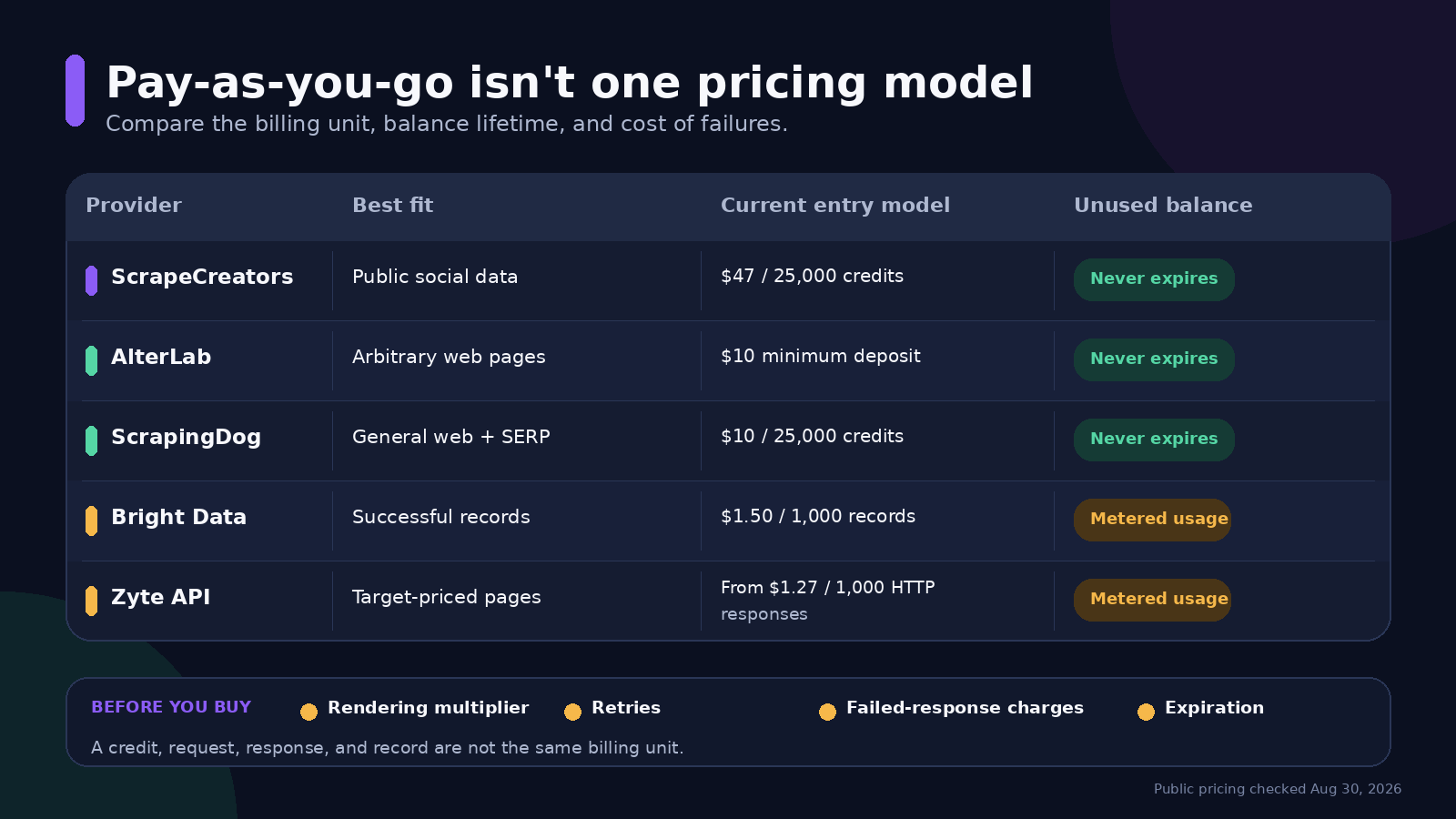
A pay-as-you-go scraping API is best when your usage is irregular and you do not want a monthly minimum. For public Instagram, TikTok, YouTube, Facebook, Reddit, and other social data, I would use ScrapeCreators. For arbitrary websites, start with AlterLab or ScrapingDog. Bright Data and Zyte make more sense when you want metered usage tied to successful records or target-specific responses.
I run ScrapeCreators, so treat that recommendation as a founder’s recommendation, not a neutral award. I checked every pricing page in this guide on August 30, 2026. I also called one ScrapeCreators endpoint, but I did not run a controlled reliability benchmark across all five providers.
Quick comparison
“Pay as you go” does not describe one billing model. Some vendors sell prepaid credits. Others meter successful records or responses and bill the usage. Those are different products, even when the pricing pages use the same phrase.
| API | Best for | Current entry model | Unused balance | Main catch |
|---|---|---|---|---|
| ScrapeCreators | Public social profiles, posts, comments, search, transcripts, and ads | 100 free credits, then $47 for 25,000 | Purchased credits never expire | Not an arbitrary-website scraper; some endpoints use more than one credit |
| AlterLab | Arbitrary public web pages with automatic request routing | 5,000 free requests, then a $10 minimum deposit | Balance never expires | The request tier selected for a URL changes its cost |
| ScrapingDog | General web, Google search, and several structured APIs | 200 free credits, then $10 for 25,000 pay-as-you-go credits | Pay-as-you-go credits never expire | Its monthly subscriptions have a lower unit price, and pay as you go cannot run alongside a subscription |
| Bright Data Web Scraper API | Buyers who prefer billing by successfully delivered record | 5,000 records per month free, then $1.50 per 1,000 records | Metered usage, not a prepaid balance | A record is not the same unit as a page request |
| Zyte API | General web retrieval with target-specific pricing | $5 trial credit; pay as you go from $1.27 per 1,000 HTTP responses | Metered usage, not a prepaid balance | Browser-rendered responses start higher, and the exact site changes the quote |
The table is not a reliability ranking. It is a billing and product-fit comparison. A social profile returned as structured JSON is not directly comparable to raw HTML, a rendered page, or one record from a collector.
What pay as you go should mean
A useful pay-as-you-go offer answers six questions without a sales call:
- Is there a recurring minimum?
- What exactly uses one billing unit?
- Does browser rendering or a premium route use more units?
- Do failed, blocked, empty, or cached responses cost anything?
- Does an unused balance expire?
- Can you set a spend limit before an automation loops?
This distinction matters because several popular scraper products are usage-based only after you buy a monthly plan. As checked on August 30, ScraperAPI starts at $49 per month, ScrapingBee starts at $49 per month, Firecrawl’s paid plans start at $16 per month when billed yearly, and Apify’s Starter plan is $29 per month plus usage. These can still be good products. They just do not solve the same “buy once and come back in three months” problem.
The audience questions were consistent across the public sources I reviewed. People asked whether the tool works on dynamic sites, how it handles Cloudflare and other bot protection, whether it can follow subpages, and what happens when a cheap request returns stale or incomplete data. Those questions changed this guide. The comparison now puts billing units and failure rules ahead of headline credit counts.
Five pay-as-you-go scraping APIs
1. ScrapeCreators for public social data
ScrapeCreators is the best fit here when the input is a public social profile, post, video, comment thread, search query, transcript, or ad. It returns structured objects instead of making you parse the platform’s HTML yourself.
New accounts get 100 free credits with no card. The $47 pack contains 25,000 credits, which is $1.88 per 1,000 one-credit requests. The $497 pack contains 500,000 credits, or about $0.99 per 1,000 one-credit requests. Most endpoints use one credit, but some use more. The exact amount is shown in the docs.
Purchased credits never expire. There is no account-level rate or concurrency cap, although the current guidance is to stay below 500 concurrent requests for the best reliability. A valid cache hit costs zero credits; a cache miss uses the endpoint’s normal price.
The limitation is deliberate. ScrapeCreators does not accept any random website and return the page. It covers supported public social and data platforms. Choose another provider if your job is crawling stores, job boards, publisher sites, or a mixed list of arbitrary domains.
You can review the API introduction, compare the wider social media API shortlist, or start with the free credits.
2. AlterLab for arbitrary pages without an expiring balance
AlterLab is the cleanest current example of prepaid general-web scraping. Its pricing page says there is no subscription, the balance never expires, and the minimum deposit is $10. It also advertises 5,000 free requests.
The interesting part is its router. AlterLab assigns a request tier based on the target rather than forcing every URL through the most expensive browser or proxy setup. That can reduce waste on easy pages. It also means the smallest advertised request price is not a quote for every target.
Pick AlterLab if you need arbitrary public pages and want to fund an account only when a project is active. Before committing, run the exact URLs you care about and record which tier each one uses.
3. ScrapingDog for occasional general scraping and search
ScrapingDog’s pay-as-you-go offer starts at $10 for 25,000 credits. Its pay-as-you-go credits do not expire, and the product page says failed requests are not charged. The current free tier has 200 credits.
There is an honest tradeoff on ScrapingDog’s own page: subscriptions are at least 50% more economical than its pay-as-you-go rate. Pay as you go is for freelancers, tests, and irregular jobs. Steady production traffic should be compared with the monthly plans. You also cannot use a pay-as-you-go balance and a subscription at the same time.
This is a sensible option when the target list mixes normal websites with Google search or one of ScrapingDog’s structured APIs. Check the credit cost of the exact endpoint because one credit is not guaranteed to equal one result.
4. Bright Data when a delivered record is the billing unit
Bright Data’s Web Scraper API currently has a pay-as-you-go rate of $1.50 per 1,000 records. Its page says you pay for what is successfully delivered, failed deliveries are not charged, and you can set monthly spend limits. The free offer includes 5,000 records per month without a card.
This model is attractive when a collector returns a clear set of records and you would rather not pay for failed delivery attempts. It is also easier to take through enterprise procurement than a small prepaid tool.
Do not compare the $1.50 figure directly with a price per 1,000 requests. One request may return several records, one record, or nothing, depending on the collector. Bright Data is also a much broader platform than most small projects need.
5. Zyte API for target-specific response pricing
Zyte API prices successful responses by the website and retrieval mode. Its current public table shows pay-as-you-go pricing from $1.27 per 1,000 HTTP responses and $16.08 per 1,000 browser-rendered responses. The trial includes $5 of credit and does not require a commitment or subscription.
That target-specific model is more honest than pretending an easy static page and a difficult rendered page cost the same amount. It also makes a generic cost comparison less useful. Put representative URLs into Zyte’s calculator and separate plain HTTP from browser-rendered traffic before estimating a bill.
Zyte is a natural fit for Scrapy teams and mixed-domain crawling. It is overkill if you only need a normalized TikTok profile or YouTube transcript.
Calculate cost per usable result
The sticker price is not the number that should decide the purchase. Use this instead:
Effective cost per usable result = total money spent / responses that contain the expected data
Count a response as usable only when it passes a small contract check. For example, an HTTP 200 page containing a CAPTCHA, login shell, empty list, or stale cached object should not count as success just because the transport worked.
Before buying a large pack, take ten representative inputs and record:
- the billing units charged for each input
- whether rendering or a premium route multiplied the charge
- retries and blocked responses
- valid items or records returned
- response time and pagination behavior
- the fields your application still has to normalize
This is also where pay as you go can lose to a monthly plan. If the workload is steady and every request uses the same route, a subscription discount may cost less. Prepaid credits are most useful when demand spikes, pauses, or has not been proven yet.
Managed API or build it yourself?
A free scraper can be the right answer for a stable site and a small job. The n8n walkthrough I reviewed shows a practical way to fetch HTML and use generated JavaScript for extraction without paying an API on every run.
The comments exposed the boundary quickly. Viewers asked about dynamic pages, recursive crawling, cookie prompts, proxies, and sites that block automation. A separate web scraping discussion covered browser and TLS fingerprints, JavaScript apps, retries, and the maintenance burden. Its comment threads repeated the same concern: a scraper can fail silently by returning plausible but wrong data.
Reddit discussions on the build-versus-buy cutoff and small self-service APIs added a useful rule. Split by target difficulty, not only volume. Keep easy, stable sources in house. Pay for the hostile retrieval layer when browser state, proxies, CAPTCHAs, and monitoring become their own product.
TikTok comments on a 90-second scraper API demo were less interested in setup speed than bot protection, large-site crawling, and whether the same approach worked on Facebook. These are anecdotes, not reliability data, but they are good buying questions.
Build it yourself when the target is stable, the parser is simple, and your team can own monitoring. Buy the managed API when missing or stale data costs more than the bill.
Real API request example
I ran this request against the live ScrapeCreators API on August 30, 2026. It searched YouTube in a US context for the primary query used in this guide:
curl --get 'https://api.scrapecreators.com/v1/youtube/search' \
  --header "x-api-key: ${SCRAPE_CREATORS_API_KEY}" \
  --data-urlencode 'query=pay as you go scraping api' \
  --data-urlencode 'region=US' \
  --data-urlencode 'type=videos' \
  --data-urlencode 'sortBy=relevance'
The live response included this first result:
{
  "videos": [
    {
      "id": "aIAPaCl6Dus",
      "title": "Pay As You Go Pricing for Scrapingdog APIs (Usage-Based Model Explained)",
      "url": "https://www.youtube.com/watch?v=aIAPaCl6Dus",
      "viewCountInt": 93,
      "channel": {
        "title": "Scrapingdog"
      }
    }
  ]
}
That call proves the documented request and response shape for one query at one point in time. It is not evidence that every YouTube search or every provider has the same reliability. If you need a broader any-site product comparison, read the web scraping API guide.
Sources and pricing checked
Pricing and product claims were checked against these primary pages on August 30, 2026:
- ScrapeCreators homepage and pricing
- ScrapeCreators credit policy
- AlterLab pricing
- ScrapingDog pay-as-you-go announcement
- ScrapingDog current pricing
- Bright Data Web Scraper API pricing
- Zyte pricing
- Apify pricing
- Firecrawl pricing
- ScraperAPI pricing
- ScrapingBee pricing
Prices, endpoint costs, and credit rules can change. Recheck the provider’s current page with your actual target URLs before moving a production workload.


