
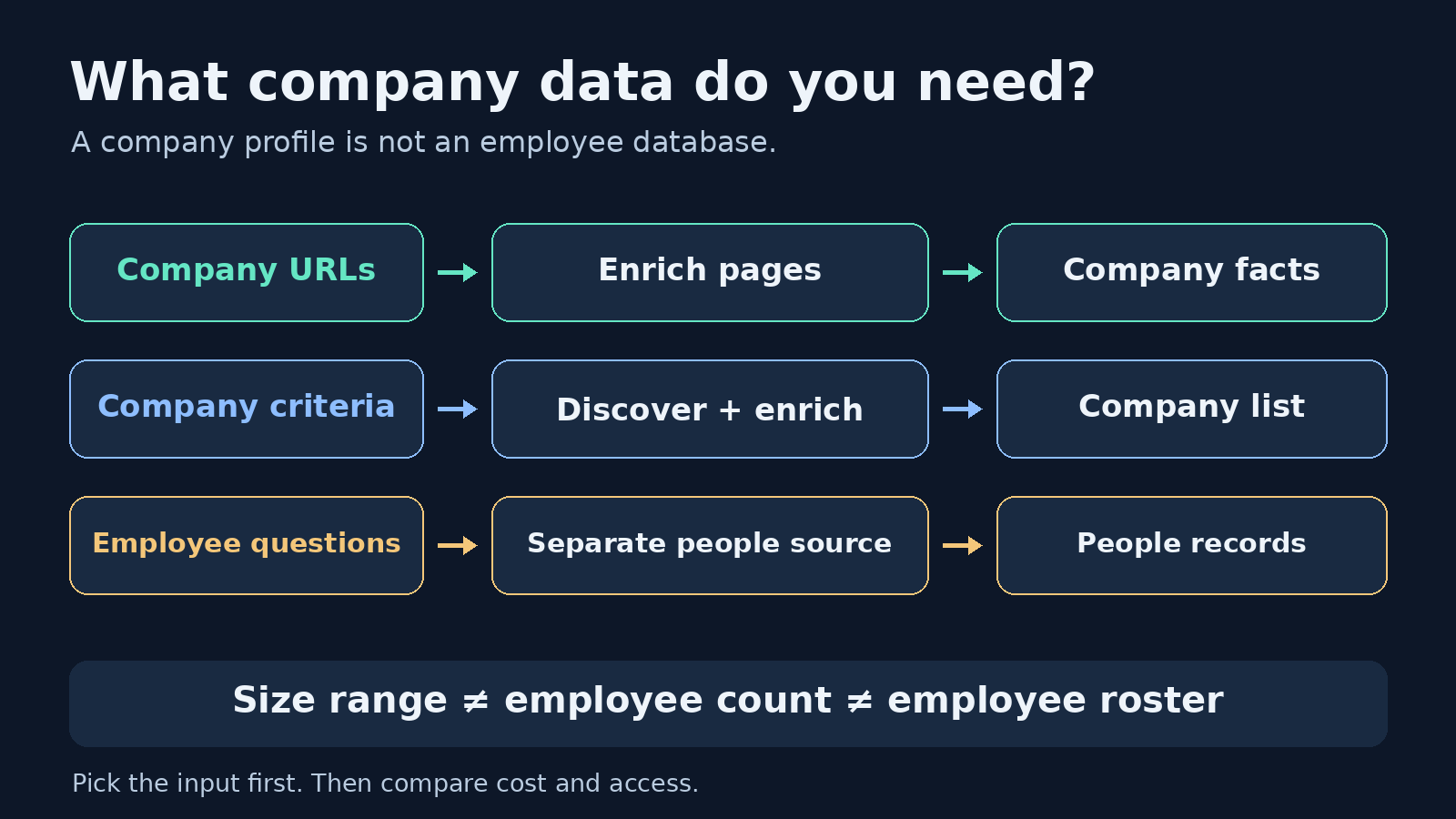
If you already have LinkedIn company URLs, choose ScrapeCreators for a straightforward public-page API, Apify for scheduled batch runs, or Bright Data for larger collection and delivery jobs. PhantomBuster is a better fit for spreadsheet users who accept a connected LinkedIn account. Browse AI suits no-code monitoring; MagicalAPI is worth comparing when you also need company discovery.
The important distinction: a company scraper enriches an organization, not its entire employee roster. This guide compares six options for company-page data. It does not rank email finders, Sales Navigator people exporters, or LinkedIn outreach tools.
Disclosure: I build ScrapeCreators. I recommend it below for known public company URLs, not every LinkedIn workflow. Prices and product documentation were checked on October 3, 2026. We made three live ScrapeCreators company requests; we did not run a cross-vendor performance benchmark.
Choose a scraper by the job you actually have
Before choosing a tool, decide whether you have a list of company URLs or need to find companies first. Those are separate operations. A URL-to-company API will not automatically discover every software company in a city.
| Tool | Choose it if | Input and access | Output or workflow | Billing unit checked October 3, 2026 |
|---|---|---|---|---|
| ScrapeCreators | You already have public company URLs and want JSON in your application | Company URL; API key, no personal LinkedIn cookie in the request | One company record per request | Company endpoint: 1 credit; starter purchase: $10 for 5,000 credits |
| Apify company Actors | You want batch jobs, schedules, and downloadable datasets | Depends on the Actor: URLs, names, search URLs, or cookies | Actor runs and dataset exports | Actor-specific charges plus applicable platform usage; examples below |
| Bright Data | You need a managed collection pipeline or many delivered records | Company URLs, or the vendor’s discovery mode | API collection and batch delivery | Pay-as-you-go page lists $1.50 per 1,000 records |
| PhantomBuster | You want a spreadsheet workflow and can connect LinkedIn | Single URL, CSV, or Google Sheet; connected account | Company enrichment, downloadable CSV, scheduling | Start: $56/month equivalent, $672 billed annually; 20 execution hours/month |
| Browse AI | You want to set up extraction and monitor pages without writing code | Company-page extraction template and configured robot | Structured extraction and scheduled monitoring | Free: 50 credits/month; Personal: $19/month equivalent billed annually, 12,000 credits/year |
| MagicalAPI | You need company search alongside profile retrieval | Company search filters or company-detail inputs | Company search and full profiles | Pay as you go: $5 per 1,000 credits; confirm credits per operation |
A credit, a record, an execution hour, and an Actor run are different units. Do not compare these prices as though every purchase returns the same number of usable company profiles. Browse AI says premium sites can have a minimum of 2 to 10 credits per task. Apify pricing belongs to the particular Actor, not a single universal LinkedIn price.
For the wider set of people, posts, and company tools, see our general LinkedIn scraper comparison. This page goes deeper on the narrower company-enrichment decision.
1. ScrapeCreators for public company URLs in your app
ScrapeCreators’ LinkedIn API is the simplest option here when you know the company page URL and want a JSON response. You send your API key and a URL. You do not send your personal LinkedIn login or session cookie.
The company endpoint documentation lists fields such as name, description, website, industry, size, employee count, followers, headquarters, and specialties. Fields depend on what the public page exposes. A company record is not a guarantee that every field will be present or accurate enough for your downstream decision.
Choose this if you are enriching existing CRM accounts, adding company context to an internal research tool, or refreshing a small approved list. It also works in an n8n HTTP Request node: GET request, x-api-key header, url query parameter.
Choose another tool if you need a ready-made company-search interface, employee email discovery, or an outreach sequence. /v1/linkedin/company takes a company URL, not a query like “fintech companies in Boston.” You handle list scheduling and storage yourself.
The current endpoint costs one credit per successful company fetch. The pricing section lists a $10 purchase for 5,000 credits with no subscription. At that tier, 1,000 successful one-credit company requests cost $2 in credits. That is a calculation for this endpoint, not a price for 1,000 verified contacts or a managed export service.
A real request and a useful response check
Use the named company slug and HTTPS. The current route rejects numeric company IDs, missing URLs, and company /posts/ links.
curl --get 'https://api.scrapecreators.com/v1/linkedin/company' \
  --header "x-api-key: $SCRAPE_CREATORS_API_KEY" \
  --data-urlencode 'url=https://www.linkedin.com/company/notionhq/'
On October 3, 2026, our saved Notion response included this excerpt:
{
  "success": true,
  "name": "Notion",
  "industry": "Software Development",
  "size": "501-1,000 employees",
  "employeeCount": 7137,
  "credits_charged": 1
}
Those fields were top-level in the live response. The excerpt deliberately omits unrelated fields. It is a dated observation, not a sample with invented values.
We also requested Google and Microsoft. All three returned HTTP 200, the expected company names, and one charged credit each. Three large public pages are a small smoke check, not proof of universal coverage or uptime.
The Notion result illustrates why parsing success is not enough. Its size range and numeric employee count differ substantially. Preserve both. Do not silently replace the range with the number or present either as audited headcount.
2. Apify for company batches and scheduled runs
Apify is a marketplace of Actors. That gives you more workflow choices, but you need to choose the exact implementation rather than buy “Apify LinkedIn scraping” as one product.
Two examples worth comparing:
curious_coder/linkedin-company-scraperaccepts LinkedIn company-search or Sales Navigator company-search URLs. Its page says it requires LinkedIn authentication cookies and lists a $30/month rental plus usage.- HarvestAPI’s company-detail Actor accepts company URLs or names and says no cookies or LinkedIn account are required. It points advanced filtered discovery to a separate company-search Actor.
That distinction matters more than the shared Apify logo. The first is a search-results workflow tied to account access. The second can enrich URLs you already hold.
HarvestAPI’s live listing showed “from $3.00 / 1,000 companies” in the pricing header, while its README still said “$4 per 1k companies.” We found that disagreement on the same day. Check the current pricing tab and run configuration instead of treating the README number as the invoice amount.
Choose Apify if you want dataset exports, schedules, and a platform where you can combine multiple collection jobs. Choose a direct endpoint if you want less run-and-dataset plumbing for a single company lookup. Check which output fields the chosen Actor selects, who maintains it, and whether its current pricing includes your expected workflow.
We reviewed these Actor pages. We did not run either Actor, so their freshness and speed claims remain vendor claims rather than measurements in this guide.
3. Bright Data for collection and delivery pipelines
Bright Data’s LinkedIn company scraper offers company records from provided URLs and describes a separate discovery mode. The company page lists fields including industry, size, headquarters, specialties, website, employees, and funding information.
Choose this if your problem includes collecting many records and delivering them into an existing data pipeline. Its documented workflow includes API collection and batch delivery, rather than only one interactive lookup.
The pay-as-you-go pricing displayed $1.50 per 1,000 records on the checked company product page. A delivered record is not the same unit as a credit spent on a request. Clarify the billable record definition, discovery charges, and your selected delivery configuration before estimating a full job.
Choose another option if you want a small API integration with minimal setup, or a spreadsheet workflow you can own without building a pipeline. Also separate a newly collected scrape from buying a pre-collected dataset. Ask about collection timestamps, refresh behavior, and which fields are guaranteed in the particular product you buy.
We verified the product page, not the returned dataset. Treat its coverage claims as documentation to evaluate with your own sample.
4. PhantomBuster for company URLs in a spreadsheet
PhantomBuster’s company scraper accepts a single company URL, a CSV, or a Google Sheet of company URLs. It exports company details and can run on a schedule.
This is a good fit if the person running the workflow lives in spreadsheets rather than application code. Its own walkthrough shows connecting LinkedIn, choosing the URL source, configuring the launch, and downloading the CSV. That is a concrete workflow advantage over a raw endpoint.
The tradeoff is account-connected automation. You need a connected LinkedIn account, and its current product page recommends up to 80 company scrapes per day with a regular account or 150 with Sales Navigator. These are PhantomBuster’s recommendations, not a promise that LinkedIn permits those actions or that your account cannot be restricted.
The checked annual pricing showed Start at $56 per month equivalent, billed $672 annually, with 20 execution hours per month. That price includes broader automation capacity. It is not a fixed fee per company record.
Choose it if you accept the access model and want the company enrichment step inside a spreadsheet or outbound workflow. Choose a no-personal-cookie API if sharing a connected session is unacceptable. Do not assume connecting a company scraper also gives you a complete employee roster.
5. Browse AI for no-code extraction and monitoring
Browse AI’s LinkedIn company template is for extracting company-page data such as name, industry, size, headquarters, and specialties. Browse AI also supports scheduled monitoring, so it is worth evaluating when your real need is “tell me when this page changes.”
Choose this if you want a configurable robot and a no-code setup rather than a fixed endpoint schema. Your evaluation should include the extraction itself and what happens when the page layout changes.
The checked pricing page listed 50 credits per month on Free. Personal displayed $19 per month equivalent billed annually, with 12,000 credits per year. Browse AI says premium sites can require a minimum of 2 to 10 credits per task. Do not equate the plan’s credit allowance with the number of LinkedIn companies you can monitor.
Before choosing it, confirm the live template’s access requirements and actual task charge for your configuration. We did not execute a Browse AI robot. If you need a documented JSON contract for one company URL, a fixed API may be easier to integrate and validate.
6. MagicalAPI for company discovery and detail retrieval
MagicalAPI’s company product separates company search from full company profiles. Its page describes search by location, size, and industry, alongside company details such as website, employee size, and specialties.
Choose it if you do not have all the company URLs yet and want to evaluate discovery and enrichment from the same vendor. That is a different requirement from feeding known URLs into ScrapeCreators.
The checked pricing page listed pay-as-you-go credits at $5 per 1,000. Confirm the credit cost of search versus detail operations before comparing a completed enrichment job with a one-credit lookup elsewhere. The advertised credit price alone does not tell you the cost of finding, qualifying, and retrieving a company.
We reviewed the product and pricing pages, but did not call MagicalAPI. Validate supported filters, match quality, and response timestamps with a representative sample before you commit.
Keep company facts separate from employees and revenue
A recurring question in a public n8n discussion about company pages was whether to discover companies or enrich URLs already collected. Replies also focused on employee counts and size ranges. Those are useful requirements, not evidence that any vendor’s numbers are authoritative.
Use a small field contract before comparing vendors:
| Store this field | Use it for | Do not infer |
|---|---|---|
| Input company URL and returned name | Checking you matched the intended organization | That a similar name is the same legal entity |
| Website URL | Resolving the company’s web presence | That every returned link is a clean root domain |
| Industry and specialties | Categorization and research context | Independently verified business activity |
| Size range and numeric employee count, separately | Comparing the two signals and spotting anomalies | An audited payroll total or complete employee list |
| Followers | A public page signal | Customers, revenue, or employee count |
| Your retrieval time and provider | Tracking when and where you obtained the record | The time every underlying source field was updated |
Keep null or absent values missing. Do not turn an unavailable employee count into zero, and do not deduplicate organizations by name alone.
A company enrichment tool does not automatically return employee emails, employee profiles, every follower, or company revenue. Those need separate sources and different permissions. If you actually need posts, our LinkedIn post scraper guide covers that workflow instead.
Check the record before feeding it to an AI assistant
For a CRM or AI research workflow, keep the company URL beside the response. Check success, the HTTP status, and the identity fields before saving the record. Reject an empty response rather than converting it into “company has no employees.”
Store retrieved_at yourself. Then pass the selected facts to your assistant with their source and date. Company descriptions are what the organization publishes about itself, not independent proof of its claims. An assistant should not turn a size range or follower count into a revenue estimate.
A separate discussion about quiet scraper failures reinforced another practical check: track the last successful retrieval and failed inputs. A scheduled job starting does not tell you whether it produced usable data. The comments are qualitative reports, not a reliability ranking of the tools here.
Questions to answer before buying
What is the best LinkedIn company scraper if I already have company URLs?
ScrapeCreators is a straightforward choice for a public company URL-to-JSON request. An Apify company-detail Actor is worth considering for scheduled batches and dataset exports. Test a few of your own companies, including small pages and redirected URLs, before choosing based on price.
Can I scrape LinkedIn company data without a personal LinkedIn cookie?
Some tools support that model. The ScrapeCreators request above requires an API key and company URL, not your LinkedIn cookie. HarvestAPI’s Apify listing also advertises no-cookie access. Other tools, including the PhantomBuster workflow and the cited curious_coder Actor, use connected account access. No-cookie access does not remove contractual or legal obligations.
Does a company scraper return all employees or their emails?
Not necessarily. Company details, employee-profile search, and contact enrichment are separate products. A numeric employee count is not a list of employee records. Check the exact endpoint or Actor rather than assuming its company data includes people data.
Is scraping a public LinkedIn company page automatically permitted?
No. LinkedIn’s User Agreement restricts scraping and automated access. Public visibility is not a blanket permission or a compliance guarantee. Review the terms, privacy obligations, and intended use; use an authorized integration where appropriate. This guide is not legal advice.
If your job is known public company URLs into JSON, create a ScrapeCreators account and check the company endpoint against your own fields. If you need company discovery, employee contacts, or account-connected automation, choose the tool built for that job instead.


