
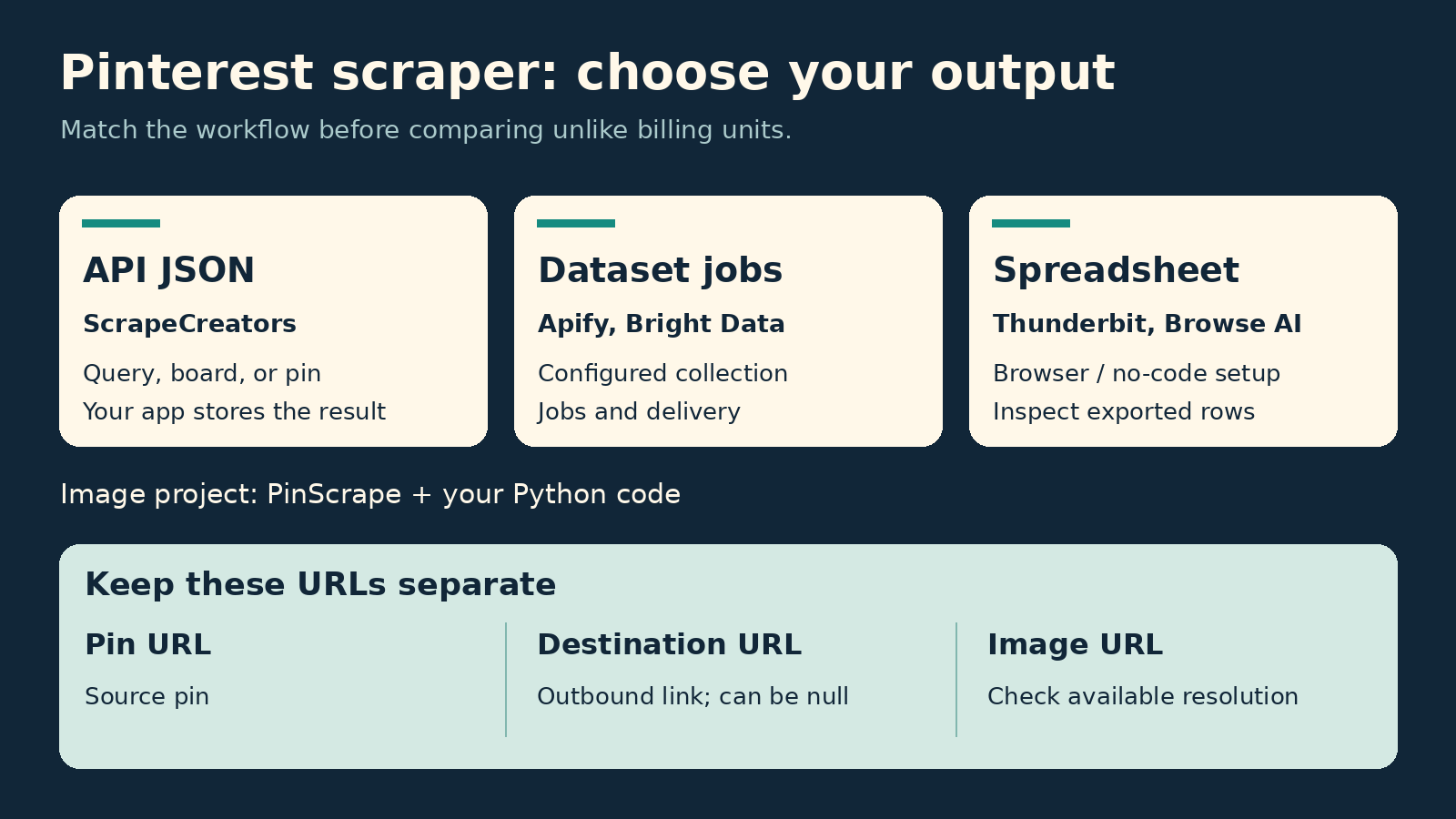
Choose ScrapeCreators if you want public Pinterest search, board, or pin data as JSON in your app. Choose Apify if you want scheduled scraping jobs and datasets. Bright Data fits managed collection pipelines. Thunderbit and Browse AI are better starting points for spreadsheet work without code. PinScrape is worth inspecting for a Python image-collection project you will maintain yourself.
The best Pinterest scraper depends on what you need back: structured pin records, a spreadsheet, or actual image files. Those are different deliverables. This list compares six options without pretending their prices or outputs are interchangeable.
Disclosure: I build ScrapeCreators. It is my recommendation for public data requests, not every Pinterest task. Prices and documentation were checked on October 4, 2026. We made four live ScrapeCreators requests. We did not benchmark the other tools.
Choose the output before the tool
Start with the input you already have. A search phrase, a board URL, and a single pin URL need different retrieval paths. Then decide whether another application will consume the result or a person will open it in a spreadsheet.
| Tool | Choose it if | Input and result | Cost unit checked October 4, 2026 | Main tradeoff |
|---|---|---|---|---|
| ScrapeCreators | You need public Pinterest data in your application | Search query, board URL, or pin URL to JSON | Search, board, and pin calls cost 1 credit each; $47 buys 25,000 credits | You write export, storage, and scheduling logic |
| Apify | You want hosted jobs, schedules, and dataset exports | Actor-specific search and URL inputs; datasets | The reviewed epctex Actor lists $35/month plus usage | Select and validate the particular Actor, not just the platform |
| Bright Data | You need managed record collection and delivery | Pinterest collection API with structured output and delivery options | Pay as you go: $1.50 per 1,000 records | Check that the selected collector covers your exact Pinterest input |
| Thunderbit | You want a browser workflow and a spreadsheet | Page extraction with suggested fields and export | 1 credit per row, or 2 with subpage scraping; Starter $9/month equivalent billed yearly | Page and pagination allowances matter for larger boards |
| Browse AI | You want no-code extraction and recurring monitoring | Pinterest pin-list template and configured robots | Normally 1 credit per 10 extracted rows; Premium sites can cost more | List extraction and separate detail-page visits have different costs |
| PinScrape | You want image URLs or downloads from Python | Keyword search and image download methods | Self-hosted software; your infrastructure and maintenance costs | An image library is not a managed pin-data service |
These are workflow recommendations, not a speed leaderboard. A vendor that bills per record cannot be compared directly with one that bills per request until you know the number of useful, unique records you get from each request.
Also separate collection from permission. Pinterest’s terms restrict unauthorized automated access, including scraping without express prior permission. A paid scraper does not grant that permission or a license to reuse images. Resolve those requirements before collecting data.
1. ScrapeCreators for public pins and boards in your app
ScrapeCreators’ Pinterest API is a straightforward option when your application needs public Pinterest records rather than a browser extension. You send an API key and a query or URL. You do not send a personal Pinterest session cookie in these requests.
The relevant documented endpoints are:
- Search:
GET /v1/pinterest/searchwithqueryand an optionalcursor. - Board:
GET /v1/pinterest/boardwith a boardurland optionalcursor. - Pin:
GET /v1/pinterest/pinwith the pinurl.
For example, this is the search input we used in the live check:
curl --get 'https://api.scrapecreators.com/v1/pinterest/search' \
  --data-urlencode 'query=chocolate cake' \
  --header "x-api-key: $SCRAPE_CREATORS_API_KEY"
On October 4, the first response returned success: true, charged one credit, and contained 17 rows plus a cursor. Sixteen rows had a string title and image fields. The remaining row was an “Explore featured boards” item with a structured title and no image object. Do not equate array length with usable pin count.
A second request with the returned cursor contained 24 rows with string titles and images. Its IDs did not overlap the first page in this check. That is a pagination observation, not proof that every future search is duplicate-free or complete.
For storage, keep a small, explicit set of fields. This Python normalization example is for the search response, not the individual pin-detail response:
import os
import requests

response = requests.get(
    "https://api.scrapecreators.com/v1/pinterest/search",
    headers={"x-api-key": os.environ["SCRAPE_CREATORS_API_KEY"]},
    params={"query": "chocolate cake"},
    timeout=30,
)
response.raise_for_status()
payload = response.json()
if payload.get("success") is not True:
    raise RuntimeError("Pinterest request was not successful")

rows = []
for pin in payload.get("pins", []):
    images = pin.get("images") or {}
    if not isinstance(pin.get("title"), str) or not images:
        continue
    rows.append({
        "pin_id": str(pin["id"]),
        "pin_url": pin.get("url"),
        "title": pin["title"],
        "destination_url": pin.get("link"),
        "original_image_url": (images.get("orig") or {}).get("url"),
    })

next_cursor = payload.get("cursor")
print(f"{len(rows)} usable rows; next page: {bool(next_cursor)}")
Keep pin IDs as strings. Keep missing links as missing values rather than manufacturing a merchant URL. We also fetched the board associated with a returned pin and then that exact pin’s detail page. The board response contained nine rows with titles and images plus one non-image row. The pin detail returned the matching entityId; its outbound link was null.
The detail response uses fields such as images_orig and entityId, while the search response uses images.orig and id. Do not apply one response’s field paths blindly to another.
Pricing currently lists $47 for 25,000 credits, with credits that do not expire. At one credit per call, that purchase works out to $1.88 per 1,000 calls. It is not $1.88 per 1,000 pins. A paginated search may return many pins per call; fetching each pin’s details adds calls. Create an account to validate your own inputs before buying more credits.
Choose another option if you need a ready-made spreadsheet export or managed schedule. ScrapeCreators returns data; your application handles those steps. It also is not a secret-board reader, a follower-email exporter, or a Pinterest posting tool. Our Pinterest integration guide covers the API lane in more detail.
2. Apify for scheduled Pinterest datasets
Apify is useful when you want to run a scraping job, keep its output in a dataset, and repeat the job later. That is a different workflow from receiving a search page in a single application request.
The epctex Pinterest Actor documents search terms and start URLs, maximum item and page controls, optional comments, proxy configuration, and dataset exports. Its pricing tab lists $35/month plus usage on the verification date. Do not treat that as a price per thousand pins.
The Actor’s input specification matters. It requires a proxy configuration object and says including comments increases the time and resources used. If you only need pin titles and links, start without comments rather than paying to collect fields you will discard.
Apify’s Pinterest tutorial demonstrates saved tasks, schedules, and downloading dataset results. That supports the hosted-job recommendation. It does not prove that every current Pinterest Actor has identical fields or reliability.
Choose Apify if scheduled jobs and downloadable datasets save you more work than a direct API call. Check the exact Actor’s input, output, maintainer, and pricing. Other Pinterest Actors on the marketplace can use different billing models and retrieval methods; this section is about the linked Actor, not a platform-wide guarantee.
3. Bright Data for managed collection and delivery
Bright Data’s Pinterest Scraper API is worth comparing when Pinterest collection is one part of a larger data pipeline. Its current product page shows profile and post collectors, structured formats, and API, webhook, or cloud-storage delivery.
The Web Scraper API pricing page lists a pay-as-you-go rate of $1.50 per 1,000 records. It says the record price includes proxies, unblocking, and parsing. That is a record-based bill, not the request-based cost used above.
Before choosing it, verify the collector’s exact inputs. A batch of known profile URLs is not the same job as keyword search, and a pin collector is not automatically a complete board exporter. Ask for a sample using your input rather than relying on the broad Pinterest label.
Choose Bright Data if managed delivery and record-based purchasing fit your pipeline. A smaller application that only needs a search request may prefer a simpler endpoint contract. We reviewed documentation and pricing here; we did not run a Bright Data job or measure its delivery time.
4. Thunderbit for browser-to-spreadsheet work
Thunderbit’s Pinterest scraper describes extracting pin and board data with an AI-assisted browser workflow. It suggests fields, supports subpage extraction, and offers spreadsheet-oriented exports. That suits a marketer or researcher who wants rows they can inspect without writing a client.
Its browser-rendered pricing page states one credit per extracted row, or two credits per row when subpage scraping is enabled. The Starter plan displays $9/month equivalent, billed yearly, with 5,000 credits for the year. The free plan lists six pages per month with a maximum of 30 credits per page.
A “page” allowance is not an unlimited board allowance. Before using a plan for a large board, check how pagination, detail extraction, and the row count interact. Adding subpage scraping changes the unit cost even when your final spreadsheet has the same number of rows.
Choose Thunderbit for quick, inspectable exports. Choose an API-first tool when a backend service needs a stable, documented response shape and unattended requests. Thunderbit also advertises an API, but this recommendation is about its Pinterest browser workflow, not a tested API integration.
5. Browse AI for no-code extraction and monitoring
Browse AI’s Pinterest pin-list template describes extracting titles, image URLs, and associated pin information from Pinterest boards, profiles, or search results. You configure a robot and its extraction rather than building the retrieval code yourself.
Its pricing page lists 50 free credits per month. Personal starts at $19/month equivalent billed annually, with 12,000 credits per year. The credit FAQ says a credit normally covers 10 extracted rows or one screenshot, and that Premium sites can consume more credits.
The cost distinction is easy to miss: extracting 50 rows from a list is different from visiting 50 separate detail pages. Browse AI’s own pricing example charges additional credits for those individual visits. Repeated monitoring is another set of runs, not free access to a continuously updated dataset.
Choose Browse AI if you want no-code extraction and monitoring in the same workflow. Validate the robot on the exact Pinterest page layout and export fields you need. Do not assume a board with sections behaves like a simple list, or that a template’s existence guarantees every pin is retrieved.
6. PinScrape for a Python image project
PinScrape is a Python library centered on Pinterest images. Its current README shows keyword search, image URLs, and download methods. It marks the older search-engine-based function as deprecated and shows a Pinterest class for the newer approach.
This is a sensible project to inspect if your deliverable is image collection and you are comfortable maintaining Python code. It is not a hosted data vendor that handles support, scheduling, and a structured business-data contract for you.
No hosted-service fee does not make the project costless. Your time, network traffic, storage, and any infrastructure you add remain costs. More importantly, an image URL is not permission to train a model on that image or republish it.
Choose a managed API if you need pin metadata in production and do not want to own retrieval maintenance. Choose PinScrape if the image-oriented code fits your authorized project and you accept that maintenance. We read its current README; we did not execute the package or verify its current download success rate.
A small validation check before you buy
Use a narrow sample that resembles your real work. Include a search phrase, a public board you recognize, and one pin from that board. If you need sections, add a section URL as its own check.
Then inspect the following before comparing bills:
| Check | What to preserve | What not to assume |
|---|---|---|
| Source identity | Pin ID, board identity, canonical source URL | That a plausible title means the scraper returned the requested board |
| Pagination | Cursor, page number in your own log, unique IDs | That two full pages mean you collected the entire result set |
| Image quality | Image URL and returned dimensions | That a thumbnail is the original file |
| Destination | Outbound link, including null | That every pin links to a merchant or product |
| Usable rows | Records that meet your field requirements | That every object in the response is a normal pin |
| Retrieval time | Your collection timestamp | That a retrieved pin was published at that time |
This checklist reflects real audience questions. In a Reddit discussion about Pinterest image collection, a reply describes getting small images rather than useful full-size files. That is a reason to inspect resolution, not evidence that all extensions fail. A board-download discussion includes both extraction complaints and a developer’s update replies. Treat those as dated reports, not a current vendor benchmark.
For the live ScrapeCreators sample, a returned search pin had a 736x image with width 718 and height 1243, while its orig field pointed to an originals URL. Inspect the fields actually returned. Changing a thumbnail URL’s text is not a sound substitute for checking the source’s available image variants.
If you later download authorized images, use a short stable filename such as the pin ID and retain the descriptive title separately. Keep your export tied to the source ID so updates do not become accidental duplicates.
For a broader public-data stack, our social media API comparison covers tools across platforms. This page stays focused on choosing a Pinterest scraper, rather than replacing the integration guide or ranking every social API.
Questions to answer before collecting Pinterest data
What is the best Pinterest scraper for public pins and boards?
Choose ScrapeCreators for application requests, Apify for scheduled datasets, Bright Data for managed collection and delivery, or Thunderbit and Browse AI for no-code exports. PinScrape is an image-oriented Python option. Test the exact inputs and required fields before treating any one of them as a complete replacement for the others.
Does a Pinterest scraper download original images?
Not necessarily. ScrapeCreators returns available image fields and URLs, not a downloaded image archive. Some tools focus on files; others focus on metadata or spreadsheets. Confirm both the resolution you need and your rights to download or reuse the image.
Can a Pinterest scraper collect secret boards or follower email addresses?
Do not expect that from a public-data scraper. ScrapeCreators does not provide secret-board access or a follower-email list. Do not try to turn a public pin lookup into access to private content.
Is buying a Pinterest scraper enough to make collection permitted?
No. Pinterest’s terms restrict unauthorized automated access, and the content can carry separate privacy and copyright obligations. Buying access to a tool does not settle those obligations. If your workflow requires authorized account operations, evaluate Pinterest’s own approved integration route rather than treating a public-data scraper as a substitute.


