
The short answer
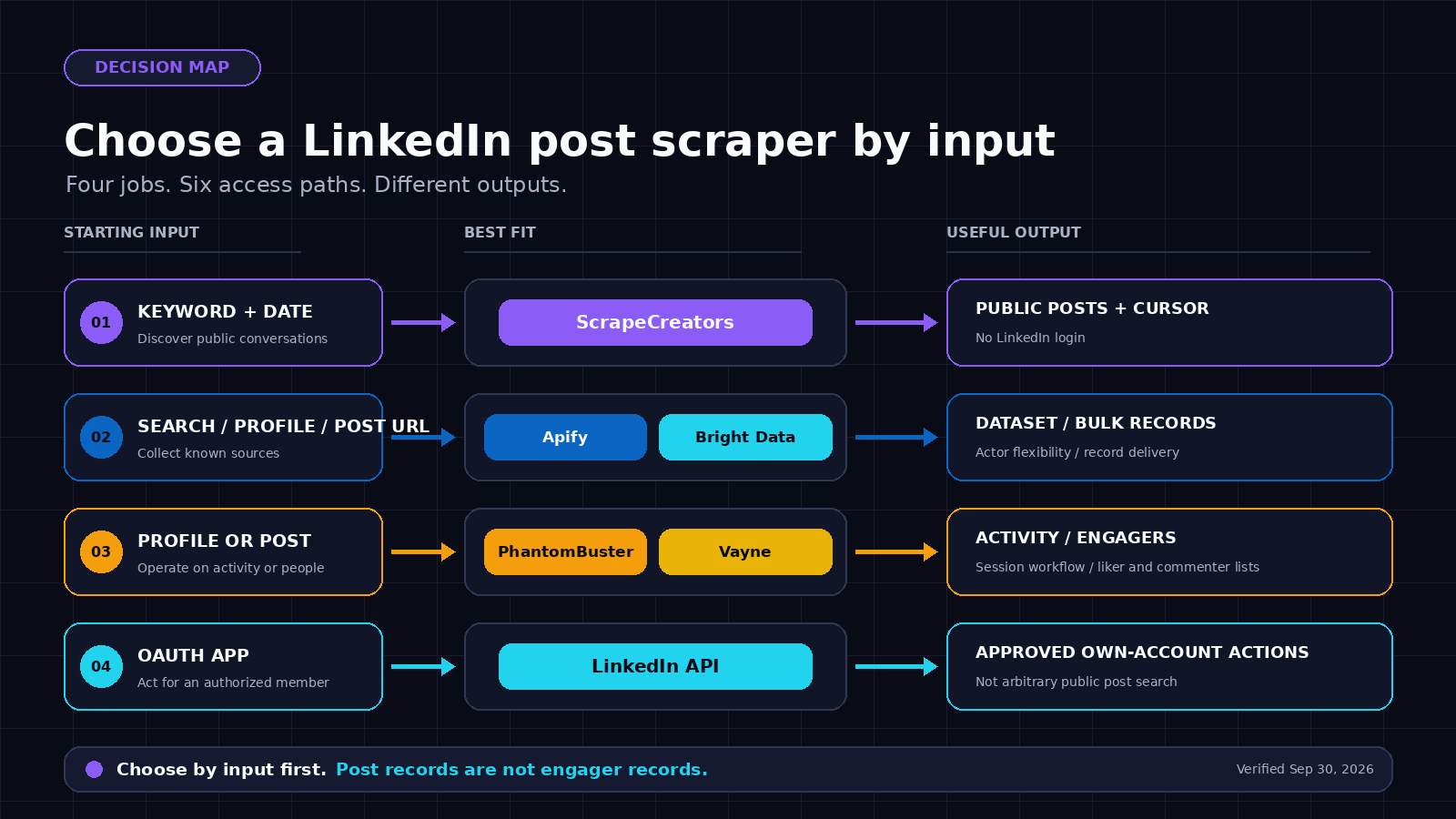
For a developer who needs to search public LinkedIn posts by keyword or fetch one known post as JSON, ScrapeCreators is my default pick. I run ScrapeCreators, so that recommendation is not neutral. Apify is better when you want an Actor, datasets, and flexible source URLs. Bright Data fits bulk record delivery. PhantomBuster is easier for a session-based no-code profile activity workflow. Vayne is built for turning post likers and commenters into lead lists. LinkedIn’s official API is the right boundary for approved own-account actions, but it is not a general public post-search API.
That is the verdict. Do not choose from a generic “LinkedIn scraper” feature list. Choose from the input you have and the output you need. Product facts and prices below were checked on September 30, 2026.
Start with the input
“Scrape LinkedIn posts” can describe jobs that need completely different products.
| Job | Input you have | Output you need | Common buying mistake |
|---|---|---|---|
| Discover conversations | Keyword and date window | Matching public posts, authors, dates, engagement, and a next cursor | Buying a tool that only accepts known post URLs |
| Archive a creator or company | Profile or company URL | Recent or historical posts in order | Assuming every product covers people and companies equally |
| Enrich one known post | Post URL | Full text, author, media, counts, and visible comments | Paying for discovery when the URL is already known |
| Build an engager list | Post URL | Likers, commenters, reaction type, and profile URLs | Confusing post records with people records |
| Monitor a niche | Saved query or profile list plus a schedule | Dated snapshots, alerts, or webhook deliveries | Expecting the provider to keep a change history for you |
| Publish or act for a member | OAuth-authorized LinkedIn member | Approved write actions | Treating a read scraper as an official publishing API |
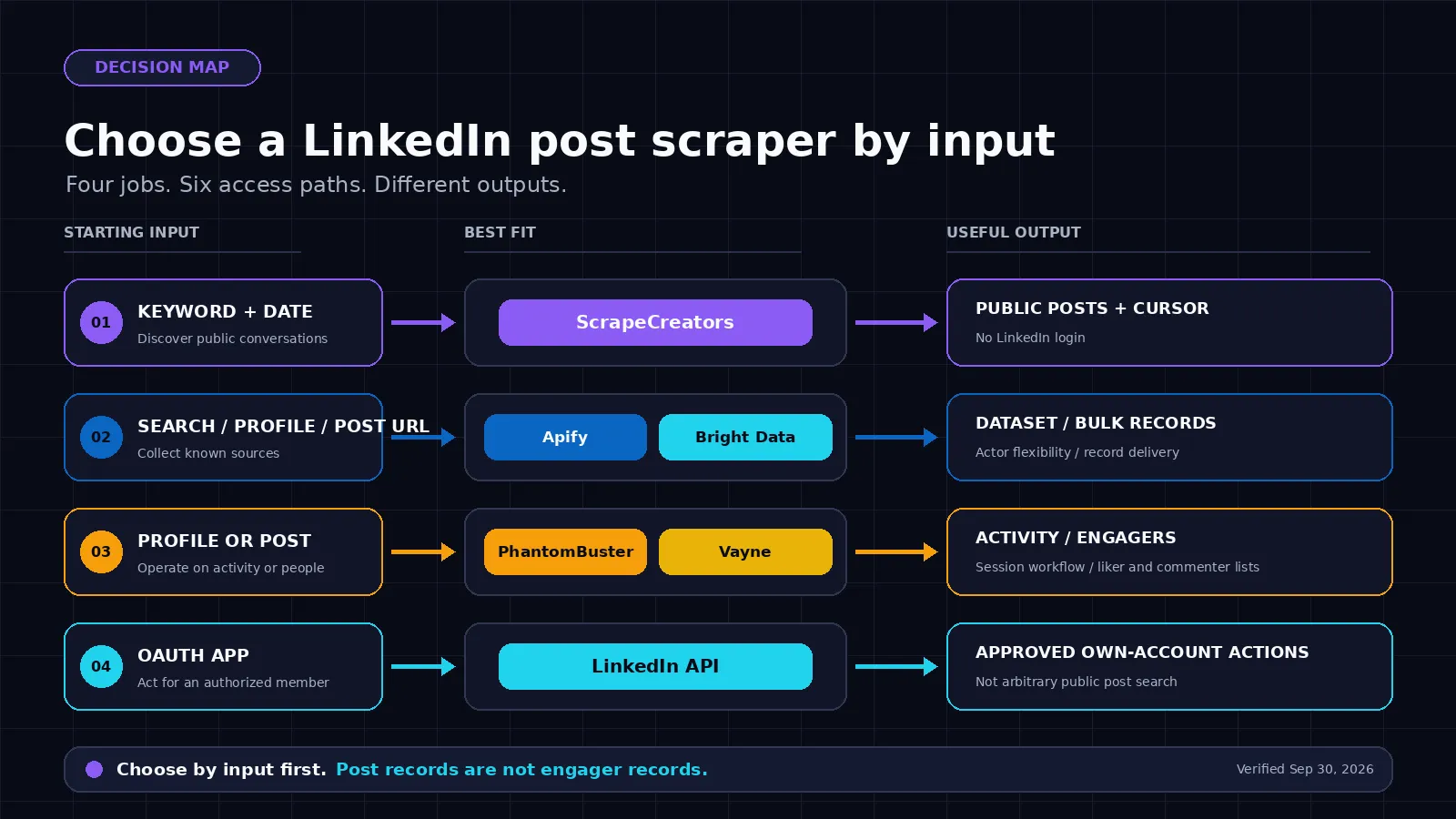
A provider can be excellent in one row and useless in another. This is the main thing the ranking pages miss. The live US results for linkedin post scraper include an Actor, an enterprise record API, a social-listening roundup, and a browser-session automation product. Those are not interchangeable.
Comparison table
The prices use different units. A request, result, record, execution hour, and engager credit are not the same thing.
| Tool | Best for | Accepted input | Useful output | Entry pricing checked September 30, 2026 | Main limitation |
|---|---|---|---|---|---|
| ScrapeCreators | Keyword discovery and known-post JSON | Query, date window, cursor, or post URL | Posts, authors, media, counts, visible comments, cursor | $47 for 25,000 pay-as-you-go credits; reviewed routes charged 1 credit per request | Search covers Google-indexed public posts, not a complete LinkedIn firehose |
| Apify LinkedIn Post Scraper | Actor runs, datasets, and several source types | LinkedIn search URL, profile URL, company URL, or post URL | Post records in datasets and API output | Reviewed Actor lists from $0.50 per 1,000 results | Cookie setup and separate comment/reaction Actors can add moving parts |
| Bright Data | Bulk known URLs and managed record delivery | Up to 5,000 target URLs per call, plus profile/company discovery products | JSON, NDJSON, CSV, webhook, or cloud delivery | 5,000 free records/month; pay as you go is $1.50 per 1,000 records | Bigger platform than most small monitoring jobs need |
| PhantomBuster | No-code profile activity export and workflow chaining | Profile URLs, Google Sheet, or previous Phantom output | Posts, articles, comments, reactions, documents, newsletters, and events | 14-day trial; pricing starts at $56/month billed annually | Requires a connected LinkedIn session and careful account pacing |
| Vayne | Liker and commenter lead lists | One post URL, or a profile URL and time range | Deduplicated engagers, reaction type, comment text, and post context | $29/month for 10,000 leads; API access starts on the $49 Starter plan | Focuses on engagers, not general keyword post discovery |
| LinkedIn official API | Approved member or partner integrations | OAuth and an approved application/product | Authorized profile, share, marketing, sales, or compliance actions | No public per-call price on the access page reviewed | General public post search is not an open permission |
1. ScrapeCreators
Choose ScrapeCreators if: your app needs a normal REST request for keyword discovery or a known public post, and you do not want to connect a LinkedIn member account.
The LinkedIn Search Posts endpoint accepts a required query, an optional date window from last-hour through last-year, and a cursor. It returns public posts found through Google-indexed LinkedIn results. Each post can include the URL, publication date, text, author, images or other media, visible comments, like count, and comment count. The cursor currently tops out at 11.
The separate LinkedIn Post endpoint is for a URL you already know. That separation matters. Search and enrichment should not be hidden behind the same vague input box.
I checked the search route with linkedin post scraper on September 30. Page one returned 10 posts and cursor 2; page two returned 10 different posts and cursor 3. I also sent one returned public URL to the post-detail route. It returned HTTP 200 with the post URL, publication date, text, author, media fields, visible comments, and engagement counts. That is a point-in-time fixture check, not a reliability benchmark.
Pricing is pay as you go. The site currently lists 25,000 credits for $47 and 500,000 for $497. Credits do not expire. Both LinkedIn routes reviewed here list one credit per request, and the live calls reported one charged credit each. A cache hit costs zero only when the result is actually in cache.
The honest limit is completeness. Search is based on what Google has indexed, so it will not equal every post visible inside a logged-in LinkedIn search. It also does not write posts, send messages, reveal private analytics, or bypass privacy settings. Choose another tool if you need a complete account-owned archive or official write access.
2. Apify LinkedIn Post Scraper
Choose Apify if: your team already works with Actors, runs, datasets, schedules, webhooks, or client libraries and wants to feed several LinkedIn source types into one job.
The Curious Coder LinkedIn Post Scraper currently ranks first in the live US result I checked for the main query. Its product page accepts a LinkedIn post-search URL with filters, profile or company URLs, and individual post URLs. Output includes post text, media, links, timestamps, author details, and engagement metrics. Apify can export datasets as JSON, CSV, or Excel.
The current Actor page lists pricing from $0.50 per 1,000 results. It also tells users to configure cookies for the reviewed workflow and points to a separate cookieless Actor. Reactions and comments are separate Actors. That modularity can be useful, but price the whole pipeline rather than quoting the post-result rate alone.
Apify is the strongest relevant competitor for this query. Its product page is specific about inputs and has a full sample payload. It is still one Actor maintained by a community developer, not a neutral comparison of discovery, post enrichment, engager extraction, official access, and account exposure. Check the Actor’s current maintenance state and issue response before putting it behind a customer-facing feature.
3. Bright Data
Choose Bright Data if: you have large known-URL batches, need multiple delivery formats, or want LinkedIn post records inside a broader enterprise data platform.
Bright Data’s LinkedIn Post Scraper API accepts up to 5,000 target URLs in one API call. The page lists fields such as post URL, ID, author profile, headline, text, publication date, likes, comments, reposts, and attached media. Delivery options include JSON, NDJSON, CSV, webhooks, and cloud storage. Separate products cover discovery by profile and company URL.
The current page advertises 5,000 free records per month, then $1.50 per 1,000 records on pay as you go. Its Scale plan lists $499 per month with 384,000 included records and $1.30 per 1,000 additional records. It says successful delivered records are the billing unit, with proxy, unblocking, rendering, and parsing included.
This is a good fit when records and delivery are the unit you want. It is less direct when your starting point is a small keyword query and you want results back in one simple synchronous response. Do not compare $1.50 per 1,000 delivered records with a per-request credit without measuring how many records your request actually returns.
4. PhantomBuster
Choose PhantomBuster if: you want a browser-assisted, no-code workflow that exports activity from known profiles and chains the result into lead generation automations.
PhantomBuster’s LinkedIn post scraper guide uses its LinkedIn Activity Extractor. You give it one profile URL, a Google Sheet of profiles, or output from another Phantom. It can export posts, articles, comments, reactions, documents, newsletters, and events. You can set launch frequency and pass the output into other Phantoms or CRM workflows.
The tradeoff is right in its setup: connect your LinkedIn session cookie through the browser extension. PhantomBuster tells first-time users to start slowly and respect its recommended LinkedIn limits to reduce restriction risk. Its page lists a 14-day trial and pricing from $56 per month on an annual plan, including 20 execution hours, 10 Phantom slots, AI credits, and email-finder credits.
This is easier for an operator than building an API pipeline. It is not my pick for a backend service that should stay independent of an employee’s LinkedIn account. The live exact-query page also spends most of its comparison section on PhantomBuster and Octoparse. It does not separate all the input and billing models in the table above.
5. Vayne
Choose Vayne if: the records you really want are the people who liked or commented, not the post objects themselves.
Vayne’s post engagement scraper accepts one public post URL or a profile URL. Profile mode covers a selected time range and up to 20 recent posts per run. The output includes name, LinkedIn profile URL, headline, reaction type, whether the person commented, the full comment text, and post context. The page says no LinkedIn account or cookie is required.
The unit is one credit per engager. Current plans start at $29 per month for 10,000 leads. The pricing comparison says API and MCP access start with the $49 Starter plan, which includes 20,000 leads. Vayne can schedule profile runs and send a webhook, keeps CSV files for 90 days, and keeps paginated API results for seven days.
This is a clean specialist choice. It is also why the word “scraper” is too broad. Vayne is not promising arbitrary keyword post discovery. If you need to find posts first and then pull engagers, you need a discovery source before it.
6. LinkedIn official API
Choose LinkedIn’s official API if: your product acts for an authorized member or belongs in an approved LinkedIn partner program.
LinkedIn’s current access guide says most permissions and partner programs require explicit approval. The open permissions cover OpenID Connect profile and email plus w_member_social, which can post, comment, and like on behalf of an authenticated member. Marketing, Sales Navigator, Talent, and compliance capabilities have separate approval programs.
That is not a general read API for searching arbitrary public posts. It should not be sold as one. Use it when the official OAuth and permission model matches the product. Use a public-data provider only after you have reviewed LinkedIn’s User Agreement, privacy obligations, and the rights attached to your planned use.
What buyers actually ask
I searched YouTube for the main query and three close variants, then read five relevant transcripts. I also reviewed 43 fetched Reddit comment and reply rows across three discussions and 30 LinkedIn search results with 103 returned comment rows before deduplication. This was audience research, not a vendor reliability test.
The useful questions were concrete:
- Can the tool search posts by keyword, or does it require profile and post URLs first?
- Does it work for individual profiles, company pages, or both?
- Can it include images, comments, likers, and reaction types?
- Can a user cap the result count or select a time range?
- Does it need a personal LinkedIn cookie?
- How quickly does the workflow break when LinkedIn changes?
- Can it run on a schedule and tell someone when a job quietly stops returning data?
Those questions appeared in comments under a Make and Apify profile-post workflow, an n8n and Apify workflow, and a Reddit discussion about keyword post search and maintenance. Another Reddit thread centered on posts, comments, and cookie exposure.
The research changed this guide in three ways. I made the input type the first decision, put cookie requirements in the comparison table, and separated post records from engager records. I also included monitoring as a real requirement. A scheduled scraper that returns nothing for four days can be worse than one that fails loudly.
Real request and output
Here is the ScrapeCreators request I ran for this review. Keep the API key in an environment variable rather than a script or repository.
curl --get "https://api.scrapecreators.com/v1/linkedin/search/posts" \
  --header "x-api-key: $SCRAPE_CREATORS_API_KEY" \
  --data-urlencode "query=linkedin post scraper" \
  --data-urlencode "date_posted=last-year"
The live response returned 10 posts and cursor 2. This shortened excerpt uses one public result from that response. The post description is intentionally truncated here.
{
  "success": true,
  "query": "linkedin post scraper",
  "posts": [
    {
      "url": "https://www.linkedin.com/posts/briangormanh_apifys-linkedin-post-scraper-by-curious-activity-7450883381145288704-S95P",
      "datePublished": "2026-04-17T12:30:28.756Z",
      "description": "Apify's LinkedIn Post Scraper (by Curious Coder) is awesome...",
      "author": {
        "name": "Brian Gorman",
        "url": "https://www.linkedin.com/in/briangormanh",
        "followers": 5877
      },
      "likeCount": 12,
      "commentCount": 8
    }
  ],
  "cursor": "2"
}
A useful production job would store the post URL as the stable key, preserve datePublished, save the crawl time separately, follow cursors deliberately, and alert when a normally active query returns an empty or sharply smaller page. Do not infer that a missing post was deleted. It may have fallen out of Google’s index or become unavailable to the public fetch path.
How to choose
Use this order:
- Write down the input you actually have: keyword, profile URL, company URL, post URL, or authorized member.
- Write down the record you need: posts, one enriched post, engagers, or official write actions.
- Reject every tool that does not support both sides of that pair.
- Decide whether a LinkedIn session cookie is acceptable. For a backend product, my answer is usually no.
- Run one real fixture and one second page before comparing price.
- Save IDs, crawl timestamps, raw counts, and error states so quiet failures are visible.
- Review terms, privacy, retention, and outreach rules before using public professional data.
For keyword discovery plus JSON, start with the LinkedIn Search Posts docs. For one known URL, use the LinkedIn Post docs. The broader LinkedIn scraper comparison covers profiles, companies, jobs, and Sales Navigator rather than this post-only decision. The LinkedIn scraping guide explains the wider API and account-access tradeoffs.
If the ScrapeCreators route fits, create an account and run your own public fixture before buying credits.
What I verified
All checks below were performed on September 30, 2026.
- ScrapeCreators LinkedIn search documentation, post documentation, pricing, current backend source, and three live public API requests
- Apify’s Curious Coder LinkedIn Post Scraper, including its current input, output, price, maintenance label, and related Actor notes
- Bright Data’s LinkedIn Post Scraper API, including target-URL batch size, record fields, delivery methods, and current public prices
- PhantomBuster’s LinkedIn post scraper workflow, session setup, listed outputs, pacing warning, and current entry price
- Vayne’s post engagement scraper and pricing, including the 20-post profile cap, one-credit-per-engager unit, retention windows, and API plan boundary
- LinkedIn’s API access guide and User Agreement
- Live US Google results for the primary query and three close variants, plus current Ahrefs US metrics and ScrapeCreators Search Console ownership
I did not run paid competitor accounts or their private dashboards. Competitor capability notes come from their current primary-source pages, not hands-on reliability testing.
Limitations
Public LinkedIn data is not the same as permission to use it for anything. LinkedIn’s User Agreement currently prohibits scraping and other unauthorized automated access. Privacy, database, employment, marketing, and consumer-protection rules can also apply. Collect the minimum data you need, document a lawful purpose, secure it, set deletion dates, and do not turn a public comment into permission for spam.
No tool here guarantees a complete history. Posts can be deleted, edited, made less visible, excluded from search engines, restricted by geography, or missing from a provider’s fetch path. Engagement counts are snapshots. Comments and reactions can change after collection. A successful fixture proves only that one request worked at one time.
If you need private analytics, complete account-owned history, publishing, messaging, or member-authorized actions, use the relevant LinkedIn product and OAuth flow. If you need people who engaged, buy an engager workflow rather than a post API. If you need arbitrary websites as well as LinkedIn, choose a general web-data platform instead of forcing a social API into the job.
FAQ
What is the best LinkedIn post scraper in 2026?
ScrapeCreators is my default for developer-facing keyword search and known-post JSON. I run it, so treat that as a disclosed founder recommendation. Apify is the better Actor and dataset choice. Bright Data fits bulk delivered records. PhantomBuster fits no-code profile activity with a connected session. Vayne fits liker and commenter lead lists.
Can I scrape LinkedIn posts without a LinkedIn login?
Yes, some hosted products can fetch public post data without your LinkedIn login. ScrapeCreators does not ask for a LinkedIn cookie for the routes reviewed here. Vayne also says its post-engagement workflow needs no LinkedIn account. PhantomBuster’s workflow does require a connected session.
Can a LinkedIn post scraper search by keyword?
Only if it has a discovery path. ScrapeCreators accepts a keyword and optional date window. The reviewed Apify Actor accepts a LinkedIn post-search URL. Known-URL extractors need another step to find the URLs first.
Can I scrape comments and reactions from a LinkedIn post?
Check the output contract. ScrapeCreators returns visible comments with the reviewed post responses. Vayne focuses on likers and commenters. Apify points from its post Actor to separate comment and reaction Actors. A post’s commentCount does not prove every comment row was returned.
Does LinkedIn allow post scraping?
LinkedIn’s current User Agreement prohibits scraping and other unauthorized automated access. That is a contract issue separate from whether data is publicly visible. Laws and rights vary by jurisdiction and use case. Get legal advice when the collection affects people or business decisions.
How much does a LinkedIn post scraper cost?
Start with the billing unit. ScrapeCreators uses request credits. Apify’s reviewed Actor prices results. Bright Data prices successful delivered records. PhantomBuster bundles execution time and Phantom slots. Vayne charges plans and engager credits. Run your real input through the full pagination path before comparing totals.


