
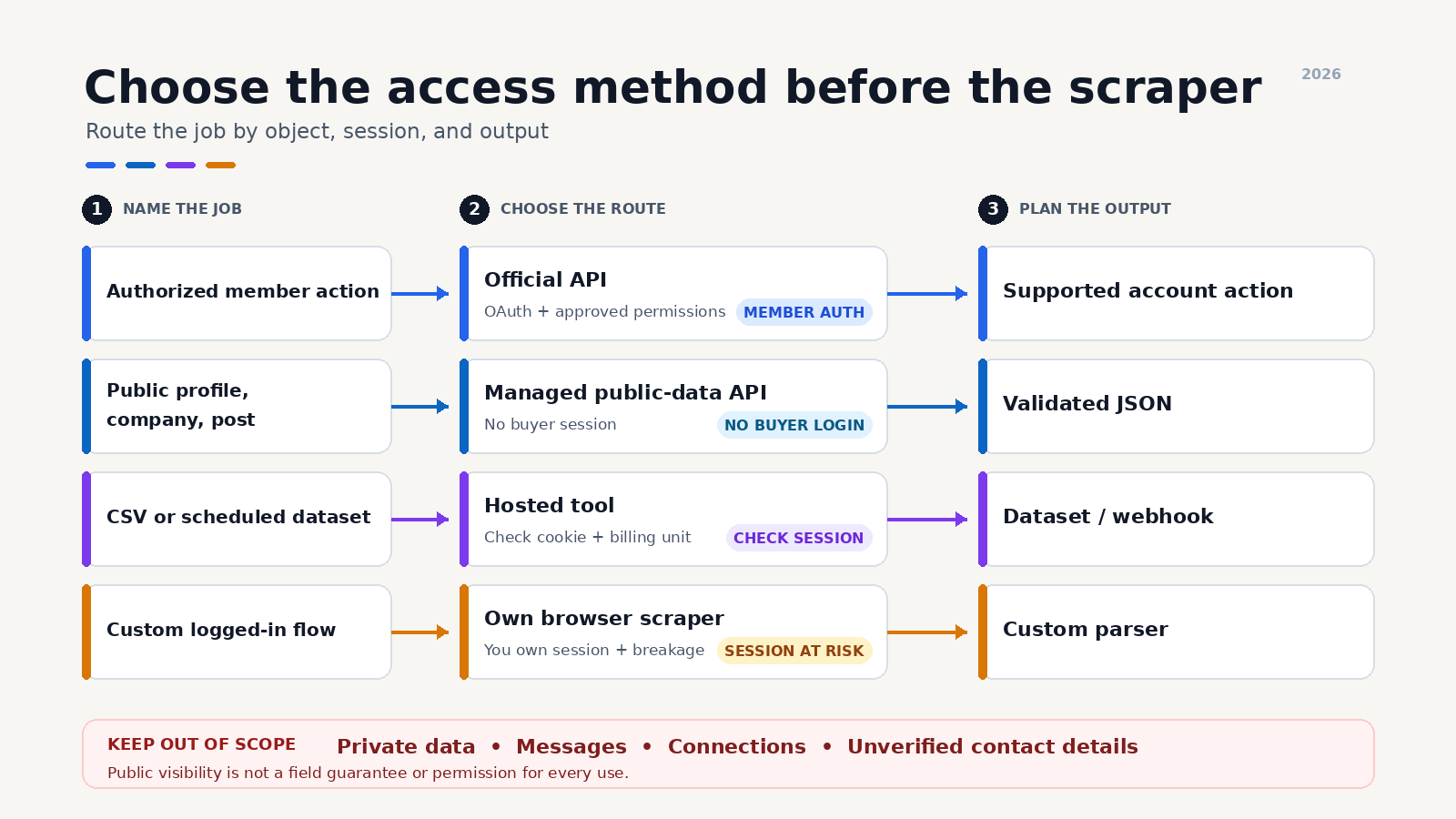
The practical way to scrape LinkedIn depends on the access you need. Use LinkedIn’s official API for approved, user-authorized workflows. Use a managed public-data API for public profiles, companies, and posts when you want JSON without sharing a LinkedIn session. Hosted tools fit exports and no-code jobs. A self-built browser scraper gives you control, but it also gives you the account risk and maintenance burden.
I run ScrapeCreators, so I have a stake in one of those options. I checked the cited product pages, LinkedIn terms, official API access page, and live endpoints on September 8, 2026. This guide separates what I verified from what can change.
Choose the access method first
“LinkedIn scraper” can describe four very different products. One asks a user to approve an official OAuth integration. Another fetches public pages without the buyer’s account. A browser extension may reuse the buyer’s session cookie. A hosted actor may deliver a dataset without exposing how access works.
That difference matters more than the longest feature list.
| Method | Best fit | Needs your LinkedIn session? | What you maintain | Main limitation |
|---|---|---|---|---|
| LinkedIn official API | Approved member, marketing, learning, or Sales Navigator integrations | Yes, for member-authorized access | OAuth, permissions, product review, and API version changes | It is not an unrestricted public-profile API |
| Managed public-data API | Public profiles, company pages, posts, comments, and search inside an app | No, when the provider collects public pages independently | Request logic, validation, storage, and your data-use controls | It cannot return private fields or act as a user |
| Hosted scraper or no-code tool | CSV exports, scheduled runs, and one-off research | It depends on the tool | Inputs, schedules, datasets, and vendor changes | Pricing units and account dependence vary widely |
| Self-built browser scraper | A narrow workflow your team is prepared to own | Usually, if the page is behind login | Browser fingerprints, selectors, sessions, retries, proxies, and parsers | High breakage and direct account risk |
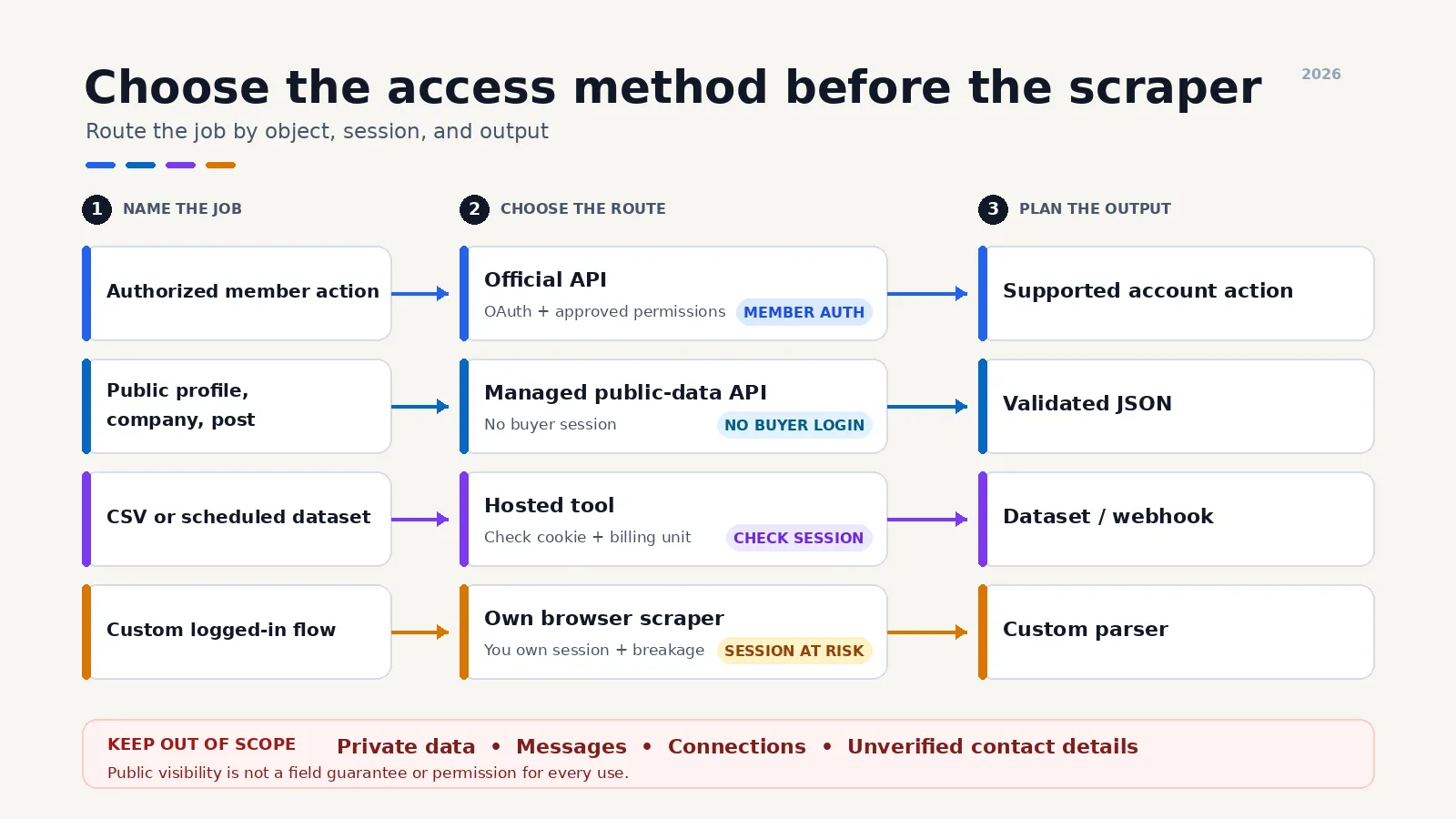
Before choosing, write down the object you need. A public person profile, company page, company posts, individual post, post comments, post search, Sales Navigator export, email enrichment, and account automation are separate jobs. A tool can handle one and be useless for the next.
What LinkedIn data can you collect?
Public visibility is the first boundary, but it is not a field guarantee.
ScrapeCreators currently documents endpoints for a person’s public profile, a company page, company posts, public post search, individual posts, post transcripts, ad search, and ad details. The person profile endpoint states that it only returns what is publicly available in an incognito browser. LinkedIn can show different fields by page, viewer, region, and date.
On September 8, I called three public fixtures:
- Sam Parr’s person profile returned HTTP 200 in 2.876 seconds. It charged one credit and included the name, location, 90,806 followers, eight recent posts, ten experience records, and three education records in that response.
- Shopify’s company page returned HTTP 200 in 2.516 seconds. It charged one credit and included the company name, industry, employee count, size, founding year, headquarters, employees, and eight posts.
- Shopify’s company-posts endpoint returned HTTP 200 in 2.833 seconds. It charged one credit and returned eight posts. The first returned post included its public URL, publication time, text, and engagement fields.
Those calls confirm the response shapes for those fixtures on that date. They do not prove that every profile exposes work history, that every page returns the same number of posts, or that the same fields will remain public.
Decide how your application handles missing data before launch. null, an empty array, and an absent key should not all mean “person does not exist.” Keep the source URL and collection time beside the record. Do not infer a private email, relationship, or attribute from an empty public field.
This guide does not cover sending invitations, messages, likes, comments, or connection requests. ScrapeCreators does not provide those actions. It also does not turn a public profile into a verified email address. If contact enrichment is the goal, treat it as a separate data source with its own consent, accuracy, and deletion rules.
Method 1: Use LinkedIn’s official API
Start with the official route when it covers the product.
Microsoft’s current LinkedIn API access page says the APIs use OAuth 2.0 and that most permissions and partner programs require explicit LinkedIn approval. A small set of open permissions is available to all developers. Marketing permissions require approval, and sales integrations require approval as a Sales Navigator Application Platform partner.
The official API is the right fit when:
- a member should knowingly authorize your application;
- you need an approved action on that member’s behalf;
- the use case fits LinkedIn’s Marketing, Learning, or Sales products;
- your business can complete the relevant product review or partner process.
It is the wrong fit when the requirement is “give me any public profile URL and return every visible field.” Official API access is permissioned by product and member. It is not a general scraping license.
The upside is a supported authentication model and a clearer platform relationship. The tradeoff is coverage. Check the exact product and permission before designing the database around fields you may not receive.
Method 2: Use a managed public-data API
A managed API fits when you have a public URL or query and need structured data inside software. The provider handles fetching and parsing. Your code handles inputs, validation, retries, and use of the returned data.
Here is the profile request I ran on September 8:
curl --get "https://api.scrapecreators.com/v1/linkedin/profile" \
  -H "x-api-key: $SCRAPE_CREATORS_API_KEY" \
  --data-urlencode "url=https://www.linkedin.com/in/parrsam/"
The API key stays in an environment variable. Do not put it in client-side JavaScript, screenshots, logs, or a Git repository.
The request returned HTTP 200 in 2.876 seconds and charged one credit. This is a shortened excerpt from the observed payload:
{
  "success": true,
  "credits_charged": 1,
  "name": "Sam Parr",
  "location": "New York City Metropolitan Area",
  "followers": 90806,
  "recentPosts": ["8 public post records"],
  "experience": ["10 public experience records"],
  "education": ["3 public education records"]
}
Counts and fields can change after publication. Use that payload as an example, not a fixture.
For a company record, switch the endpoint and URL:
curl --get "https://api.scrapecreators.com/v1/linkedin/company" \
  -H "x-api-key: $SCRAPE_CREATORS_API_KEY" \
  --data-urlencode "url=https://www.linkedin.com/company/shopify/"
For company posts, use /v1/linkedin/company/posts with the same public company URL. For broader monitoring, use public LinkedIn post search and store the returned cursor rather than pretending one response is the full result set.
ScrapeCreators’ live homepage listed 100 free credits, $47 for 25,000 credits, and $497 for 500,000 credits on September 8. The three checks above each charged one credit. Most endpoints cost one credit, but check the endpoint documentation because some operations cost more. Credits do not expire.
A managed API removes a lot of scraping infrastructure. It does not remove application work. Validate URLs, set sensible request deadlines, log response status without logging sensitive data, deduplicate records, and decide when stale stored data should be refreshed.
Choose another route if you need private profiles, LinkedIn messages, connection actions, Sales Navigator list export, job search, or verified contact details. Those are outside this public-data API’s scope.
Method 3: Use a hosted scraper or no-code tool
Hosted tools make sense when the output is a dataset rather than a live application response. You enter profile or company URLs, run a job, and download JSON or CSV. Some tools add schedules, webhooks, email enrichment, or workflow builders.
The hard part is figuring out what the tool is doing on your behalf.
Ask these questions before connecting an account:
- Does it need a LinkedIn password, cookie, browser extension, or Sales Navigator session?
- Does it collect a live public page or return a record from an existing database?
- Is billing based on requests, records, browser time, compute, or exported leads?
- What happens when the selected actor or template changes owners, input fields, or output schema?
- Can you delete collected records and document their source date?
For a vendor-by-vendor comparison, use the separate LinkedIn scraper roundup. That page compares managed APIs, bulk products, no-code tools, Sales Navigator exporters, and official access. This page owns the method and implementation question instead of repeating the same rankings.
A hosted dataset is often the fastest route for a one-time list. It can be awkward for a product that needs one profile in a predictable response contract. A visual automation is useful for an operator. It may be the wrong dependency for an API endpoint that must return in seconds.
Method 4: Build and maintain your own scraper
A self-built scraper offers control over the browser flow, parsed fields, storage, and retry policy. It also puts every failure on your team.
The open-source linkedin_scraper repository that ranked first in the live US Google results on September 8 uses Playwright. Its documentation includes person, company, job, and company-post scraping, plus manual or programmatic authentication. That is a useful picture of the real scope. “Parse a page” quickly becomes browser installation, login handling, selectors, callbacks, errors, and data models.
A production browser scraper usually needs:
- a controlled browser version and coherent request fingerprint;
- secure session storage, if login is involved;
- navigation and element waits that tolerate slow pages;
- selectors and parsers that fail loudly when the page changes;
- bounded retries and request-level diagnostics;
- deduplication and idempotent storage;
- alerts for empty success-shaped responses;
- regular fixture checks across person, company, and post pages.
Do not treat a browser that loaded HTTP 200 as a successful scrape. It may have received a login wall, challenge, consent page, or shell with no useful data. Validate the expected object and minimum fields before saving or billing anything.
I would only build this path when the workflow is narrow, recurring volume justifies it, the team understands LinkedIn’s rules, and somebody owns maintenance. For a side project that needs one public profile object, the infrastructure is usually the project.
A production workflow that does not collapse later
The collection method is one part of the system. The surrounding decisions determine whether the data stays useful.
1. Separate discovery from extraction
If you already have a public LinkedIn URL, call the matching object endpoint. If you only have a name, company, or topic, you need discovery first. Search results can be ambiguous. Keep the discovery query and the selected canonical URL so another run does not create a second person or company record.
Post search is another discovery path. It returns matching public posts and a cursor. An individual post endpoint can then fetch the selected post and its returned comments. Do not make every search result trigger ten detail requests unless the extra fields are necessary.
2. Store provenance with the object
Keep at least:
{
  "source_url": "https://www.linkedin.com/company/shopify/",
  "source_type": "linkedin_company",
  "collected_at": "2026-09-08T10:30:00Z",
  "provider": "scrapecreators",
  "payload_version": 1
}
A name and employee count without a source date become misleading fast. Provenance also makes deletion, correction, and refresh jobs possible.
3. Treat missing fields as normal
Public page shapes move. A person may expose posts but not a detailed work history. A company can have a visible page and no returned posts. A post can have a public comment count larger than the comments included on the first response.
Write schema validation that accepts documented optional fields. Alert when the entire expected object disappears. Those are different cases.
4. Add refresh rules instead of scraping everything again
Profile headlines and company employee counts may need periodic refreshes. Old post text rarely needs daily refetching. Store a per-object refresh timestamp and use a queue. This reduces cost, duplicate work, and unnecessary collection.
5. Keep human review in consequential workflows
Do not let one public profile field automatically reject a job applicant, assign a sensitive trait, or trigger high-volume outreach. Public does not mean accurate, current, or appropriate for every decision. Add review and a correction path where an error could affect a person.
What builders keep getting stuck on
I used ScrapeCreators as a research engine before rewriting this guide. I searched four close YouTube queries in US context, read five available transcripts, reviewed 38 unique comments across four videos, and fetched seven reply rows from five substantive comment threads. I also reviewed 30 Reddit search rows, 51 actual comment and reply rows from three focused Reddit discussions, 13 LinkedIn posts, and 65 comments returned with those posts.
These were qualitative discussions, not a representative poll. The recurring questions still changed what belongs in this guide:
- “Will this get my account banned?” People repeatedly asked whether a tool needed their account, cookie, or browser. That is why the decision table separates account-dependent automation from independent public-data access.
- “Where do the input URLs come from?” Several builders had a scraper but no reliable way to discover the right profiles. The workflow now separates discovery, URL resolution, and object extraction.
- “Is it live or an old database?” A LinkedIn discussion questioned whether recruitment tools were fetching current profiles or serving stored records. Ask the provider and keep a collection timestamp.
- “Why is the output missing a field?” YouTube tutorials and replies asked about job history, titles, websites, banners, reactions, comments, and contact data. A product name is not a response contract. Test the exact field on representative public fixtures.
- “Why did a working tool stop?” Threads discussed restrictions, slow or stale records, actors that changed, and extensions that stopped working. That pushed maintenance ownership and success-shape validation into the method choice.
- “Can I do this free?” Free tutorials often still depended on a hosted workflow, an API plan, a paid Sales Navigator seat, or manual upkeep. Compare the full job, not the headline price.
Three useful public videos were the n8n profile workflow, a Claude Code and Apify walkthrough, and a profile scraping API example. Their transcripts showed what builders care about after the demo: list inputs, field coverage, pagination, downstream storage, and whether the setup can run repeatedly.
The clearest Reddit discussions were about reliable LinkedIn scrapers for n8n, account restrictions and lead scraping, and scraping versus enrichment without bans. Much of the vendor advice was promotional or anecdotal. The useful part was the repeated distinction between public data, account automation, list discovery, and email enrichment.
LinkedIn’s own public post search returned the same split. Operators debated manual follow-up, session-based extensions, hosted data, browser agents, and official integrations. One popular thread asking how to follow up with post engagers drew 163 public comments. That engagement count shows the question attracted discussion, not that any answer is broadly preferred.
LinkedIn’s rules and the legal boundary
LinkedIn’s current User Agreement prohibits developing, supporting, or using software, scripts, robots, crawlers, browser plugins, or other technology to scrape profiles and other service data. It also prohibits bypassing access controls and using bots or unauthorized methods to access the service or perform actions.
LinkedIn’s separate Crawling Terms say automated crawling without express permission is strictly prohibited and provide an email address for permission requests. LinkedIn’s robots.txt is another technical signal, but robots rules are not a complete legal opinion or a substitute for the contracts that apply to you.
That is LinkedIn’s stated policy. The legal analysis is broader and depends on jurisdiction, access method, data type, contract formation, privacy law, intellectual property, and use. A public page is not a blank check to build a sensitive people database or send unsolicited outreach.
At minimum:
- collect only the fields you can justify for the product;
- do not bypass logins or access private content;
- avoid session-sharing tools if you are not willing to risk that account;
- set retention and deletion rules;
- protect personal data and restrict internal access;
- document source, date, and correction procedures;
- get qualified legal advice for large-scale or sensitive uses.
The general web-scraping legal guide covers court decisions and legal concepts in more detail. It is still not legal advice.
Which method should you use?
Use LinkedIn’s official API when the supported product covers the workflow and a member or organization should authorize access.
Use a managed public-data API when your software needs supported public profiles, companies, posts, or post search in JSON without handling the buyer’s LinkedIn session. ScrapeCreators’ LinkedIn API fits that job and also covers other public social platforms through the same account and documentation.
Use a hosted scraper or no-code tool when an operator wants a scheduled export, dataset, or visual workflow. Check whether it needs a cookie, how it bills, and what happens when the selected integration changes.
Build your own browser scraper only when control is worth the maintenance and account exposure. Budget for the challenge pages, selector changes, missing fields, sessions, browser updates, and monitoring before calling it cheaper.
Do not use any of these as a shortcut to messages, connection actions, private fields, or verified contact data. Pick the method after naming the object, access level, output contract, and acceptable risk.
Sources checked
Product capabilities, prices, endpoint behavior, and policy wording can change. These sources were checked on September 8, 2026:
- LinkedIn User Agreement
- LinkedIn Crawling Terms and Conditions
- LinkedIn robots.txt
- Getting Access to LinkedIn APIs
- ScrapeCreators LinkedIn API
- ScrapeCreators LinkedIn profile documentation
- Scrapfly’s LinkedIn scraping guide
- Apify’s LinkedIn profiles and companies guide
- Bright Data’s LinkedIn scraper page
joeyism/linkedin_scraperon GitHub
I could not inspect ZenRows’ ranking guide because its site returned a Cloudflare block to the research request. It is listed in the SERP evidence, but no claim in this article depends on that page.


