
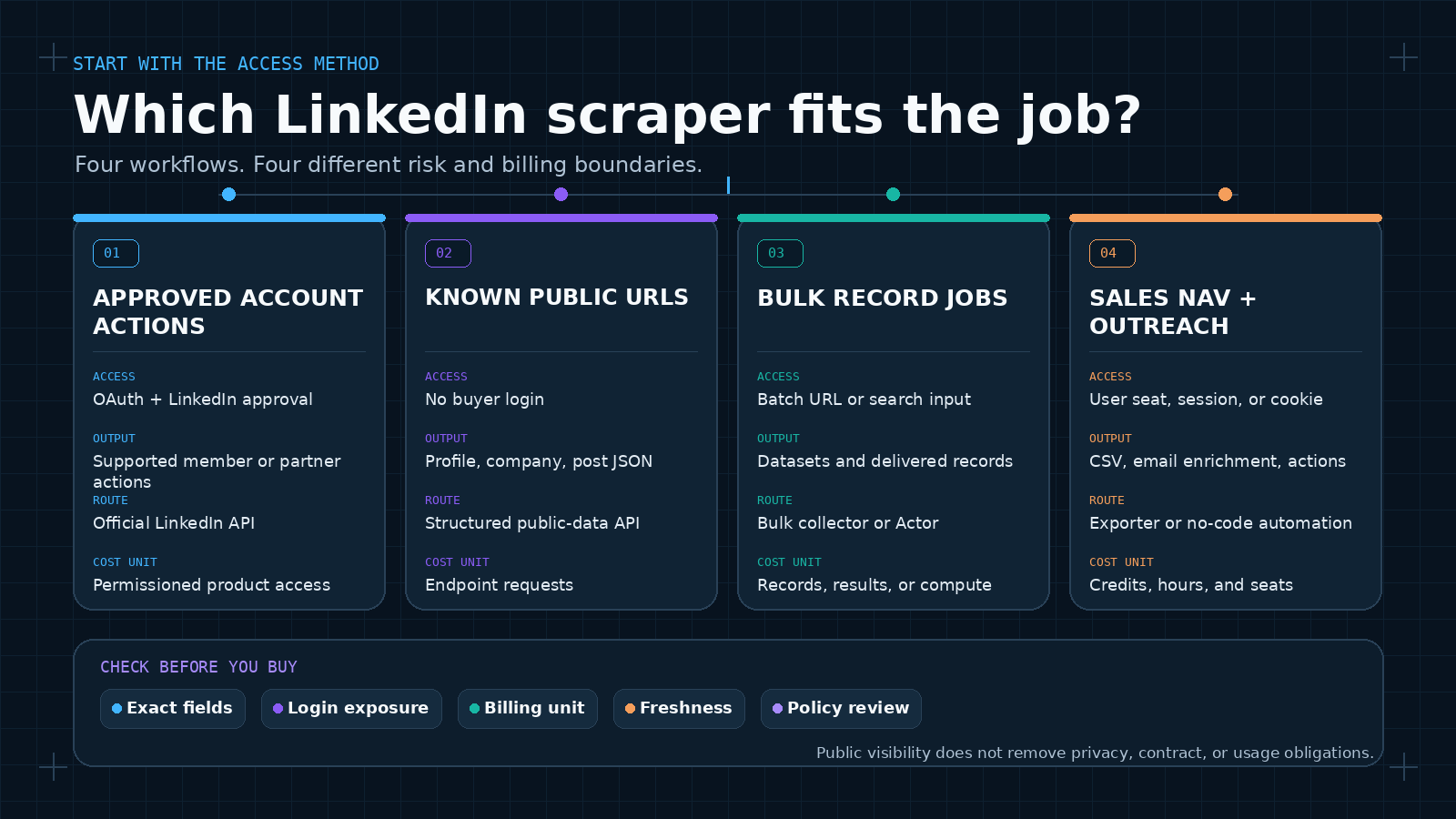
The best LinkedIn scraper depends on the workflow. ScrapeCreators is my pick for developers who want public profiles, companies, posts, and post search through one REST API. Bright Data is built for bulk records. Apify gives you a marketplace of Actors. Scrapingdog has a focused profile API. PhantomBuster handles no-code prospecting, Evaboot exports Sales Navigator leads, and LinkedIn’s official API is the right route for approved account access.
I run ScrapeCreators, so that ranking comes with an obvious disclosure. I checked each provider’s own product, documentation, terms, and pricing pages on August 24, 2026. I also called three ScrapeCreators LinkedIn endpoints. I did not run a controlled reliability benchmark across all seven options.
Quick comparison
| Rank | LinkedIn scraper | Best for | Price basis checked August 24, 2026 | Main tradeoff |
|---|---|---|---|---|
| 1 | ScrapeCreators | Public LinkedIn data inside an app or AI agent | 100 free credits; $47 for 25,000; tested profile, company, and post calls cost 1 credit each | No people-search database, email finder, or account automation |
| 2 | Bright Data | Large batches of profiles, companies, jobs, and posts | 5,000 records monthly free; $1.50 per 1,000 successful records pay as you go | A delivered record is not the same unit as one API request |
| 3 | Apify | Configurable Actor runs, datasets, exports, and email search | HarvestAPI page lists $4 per 1,000 profiles or $10 per 1,000 with email search | Actor quality, contract, and pricing depend on the developer you choose |
| 4 | Scrapingdog | A focused person and company profile API | Profile request costs 50 credits; $40 Lite plan includes 200,000 credits | Jobs use a separate API; protected profiles cost more credits |
| 5 | PhantomBuster | No-code extraction plus prospecting automations | Pricing page metadata says plans start at $59; annual plans get 20% off | LinkedIn workflows can require your session cookie and run through your account |
| 6 | Evaboot | Sales Navigator exports, cleanup, and work-email finding | 100-credit plan displayed at $9/month billed annually; 1 credit per export and 1 per found email | Requires an active Sales Navigator seat and a subscription |
| 7 | LinkedIn official APIs | Approved member, marketing, learning, or Sales Navigator integrations | No general public price; access depends on product and approval | Not an unrestricted public-profile scraper |
These prices are not interchangeable. ScrapeCreators prices endpoint requests. Bright Data prices delivered records. Apify’s selected Actor prices profiles and optional email searches. Scrapingdog assigns 50 or 100 credits to one profile request. Evaboot charges separately for an exported lead and a found email.
How I ranked these LinkedIn scrapers
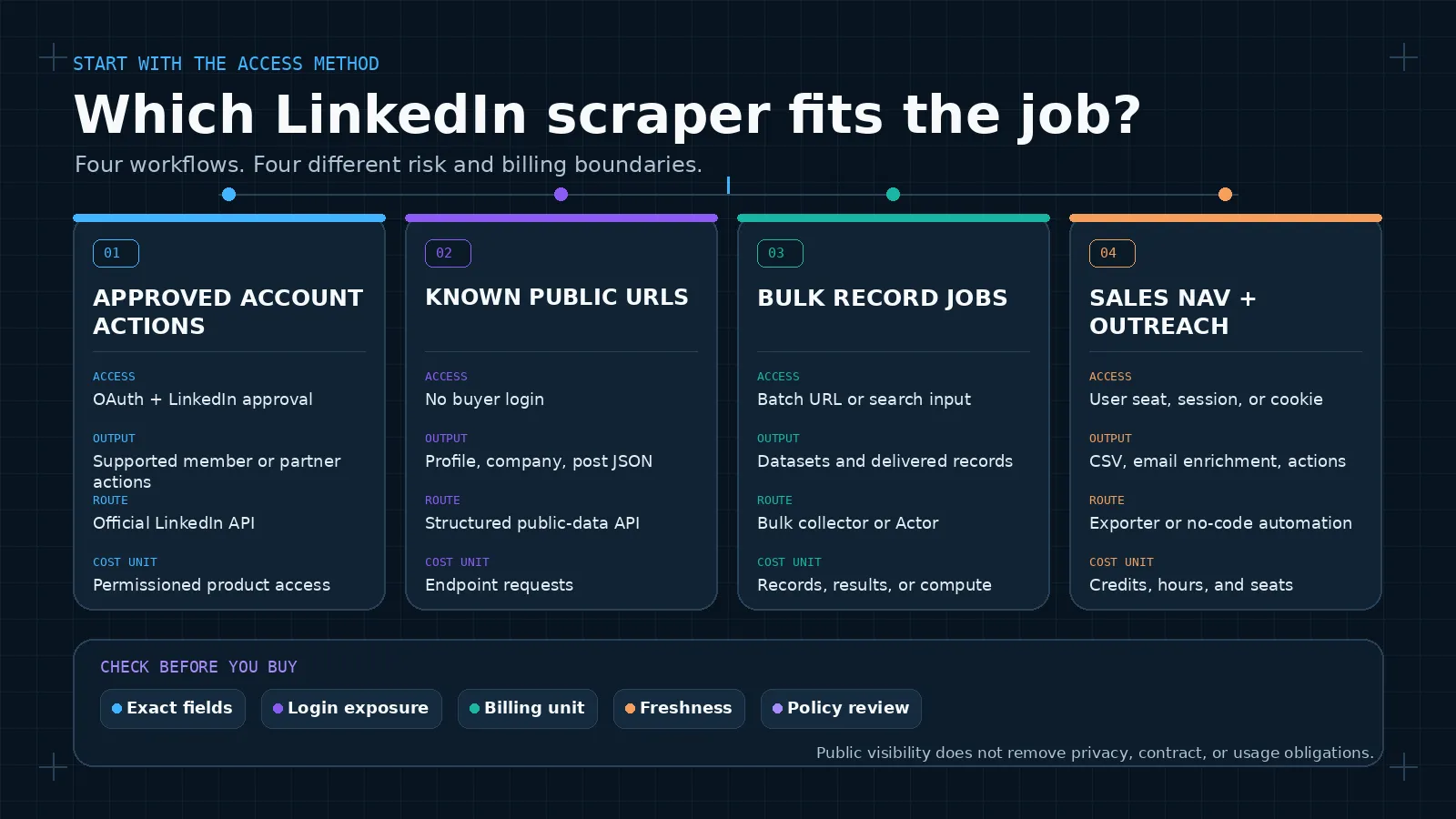
I started with the access method, not the longest feature list.
- Does the tool need the buyer’s LinkedIn login, browser session, or cookie?
- Does it return stable JSON, a downloadable dataset, or an automation that acts through the account?
- Can it collect the exact object the buyer needs: profiles, companies, posts, jobs, search results, or contact enrichment?
- Is the billing unit clear enough to model a real job?
- What breaks when a public field disappears, an Actor changes, or LinkedIn restricts an account?
- When should the buyer use an official API or a different provider instead?
The live US Google results split cleanly on August 24. Listicles, Reddit threads, product roundups, and a YouTube tutorial ranked for best linkedin scraper and best linkedin scrapers. Bright Data docs, Apify, ScraperAPI, Unipile, and open-source libraries ranked for linkedin scraper api and linkedin scraping api.
That split matters for URL ownership. This article answers tool-selection intent. The existing LinkedIn API page remains the product owner for API queries, and the existing LinkedIn scraping guide remains the educational owner for how-to intent. The top-three free LinkedIn profile viewer is a separate viewer query and should not be rewritten into a scraper roundup.
The seven best LinkedIn scrapers
1. ScrapeCreators
ScrapeCreators’ LinkedIn API is the simplest fit when a developer needs public LinkedIn objects in JSON and expects the same application to work with YouTube, Instagram, TikTok, Facebook, Reddit, or another social platform.
The current LinkedIn catalog covers public person profiles, company pages, company posts, public post search, individual posts, post transcripts, and LinkedIn Ad Library search and details. The profile endpoint documentation accepts a public profile URL. It returns what LinkedIn exposes publicly, so field coverage can vary by person and over time.
I called the profile endpoint with Sam Parr’s public URL on August 24. The response returned HTTP 200 in 2.19 seconds, charged one credit, and included a name, location, follower count, recent posts, experience, education, articles, and other public profile fields. The company and post calls also returned HTTP 200 and charged one credit each. Three successes are contract checks, not a reliability benchmark.
New accounts get 100 free credits. The $47 pack contains 25,000 credits, or $1.88 per 1,000 one-credit requests. The $497 pack contains 500,000, or about $0.99 per 1,000. Credits do not expire.
Choose something else for LinkedIn people search, Sales Navigator list export, verified email enrichment, phone numbers, private profile fields, connection requests, or messages. ScrapeCreators does not ask for a user’s LinkedIn session and does not automate an account.
2. Bright Data
Bright Data’s LinkedIn Scraper is the bulk option. Its page lists ten LinkedIn scrapers for people profiles, company information, jobs, job discovery, posts, and other record types. Buyers can use an API or a no-code collector, send bulk requests of up to 5,000 URLs, and receive structured results.
The free tier displayed 5,000 records per month. Pay as you go was $1.50 per 1,000 successfully delivered records. The $499 Scale plan included 384,000 records, then $1.30 per 1,000 additional records. The page listed unlimited concurrency on paid options.
This is a sensible choice when the unit of work is hundreds of thousands of records, the team needs batch delivery and spend controls, or jobs are part of the scope. It is more platform than a small app needs for one profile lookup.
Do not compare $1.50 per 1,000 Bright Data records directly with $1.88 per 1,000 ScrapeCreators requests. One request may return one profile, one company object, one post with comments, or a page of results. Count a complete workflow.
3. Apify
Apify is a marketplace and cloud runtime, not one LinkedIn scraper. The specific choice matters.
I reviewed the community-maintained HarvestAPI LinkedIn Profile Scraper. Its page says it takes profile URLs or identifiers, returns work experience, education, skills, and other profile fields, and does not need the buyer’s LinkedIn cookies or account. It displayed $4 per 1,000 detailed profiles or $10 per 1,000 profiles with email search. It also showed 65,000 total users, 11,000 monthly users, a 4.5 rating, and a modification three days before this review.
Apify’s platform adds runs, schedules, datasets, webhooks, SDKs, and exports. The free platform plan includes $5 of monthly usage. Starter is $29 per month plus pay as you go. Apify says unused prepaid usage expires at the end of the billing cycle.
Choose Apify when the Actor model is useful or when you need a specific profile-search, company, jobs, or enrichment Actor. Check the selected Actor’s developer, recent modifications, pricing tab, issues, input schema, output contract, and cookie requirements. A marketplace result is not a platform-wide guarantee.
4. Scrapingdog
Scrapingdog’s Profile Scraper API accepts a profile or company identifier and returns structured JSON. The product page lists name, headline, location, followers, experience, and company fields. It says the scraper does not use Sales Navigator or the buyer’s account.
Pricing takes one extra calculation. A profile request costs 50 credits, or 100 credits when the profile is protected. The free plan has 200 credits, enough for four normal profile requests. Lite is $40 per month for 200,000 credits, which works out to 4,000 normal profile requests, or $10 per 1,000, if the full allowance is used. Protected profiles consume twice the credits.
Scrapingdog is a clean candidate when person and company profiles are the whole job and a monthly plan is acceptable. Its FAQ says jobs use a separate Jobs Search API. It is not the first pick if the product needs public LinkedIn posts, post comments, transcripts, and several non-LinkedIn social networks behind the same contract.
5. PhantomBuster
PhantomBuster is built for no-code prospecting workflows. Its current guide walks through selecting profiles, connecting a LinkedIn session cookie, choosing email discovery, setting behavior, and scheduling launches. Its pricing page compares automation slots, execution time, email credits, AI credits, URL-finder credits, integrations, outreach campaigns, and lead warming.
The live pricing page metadata said plans start at $59 and annual plans get a 20% discount. The product is not priced as a simple number of profile API requests, so the useful cost question is how many workflows, hours, email attempts, and LinkedIn accounts the team needs.
Choose PhantomBuster when the goal includes extraction, enrichment, and outreach steps in a visual automation. Do not treat a session-based tool as account-independent. LinkedIn can see behavior performed through the account, and PhantomBuster’s own guide discusses extraction limits and launch frequency.
6. Evaboot
Evaboot is for a narrower job: export the results of your own Sales Navigator searches, clean the records, and optionally find and verify work emails.
The pricing page displayed a 100-credit plan at $9 per month when billed annually. Exporting one lead or account costs one credit. Finding one verified email costs another credit, while an email that is not found is free. Evaboot says the product requires an active Sales Navigator seat. One search can export up to 2,500 leads or 1,000 companies because Sales Navigator stops paginating beyond that point.
This is the better choice when a sales team already lives in Sales Navigator and wants CSV, CRM, webhook, and email-finder output. It is not a public LinkedIn API for an application. It also does not find phone numbers, according to the current FAQ.
7. LinkedIn official APIs
The official LinkedIn API path belongs on this list because some buyers should not use a scraper at all.
LinkedIn’s APIs use OAuth 2.0. Microsoft says most permissions and partner programs require explicit LinkedIn approval. Open permissions cover limited member authentication and sharing. Marketing permissions require approval, and sales integrations require approval as a Sales Navigator Application Platform partner.
Use this route when users authorize your app, the integration needs supported member actions, or the company qualifies for the relevant partner program. It is the wrong fit when the requirement is unrestricted collection of arbitrary public profiles.
The absence of a general public-profile API is not permission to ignore LinkedIn’s terms. It is a product constraint to document.
What current users actually ask about
Feature tables miss the questions people ask once they try to build something.
For this review, I searched four close YouTube queries in US context, fetched and read six transcripts, reviewed 76 unique comments across six videos, and fetched 23 replies from 16 discussion threads. I also reviewed 114 returned Reddit comments and replies across seven threads, plus 39 comments returned from six LinkedIn posts.
The same issues kept coming back:
- Will this put my account at risk? Viewers asked about cookies, account bans, browser extensions, and whether a no-login method really avoids their session. The article separates account-dependent and account-independent tools instead of calling either one “safe.”
- What data is actually returned? People asked for education, experience, skills, banner images, companies, posts, followers, emails, and phone numbers. “LinkedIn scraper” is too broad to answer that. Test the exact object and field.
- Can I input a list I already have? One discussion involved 4,000 names in a spreadsheet. Another involved known company URLs. Bulk URL input, name resolution, and discovery are different jobs.
- How do I filter beyond LinkedIn search? A creator asked for US SaaS founders with 5,000 to 10,000 followers who post inconsistently. That needs discovery, profile and post enrichment, then a scoring layer. No single title filter solves it.
- Why did yesterday’s workflow stop working? One video’s pinned comment said the featured Apify Actor no longer worked and recommended another. Marketplace availability and schema stability belong in vendor checks.
- Is “free” really free? Comments challenged free claims when a workflow needed a paid Actor, plan, Sales Navigator seat, or a low run limit. The table names the billing unit instead.
The strongest public discussions included a Reddit thread on reliable LinkedIn scrapers, a thread about account restrictions, and a LinkedIn discussion about the API and tools used in outbound stacks. Those are qualitative reports, not representative surveys or proof that one vendor is reliable.
A tested LinkedIn API request
I ran this request against ScrapeCreators on August 24, 2026. The API key stays in an environment variable:
curl --get "https://api.scrapecreators.com/v1/linkedin/profile" \
  -H "x-api-key: $SCRAPE_CREATORS_API_KEY" \
  --data-urlencode "url=https://www.linkedin.com/in/parrsam/"
The request returned HTTP 200 in 2.19 seconds and charged one credit. This is a shortened shape from the observed response:
{
  "success": true,
  "credits_charged": 1,
  "name": "Sam Parr",
  "location": "New York City Metropolitan Area",
  "followers": 90225,
  "recentPosts": ["...8 public post records..."],
  "experience": ["...10 public experience records..."],
  "education": ["...3 public education records..."]
}
Follower counts and public fields change. Some profiles expose less. Do not use this object as a permanent fixture or infer that every LinkedIn profile has the same fields.
The company check used Shopify’s public page. It returned HTTP 200 in 2.65 seconds with one credit charged and included the company name, industry, employee count, specialties, funding, employees, posts, and a pagination token. The post check returned HTTP 200 in 2.43 seconds with one credit charged and included text, media, author, like count, comment count, and two returned comments.
These checks prove that the current endpoints return useful JSON for these three public examples. They do not compare success rate, latency distribution, freshness, or field coverage against another provider.
What the pricing numbers actually mean
A cheap headline can become an expensive workflow when the denominator changes.
| Provider | Published unit | Cost question to answer before buying |
|---|---|---|
| ScrapeCreators | Credits per endpoint request | How many profile, company, post, search, and pagination calls does one job need? |
| Bright Data | Successfully delivered records | How many records will each input URL or collector produce? |
| Apify | Actor-specific events, results, or compute | Which Actor is running, and does it also charge for email search or platform use? |
| Scrapingdog | 50 or 100 plan credits per profile request | How many targets are protected, and will the monthly allowance be used? |
| PhantomBuster | Plan limits across slots, hours, and enrichment credits | How many automations and account sessions must run at once? |
| Evaboot | One credit per export and one per found email | How many exported leads need emails, and what does Sales Navigator cost too? |
| LinkedIn official APIs | Permissioned product access | Does the app qualify, and which actions require a partner program? |
For 10,000 known public profile URLs, compare ten thousand profile requests or records. For a list of names, add profile discovery. For recruiting leads, add email verification, consent review, bounce handling, and CRM writes. For an AI research agent, add post search, post details, comment pagination, deduplication, and storage.
A monthly allowance also has a utilization problem. Scrapingdog’s $40 plan can represent $10 per 1,000 normal profile requests only if the workload uses the full 200,000-credit allowance. Evaboot credits roll over while an active subscription continues. Apify says unused prepaid usage expires after the billing cycle. ScrapeCreators credits do not expire.
Model the chain, not one line in a pricing table.
Official LinkedIn API vs a public-data scraper
Use the official LinkedIn API when the user is authorizing an action on their own account, when a supported marketing or learning integration covers the requirement, or when the business can qualify for the Sales Navigator partner program.
Use a managed public-data scraper when the application needs public pages that are visible without asking each subject to authorize the app, and the business accepts the provider, policy, privacy, and maintenance tradeoffs.
Use a session-based automation when the user knowingly wants a workflow to act through their own LinkedIn account and has reviewed the risk. That is a different product from a public-data API, even if both export a CSV.
Use a B2B database or enrichment provider when the goal is a verified work email or phone number rather than LinkedIn content. Scraping a public profile and finding contact data are separate processes with different sources and obligations.
If the official route covers the job, start there. If it does not, write down the missing field, object, or workflow before shopping for a scraper.
Which LinkedIn scraper should you choose?
Choose ScrapeCreators if you are building software or an AI agent that needs public LinkedIn profiles, companies, posts, post search, and other social platforms through one API. Test the profile endpoint with the free credits before committing.
Choose Bright Data if the workload is a large batch of delivered LinkedIn records, especially when jobs, bulk URL handling, spend controls, and enterprise delivery matter.
Choose Apify if you want configurable Actors, datasets, schedules, webhooks, and the ability to swap between specialized LinkedIn tools. Treat the chosen Actor as a dependency and monitor it.
Choose Scrapingdog if you want a focused person and company profile endpoint, its 50-credit request model is easy for your team to forecast, and a monthly plan fits.
Choose PhantomBuster if a no-code prospecting workflow matters more than a synchronous application API, and the user accepts a session-based automation model.
Choose Evaboot if the team already has Sales Navigator and needs clean exports plus verified work-email attempts.
Choose LinkedIn’s official APIs if the use case is authorized member access or fits an approved partner program.
For a wider platform decision, the best social media scraping APIs guide compares products beyond LinkedIn. For implementation details and public field examples, read the LinkedIn scraping guide.
Limits and policy questions to settle first
LinkedIn changes public pages, fields, access controls, and enforcement. A production integration should expect nullable fields, missing profiles, changed post formats, expiring media URLs, partial comment samples, and pagination tokens.
Before launch, answer these questions:
- Does the tool touch a user’s login, password, cookie, browser, or IP?
- Which profile, company, post, job, search, and contact fields come from which source?
- Does a failed or partial request consume credits?
- How will you detect stale data rather than silently serving it?
- What happens when the provider or Actor changes its output schema?
- Can a person request correction or deletion?
- How long will personal data be stored, and who can access it?
- Are the collection method and intended use allowed in every relevant jurisdiction and contract?
LinkedIn’s current User Agreement prohibits bots or unauthorized automated methods and says users may not develop or use software, scripts, crawlers, browser plugins, or other technology to scrape profiles and other service data. A tool saying “public” or “no cookies” does not make that language disappear.
This is not legal advice. Public visibility does not settle privacy, copyright, contract, database-right, or data-protection questions. Get counsel for sensitive personal data, hiring, credit, insurance, monitoring, or large-scale commercial collection.
Sources checked
I checked these primary pages on August 24, 2026:
- ScrapeCreators LinkedIn API, pricing, profile docs, company docs, and post docs
- Bright Data LinkedIn Scraper and Web Scraper API pricing
- HarvestAPI LinkedIn Profile Scraper on Apify and Apify pricing
- Scrapingdog Profile Scraper API and Scrapingdog pricing
- PhantomBuster LinkedIn scraping guide and PhantomBuster pricing
- Evaboot pricing and limits
- LinkedIn API access documentation and LinkedIn User Agreement
Pricing, public fields, and platform rules change. Recheck the exact plan, endpoint, Actor, and terms before buying or shipping.


