
The short answer
Meta does not publish a per-call price for its Instagram APIs, so official API access can be free in the narrow sense. It is not free of setup work. You need an eligible Business or Creator account, OAuth, the right permissions, and sometimes App Review and business verification.
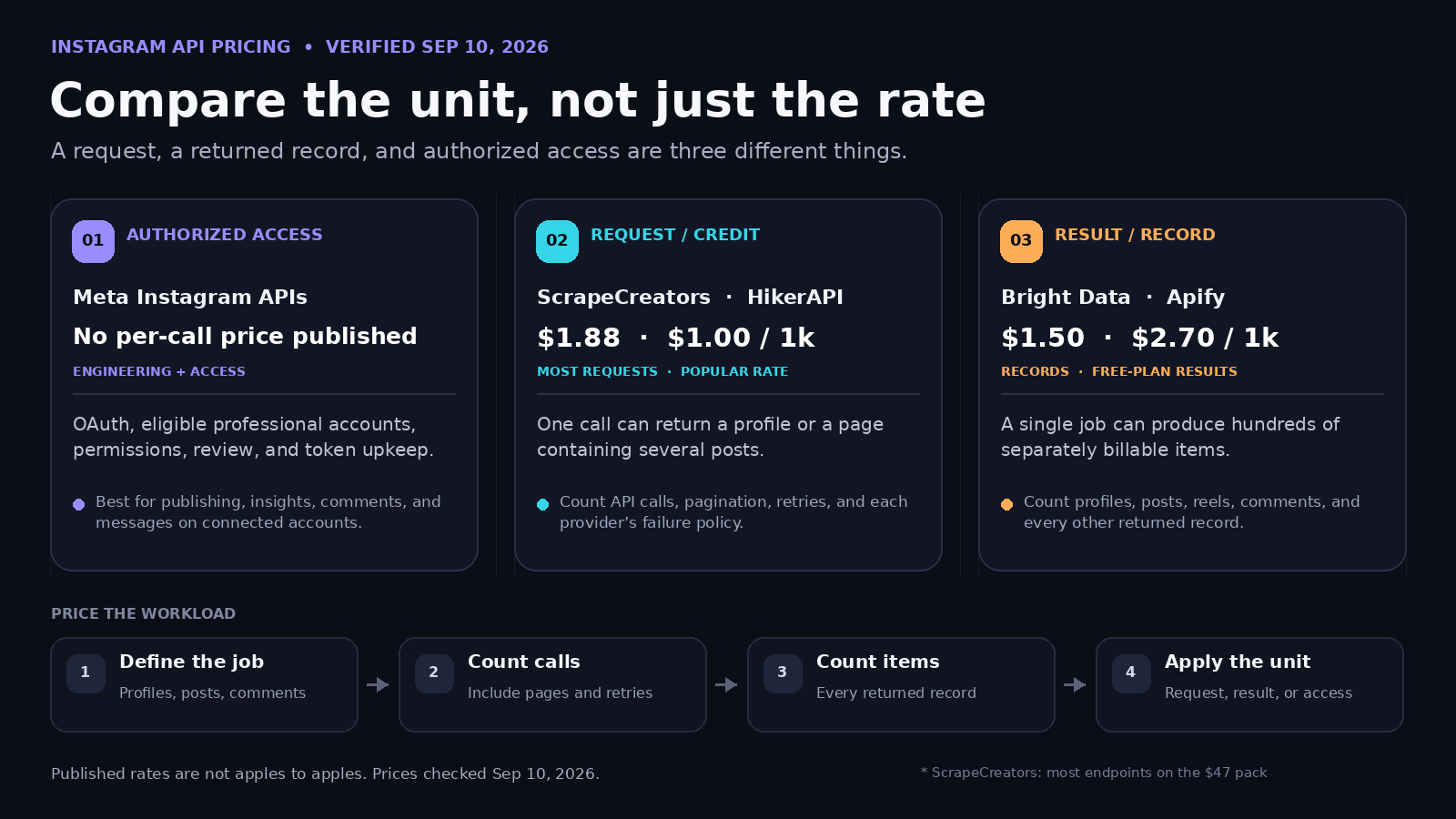
If you need public profiles, posts, reels, or comments from accounts that have not authorized your app, you are comparing paid public-data APIs instead. Current published prices range from request-based rates below $2 per 1,000 calls to record-based rates between $1.50 and $2.70 per 1,000 results. Those numbers are not interchangeable. One API call can return several billable records.
Prices and product details below were checked against vendor and Meta pages on September 10, 2026.
Instagram API pricing compared
| Option | Published starting price | What gets billed | Best fit | Important catch |
|---|---|---|---|---|
| Meta Instagram APIs | No per-call price published | Your own engineering and hosting; API usage is permission and rate-limit constrained | Publishing, messaging, insights, comments, and media for accounts that authorize your app | Professional-account requirements, OAuth, permissions, and review can limit access |
| ScrapeCreators | 100 free credits; $47 for 25,000 credits, advertised as $1.88 per 1,000 requests for most endpoints | Usually one credit per request; some endpoints cost more; cache hits cost zero | Public profile, post, reel, comment, and discovery data through one API | Public read access only. It does not replace Meta for publishing or private insights |
| HikerAPI | 100 free requests; $1 per 1,000 requests on its popular rate and $0.60 at volume | Request | Instagram-only public-data work where a request-priced model fits | Its pricing page says 200, 400, 403, and 404 responses are charged; 50x responses are not |
| Bright Data | 5,000 records per month free; $1.50 per 1,000 records pay as you go | Successfully delivered record | Bulk record extraction and teams that want managed scraping infrastructure | A request that returns 100 posts can create 100 billable records |
| Apify Instagram Scraper | $2.70 per 1,000 results on the Free plan; paid plans list discounts down to $1.50 | Result, such as a post, reel, comment, profile, hashtag, or place | No-code runs, scheduled jobs, exports, and Actor workflows | Platform plan and per-result costs both matter; free-plan comments are limited to one page per post |
| EnsembleData | 50 units per day free; $100 per month for 1,500 units per day | Endpoint-specific unit | Teams that want several social platforms under a daily allowance | A unit is not always a request or a record, so check each endpoint’s unit cost |
Disclosure: I run ScrapeCreators. I included primary pricing links because the fair comparison is the vendor’s current billing unit, not my summary of it.
There is no honest single winner here. Meta is the right tool when users connect their own accounts and you need write actions or private account insights. ScrapeCreators and HikerAPI have straightforward request pricing for public reads. Bright Data and Apify make more sense when you think in delivered records or managed jobs. EnsembleData packages several networks into daily unit allowances.
Why the official API can cost more than zero
The search question is usually “Is the Instagram API free?” The buying question is “Can the official API return the data my product needs without weeks of integration work?”
Meta’s current Instagram Platform overview separates two login paths. Both focus on Instagram Business and Creator accounts. The Facebook Login route also requires the Instagram professional account to be linked to a Facebook Page. Meta says these APIs can publish media, manage comments, retrieve insights, handle messages, and fetch limited metadata about other professional accounts.
That makes the official API a strong choice for social scheduling, inbox tools, and analytics dashboards where each customer authorizes access. It is a poor substitute for arbitrary public-profile research. Personal accounts and unaffiliated public accounts do not suddenly become available because you completed OAuth.
Some public-data access also has a gate. Meta’s Instagram Public Content Access documentation says hashtag search access requires App Review and business verification, and may require extra contracts. The allowed uses are specific, including campaign discovery, customer support, contest management, and aggregated audience work.
The cash price may be zero. The practical cost includes:
- building and maintaining two possible login flows;
- handling short- and long-lived tokens, refreshes, revocations, and reconnects;
- recording permission grants and passing App Review for advanced access;
- keeping up with version changes and fields that disappear;
- hosting webhooks and media workflows for publishing or messaging.
This setup cost came up repeatedly in the developer material I reviewed. One detailed Graph API walkthrough spends most of its time on app setup, permissions, connected Pages, tokens, and business verification. A separate public-data workaround video exists because the creator could not get the official access needed for the project. That does not make unofficial access right for every job, but it explains why a zero-dollar API can still be the expensive path.
The billing unit changes the bill
I would not pick an Instagram API from its per-1,000 number until I knew what the thousand represented.
Per request or credit
A request-priced API charges for the call. A profile lookup is one call. A page of posts can also be one call even when it contains several posts. Pagination creates more calls.
ScrapeCreators sells non-expiring credits. Its current pricing page says most endpoints use one credit per request, while a few use more. The $47 pack contains 25,000 credits. The $497 pack contains 500,000. A cache hit costs zero credits, while a cache miss fetches live public data at the endpoint’s normal cost.
HikerAPI also prices by request. Its lowest advertised rate requires enough volume to unlock it. Read the failure policy too: its pricing page counts several client-error status codes as chargeable responses.
Per result or record
Apify’s Instagram Scraper prices a profile, post, reel, comment, hashtag, or place as a result. Bright Data prices successfully delivered records. This can be clean for bulk extraction because your bill tracks the output row count.
It can also make a headline rate look cheaper than the resulting job. If one run returns 10 profiles and 1,000 posts, it produced 1,010 billable records before comments. The number of HTTP requests does not tell you the bill.
An Apify walkthrough shows why teams like this model: the same job can take URLs or search terms, run on a schedule, and export JSON or CSV. Comments under that walkthrough also show the part pricing pages cannot settle. People asked why a 700-comment post returned only a handful of comments, whether older posts could be fetched without walking newer pages first, and whether output media URLs would still work. Cost matters, but coverage and pagination determine whether the result is useful.
Per unit or daily allowance
EnsembleData gives each plan a number of units per day, then assigns different unit costs to endpoints. This model works if your traffic is predictable. It takes a little more spreadsheet work because 1,500 daily units does not necessarily mean 1,500 identical Instagram results.
Estimate your monthly cost
Write down the job before opening pricing calculators:
- How many profiles, posts, reels, and comments do you need?
- Do you need only the first page, or every available page?
- How often will you refresh the same URL?
- Does the provider bill the request, each returned item, or endpoint units?
- Are failed calls, empty responses, or cache hits charged?
For request pricing, use:
monthly cost = (billable requests / 1,000) x request rate
For result pricing, use:
monthly cost = (profiles + posts + reels + comments + other records) / 1,000 x result rate
Suppose a job looks up 10,000 profiles and requests one page of posts for each profile. Under request pricing, that is roughly 20,000 calls before retries and cache discounts. At ScrapeCreators’ advertised $1.88 per 1,000 requests, the usage value is $37.60 and fits inside one $47 credit pack.
That same job is not 20,000 results under a record model. If every posts page returns 12 posts, the job yields 130,000 records: 10,000 profiles plus 120,000 posts. At $1.50 per 1,000 records, that is $195. At $2.70, it is $351.
Those are modeled examples, not quotes. A real account may expose fewer posts, need more pages, return cache hits, or fail. A mismatch between the rate and billing unit can change the estimate by much more than the headline number.
Which option should you choose?
Choose Meta’s official API if
- users connect their own professional accounts;
- you need to publish posts, reply to comments, send messages, or retrieve authorized insights;
- your product can support OAuth, review, and token lifecycle work;
- the required fields and use case fit Meta’s documented permissions.
Choose ScrapeCreators if
- you need public profiles, posts, reels, comments, or discovery endpoints without target-account OAuth;
- you want one API and one credit balance across Instagram and other social platforms;
- request-based pricing fits better than paying for every record;
- you prefer credits that do not expire and expect repeated URLs to benefit from free cache hits.
ScrapeCreators does not publish, follow, like, or retrieve private data. If your app needs write actions or an account owner’s private insights, use Meta. If you need a managed browser workflow, no-code exports, or a dedicated Instagram-only provider, another tool may fit better.
Choose a record-based scraper if
- your primary unit is a clean dataset row;
- you want bulk jobs, schedules, exports, or managed datasets;
- your team is comfortable estimating total output records;
- you would rather pay for delivered results than individual page requests.
The broader Instagram scraping API comparison covers provider fit beyond price. If you are still deciding whether an API or your own scraper makes sense, start with the practical Instagram data guide.
A real public-data request
A profile request to the ScrapeCreators Instagram Profile endpoint needs only the public handle and API key:
curl "https://api.scrapecreators.com/v1/instagram/profile?handle=instagram" \
  -H "x-api-key: $SCRAPE_CREATORS_API_KEY"
On September 10, 2026, I called that exact public fixture. It returned HTTP 200 with success: true, the instagram username, follower and following counts, profile fields, and 12 recent timeline items. I also called the Posts endpoint for the same handle. It returned 12 items, more_available: true, and a pagination cursor.
A shortened profile response looked like this:
{
  "success": true,
  "data": {
    "user": {
      "username": "instagram",
      "is_verified": true,
      "edge_followed_by": {
        "count": 686508139
      }
    }
  }
}
Counts change, so do not copy that number into your application. Read the current response. Store the pagination cursor if you need older posts, and expect media URLs to expire or change.
Limits to plan for
No Instagram data route is unlimited in every sense.
Private content stays private. Public-data APIs can return only what Instagram exposes publicly. A post count on a profile does not guarantee that every post is available to a logged-out data source. Deleted, moderated, age-gated, region-gated, or otherwise restricted items can be absent.
Coverage differs by endpoint. A first comments response is not proof that every comment was returned. ScrapeCreators’ current Instagram comments documentation calls that endpoint one of its more error-prone routes and tells customers to expect about 90% success. Build retries, preserve cursors, and avoid treating an empty page as a complete archive without checking the response contract.
I saw this firsthand in the verification run. The instagram profile and posts fixtures succeeded, but an earlier profile request for another public handle returned HTTP 500, while its posts request returned HTTP 200 with no items. A spot check is not an uptime study. Test several real inputs from your workload before choosing a provider.
Also decide whether you need reading or writing. Public-data APIs are for reading public data. They should not promise private emails, private account content, or actions on behalf of users. For authorized publishing, messages, and private insights, Meta’s official route is the right boundary.
If comments are central to the project, read the Instagram comments API guide before estimating call volume.
Frequently asked questions
Is the Instagram API free?
Meta does not list a per-call fee for its Instagram APIs. You still pay for development, OAuth, review work, hosting, monitoring, and maintenance. Public-data providers charge according to requests, results, records, or units.
How much does the Instagram API cost per 1,000 requests?
There is no universal rate. On September 10, 2026, ScrapeCreators advertised $1.88 per 1,000 requests for most endpoints on its $47 credit pack. HikerAPI advertised $1 per 1,000 requests on its popular rate and $0.60 at volume. Bright Data and Apify price records or results, so their per-1,000 figures measure something different.
Does Meta charge for the Instagram Graph API?
Meta’s public developer pages do not publish a per-request price. Access is shaped by account type, permissions, OAuth, rate limits, App Review, and business verification rather than a simple price list.
Can I use the official API for any public Instagram profile?
Not in the same way as a public-data scraper. Meta’s current platform is centered on Business and Creator accounts that authorize your app, plus limited discovery features such as hashtags and metadata about other professional accounts. Check the exact permission and endpoint before planning the product.
Which price should I compare first?
Compare the unit. Estimate requests, returned records, pagination, retries, and refresh frequency. Then apply the rate. A cheap record can be expensive when one job creates thousands of records, while a cheap request can be expensive when pagination creates thousands of calls.


