
Yes, you can scrape comments from a public Instagram post or Reel by sending its URL to GET /v2/instagram/post/comments. The response includes comment text, timestamps, like counts, commenter fields, reply metadata, and a cursor for the next page. You do not need your own Instagram login.
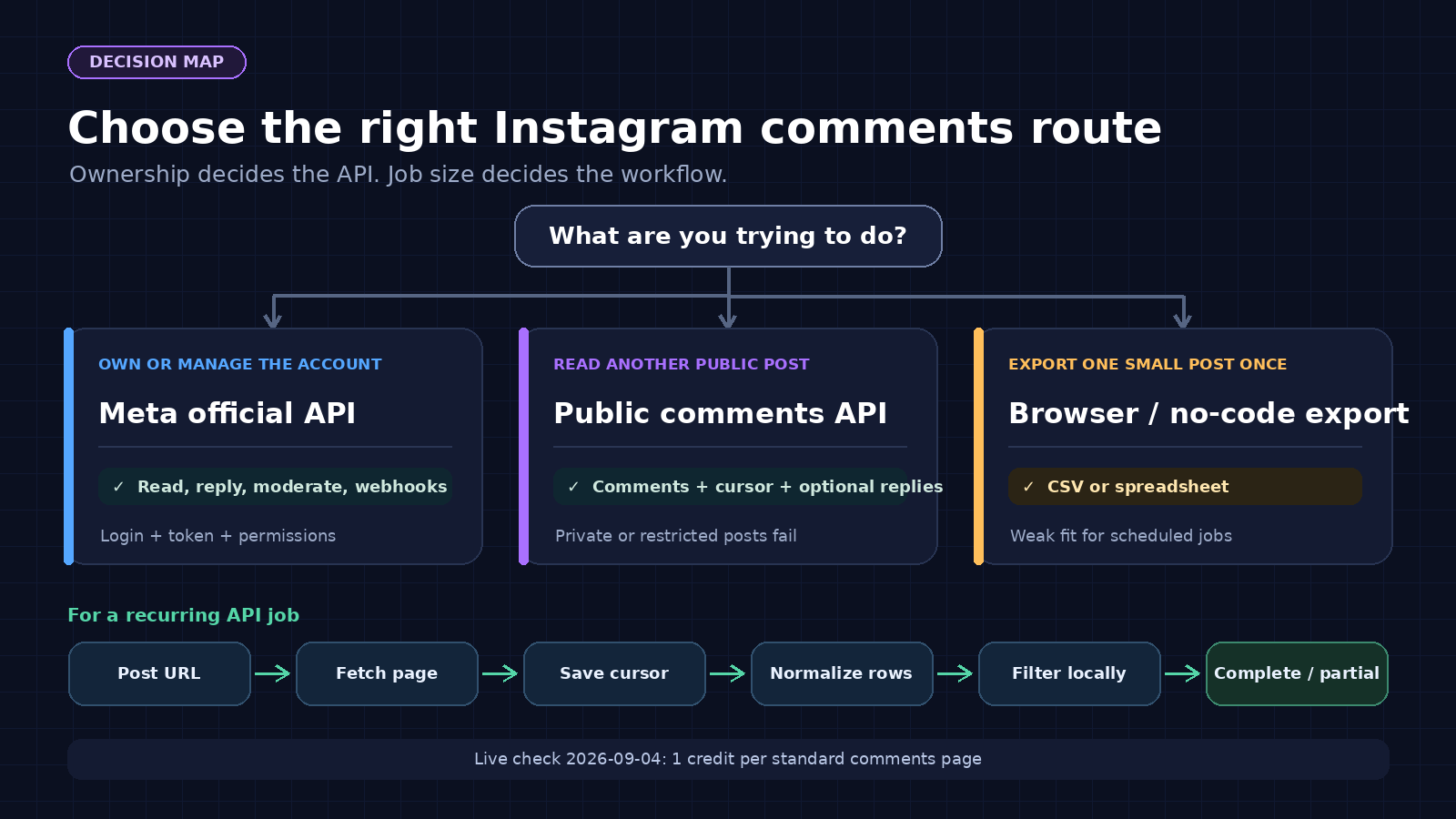
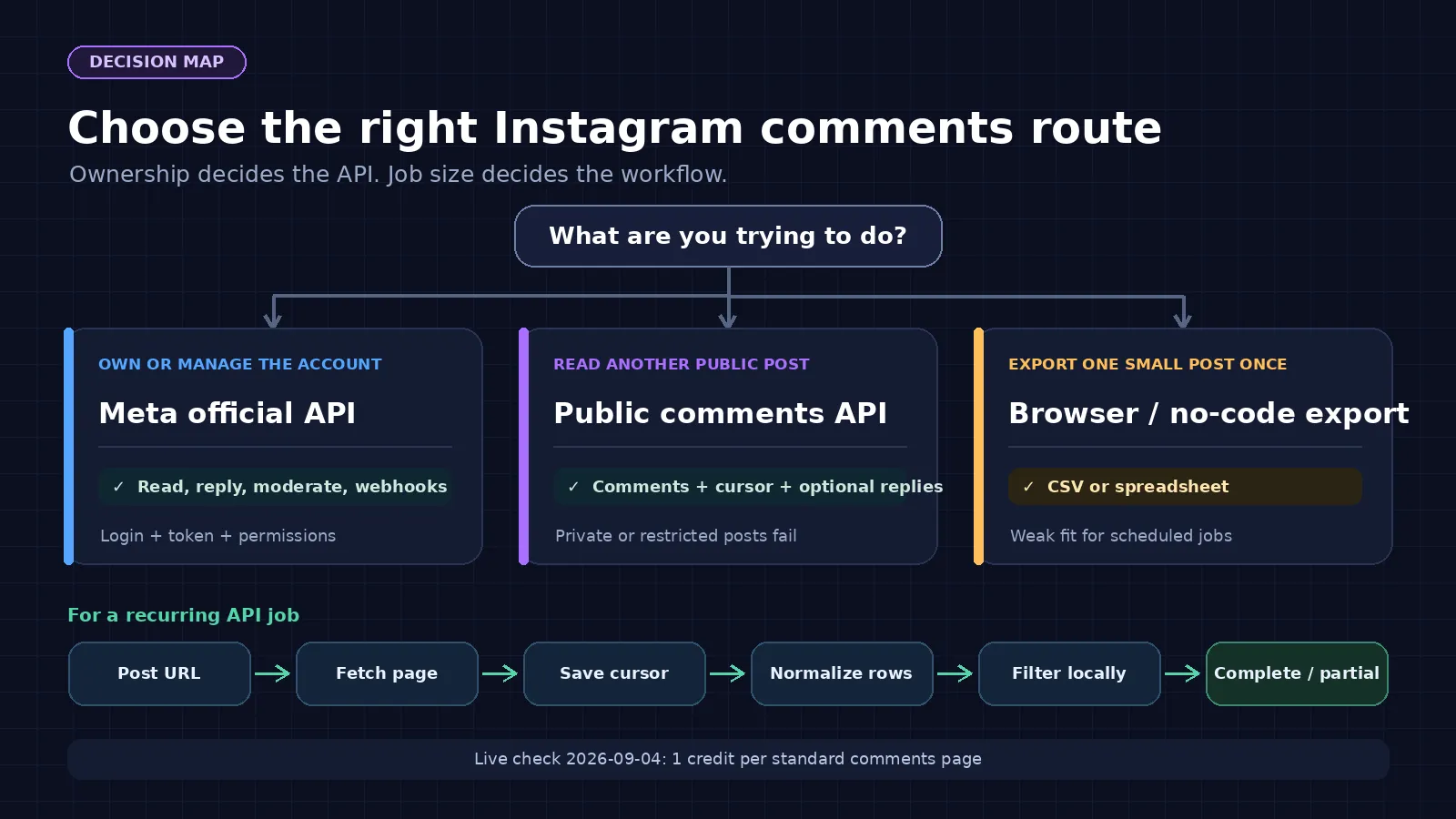
Use Meta’s official comments API instead when you own or manage the professional account and need moderation or webhooks. Use a public-data API when you need read access to someone else’s public post. Neither route unlocks private, deleted, or restricted content.
I run ScrapeCreators, so this is a product-led guide. I also included the cases where you should use Meta or a one-off export instead.
Endpoint behavior, pricing, limits, and source pages were checked on September 4, 2026.
Choose the right way to get Instagram comments
“Instagram comments API” can mean three different jobs. Picking the wrong route is where most of the pain starts.
| Method | Best for | What you need | Replies | Main limitation |
|---|---|---|---|---|
| Meta Instagram API | Comments on media owned by a professional account you manage | Meta app, login flow, access token, permissions, and sometimes Advanced Access | Read and write, including moderation workflows | It is built around your app users’ professional accounts, not arbitrary public posts |
| ScrapeCreators public comments API | Reading comments from another public post or Reel by URL | ScrapeCreators API key | Optional inline replies or a separate replies endpoint | Private and restricted media will not work, and some public requests fail |
| Browser extension or no-code export | A one-time CSV or spreadsheet | Browser session or vendor account | Varies by tool | Harder to schedule, monitor, and integrate into a product |
Meta’s current documentation is quite specific. Its comment moderation guide covers media owned by your app users. It lists login, access tokens, permissions such as instagram_manage_comments, and webhooks. The comments reference also says the edge returns at most 50 comments per query, returns top-level comments unless replies are expanded, and cannot filter comments by timestamp.
That is a good fit for a brand’s own inbox or moderation system. It is the wrong assumption for market research on an unrelated creator’s public Reel.
A public comments API flips that tradeoff. You give it the post URL and get read-only public data back. There is no posting or moderation access. If you need a broader view of the available Instagram routes first, start with the Instagram API overview.
What the live API returned
I checked the endpoint against production on September 4, 2026 rather than relying on an old sample response.
A current public @instagram post returned:
- 14 comments and a cursor on page one
- 11 comments and another cursor on page two
- one credit charged per page
- response times of 3.36 seconds and 3.01 seconds
The response included id, text, created_at, comment_like_count, user details, and pagination state. I did not publish the commenters’ text in this article.
There is an important catch. Two older public fixtures returned HTTP 500 during the same check. The comments endpoint documentation calls this one of our more error-prone endpoints and says to expect about a 90% success rate. That is not a service-level guarantee. It is a warning to build retries and incomplete-run handling into your job.
The working request cost one credit. On the current prepaid tiers, $47 buys 25,000 credits and $497 buys 500,000 credits. That works out to $1.88 or about $0.99 per 1,000 one-credit pages, depending on the tier. Purchases are one-time, not monthly subscriptions, and the homepage says credits do not expire. Check current pricing before budgeting because prices can change.
Make your first comments request
Put your key in an environment variable. Do not paste it into source control.
curl --get "https://api.scrapecreators.com/v2/instagram/post/comments" \
  --header "x-api-key: $SCRAPE_CREATORS_API_KEY" \
  --data-urlencode "url=https://www.instagram.com/p/DcymgItMFao/"
A trimmed example of the response shape looks like this:
{
  "success": true,
  "credits_charged": 1,
  "comments": [
    {
      "id": "17900000000000000",
      "text": "Example public comment",
      "created_at": "2026-09-04T10:16:51.000Z",
      "comment_like_count": 0,
      "user": {
        "username": "example_user"
      }
    }
  ],
  "cursor": "NEXT_PAGE_CURSOR"
}
The values above are placeholders that preserve the field shape. The real production check returned ordinary people’s public comments, so I left their text and usernames out.
Use the canonical post or Reel URL when possible. Short share links and redirect wrappers add another place for a request to fail. If you only need post metadata before deciding whether to collect comments, read the Instagram data scraping guide or inspect the endpoints on the public Instagram data API overview.
Paginate without losing your place
The first page is rarely the whole discussion. Keep passing the returned cursor until the API stops returning one or until your own collection limit is reached.
import os
import time
import requests

API_URL = "https://api.scrapecreators.com/v2/instagram/post/comments"
POST_URL = "https://www.instagram.com/p/DcymgItMFao/"
HEADERS = {"x-api-key": os.environ["SCRAPE_CREATORS_API_KEY"]}


def fetch_page(cursor=None):
    params = {"url": POST_URL}
    if cursor:
        params["cursor"] = cursor

    for attempt in range(3):
        response = requests.get(API_URL, headers=HEADERS, params=params, timeout=45)
        if response.status_code == 200:
            return response.json()
        if response.status_code < 500:
            response.raise_for_status()
        time.sleep(2 ** attempt)

    response.raise_for_status()


comments = []
cursor = None

for page_number in range(1, 6):
    page = fetch_page(cursor)
    comments.extend(page.get("comments", []))

    cursor = page.get("cursor")
    print(f"page={page_number} total_comments={len(comments)}")

    if not cursor:
        break
Five pages is an example safety cap, not an endpoint limit. Set yours from the job’s budget and the number of comments you actually need.
Store the last successful cursor after every page if the job matters. A job that dies on page 37 should resume from page 37, not spend another 36 credits replaying work it already completed. Deduplicate by comment ID after a restart because a live comment feed can change while you paginate.
Do not use comment_count on the post as proof that you collected every row. Instagram can hide, remove, reorder, or restrict comments. The API can also finish without matching the public counter.
Handle replies, date ranges, and hidden comments
These three questions came up repeatedly in the social research for this update. They are also the places where a basic export usually stops being enough.
Replies
Add include_replies=true when you want replies attached to parent comments:
curl --get "https://api.scrapecreators.com/v2/instagram/post/comments" \
  --header "x-api-key: $SCRAPE_CREATORS_API_KEY" \
  --data-urlencode "url=https://www.instagram.com/p/DcymgItMFao/" \
  --data-urlencode "include_replies=true"
As verified in the current docs on September 4, 2026, that option costs 15 extra credits and is limited to 20 parent comments per request. Do not turn it on by default for a large crawl.
A cheaper pattern is to collect parent comments first, inspect child_comment_count or reply metadata, and call the separate replies route only for threads you need. This matches a common audience request: people want the actual discussion, not a spreadsheet that silently drops every response.
Date ranges
The current public comments endpoint has no start_date or end_date parameter. Meta’s official comments reference says its edge cannot filter by timestamp either.
Fetch the pages you need, then filter created_at locally:
from datetime import datetime, timezone

start = datetime(2026, 9, 1, tzinfo=timezone.utc)
recent = [
    comment
    for comment in comments
    if datetime.fromisoformat(comment["created_at"].replace("Z", "+00:00")) >= start
]
This is client-side filtering. It does not save upstream pages or credits. If someone promises a historical date filter, ask whether the provider has its own archive or still paginates the live feed behind the scenes.
Hidden and moderated comments
Public-data collection only sees what the public source exposes. It cannot promise comments that Instagram has hidden, deleted, limited, or placed behind an account-only moderation view.
If you manage the professional account and need moderation state, use Meta’s official route. Its comment tools are designed for the account owner, with the required permissions and webhook events. Do not treat a public scraper as a back door into private moderation data.
Build a useful comment dataset
The raw text is usually the start of the job. The next step might be a spreadsheet, a search index, a support-theme report, or an input to a sentiment model.
Across five YouTube transcripts reviewed for this update, the most practical workflows were exporting to Google Sheets or CSV, running sentiment analysis, and looking for recurring questions. The comment threads asked for date ranges, replies, cost clarity, commenter attributes, and access to hidden negative comments. Reddit discussions kept returning to Meta’s login and permission setup. TikTok comments asked whether the same workflow could cross platforms and filter posts before collection.
Those questions changed this guide. The old version showed a request and then jumped straight to a success story. This version separates the access methods, shows a resumable cursor loop, explains the reply surcharge, and says plainly that date filtering and hidden comments are not available through this route.
For analysis, keep the stored schema boring:
{
  "source": "instagram",
  "post_url": "https://www.instagram.com/p/DcymgItMFao/",
  "comment_id": "17900000000000000",
  "parent_comment_id": null,
  "text": "Example public comment",
  "created_at": "2026-09-04T10:16:51.000Z",
  "like_count": 0,
  "username": "example_user",
  "collected_at": "2026-09-04T10:20:00.000Z"
}
Keep collected_at separate from created_at. One is your observation time. The other is the platform’s comment timestamp. That distinction matters when you rerun a post and compare changes.
If you are comparing Instagram providers rather than committing to one route, the Instagram scraping APIs guide explains why field names, billing units, and access rules should not be flattened into one imaginary universal contract.
Plan for failures
The live check for this article produced both successes and failures. That is more useful than pretending one green request proves reliability.
A production collector should:
- Retry only a small number of server errors with backoff.
- Fail fast on invalid input and authentication errors.
- Save the last successful cursor and page count.
- Mark a post as partial when pagination stops on an error.
- Keep the original post URL and collection time in every run record.
- Alert on a change in failure rate, not one isolated 500.
Do not loop forever. Instagram-side restrictions do not become solvable because the 40th retry came from the same job.
Also separate an empty page from a failed page. An empty successful response can mean there are no visible comments. A 500 means the request failed. Your downstream analysis should not turn both into comments: [] and call the dataset complete.
ScrapeCreators does not impose an account-level rate limit, but that does not remove upstream limits or make unbounded concurrency sensible. Start with low concurrency, record latency and status, then increase carefully. For large jobs, sample a few posts first and estimate pages, reply expansion, and retry overhead before buying credits.
Limitations and responsible use
A public post is not the same as unrestricted data.
- Private, deleted, age-gated, region-gated, or login-gated media may not return comments.
- Hidden and moderated comments are not guaranteed in a public response.
- Public comment counts can differ from the rows you can retrieve.
- The endpoint is read-only. It does not post, hide, delete, or moderate comments.
- Usernames and comment text can be personal data. Collect less, retain it for less time, and secure it.
- Platform terms, privacy law, and intellectual-property rules vary by use and location.
Do not build unsolicited outreach lists just because a username is public. If your real goal is community research, aggregate themes and avoid exposing individual commenters when you publish the result. For regulated, high-risk, or user-profiling work, talk to a lawyer before collecting anything.
Choose another route when the fit is wrong. Meta is the better choice for owned-account moderation and webhooks. A one-off browser export may be easier for a single small post. ScrapeCreators makes sense when your application needs repeatable, read-only access to public comments by URL and you can handle occasional failures.
Frequently asked questions
Can I scrape comments from any public Instagram post?
You can request many public posts and Reels, but not every URL will work. Private, deleted, restricted, or login-gated media can fail. ScrapeCreators currently documents roughly 90% expected success for this endpoint, not a guarantee.
Do I need an Instagram login or Meta app review?
Not for the ScrapeCreators public-data route. Meta’s official route requires the relevant login flow, tokens, permissions, and professional-account relationship described in its documentation.
Can I filter Instagram comments by date?
Not at request time with the current endpoint. Paginate through the feed and filter created_at in your own code. That still consumes the pages you fetched.
Does the API return replies?
Yes. Use include_replies=true for inline reply collection or the separate replies endpoint for selected threads. Check the current docs before running this at scale because reply expansion has a higher credit cost.
How should I handle failed comment requests?
Retry a few times with backoff, save progress after each successful page, and mark the run partial if it cannot finish. Never turn a failed request into a successful empty dataset.
Is scraping public Instagram comments legal?
It depends on the data, location, purpose, platform terms, and how you use the result. Public visibility alone does not settle those questions. This article is technical guidance, not legal advice.
You can inspect the live request and response schema in the Instagram comments API docs. If the route fits, create an account and start with the free credits before committing to a larger crawl.


