
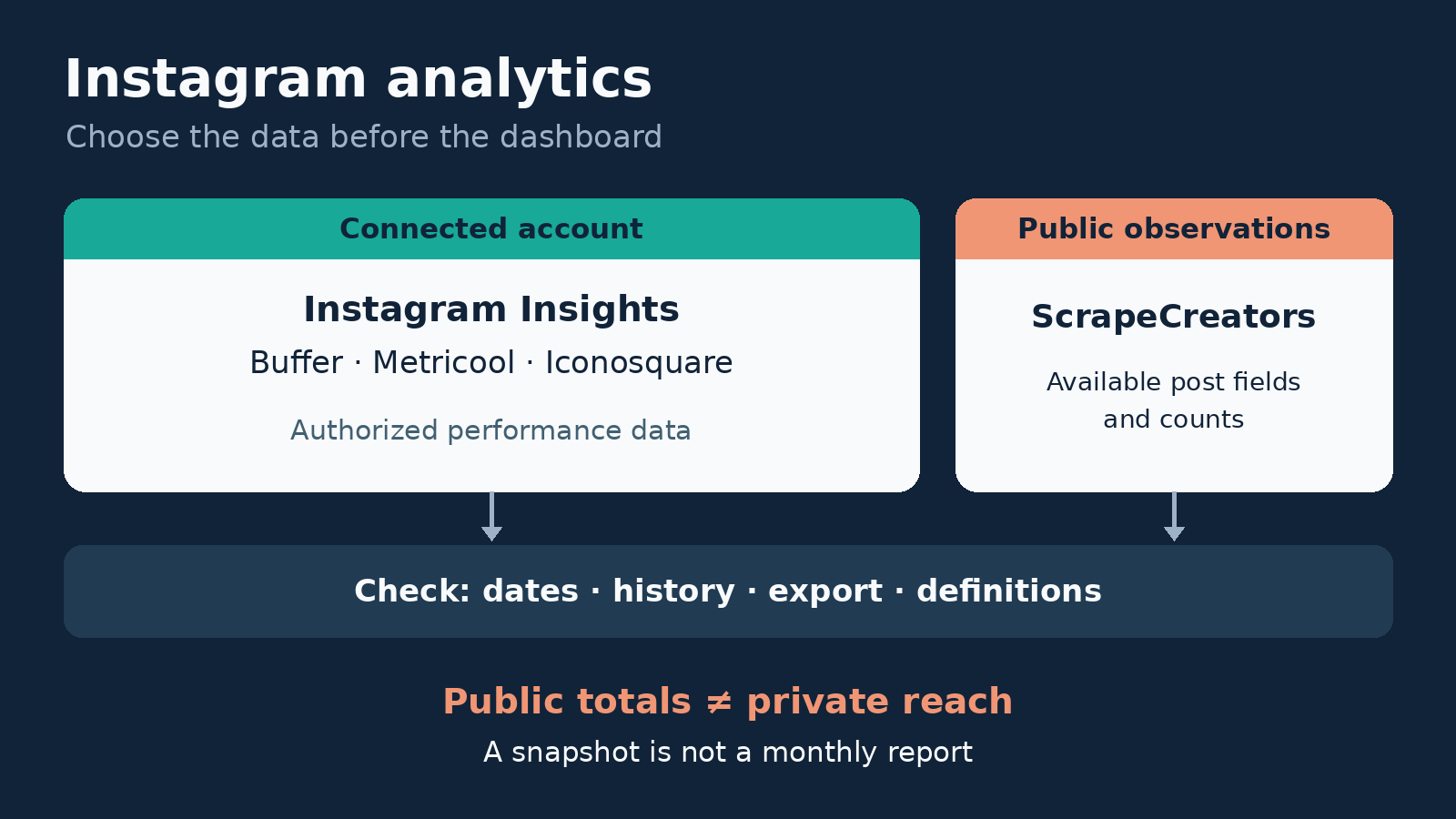
The best Instagram analytics tools depend on the report you need. Start with Instagram Insights for your own professional account. Choose Buffer for lightweight checks beside your publishing workflow, Metricool for multi-brand reporting, or Iconosquare for analytics dashboards and scheduled reports. Choose ScrapeCreators only when you need public post records inside software you build. It does not replace authorized Instagram Insights.
I build ScrapeCreators. If you need reach, saves, audience demographics, or a client report without writing code, I would start with a connected-account tool, not our API.
Prices, plan gates, documentation, and our public API observations were checked on November 6, 2026. We reviewed the other products through their primary pages, not paid accounts or a comparative accuracy test.
Choose the report before the tool
| Tool | Choose it for | Current price or unit | Important boundary |
|---|---|---|---|
| Instagram Insights | Understanding your own professional account | Native starting point without another analytics subscription | Account access and metric availability still matter |
| Buffer Insights | Quick performance checks in your publishing dashboard | Free; Essentials starts at $6/channel/month or $60/channel/year | Custom dates and CSV, Markdown, and PDF exports require a paid plan |
| Metricool | Reports across brands and their connected networks | Starter: $25/month for up to five brands, or $20/month equivalent billed yearly | API, custom templates, and advanced analytics have different gates |
| Iconosquare | Custom dashboards and recurring report delivery | Launch: $46/month for five profiles, or $39/month equivalent billed yearly | Its cheaper Starter plan does not include report scheduling |
| ScrapeCreators | Public post evidence for your own application | $47 buys 25,000 prepaid credits | Request/page billing buys records, not private Insights or a reporting workspace |
Prices exclude applicable taxes. Annual-equivalent prices require annual payment. Brands, connected profiles, channels, and API credits are different billing objects, so the cheapest headline is not necessarily the cheapest finished report.
This comparison is about measuring accounts you manage and choosing a reporting workflow. If the job is researching other accounts, use the separate Instagram competitor tool comparison. If the job is selecting an extraction provider, see the Instagram scraper roundup.
1. Instagram Insights for your own account’s evidence
Start with Instagram’s own Insights tools. Before paying for another dashboard, identify the decisions your current account data cannot answer conveniently.
For example, you may already have enough information to compare your own posts by the metrics available to your account. What you lack might be a reusable monthly report, a longer observation history, or a way to combine several managed accounts. Those are good reasons to evaluate another tool. Wanting a more attractive chart, by itself, is a weaker reason.
Account access is the first gate. Meta’s Insights API documentation describes authorized access to Business and Creator accounts and their media. It requires the appropriate access token and permissions. A public username is not a replacement for that authorization.
The same documentation says some account metrics are unavailable below 100 followers, user metrics are stored for up to 90 days, and unavailable Insights may return an empty dataset rather than zero. That is a specific API boundary, not a promise that every native screen or reporting vendor has the same history.
Choose it if: you manage one account and are still learning what matters. Choose a reporting workspace when recurring delivery, account switching, or stored history becomes the actual bottleneck.
2. Buffer for a lightweight publishing and measurement loop
Buffer Insights puts follower growth, engagement, and impressions beside the publishing workflow. You can look at a single channel or an aggregated All Channels view. Instagram support is for professional accounts.
There is an important recent change: Buffer says Analyze retired on October 7, 2026. Insights is the current product. Do not buy based on an older review of Analyze’s reporting features.
Current Insights is available on every plan, including Free. Last month and custom date ranges, plus CSV, Markdown, and PDF exports, are paid features. Chart snapshots are available on Free. Buffer explicitly says Insights does not currently have audience demographics, Best Time to Post recommendations, or the old drag-and-drop report builder.
That makes it a sensible option for a small team that wants a quick answer to “How did our posts perform?” without opening a separate reporting application. It is less suitable if your required deliverable depends on the missing features above.
The current plan reference lists three connected channels on Free. Essentials costs $6 per channel per month for channels 1 through 10, or $60 per channel per year. The price changes in higher channel bands, so use the current calculator for a larger portfolio.
Choose it if: publishing and a straightforward check-in belong together. Choose a deeper reporting product when audience detail or a more configurable report is essential.
3. Metricool for multi-brand reports with clear upgrade gates
Metricool’s Instagram analytics sits inside a broader brand-management workspace. Its billing model is useful when you manage several networks for each business: a brand can contain one profile for each supported social network, rather than charging the same way as a per-channel product.
The USD pricing page lists Free for one brand and 30 days of analytics. Starter begins at $25 monthly for up to five brands, or $20 per month billed annually, which is $240 for the year. Starter includes PDF/PPT reports and unlimited analytics history.
Read that history label carefully. Retention in the product does not prove that every metric will backfill to any date you request. Ask to see the earliest populated date for the actual Instagram account you plan to report on.
The plan and add-on reference separates three purchases that are easy to confuse:
- Starter includes standard reports.
- Advanced adds team/client management, customizable templates, the Data Studio connector, and API access.
- The Advanced Analytics add-on expands Metricool Studio, Campaign Dashboards, and detailed analytics. It is an extra charge, starting at $12/month on Starter.
The current Advanced starting price is $67 monthly for up to 15 brands, or $53 per month billed yearly. You do not need that plan merely because the product uses the word “analytics.” You may need it if your deliverable requires the API or custom templates.
Choose it if: several brands need repeatable reports from one workspace. Confirm your exact report, export, and collaboration needs before paying for an upgrade or add-on.
4. Iconosquare for dashboards and scheduled report delivery
Iconosquare’s Instagram workspace supports account analytics and custom dashboards. Its reporting workflow is worth considering when a colleague or client expects the same report to arrive regularly, not just when you remember to download it.
The current plans page has Free, Starter, Launch, Scale, and Custom tiers.
Free allows two social profiles and one month of analytics history. Starter begins at $13/month for three profiles, or $10/month billed yearly. It includes custom analytics dashboards and one year of history, but its feature grid does not include report scheduling or social-profile report downloads.
For that reporting job, evaluate Launch: five profiles, one user, and automated reports at $46 monthly or $39/month billed annually, which is $468 for the year. The feature grid places report scheduling and social-profile reports on Launch and Scale, not Free or Starter.
Scale begins at $95 monthly for five profiles, or $79/month billed annually. It adds three users, collaboration, campaign tracking, and listening, with two years of analytics history. Do not pay for Scale merely to get a scheduled account report when Launch covers that requirement.
History allowance still needs an account-specific check. Ask the trial to show the date range you need, including a Reel, a Story, and a collaboration post if those matter to your work. We did not connect a private account or test scheduled delivery.
Choose it if: custom dashboards and recurring delivery are the product you are buying. Choose the smaller tier only after confirming it includes the actual export you need.
5. ScrapeCreators for public evidence inside a custom report
Our Instagram API is a different purchase. It retrieves public records for developers. It does not connect to your professional account to unlock reach, saves, audience demographics, or conversions.
Use it when you already have a reporting application and need public post identity, captions, dates, or available engagement counts beside your authorized data. Keep the two sources separate. A public post’s current like count is not the number of likes it received during last month’s reporting window.
The user-post endpoint takes a handle and returns a paginated feed. Our pricing is prepaid: $47 for 25,000 credits. Today’s three successful fixture requests each charged one credit. That was one charge per page, not per post. Partial or missing optional metrics do not automatically make a successful request free.
We checked two Nike pages and one adidas page. Each returned 12 records. The two Nike pages had no repeated IDs, and both exposed another cursor. This proves those particular pages worked, not that we exported an entire reporting period.
The fixtures also show why the schema matters. Nike’s second page included a media owner named nsw; adidas’s page included adidastennis and was not strictly newest-first. Preserve the requested account separately from the media owner. Do not silently attribute every record to the requested handle or assume returned order is a clean date filter.
Our docs warn that play counts can be inaccurate and exclude Facebook views. A zero is a real value when returned; an unavailable value should remain unknown. This API is a poor replacement for connected-account Insights when private metrics are the reason you are shopping.
Choose it if: you need public records in software you control. Start with the docs and create an API account only if you are comfortable owning storage, analysis, and reporting.
Keep a public snapshot separate from private Insights
This Python example makes one request and saves an evidence packet. Set SCRAPE_CREATORS_API_KEY first. It intentionally leaves private metrics unknown and does not invent a reporting-period total.
import os,json
from datetime import datetime,timezone
from urllib.parse import urlencode
from urllib.request import Request,urlopen

params={'handle':'nike','trim':'true'}
request=Request('https://api.scrapecreators.com/v2/instagram/user/posts?'+urlencode(params),headers={'x-api-key':os.environ['SCRAPE_CREATORS_API_KEY']})
with urlopen(request,timeout=60) as response:
    data=json.load(response)
if data.get('success') is not True or not isinstance(data.get('items'),list) or not data['items']:
    raise RuntimeError('No usable public post page returned')
with open('instagram-public-source.json','w') as file:
    json.dump(data,file)
observed_at=datetime.now(timezone.utc).isoformat()
rows=[]
seen=set()
for post in data['items']:
    post_id=str(post['id'])
    if post_id in seen:
        continue
    seen.add(post_id)
    rows.append({
        'source_handle':params['handle'],
        'media_owner':(post.get('user') or {}).get('username'),
        'post_id':post_id,
        'url':post.get('url'),
        'published_at':post.get('created_at'),
        'observed_at':observed_at,
        'metric_scope':'public totals at collection time',
        'likes':post.get('like_count'),
        'comments':post.get('comment_count'),
        'plays':post.get('play_count'),
        'authorized_reach':None,
        'authorized_saves':None,
        'conversions':None,
    })
packet={
    'rows':rows,
    'credits_charged':data.get('credits_charged'),
    'has_more_pages':bool(data.get('next_max_id')),
    'complete_reporting_period':False,
}
with open('instagram-evidence.json','w') as file:
    json.dump(packet,file,indent=2)
print(json.dumps({'rows':len(rows),'credits':packet['credits_charged'],'more_pages':packet['has_more_pages']}))
We ran this exact example separately on November 6: 12 unique rows, one credit, more pages available. It is a first-page observation, not a complete export. The null private fields are our example’s explicit boundaries, not new fields supplied by the API.
For more pages, pass the returned next_max_id with the same handle and repeat trim=true. A cursor does not carry those stateless options forward. Record collection time, deduplicate by ID, validate dates, and stop if the response does not contain usable records. Pagination still does not turn current public totals into historical daily Insights.
Give each trial the same reporting job
A useful trial should end with a decision, not a folder of screenshots. Try this proposed checklist on an account you are authorized to connect:
- Pick one completed reporting period and one business question. For example, decide whether to repeat a particular content format.
- Check identical dates and timezone in the native account and candidate tool. Distinguish posts published in that period from interactions measured during it.
- Inspect one ordinary post, one Reel, and any collaboration you need to include. Write down metric definitions and missing fields.
- Produce the actual required file on the plan you intend to buy. A trial with every feature enabled does not establish access on the cheapest tier.
- Write one recommendation and the evidence behind it. If the goal is appointments, verify the booking outcome in your booking system instead of calling a profile visit a conversion.
Those checks address concrete questions in Milou Pietersz’s reporting walkthrough and its comments: monthly metrics, missing account access, and appointment attribution. This public client-audit discussion also asks how to turn numbers into a useful recommendation. These are qualitative questions, not proof that any named tool improves results.
Do not compare engagement rates until their numerator and denominator agree. A follower-based rate and a reach-based rate answer different questions. Do not total post reach and call it unique account reach, either.
If a tool cannot produce the specific report or explain an important discrepancy, another annual subscription will not fix the missing evidence.
Questions before you subscribe
What is the best free Instagram analytics tool?
Start with Instagram Insights for an account you manage. Buffer, Metricool, and Iconosquare also have free options, but their date, export, profile, and history limits differ. Test the required output, not just whether a free dashboard opens.
Can an Instagram analytics tool show private metrics without account access?
A public username does not grant authorized Insights access. Public records and estimates should stay labeled separately from connected-account reach, saves, and audience data. Meta’s permission requirements still apply to the authorized route.
Does Buffer still have Analyze?
Buffer says Analyze retired on October 7, 2026. Its current Insights feature is free across plans, with paid date-range and export options. Older walkthroughs can describe features that current Insights does not include.
Can I export a monthly report from public post data?
You can export an observed public sample, but current cumulative counts do not establish interactions during that month. Use authorized period metrics for your own account’s performance, and label public snapshots with collection time and coverage.