
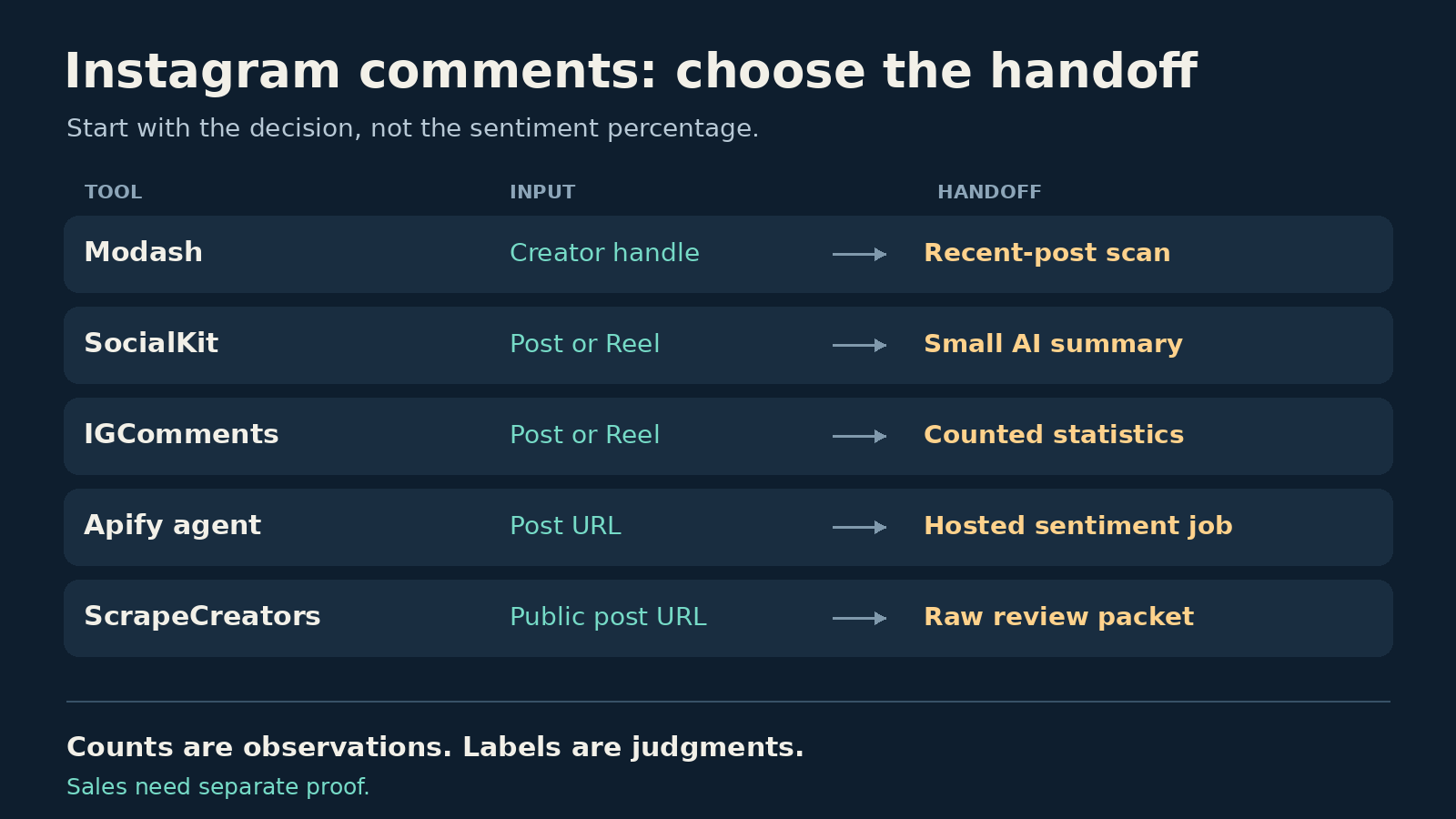
For a quick creator-level Instagram comment analysis, I would shortlist Modash. For a single post’s AI sentiment summary, look at SocialKit or Apify’s Comments Analyzer Agent. Choose IGComments for transparent counts rather than AI judgments. Use ScrapeCreators only if you want to build the collection and review workflow yourself. It supplies public comments, not finished sentiment scores.
The useful question is what you need to act on: unanswered questions, repeated objections, creator buying signals, or a reviewable dataset. A chart with a positive percentage is not enough.
I run ScrapeCreators. I checked the linked product pages, access rules and prices on November 24, 2026, and executed the bounded collection example below. I did not run a paid competitor analysis or benchmark classifier accuracy.
Choose the analysis you actually need
| Tool | Input and useful handoff | Current entry point | Boundary to check |
|---|---|---|---|
| Modash | Creator handle; questions, thin comments and purchase-intent examples across recent posts | Free browser tool; commercial Raw API is separate | Last 12 posts, top-level comments only in the free analyzer |
| SocialKit | One public post or Reel URL; AI sentiment and themes | Free account includes 20 credits | Up to 20 popularity-ranked comments, not the whole conversation |
| IGComments | Post or Reel URL; counts, word frequencies and inspectable comment rows | Free through 200 comments; larger-post passes from $4.99 | Counts are not sentiment judgments; large-post free results are a preview |
| Apify Comments Analyzer Agent | Post URL; sentiment summary and linked comment-level output | $1 per 1,000 comment events; Free plan has $5 monthly spend | Set the collection limit explicitly and inspect the complete run’s charges |
| ScrapeCreators | Public URL; raw parents, selected replies and your own labels | $47 buys 25,000 prepaid credits | You build the analysis; reply collection has separate costs and pagination |
These are different purchases. Free browser access, comment events, one-post passes and prepaid request credits do not translate into an honest universal price per thousand analyzed comments. The primary links in each section are the current references.
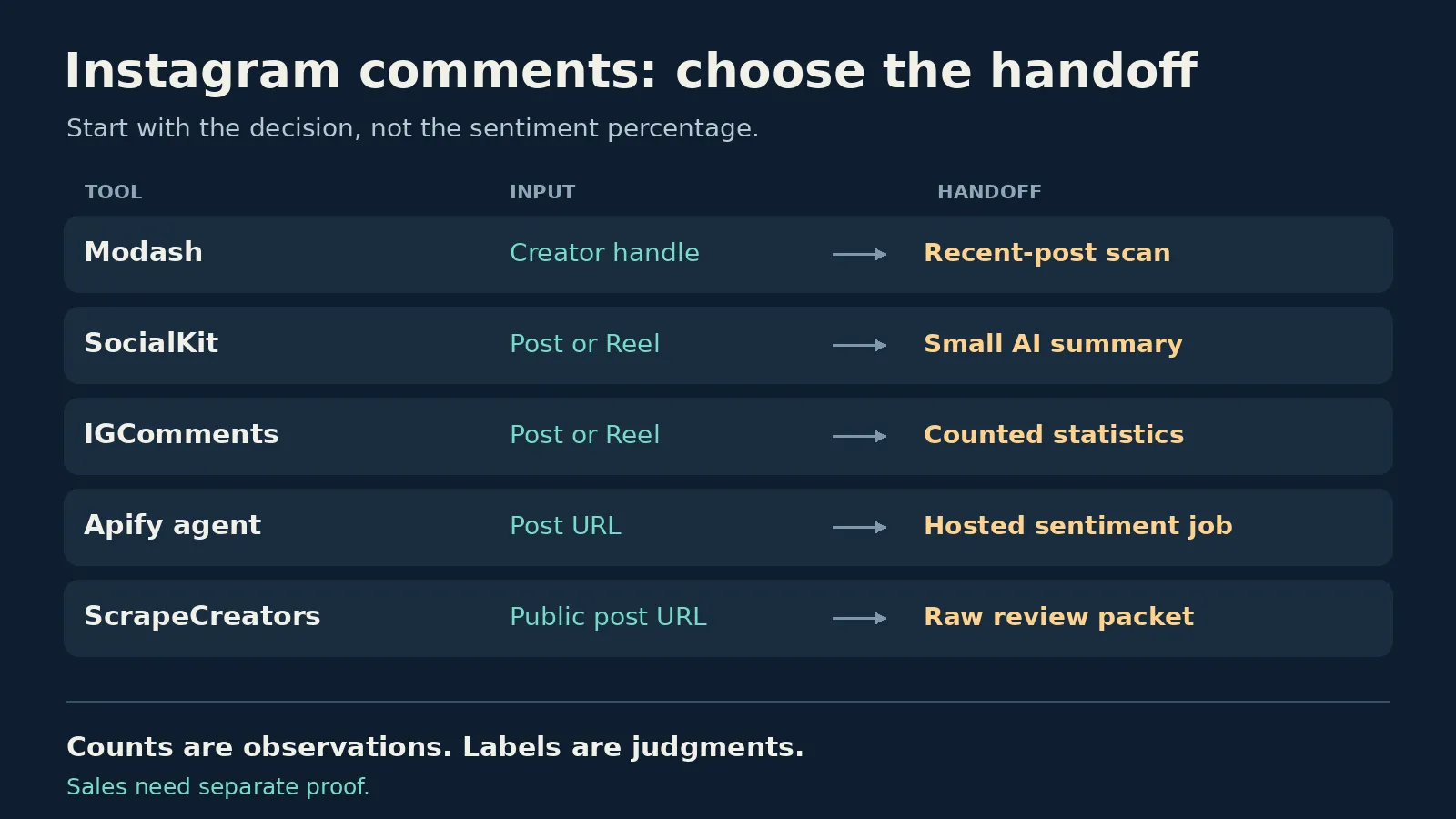
This page compares analysis handoffs, not scraping vendors or file formats. Our Instagram comments guide covers collection and pagination. The comment exporter comparison covers buying a CSV or Excel file. Neither a successful request nor a downloaded spreadsheet proves that the analysis is useful.
1. Modash for a creator-level first look
Modash’s Instagram comment analyzer starts with a handle rather than one post. Its free workflow reads the latest 12 posts, skips older pinned posts and categorizes top-level comments. The expanded FAQ confirms that replies are excluded; the separate Raw API can retrieve them.
Its output separates lightweight reactions, questions and buying signals. That is a useful starting point for deciding which creator or post deserves closer reading. The commercial API returns raw data, so do not assume purchasing API access also purchases the free tool’s analysis logic.
My mkbhd browser attempt did not produce a completed report during the check. The preloaded Maya Moves card is a demonstration, not a result I obtained for that creator.
Choose Modash if your first decision is which creator’s recent discussion to investigate. Choose another route if you need a particular older campaign post or reply context.
A flagged buying question is a lead to inspect, not proof of a sale. Ask for the source post and original comment before using an intent count in a partnership decision.
2. SocialKit for a small post-level AI summary
SocialKit’s Instagram analyzer takes a public post or Reel URL. It describes sentiment, themes, takeaways and labeled examples. Its current expanded FAQ says up to 20 top comments, selected using Instagram’s popularity ranking. It also explicitly limits conclusions to the retrieved sample.
The free entry point requires a SocialKit account and includes 20 credits. Submitting a public Reel sent my browser to Sign In. I did not sign in or obtain a report, and I have not verified how many analyses those credits buy.
Choose SocialKit if a small, quick summary is enough to decide what to read next. Choose another route if you need a larger, deliberately sampled conversation or an auditable custom classification scheme.
Before circulating the output, put the sample size beside the sentiment percentage. Read the actual examples. Twenty popular comments can be useful, but they are not a poll of everyone who saw the Reel.
3. IGComments for counts you can inspect
IGComments’ analyzer deliberately uses counting rather than AI sentiment. It reports things such as unique commenters, repeated commenters, questions, frequent words and replies versus parents. You can move from a statistic to the comments behind it.
Its pricing page lists a free 200-comment allowance. Larger posts show a free preview; one-post passes currently cost $4.99 through 2,000 comments, $7.99 through 10,000, $9.99 through 30,000 and $14.99 through 100,000. Optional Pro is $12/month or $99/year, with a 100,000-comment monthly allowance. Monthly Pro limits individual posts to 30,000; annual Pro raises that to 100,000. Passes and subscriptions are separate choices.
Choose IGComments if you want inspectable counts and search before deciding whether an AI model is necessary. Choose another option if you want ready-made semantic themes or sentiment labels. I checked its published workflow, not a completed export.
Repeat commenters are not automatically bots. Question marks are not a complete definition of questions. Counted statistics still need interpretation, and a later fetch can contain different comments.
4. Apify for a hosted sentiment-analysis job
The specific listing is Apify’s Comments Analyzer Agent, not every comments scraper on the marketplace. Its README describes a summary plus linked comment-level sentiment and flagged records. Check both artifacts before treating the job as finished.
Read the current input schema: postUrl supplies the post, while required maxComments currently defaults to 1, with a range of 1 to 1,000. The adjacent description says unspecified means all comments. I would follow the schema and set a deliberate limit rather than rely on that conflicting sentence.
The pricing tab lists $1 per 1,000 comment events with platform usage included. The Free plan provides $5 monthly spend. The public pricing history also refers to other Actor runs, so inspect the whole execution’s charges instead of assuming the displayed analysis event is every cost. I did not execute a paid job.
Choose Apify if you want hosted analysis and an automation handoff. Choose another route if your custom labels or required reply scope do not match the output. Validate those on a small run first.
5. ScrapeCreators for a review workflow you control
The ScrapeCreators Instagram API fits software that needs public source rows before analysis. It does not classify sentiment or confirm buying intent. Keep it off your shortlist if you only want a finished browser report.
The parent-comments endpoint returns comment records and a cursor. A nonempty normal page costs one credit; a successful empty parent page costs zero. include_replies=true costs 15 credits total for a nonempty parent page, even if no replies appear, and is slower with a documented timeout risk.
For a small number of threads, use the separate comment-replies endpoint with the post url and parent comment_id. A successful reply request costs one credit, including an empty result. Parent and reply cursors are separate. A null child_comment_count means unknown, not zero.
Prepaid pricing starts at $47 for 25,000 credits. That purchases collection, not 25,000 labeled comments. Your classification, review and delivery still need implementation. Create an account if that is the job you actually want to own.
A bounded review packet before adding AI
Here is a deliberately small Python example. It collects at most two parent pages and one reply page for a single selected parent. It saves the source bodies, receipt times, continuation state and review rows. It leaves theme and sentiment null because collection has not performed analysis.
Set SCRAPE_CREATORS_API_KEY in your environment. The script uses only Python’s standard library.
import json
import os
from datetime import datetime, timezone
from pathlib import Path
from urllib.parse import urlencode
from urllib.request import Request, urlopen

POST = "https://www.instagram.com/reel/DOq6eV6iIgD/"
BASE = "https://api.scrapecreators.com"
pages = []
parents = {}
cursor = None


def get(path, params):
    request = Request(
        BASE + path + "?" + urlencode(params),
        headers={"x-api-key": os.environ["SCRAPE_CREATORS_API_KEY"]},
    )
    with urlopen(request, timeout=40) as response:
        body = json.load(response)
        http_status = response.status
    if body.get("success") is not True:
        raise RuntimeError("Collection failed; do not label this run complete")
    pages.append({"path": path, "params": params,
                  "received_at": datetime.now(timezone.utc).isoformat(),
                  "body": body, "http_status": http_status})
    return body


for _ in range(2):
    params = {"url": POST, "include_replies": "false"}
    if cursor:
        params["cursor"] = cursor
    body = get("/v2/instagram/post/comments", params)
    for comment in body["comments"]:
        parents[str(comment["id"])] = comment
    previous = cursor
    cursor = body.get("cursor")
    if not cursor or cursor == previous:
        break

# Read one thread only. Unknown reply counts are not a reason to skip it.
parent_id = next(iter(parents), None)
reply_body = None
if parent_id is not None:
    reply_body = get("/v1/instagram/post/comment/replies",
                     {"url": POST, "comment_id": parent_id})
    for reply in reply_body["comments"]:
        if str(reply["parent_comment_id"]) != parent_id:
            raise RuntimeError("Reply parent did not match")

review_rows = []
for comment in parents.values():
    review_rows.append({"post_url": POST, "comment_id": str(comment["id"]),
                        "source": comment, "theme": None,
                        "sentiment": None, "review_status": "unreviewed"})
packet = {"post_url": POST, "pages": pages, "parents": review_rows,
          "selected_parent_id": parent_id,
          "selected_thread_replies": reply_body,
          "next_parent_cursor": cursor,
          "scope": "At most two parent pages and one selected reply page"}
Path("instagram-comment-review.json").write_text(
    json.dumps(packet, ensure_ascii=False, indent=2), encoding="utf-8")
print(json.dumps({"parent_rows": len(parents),
                  "selected_reply_rows": len(reply_body["comments"]) if reply_body else 0,
                  "more_parent_pages": bool(cursor),
                  "credits_charged": sum(p["body"].get("credits_charged", 0)
                                         for p in pages)}))
I ran this exact code on November 24. The parent pages returned 12 and 24 rows, with 36 unique parent IDs and a cursor still present. The selected thread returned zero replies, a terminal reply cursor and a one-credit charge. The three requests cost three credits in total.
The first parent response reported 90 comments including replies. That is not the same population as 36 collected parents, so I would not call this a percentage-complete export. All 36 parent reply counts were null. Reading one empty thread does not establish that the other 35 have no replies.
This packet preserves the original text, native counts and long string IDs. It is a partial collection receipt, not a sentiment report, reliability benchmark or proof that the public total is obtainable. The separate replies endpoint is worth understanding before enabling broad reply expansion on every parent page.
For a real analysis handoff, add a label definition, supporting source ID, reviewer correction and model or rule version. Keep source text unchanged. You should be able to replace a classifier without recollecting the conversation or losing the evidence behind an earlier decision.
Check the meaning before trusting the chart
I would trial a tool against a short acceptance checklist, not the nicest dashboard. These are proposed checks, not benchmark results:
- Scope: Is the input one post, the newest posts from a handle, or an account you control? A selected-post analyzer is not a search for every comment a person has ever left across Instagram.
- Coverage: Record collected parents, fetched replies and source-reported total separately. Record unknown values and remaining cursors. Never silently call a popularity-ranked preview the full discussion.
- Labels: Decide whether sentiment is about the product, creator, customer service or another person. Keep purchase questions separate from confirmed transactions.
- Evidence: Open the original row behind an important theme. Preserve emoji and original languages even if your model needs a separate translated field.
- Action: Ask what someone should do next: answer a recurring sizing question, investigate a service complaint, or make a follow-up post. A generic positive summary is not an action list.
The audience research made those distinctions concrete. In the public discussion about an Instagram influencer comment analyzer, a reply challenged the gap between apparent buying intent and actual sales. That objection belongs in a buying checklist; the tool maker’s promotional conversion claim is not evidence I would use to rank providers.
Maximilian Jesch’s Instagram LLM analysis walkthrough shows the work involved in defining categories and improving structured outputs. Its discussion also raises the cost of model use. I would preserve original language and emoji rather than copy the tutorial’s filtering choices. Those choices change what your eventual percentages describe.
Sandra Talks Data’s Air Canada walkthrough illustrates another useful question: positive toward whom? Support for workers and criticism of an airline can coexist in a conversation. It is a workflow example, not my independent validation of its sentiment scores or today’s collection defaults.
Frequently asked questions
What is the best Instagram comment analyzer?
Shortlist Modash for a creator-level scan, SocialKit for a small post summary, IGComments for inspectable counts and Apify for a hosted sentiment job. ScrapeCreators fits a custom collection-and-review pipeline, not a finished analyzer. Choose by input, reply scope and the evidence behind the output.
Can I analyze Instagram comments for free?
There are bounded free entry points. Modash offers a free browser analyzer; SocialKit requires a free account with credits; IGComments provides a 200-comment allowance or preview; Apify provides monthly free spend. None establishes unlimited collection, complete replies or verified classifier accuracy.
Does an Instagram comment analyzer include replies?
It depends on the tool and workflow. Modash’s free analyzer excludes replies, IGComments says replies contribute to its statistics, and ScrapeCreators offers separate reply requests or paid parent-page expansion. Verify actual parent links, returned rows and remaining reply cursors before reporting full discussion coverage.
Can comment analysis prove purchase intent or sales?
It can flag possible buying questions for review, but a comment label does not prove a purchase. Keep inferred intent separate from transactions and connect it to your own attribution evidence before making a sales claim.