
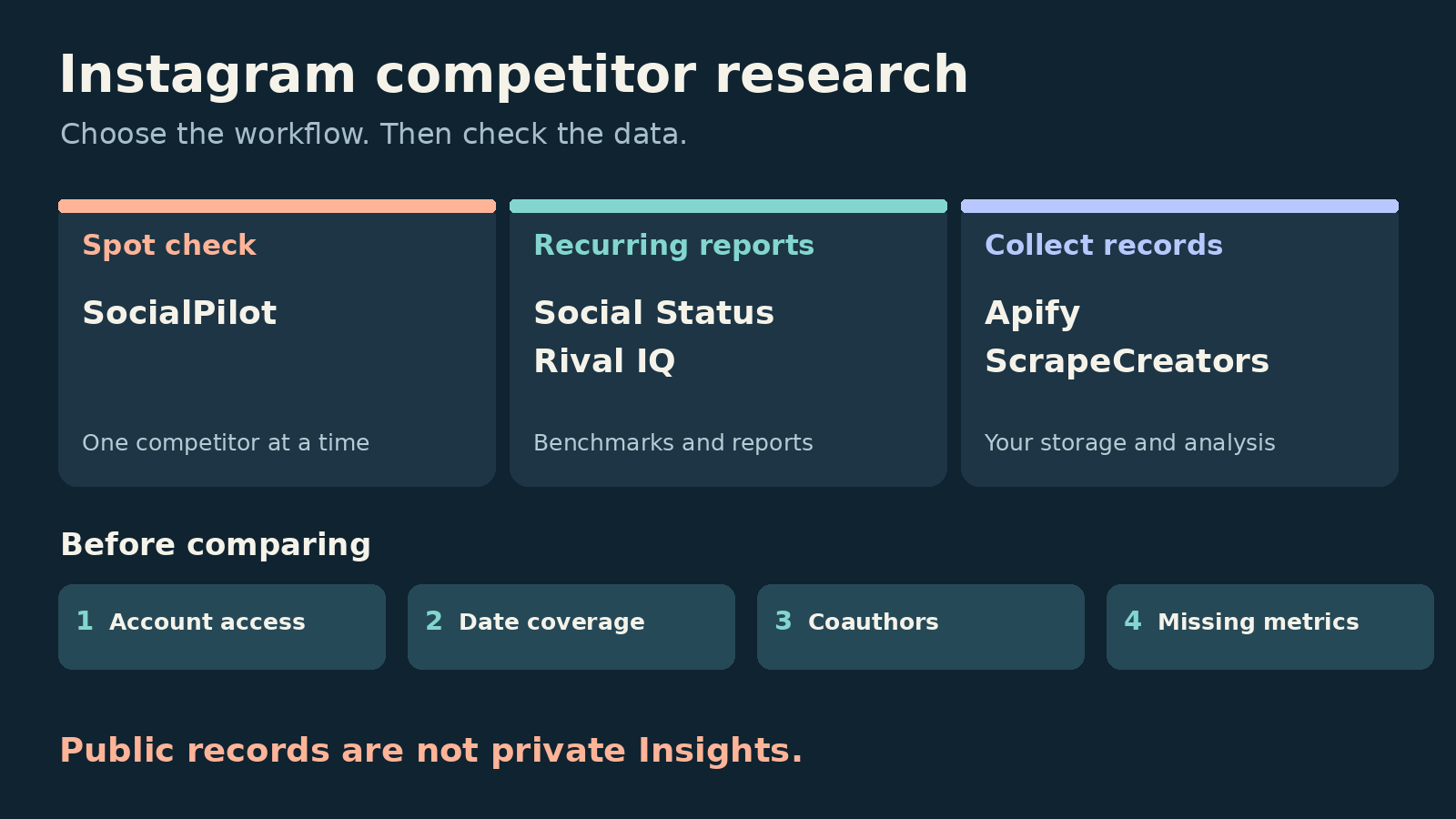
The best Instagram competitor analysis tools depend on what you need to deliver. Start with SocialPilot for a free side-by-side check, Social Status for recurring public-profile reports, or Rival IQ for benchmarking and alerts. Choose Apify for scheduled datasets you will analyze yourself. Choose ScrapeCreators if you are building a tracker that needs public profile and post data through REST. A collector is not a finished analytics dashboard.
I build ScrapeCreators. If you need a client-ready report tomorrow, I would buy a reporting tool rather than turn an API integration into an unexpected software project.
Prices, plan gates, documentation, and our API observations were checked on October 26, 2026. The other tools were reviewed through their primary pages, not a paid accuracy benchmark.
Compare the five options
| Tool | Choose it for | Price or billing unit checked today | Check before committing |
|---|---|---|---|
| SocialPilot’s free comparison tool | An occasional comparison against one competitor | Free, according to its tool page | It compares two usernames, not an ongoing multi-competitor dataset |
| Social Status | Recurring reports on supported professional profiles | Micro: $9/month, three quota units; Basic: $29/month, ten | Account eligibility, history, and export gates matter |
| Rival IQ | Benchmarking, reports, and breakout-post alerts | Drive: $239/month for ten tracked companies | Six-month history allowance is not guaranteed day-one backfill |
| Apify Instagram Scraper | Scheduled collection and dataset exports | Result event: $2.70/1,000 on Free; lower rates with paid plans | The advertised $1.50 rate belongs to Business, not Free |
| ScrapeCreators | Public Instagram records inside your own tracker | $47 buys 25,000 prepaid credits | You build scheduling, storage, history, and reports |
Dashboard subscriptions, returned results, and request credits buy different things. A cheap collection bill does not include the time needed to maintain your analysis.
Public competitor data is not private Insights
An Instagram competitor report should separate three kinds of numbers:
- Public observations, such as available likes, comments, follower counts, captions, and post dates.
- Authorized Insights from an account that connected to your app.
- Estimates produced by the reporting vendor.
Those categories should remain visible in the final report. Meta’s Insights documentation describes access tokens and permissions for an app user’s professional account. Its separate Business Discovery API exposes basic metadata and public media metrics about other professional accounts. That is not blanket access to their private analytics.
Do not label a competitor’s public play count as unique reach, or treat a missing save count as zero. A growth spike also does not tell you whether paid distribution, a collaboration, or a giveaway caused it.
That last distinction came up directly in this public discussion about Instagram and YouTube benchmarking. It is a useful buyer question, not evidence that any named vendor can solve attribution.
1. SocialPilot for a free side-by-side check
SocialPilot’s Instagram competitor analysis tool is the easiest starting point here for someone who wants a comparison without choosing a subscription first.
Its page asks for your company’s username and one competitor’s username. SocialPilot says you do not need to connect either Instagram account. It advertises comparisons of posting frequency, follower-based engagement, content formats, hashtags, and top or least-performing posts.
Use that to decide what deserves a closer look. For example, compare whether a competitor’s strongest posts are carousels or videos before buying a larger reporting workflow.
The limitation is the scope: SocialPilot says this tool compares one competitor at a time. I would not assume it provides a persistent watchlist, a complete export, or a populated history simply because the results are presented as charts. We did not execute its report flow for this article.
One caution: its marketing mentions shares and “publicly available Instagram Insights.” Check what an actual report returns and how each metric is sourced. That wording does not establish access to another company’s private reach, saves, or account Insights.
Choose it if: you want a free preliminary comparison. Choose a recurring dashboard if someone expects the same report every week.
2. Social Status for recurring competitor reports
Social Status Competitor Analytics is a better fit when the deliverable is a repeatable report rather than a one-off lookup. Its content feed and comparisons help you review post performance, formats, and posting frequency across competitors.
The current pricing grid puts competitor analytics on Micro and above, not Free. Micro is $9/month with three quota units and two months of data history. Basic is $29/month with ten units and three months. Basic adds CSV/XLSX exports and PDF reports.
Quota counts the profiles and ad accounts you add, not just competitors. Your own Instagram profile plus two competitor profiles can consume all three Micro units.
Its channel notes restrict Instagram support to professional Business or Creator profiles connected to a Facebook Page. Do not assume a consumer profile or a stand-alone professional account qualifies. Check your actual competitor list before paying.
History needs the same care. Social Status distinguishes historical post retrieval from daily follower observations and says it saves daily follower counts after connection. Ask it to show the earliest populated dates for the exact competitor profiles, rather than reading “three months of history” as a promise of every historical metric.
Choose it if: you want recurring comparisons and exportable reports on supported accounts. Choose a more flexible collector when public accounts outside that eligibility boundary are essential, accepting the extra engineering work.
3. Rival IQ for benchmarking and alerts
Rival IQ’s Instagram analytics fits a team that wants competitor research to arrive as reports and alerts rather than as JSON.
Its Drive plan is $239/month, with ten tracked companies, one user, and six months of data history. It includes competitive benchmarking, content analysis, scheduled exports, and email alerts. A company is the billing object; Rival IQ tracks a social handle per monitored network for that company.
Two qualifications matter. The pricing page warns that you may not initially have the full advertised history. It also lists a 12-hour metrics-freshness level for Drive. Do not buy it on the assumption that every new post appears instantly or that six months of follower observations are already populated.
Rival IQ distinguishes public competitive metrics from connected-account Insights. Its estimated impressions are labeled as estimates on the pricing page, and API access is an add-on associated with Engage Pro, not a Drive feature to assume.
Choose it if: scheduled reporting and alerts justify the subscription. Choose a data API if you mainly need records for an existing warehouse and already have people maintaining that pipeline.
4. Apify for scheduled Instagram datasets
Apify’s Instagram Scraper is a hosted collection job. It can take profile or content URLs, create a dataset, export results, and run on a schedule. That is useful if you want to own the analysis without operating the scraper runtime yourself.
Its input schema separates resultsType from directUrls and resultsLimit. For competitor post collection, that means selecting post results and supplying the relevant profile URLs. Its date filter notes that pinned posts may still appear, so validate returned dates rather than trusting the request filter alone.
Read the Actor’s pricing tab, not just the “from” headline. The result event is $2.70 per 1,000 on Free, $2.30 on Starter, $1.90 on Scale, and $1.50 on Business. The corresponding paid monthly commitments are $19, $199, and $999, with spending included. Platform usage is listed as included for this Actor.
Those are result prices, not a price for monitoring one competitor forever. Recollecting posts can add results. Other Actors have their own prices and schemas.
Choose it if: you want schedules and exported datasets in a hosted platform. Choose a dashboard if you need finished comparisons. Choose a REST data API when the collection step belongs inside software you already run. We did not run this Actor in today’s checks.
5. ScrapeCreators for a custom Instagram tracker
Our Instagram API is for developers building their own reporting workflow. The Profile endpoint supplies public account metadata, while user posts supplies paginated media records.
There is no ready-made competitor dashboard behind those calls. You decide what to collect, retain, compare, and report. That is useful when you need to preserve custom fields, connect several platforms, or feed a system you already own. It is a poor fit if you do not want to maintain software.
Our pricing is prepaid: $47 buys 25,000 credits. Today’s successful profile and post-page fixture calls charged one credit each. That is a request/page unit, not one credit per post. Successful partial pages can be billable even when some optional counts are missing. Check the response and current docs rather than assuming every missing metric makes a request free.
We checked Nike’s profile and first post page, plus adidas’s first page. Both post pages returned 12 records and another cursor. The profile returned Nike’s username and follower count; it did not provide a usable total media_count in that response.
The pagination check was not clean. Nike’s next-page request, and one retry with the same cursor, returned an uncharged 503 saying Instagram had not supplied complete post dates. I would not present that check as proof of a complete historical export. If guaranteed backfill is essential, make successful pagination through your required period an acceptance test before adopting the API.
For broader collection choices, see our Instagram scraper comparison. For the specific metric problem, see why Instagram play counts can be missing.
Export a first-page snapshot without hiding its limits
This Python example makes two read-only requests and writes a CSV. Set SCRAPE_CREATORS_API_KEY in your environment first. It intentionally collects one page per handle and does not claim to cover a full reporting period.
import csv
import json
import os
from datetime import datetime, timezone
from urllib.parse import urlencode
from urllib.request import Request, urlopen

rows = []
for handle in ("nike", "adidas"):
    params = urlencode({"handle": handle})
    request = Request(
        "https://api.scrapecreators.com/v2/instagram/user/posts?" + params,
        headers={"x-api-key": os.environ["SCRAPE_CREATORS_API_KEY"]},
    )
    with urlopen(request, timeout=60) as response:
        data = json.load(response)
    if not data.get("success") or "items" not in data:
        raise RuntimeError("No usable post page returned")
    # Keep these bodies locally so you can audit the resulting CSV.
    with open(handle + "-snapshot.json", "w") as file:
        json.dump(data, file)
    collected_at = datetime.now(timezone.utc).isoformat()
    seen = set()
    for post in data["items"]:
        post_id = str(post["pk"])
        if post_id in seen:
            continue
        seen.add(post_id)
        rows.append({
            "source_handle": handle,
            "media_owner": (post.get("user") or {}).get("username"),
            "post_id": post_id,
            "shortcode": post.get("code"),
            "published_at": post.get("created_at"),
            "collected_at": collected_at,
            "likes": post.get("like_count"),
            "comments": post.get("comment_count"),
            "plays": post.get("play_count"),
            "more_pages": bool(data.get("next_max_id")),
        })

if not rows:
    raise RuntimeError("No rows to export")
with open("instagram-snapshot.csv", "w", newline="") as file:
    writer = csv.DictWriter(file, fieldnames=list(rows[0]))
    writer.writeheader()
    writer.writerows(rows)
print("Exported", len(rows), "first-page observations, not a full timeline")
We ran this exact example separately on October 26. It produced 24 first-page observations from two requests, charging two credits. Both responses still had another cursor. Missing values stay blank in the CSV rather than turning into zero.
Keep source_handle separate from media_owner. In our earlier Nike fixture, post De1uJmpqUcb had user.username=nsw and listed Nike as a coauthor. Dropping it because the owner differs from the requested handle would discard a collaboration. Counting it as two independent posts in an aggregate brand portfolio would create another kind of mistake.
To extend this into pagination, pass the returned next_max_id with the same handle. If you use trim or require_play_counts, repeat those options on every request; a cursor does not preserve them. Keep the failed page marked incomplete, preserve previously collected rows, and do not interpret an error as the end of the timeline.
Four checks before you rank competitors
- Account coverage. Try the actual handles you need. Professional-account requirements and public-profile access are different boundaries. None of this grants access to private posts.
- Dates and completeness. Check every publication date and the remaining cursor. Our adidas fixture began with a September 25 post, followed by October 25 content. One older item at the top is not a reason to stop a rolling-window export. A page of results is not a complete month.
- Identity and missing metrics. Preserve coauthors, distinguish unavailable counts from real zeroes, and keep publication time separate from collection time. The current user-post docs warn that plays can be inaccurate and exclude cross-posted Facebook views. Do not equate them with another dashboard’s combined total.
- A useful comparison rule. Compare similar formats and post ages. If you use
(likes + comments) / followers, label the follower denominator as today’s snapshot, not the count at publication. Review medians and individual outliers before turning one viral collaboration into a rule.
Audience research reinforced these checks. Comments on this Instagram competitor workflow video discuss missing captions in an export and which view exposes them. Comments on this Instagram competitive-insights video describe people not seeing the feature. These are reasons to verify your own export and account access, not proof of a current country restriction or a vendor defect.
For AI-assisted analysis, keep source rows and permalinks alongside every proposed insight. Ask for a content hypothesis supported by specific posts, then verify those posts manually. Do not ask a model to turn incomplete public data into a competitor’s revenue or private reach.
Questions before you commit
What is the best free Instagram competitor analysis tool?
SocialPilot is a reasonable first stop for a free two-username comparison. Verify the actual returned report before relying on a particular field. Its free tool should not be confused with an ongoing reporting subscription.
Can I see a competitor’s Instagram reach or saves?
Public collection does not authorize access to their private Insights. Ask whether a metric is public, connected-account data, or an estimate. Keep that label in exports and AI summaries.
Can I get historical Instagram follower growth?
Not from a single current count. Ask when daily observations started, which dates have values, and whether the history is backfilled or estimated. Old posts and old follower observations are different datasets.
Which tool should I choose if I already have a database?
Use Apify when hosted schedules and datasets are the missing piece. Consider ScrapeCreators when you need REST records inside your own application and can handle partial data and retries. You can create an account to check your actual profiles before deciding. If you mainly need reports, Social Status or Rival IQ will save you from building that layer yourself.


