
The short answer
For competitor creative research, ScrapeCreators is my practical default because one API covers advertiser lookup, domain-based ad search, filters, pagination, and optional creative details. I run ScrapeCreators, so this is not a neutral recommendation. Apify is strong if your stack already uses Actors. Adyntel is built around ad intelligence. SerpApi and SearchAPI.io fit teams that already buy search APIs.
If you want the paid ads visible for a keyword on Google Search right now, use Oxylabs or Bright Data instead. That is a different job. The products, docs, prices, and live API examples in this guide were checked on September 25, 2026.
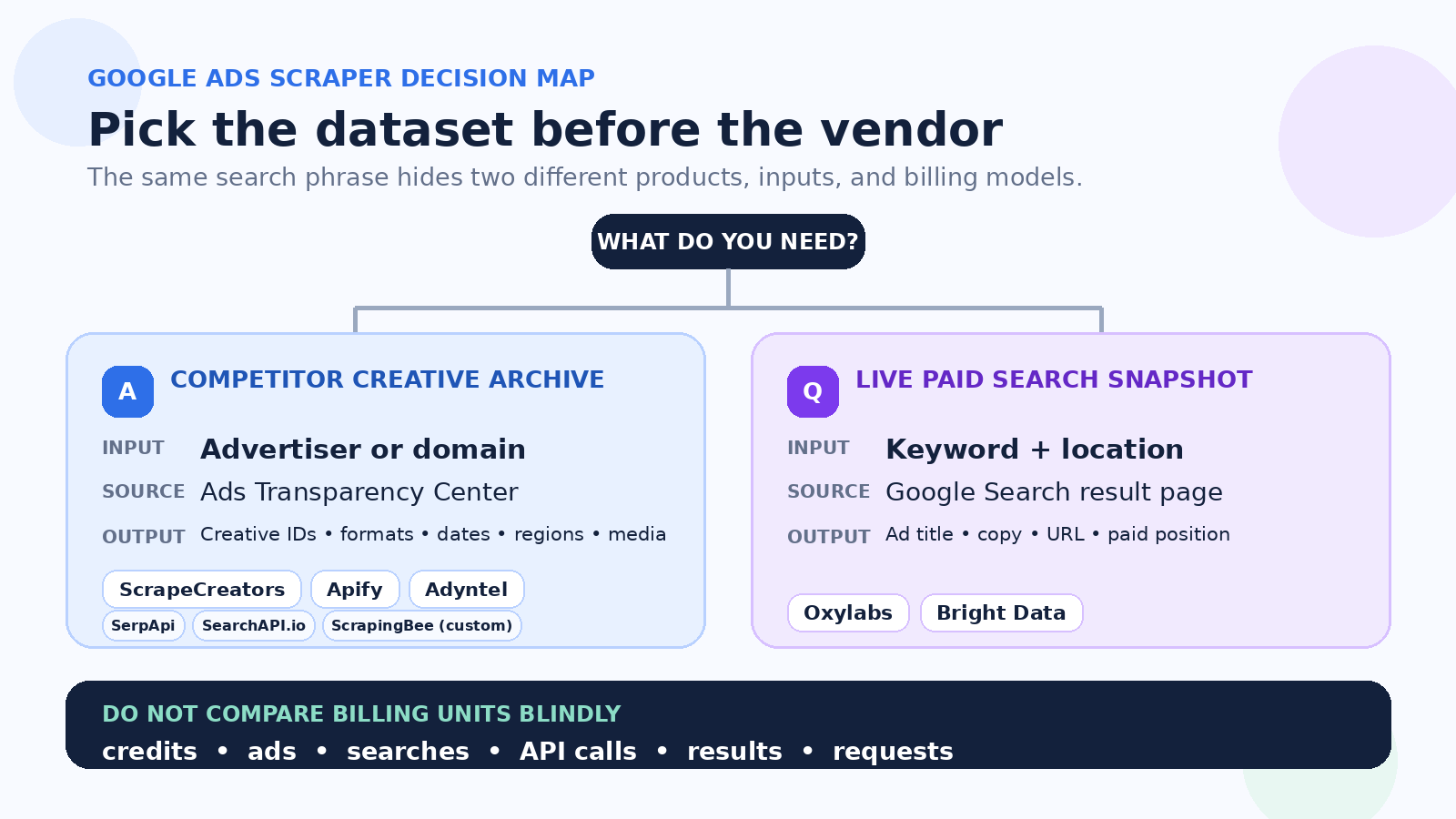
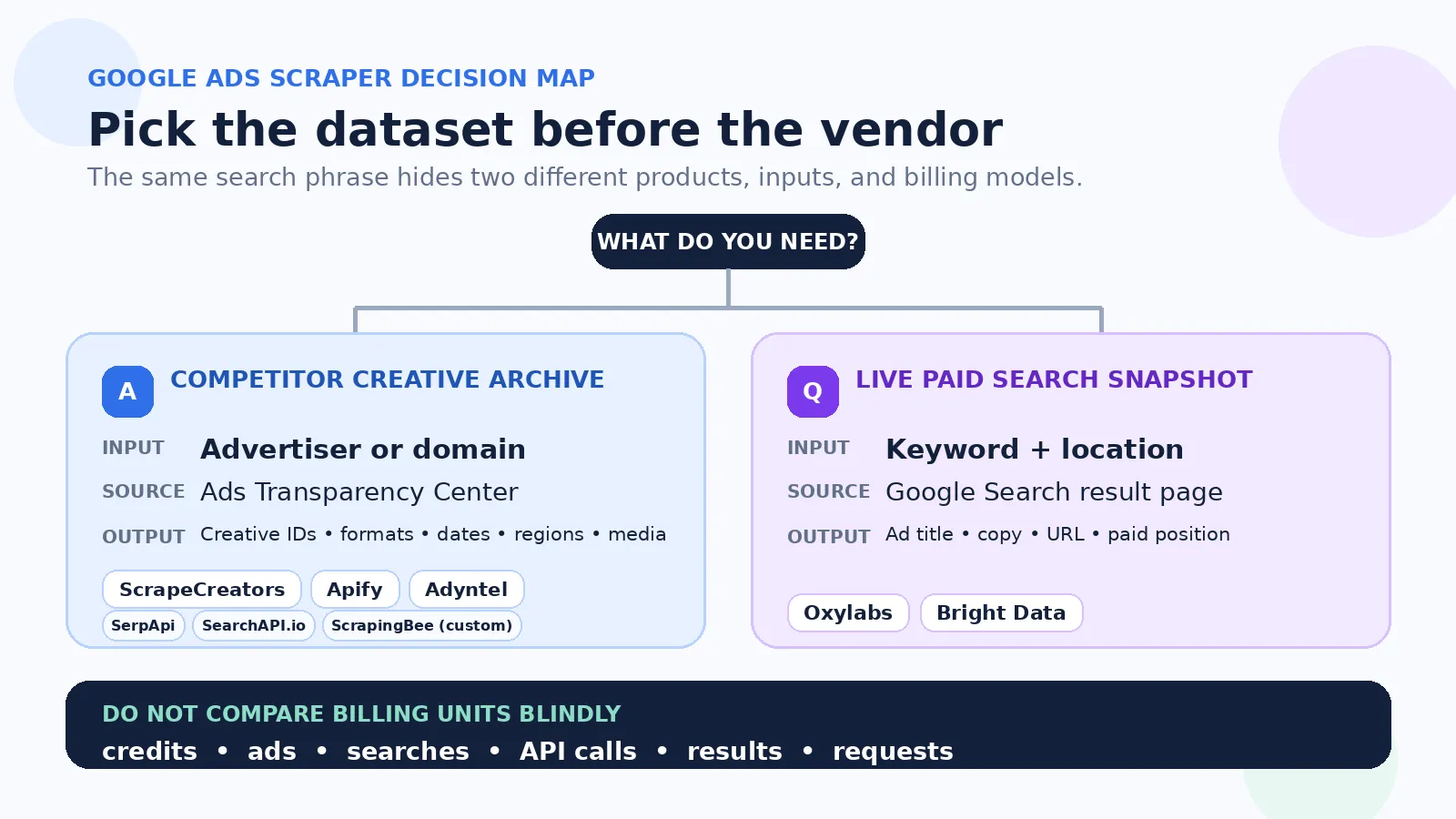
Two different products share this name
“Google Ads scraper” can mean either of these:
| Job | Input | Output | Best use |
|---|---|---|---|
| Scrape the Ads Transparency Center | Advertiser, company domain, or Transparency Center URL | Public creative IDs, formats, run dates, regions, and available creative variants | Competitor creative research, change monitoring, and ad archives |
| Scrape ads from Google Search results | Keyword plus country, city, language, or device | Paid result title, text, display URL, target URL, and position visible in that search | PPC placement checks, local ad monitoring, and SERP research |
These datasets are not interchangeable. An advertiser archive can tell you that a brand ran an image or text creative in a region. It does not tell you which private search term triggered that ad, what the brand bid, or whether the campaign converted. A paid-results scrape tells you what appeared for one query and location at one moment. It does not give you the advertiser’s full creative history.
That distinction is the fastest way to cut this list in half. Options 1 through 5 have documented Ads Transparency Center routes. Option 6 is a custom scraping path where you own the parser. Options 7 and 8 focus on ads shown in live Google search results.
Comparison table
The prices below use each vendor’s own unit. An ad, API page, search, credit, result, and request are not the same thing.
| Option | Best for | Data surface | Published starting point | Main catch |
|---|---|---|---|---|
| ScrapeCreators | Developers who want ready Google advertiser and ad JSON | Transparency Center advertiser lookup and company ads | $47 for 25,000 pay-as-you-go credits; my basic company-ad checks cost 1 credit and the rich-detail check cost 25 | Rich details cost more, and public data does not reveal campaign performance |
| Apify | Teams already using Actors and datasets | Transparency Center creatives from supplied URLs or domains, depending on Actor | Reviewed Actor lists $0.90 per 1,000 ads | It is a marketplace, so inputs, schemas, maintenance, and price vary by Actor |
| Adyntel | Ad-intelligence products and monitoring | Domain-based advertiser and creative data | 50 free credits; $44/month for 5,000 credits; page says 1 credit per API call | A call/page is not an ad, and a full advertiser may require continuation pages |
| SerpApi | Existing SerpApi users and no-code connectors | Transparency Center free-text or advertiser searches | 250 searches/month free; $25/month for 1,000 searches | Search allowance is monthly and pagination consumes more searches |
| SearchAPI.io | Search-API stacks that want normalized ad objects | Transparency Center advertiser, creative, and detail endpoints | 100 free requests; $40/month for 10,000 searches | Search pages and detail lookups are separate work |
| ScrapingBee | Teams that want to own a custom parser | Rendered Google Ads pages or paid Google Search results | $19/month for 75,000 general API credits; 1,000 free credits | Its current page promises rendered HTML for parsing, not normalized Transparency Center JSON |
| Oxylabs | Paid placements on current Google results | Google Search ads by query and location | Up to 2,000 results free; Google results listed at $1 per 1,000 on the $49 plan | This is live SERP advertising, not the Transparency Center archive |
| Bright Data | High-volume, location-aware paid-search monitoring | Current Google Search ad results | 5,000 requests/month free; pay as you go at $1.50 per 1,000 requests | A request can return a different number of ads by query and location |
1. ScrapeCreators
ScrapeCreators’ Google Ad Library API is my pick when a developer wants stable endpoints rather than a browser session or one-off export. The two useful routes are:
GET /v1/google/company/adsfor ads by company domain, with region, date, platform, format, cursor, and optional detail controls;GET /v1/google/ads/searchfor advertiser discovery before you query a company.
The basic company search I ran for lululemon.com in the US returned 40 ads, a cursor, and an estimate of 6,000 matching ads in 1.036 seconds. Each row included a creative ID, advertiser ID, format, ad URL, advertiser name, domain, image URL, and first/last shown dates when present. Following the cursor returned 40 different creative IDs in 1.031 seconds.
Setting get_ad_details=true returned 40 richer rows in 13.654 seconds. The richer shape included variation arrays and additional creative fields, but it cost 25 credits instead of 1. That difference belongs in a production budget. Fetch basic pages for discovery, then enrich only the ads you actually need.
The pricing section currently lists 25,000 credits for $47 and 500,000 credits for $497. Credits do not expire. Route costs vary, so check the endpoint rather than treating one credit as a universal request price.
Choose ScrapeCreators if you want advertiser search, company ads, filters, cursor pagination, and optional details under one key. Choose another tool if your input is a search keyword and you need the sponsored placements visible on that search-results page.
2. Apify
Apify is a marketplace of Actors, not one Google Ads product. Gustavo Silva’s Google Ads Scraper ranked first for google ads scraper, google ads library scraper, and best google ads scraper in the final live US check. Apify also held first place for google ads transparency scraper, but that query surfaced a different Actor from xtech. The exact marketplace page can change even when the platform stays at the top.
The Actor page says it reads Google’s Ads Transparency Center and accepts a list of Transparency Center URLs. Its published output includes text, image, and video ads plus creative metadata. Pricing is $0.90 per 1,000 ads, and the page advertises up to 400 ads per minute.
Those numbers look attractive, but inspect the exact workflow. A Transparency Center URL is a more specific input than a company name. A community Actor can also change its schema, maintainer, pricing event, or runtime independently of Apify itself. Other Actors in the store accept domains or use different billing.
Choose Apify if you already schedule Actors, store results in datasets, and prefer per-result billing. Run the actual Actor on several representative advertisers before you depend on its claimed speed or complete creative coverage. I reviewed the public store page and metadata. I did not run the paid Actor.
3. Adyntel
Adyntel’s Google Ads scraper is the most focused ad-intelligence product in this list. You pass a company domain. Its docs show a 40-ad page with a continuation token and fields such as advertiser identity, creative format, dates, destination URL, and creative variations.
The pricing page advertises 50 free credits. The Startup plan is $44 per month for 5,000 credits, and the page says one credit equals one API call. That makes the budget easier to read than a general browser-credit plan, but a call is still not a complete advertiser. A company with many ads needs more pages.
Choose Adyntel if Google, Meta, LinkedIn, and TikTok ad intelligence is the product you are building and its normalized contract fits your downstream model. Ask for a representative response and test continuation behavior before estimating a full-market scan.
4. SerpApi
SerpApi’s Google Ads Transparency Center API accepts a free-text query or advertiser ID. It documents region, start/end dates, ad format, topic, pagination, and JSON output. That is a good fit for a team already routing several search engines through SerpApi.
The pricing page currently lists 250 searches per month for free. The Starter plan is $25 per month for 1,000 searches. Higher plans buy more searches and throughput. Treat every next page as more work, and confirm whether the response you need requires a second detail lookup.
A public no-code walkthrough showed a common SerpApi pattern: configure advertiser and region inputs, run the API, then send the returned JSON into a spreadsheet or automation. That is convenient for a small workflow. It does not remove the need to define a stable key, follow pages, and deduplicate ads.
Choose SerpApi if the monthly search model and existing integrations save your team time. For a dedicated Google creative archive, compare the cost of full pagination rather than only the first call.
5. SearchAPI.io
SearchAPI.io’s Google Ads Transparency Center API separates advertiser lookup, creative search, and ad-detail retrieval. The docs expose advertiser or domain inputs, region, platform, ad format, topic, date controls, and pagination.
Its pricing page currently offers 100 free requests. The Starter plan is $40 per month for 10,000 searches, with one concurrent request on that tier. SearchAPI.io makes sense when you want a familiar search-API request style and can model discovery, list pages, and details as separate calls.
Choose SearchAPI.io if you already use it for other search products or the 10,000-search starter allowance matches your job. Test a large advertiser before assuming one search equals one company export.
6. ScrapingBee
ScrapingBee’s Google Ads Scraper API is the custom-build option in this list. Its current page says ScrapingBee handles browser rendering, blocking, proxies, and geotargeting, then gives you rendered HTML to parse. It also points buyers to the separate Google Search API for paid SERP results.
General ScrapingBee pricing starts at $19 per month for 75,000 API credits, with 1,000 free credits. That headline is not a per-ad price. JavaScript rendering, premium proxies, and other request modes can spend different credit amounts.
Choose ScrapingBee if your team already uses its browser and extraction APIs and is willing to own selectors, pagination, normalization, and regression checks. Do not choose it because you expect the ready advertiser and creative JSON supplied by the first five tools. Run a representative page, record credits spent and parser output, then compare that whole job with the hosted contracts.
7. Oxylabs
Oxylabs’ Google Ads scraper targets paid ads shown in Google Search results. You send a search query and location context. It returns the paid placements present in that SERP, not the advertiser’s Ads Transparency Center history.
This is the better product if the question is, “Which ads appear for emergency plumber chicago from Chicago today?” It can support keyword monitoring, paid-position checks, and local market research. It cannot replace a domain-based creative archive.
The page offers up to 2,000 results in a free trial. Its current regular pricing table lists Google results at $1 per 1,000 successful results on the $49 monthly plan. JavaScript-rendered results have another rate. Oxylabs bills successful results, which is different from a request or an advertiser page.
Choose Oxylabs if keyword and location are your real inputs. Do not buy it expecting a complete history of everything one brand ran.
8. Bright Data
Bright Data’s Google Ads API also targets ads in live Google search results. The page lists fields such as advertiser name, location, ad information, target keyword, and ad title, with location-aware collection and API, webhook, or batch delivery options.
The free tier currently includes 5,000 requests per month. Pay-as-you-go pricing is $1.50 per 1,000 requests, while the $499 Scale plan includes 380,000 requests and lists $1.30 per 1,000 additional requests.
This model works well when a request is the unit you already forecast. The number of paid placements can vary by query, region, device, time, and auction conditions, so a fixed request count does not guarantee a fixed number of ad rows.
Choose Bright Data for large, location-sensitive paid-search monitoring or when its delivery options fit your data pipeline. Choose a Transparency Center API when the advertiser, not the keyword, is the object you need.
Use Google first for manual research
Before paying for automation, try Google’s Ads Transparency Center. It is the primary public source for finding verified advertisers and viewing ads they ran across Google surfaces. For five competitors once a month, the manual product may be enough.
I could not find a self-serve official API for general commercial-ad searches in Google’s current public docs. That is why hosted APIs and Actors exist. They give you automation contracts around the public source. They do not become Google’s official API by doing so.
The free manual center is also a useful control. Pick two known advertisers and compare what the browser shows with what a vendor returns. If the counts, date ranges, regions, or formats look wrong, resolve that before buying volume.
What buyers actually ask for
I searched YouTube for the primary query and three close variants in a US context. The API returned 75 rows across the four requests, 55 unique video IDs after deduplication. I read three full transcripts: a ScrapeCreators Transparency Center walkthrough, an Apify Actor walkthrough, and the SerpApi workflow.
The videos agreed on one practical workflow: resolve the advertiser, retrieve pages of creatives, then export or monitor the fields you care about. They differed on the operating layer. ScrapeCreators used a direct API call, Apify used an Actor and dataset, and SerpApi showed a search-API/no-code path.
The useful audience questions were narrower than “what is best?” One YouTube commenter asked whether search-ad destination URLs expose the real final URL or only the display URL. The creator confirmed that Google did not expose the real URL in that response. TikTok comments asked why some advertisers returned blank results, whether the tool was free, how to find Facebook ads too, and why creative search did not show keywords.
Those questions changed this guide. It separates creative archives from live search ads, puts input shape before brand, and treats final URLs, keywords, spend, and performance metrics as fields to verify rather than promises.
The social searches were noisy. TikTok returned 120 rows, 83 unique IDs, but many were general campaign advice or Google Maps lead-scraping videos. LinkedIn returned 40 rows, 38 unique URLs, with a similar mix of scraping, PPC, and AI posts. I used those results as qualitative audience research, not ranking evidence.
One Reddit thread asked how to identify companies running ads at large scale because existing products felt expensive or limited. Its public counter showed 26 comments; the endpoint returned nine top-level rows plus nested replies for review. The useful distinction was between competitor intelligence and prospecting. A domain-based ad API starts with companies you already know. It does not magically enumerate every advertiser in an industry, identify decision makers, or enrich contact data.
How to choose
Use this order rather than sorting by the cheapest-looking number.
1. Pick the dataset
Use a Transparency Center scraper for competitor creative history by brand or domain. Use a Google Search ads scraper for keyword and location snapshots. If you need both, plan them as two data sources with separate keys and timestamps.
2. Check your starting input
A company domain, advertiser name, advertiser ID, Transparency Center URL, and search keyword are different inputs. ScrapeCreators and Adyntel can start from a domain. The reviewed Apify Actor starts from a Transparency Center URL. Oxylabs and Bright Data start from a search query.
3. Write down the required fields
For creative research, that might be creativeId, format, first/last shown dates, region, media URLs, ad copy, and landing page. For paid-search monitoring, it might be query, location, rank, headline, display URL, and collection time.
Do not assume a normal public creative record includes private bid keywords, exact spend, CTR, conversions, or campaign settings. If a product page promises those fields, ask for a real commercial-ad response and the source behind each value.
4. Model the native billing unit
| Billing unit | Formula to model | Options here |
|---|---|---|
| Vendor credits per route | Requests × route credits × credit price | ScrapeCreators |
| Returned ads | Ads returned × per-ad rate | Reviewed Apify Actor |
| API calls or pages | Discovery + list pages + detail calls | Adyntel |
| Monthly searches | Searches × pagination/detail calls | SerpApi, SearchAPI.io |
| Browser/API credits | URLs × mode multiplier × retries | ScrapingBee |
| Successful result rows | Paid placements returned × result rate | Oxylabs |
| Requests | Queries × locations × devices × schedules | Bright Data |
A fair test uses the same advertisers or keyword/location pairs. Record returned rows, unique IDs, page count, detail completeness, elapsed time, retries, and total vendor units.
5. Decide who owns maintenance
A fixed API owns more of the retrieval and response shape. An Actor packages the job in Apify but remains maintainer-specific. A general browser API handles rendering and proxies while your team still validates the extraction. A manual workflow costs operator time instead of infrastructure.
If you are comparing more ad platforms, my ad library API guide covers Meta, TikTok, LinkedIn, and Google together. If your use case is paid placements on ordinary search results, the SERP API comparison is the better adjacent guide.
Real request and output
This request retrieves basic Google ad records for one company domain:
curl --get "https://api.scrapecreators.com/v1/google/company/ads" \
  --data-urlencode "domain=lululemon.com" \
  --data-urlencode "region=US" \
  --data-urlencode "get_ad_details=false" \
  -H "x-api-key: $SCRAPE_CREATORS_API_KEY"
The live response on September 25, 2026 included this excerpt:
{
  "success": true,
  "credits_charged": 1,
  "number_of_ads_estimate": 6000,
  "ads": [
    {
      "advertiserId": "AR01614014350098432001",
      "creativeId": "CR12564523922155896833",
      "format": "text",
      "advertiserName": "lululemon athletica canada inc.",
      "domain": "lululemon.com",
      "firstShown": "2023-06-14T07:43:24.000Z",
      "lastShown": "2026-09-25T09:24:35.000Z"
    }
  ],
  "cursor": "..."
}
The cursor is opaque. Pass it back unchanged for the next page:
const domain = "lululemon.com";
let cursor;
const ads = [];

for (let pageNumber = 0; pageNumber < 10; pageNumber += 1) {
  const params = new URLSearchParams({
    domain,
    region: "US",
    get_ad_details: "false",
  });
  if (cursor) params.set("cursor", cursor);

  const page = await fetch(
    `https://api.scrapecreators.com/v1/google/company/ads?${params}`,
    { headers: { "x-api-key": process.env.SCRAPE_CREATORS_API_KEY } },
  ).then((response) => response.json());

  ads.push(...page.ads);
  cursor = page.cursor;
  if (!cursor) break;
}

console.log(new Set(ads.map((ad) => ad.creativeId)).size);
The ten-page cap in this sample is deliberate. Decide whether your production job needs the entire advertiser archive, only recent ads, or a fixed monitoring window. An estimate is not a promise that every page will contain the same number of unique rows.
What I verified
I called ScrapeCreators because it is the product I can verify directly. I reviewed competitor product pages, docs, API/store metadata, and pricing pages. I did not run paid competitor products, so this is not a success-rate benchmark.
| Live ScrapeCreators check | Result | Useful output |
|---|---|---|
Advertiser search for lululemon, region US | HTTP 200 in 0.918 seconds, 1 credit | Four advertiser rows plus website matches |
| Company ads page 1, basic | HTTP 200 in 1.036 seconds, 1 credit | 40 ads, cursor, 6,000 estimated matches |
| Company ads page 2, basic | HTTP 200 in 1.031 seconds, 1 credit | 40 more ads with no creative-ID overlap |
| Company ads page 1, details | HTTP 200 in 13.654 seconds, 25 credits | 40 enriched ads, variation arrays, 2,000 estimated matches |
The rich request taking about 13 times longer and 25 times the credits is why I recommend basic discovery first. Four successful calls do not prove universal reliability. Large advertisers, formats, regions, date filters, and upstream changes can behave differently.
Limitations
A Google Ads scraper does not give you a competitor’s Google Ads account.
- Transparency data can show public creatives, formats, regions, and run dates. It does not generally reveal exact spend, bids, CTR, conversions, audiences, or private campaign settings for ordinary commercial ads.
- A displayed landing URL may not be the final destination URL you expect. Verify this field with your own representative ads.
- “First shown” and “last shown” describe what the public source reports. They do not prove continuous delivery between those timestamps.
- An estimated ad count is not an audited total. Deduplicate by creative ID and keep the collection timestamp.
- Search ads vary by location, language, device, time, personalization, and auction conditions. One result page is not a universal rank.
- Media URLs can expire or change. Store IDs and metadata first, then review whether your use case permits storing the media itself.
- Product prices, limits, schemas, and source behavior can change after the verification date.
Use public advertising data for legitimate research and monitoring. Review Google’s terms and the rules that apply to your company, location, storage, and downstream use. Do not describe a creative archive as proof that an ad performed well.
If your app needs ready advertiser and creative JSON, start with the Google Ad Library API, read the company ads docs, or create an account and run the same domain through basic and rich modes.
FAQ
What is the best Google Ads scraper for competitor ad research in 2026?
ScrapeCreators is my practical default for developers who want structured advertiser and creative data by domain. Apify is better for teams already using Actors and datasets. Adyntel is focused on ad intelligence. SerpApi and SearchAPI.io fit search-API stacks. The right pick depends on input, required fields, and billing unit.
What is the difference between a Google Ads Transparency scraper and a Google Search ads scraper?
A Transparency Center scraper retrieves an advertiser’s public creative archive. A Google Search ads scraper runs a keyword and location search and returns the paid placements visible on that results page. Use the first for competitor creative monitoring and the second for PPC placement monitoring.
Can a Google Ads scraper reveal a competitor’s keywords, spend, CTR, or conversions?
Not reliably from ordinary Transparency Center data. You can collect public creatives and available dates, regions, formats, and landing information. Private bid keywords, exact spend, CTR, conversions, and account settings generally are not exposed for normal commercial campaigns.
Does Google have an official Ads Transparency Center API?
Google provides the public Ads Transparency Center for manual research. I could not find a self-serve official API for general commercial-ad searches in the current public documentation. The hosted APIs here wrap the public surface in their own contracts.
Is Apify or ScrapeCreators better for Google Ads data?
Choose ScrapeCreators for advertiser lookup and company-ad endpoints under one API key with pay-as-you-go credits. Choose Apify when its Actor and dataset model already fit your stack. Check the exact Apify Actor because maintainers, inputs, schemas, and prices vary.
How much does a Google Ads scraper cost?
The unit matters more than the headline. ScrapeCreators uses route credits, the reviewed Apify Actor charges per ad, Adyntel per API call, SerpApi and SearchAPI.io per search, ScrapingBee by API credits, Oxylabs by successful results, and Bright Data by requests. Run the same fixture and compare total job cost.


