
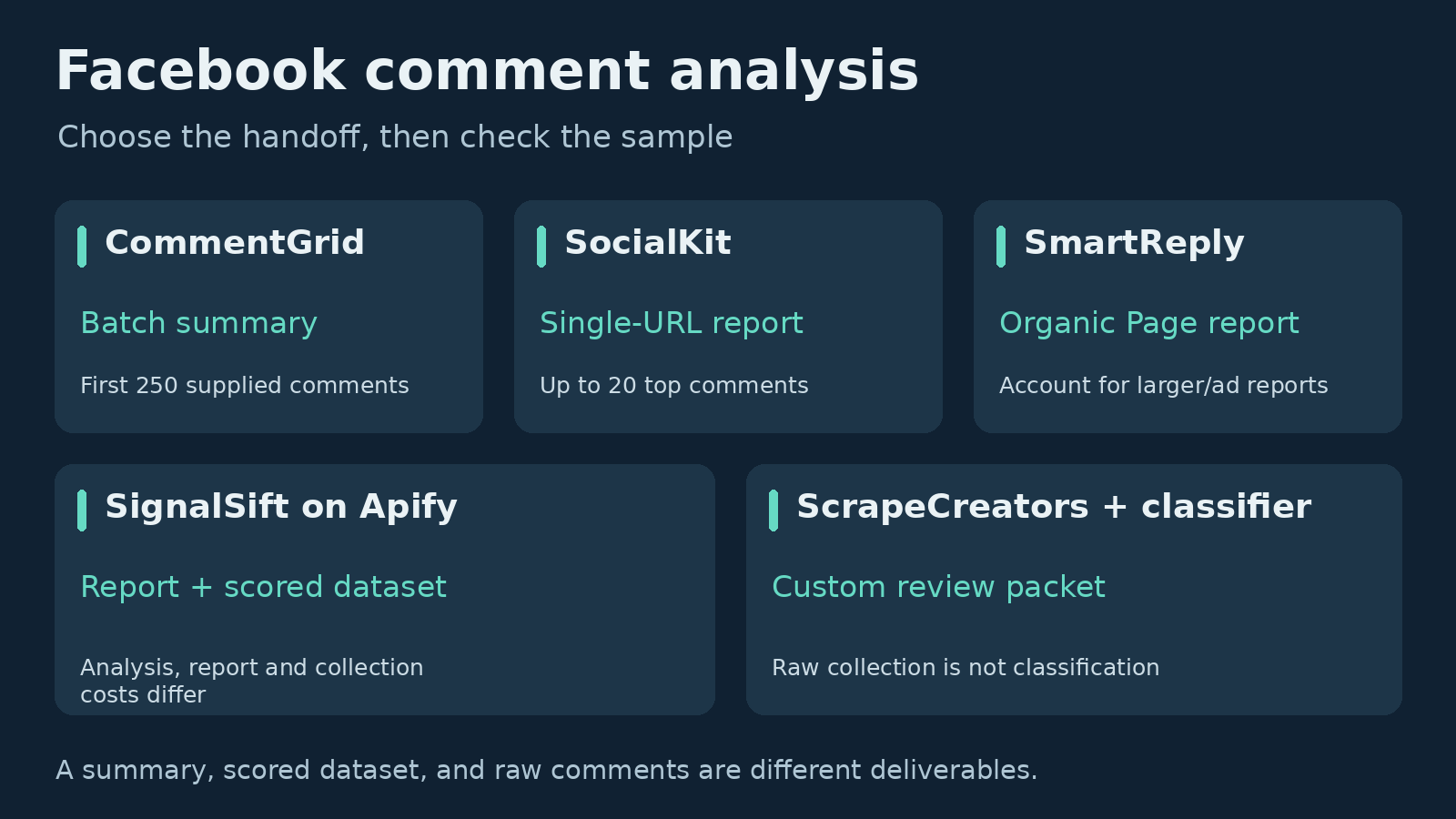
For a Facebook comment analyzer, I would start with CommentGrid if you already have the comments, or SocialKit for a small, single-post report. SmartReply is worth evaluating for a recent organic-Page overview. SignalSift on Apify offers a more detailed report and scored dataset. Choose ScrapeCreators plus your own classifier only when an engineer needs control over collection and review. It is not a ready-made sentiment analyzer.
I run ScrapeCreators. I checked these tools on November 28, 2026, ran CommentGrid’s built-in sample, and executed the ScrapeCreators collection example below. I did not purchase the other services or benchmark their classification accuracy.
Choose by the report you need back
The useful question is not just whether a tool can produce a positive/negative chart. Ask what went into that chart, whether replies count, and whether you can inspect the comments behind it.
| Option | What you supply | Useful handoff | Cost or access boundary | Main limitation |
|---|---|---|---|---|
| CommentGrid | Comment text, CSV, or Excel | Batch sentiment percentages and summary | Free online use subject to limits; first 250 parsed comments | Does not fetch a Facebook URL or return a label for every row |
| SocialKit | One post, video, or Reel URL | Small report with themes and labeled top comments | Sign-in; page lists 20 starter credits and 1 credit per analysis | Up to 20 top comments, not the whole thread |
| SmartReply | Public Page selected by name | Recent organic-Page comment report | Basic organic analysis advertised free; larger/ad reports require an account | No fixed historical window or completeness established in this check |
| SignalSift on Apify | Public post URLs or a supported scraper dataset | HTML report, JSON summary, and comment dataset | Analysis, report, optional reply-draft events; collection can cost extra | More settings and a separate scraping bill for URL input |
| ScrapeCreators + your classifier | Public post URL, then pagination and reply requests | Raw rows and an explicitly scoped review packet | Prepaid API credits, plus your model and engineering costs | You build the classification and report yourself |
These are different purchases. A free browser summary, a priced analysis event, and a credit for a raw comment page are not interchangeable units.
This article covers comments under selected Facebook content. It is not a promise of Facebook-wide keyword listening, research into a whole region’s population, or access to private discussions. For a downloadable file without analysis, use the separate Facebook comment exporter comparison.
1. CommentGrid for comments you already collected
CommentGrid’s Facebook sentiment analyzer is the simplest starting point when the collection work is already done. Paste one comment per line or upload CSV/Excel with a comment or text column.
The current limit matters: it processes the first 250 parsed comments. Uploading a larger spreadsheet does not make the report cover every row. It returns the batch count, positive/neutral/negative percentages, and a written summary. Its FAQ explicitly says it does not return a sentiment label for each individual comment.
I clicked its own five-comment sample and ran the analysis. The browser returned five analyzed comments, 60% positive, 40% neutral, and 0% negative, plus a summary. Those were the tool’s supplied sample comments, not a Facebook collection or an accuracy test. I would not extrapolate that result to a campaign.
Choose it for a quick read of a defined batch. Choose another route if you need automated collection, comment-level labels, or evidence you can repeatedly join to the same IDs. Keep your original file: one-comment-per-line input can otherwise make multiline comments and row boundaries easy to mishandle.
2. SocialKit for a small report from one public URL
SocialKit’s Facebook Comments Analyzer accepts a post, Watch-video, or Reel URL. It describes sentiment percentages, common themes, an audience summary, suggested takeaways, and individually labeled top comments.
The important qualification is in its FAQ: up to 20 top comments per analysis. That can be useful for a quick triage, but it is not a full-thread audit. A post with thousands of comments may have a very different discussion outside that sample.
The same page lists 20 starter credits after signup and 1 credit per analysis. In my browser check, submitting a public Reel URL led to sign-in, not a completed report. I did not create an account or obtain analysis output, so the output and limit here are documented capabilities, not a successful test of that Reel.
SocialKit links its separate comments API for deeper, paginated collection. Do not assume that collecting more raw pages automatically expands the browser analyzer’s sample or gives you a bulk sentiment API. Verify that exact handoff before building around it.
I would shortlist it when someone wants a small report from a link rather than preparing a spreadsheet. I would not use its top-comment percentages as the sentiment of every commenter, follower, or customer.
3. SmartReply for a recent organic-Page overview
SmartReply’s free Facebook comment-analysis page starts with a Page-name search, not a pasted list of comments. Its published workflow covers recent posts and organic comments, a sentiment breakdown, engagement information, and insights.
The free interface explicitly excludes ad analysis. Larger reports and ads require an account; its ad FAQ also describes connecting your Facebook Page. That distinction is more useful than calling every Facebook workflow a public-post analyzer.
I searched for NASA and the selector resolved its public Page. With no email supplied, the Analyze control remained disabled during my check. I did not get a completed report or CSV. The report-email field was labeled optional, while the export dialog required an email. I would verify the full report and download flow before relying on the free offer.
Its page makes broad accuracy and sarcasm claims. I did not independently validate them. Nor did I establish a fixed date range, an exact row cap, or complete historical coverage. Those are questions to bring to a trial, not gaps to fill with assumptions.
Choose this lane if you want a Page-level organic pulse. If the job is one exact post, a reproducible monthly batch, or a row-level audit trail, ask to see that output first.
4. SignalSift on Apify for a detailed report and scored rows
SignalSift’s Facebook Comments Analyzer is a community-maintained Apify Actor. It documents an HTML report, a compact JSON summary, and a dataset with one row per comment. Its analysis includes questions, objections, requests, buying-intent labels, spam, and reply drafts.
Unlike a simple three-way chart, its report uses mood weighted by likes. That changes what the number means: highly liked comments receive more influence. A weighted reaction measure is not the percentage of unique people who hold an opinion, and a buying-intent label is not a sale.
Its input schema supports public post URLs or a dataset produced by apify/facebook-comments-scraper. Do not assume any arbitrary dataset or ScrapeCreators JSON is a drop-in replacement. For URLs, it runs a separate collector on your account. Ad Library links are not supported inputs; its instructions ask for the ad’s own post link.
The current event table lists:
- $0.80 per 1,000 analyzed comments on Free/Starter, $0.65 on Scale, and $0.50 on Business.
- $0.05 per generated report and $0.01 per drafted reply.
- Platform usage included for this Actor, but scraping charged separately when you supply URLs.
The headline’s lower “from” price is not the Free-plan rate. Reply drafting defaults to enabled. includeReplies defaults to false, and the per-post collection limit counts parents rather than replies. Its docs also flag an additional collector charge when using the date filter. Check the live run estimate with the actual input; the analysis rate alone is not your total bill.
I would evaluate this for a repeatable, inspectable report, especially if you already use the supported scraper dataset. I did not run a paid job or verify its advertised accuracy. Its fictional demo and developer-reported test are examples, not independent evidence about your community’s language or sarcasm.
5. ScrapeCreators plus your classifier for a workflow you control
ScrapeCreators’ Facebook API supplies public comment data. The comments endpoint returns text, IDs, timestamps, reaction counts, declared reply counts, and pagination. It does not produce a sentiment report.
Use sort=all when you want Facebook’s unfiltered comment view rather than the default most_relevant view. Repeat sort=all on every parent cursor request. The name does not guarantee that every publicly counted comment is retrievable.
Replies are a separate step. Pass the selected comment’s complete, fresh feedback_id and expansion_token to the replies endpoint. Do not truncate the token or assume a parent-page request included its thread.
Current pricing includes 25,000 prepaid credits for $47, without a subscription. In the executed example below, each populated comments/replies request cost one credit. That is a page/request cost, not a fee per classified comment. Your model usage, report generation, scheduling, and human review are separate.
Choose this route when your team needs specific labels, a correction process, or data joined to your own records. If you need a report this afternoon and have no engineer, choose a finished analyzer instead. For collection details beyond this small sample, see the Facebook comments guide. If you are building the custom route, get an API key and start with a small collection before adding a model.
A bounded packet before you ask a model for sentiment
A useful trial needs the original rows and a clear scope. This standard-library Python example collects at most two parent pages and one reply page from one branch. It keeps IDs and text, records remaining pages, and leaves sentiment unset. It performs no classification and posts no replies.
Set SCRAPE_CREATORS_API_KEY in your environment, then run:
import json
import os
import urllib.parse
import urllib.request
from datetime import datetime, timezone
from pathlib import Path

post_url = "https://www.facebook.com/reel/753347914167361"
headers = {"x-api-key": os.environ["SCRAPE_CREATORS_API_KEY"]}
requests_made = []

def get(path, params):
    request = urllib.request.Request(
        "https://api.scrapecreators.com" + path + "?" + urllib.parse.urlencode(params),
        headers=headers,
    )
    with urllib.request.urlopen(request, timeout=45) as response:
        data = json.load(response)
    if data.get("success") is not True:
        raise RuntimeError("API did not return success")
    requests_made.append({"path": path, "params": params,
                          "credits_charged": data.get("credits_charged")})
    return data

parents = []
page = {}
cursor = None
for _ in range(2):  # Local sample budget, not an API limit.
    params = {"url": post_url, "sort": "all"}
    if cursor:
        params["cursor"] = cursor
    page = get("/v1/facebook/post/comments", params)
    parents.extend(page["comments"])
    cursor = page.get("cursor")
    if not cursor:
        break
parents = list({row["id"]: row for row in parents}.values())

branch = next((row for row in parents if row.get("reply_count", 0) > 0
               and row.get("feedback_id") and row.get("expansion_token")), None)
reply_page = {}
if branch:
    reply_page = get("/v1/facebook/post/comment/replies", {
        "feedback_id": branch["feedback_id"],
        "expansion_token": branch["expansion_token"],
    })

rows = {}
for kind, source_rows in [("parent", parents), ("reply", reply_page.get("replies", []))]:
    for row in source_rows:
        rows[row["id"]] = {
            "id": row["id"], "kind": kind, "source_url": post_url,
            "branch_parent_id": branch["id"] if kind == "reply" else None,
            "text": row.get("text"), "created_at": row.get("created_at"),
            "reaction_count": row.get("reaction_count"),
            "declared_reply_count": row.get("reply_count"),
            "sentiment": None, "review_status": "unreviewed",
        }
packet = {
    "observed_at": datetime.now(timezone.utc).isoformat(), "sort": "all",
    "scope": "Two parent pages and one reply page from one branch at most",
    "parents_fetched": len(parents),
    "declared_replies_on_parents": sum(row.get("reply_count", 0) for row in parents),
    "reply_rows_fetched": len(reply_page.get("replies", [])),
    "more_parent_pages": bool(cursor),
    "more_selected_branch_replies": bool(reply_page.get("cursor")),
    "requests": requests_made, "rows": list(rows.values()),
}
Path("facebook-review-packet.json").write_text(json.dumps(packet, ensure_ascii=False, indent=2))
print(json.dumps({key: value for key, value in packet.items() if key not in ["rows", "requests"]}, indent=2))
I ran this exact code on November 28. It saved 20 unique parent comments and 10 reply rows, with 74 replies declared across the fetched parents. Both the parent feed and selected reply branch still had more pages. The three requests charged 3 credits. This is a 30-row handoff, not 74 fetched replies or a complete-thread sentiment result.
A separate post-details request during the same investigation reported 1,433 public comments. That counter is not the number of rows analyzed. The code intentionally does not replace it with the size of its sample.
The packet keeps sentiment: null and review_status: "unreviewed". Next, give your chosen model a defined label set and retain its version and prompt beside the result. Ask it to distinguish sentiment about the product from tone toward another commenter, allow mixed/uncertain cases, and return the supporting comment IDs. Reject labels attached to IDs outside the packet. That is a proposed analysis step, not one this example executed.
A trial that exposes misleading results
I would run the same clearly defined input through a shortlist before comparing chart designs.
Check the collection first. Record the selected posts, dates, comment view, page limit, parents fetched, replies declared, and replies actually fetched. An older discussion about analyzing comments rather than mentions captures the distinction well. Its historical vendor recommendations are not today’s product specifications.
Open a reply thread. In the comments under this Facebook collection walkthrough, viewers ask why replies are missing and why their output stops short of the visible count. That is a reason to inspect coverage, not evidence that every current tool has the same bug.
Read the labels against their target. A hostile reply may defend your product. A neutral shipping question may still deserve an answer. Keep sentiment, subject, question/complaint type, and response priority separate. The Excel sentiment walkthrough and its sarcasm discussion are useful reminders to inspect examples behind a summary; they are not a current Excel entitlement check.
Ask what the percentages measure. Is the denominator all submitted rows, only analyzed rows, only non-spam rows, or a like-weighted total? Do missing text and uncertain cases disappear? Keep those exclusions visible. Do not call a top-20 summary an improvement over last month’s full export.
Verify the next action separately. An alert, an editable draft, and an automatically posted response are different outputs. Require a human check for the important cases. A negative label alone does not establish a refund request, product defect, or campaign loss.
If you need broad, ongoing mention monitoring rather than a selected Facebook comment batch, the social sentiment tools comparison covers that separate buying decision.
Frequently asked questions
What is the best Facebook comment analyzer?
Start with CommentGrid for text or files you already have, SocialKit for a small single-URL report, or SmartReply for a recent organic-Page overview. Evaluate SignalSift on Apify for a detailed report and dataset. ScrapeCreators plus your own classifier fits a custom engineering workflow, not an out-of-the-box sentiment report.
Can I analyze Facebook comments for free?
CommentGrid offers limited free online analysis of supplied text, and SmartReply advertises basic organic-Page analysis. SocialKit lists 20 starter credits after signup. Free access does not establish unlimited rows, full replies, historical coverage, or a successful report for every public URL. Check the actual input and export flow.
Does ScrapeCreators return Facebook comment sentiment?
No. The endpoints used here return public comments and replies, not sentiment labels. The example creates a review packet with null sentiment fields. You add classification, preserve the source IDs, and review important or uncertain cases before making a report.
Why are there fewer analyzed comments than Facebook shows?
A top-comment sample, input cap, selected view, unavailable content, incomplete pagination, reply coverage, or the analyzer’s exclusions can reduce the count. Keep the public counter, fetched parents, declared replies, fetched replies, and successfully classified rows separate. A polished chart does not prove complete collection.