
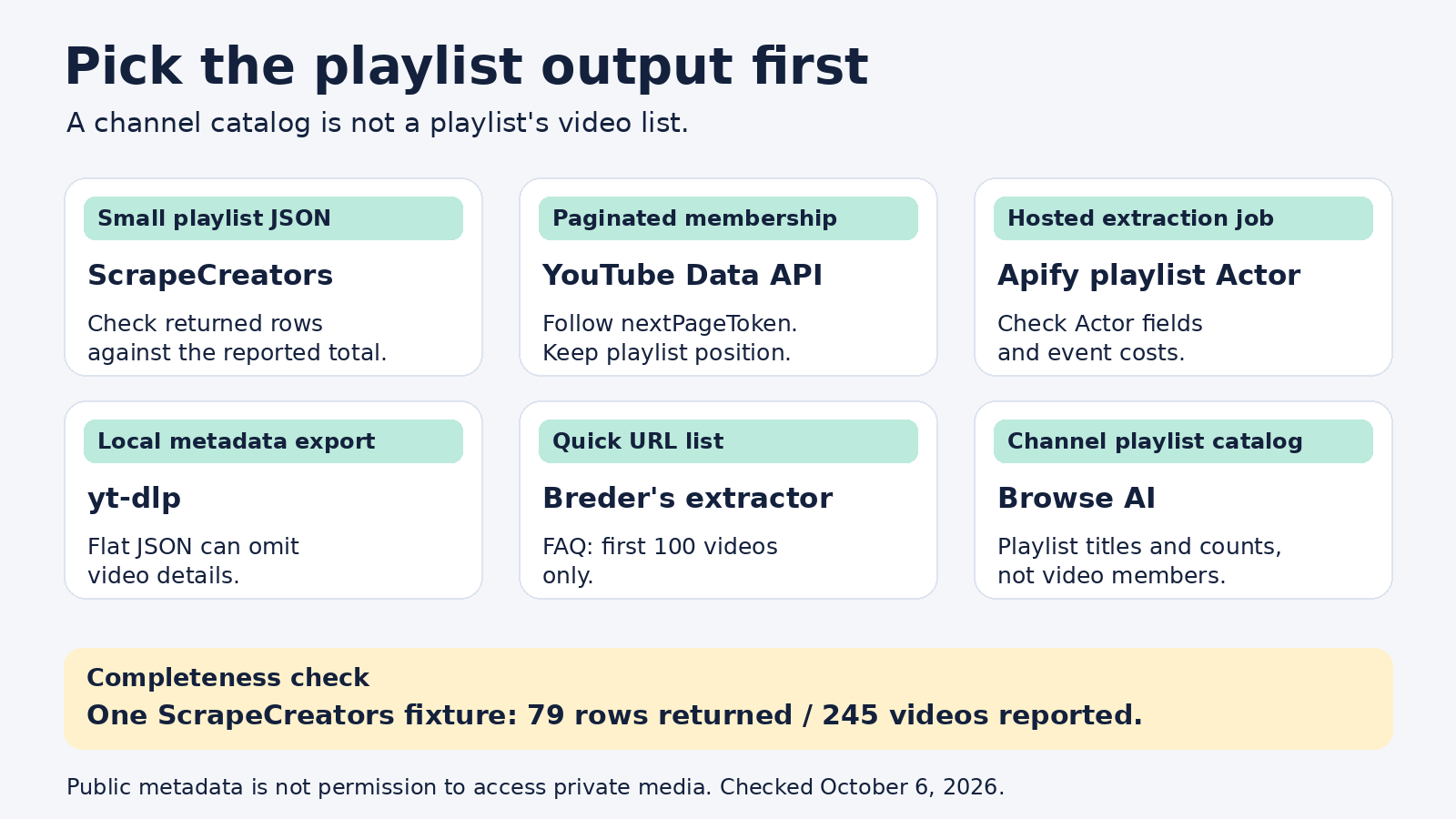
The short answer
For a small public YouTube playlist you want as JSON, I’d start with ScrapeCreators. For a complete archive of a long playlist, use Google’s YouTube Data API or evaluate a playlist-specific Apify Actor. Use yt-dlp if you want to run the extraction yourself, David Breder’s extractor for a quick URL list, and Browse AI when your job is listing a channel’s playlists rather than the videos inside one playlist.
I run ScrapeCreators, so that recommendation is not neutral. More importantly, our current playlist endpoint is not my recommendation for guaranteed full-playlist enumeration. A live check below returned 79 video rows for a playlist reporting 245 videos.
Prices and documented capabilities were checked on October 6, 2026. I called ScrapeCreators for the examples. I did not run extraction jobs on the other products.
Decide what you need to export
A YouTube playlist scraper can mean several different things:
- A list of videos inside one known playlist, with titles and URLs.
- A catalog of playlists from a channel, with each playlist’s title and video count.
- A repeatable metadata archive that preserves membership and order.
- Actual audio or video files, which is a separate downloading job.
Those are not interchangeable. A channel’s playlists tab is a catalog of collections. It is not the contents of every collection. A playlist’s reported total is also not proof that an extractor returned every row.
For research or a course inventory, write down your minimum fields before choosing a provider: playlist ID, video ID, video URL, title, duration, returned order, and the time you fetched the data. Add availability and an explicit playlist position when your workflow needs them. Do not manufacture fields a source does not return.
If you really need a channel’s entire upload history, start with our channel-video collection guide. For short-form feeds, the YouTube Shorts scraper comparison covers a different collection path. This article is about choosing a tool for playlist data, not replacing either workflow.
Six options at a glance
| Tool | Best fit | Input and output | Cost unit | Important boundary |
|---|---|---|---|---|
| ScrapeCreators | A small public playlist in an existing API workflow | Playlist ID to JSON with playlist metadata and video rows | Request credits; all four observed playlist calls charged 1 credit each | No documented playlist cursor; a long fixture returned only part of the reported total |
| Apify: API Dojo playlist Actor | Hosted playlist extraction jobs and datasets | Playlist inputs to a dataset; vendor documents video position and availability fields | Playlist-query events plus video-item events | Actor-specific contract and pricing, not a universal Apify promise |
| YouTube Data API | Official, paginated membership and order | Playlist ID to playlistItems, with nextPageToken | Google project quota units | Video duration and other video details require a separate resource request |
| yt-dlp | A developer-controlled metadata export | Playlist URL to locally generated JSON | Open-source software plus your compute and maintenance | Flat extraction can omit details; you own operational failures |
| David Breder’s extractor | A one-off text or JSON URL list | Playlist URL to IDs, titles, and URLs | Check the tool’s live terms; no paid API plan assumed here | Its FAQ says it extracts only the first 100 videos |
| Browse AI | A no-code catalog of channel playlists | Channel playlists tab to playlist titles, counts, positions, and thumbnails | Automation credits within a plan | This prebuilt robot lists playlists, not every video within each playlist |
The last two belong here because buyers encounter them for the same search. Choose them for their actual output, not because their names contain “playlist scraper.”
1. ScrapeCreators
ScrapeCreators’ YouTube API is a straightforward choice when you’re already collecting public video data and want playlist metadata through the same API key and docs. The playlist endpoint documentation specifies GET /v1/youtube/playlist with a required playlist_id.
The returned object includes the playlist title, owner, reported totalVideos, and a videos array. In our successful fixtures, video rows included IDs, URLs, titles, thumbnails, duration text, duration seconds, and channel information. They did not include an explicit playlist-position field or a continuation cursor.
Our check of freeCodeCamp’s HTML and CSS playlist returned 10 rows with totalVideos: 10. Another public music playlist returned 100 rows with totalVideos: 100. Those observations make this useful for a small curriculum index or a known playlist feeding a spreadsheet.
The long-playlist check is the catch. 3Blue1Brown’s uploads playlist reported 245 videos but returned 79 rows. The endpoint’s current public contract has no cursor parameter, so you cannot assume another request will fetch the next page. An invalid playlist ID also returned success: true without useful playlist data and charged one credit. Validate the payload yourself. Neither observation is a promise about all playlists or all future responses.
Current pricing lists $47 for 25,000 credits and $497 for 500,000 credits, with no subscription and non-expiring credits. The playlist calls here each charged one credit. That is request pricing, not pricing for every video in a completed archive. The number of returned rows varied substantially.
Choose it if you want simple API access to a small public playlist and can reject incomplete data. Choose another route if a complete long-playlist archive is a hard requirement. You can create an account to check your own public fixtures before buying credits.
2. Apify’s API Dojo playlist Actor
API Dojo’s YouTube Playlist Scraper is the strongest playlist-specific Apify page in this comparison. Its documentation describes playlist extraction, video positions, durations, engagement fields, and unavailable-video flags. Those are vendor-documented capabilities, not fields I verified from an Actor run.
Apify is a marketplace of Actors. The developer, schema, and billing rules belong to the particular Actor you choose. That flexibility is useful if you want a hosted job and a dataset rather than a synchronous response you normalize yourself.
Read the live pricing tab, not just the headline. On October 6, it displayed a playlist-query event at $25 per 1,000 queries, including the first 100 videos, and additional video-item events at $0.50 per 1,000. Platform usage was marked included. The README separately described a $0.05 playlist-query charge, which conflicts with the pricing tab’s $0.025 equivalent. Confirm the charge shown for your run before budgeting.
That distinction matters even for a tiny export: “from $0.50 per 1,000 videos” does not describe the entire cost when a playlist-query event also applies.
Choose it if you want hosted extraction jobs and the Actor’s documented fields match your archive. Before committing, run your largest playlist and check returned row count, position, unavailable entries, and the exact charged events. I would not infer completeness from a marketplace description alone.
3. YouTube Data API
For official playlist membership, Google’s playlistItems.list is a strong starting point. It supports a playlist ID, a pageToken, and maxResults up to 50. A call costs one quota unit according to the method’s documentation.
Request snippet,contentDetails when you need the video identifier and playlist metadata. The snippet includes position information; pagination uses nextPageToken. That explicit page contract is a better fit than an undocumented partial result when order and coverage matter.
curl --get 'https://www.googleapis.com/youtube/v3/playlistItems' \
  --data-urlencode 'part=snippet,contentDetails' \
  --data-urlencode 'playlistId=PLWKjhJtqVAbnSe1qUNMG7AbPmjIG54u88' \
  --data-urlencode 'maxResults=50' \
  --data-urlencode "key=$YOUTUBE_DATA_API_KEY"
This is a documented example, not a request I executed during this review. Follow every returned page token. A playlist item is a membership record, not a full video-detail record: obtain additional video fields through the appropriate video resource rather than assuming they arrive with playlistItems.
Choose it if official access and explicit pagination matter more than avoiding Google project setup. Review Google’s current quota rules, access requirements, and API policies. Public API-key access does not grant access to someone else’s private playlist.
4. yt-dlp
yt-dlp is an open-source command-line tool with playlist extraction and JSON output. It is worth considering even when you do not want to download media.
The project’s documented flags include --flat-playlist, --skip-download, and --dump-single-json. This combination asks for playlist-level metadata without downloading the video files:
yt-dlp --flat-playlist --skip-download --dump-single-json \
  'https://www.youtube.com/playlist?list=PLWKjhJtqVAbnSe1qUNMG7AbPmjIG54u88' \
  > playlist.json
Flat extraction avoids fully resolving every video, so some metadata can be missing. Treat it as an index. If you require more detail, investigate full extraction and its additional requests. This command is based on the project’s documentation; I did not execute it here.
There is no hosted API subscription in this local workflow. Your costs are compute, debugging, upgrades, and any infrastructure you operate. That can be a good trade for a one-off job and a bad trade for a business pipeline nobody wants to maintain.
Choose it if you want control over local extraction and can handle breakage. Keep the metadata task separate from downloading copyrighted media. A tool’s downloading support is not permission to use someone else’s content.
5. David Breder’s YouTube Playlist Extractor
David Breder’s extractor answers a simpler question: “Can I paste a playlist URL and copy its video links?” Its page describes IDs, titles, URLs, plain-text output, JSON output, and clipboard copying.
The important limit is unusually clear. The FAQ says it extracts up to 100 videos and takes the first 100 for larger playlists. That makes it a candidate for a quick list, not a complete large archive.
I reviewed the product page, not a submitted extraction. I also would not treat this browser tool as a contracted production API or assume unlimited usage from the presence of an input form.
Choose it if you need a manual URL export and can live with the stated limit. Choose a paginated or independently verified job-based route if completeness matters, or an API if another program needs to call it repeatedly.
6. Browse AI
Browse AI’s prebuilt YouTube playlist robot extracts the playlists tab of a channel. Its documented fields include playlist title, video count, playlist position, and thumbnail. The position here describes a playlist in the channel catalog, not each video’s position inside that playlist.
That is useful for a content-strategy overview: which collections a creator publishes and how they organize them. It is not a substitute for enumerating the videos in a known playlist. If you need both levels, plan a second extraction step.
The pricing page, checked in a browser, displayed a free plan with 50 monthly credits and Personal at $19 per month billed annually with 12,000 annual credits. Automation credits are not equivalent to a playlist-query event or a Google quota unit. Estimate your actual robot runs before comparing bills.
Choose it if you’re a no-code user building a channel-playlist catalog. If your input is one playlist ID and your desired output is every member video, start with one of the first four routes instead.
A real request and a guarded CSV export
Here is the ScrapeCreators request used for the freeCodeCamp fixture:
curl --get 'https://api.scrapecreators.com/v1/youtube/playlist' \
  --data-urlencode 'playlist_id=PLWKjhJtqVAbnSe1qUNMG7AbPmjIG54u88' \
  -H "x-api-key: $SCRAPE_CREATORS_API_KEY"
The response reported success: true, title: "HTML and CSS Tutorials", totalVideos: 10, and credits_charged: 1. Its first video had ID kUMe1FH4CHE, duration text 4:07:30, and lengthSeconds: 14850. Those are actual returned values, not illustrative metrics.
This Python example checks the useful data before writing a CSV. It preserves the response order and labels its ordinal honestly; returned_row is not an authoritative playlist position.
import csv
import os
import requests

playlist_id = "PLWKjhJtqVAbnSe1qUNMG7AbPmjIG54u88"
response = requests.get(
    "https://api.scrapecreators.com/v1/youtube/playlist",
    params={"playlist_id": playlist_id},
    headers={"x-api-key": os.environ["SCRAPE_CREATORS_API_KEY"]},
    timeout=40,
)
response.raise_for_status()
data = response.json()
videos = data.get("videos") or []
if not data.get("success") or not data.get("title") or not videos:
    raise RuntimeError("No usable playlist data returned")
if any(not video.get("id") for video in videos):
    raise RuntimeError("A returned video row has no ID")
if data.get("totalVideos") is None or data["totalVideos"] != len(videos):
    raise RuntimeError("Coverage is unverified or incomplete; do not export as complete")

with open("playlist.csv", "w", newline="", encoding="utf-8") as file:
    writer = csv.writer(file)
    writer.writerow(["playlist_id", "returned_row", "video_id", "title", "url"])
    for row, video in enumerate(videos, start=1):
        title = video.get("title") or ""
        # Prevent imported titles from becoming spreadsheet formulas.
        if title.lstrip().startswith(("=", "+", "-", "@")):
            title = "'" + title
        writer.writerow([playlist_id, row, video["id"], title, video["url"]])
I executed this example and parsed the resulting CSV: it contained a header and 10 video rows. The count guard would reject the 79-of-245 fixture. Matching counts still are not a complete accuracy guarantee: your source may omit unavailable entries or expose a changing total.
Do not deduplicate playlist membership solely by video ID if repeated appearances matter. Keep a separate unique-video inventory when you need it, and record fetched time for snapshots. Use a CSV writer rather than joining fields with commas; video titles can contain punctuation that breaks a handmade CSV.
What audience research changed
A Reddit discussion about exporting playlist catalogs distinguishes playlist names and counts from the URLs inside each playlist. Its replies also raise the problem of commas in titles. That is why the comparison separates the two collection levels and the example uses a real CSV writer.
A playlist-export tutorial and its discussion surfaced interest in deleted or private video references. Recovering a visible ID is not recovering inaccessible media. Another export-tool discussion separates moving playlists between accounts from downloading the actual files. Neither is something the ScrapeCreators playlist endpoint does.
These are qualitative questions from public discussions, not product benchmarks or evidence of search rank. They helped define the boundaries buyers need before picking a tool.
Questions to ask before buying
What is the best YouTube playlist scraper for a complete archive?
Start with the YouTube Data API’s explicit page-token contract, or run a playlist-specific Apify Actor against your largest real fixture. Confirm membership count, order, and unavailable entries. ScrapeCreators’ current playlist endpoint returned a partial long-playlist result in this review, so I would not use it as a completeness guarantee.
Can I export a YouTube playlist to CSV without downloading videos?
Yes. An API response or yt-dlp metadata export can feed a CSV writer. A browser extractor can also give you URLs. Exporting titles and links does not require downloading audio or video files.
Can a playlist scraper retrieve private or deleted videos?
Do not assume that. A visible unavailable entry may retain an identifier, but it does not grant access to the video. Official access to private data requires appropriate authorization. Public scraping cannot bypass the owner’s privacy choices.
Is a playlist total the same as the number of exported rows?
No. Our long fixture reported 245 videos and returned 79 rows. Save both numbers. Fail visibly when your workflow expects a complete export, rather than presenting a partial response as the whole playlist.
Which tool should I use for a channel’s list of playlists?
Browse AI’s cited robot is specifically for that catalog. It returns playlist-level fields. Collecting the videos inside each playlist is another job, and collecting every channel upload is different again.


