
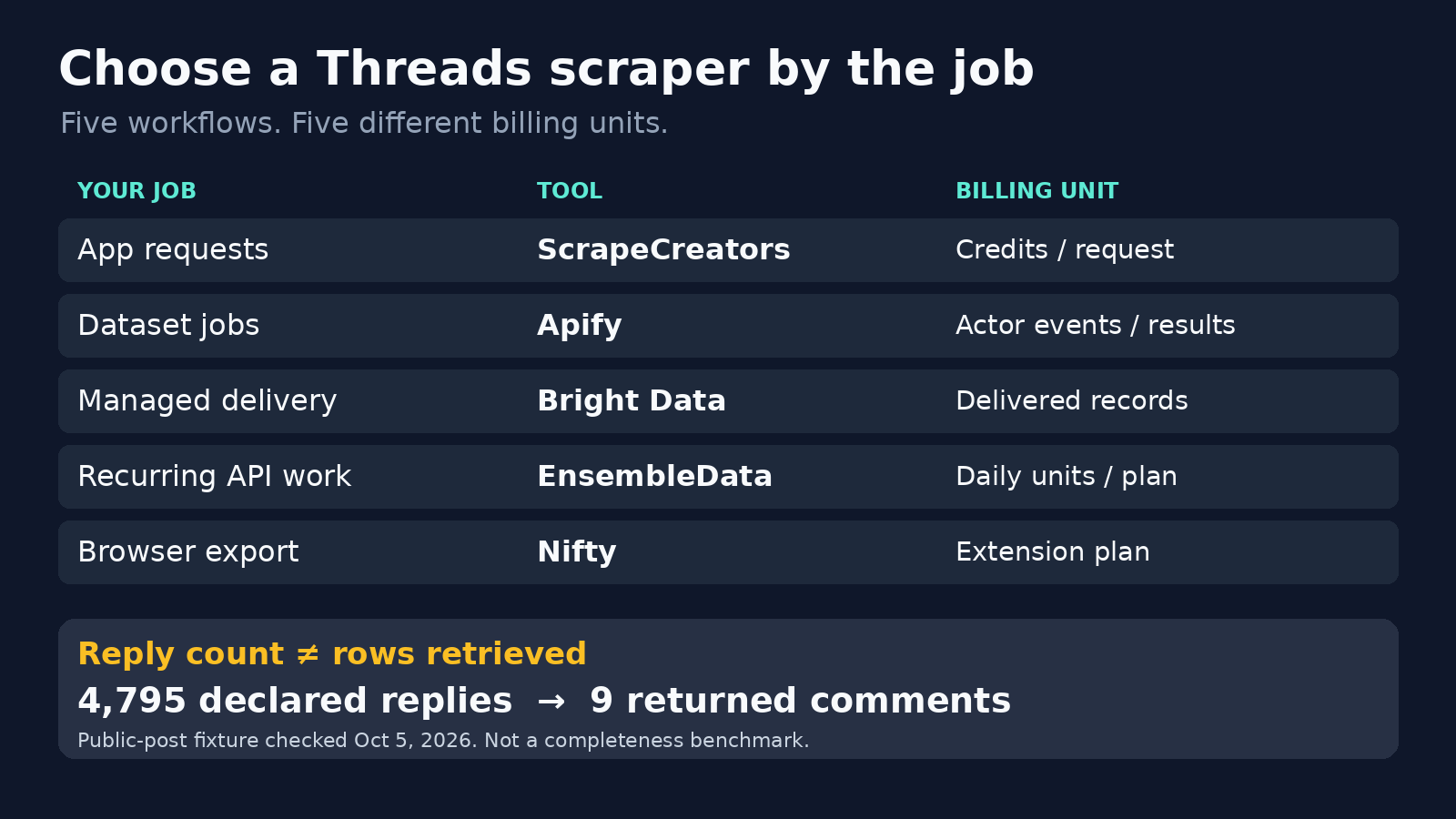
For a Threads scraper inside an app, I would start with ScrapeCreators. Choose Apify when you want configurable scraping jobs and downloadable datasets, Bright Data for managed record delivery, EnsembleData for a recurring social-data workload, and Nifty for a browser-to-spreadsheet export. None of these choices should come with an assumption that you can retrieve an account’s entire history or every reply.
I run ScrapeCreators, so that recommendation comes with the obvious bias. I checked the providers’ own pages, called six public-data fixtures, and reran the example code on October 5, 2026. I did not benchmark the other four products. This is a buying guide, not a claim that one service always wins on speed or completeness.
Which Threads scraper fits your job?
Start with the input you have. A username, a keyword, and a post URL are different jobs. Then decide whether the output belongs in an application or a spreadsheet.
| Tool | Choose it for | Input and output model | What you pay for | Main thing to check |
|---|---|---|---|---|
| ScrapeCreators | Public Threads data inside your application | Username, keyword, or post URL to JSON | Credits per endpoint request | Recent-feed and visible-reply coverage, not a guaranteed archive |
| Apify | Configurable jobs and dataset exports | Actor-specific inputs to datasets, CSV, JSON, or Excel | The selected Actor’s events/results and applicable platform charges | Exact Actor, maintenance owner, and pricing tier |
| Bright Data | Managed collection and record delivery | Supported Threads inputs to structured records | Successfully delivered records | The selected collection mode and definition of one record |
| EnsembleData | Recurring social research through one provider | Keyword, profile, user-post, and reply resources to JSON | Monthly plans with daily units | Endpoint-specific units and whether the daily allowance fits bursty work |
| Nifty | An analyst exporting what they can browse | Browser pages to CSV, Excel, JSON, or HTML | Browser-extension plan | Rows actually loaded, export limits, and session dependence |
Prices and access rules below were verified on October 5, 2026. The units differ. A request can return several posts; a delivered record usually represents one object; an Actor run can incur several event types.
1. ScrapeCreators for a REST API inside your app
ScrapeCreators’ Threads API is the straightforward choice if you already have a backend and want public profile, feed, post, or keyword data without maintaining a scraper yourself.
The current resources include:
GET /v1/threads/profile?handle=...for a public profile.GET /v1/threads/user/posts?handle=...for recent public posts.GET /v1/threads/post?url=...for a known post and returned conversation data.GET /v1/threads/search?query=...for keyword discovery.
Use the Threads documentation for each contract. A post’s text is under post.caption.text, and reply counters can live under post.text_post_app_info. Do not assume every resource has the same object shape.
There are useful limits to know before you buy. The user-posts documentation describes roughly the last 20 to 30 publicly visible posts. My calls for zuck and threads each returned 15 posts. That is a recent feed, not an account-history export. The current resource does not document a history cursor.
The trim=true option makes feed responses smaller, but the current backend’s trimmed field list excludes some engagement fields. Keep the full response if you need to inspect reply and repost metadata.
Each of the six fixture requests in this check charged one credit. The pricing section lists 25,000 credits for a $47 pay-as-you-go purchase. Credits do not expire, and there is no required subscription. A credit is not a post: different endpoints can have different costs, so check the docs rather than applying one price to the entire catalog.
Choose another tool if you need a ready-made spreadsheet interface, an authenticated publishing workflow, or a historical archive that the public source does not expose. You can create an account to check your own inputs before building around these limits.
2. Apify for configurable runs and exports
Apify is a marketplace of Actors. That matters more than the word “Apify” in a comparison table: one Threads Actor may accept profile usernames, another may focus on search, and another may extract replies from known post URLs.
The Automation Lab Threads Scraper documents profile, posts, and keyword-search modes. Its inputs include usernames, searchQueries, and a maximum-post setting. It exports JSON, CSV, and Excel, or makes the dataset available through an API. That fits scheduled research jobs better than writing your own export layer.
Its page identifies Automation Lab as the community maintainer. If you buy this Actor, that is the implementation you should evaluate, not every Threads scraper in the marketplace.
Pricing needs a closer read. The page’s banner advertised “from $2.60 / 1,000” extracted posts when checked. Its README also showed a FREE-tier event table with $0.02 per start, $0.005 per profile, and $0.005 per post. A 20-post run with one profile would therefore have an estimated $0.125 event charge under that table. Different tiers have different rates. Those statements are not interchangeable quotes for the same job.
Check the current Actor pricing tab, selected plan, event caps, and any applicable platform charges before committing a budget. I did not run the Actor, so I cannot certify its reply coverage or production reliability.
Choose Apify if you want configurable runs, datasets, and exports. Choose a simpler REST provider if you would rather integrate one documented request than select and operate marketplace jobs. Our Apify comparison explains that operating-model difference in more detail.
3. Bright Data for managed record delivery
Bright Data’s Threads scraper fits teams that want managed collection rather than browser sessions or a scraper deployment of their own.
The important buying question is which collection mode matches your job. Collecting a known post and discovering posts from a profile are different pipelines. Confirm the supported inputs and output schema for the mode you select before assuming a marketing list of fields applies to every response.
Its product and Scraper API pricing page listed pay-as-you-go pricing of $1.50 per 1,000 records when checked. The Scale plan listed $499 per month, 384,000 included records, and $1.30 per 1,000 additional records. The pages describe payment for successfully delivered records, with proxies, unblocking, and parsing included.
That is a record price, not a price for 1,000 API calls. Ask whether reply rows, discovered posts, and profile objects count separately in your selected workflow. A job returning 10,000 objects can cost differently from 1,000 requests returning ten objects each.
Choose Bright Data when managed delivery and a defined record contract fit your data pipeline. A small app that only needs a few public post lookups may find a request-based API easier to reason about. I reviewed the product and pricing pages, not a live Bright Data collection job.
4. EnsembleData for recurring social research
EnsembleData’s Threads product lists keyword posts, user discovery, user profiles, user posts, and post replies. It is a useful option if your workload crosses several social networks and you prefer one provider relationship.
The pricing page uses daily units within monthly plans. The Wood plan listed $100 per month for 1,500 units per day. The free trial listed 50 units per day.
Its Threads pricing table listed user information at four units, user search at four units, and keyword search, user posts, and post replies by the number of returned posts or replies. A request returning many objects can therefore use many units. Do not divide the monthly fee by a guessed number of requests and call that a universal request price.
The public product page uses broad language about histories and nested conversations. Treat those as reasons to test the relevant endpoint, not proof that every older post or reply is available for your fixture. Ask for the actual response, pagination behavior, and unit debit on a representative account.
Choose EnsembleData for a steady, recurring workload where its daily allowance matches your use. If most of your work happens in one large monthly batch, compare that batch with the daily unit contract before choosing a plan. I did not call EnsembleData’s API in this review.
5. Nifty for a browser-to-spreadsheet export
Nifty’s Threads Scraper is a different kind of tool. It runs in your browser and lists “Threads in a List,” user details, followers in a list, and following in a list as scraping options.
That is a sensible starting point for an analyst who wants to inspect pages, choose columns, and export a spreadsheet. Nifty’s own site describes CSV, Excel, JSON, and HTML exports, plus custom fields on paid plans. Its Threads product page links directly to its browser extensions.
The current pricing section listed a free plan with ten rows per export, $9.99 per month for one scraper, and $29.99 per month for all scrapers. The paid plans advertise unlimited rows per export. An unlimited export allowance does not mean the underlying site will expose unlimited history.
The vendor’s demonstration shows collection growing as the user scrolls, then exporting selected fields to CSV. That makes the workflow clear, but it is not an independent completeness test. I read the transcript; I did not install or run the extension.
Choose Nifty for a hands-on export. For unattended server requests, a REST API or hosted job is a better starting point. Also distinguish this product from other extensions called “Threads Scraper”: verify the developer and installation link rather than buying from the name alone.
Check the official API before buying a scraper
Meta has an official Threads API. It is wrong to dismiss it as having no public discovery support.
The current keyword and topic-tag search documentation supports searching public Threads media. It requires an appropriate access token, threads_basic, and threads_keyword_search. Without approval for the search permission, results are limited to posts owned by the authenticated user; approved access can search public posts.
The docs list a limit of 2,200 queries per user within a rolling 24-hour period. They also document TOP and RECENT search modes, date filters, and a maximum of 100 media objects per requested page. Those rules apply to Meta’s resource, not to third-party providers.
Choose the official API when its permissions and supported data fit your application, especially if you need publishing or other authenticated account functions. Start with Meta’s setup and authorization guide. A public-data scraper is not a substitute for permission to publish, moderate, or read private account information.
A reply count is not a conversation export
This is the check I would do before spending time comparing headline prices.
On October 5, a request for this public post returned post, comments, relatedPosts, and threadItems. The post reported direct_reply_count: 4795. The response contained nine entries in comments, five in relatedPosts, and none in threadItems.
Nine returned comment entries are not 4,795 retrieved replies. Related posts are not extra replies. An empty threadItems array does not prove that no conversation exists. These are separate fields with separate meanings.
A second known-post request, using a permalink returned by the feed, returned eight comment entries. Together with two feed calls, one profile call, and one keyword-search call, the six fixtures all returned successful responses and charged one credit each. The keyword query OpenAI returned 17 posts. This is a small functional check, not a completeness or uptime benchmark.
Before you choose any provider, verify the post’s identity, author, text, reply counters, rows returned, and whether a documented continuation path actually yields additional unique IDs. If no continuation is exposed, do not invent one or label the first response a full export.
Request one public post and inspect coverage
Rerunning the exact code below returned the same post and nine comment entries, but four related posts instead of five. The response can change between calls; that is another reason to save the retrieval time and count each resource separately.
This example uses Python’s standard library. Set SCRAPE_CREATORS_API_KEY in your environment and run it from your backend, not from a public browser bundle.
import json
import os
from urllib.parse import urlencode
from urllib.request import Request, urlopen

params = {"url": "https://www.threads.com/@zuck/post/DK-BydcJHkF"}
request = Request(
    "https://api.scrapecreators.com/v1/threads/post?" + urlencode(params),
    headers={"x-api-key": os.environ["SCRAPE_CREATORS_API_KEY"]},
)
with urlopen(request, timeout=30) as response:
    data = json.load(response)
if not data.get("success") or not data.get("post", {}).get("id"):
    raise RuntimeError("The response did not contain a usable post")

post = data["post"]
info = post.get("text_post_app_info") or {}
print(json.dumps({
    "post_id": post["id"],
    "username": post.get("user", {}).get("username"),
    "text": (post.get("caption") or {}).get("text"),
    "declared_direct_replies": info.get("direct_reply_count"),
    "comment_rows_returned": len(data.get("comments") or []),
    "related_post_rows_returned": len(data.get("relatedPosts") or []),
    "thread_item_rows_returned": len(data.get("threadItems") or []),
}, indent=2))
Keep missing values as null. Converting an unavailable reply counter to zero changes the meaning of your data. Save the stable post ID and retrieval time so a later fetch can update the same record rather than creating another copy.
For a fuller integration walkthrough, use our Threads profiles, posts, and keyword guide. This page is about choosing a tool; that guide covers implementation.
What to check before buying volume
A public scraping discussion raised practical questions about timeline previews, loading more content, and whether storing public data is allowed. Those questions changed the checklist here. They are audience questions, not legal authority or a provider benchmark.
Test a recent account, an older post, and a post with many replies. Record which data you requested and which rows you actually received. Then check the following:
- Does the input identify the intended account or post? Check returned IDs and canonical URLs.
- Can you retrieve additional unique rows, or are you looking at the public preview again?
- Does the price meter count calls, output objects, start events, or daily units?
- Who maintains the implementation when Threads changes?
- Can you retain and use the data for your purpose? Review applicable terms, privacy, copyright, and retention obligations.
Avoid fake accounts and private-data workarounds. Public visibility is not a blanket grant of permission to collect, store, resell, or train on personal content. Get legal advice where the use warrants it. None of the tools here removes that responsibility.
For AI analysis, pass the returned sample size and missing fields alongside the text. Ask for “themes in the nine comments retrieved,” not “what all 4,795 replies think.” Otherwise a useful extraction becomes a misleading summary.
Frequently asked questions
What is the best Threads scraper for public posts?
ScrapeCreators is my choice for public data in an application. Apify fits configurable jobs and exports, Bright Data fits managed records, EnsembleData fits recurring unit-based API work, and Nifty fits browser exports. Choose from the workflow and observed coverage, not a universal ranking.
Can I scrape every post from a Threads account?
Do not assume that. ScrapeCreators’ current public-feed resource is limited to recent visible posts and does not document a history cursor. Other providers may offer different access, but you need to verify oldest returned dates, continuation, and unique IDs before calling any result complete.
Can a Threads scraper retrieve every reply?
A visible reply counter does not establish extraction coverage. Our checked post reported 4,795 direct replies but returned nine comment entries. Evaluate the provider’s reply resource, parent-child mapping, and continuation with your own post.
Is there a free Threads scraper?
Nifty offers ten rows per export on its free plan, and other providers offer trial allowances or credits. Free access has limits. Open-source software also carries hosting and maintenance work even when the repository itself is free to download.
Does Meta have an official Threads search API?
Yes. Its keyword-search resource supports public discovery with approved permissions and an access token. Without search-permission approval, the documented behavior is limited to the authenticated user’s posts. Check that route before choosing unofficial access.


