
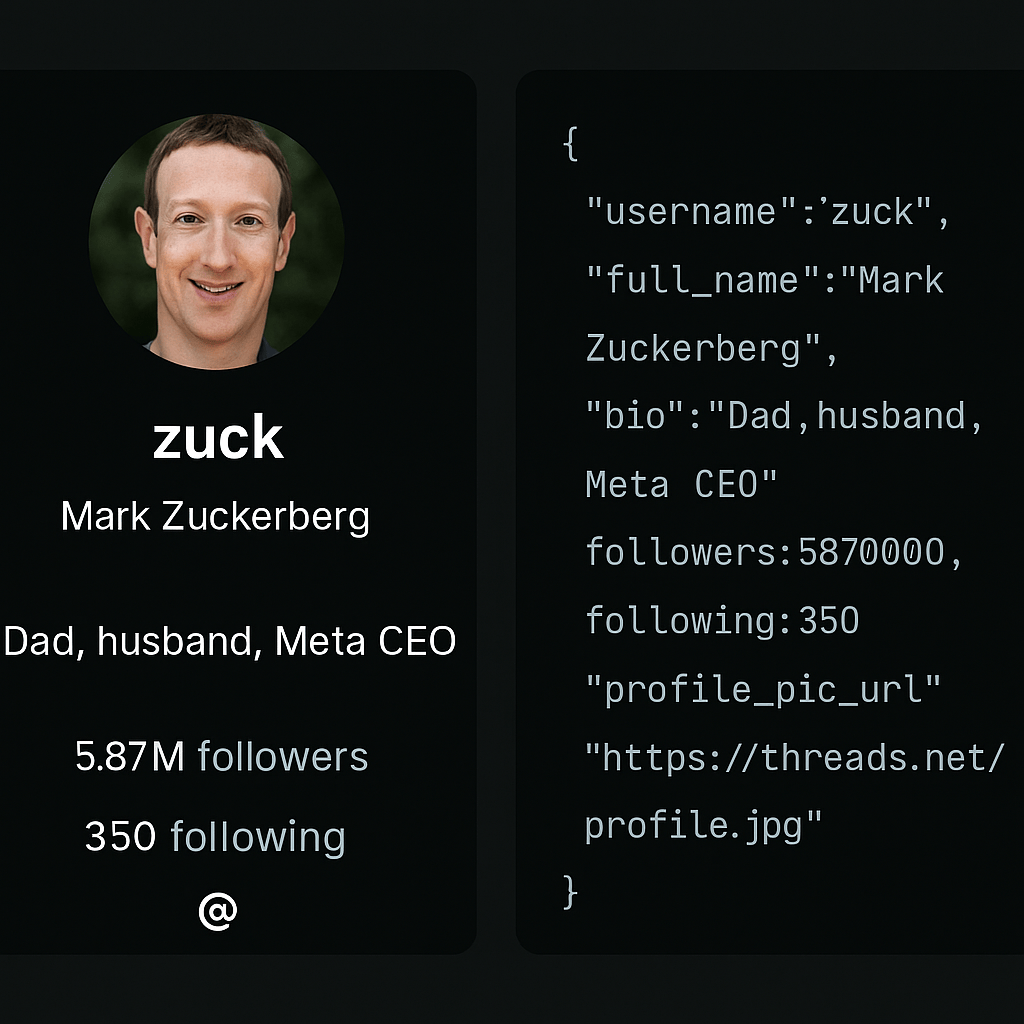
An unofficial Threads API lets you pull public profiles, posts, and keyword search results as JSON—without a Meta developer app, business account, or OAuth review.
That matters when you need data today:
- Profile bios, follower counts, and post feeds in one call
- Single-post detail for sentiment or archiving
- Keyword and user search for brand monitoring and outreach
Meta’s official Threads API is built for approved apps. For teams who only need public data, a ready-made API key is faster.
In this guide, you’ll learn:
- Five endpoints: profile, posts, post, keyword search, and user search
- Example requests and sample JSON from a live profile call
- How the unofficial API compares to Meta’s official access path
- Real use cases and a three-step setup to your first request
Here’s how to call your first endpoint.
What You Can Do with the Unofficial Threads API
We’ve built endpoints to cover the most useful data on Threads. Here’s what’s available:
1. Profile
Retrieve complete public profile data for any Threads user. Returns**:** username, bio, profile image, follower count, following count, and more.
Example use cases:
- Build an influencer database
- Monitor competitor profiles
- Enrich social media reports
2. Posts
Pull all public posts from a user in chronological order. Returns: post text, images, videos, timestamps, and engagement stats.
Example use cases:
- Track posting frequency and engagement trends
- Archive content for analysis
- Study content formats that perform well
3. Post
Retrieve details for a single post by ID. Returns: full text, media, engagement stats, and metadata.
Example use cases:
- Run deep sentiment or keyword analysis
- Share a single post in another app
- Store high-value posts for later reference
4. Search by Keyword
Search Threads posts by a keyword or phrase. Returns: matching posts with their metadata.
Example use cases:
- Monitor brand mentions
- Track trending industry topics
- Discover organic conversations
5. Search Users
Find users based on their name or bio keywords. Returns: usernames, bios, profile links, and profile stats.
Example use cases:
- Identify influencers in your niche
- Build targeted outreach lists
- Research communities around specific interests
Example API Request
Here’s how easy it is to start pulling Threads data with Scrape Creators:
const res = await axios.get(
  "https://api.scrapecreators.com/v1/threads/profile?handle=zuck",
  {
    headers: { "x-api-key": process.env.SCRAPE_CREATORS_API_KEY },
  }
  );
console.log(res.data);
Sample JSON response:
{
  "success": true,
  "pk": "63055343223",
  "profile_pic_url": "https://instagram.fphl1-1.fna.fbcdn.net/v/t51.2885-19/452737457_1313286386312102_744138929735022550_n.jpg?stp=dst-jpg_s150x150_tt6&efg=eyJ2ZW5jb2RlX3RhZyI6InByb2ZpbGVfcGljLmRqYW5nby43NjguYzIifQ&_nc_ht=instagram.fphl1-1.fna.fbcdn.net&_nc_cat=1&_nc_oc=Q6cZ2QGI6rV6WitBOFusBSbmxIOuuumYDGSoKQkrc24pi0jTNyuYZmrwQkGEZ458Pnm9OfI&_nc_ohc=0shb9Eadb5QQ7kNvwGA5A8D&_nc_gid=yC-nekfCiY5snnILiZGDXQ&edm=APs17CUBAAAA&ccb=7-5&oh=00_AfWIApMggPi9kzBSwD0n5g3wfjP9ctsdCxPJrh1o4d64wQ&oe=68A40D8E&_nc_sid=10d13b",
  "username": "zuck",
  "follower_count": 5057266,
  "hd_profile_pic_versions": [
    {
      "height": 640,
      "url": "https://instagram.fphl1-1.fna.fbcdn.net/v/t51.2885-19/452737457_1313286386312102_744138929735022550_n.jpg?stp=dst-jpg_s640x640_tt6&efg=eyJ2ZW5jb2RlX3RhZyI6InByb2ZpbGVfcGljLmRqYW5nby43NjguYzIifQ&_nc_ht=instagram.fphl1-1.fna.fbcdn.net&_nc_cat=1&_nc_oc=Q6cZ2QGI6rV6WitBOFusBSbmxIOuuumYDGSoKQkrc24pi0jTNyuYZmrwQkGEZ458Pnm9OfI&_nc_ohc=0shb9Eadb5QQ7kNvwGA5A8D&_nc_gid=yC-nekfCiY5snnILiZGDXQ&edm=APs17CUBAAAA&ccb=7-5&oh=00_AfWWudakWfAQO013MtFdSipYSUN_o0kJ34oWyAYtH-z8SA&oe=68A40D8E&_nc_sid=10d13b",
      "width": 640
    }
  ],
  "is_verified": true,
  "biography": "Mostly superintelligence and MMA takes",
  "full_name": "Mark Zuckerberg",
  "bio_links": [],
  "profile_tags": {
    "nodes": [
      {
        "display_name": "AI",
        "name": "ai",
        "id": "18392111818029156"
      },
      {
        "display_name": "MMA",
        "name": "mma",
        "id": "18400625521011745"
      },
      {
        "display_name": "memes",
        "name": "memes",
        "id": "18402364270062744"
      }
    ]
  },
  "id": "63055343223"
}
Why Use the Unofficial Threads API Instead of the Official One?
| Official Threads API | Scrape Creators Unofficial Threads API |
|---|---|
| Requires business account | Works with any public Threads account |
| Must create & configure an app | No setup beyond API key |
| App review & approval process | Instant access |
| Limited endpoints initially | Ready-to-use core endpoints |
| Designed for big brands | Perfect for developers, marketers, analysts |
Real World Use Cases
- **Influencer Marketing: **Discover and track relevant creators in your niche
- **Brand Monitoring: **Get alerted whenever someone mentions your brand
- **Content Analysis: **See what formats, hashtags, and posting times work
- **Market Research: **Understand audience sentiment on trends and products
- **Archiving & Compliance: **Keep a historical record of posts for audits
Getting Started in 3 Steps
- Sign Up: Create a free account at Scrape Creators.
- Get Your API Key: Copy it from your dashboard.
- **Make Your First Request: **Use curl, JavaScript, Python, or your favorite language.