
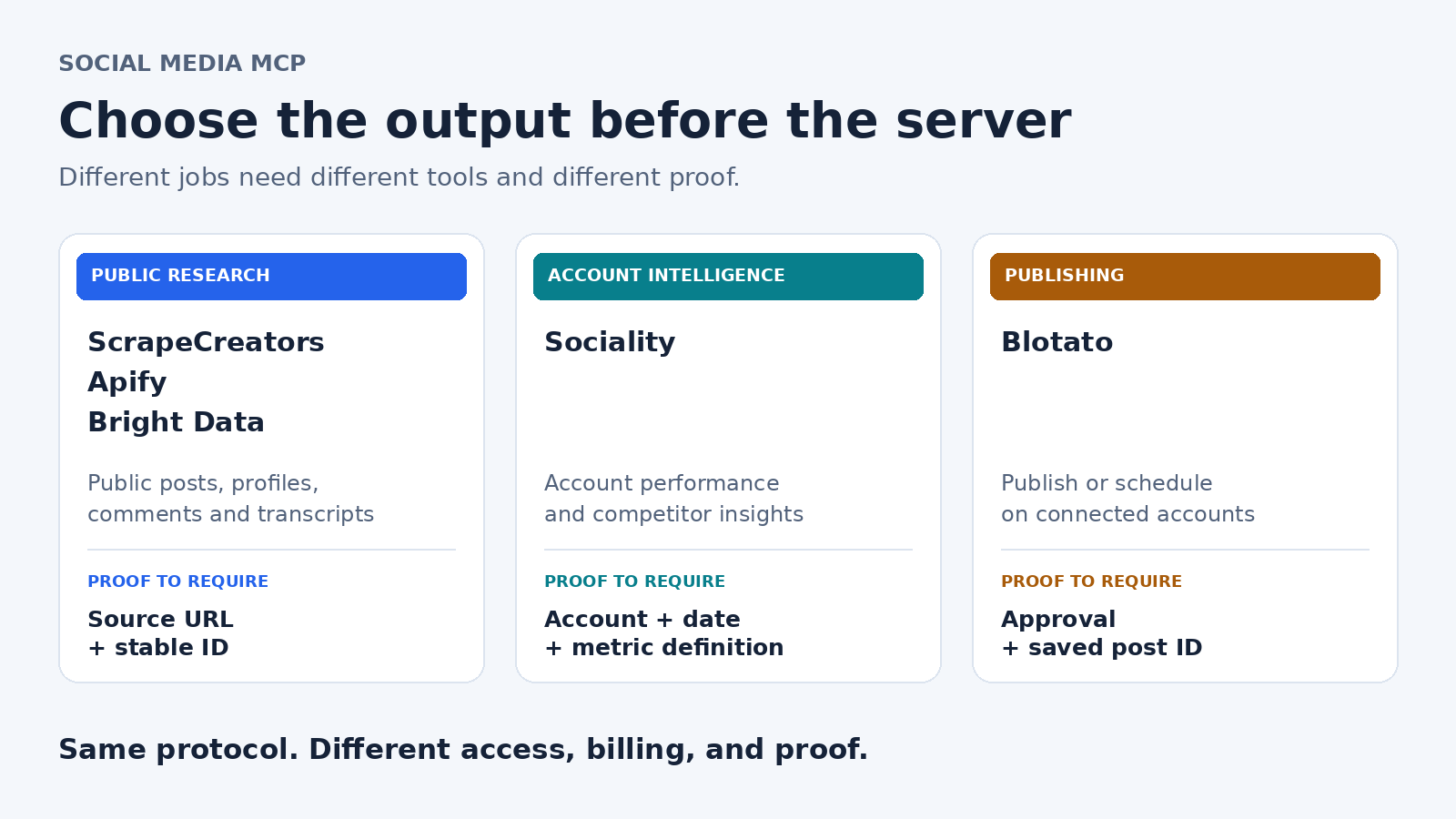
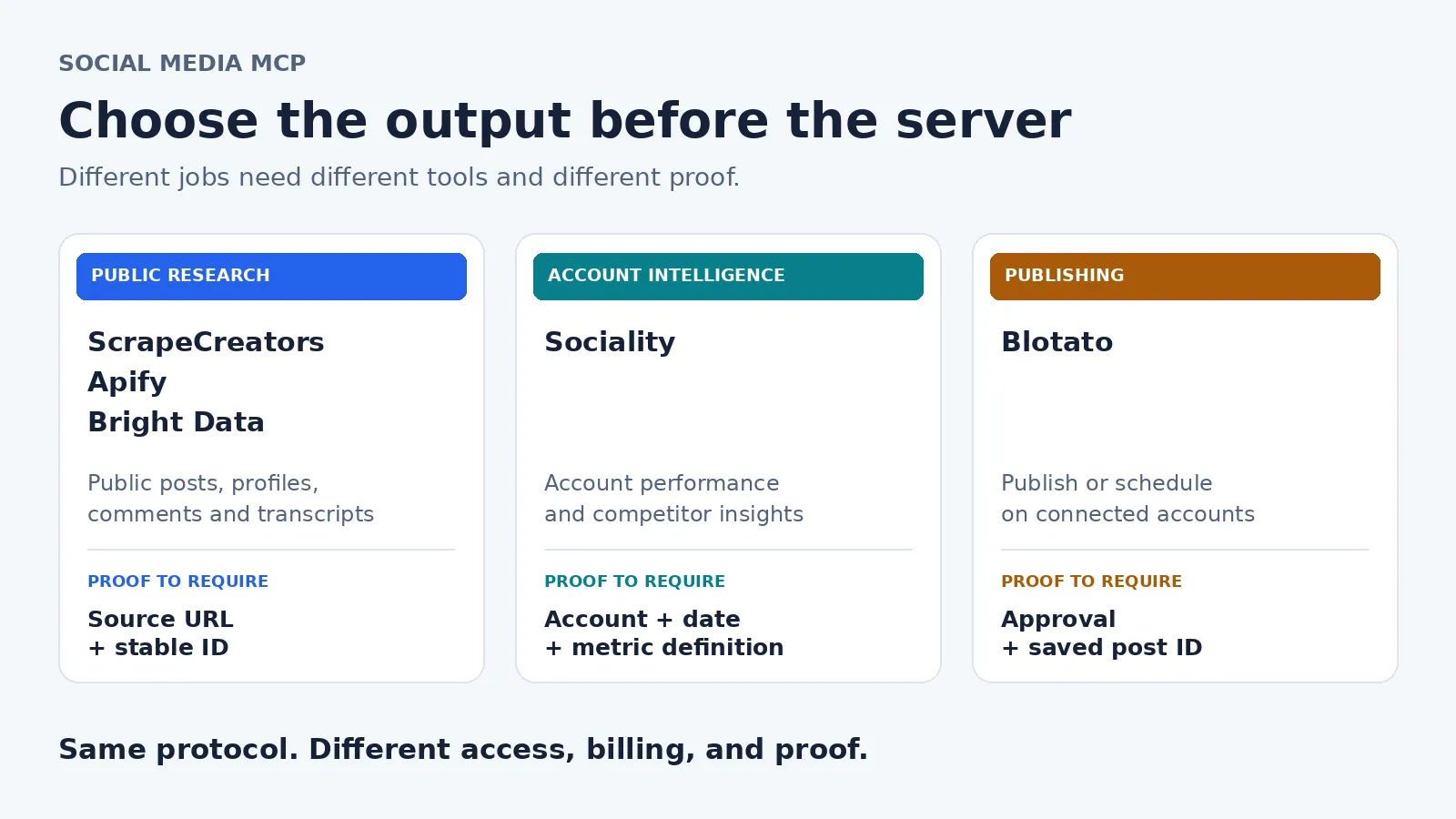
The best social media MCP server depends on the work. Choose ScrapeCreators for public social research, Apify for Actor discovery and datasets, Bright Data for social plus wider web collection, Sociality for account and competitor intelligence, or Blotato for publishing to accounts you connect. A research connector is not a scheduler, and a scheduler is not an unrestricted competitor-data API.
I run ScrapeCreators. That is my bias, so I would rather tell you where another product fits than pretend mine does every job. I checked the product and pricing sources on October 16, 2026, and ran a real ScrapeCreators MCP connection and search. I did not benchmark all five servers.
Choose the job before the server
MCP gives an assistant a way to discover and call tools. The tool’s underlying service still determines what data it can return and which actions it can take.[11]
Start by finishing this sentence: “My agent needs to return ___.” A public post with a source URL, an account-performance report, and a scheduled post ID are three different deliverables.
| Server | Choose it for | Access and connection | Cost unit checked October 16, 2026 | Check before committing |
|---|---|---|---|---|
| ScrapeCreators | Public profiles, posts, comments, search, and transcripts through supported endpoints | Hosted HTTP; OAuth or direct x-api-key | Prepaid API credits; $47 for 25,000 | Exact platform coverage, pagination, missing fields, and charges per endpoint |
| Apify | Discovering Actors, running collection jobs, and retrieving datasets | Hosted HTTP with OAuth or Bearer token; local option | Actor events and/or platform usage; Free includes $5 monthly usage | Exact Actor inputs, price, permissions, run status, and result retrieval |
| Bright Data | Combining public social extraction with broader web research | Remote or local MCP using Bright Data credentials | Advertised 5,000 free monthly requests; pay-as-you-go headline $1.50 per 1,000 requests | Request versus record versus browser-bandwidth charges |
| Sociality | Account reporting and competitor benchmarking | Remote HTTP with OAuth and workspace context | 1,000 one-time free credits; Growth starts at $49/month for 2,000 credits | Whether a credit represents a post or a day of metrics, plus available history |
| Blotato | Publishing and scheduling on connected accounts | Hosted MCP; OAuth or a client-supported API-key header | Starter $29/month; generation credits and platform caps are separate considerations | API/MCP plan eligibility, account authorization, and publication approval |
These are starting points, not comparable “prices per scrape.” An Actor event, a metric-day, a request, and a monthly publishing subscription buy different work. The provider sections below link the specific contracts.
1. ScrapeCreators for public social research
Choose ScrapeCreators when an agent needs public social data before it writes an answer: find relevant videos, read available transcripts, inspect comments, or retrieve a known public profile. The MCP documentation provides a hosted endpoint at https://api.scrapecreators.com/mcp, with OAuth and direct API-key authentication.[1]
That is different from handing an agent your social account and asking it to manage the calendar. ScrapeCreators retrieves data; it does not publish posts to your accounts. Check the actual endpoint for the platform and object you need. Public-profile access does not imply private analytics, an exhaustive archive, or every reply in a conversation.
For a client that supports remote HTTP and OAuth, the documented connection shape is:
{
  "mcpServers": {
    "scrape-creators": {
      "url": "https://api.scrapecreators.com/mcp"
    }
  }
}
Use the client’s authorization flow rather than pasting a key into a prompt. Direct-key clients can send x-api-key instead.[1]
I connected to the production MCP endpoint, completed initialization, discovered the tool catalog, and called v1_youtube_search. The catalog returned 194 tool definitions in that check. That number is a dated observation, not a reason to load every tool into every agent. A small research task should expose only the tools it needs when the client supports that restriction.
The pricing section lists 100 starter credits and prepaid packages. A $47 package contains 25,000 credits, and credits do not expire.[2] The search checks below each charged one credit. Other endpoints can cost more, so do not budget an agent conversation as one API request.
Choose something else if your required output is a published post, authorized account analytics, or arbitrary website collection. Our broader social API comparison covers API selection without assuming MCP is the right interface.
2. Apify for Actor discovery and datasets
Choose Apify when the agent needs a catalog of specialist collection jobs rather than one fixed social API. Its MCP server can search Actors, inspect their schemas and pricing, start runs, and retrieve stored results. The hosted endpoint supports OAuth; a local stdio setup is also documented.[3]
The important detail is the result lifecycle. Apify’s current call-actor tool returns run status and storage IDs, not the collected output. The agent then needs get-dataset-items to retrieve rows. A successfully started run is not a finished research answer.[3]
Apify also documents exclusions: full-permission Actors and rental Actors are not available through this server. Do not assume that finding a tool in Apify Store means the MCP server can execute it.[3]
Its Free plan includes $5 of monthly platform usage. Starter is $19/month plus usage beyond the included amount. Individual Actors use their own event and/or usage models, so inspect the exact Actor rather than assigning one cost to “Apify MCP.”[4]
An older Apify MCP walkthrough demonstrates the appeal of discovering and combining different scrapers.[13] Its setup and price examples are historical, not today’s contract. The current docs are the source for tool names, permissions, and result retrieval.
I would choose Apify over ScrapeCreators when Actor flexibility and saved datasets are part of the requirement. I would prefer a narrower API when the same supported object needs to come back repeatedly with fewer orchestration steps. The Apify comparison explains that tradeoff in more detail.
3. Bright Data for social and wider web collection
Choose Bright Data when social research is one part of a larger collection job that also needs websites, search results, or browser interaction. Its current tool reference separates search and page extraction from structured scraper jobs and browser tools.[5]
For structured output, the documented flow is search_scrapers, get_scraper_details, then run_scraper with the required inputs. If a run is still active, the agent checks progress and retrieves the results later. That is more work than reading a single synchronous response, but it gives you a broader collection surface.[5]
A useful distinction in the docs: run_scraper collects fresh records from inputs, while search_dataset searches existing datasets. Those are not interchangeable freshness guarantees. The current searchable-dataset examples are LinkedIn datasets, not a promise of arbitrary historical search across every social network.[5]
The pricing page advertises 5,000 free requests per month and a $1.50-per-1,000-request pay-as-you-go headline. It separately lists managed browser bandwidth at $8/GB on that option. The tool reference says scraper runs bill per record.[5][6] Ask which meter your actual workflow uses before multiplying a headline rate by the number of prompts.
I would not connect the full browser toolset just to read one public profile. It makes more sense when the wider web and browser capabilities are useful, and your team is comfortable checking each tool’s inputs, output, and bill.
4. Sociality for account and competitor intelligence
Choose Sociality when you need an agent to work with account-performance and competitor-insight data in a workspace. Its MCP documentation frames it as structured access to Sociality’s intelligence layer, not a replacement for the dashboard. It supports remote HTTP and OAuth.[9]
This is a reporting decision. If you want a repeatable account report, ask for the metric definition, time window, available history, and account coverage before asking the model to draw charts. A public post’s visible likes are not the same thing as a workspace’s account-level performance metrics.
The MCP-only pricing option offers 1,000 one-time starter credits. Growth starts at $49/month for 2,000 credits. Sociality defines a credit around a unit such as one post with full details, one day of account metrics, or one day of competitor insights. Its pricing FAQ also warns that historical backfilling depends on source availability.[10]
That unit can make sense for recurring reports, but it should not be compared directly with a page-based scraper credit. Decide whether you are collecting a snapshot or buying ongoing reporting context.
A NapoleonCat analytics demo makes a related distinction clearly: the assistant works from the profiles and analytics available in the connected account.[14] That is a useful question to ask any reporting vendor, not evidence that I tested Sociality’s metrics.
Choose a public-data API instead if the actual job is ad hoc collection of supported public objects outside that reporting setup. Choose a publishing product if the deliverable is a post in an outbound queue.
5. Blotato for publishing to your own accounts
Choose Blotato when the agent should publish or schedule content on accounts you connect. Its MCP page explicitly distinguishes publishing through official platform APIs from scraping public data. It documents a hosted endpoint, OAuth for supported clients, and API-key headers for others.[7]
This is the option I would look at before ScrapeCreators for “schedule next week’s posts.” A research API cannot become a publishing API just because both products support MCP.
Starter is $29/month. The pricing page lists separate AI-generation credits and platform-specific caps, so “no per-post fees” should not be read as unlimited generation or unlimited activity on every platform. The free-trial section excludes API access. Confirm the current MCP eligibility for your account instead of assuming a free website trial proves the connector will work.[8]
Before any real publication, verify the target account, media, caption, time zone, and final approval. Then inspect the saved post or queue record. A chat message saying “scheduled” is weaker evidence than a returned object you can find in the publishing system.
I did not publish or schedule anything through Blotato for this article. Its recommendation here comes from its documented workflow, not a made-up publishing test.
A real MCP request you can repeat
This Python example uses only the standard library. Set SCRAPE_CREATORS_API_KEY in your environment. It initializes MCP, discovers the search tool, runs a public YouTube query, and prints a small projection rather than dumping every field. It can consume credits.
import json
import os
import urllib.request

url = "https://api.scrapecreators.com/mcp"
headers = {
    "x-api-key": os.environ["SCRAPE_CREATORS_API_KEY"],
    "Content-Type": "application/json",
    "Accept": "application/json, text/event-stream",
}

def rpc(method, params=None, request_id=None):
    payload = {"jsonrpc": "2.0", "method": method}
    if params is not None:
        payload["params"] = params
    if request_id is not None:
        payload["id"] = request_id
    request = urllib.request.Request(
        url, data=json.dumps(payload).encode(), headers=headers
    )
    with urllib.request.urlopen(request, timeout=90) as response:
        session = response.headers.get("Mcp-Session-Id")
        if session:
            headers["Mcp-Session-Id"] = session
        text = response.read().decode()
    if not text.strip():
        return {}
    if text.lstrip().startswith("event:") or text.lstrip().startswith("data:"):
        text = [line[6:] for line in text.splitlines() if line.startswith("data: ")][-1]
    message = json.loads(text)
    if "error" in message:
        raise RuntimeError(message["error"])
    return message.get("result", {})

init = rpc("initialize", {
    "protocolVersion": "2025-03-26", "capabilities": {},
    "clientInfo": {"name": "social-research-check", "version": "1.0"},
}, 1)
headers["MCP-Protocol-Version"] = init["protocolVersion"]
rpc("notifications/initialized")
tools = rpc("tools/list", request_id=2)["tools"]
assert any(tool["name"] == "v1_youtube_search" for tool in tools)
result = rpc("tools/call", {
    "name": "v1_youtube_search",
    "arguments": {"query": "social media mcp server", "region": "US", "type": "videos"},
}, 3)
if result.get("isError"):
    raise RuntimeError(result["content"])
data = json.loads(next(item["text"] for item in result["content"] if item["type"] == "text"))
if not data.get("success") or not data.get("videos"):
    raise RuntimeError("The tool did not return usable videos")
print(json.dumps({
    "success": data["success"], "credits_charged": data.get("credits_charged"),
    "video_rows": len(data["videos"]),
    "first_video": {key: data["videos"][0].get(key) for key in ("id", "title", "url")},
}, indent=2))
The exact example returned this projection on October 16, 2026. Other response fields and search collections are omitted:
{
  "success": true,
  "credits_charged": 1,
  "video_rows": 2,
  "first_video": {
    "id": "G6HS6sRGBc4",
    "title": "Best Social Media MCP Servers: Automate Content Creation using AI",
    "url": "https://www.youtube.com/watch?v=G6HS6sRGBc4"
  }
}
An earlier call with the same search arguments returned 16 video rows; the later example returned two. Both charged one credit. Search results are variable, and this small check does not establish completeness, reliability, or a speed advantage over another vendor.
The successful MCP wrapper contained the API body inside a text content block. The example parses that body and checks success and usable rows. An HTTP 200 or a non-error protocol envelope alone would not prove that the agent found evidence.
Compare the whole agent job, not one tool call
A prompt can trigger discovery, several search pages, transcripts, comments, and follow-up retries. Your bill follows those operations, not the number of sentences the user typed.
At ScrapeCreators’ $47 package, one credit works out to $0.00188. Five calls that each charge one credit would use $0.0094 of that package. This is arithmetic for a stated workload, not a quote for every five-step agent task. Count actual credits_charged, including endpoints with different costs.[2]
For Apify, include the Actor’s event or usage price and the run/result lifecycle.[3][4]
For Bright Data, separate requests, returned records, and browser traffic.[5][6]
For Sociality, account for metric-days and posts.[10]
For Blotato, start with the subscription and check generation and platform limits.[8]
Keep the AI client’s token or subscription costs separate. A free allowance from a data provider does not pay for model reasoning.
The acceptance check before you connect production
A social media managers discussion raises practical questions about reporting, approvals, and what still needs a native dashboard.[12] Several participants disclose vendor affiliations. One commenter later clarifies that their scheduling was manual, so I would not treat the thread as a verified MCP benchmark.
It is a useful checklist prompt, though. Require a different proof for each job:
| Job | Proof worth saving | A misleading substitute |
|---|---|---|
| Public research | Source URL, stable ID, retrieval time, returned rows, and continuation state | A fluent summary without retrievable sources |
| Account reporting | Account identity, metric definition, date range, and availability gaps | Calling public engagement counts private analytics |
| Publishing | Approved content, destination account, scheduled time, returned post ID, and readback | A model saying it completed the action |
Give the agent a small fixture set before a recurring workload. Include a known public object, an unavailable input, and a paginated task. Ask it to preserve the raw source references, separate public counters from rows actually fetched, and stop at a page or spend budget.
For publishing, also test the approval path without sending a real post. Do not assume OAuth sign-in is per-action approval. The MCP specification recommends human visibility and control over tool use; annotations are hints, not a substitute for checking the server and the action.[11]
Treat text inside retrieved posts, comments, and pages as untrusted source material. It should inform the answer, not change the agent’s permissions or instruct it to publish. Keep the public research connection separate from the account-writing connection where your client allows it.
Questions buyers ask
What is the best social media MCP server?
For public social research, start with ScrapeCreators. For Actor jobs and datasets, choose Apify. For broader collection, consider Bright Data. For account and competitor reporting, look at Sociality. For publishing to connected accounts, look at Blotato. Start with the required output, not the longest tool list.
Can one MCP server research competitors and publish posts?
Some products expose both read and write operations, but verify each specific capability. Researching public accounts, reading authorized account insights, and publishing have different access requirements. Combining connectors is reasonable; silently treating one as permission for the other is not.
Should I use MCP or the REST API?
Use MCP when an assistant should choose and call tools during a task. Use REST when your program already knows the endpoint, inputs, pagination, and schedule. ScrapeCreators exposes the underlying YouTube API as well as MCP, so you can use a deterministic collector and let the model analyze its output afterward.[1]
How do I try the research workflow?
Create a ScrapeCreators account, use the starter credits on your actual supported inputs, and follow the MCP connection instructions. Keep the first task small. Buy more only after the returned objects, sources, pagination, and charges match what your application needs.[1][2]
Sources
[1] https://docs.scrapecreators.com/integrations/mcp [2] https://scrapecreators.com [3] https://docs.apify.com/mcp [4] https://apify.com/pricing [5] https://docs.brightdata.com/products/mcp-server/tools [6] https://brightdata.com/pricing/mcp-server [7] https://www.blotato.com/mcp [8] https://www.blotato.com/pricing [9] https://sociality.io/docs/welcome/sociality-mcp-explained [10] https://sociality.io/pricing [11] https://modelcontextprotocol.io/specification/2025-06-18/server/tools [12] https://www.reddit.com/r/SocialMediaManagers/comments/1wce9l7/anyone_actually_running_their_social_posting [13] https://www.youtube.com/watch?v=OdJeXVrcpus [14] https://www.youtube.com/watch?v=pyWbfLfFlAo


