
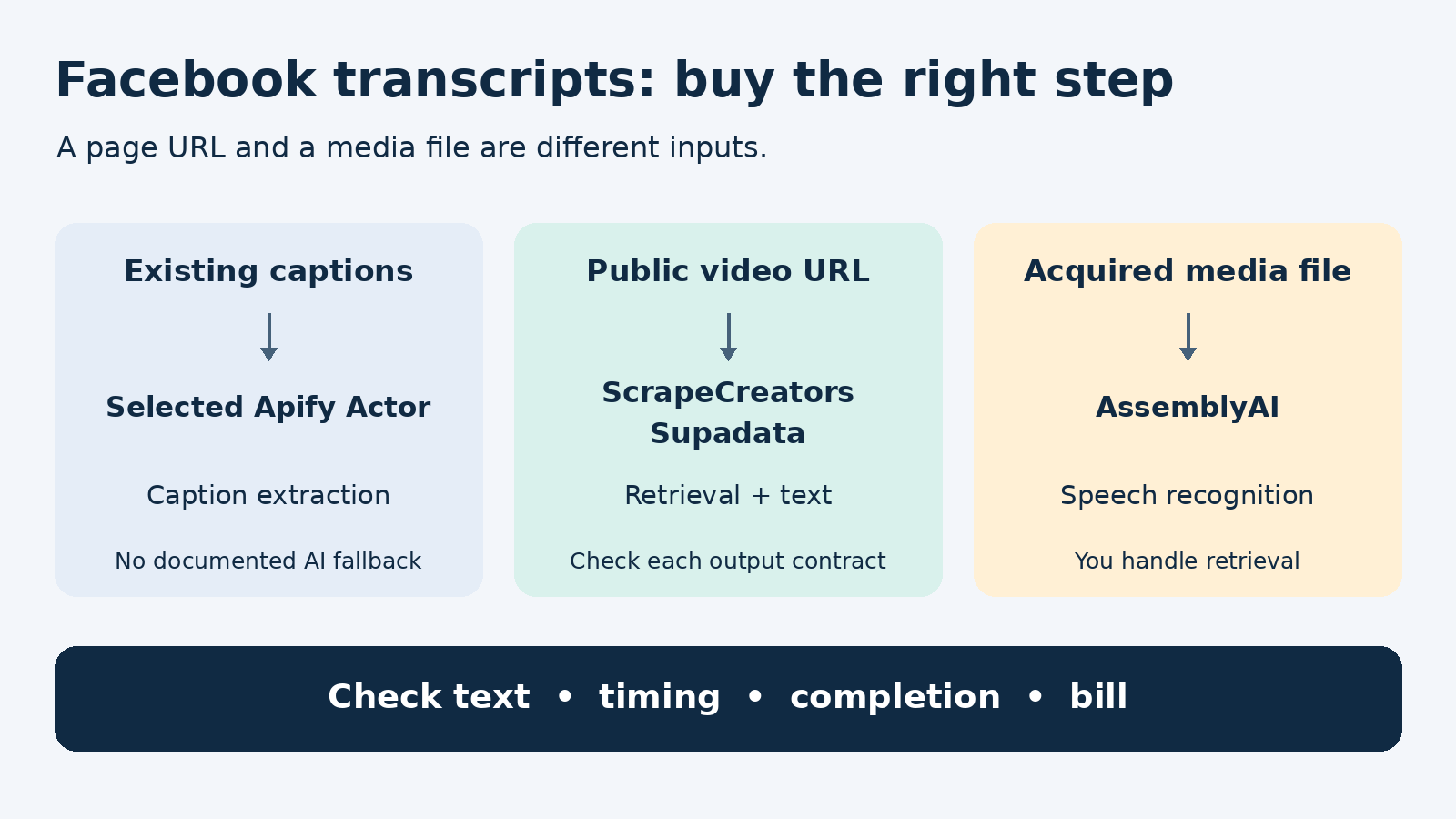
The best Facebook transcript API depends on who retrieves the video and what your app needs back. Choose ScrapeCreators for prepaid public-video transcripts alongside other Facebook data. Choose Supadata for timestamped segments and an explicit async-job path. Choose the Apify Facebook Video Transcript Extractor if you already use Actors and want existing caption extraction. Choose AssemblyAI if you already have an authorized media file and need a separate speech-recognition service. AssemblyAI is not a Facebook page retriever.
For searchable text, a string can be enough. For subtitles or clip selection, require a usable timeline before buying.
Disclosure: I build ScrapeCreators. We called its Facebook endpoint for the observations below, not all four vendors. Prices and mutable API contracts were checked on October 19, 2026. This is a buying guide, not an accuracy or reliability benchmark.
Compare the four buying paths
| Option | Best fit | Input and retrieval | Useful output | What to check first |
|---|---|---|---|---|
| ScrapeCreators | Public-video text inside a broader Facebook workflow | Facebook post or Reel URL; hosted retrieval | Transcript string, post ID; duration fields for returned AI text | Native and AI strings can have different formatting; paid long mode changes the bill |
| Supadata | Timed chunks and clients that can manage jobs | Public Facebook URL through its shared transcript API | Plain text or segments with offsets and durations | Handle both a transcript and HTTP 202 with a job ID |
Apify linen_snack extractor | Existing-caption collection in an Actor workflow | Facebook video page URL; selected Actor fetches the page | Dataset item with URL and transcript, or null/error | This specific Actor documents page-embedded extraction, not an AI fallback |
| AssemblyAI | Speech recognition after media acquisition | Uploaded media or a directly accessible media-file URL; you acquire it | Transcript job, text, and optional speaker labels | A Facebook watch-page URL is not the input shown in its file-transcription contract |
These are different responsibilities, not four interchangeable wrappers. A recognizer can work perfectly after a downloader fails. A page-caption extractor can also work correctly and return nothing when there is no caption track.
For a single clip you own, a manual export and upload may be enough. Paying for an integration makes more sense when your app needs repeatable inputs, status tracking, and usable results without someone copying text by hand.
1. ScrapeCreators for public-video text without a subscription
The Facebook transcript endpoint accepts url on GET /v1/facebook/post/transcript. It tries an existing transcript or native captions before AI transcription. A returned native transcript costs 1 credit. No transcript costs 0 credits.
Its default AI mode is deliberately bounded: successful transcription of a video up to 120 seconds, inclusive, costs 1 credit. Longer AI requests require allow_long_transcription=true. That flag bills all successful AI in that request at 10 credits per started minute, including short videos. It does not force AI when native captions exist.
For example, opting a 60-second AI video into paid mode costs 10 credits rather than the default 1. A 177-second AI video costs 30 credits in paid mode. Native captions remain 1 credit even for a long video with the flag set. Check the returned charge, not just your estimated duration.
That makes ScrapeCreators a reasonable fit when transcripts sit beside posts, comments, or creator data. Start with the Facebook transcript product page, rather than a general speech-recognition integration.
There are two important limits. First, the route is synchronous. Removing a fixed duration cap does not guarantee a long recording will finish before a runtime or network limit. Second, the transcript is a string, not a promised word-timestamp schema. One observed string included SRT-style cues; another was plain text. Do not build a subtitle editor around incidental formatting.
The current prepaid packs include 25,000 credits for $47, with no monthly subscription. The AI rules above still determine how many credits a request uses. If that model fits, create an account and check your own URLs before buying a larger pack.
2. Supadata for timed segments and async handling
Supadata’s Facebook tool exposes a shared transcript API rather than a Facebook-only integration. Its endpoint contract supports native, auto, and generate modes. Auto mode tries an existing transcript before generation; native mode avoids the generation path.
The output choice matters more than the free browser form. With text=true, content is a string. Otherwise, the documented chunks contain text, offset, duration, and language, with times in milliseconds. That is a clearer contract for an app that needs to link words to a video position.
A request can return HTTP 202 and jobId rather than finished text. Keep that job ID, poll the documented status endpoint, and persist the completed result. An accepted job is not a completed transcript. The documentation also says completed job results expire after one hour, so the polling response should not be your only copy.
Its pricing page lists 100 free monthly credits and Basic at a $5 monthly equivalent, billed $60 annually, for 300 monthly credits. The published meter is 1 credit for an existing transcript and 2 credits per generated minute, not one request for every video regardless of processing.
Choose it when structured timing and job handling matter more than keeping a strictly prepaid account. Before a large import, check unavailable-transcript and silent-video charging as well as successful results. The docs distinguish those states, including chargeable empty speech results and a billable transcript-unavailable response. We did not execute Supadata or measure its transcription accuracy here.
3. Apify for caption extraction in an existing Actor setup
The exact tool reviewed is linen_snack/facebook-video-transcript-extractor, a community-maintained Actor. Apify is a marketplace, so another Facebook or video-transcriber listing can have a different input, extraction method, and bill.
This Actor’s README describes fetching Facebook video HTML and extracting embedded transcript data. Its input schema requires a video-page url and offers optional proxy configuration. Results go into a dataset with the source URL and transcript; missing text can appear as a null transcript with an error.
Choose this path if you already want results in an Apify dataset and your collection is about available captions. Do not treat it as a documented way to generate speech text when captions are absent. Its README explicitly warns that Facebook page changes and blocking can affect extraction.
The Actor’s Pricing tab says pay per usage, not a fixed amount per successful transcript. Review run usage and any proxy or platform charges before comparing it with request credits. A cheap failed run is still not a useful transcript.
We did not run this Actor. Its useful distinction here is the narrower caption-extraction job, not a claim that its results are more complete or less reliable than another provider’s.
4. AssemblyAI for media you have already acquired
AssemblyAI’s file-transcription quickstart starts with an accessible media-file URL or an uploaded file. You submit a transcription job and retrieve it until it completes or errors. The SDK can handle uploading and polling.
Choose it when you control the media acquisition step, or already store your own videos, and want speech recognition as a separate component. Its contract supports speaker labels and a structured transcription workflow. Do not send an ordinary Facebook page link and assume the speech service will also implement Facebook retrieval.
The pre-recorded pricing section lists Universal-2 at $0.15 per hour and Universal-3.5 Pro at $0.21 per hour. Speaker diarization is separately listed at $0.02 per hour. These are recognition prices, not an all-in cost to collect and process Facebook URLs.
Your actual job also includes obtaining authorized media, moving bytes, handling unavailable files, and keeping each output tied to the correct source. We did not call AssemblyAI. Its model claims and advertised prices are not a four-provider accuracy comparison.
What the live Facebook requests actually showed
On October 19, we sent three public URLs to ScrapeCreators in default mode. We did not enable paid long transcription.
| Request | Observed result | Credits charged | Practical consequence |
|---|---|---|---|
facebook.com/reel/1535656380759655 | HTTP 200; nonempty string with SRT-style cues | 1 | Preserve the string; do not assume every video has this formatting |
facebook.com/reel/682865820350105/ | HTTP 200; plain transcript string and AI duration fields | 1 | Media duration is not a word or subtitle timeline |
facebook.com/watch/?v=1350752639547526 | HTTP 400; 657-second video exceeded the default AI limit | 0 | Ask for an explicit paid-mode decision instead of retrying the same default request |
The second result reported duration_seconds: 46.673 and duration_minutes: 0.78. That is useful for identifying the returned AI path and understanding duration, but it does not locate a phrase within the video. We did not validate the transcript against a human reference.
The first response’s post_id was 25118307061088489, not the number in the submitted Reel URL. Keep the original source URL as well as the returned identifier; do not overwrite one with the other.
Here is the complete Python example we executed separately. It saves the returned text and fails on an empty result. It deliberately omits paid long mode and automatic retries.
import json
import os
from pathlib import Path
from urllib.parse import urlencode
from urllib.request import Request, urlopen

video_url = "https://www.facebook.com/reel/1535656380759655"
query = urlencode({"url": video_url})  # Paid long mode is deliberately omitted.
request = Request(
    "https://api.scrapecreators.com/v1/facebook/post/transcript?" + query,
    headers={"x-api-key": os.environ["SCRAPE_CREATORS_API_KEY"]},
)
with urlopen(request, timeout=90) as response:
    result = json.load(response)

transcript = result.get("transcript")
if result.get("success") is not True or not isinstance(transcript, str) or not transcript.strip():
    raise RuntimeError("No usable transcript; preserve this URL as an unresolved job")

Path("facebook-transcript.txt").write_text(transcript, encoding="utf-8")
print(json.dumps({
    "post_id": result.get("post_id"),
    "credits_charged": result.get("credits_charged"),
    "saved_nonempty_text": True,
}, indent=2))
The executed script printed this summary. saved_nonempty_text is computed by the script, not an API field:
{
  "post_id": "25118307061088489",
  "credits_charged": 1,
  "saved_nonempty_text": true
}
A production worker should also save an error record when an HTTP request fails. Give it the original URL, attempt time, HTTP status, provider, and unresolved reason. Do not collapse a timeout, inaccessible video, empty transcript, and finished job into the same blank cell.
Compare bills at the point where useful text exists
| Provider | Published billing object | A cost that can be missed |
|---|---|---|
| ScrapeCreators | Returned native text: 1 credit; default successful short AI: 1 credit; opted-in AI: 10 per started minute | Paid mode also changes the price of short AI videos; synchronous long jobs can fail |
| Supadata | Existing transcript: 1 credit; generated minute: 2 credits | Annual-only Basic commitment, some unavailable or empty results, and final async charge reconciliation |
| Selected Apify Actor | Platform usage for the Actor run | Proxy usage and runs that produce no transcript; no universal per-transcript rate |
| AssemblyAI | Recognition by audio duration and chosen model/add-ons | Facebook retrieval, file transfer, and your own queue are outside the speech rate |
For budgeting, use a small representative batch and calculate total acquisition and processing spend divided by usable transcripts saved. Define usable first. If your product requires timed passages, plain text should not pass that acceptance rule simply because it is nonempty.
Do not normalize vendor credits as though they were the same currency. A plan that includes more credits can still produce fewer useful transcripts for a workload dominated by AI generation or inaccessible videos.
The checks I would run before a bulk import
In this Facebook-transcription tutorial, comments raise two practical questions: what is actually free, and whether many videos can be processed without pasting each URL. A separate older Facebook transcript walkthrough now labels itself as no longer working. Those are useful buying questions, not evidence about today’s API success rates.
Test your workflow with these inputs before scheduling hundreds of jobs:
- A public short video with captions. Verify the exact text type, returned identifier, and bill. Store the original URL separately.
- A public short video without usable captions. Check whether the service generates text, returns unavailable, or stops. Confirm whether that state is chargeable.
- A longer recording. Make the cost decision explicit before opting into generation. Verify that your chosen path has a workable completion mechanism.
- A restricted or removed URL. Require a distinguishable failure record, not fabricated text or an endless retry.
- A clip containing names, numbers, or multiple speakers. Compare a short passage with the audio yourself. Correct formatting is not proof of accurate words.
For large queues, track submitted, accepted, completed, failed, and empty separately. Deduplicate input URLs before submitting. Put a spending ceiling and a maximum attempt count around retries; do not silently turn a default-limit rejection into paid processing.
A public discussion about bulk Meta-ad transcripts also makes a useful distinction: ad copy is not the words spoken in the video. This guide’s example uses an ordinary post/Reel endpoint. Ad Library URLs need their own supported route and acceptance test. Our ad-library API guide covers that separate collection job. If you also collect another platform, the TikTok transcript provider comparison is a separate buying decision, not proof of Facebook coverage.
Questions buyers ask
What is the best Facebook transcript API?
Choose by output and retrieval responsibility. ScrapeCreators fits prepaid public-video text with adjacent Facebook data. Supadata fits documented segment timing and job handling. The selected Apify Actor fits embedded-caption extraction. AssemblyAI fits media files you already have. Run your own small acceptance set before committing a collection pipeline.
Can I rely on timestamps from every Facebook transcript?
No. A string can contain subtitle-like cues without guaranteeing a stable segment schema. Our two successful ScrapeCreators fixtures differed in formatting. If your app must seek to a phrase, require explicit timing fields or validate and parse a supported subtitle format.
Can I transcribe a private Facebook video?
Do not treat public-URL support as access to private content. Use media you are authorized to process and a retrieval path that actually supports its access conditions. An available speech-recognition service does not solve a missing or restricted media file.
Does paid long transcription guarantee a completed result?
No. ScrapeCreators’ paid flag removes its fixed AI duration cap but leaves a synchronous route with resource and timeout risks. For long files you already possess, a job-based recognizer may fit better. Check the completion path and actual charge before scaling.


