
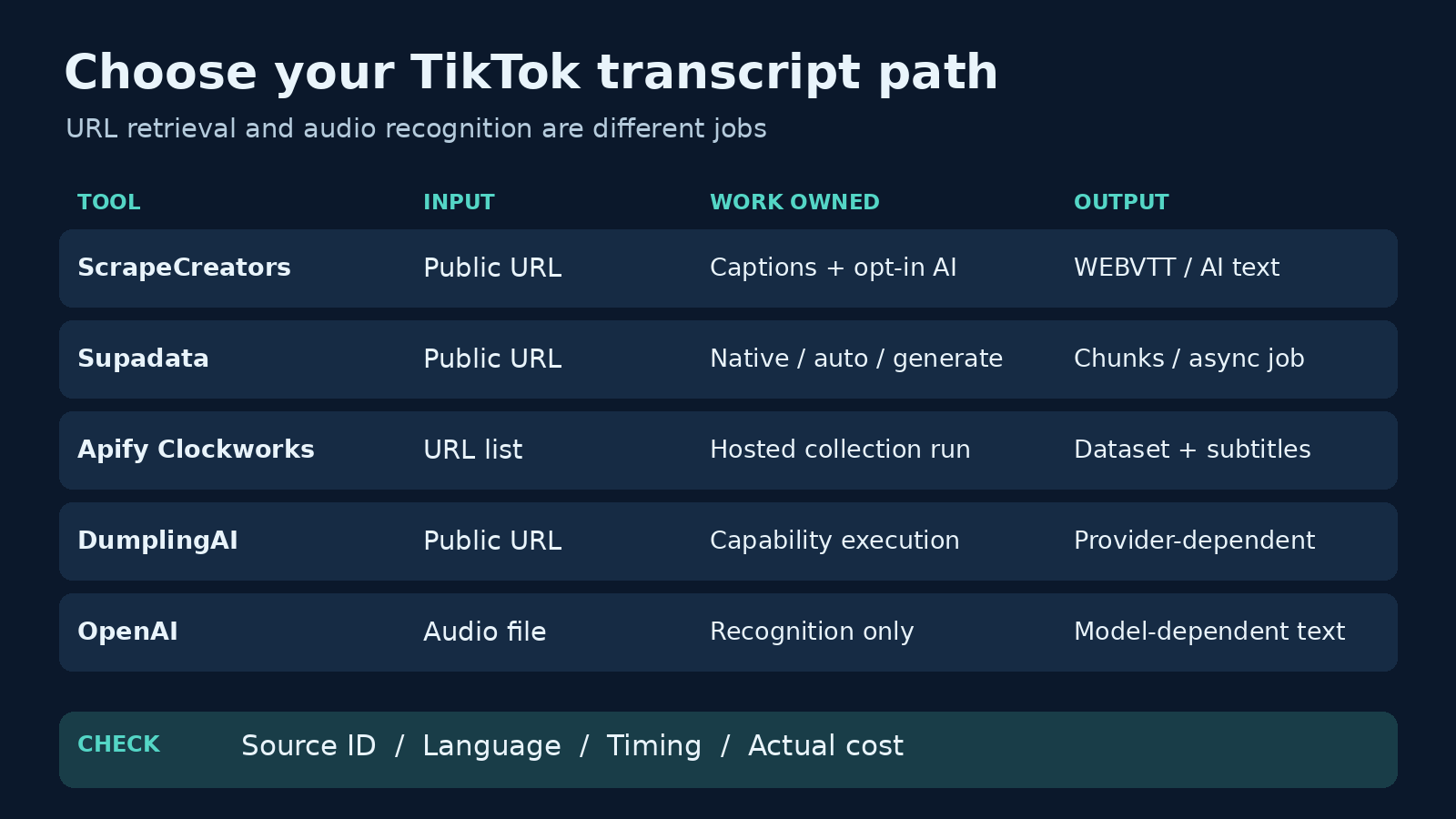
The best TikTok transcript API depends on what you need back. Choose ScrapeCreators for prepaid public-video requests, Supadata for segmented JSON and asynchronous processing, Apify Clockworks for hosted datasets, or DumplingAI when transcripts belong inside a wider automation stack. Use OpenAI if you already have the audio file and want to own the transcription pipeline. It does not fetch a TikTok page for you.
The first question is whether you want existing captions or newly transcribed audio. Those can have different prices, languages, and timestamp formats, even within the same API.
Disclosure: I build ScrapeCreators. This is a workflow comparison, not an independent five-provider accuracy benchmark. We called ScrapeCreators for the examples below; the other tools’ capabilities come from their current primary documentation. Prices and mutable details were checked on October 13, 2026.
Choose by input and output
A TikTok transcript is the spoken content of a video. The post description, hashtags, and comments are different resources. A tool that returns a video’s caption field may still return no speech transcript.
| Option | Choose it when | Input and output | Billing unit to inspect | Main caveat |
|---|---|---|---|---|
| ScrapeCreators | You want one public-video endpoint and prepaid credits | TikTok URL; native WEBVTT or AI text | Returned transcript, or started AI minute in paid mode | AI fallback is opt-in; its text is not native timestamped captions |
| Supadata | Your app wants transcript chunks or an async job | Video URL; text or segmented JSON | Native transcript or generated minute | Default auto mode can generate audio text; handle HTTP 202 |
| Apify Clockworks | You want a hosted run and downloadable dataset | List of TikTok video URLs; subtitle/transcription records | Video result plus optional started transcription minute | Discovery and transcription are separate jobs; inspect the exact Actor |
| DumplingAI | You already use its automation capabilities | Video URL; transcript capability through its API | Capability/provider credits and subscription allocation | Confirm the selected provider’s timestamps, fallback, and cost |
| OpenAI | You already possess authorized audio files | Uploaded audio file; model-specific text or timestamp output | Audio/model usage | You handle TikTok access, download, and file preparation |
These are five useful paths, not five interchangeable APIs. If a browser tool solves an occasional copy-and-paste job, you may not need an API at all. Our free TikTok transcript tool is a separate manual option.
1. ScrapeCreators for prepaid public-video transcripts
ScrapeCreators’ TikTok transcript API takes a public video URL. The dedicated route is GET /v1/tiktok/video/transcript. It returns id, url, and transcript, plus billing fields in the public response.
The native path retrieves an available caption track. Set language=en when you want the English track. If you omit the language, the implementation tries the original language metadata and then defaults to English. Native captions return WEBVTT with cue times. No returned transcript means zero credits on this dedicated route.
When native captions are unavailable, use_ai_as_fallback=true enables audio transcription. The current documentation makes an important pricing distinction:
- Returned native captions cost 1 credit, without a fixed caption-length limit.
- By default, successful AI transcription of a video up to 120 seconds, inclusive, costs a flat 1 credit. Longer AI transcription is not enabled by default.
allow_long_transcription=trueopts into 10 credits per started minute for all successful AI in that mode, including short videos. It does not force AI or enable fallback by itself.- On this dedicated transcript route, the AI rate replaces the native-caption fee. It is not an extra native-caption charge.
Do not add the paid flag to every request just because its name sounds harmless. A one-minute AI result in paid mode costs 10 credits rather than the default short-video rate. Native captions still cost 1 credit with that flag.
The route remains synchronous. The docs advise allowing at least 30 seconds on your client; long transcription can still exceed resource limits or time out. A removed, private, or inaccessible video is not made accessible by choosing AI fallback.
The pricing section currently lists $47 for 25,000 nonexpiring credits, with 100 starter credits and no required subscription. That pack covers more caption-backed requests than paid long-AI requests. Start with a small real URL sample after creating an account, rather than buying against a headline cost per request.
Choose another tool when you need a durable async transcription queue or guaranteed timestamped AI segments. Our observed AI fallback returned plain text, not WEBVTT cues.
2. Supadata for segmented JSON and async processing
Supadata’s TikTok transcript page documents one URL-based endpoint, GET /v1/transcript, and text or segmented JSON output. Chunks include text, offset, and duration; the documented timing unit is milliseconds.
Its transcript specification separates three modes:
nativeonly fetches an existing transcript.autotries native text and generates a transcript when unavailable. This is the default.generatealways uses AI transcription.
This is convenient if you want fallback without managing it yourself. It also means you should explicitly select native when your job must never generate audio text. The mode controls work, not just formatting.
The API can return a transcript immediately with HTTP 200 or an asynchronous job ID with HTTP 202. Your code needs to poll /transcript/{jobId} for the latter. A job ID is not the finished transcript, and an HTTP client that only accepts 200 can reject a legitimate queued job.
Supadata’s pricing lists 100 free credits per month. Basic is $5 per month equivalent, billed $60 annually, for 300 credits per month. Native transcript retrieval costs 1 credit; generated transcripts cost 2 credits per minute. These credit units are not ScrapeCreators credits, and the annual commitment matters for occasional usage.
Choose Supadata when structured chunks and async handling fit your app better than raw WEBVTT. Check your own languages and captionless fixtures before treating the platform page’s broad coverage claims as a guarantee.
3. Apify Clockworks for hosted datasets
Clockworks’ TikTok Transcript Extractor is a specific Apify Actor, not a description of every TikTok scraper in the marketplace. Its current page accepts video URLs, downloads available subtitles, and offers AI transcription when subtitles are missing. The output also includes engagement data.
This fits teams that want a configured run and a dataset rather than writing a per-URL collection loop. If you do not have the URLs yet, the page directs you to a separate TikTok scraper for discovery. That distinction matters: accepting a list of URLs is not the same as discovering every video from an account.
The page explains that native subtitles are included in the video fee, while AI adds a charge per started minute. Current public Actor metadata lists a FREE-tier video event at $0.0037 and AI transcription at $0.048 per started minute. GOLD-tier entries are $0.0017 per video and $0.027 per started AI minute. Check your actual plan and add-on settings; the advertised “from” price is not everyone’s price.
The cheapest result fee is not necessarily the cheapest finished transcript. A captionless video can trigger a different bill from one with subtitles, and separate discovery adds its own work.
Apify also has other transcript Actors with different contracts. For example, the Vistics listing says transcripts are returned where available. Its page headline and current event metadata show result-based pricing, while its FAQ still mentions a monthly rental. Confirm the live pricing tab rather than applying one Actor’s price or fallback behavior to another.
Choose Clockworks when hosted runs and datasets are worth the extra configuration. We did not run either Actor during this comparison, so this is not a claim about their accuracy or success rate.
4. DumplingAI for a wider automation stack
DumplingAI’s TikTok transcript capability sits alongside other data and automation functions. Its page describes transcript extraction, language support, and optional timestamps, with API and MCP access.
The current docs favor a Unified API: discover a capability or provider endpoint, then run it through /api/v2. The execution reference is the better starting point for a new integration than a guessed old documentation URL.
There is still a published v1 OpenAPI specification. Its direct TikTok transcript route uses a POST body with required videoUrl and optional preferredLanguage; the response schema includes a transcript string and language. It also documents a transcript-not-available 404. That is a narrower contract than assuming every request returns AI-generated, timestamped segments.
Before committing, inspect the selected v2 provider’s output and credit quote. We could verify the broad capability and public schemas, but not one universal TikTok transcript credit cost or missing-caption fallback policy across providers. Those remain purchase checks, not inferred features.
Pricing currently displays Starter at $40 per month equivalent on annual billing, with 1,200,000 credits per year. Its FAQ says subscription credits do not roll over, credit packs never expire, and action/parameter choices change credit usage. A large credit allocation is meaningless until you know how many credits your chosen execution consumes.
Choose DumplingAI when you already need its surrounding automation stack. If you only need one transcript endpoint, compare the contract and minimum commitment before paying for the wider bundle.
5. OpenAI for audio files you already control
OpenAI’s speech-to-text API is useful when you already have the authorized audio file. It is not a TikTok URL scraper. Your system owns retrieval, audio extraction, storage, and any retry work before calling /v1/audio/transcriptions.
The current guide accepts files up to 25 MB and lists formats including MP3, MP4, M4A, WAV, and WebM. Larger recordings need preparation or splitting. Model choice also changes output: the guide points to whisper-1 for word or segment timestamps, and says timestamp_granularities[] is supported only for that model.
The pricing reference lists an estimated $0.003 per minute for gpt-4o-mini-transcribe and $0.006 per minute for gpt-4o-transcribe. Those are transcription estimates, not all-in TikTok collection costs. They do not pay for a working media downloader or supply timestamp features from a different model.
Choose this path for media you already possess, or when you want to control the recognition step. Choose a URL-based provider if maintaining TikTok access is precisely the work you want to avoid.
A real request and three observations
This native-caption request ran successfully on October 13, 2026. Keep the key on your server.
curl --get 'https://api.scrapecreators.com/v1/tiktok/video/transcript' \
  -H "x-api-key: $SCRAPE_CREATORS_API_KEY" \
  --data-urlencode 'url=https://www.tiktok.com/@stoolpresidente/video/7499229683859426602' \
  --data-urlencode 'language=en'
An exact projection from the saved response, with the transcript shortened after the first cue and the balance omitted:
{
  "success": true,
  "credits_charged": 1,
  "id": "7499229683859426602",
  "url": "https://www.tiktok.com/@stoolpresidente/video/7499229683859426602",
  "transcript": "WEBVTT\n\n\n00:00:00.180 --> 00:00:01.740\nAlright, pizza review time."
}
| Request | Observed response | Charge | What it proves |
|---|---|---|---|
| Pizza video, English, no fallback | HTTP 200; WEBVTT | 1 credit | This fixture had a retrievable English caption track |
| A second public video, English, no fallback | HTTP 200; WEBVTT | 1 credit | The native path worked for a second input |
Same pizza video, language=de, AI fallback enabled, no paid-long flag | HTTP 200; English plain text; duration_seconds=89.963 | 1 credit | Missing requested-track fallback and native captions can return different formats |
The last request is especially useful. Asking for German did not translate the English audio. It returned English text through AI fallback. Do not build a translation feature by renaming the language parameter.
These are three request observations, not an accuracy benchmark or a long-video test. We did not verify the paid long-AI mode with a long fixture. The provider’s docs and source support its contract, not a guarantee that every long clip completes.
Compare the billable work, not just the headline
Suppose you process a known list of public video URLs. Separate discovery, native caption retrieval, audio transcription, and analysis in your budget. Do not assume one “result” buys all of them.
For ScrapeCreators’ dedicated route, a successful default short AI result costs 1 credit. Paid-mode AI uses 10 * ceil(duration_seconds / 60). At 177 seconds, that is 30 credits; at 60 seconds, it is 10. Returned native captions remain 1 credit. Use the actual credits_charged field to reconcile the bill rather than inferring it from the presence of a duration field.
Supadata’s generated-minute credits, Apify’s video events and started-minute add-on, DumplingAI’s capability credits, and OpenAI’s model usage do not share a universal unit. Compare the bill for your caption-present and caption-missing samples separately. Include annual commitments, discovery, retries, media storage, and the cost of producing a usable timestamp format.
A transcript also does not tell you whether a creator’s claim is true or whether a hook caused sales. Keep analysis separate from retrieval. If you want to build a research workflow afterward, the TikTok content-brief skill shows the source-preserving structure; use today’s endpoint docs for changing limits and prices. The broader TikTok scraper comparison covers discovery and account data rather than just speech text.
The acceptance check before a bulk job
A useful buyer check starts with a small URL set that resembles your workload. Include your target languages, a known caption track, a video missing the requested track, and the longest duration you expect to process. Add an unavailable input so you see how your application handles failure.
| Check | Accept the result only when | Failure to avoid |
|---|---|---|
| Source identity | Returned video ID matches the requested source | Attaching another video’s speech to a row |
| Transcript presence | Text is nonempty and contains speech | Treating HTTP 200 or a job ID as finished content |
| Language | Actual returned text matches the intended task | Assuming track selection is translation |
| Timing | Required cues or offsets exist in the chosen mode | Feeding plain AI text into a subtitle editor |
| Cost | Actual charge matches the opted-in work | Enabling a paid mode globally |
| Batch bookkeeping | Every unique URL has a result or explicit status | Silently dropping videos without captions |
Audience research reinforced these checks. Replies on an n8n transcript tutorial describe filtering videos without English subtitles after an invalid-URL step. A public developer discussion separates missing captions from media retrieval; another buyer thread asks about batches and mentions background music polluting speech text. These are qualitative questions, not independent provider benchmarks.
Keep one row per source URL with its stable video ID, requested language, collection time, actual charge, raw format, and status. Preserve failed and empty results instead of hiding them from a summary. Retry transient retrieval failures in a bounded way, but do not turn every missing-caption result into a repeated paid transcription attempt.
Before you index the text for an AI agent, retain the source URL and mark native versus generated output where you can establish it. Review quotations against the original audio. A transcript is evidence of returned text, not permission to copy a creator’s script or republish their media; check platform terms and your rights to the intended use.
Questions buyers ask
What is the best TikTok transcript API?
For prepaid URL-based retrieval, start with ScrapeCreators. For segmented JSON and async processing, evaluate Supadata. For hosted dataset work, evaluate the specific Apify Clockworks Actor. DumplingAI fits an existing automation stack; OpenAI fits audio files you already control. Run the acceptance check on your own clips before choosing.
Can I transcribe a TikTok video without existing captions?
Yes, when your selected provider and mode include audio transcription. ScrapeCreators requires use_ai_as_fallback=true; Supadata has auto and generate; Clockworks documents an AI add-on. A tool that only retrieves subtitles cannot promise a transcript for every public video.
Can I get all transcripts from a TikTok account?
A per-video transcript endpoint cannot discover an account’s archive by itself. Collect the public URLs separately, deduplicate them, then transcribe the selected videos. Track coverage and missing rows instead of calling a small returned sample a complete archive.
Are TikTok transcript timestamps always available?
No. Native captions, generated plain text, and timed AI segments are different outputs. Our ScrapeCreators native requests returned WEBVTT, while its observed AI request returned plain text. Make timing a purchase requirement if your product needs subtitles or precise clip boundaries.
Does a transcript API translate the video?
Not necessarily. A language argument may select an existing subtitle track. Our German-requested fallback returned English audio text. Verify translation explicitly, including its separate billing and output, instead of assuming a successful transcript request translated anything.


