
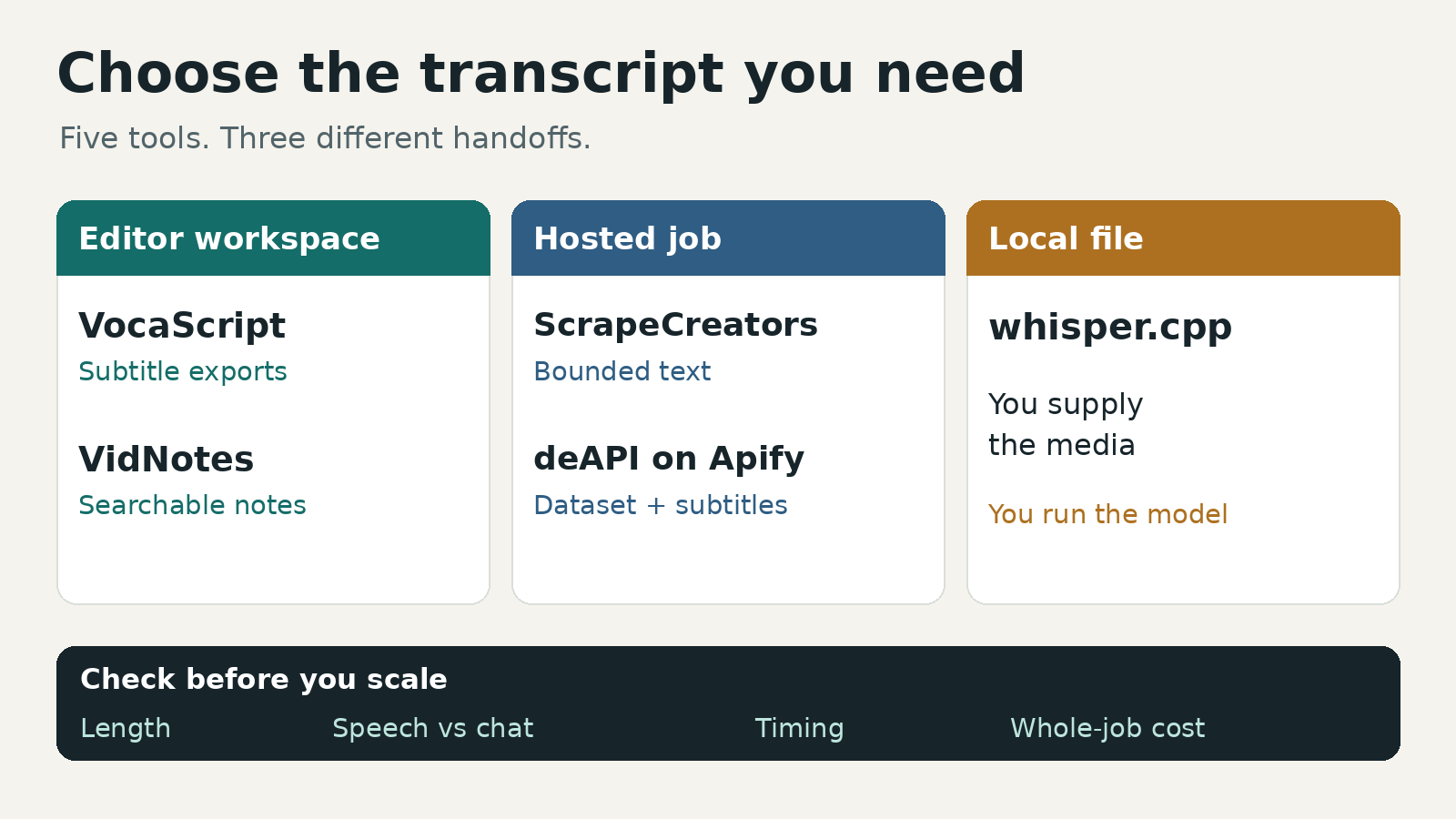
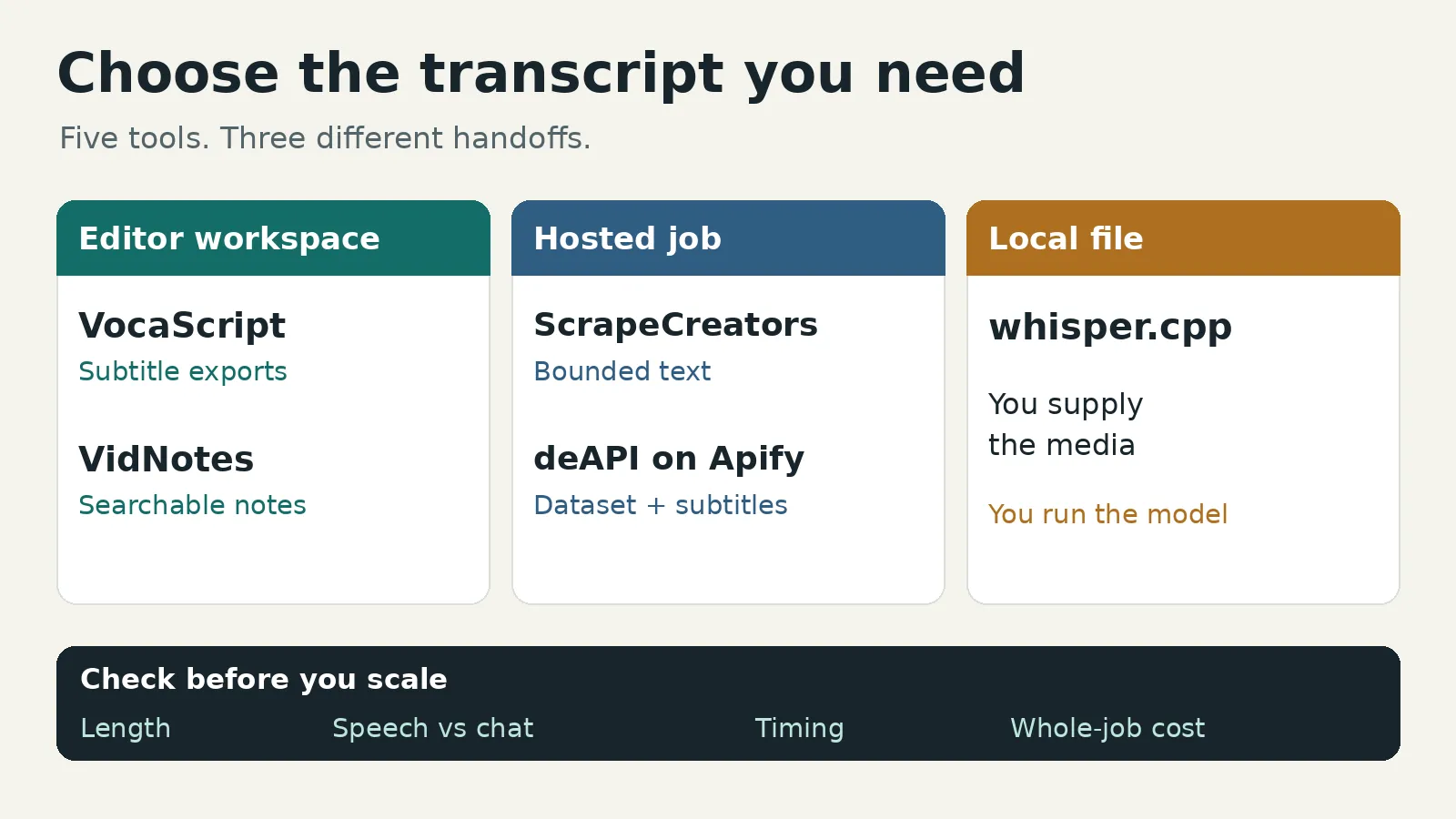
Use VocaScript when you want to review a Twitch recording and export subtitles. Use VidNotes for searchable notes and summaries. Choose Apify’s deAPI Actor for a dataset workflow, ScrapeCreators for a custom API integration with a bounded time range, or whisper.cpp for a recording you already have locally. These buy different workflows, not interchangeable transcripts.
I built ScrapeCreators, so that recommendation has an obvious bias. An editor who needs a ready-made subtitle workspace should start with an editor, not our API.
Prices and capabilities below were checked on October 30, 2026. I ran the ScrapeCreators example, not a five-vendor accuracy or speed benchmark.
Quick comparison
| Tool | Choose it for | Input and useful output | Cost or limit to check |
|---|---|---|---|
| VocaScript | Reviewing text and exporting captions | Twitch VOD, highlight, or clip link; transcript editor, TXT, paid SRT/VTT/JSON | Plus is $10/month before tax, with 30 hours/month and a four-hour per-transcription limit |
| VidNotes | A searchable library with summaries | Public recording link; timestamped text, notes, PDF/Markdown/TXT | $9.99 billed monthly, or $49.99 billed yearly; check Twitch access and credit use separately |
| ScrapeCreators | Adding speech text to your own app | Public VOD URL plus optional range; asynchronous job and timestamped text | 10 credits per started minute of the selected range; not the ordinary one-credit profile price |
| deAPI on Apify | Batches with dataset delivery | Public recordings; text, timing, subtitles, optional speaker labels | Standard: $0.0188 per recording plus $0.003 per started minute, with a separate start event |
| whisper.cpp | Processing a local file yourself | Downloaded audio; local command-line transcription and subtitle outputs | MIT-licensed software; you supply media, hardware, storage, and maintenance |
A monthly allowance is not a per-file limit. A per-minute event price is not the whole job price. And a timestamped string is not automatically an SRT file you can import into an editor.
1. VocaScript for reviewing and exporting captions
VocaScript is the clearest starting point here if the job ends with a person correcting text and downloading subtitles. Its Twitch tool accepts past broadcasts, highlights, and clips. It separates spoken audio from chat and explains the guest allowance instead of making “free” do all the work.
A guest transcription covers up to five minutes. A free account covers up to 25 minutes per transcription within 120 minutes per month. Paid plans raise the per-transcription ceiling: four hours on Plus, eight on Pro, and 16 on Max. The pricing FAQ says an overlong file can produce a partial transcript rather than being rejected. That distinction matters for a six-hour stream: a successful four-hour result is still missing two hours.
Plus costs $10/month before tax and includes 30 transcription hours. Pro is $25/month for 80 hours. Those are monthly prices, not the lower monthly equivalent of an annual purchase. TXT export is free; SRT, VTT, and JSON require a paid plan. Text-based AI features have a separate credit allowance.
Choose another tool if you need a programmatic job contract rather than an editing workspace. Also check where the partial transcript stops before feeding it into a recap or calling it a complete archive.
2. VidNotes for searchable stream notes
VidNotes fits the viewer, researcher, or creator who wants to ask questions about a recording later. Its Twitch page describes recorded VODs, highlights, and clips, with timestamps, summaries, chapters, and chat with citations. It explicitly distinguishes recorded-content processing from live transcription.
The purchase detail needs care. The Twitch landing page promotes free trials and unlimited paid transcription. The current pricing page describes paid transcription plus optional credit packs, while its free card specifically lists YouTube links, one video a day, and a 15-minute limit. I would not read that as a promise of a free multi-hour Twitch transcript.
The monthly toggle shows $9.99/month. Annual billing is $49.99 upfront, displayed as $4.17/month. Accountless buying is not implied: the page asks buyers to sign in for account credits. Optional web packs include 25 credits for $1.99; a transcription up to 15 minutes uses five credits, while longer videos and AI tools use more. Confirm the selected Twitch job’s entitlement and cost before paying.
Choose VidNotes for notes, not because you need a particular subtitle format. The listed exports are PDF, Markdown, and TXT. If an editor needs SRT or word-level alignment, verify that exact artifact instead of assuming a timestamped note provides it.
3. ScrapeCreators for a bounded API workflow
ScrapeCreators is useful when the transcript is one input to your own search, research, or clipping system. The VOD workflow uses POST /v1/twitch/vod/transcript, followed by GET /v1/twitch/vod/transcript/{job_id}. Send a public replay URL, optionally with numeric from and to values in seconds.
This is different from the documented clip transcript endpoint. A clip URL and a VOD URL are different inputs. The VOD job routes are not yet listed in the main public endpoint catalog I checked; the example below reflects the live job contract verified for this article. Keep the general API reference handy for authentication, and confirm this contract before a large integration.
The VOD service checks native captions before AI and returns a transcript_source. Its VOD billing is 10 credits per started minute of the selected range, including native results. Do not apply the clip endpoint’s native-caption price or short-AI allowance to VOD jobs. There is no fixed VOD-duration cap in the current service, but source access, processing resources, and failures still matter. Results expire after seven days, so save them yourself.
Current credit pricing starts with 100 free credits and a $47 prepaid pack containing 25,000 credits. At that pack’s rate, a one-minute VOD range allocates $0.0188 and a full hour allocates $1.128. Those are consumption calculations, not separate purchasable packs or an accuracy comparison. You buy the pack; you do not buy a $1.128 plan.
The limitation is important: the observed result is a timestamped text string, not an editor, a verified speaker map, or a structured subtitle file. You add review, indexing, format conversion, and retention. The Twitch data guide covers profile and video metadata, which is a different job.
4. Apify for a transcription dataset
The deAPI Twitch and Kick Actor fits scheduled batches and Apify datasets. It documents text, segments, SRT/VTT, optional word timing and speaker labels, and a ten-hour recording ceiling. It is a community-maintained Actor, not a promise about every Apify transcription listing.
Its pricing tab lists several events. Standard transcription costs $0.0188 per recording plus $0.003 per started minute. Word timing or speakers use $0.0264 plus $0.0044/minute instead. Metadata adds $0.005; Actor Start is $0.00005. Platform usage is included. A standard 60-minute recording therefore allocates $0.19885 with one start and no metadata, not merely the per-minute headline.
The README restricts free accounts to one recording per run, 20 minutes per recording, and 20 transcribed minutes per calendar month. Check those limits alongside Apify’s general free allowance.
Choose it for dataset automation, not live captions. We did not execute this Actor. Test the selected configuration before treating its speaker labels or subtitle timing as accurate.
5. whisper.cpp for a local recording
whisper.cpp makes sense when you already have an authorized copy of the recording and want to process it locally. It is a C/C++ implementation of Whisper with command-line examples and multiple hardware backends. Its MIT license does not impose a software subscription.
That does not make the whole workflow free. You manage the download, model files, audio conversion, memory, processing time, output files, and upgrades. The official quick start uses a model download and local WAV input; the CLI supports text and subtitle output options. Do not paste a Twitch page URL into a local audio-file argument and expect the model to fetch the stream.
This is the option I would shortlist for an existing local archive when cloud upload is undesirable. It is a poor fit for someone who wants a hosted editor or a supported public-link API with no operational work. We reviewed its current documentation, not a local accuracy or hardware benchmark.
An API example that waits for text
Install Python’s requests package and set SCRAPE_CREATORS_API_KEY in your environment. Save this as transcribe_twitch.py. It submits one range, saves the job ID, and polls that job rather than repeatedly creating paid work.
import json
import os
import sys
import time
from pathlib import Path

import requests

api = "https://api.scrapecreators.com/v1/twitch/vod/transcript"
headers = {"x-api-key": os.environ["SCRAPE_CREATORS_API_KEY"]}
url, start, end = sys.argv[1], float(sys.argv[2]), float(sys.argv[3])

response = requests.post(
    api,
    headers=headers,
    json={"url": url, "from": start, "to": end},
    timeout=60,
)
response.raise_for_status()
job = response.json()
Path("twitch-submission.json").write_text(json.dumps(job, indent=2))
if not job.get("success") or not job.get("job_id"):
    raise RuntimeError(job)

# Save this ID. Poll again after a client failure; do not submit twice.
print("job_id:", job["job_id"])
deadline = time.monotonic() + 600
while time.monotonic() < deadline:
    response = requests.get(
        f"{api}/{job['job_id']}", headers=headers, timeout=60
    )
    response.raise_for_status()
    result = response.json()
    if not result.get("success"):
        raise RuntimeError(result)
    if result["status"] == "failed":
        raise RuntimeError(result.get("message", "Transcription failed"))
    if result["status"] == "ready":
        text = result.get("transcript")
        if not isinstance(text, str) or not text.strip():
            raise RuntimeError("Job is ready but has no usable text")
        Path("twitch-result.json").write_text(json.dumps(result, indent=2))
        Path("twitch-transcript.txt").write_text(text)
        print("Saved text; credits charged:", result["credits_charged"])
        break
    time.sleep(5)
else:
    raise TimeoutError(f"Keep polling job {job['job_id']}; do not resubmit")
I executed it against this public TwitchDev recording, selecting seconds 60 through 120:
python transcribe_twitch.py https://www.twitch.tv/videos/806178797 60 120
Submission returned HTTP 202 with zero credits charged and a quoted credit_cost of 10. Polling reached ready, returned transcript_source: "ai", and reported 10 credits charged. The result described the full recording as 671 seconds, but the selected range as 60 seconds. Those are different durations.
Here is a projection from that saved result, with the job ID and transcript omitted:
{
  "status": "ready",
  "duration_seconds": 671,
  "from": 60,
  "to": 120,
  "transcribed_duration_seconds": 60,
  "credit_cost": 10,
  "credits_charged": 10,
  "transcript_source": "ai"
}
Do not mistake this for proof of full speech coverage. This execution returned only one timestamped line. A separate request for seconds 0 through 60 returned four lines and also cost 10 credits. I did not hand-align either result against the audio, so neither establishes word accuracy or complete range coverage. The example verifies submission, polling, billing, and usable text, not an entire VOD export. An invalid non-VOD URL returned HTTP 400 and charged zero credits.
For a custom workflow, create an API key, try a short range, and review the actual words before scaling. If you need a finished subtitle editor, use one of the workspace options above.
A five-minute acceptance check
Before committing to a tool, test the artifact you will hand to the next person or system.
- Input and access. Does the exact recording still play publicly? A saved title or thumbnail does not prove the media is accessible. Keep a local copy when you have permission and need a lasting archive.
- Requested versus delivered length. Record the source duration, requested range, returned text, and last meaningful timestamp. Check whether a plan silently returns only its allowed portion. Silence can explain gaps, but a finished job alone cannot.
- Speech, chat, and captions. Audio text is not chat history. Twitch’s closed-caption guide also confirms captions can exist on streams and past broadcasts. Do not accept the blanket claim that every Twitch recording has no captions. Burned-in screen text is another separate extraction job.
- Timing and review. Check a few spoken names and moments near both ends of the range. A clip-relative clock and a full-VOD clock are not the same. Subtitle start/end times and anonymous speaker labels need their own validation.
- Whole-job cost. Include recording events, minute rounding, starts, add-ons, subscription commitment, and your own processing. Save the output before the job or recording disappears.
The research behind this guide reinforced the distinction between a live overlay and a reusable file. A LocalVocal walkthrough and its comment threads discuss separate screen/file destinations and changing settings. An editor’s marker-based workflow shows why offsets matter when a highlight starts partway through a broadcast. These are workflow questions, not comparative accuracy evidence or a recommendation to follow an old tutorial unchanged.
For a different platform, the YouTube transcript API comparison separates existing captions from other processing paths. Keep the same discipline here: decide what input you own, what output you need, and what the returned text actually proves.
Questions before you buy
What is the best tool to transcribe a Twitch VOD?
For an editor, start with VocaScript. For searchable notes, shortlist VidNotes. For dataset jobs, evaluate the specific deAPI Actor on Apify. For custom integrations, try a bounded ScrapeCreators job. For local recordings, consider whisper.cpp. None is automatically best at every language, recording length, and export format.
Can I transcribe a Twitch VOD for free?
Sometimes, within an allowance. VocaScript’s guest and free-account limits differ. VidNotes’ free card lists YouTube links, so confirm Twitch eligibility. Local software avoids a hosted subscription but still uses your machine and time. “Free to try” is not a full-length guarantee.
Does a Twitch transcript include chat?
Not by default. Speech and chat are separate sources with separate clocks. If you need both, collect each deliberately and retain their IDs and timestamps before joining them.
Is a ready transcription job proof of a complete transcript?
No. It proves a job reached its finished state. Check the actual text against the recording before using it as a quote, accessibility deliverable, or evidence that something was never said.


