
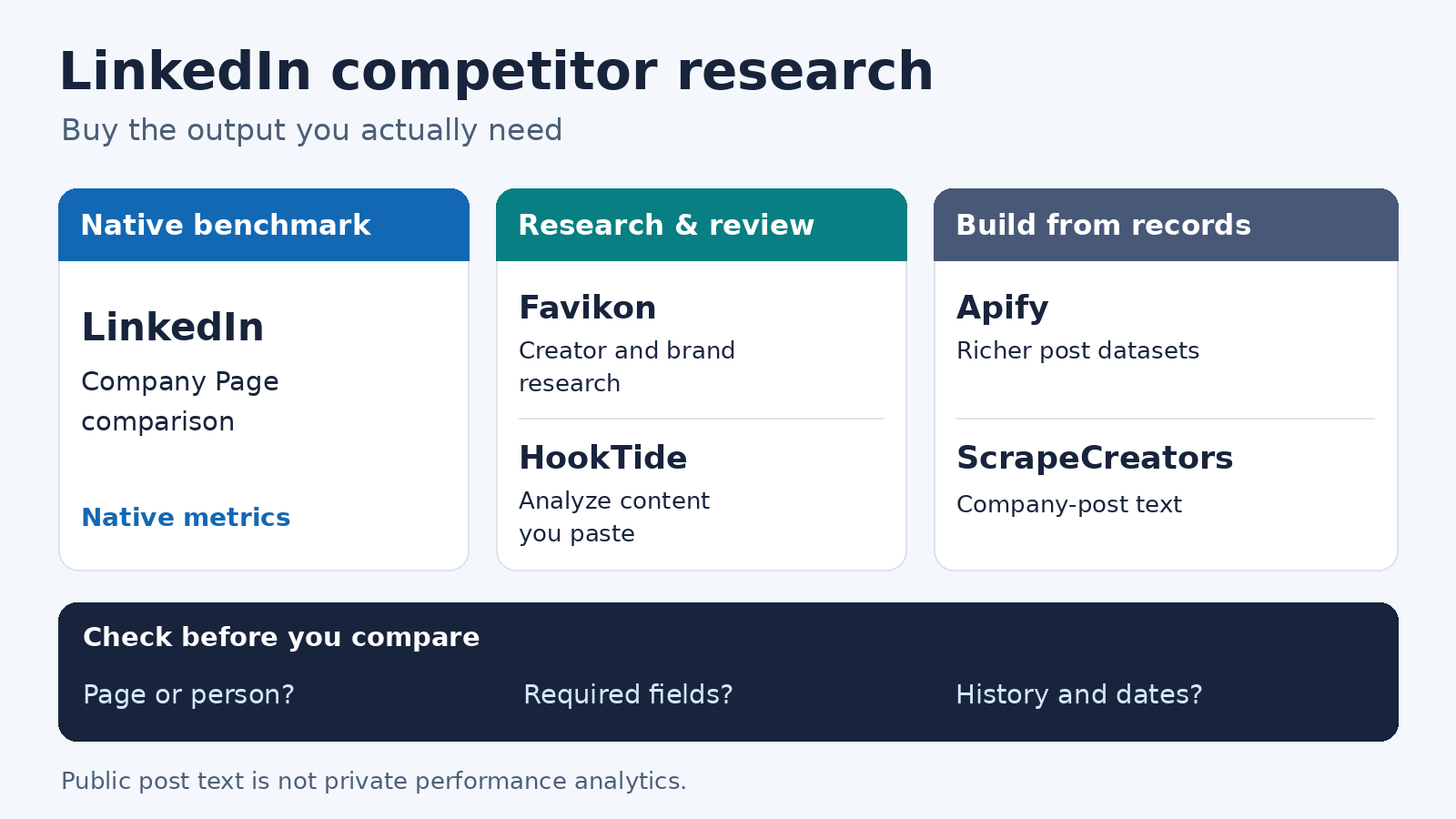
The best LinkedIn competitor analysis tools depend on what you need to compare. Start with LinkedIn’s native competitor analytics for a small company-Page benchmark. Shortlist Favikon for creator and brand research, or HookTide for a manual review of content you supply. Choose Apify for richer scheduled datasets. Choose ScrapeCreators for public company-post text in your own topic tracker, not a finished engagement dashboard.
I build ScrapeCreators. If you need competitor performance reports without maintaining software, I would start with native analytics or a research workspace.
Prices, access rules, documentation, and our API checks below were verified on October 28, 2026. We did not purchase every subscription or benchmark the vendors against each other.
Compare the five options
| Tool | Choose it for | Current cost or unit | Important boundary |
|---|---|---|---|
| LinkedIn competitor analytics | A company Page admin’s native benchmark | Free Page tier; expanded features require Premium Company Page | Free comparison covers one competitor, not an unlimited watchlist |
| Favikon | Researching creators, brands, and creator partnerships | Free: 15 credits/month; Core: €199/month; Pro: €299/month on monthly billing | Competitor-creators Radar is a Pro feature; credits and tracking allowances matter |
| HookTide competitor analyzer | A quick content-strategy review | Free tool; our browser showed five uses left | The visible form takes pasted content, not a live tracking feed |
| HarvestAPI’s company-posts Actor on Apify | Batch collection with engagement and optional discussion records | Free/Starter post event: $2 per 1,000; higher-plan rates differ | Comments and reactions are separately billable events when enabled |
| ScrapeCreators | A custom company-announcement or topic tracker | $47 buys 25,000 prepaid credits; company-post requests cost one credit | The feed returns text, IDs, URLs, and dates, not engagement statistics |
A workspace subscription, a returned post, and a requested page buy different things. Compare the output you need before comparing the price.
Separate company Pages, people, and conversations
Write down your watchlist first. A company Page, a founder’s personal profile, and every post mentioning a brand require different coverage. A tool that connects your own company Page does not automatically let you inspect an unrelated personal profile.
This distinction came up in a public request for LinkedIn competitor software. The follow-up clarified that the buyer was a consultant working across several industries. A single-company benchmark and a multi-client research workspace are different purchases.
Also separate these outputs:
- Performance comparison: follower changes, reactions, comments, and a clearly defined engagement calculation.
- Content research: what a competitor announces, which themes recur, and examples worth reading.
- Conversation monitoring: discovering relevant mentions outside the known company’s own posts.
The last job is not implied by the first two. A known-Page feed is not a complete LinkedIn keyword-monitoring system. None of the public-data examples here reveals a competitor’s private impressions, clicks, pipeline, or revenue.
1. LinkedIn for native company-Page benchmarking
LinkedIn’s competitor analytics is the first place I would look if you administer a company Page and only need a small comparison. It covers follower and organic-content metrics without adding another vendor to the workflow.
The current help page draws a specific line between Free and Premium Company Pages:
- Free provides the aggregated comparison table for one competitor.
- Premium supports that table for up to nine competitors, depending on the number tracked.
- Trending competitor posts cover one competitor on Free and up to three on Premium.
That makes old advice about adding a large free competitor list unreliable. A 2022 company-Page walkthrough demonstrates the basic workflow well, but its free allowance should not override today’s documentation.
LinkedIn says trending posts are original posts from the past 30 days and refresh daily. It also warns that targeting settings can prevent some posts from appearing. The selected time range applies to when organic posts were created; all-time follower totals do not become historical totals just because you change the date picker.
Choose it if you manage a Page, can work inside LinkedIn, and need a native starting point. Check the Premium Company Page offer shown to your account if the free competitor allowance is too small. We are not quoting a universal Premium price because this comparison did not verify an account-specific purchase offer.
Choose another option if you need many clients, personal-profile research, your own dataset, or an unattended report pipeline. Native Page analytics should not be confused with unrestricted access to anyone’s private analytics.
2. Favikon for creator and brand research
Favikon’s LinkedIn competitor product describes profile research, content themes, creator partnerships, and shareable reports. This is a more useful shortlist when your competitive set includes founders and creators as well as company Pages.
The scope is wider than a reaction-count spreadsheet. Favikon describes finding similar creators, inspecting collaborations, and bringing creator research into a campaign workflow. Those features can matter for B2B influencer programs. They are less compelling if your whole job is saving one company’s latest announcements.
The pricing page needs a careful read. In our EUR browser view:
- Free included 15 replenishing credits each month.
- Core started at €199/month with monthly billing and 500 monthly credits.
- Pro started at €299/month with monthly billing and 1,000 monthly credits.
- Annual billing displayed €159 and €239 per month respectively, billed annually. Those are not month-to-month purchases.
The competitor-creators feature, Radar, belongs to Pro rather than Core. The pricing table lists Radar and lookalikes at two credits per returned creator, search at one credit per result, and creator refresh at half a credit. Favikon’s credits are its own billing objects, not equivalent to a ScrapeCreators request credit.
Its landing page invites a free trial, while the pricing page now also advertises a continuing Free plan. Do not read the word “free” as unlimited competitor reports. Confirm your exact tracking, report, and export entitlements in the plan you will buy.
Choose it if the deliverable includes creator comparisons or partnership research that colleagues can use inside a workspace. Test a smaller creator and a company Page from your actual list before committing.
Check the evidence behind the conclusions. Favikon describes AI-powered creator-price estimates. An estimated sponsorship price is not a verified competitor invoice. Ask how far back observations go, when each profile refreshed, and whether partnership labels are inferred or source-backed. We reviewed the public product and pricing, not a paid-account accuracy test.
3. HookTide for a manual content review
HookTide’s competitor analyzer is worth considering when you want a quick interpretation of content you already have, rather than a monitoring subscription.
There is an important mismatch to understand. The page’s lower instructions talk about entering a LinkedIn URL, but the actual form we inspected asks you to paste a competitor’s About section, headline, and recent posts into a text area. The visible workflow is therefore a manual, supplied-content analysis. We did not verify an automatic profile fetch or run the analyzer’s generated output.
The tool was labeled free, and our browser showed “5 uses left.” We did not establish a reset period, so this is not a promise of five free uses every day.
Choose it if you can gather a small, permitted sample yourself and want help organizing positioning, themes, or content gaps. Keep the original post links beside the material you paste so you can check every recommendation.
Do not use it to invent missing measurements. A pasted About section cannot establish follower growth. Undated posts cannot establish an exact posting cadence. If your sample has no reaction counts, an AI-generated engagement estimate is not a measured rate. For recurring comparisons, use a tool that actually collects and retains the required records.
4. Apify for richer scheduled datasets
HarvestAPI’s LinkedIn Company Posts Scraper is a specific Actor on Apify, not a claim about every LinkedIn scraper in the marketplace. It documents company-post content, author information, media, and engagement, with optional comment and reaction collection. The vendor says it does not require your LinkedIn cookies or account.
That makes it a stronger candidate than our basic company feed when the analysis depends on engagement fields. Apify supplies the run and dataset workflow; you still decide how records become comparisons, stored history, or alerts.
The current input schema includes targetUrls, maxPosts, postedLimitDate, includeQuotePosts, and includeReposts. Separate scrapeComments and scrapeReactions options control deeper collection. Confirm the repost policy before comparing companies: a brand publishing original content and a brand resharing executives’ posts are not the same cohort.
The pricing tab showed post events at $2 per 1,000 on Free and Starter, $1.75 on Scale, and $1.50 on Business. The “from $1.50” headline is not the Free-plan rate. Starter listed a $19/month platform commitment; larger plan commitments were higher.
Enabled comment and reaction records have their own billable events. The table also listed a 0-result-query event at $1 per 1,000 and an Actor-start event at $0.00005. Do not budget only the parent posts if you turn on every enrichment.
Choose it if you want underlying records, scheduled runs, and exports, and can maintain the analysis layer. Check this Actor’s actual sample against your required fields and a known set of posts. We inspected its current contract and pricing but did not execute a paid Actor run or verify a complete archive.
5. ScrapeCreators for a custom topic tracker
The ScrapeCreators LinkedIn API fits a narrower job here: collecting public company-post text for a tracker you build. You can classify announcements, retain source links, and prepare a research brief. You own the scheduler, storage, comparisons, and delivery.
The company-posts endpoint takes a company URL and a page number. The current limit is seven pages. That is a pagination ceiling, not a promise of seven full pages or every historical post.
Our production checks returned one Microsoft post on page one, ten on page two, and eight Notion posts on page one. Each request charged one credit. Microsoft’s two pages had no repeated IDs in this sample, but the sparse first page means we would not call the result a complete activity timeline.
The feed rows contained id, url, text, and datePublished. They did not contain reaction, comment, or share counts. Choose the Actor above or a verified reporting tool if engagement ranking is your requirement. Our broader LinkedIn post-scraper comparison covers collection choices; this article is about choosing a competitor-research workflow.
Dates also need care. The current pagination implementation can turn relative labels into approximate timestamps. Some reshare rows carry an activity ID different from the ID embedded in the linked original post. Preserve both the returned ID and URL, and do not merge those identities or call every returned timestamp an exact publication time.
Current pricing lists $47 for 25,000 prepaid credits and $497 for 500,000. Credits do not expire. A successful company-post page uses one credit even when it returns few records; the handler also charges successful empty results. Cost per request is not cost per complete company history.
Save a small, checkable research snapshot
This Python example fetches one Notion company-post page and writes a CSV with source IDs, URLs, reported publication dates, and collection time. It does not calculate engagement or claim to export a month of activity.
import csv
import json
import os
import urllib.parse
import urllib.request
from datetime import datetime, timezone

company_url = "https://www.linkedin.com/company/notionhq/"
params = urllib.parse.urlencode({"url": company_url, "page": 1})
request = urllib.request.Request(
    "https://api.scrapecreators.com/v1/linkedin/company/posts?" + params,
    headers={"x-api-key": os.environ["SCRAPE_CREATORS_API_KEY"]},
)
with urllib.request.urlopen(request, timeout=45) as response:
    body = json.load(response)
if body.get("success") is not True or not isinstance(body.get("posts"), list):
    raise RuntimeError("No usable post collection returned")

observed_at = datetime.now(timezone.utc).isoformat()
seen = set()
with open("linkedin-topic-snapshot.csv", "w", newline="", encoding="utf-8") as file:
    columns = ["company_url", "id", "url", "datePublished", "text", "observed_at"]
    writer = csv.DictWriter(file, fieldnames=columns)
    writer.writeheader()
    for post in body["posts"]:
        identity = post.get("id") or post.get("url")
        if not identity or identity in seen:
            continue
        seen.add(identity)
        row = {key: post.get(key) for key in ["id", "url", "datePublished", "text"]}
        row.update(company_url=company_url, observed_at=observed_at)
        # Keep spreadsheet software from interpreting public text as a formula.
        row = {key: "'" + value if isinstance(value, str) and value.lstrip().startswith(("=", "+", "-", "@")) else value for key, value in row.items()}
        writer.writerow(row)
print(f"Saved {len(seen)} unique posts; credits charged: {body.get('credits_charged')}")
We ran this exact example on October 28. It saved eight unique posts and charged one credit. Your result count can change. It deliberately makes no request-size promise and does not turn an empty result into proof that the company stopped posting.
Open public-text CSVs carefully. The example prefixes formula-like strings before spreadsheet use. Keep original source records separately if you need an unchanged audit trail, and do not upload credentials with a research export.
For a recurring job, retain run time, page number, observed records, and errors. Compare the same companies over the same collection policy. A useful weekly question is “Which themes appeared in the posts we captured?” A much stronger claim, “This company doubled its posting frequency,” requires verified coverage that this small snapshot does not establish.
Check the report before trusting the verdict
A LinkedIn automation walkthrough and an AI-summary example show why this category gets confusing: a scraper, a scheduler, a spreadsheet, and a language model can look like one product in a finished demo. They remain separate things to maintain and pay for.
Before buying or building, ask for these checks:
- Correct account type. Try a company Page and a personal profile separately if you need both. A successful company request does not prove personal-profile support.
- Known-post coverage. Pick posts you can verify directly, then check the returned set. Do not compare ten captured posts from one company with one from another as if both were complete.
- Metric definition. Separate public counts from private analytics and model estimates. State the numerator and denominator before comparing engagement percentages.
- Time and identity. Keep publication time separate from collection time, and distinguish an original post from a reshare. Ask when historical observations began.
- Traceable interpretation. Every summary should point to source rows. If an AI report declares a strategy successful, ask which measured outcome supports that claim.
A LinkedIn keyword-monitoring discussion also illustrates why full-network listening and fast alerts need their own acceptance test. Some replies are vendor promotions, not independent proof. Test the exact posts and delivery delay that matter to your work instead of treating a recommendation as a coverage guarantee.
Questions before you commit
What is the best free LinkedIn competitor analysis tool?
For company Page admins, start with LinkedIn’s native competitor analytics. Its current Free tier covers one competitor in the aggregated table. HookTide offers a free manual analyzer for content you paste; Favikon’s Free plan has a small monthly credit allowance. These are different kinds of free access.
Can I see a competitor’s LinkedIn impressions or clicks?
The public company-feed workflow here does not return either. A provider’s access to your connected Page analytics does not establish access to someone else’s private results. Require a field-level demonstration before buying for that purpose.
Can I compare founders as well as company Pages?
Shortlist a provider that explicitly supports both, such as Favikon, then verify the exact profiles. LinkedIn’s native Page competitor feature compares Pages. Our company-post example uses a company URL and does not establish a personal-profile feed.
Should I use a dashboard, an Actor, or an API?
Use native analytics or a research workspace when you need comparisons ready to share. Choose an Actor for richer datasets you will analyze, or an API for a custom workflow with a clearly bounded output. The company-data buyer guide covers a different job: enriching company records rather than interpreting competitor activity.
If public post text fits your workflow, create a ScrapeCreators account and inspect a small sample first. If you need complete engagement reporting immediately, choose the reporting or dataset option that proves those fields instead.


