
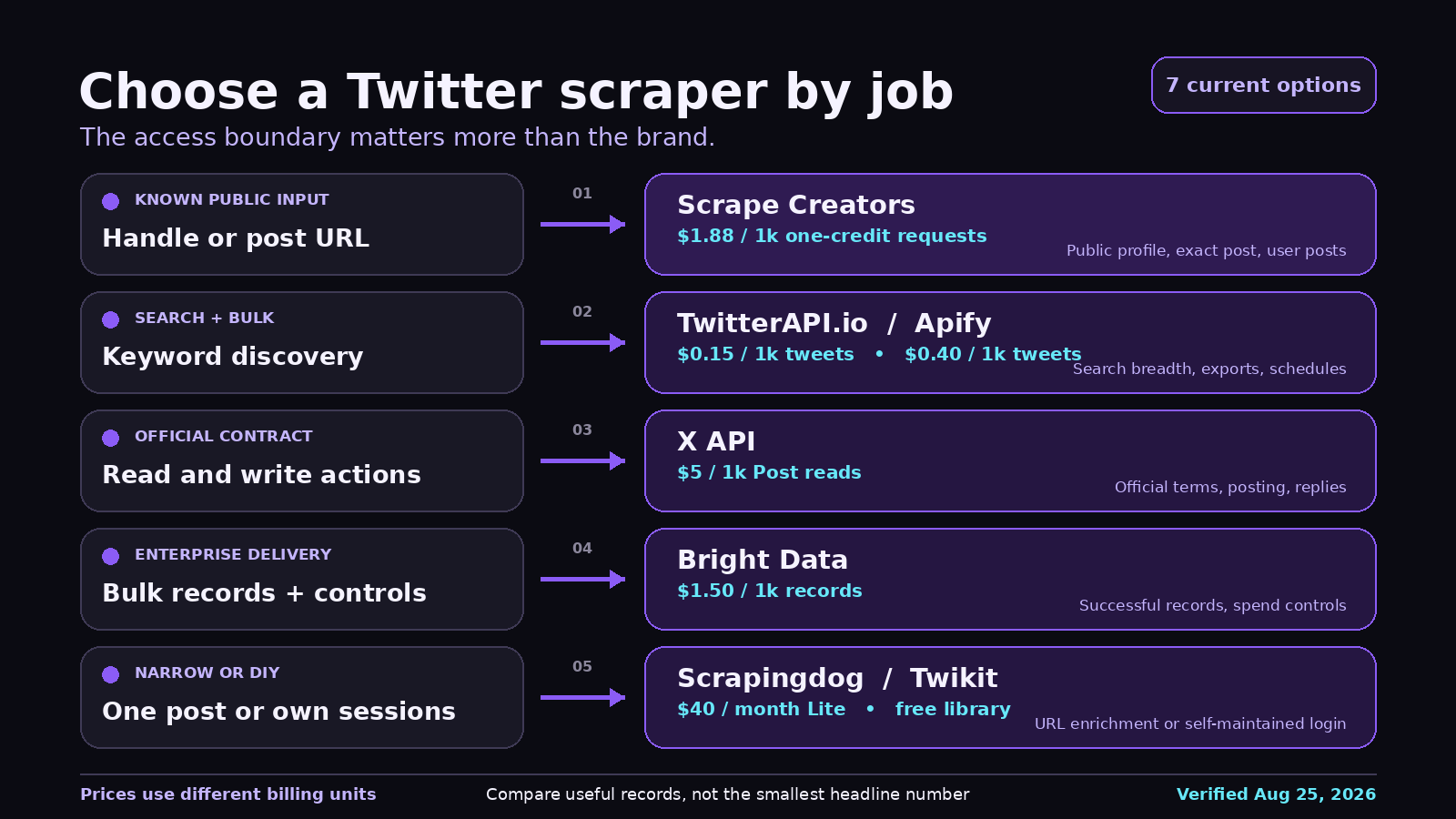
The best Twitter scraper depends on what you need. Use Scrape Creators for public profiles, exact posts, and the public posts visible for a known user. Choose TwitterAPI.io or Apify when keyword search is mandatory. Use the official X API when you need official read or write access. Bright Data makes more sense for enterprise exports and procurement.
I work on Scrape Creators. I tested only our three relevant endpoints for this article. Every competitor price and capability below comes from its own documentation, checked on August 25, 2026. That disclosure matters because a generic “best” ranking is useless if it hides what was actually verified.
Best Twitter scrapers at a glance
Pricing units are not interchangeable. One provider bills per request, another per returned tweet, and another per returned record. The table keeps those units visible instead of forcing a fake apples-to-apples number.
| Tool | Best for | Public starting price checked August 25, 2026 | Main limitation |
|---|---|---|---|
| Scrape Creators | Public profiles, exact posts, and known-user posts | 100 free credits, then $1.88 per 1,000 one-credit requests | No X keyword-search endpoint |
| TwitterAPI.io | Low-cost search and broad read access | $0.15 per 1,000 returned tweets | Third-party service, not affiliated with X |
| Apify Tweet Scraper V2 | Search jobs, exports, schedules, and no-code automation | $0.40 per 1,000 tweets | This Actor requires at least 50 tweets per paid query |
| Bright Data | Enterprise bulk collection and managed delivery | 5,000 records monthly free, then $1.50 per 1,000 records | More platform and procurement overhead than a narrow API |
| Official X API | Official access, write actions, and direct platform terms | $0.005 per Post read, or $5 per 1,000 returned Posts | Read costs climb fast at volume |
| Scrapingdog | Engagement data for one known post URL | 200 free credits, then $40 monthly for 200,000 credits | Narrow URL-in, post-data-out scope |
| Twikit | Open source experiments and custom internal workflows | Free, MIT licensed | You own login cookies, account risk, rate limits, and repairs |
How I compared the tools
I started with the job, not the vendor list. The live Google results for “best twitter scraper” and “best twitter scrapers” favor roundups. The results for “twitter scraper api” and “twitter scraping api” mix API product pages, tutorials, and official documentation. That split is why this buyer guide is a separate page from our existing Twitter scraping developer guide and Twitter API product page.
The comparison uses five questions:
- Can it get a known public profile or post without an X login?
- Can it search by keyword, and does it document pagination?
- What exactly does the price buy: a request, a returned tweet, a returned record, or an account session you maintain?
- Does it return parsed JSON, or do you still need to operate a browser, proxies, cookies, and selectors?
- What happens when you need another platform in the same workflow?
I also reviewed five YouTube transcripts, 76 unique YouTube comments, 16 fetched replies, five Reddit threads, and five TikTok discussions. The recurring questions were more practical than most vendor pages: Will this still work after a platform change? Do I need a login account? Can I search, paginate, and trim the result before passing it to an AI agent? What does a blocked request or burned account do to the real cost?
The seven best Twitter scrapers
1. Scrape Creators
Best for public profiles, exact posts, and multi-platform enrichment.
Scrape Creators is the cleanest fit when your input is a known handle or post URL. The documented X endpoints cover profiles, individual posts, and public posts for a user. It also has a community endpoint. Responses come back as parsed JSON.
I ran all three endpoints on August 25. Each returned HTTP 200 with success: true, charged one credit, and completed in 1.055 to 3.207 seconds. The user-post request returned 100 public posts for the fixture. Those are real smoke-test results, not a general uptime claim.
The pricing section lists 100 free credits. The $47 Freelance pack includes 25,000 credits, or $1.88 per 1,000 one-credit requests. The $497 Business pack includes 500,000 credits and displays $0.99 per 1,000. Credits do not expire.
There is a hard boundary: Scrape Creators does not document keyword search for X. A user’s public list can also differ from a complete chronological archive. If your requirement says “find every post mentioning this term,” pick one of the next four options.
Choose Scrape Creators if you want one API for X plus Instagram, TikTok, YouTube, Reddit, LinkedIn, and other public social sources. Choose another tool if X search, replies, write actions, or a complete historical timeline is non-negotiable. You can start with 100 free credits without a credit card.
2. TwitterAPI.io
Best for inexpensive tweet search and broad X-specific coverage.
TwitterAPI.io is a third-party X data service with a much wider X-specific surface than Scrape Creators. Its current docs include advanced tweet search, user search, user timelines, tweet replies, quotations, thread context, list timelines, community tweets, and write actions.
Its pricing page lists $0.15 per 1,000 returned tweets and $0.18 per 1,000 returned profiles. Followers and following use tiered per-item pricing. Paid credits have no minimum spend and do not expire, although promotional bonus credits have their own 30-day rule.
That makes the headline price look dramatically lower than request-priced APIs, but remember the unit. A search returning 1,000 tweets costs more than a search returning 20. The low per-record rate is attractive for monitoring and AI research pipelines that actually need search breadth.
Choose TwitterAPI.io when X search is the center of the product. Do not treat it as official X access. The company says plainly that it is independent and not affiliated with X Corp.
3. Apify Tweet Scraper V2
Best for bulk search jobs, scheduled exports, and no-code workflows.
Apify is a marketplace of cloud programs called Actors. The Tweet Scraper V2 Actor accepts search terms and can scrape by search, URL, list, or profile. You can call it through the Apify API, schedule it, export datasets, or connect the result to other tools.
The Actor’s own page lists $0.40 per 1,000 tweets and says paid queries must return at least 50 tweets. Free users get five runs per month, capped at 10 items. It also says this specific Actor is not for single-tweet or conversation scraping and points those jobs to a different Actor.
That detail is easy to miss. Apify is useful because the marketplace gives you options, but those options may have different maintainers, billing models, and output contracts. “Apify supports it” is not the same as one stable API contract across every Actor.
Choose Apify when you want search, scheduled jobs, large datasets, and integrations more than a minimal endpoint. It is also a natural fit for n8n workflows. Two relevant YouTube walkthroughs used Apify to build X search in n8n and a lead-enrichment workflow. Those videos are demonstrations, not independent reliability tests.
4. Bright Data Twitter Scraper API
Best for enterprise bulk collection and managed datasets.
Bright Data’s Twitter Scraper API covers posts, profiles, followers and following, conversations, and discovery-style inputs. It supports on-demand API calls, no-code collection, and bulk requests of up to 5,000 URLs.
The current public page lists 5,000 free records per month and pay-as-you-go pricing at $1.50 per 1,000 successful records. Its $499 monthly Scale plan includes 384,000 records, with additional records at $1.30 per 1,000. Bright Data says failed deliveries are not billed.
This is the enterprise pick because the product includes delivery formats, spend controls, high concurrency, support, and a procurement path. It is a lot of machinery if you only need to resolve a few handles.
Choose Bright Data when the buyer cares about bulk jobs, controls, support, and vendor review. Choose a narrower API when one developer wants a working profile lookup this afternoon.
5. Official X API
Best for official access and write actions.
X moved to a public pay-per-usage model. The official pricing documentation lists Post reads at $0.005 per returned resource, which is $5 per 1,000 Posts. User reads and follower or following reads cost $0.010 per returned resource, or $10 per 1,000. Pay-per-use plans are capped at 3 million Post reads per monthly billing cycle before Enterprise.
The official API is the right answer when your application must publish, reply, like, follow, or operate under X’s direct developer agreement. A scraper should not be your shortcut for write behavior.
The tradeoff is cost. For read-heavy monitoring, the official rate is far above several third-party per-tweet prices. But an official contract, stable resource IDs, and supported write actions may be worth more than the cheapest row in a spreadsheet.
Choose X when compliance and write access decide the project. Compare third-party tools when the workload is public, read-only, and high volume.
6. Scrapingdog X Scraper API
Best for a known post URL and its engagement fields.
Scrapingdog’s X Scraper API is deliberately narrow. You send a post URL and ask for parsed output. The page shows fields for views, likes, retweets, quotes, bookmarks, text, and the author handle.
The free plan includes 200 request credits. The Lite plan lists $40 per month for 200,000 request credits, which works out to $0.20 per 1,000 credits before any endpoint-specific rules. All plans cover Scrapingdog’s broader API catalog, not only X.
That can be a good deal for a product that enriches known links. It is not the tool I would pick for keyword discovery, complete user history, or complex social listening.
Choose Scrapingdog if every job starts with one known X post URL. Choose a search-focused provider if the post URL is what you are trying to discover.
7. Twikit
Best for open source experiments where you can own the risk.
Twikit is an MIT-licensed Python library that uses X’s internal interfaces. Its README lists tweet search, trends, posting, and other account functions without an official API key. The example logs in with account credentials and saves cookies.
The software is free. The operation is not. You own the account, cookies, proxy behavior, rate limits, monitoring, and repairs whenever X changes an internal request. The project was active in 2026 when I checked its repository, but repository activity does not guarantee that every function works for your account or region.
The comment sections under older “five lines of code” tutorials are full of a familiar pattern: the video stays popular long after the exact token or endpoint stops working for some viewers. That does not make open source bad. It means your test plan needs to include failure handling and maintenance time.
Choose Twikit for internal experiments, learning, or a custom system where account-based access is acceptable. Do not choose it because the library has no invoice and assume the total cost is zero.
What real projects get wrong
They compare sticker prices instead of useful records
A Reddit thread asking for the cheapest way to collect tweets quickly moved from subscription prices to the costs of accounts, cookies, proxies, and maintenance. That is the right discussion.
Price the complete job. If you need 8,000 historical posts from one account, a 20-result lookup and an 8,000-record export are not competing products. If a “free” library burns three accounts and two days of engineering time, it was not free.
They assume a general web search can see fresh X data
AI-agent builders repeatedly described the same problem on Reddit and TikTok: their agent can search the open web but still misses current conversations inside X. The fix is not a longer prompt. It is a data source that explicitly supports the required X search or post lookup.
This matters for research agents. Give the agent structured fields, dates, author IDs, post URLs, and pagination state. Then trim what it receives. One n8n tutorial spends almost as much time filtering fields and writing a useful research prompt as it spends calling the scraper. That is a better model than dumping raw responses into a context window.
They choose a scraper before defining the access boundary
Public profile data is a different job from keyword search. Keyword search is different from a complete archive. Reading is different from posting. The public X page for a user may expose only a subset of posts and may not be chronological.
Write down the boundary before signing up:
- Known handles or unknown authors?
- Known post URLs or keyword discovery?
- Public-only data or account session?
- Read only or write actions?
- One result, 100 results, or millions?
- X only or X plus other social platforms?
That list will usually remove half the vendors without a trial.
How to choose
Use this short decision rule:
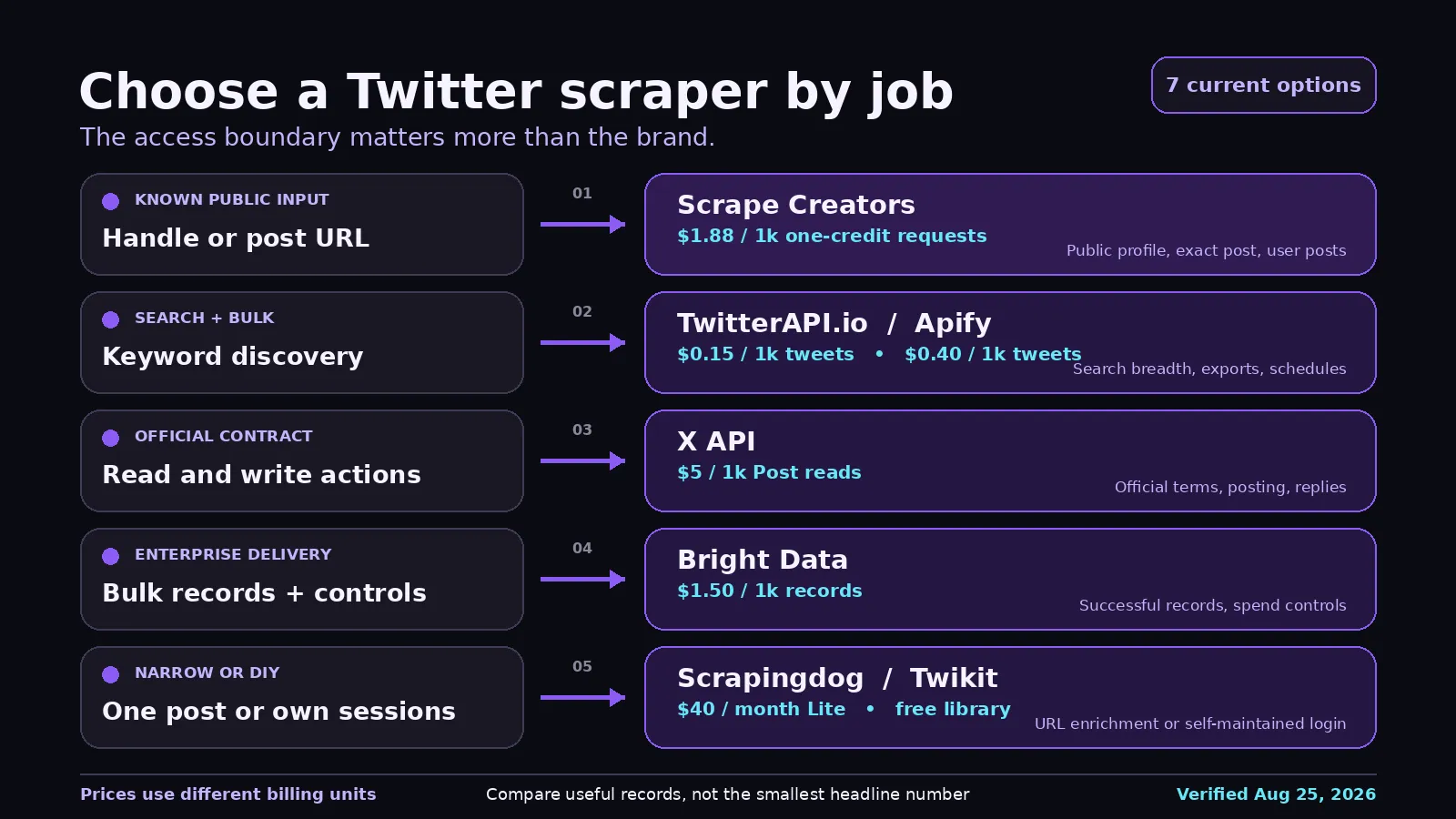
- Pick Scrape Creators for public profile and exact-post enrichment, especially when the same application also reads other social platforms.
- Pick TwitterAPI.io for low-cost X search and broad X-specific read endpoints.
- Pick Apify for scheduled search jobs, dataset exports, and no-code automation.
- Pick Bright Data for enterprise bulk delivery, spend controls, and support.
- Pick the official X API for official access or any write action.
- Pick Scrapingdog when every request starts with one known post URL.
- Pick Twikit only when you accept account sessions and ongoing maintenance.
For a broader look at general unblockers and social-specific APIs, see our web scraping API comparison. It covers a different decision: any-site page fetching versus structured social data.
A real Scrape Creators request
This request returns a public X profile by handle:
curl --get 'https://api.scrapecreators.com/v1/twitter/profile' \
  --header 'x-api-key: YOUR_API_KEY' \
  --data-urlencode 'handle=adrian_horning_'
I ran that exact request on August 25, 2026. The response was HTTP 200, took 1.120 seconds, charged one credit, and included the requested screen name and public follower count. A shortened excerpt:
{
  "success": true,
  "credits_charged": 1,
  "rest_id": "4520241209",
  "legacy": {
    "screen_name": "adrian_horning_",
    "followers_count": 20597,
    "statuses_count": 24850
  }
}
The exact values can change as the account changes. The response shape and one-credit charge are what the test was checking. Start with the profile endpoint docs or the X API overview.
Limitations and risk
Public data is still governed by law, platform terms, privacy obligations, and the purpose of your collection. Do not use a scraper to collect private content, evade access controls, harass people, or build prohibited surveillance. Store only the fields you need and set a retention policy.
Expect every unofficial Twitter scraper to change. X can alter public pages, internal APIs, rate limits, and login behavior. A hosted provider moves that maintenance off your plate, but it cannot make platform risk disappear.
The safest buying process is small and specific: take ten public examples from your actual workload, define the fields you need, test pagination and failure responses, and record the cost per useful result. A tool that wins a generic ranking can still be wrong for your one query.


