
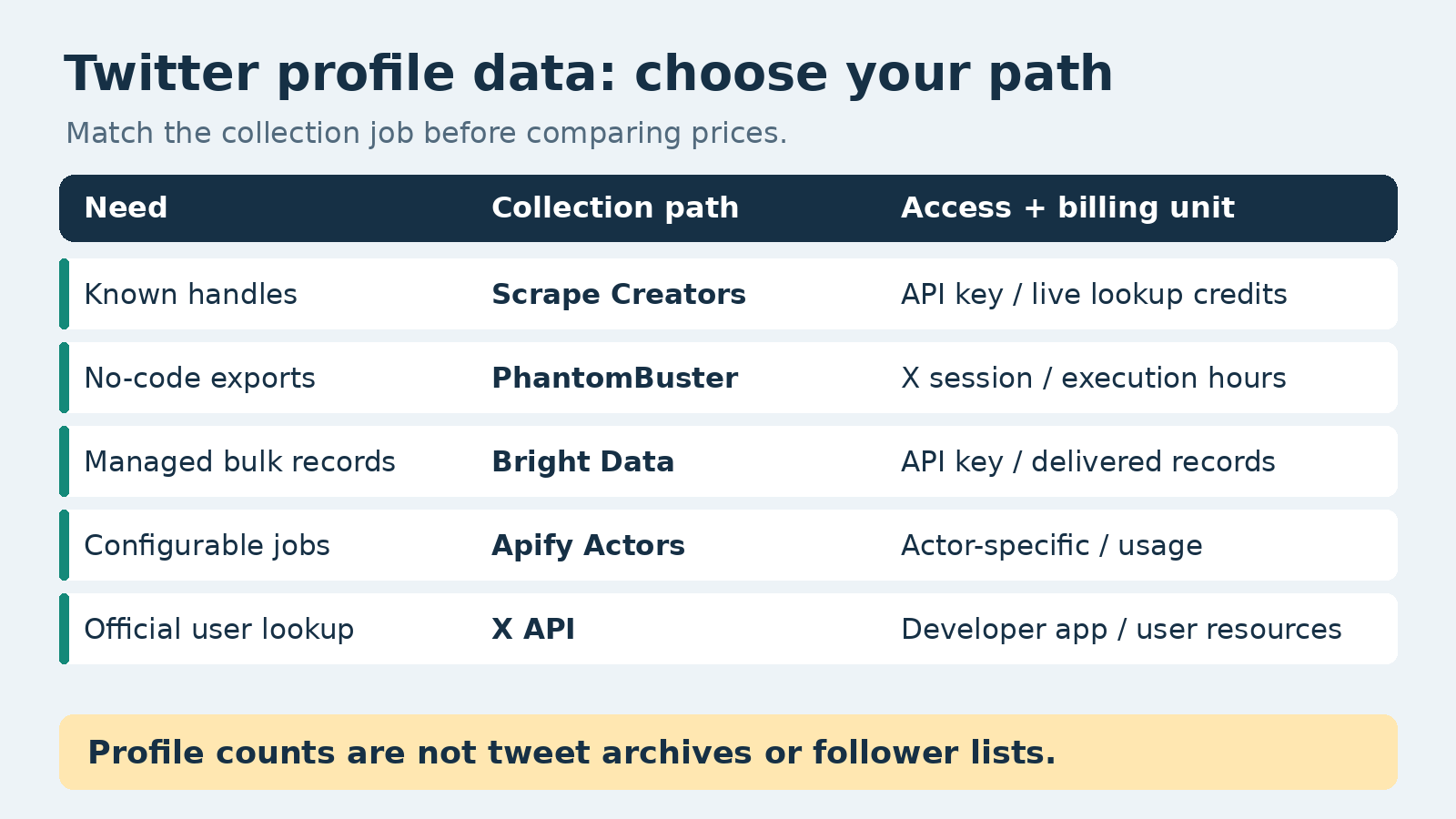
For known-handle lookups, Scrape Creators is my pick for a Twitter profile scraper that returns public account metadata through a simple API. Choose PhantomBuster for a no-code CSV workflow, Bright Data for managed bulk profile records, or Apify for configurable scraping jobs. Use the official X API when direct platform access is a requirement. None of those choices makes a profile record the same thing as an account’s entire tweet history.
I work on Scrape Creators. This article includes three live requests to our profile endpoint, not a speed or reliability benchmark across vendors. Competitor capabilities and prices come from their primary pages, checked October 10, 2026.
The five options at a glance
The useful comparison is what you put in, what comes back, and what you pay for. A low price per tweet tells you very little about a job that needs one row per account.
| Option | Choose it for | Input and access | Output model | Verified cost unit |
|---|---|---|---|---|
| Scrape Creators | Enriching a list of known public handles | Handle and Scrape Creators API key; no customer X cookie | One profile response | 1 credit for a live lookup; $47 for 25,000 credits |
| PhantomBuster | Profile lists you want in a spreadsheet | Twitter profiles and your Twitter cookie | CSV or JSON export | Start: $56/month equivalent, $672 billed annually; 20 execution hours/month |
| Bright Data | Bulk collection with managed delivery | Profile URL or username, using the matching scraper | Delivered profile records | Web Scraper API pay as you go: $1.50 per 1,000 records; 5,000 free records/month |
| Apify | Configurable profile and related-content jobs | Actor-specific inputs; the reviewed Actor supports authentication tokens for timelines | Dataset items defined by the Actor | Reviewed Actor lists pay per usage; inspect its pricing tab and run configuration |
| Official X API | Direct platform user lookup | Developer app and appropriate authorization | User resources with requested fields | User: Read costs $0.010 per returned resource |
Scrape Creators pricing, PhantomBuster pricing, Bright Data pricing, and X pricing are the source pages. These are different billing models. The PhantomBuster figure is an annual commitment, not a monthly checkout price. Apify is a marketplace, so one Actor’s cost or access requirement does not describe every Twitter Actor.
Decide what one profile means
There are three different requests people call “scrape a Twitter profile”:
- Give me this account’s name, bio, ID, website, and follower count.
- Give me its tweets, replies, and media.
- Find accounts that match a topic, company, or person.
This guide is mainly about the first job and choosing a tool for it. The second needs a timeline or post-collection workflow. The third needs discovery or identity resolution before enrichment. A known-handle lookup does not become a search engine because the output includes a biography.
That distinction showed up in the research. A WebAutomation tutorial calls the workflow a profile scraper, but its demonstrated export is tweet rows. Its comments ask about follower lists, free access, and matching a B2B contact list to Twitter usernames. Those are separate requirements, not fields you can assume every profile tool returns.
A public archiving discussion asks for complete histories of large accounts. That is useful evidence of the ambiguity, not proof of any tool’s current historical coverage. The discussion spans older platform behavior. I would not buy a metadata API for that archival job.
For broader search and post collection, use the separate Twitter scraper comparison. For the access-method tradeoffs, the Twitter and X scraping guide covers the bigger picture. This page keeps the decision narrower: which collection path fits your profile dataset?
The five profile collection options
1. Scrape Creators for public lookups by handle
Scrape Creators is the straightforward choice when you already know the handles and need account metadata in your application. The profile endpoint accepts handle. You authenticate with our x-api-key header, not your personal X session.
The returned object includes a numeric account ID in rest_id, profile fields under legacy, and separate verification fields. You can normalize it into one row per account rather than extracting an author repeatedly from every tweet.
Live lookups cost one credit. Our entry paid pack is $47 for 25,000 credits. Optional cache_max_age lets you accept a previously stored response: a matching cache hit costs zero credits, while a miss performs a live lookup at the endpoint’s normal cost. Caching documentation explains the freshness choices. Do not use an old snapshot for a report labeled “today’s follower count.”
Choose us if you want public profile enrichment alongside other social APIs without maintaining your own X session. Choose another path if your requirement is official platform access, automatic handle discovery from a company name, or a complete timeline archive. This endpoint does not promise private contact details or every follower’s identity.
2. PhantomBuster for no-code profile exports
PhantomBuster’s Twitter Profile Scraper takes Twitter profiles and a Twitter cookie. Its setup uses a browser extension to connect the account. The product page describes names, descriptions, handles, URLs, account age, and counts, with CSV or JSON downloads.
That is a practical route for someone who wants a profile list in a spreadsheet rather than an API integration. You are buying an automation environment with execution time and slots, not a fixed number of profile records per dollar.
The current Start plan displays $56 per month with $672 billed annually, five automation slots, and 20 hours of monthly execution time. Trial exports are limited to ten rows. These are plan constraints, not an estimate of how many X profiles you can collect.
Choose PhantomBuster when the no-code workflow is worth the subscription and you can manage the connected X session responsibly. I would not treat it as interchangeable with an API-key-only service. A session cookie is sensitive, and account access introduces operational work your team should explicitly accept.
3. Bright Data for managed bulk profile records
Bright Data’s Twitter Profile Scraper API describes profile URLs, X IDs, names, biographies, verification status, images, external links, and follower and following counts. It lists both profile-URL and username collection options.
The managed-record model makes sense when you want a delivered dataset and care more about its shape and delivery process than one immediate lookup. Confirm which scraper you selected before copying a request. The profile product page also contains an example with max_number_of_posts; a sample on a profile page should not make you assume every mode returns exactly one profile row.
Its Web Scraper API pricing lists a 5,000-record monthly free tier and $1.50 per 1,000 records for pay-as-you-go usage. That is a record price, not a price per HTTP request.
Choose Bright Data if managed bulk delivery fits your pipeline. Before committing, inspect a sample from the exact dataset, check the delivery contract, and verify how unsuccessful inputs appear. We reviewed its public documentation but did not run a Bright Data job for this article.
4. Apify for configurable Actor jobs
Apify is useful when you want a scraping job with configurable inputs and dataset output. The reviewed epctex Twitter Profile Scraper covers user details and related tweet collection. Its README describes authentication-token support for reliable profile timelines and says each exported item is a dataset item.
The choice is the Actor, not just Apify. A second Actor with a similar name can use different inputs, return a different row type, and have a different billing model. The reviewed listing says pay per usage. I would inspect the pricing tab and an actual small run before turning that into a per-profile budget.
There is also an important row-count trap: if your Actor exports tweets with embedded author metadata, collecting many tweets from one account does not produce that many distinct profiles. Deduplicate by the account’s stable ID before reporting profile coverage.
Choose Apify when configurable jobs and the marketplace are useful to your team. If you only need a known handle’s metadata, compare that setup with a dedicated lookup. Do not buy on an Actor’s “unlimited” marketing language without checking pagination, input limits, and session requirements for your actual job.
5. The official X API for direct user lookup
The official user lookup documentation supports usernames and IDs, including up to 100 users per multi-user request. Additional fields such as created_at, description, and public_metrics are requested explicitly.
This is the right route when your organization requires direct platform access or already operates an X developer integration. A user lookup is still not a timeline export. Batch size tells you how many users a request can contain, not that billing happens once for the whole batch.
Current X pay-per-use pricing lists User: Read at $0.010 per returned resource. Buy credits and verify the current rates in the developer console; do not use an old monthly-tier comparison to budget a new project.
Choose the official API when that contract is part of the requirement. Do not treat a scraper as a substitute for authorized write actions, and do not assume a public metadata lookup gives access to private account content.
A real public-profile request
This request uses the documented handle parameter:
curl --fail-with-body --get \
  'https://api.scrapecreators.com/v1/twitter/profile' \
  --data-urlencode 'handle=NASA' \
  -H "x-api-key: $SCRAPE_CREATORS_API_KEY"
For this article we called NASA, OpenAI, and github once each on October 10, 2026. All three returned HTTP 200, success: true, a matching handle, a numeric account ID, and profile counts. Each response reported one credit charged. This verifies those three public lookups, not all accounts, long-run availability, or private access.
The following is a field-only projection of the saved NASA response. Other fields and the account’s credit balance are omitted:
{
  "success": true,
  "credits_charged": 1,
  "rest_id": "11348282",
  "is_blue_verified": true,
  "legacy": {
    "screen_name": "NASA",
    "name": "NASA",
    "followers_count": 92329262,
    "friends_count": 115,
    "statuses_count": 74412,
    "location": "Pale Blue Dot"
  }
}
Notice the response is not wrapped in data for this successful lookup. Use the actual response shape rather than assuming every endpoint puts the useful fields at data.profile.
Map the fields before you export
A profile dataset needs a stable key and a collection timestamp. A display name is not a key, and a handle can change. Keep the numeric ID as a string so a spreadsheet or JavaScript conversion does not damage large identifiers.
| Meaning | Scrape Creators field from the observed response | How to store it |
|---|---|---|
| Account ID | rest_id | String, not a floating-point number |
| Current handle | legacy.screen_name | Text; retain the ID across handle changes |
| Display name | legacy.name | Descriptive text, not identity proof |
| Public bio | legacy.description | Source text; do not convert it into verified claims |
| Followers | legacy.followers_count | Counter at collection time |
| Following | legacy.friends_count | Counter, not the list of followed users |
| Post count | legacy.statuses_count | Counter, not the posts themselves |
| Location | legacy.location | User-entered text, not geolocation |
| Subscription badge | is_blue_verified | Keep separate from other verification fields |
| Observation time | Add fetched_at in your application | UTC timestamp for your collection |
Keep the raw response alongside the normalized row when your retention policy allows it. That makes a changed mapping easier to diagnose. Do not flatten every verification flag into a single “trusted account” label.
For an export, inspect missing values before filling them. An empty location should stay empty, not become an inferred city. A failed lookup should be a separate error record, not a row saying the account has zero followers. If an endpoint returns HTTP 200, still validate that the expected account fields exist.
Compare costs with the right denominator
Start with a fixed job: one current profile for each known handle, without tweet history. Then measure successful, distinct profile rows.
At Scrape Creators’ $47/25,000-credit pack, 1,000 one-credit live lookups use $1.88 worth of prepaid credits. You still purchase the pack upfront. That is not a $1.88 checkout option or a claim about requests that fail to produce usable profiles.
Bright Data lists $1.50 per 1,000 delivered records. The official X API’s $0.010 User: Read price makes 1,000 billable returned user resources $10 before any applicable account-specific billing rules. PhantomBuster’s execution-hour subscription and Apify’s Actor usage do not have a defensible per-profile conversion without a measured run.
For refresh jobs, include freshness in the budget. Reusing a cached profile can reduce requests to the source, but it changes what the dataset means. Store the cache timestamp separately from the time you received it. A cached response is not a new observation of an account’s counters.
Run a small acceptance check
Before loading a long list, try a small set of accounts you are authorized to collect. Check the following:
- The returned stable ID and handle match the requested account.
- Required fields are present; an optional missing field is not silently converted to zero.
- Each input has a success, unavailable, or failed status in your job log.
- Your chosen output mode returns account rows rather than tweet rows with repeated authors.
- Session handling, retries, delivery timing, and spend controls fit your operations.
- A second scheduled observation retains the same account key and a new timestamp.
Do the acceptance check with your own required fields. Three well-known organization profiles are a useful smoke check, but they do not establish coverage of small accounts, renamed handles, or unavailable profiles.
Questions to settle before buying
Do you need follower counts or follower lists? Counts are profile fields. Lists are a different collection job and may need separate endpoints, pagination, and access. Do not promise the latter because you saw the former in a sample.
Do you already know the handles? If not, solve discovery and identity matching first. A name, company, and LinkedIn URL do not reliably identify one X account. Store uncertainty rather than attaching the first similar-looking profile to a customer record.
Are you collecting profiles or an archive? A metadata lookup is appropriate for an enrichment table. A complete-content archive needs explicit coverage and media requirements. Public post counts are not evidence that your tool retrieved every post.
Can you use the data for the planned purpose? Public visibility does not remove platform terms, privacy obligations, or your own retention rules. Avoid private information, sensitive inferences, and unsolicited mass outreach. If official access is required, use the official route.
If your job is known-handle public enrichment, start with the profile documentation and a small batch. You can create a Scrape Creators account, inspect the output, and decide whether the fields meet your requirements before building the rest of the pipeline.


