
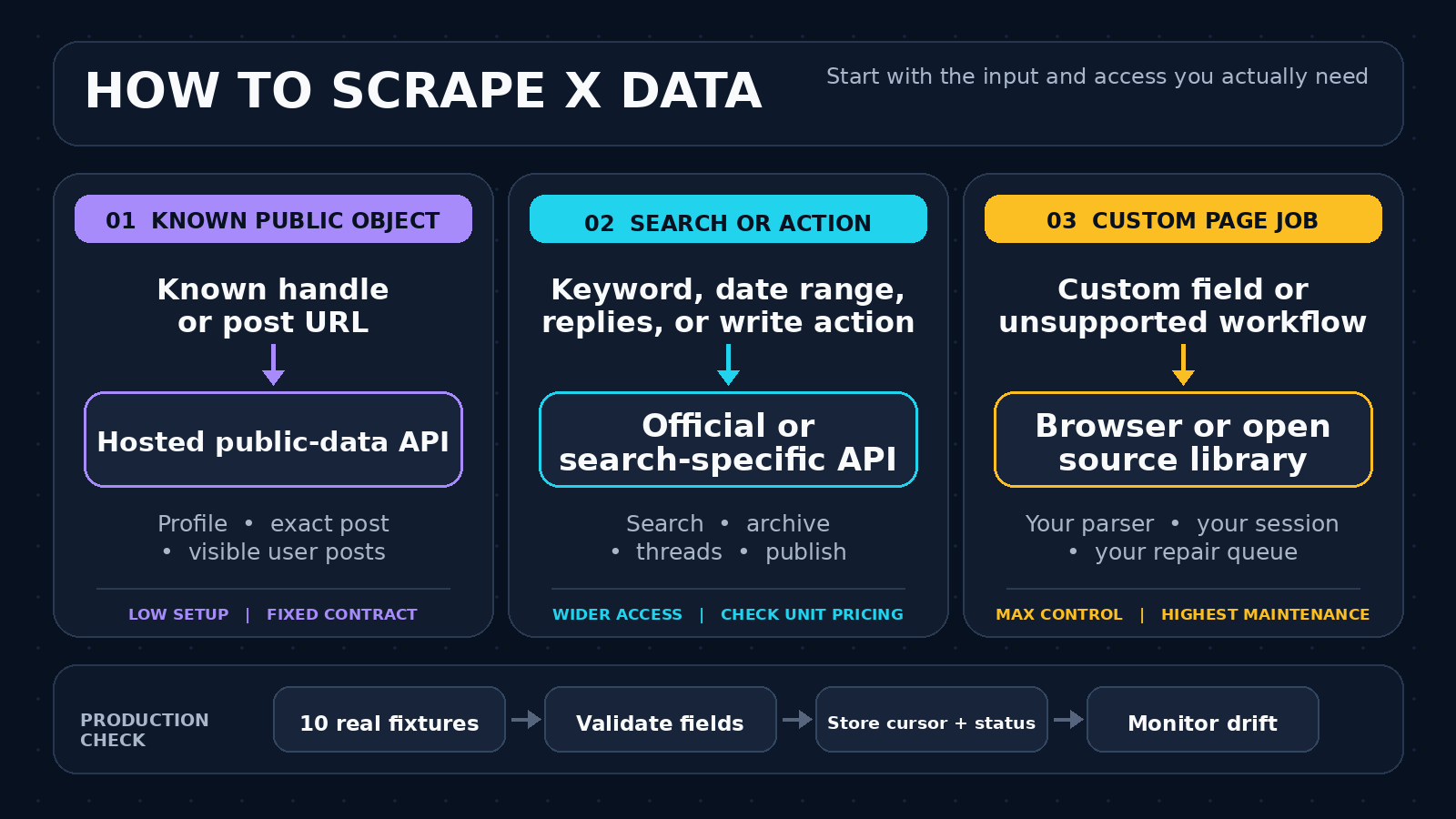
To scrape Twitter (X) data in 2026, start with the input you have. A known public handle or post URL is a good fit for a hosted JSON API. Keyword search, date ranges, complete history, replies, and write actions need the official X API or a provider that explicitly documents those features. Build a browser scraper only when you need custom page data and accept the repair work.
ScrapeCreators handles public profiles, exact posts, the posts X exposes for a known user, and communities. It does not currently offer X keyword search, replies, follower lists, or write actions. I work on ScrapeCreators, and I tested its three relevant endpoints on September 9, 2026. I did not test the competing methods in this guide.
Pick the method before the tool
Most bad Twitter scraping projects choose a library first and define the data job later. Reverse that order.
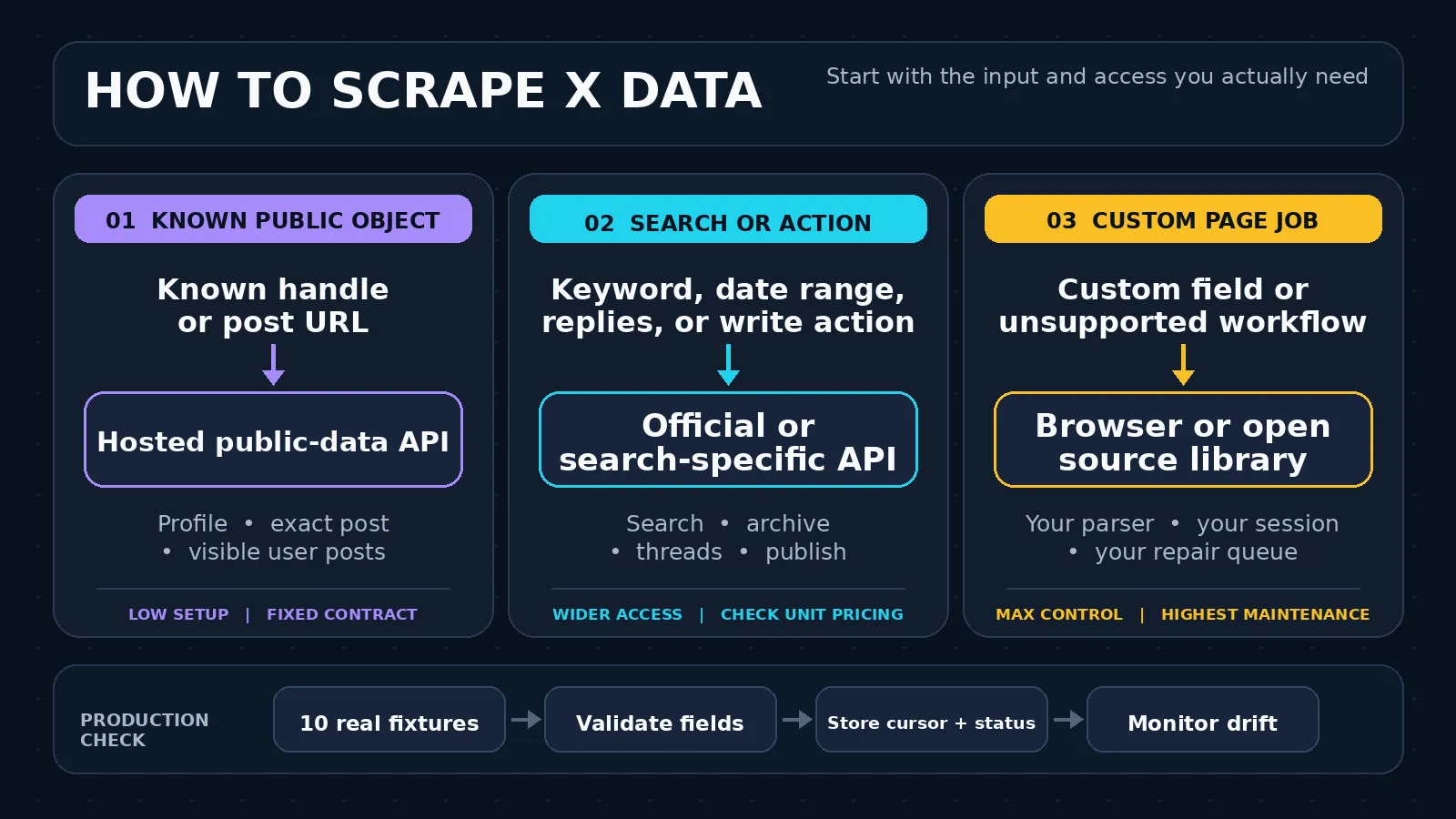
| Method | Choose it when | What you maintain | Main limitation |
|---|---|---|---|
| Hosted public-data API | You have a known public handle, post URL, or community URL and want parsed JSON | Request code, response validation, and your own storage | The provider’s documented public-data surface may not include search, replies, or complete timelines |
| Official X API or search-specific API | You need keyword search, date ranges, threads, archive access, or write actions | Developer access, credit budget, pagination, and product-specific limits | Cost and access rules vary by resource |
| Browser or open source library | You need a custom field or workflow that no API exposes | Accounts, cookies, proxies, selectors, pacing, monitoring, and repairs | Highest operational risk and maintenance load |
The decision turns on five questions:
- Do you already know the handle or post URL?
- Do you need discovery by keyword, author, language, or date?
- Is a public subset enough, or do you need a complete archive?
- Is the job read only, or must it publish, reply, follow, or like?
- Can your team maintain login sessions and repair a scraper when X changes?
If you cannot answer those, you cannot compare prices honestly. A charge per request, per returned post, and per browser session are different units.
What X exposes changes the answer
A public profile lookup, one exact post, and X-wide search are separate jobs. They should not share a vague requirement like “get Twitter data.”
For a public profile, useful fields may include the stable user ID, handle, biography, follower and following counts, verification state, location, and profile image. An exact post can include text, creation time, views, likes, reposts, replies, quotes, and media metadata. These are clean URL-in, JSON-out tasks.
A user-post feed is trickier. The current ScrapeCreators user-post documentation says X publicly exposes about 100 popular posts for a user, not their latest posts. In my September 9 check, the endpoint returned 100 posts, but the first result was from April 2025. That is useful for profile enrichment. It is not a chronological archive and should not be sold internally as one.
Search is another boundary. Builders in a recent n8n Twitter scraping discussion asked whether they could filter by topic, language, engagement, and an old date range. Those questions require a search contract, not a profile endpoint. ScrapeCreators does not currently document X search, so use the official API or a search-focused service if those filters are mandatory.
Method 1: use a hosted public-data API for known objects
This route is the shortest when your application already has a handle or URL. You send an authenticated request and receive structured data. You do not write selectors or keep a browser account alive.
ScrapeCreators currently documents six X endpoints:
- Profile by handle
- User posts by handle
- Tweet details by post URL
- Video tweet transcript by post URL
- Community details by community URL
- Community posts by community URL
That scope is deliberately narrower than a general X search product. Use it for known public objects. Do not bend it into a monitoring or archive tool it is not.
Run a real profile request
curl --get 'https://api.scrapecreators.com/v1/twitter/profile' \
  --header "x-api-key: ${SCRAPE_CREATORS_API_KEY}" \
  --data-urlencode 'handle=adrian_horning_'
I ran that request on September 9, 2026. It returned HTTP 200 in 1.316 seconds, reported success: true, and charged one credit. Here is a shortened excerpt. Counts will change as the account changes.
{
  "success": true,
  "credits_charged": 1,
  "rest_id": "4520241209",
  "legacy": {
    "screen_name": "adrian_horning_",
    "followers_count": 20615,
    "statuses_count": 24945
  }
}
The exact-post and user-post checks also returned HTTP 200 with success: true and charged one credit each. The exact-post request took 1.233 seconds. The user-post request took 3.804 seconds and returned 100 public posts.
Current ScrapeCreators pricing was checked against the site source on September 9, 2026. New accounts get 100 free credits. The Freelance pack lists 25,000 credits for $47, or $1.88 per 1,000 one-credit requests. The Business pack lists 500,000 credits for $497, or $0.99 per 1,000. Purchases are pay as you go and credits do not expire. Check the live pricing section and endpoint docs because prices and endpoint costs can change.
Handle errors instead of assuming every 200 is useful
A production integration should check the status and response shape before storing anything:
const url = new URL("https://api.scrapecreators.com/v1/twitter/tweet");
url.searchParams.set("url", "https://x.com/adrian_horning_/status/1911900126529958135");
url.searchParams.set("trim", "true");

const response = await fetch(url, {
  headers: { "x-api-key": process.env.SCRAPE_CREATORS_API_KEY },
});

const body = await response.json();

if (!response.ok || body.success !== true || !body.rest_id) {
  throw new Error(`X lookup failed with HTTP ${response.status}`);
}

const post = {
  id: body.rest_id,
  text: body.legacy?.full_text ?? null,
  createdAt: body.legacy?.created_at ?? null,
  views: Number(body.views?.count ?? 0),
  likes: body.legacy?.favorite_count ?? 0,
  url: body.url,
};
Keep the raw response somewhere private for debugging, but pass only the fields your application needs into an AI model or database. Large nested social payloads waste context and make schema changes harder to notice.
Method 2: use the official X API for search or write actions
Use the official API when your application needs an official relationship with X, keyword search, recent or archive search, or write actions. X’s current API overview lists search, timelines, threads, quote posts, publishing, user actions, Spaces, lists, DMs, and trends.
X now publishes pay-per-usage pricing rather than the old Basic and Pro monthly tiers described in stale tutorials. On September 9, 2026, the official pricing page listed:
- Post reads at $0.005 per returned resource, or $5 per 1,000 returned Posts
- User reads at $0.010 per returned resource, or $10 per 1,000 Users
- Following and follower reads at $0.010 per returned resource
- Post creation at $0.015 per request, with separate prices for some variants
- A cap of 3 million Post reads per monthly billing cycle on pay-per-use access before Enterprise
Those prices make the official API expensive for some read-heavy jobs, but cost is not the only factor. Official access is the clean choice for publishing and account actions. It also gives you a documented resource model instead of an HTML page or private web operation that can rotate without notice.
Read our X API pay-per-use breakdown for a deeper pricing analysis. If you are comparing third-party search and export products, the best Twitter scrapers guide keeps the billing units separate.
Method 3: own the browser or library
A browser or open source library gives you the most control. It also hands you the whole maintenance bill.
A custom browser job usually needs a real browser runtime, page navigation, session state, selectors, scrolling, duplicate handling, and a way to detect login walls or partial responses. Playwright is a reasonable browser framework, but installing it does not solve X’s access controls or grant permission to scrape.
Open source libraries can be faster to prototype. The snscrape repository, for example, still documents X search and profile commands. Yet the comments under an older five-line snscrape tutorial now include people reporting repeated 404s after platform changes. The video remains popular while its exact path has aged. That is the maintenance problem in one screenshot.
A recent Reddit discussion about reliable X search scraping reached the same practical point. One participant described a browser approach that mostly worked but took more than five minutes for about 400 posts and was not suitable for real-time use. That is one person’s report, not a benchmark, but it shows why “free” and “works” are incomplete requirements.
Choose this method when the missing field is worth the engineering time and you can legally use the access path. Do not choose it because a ten-minute tutorial makes the first successful run look like the whole job.
Build a collection job that survives changes
The API call is the easy part. The collection contract matters more.
Start with ten fixtures from your real workload: a small profile, large profile, post with images, post with video, deleted post, renamed handle, restricted result, community URL, malformed URL, and one case you expect to return no useful data. Save the expected fields and status for each fixture.
Then add these controls:
- Validate the response envelope and required IDs before billing the result as useful.
- Normalize IDs as strings. Social IDs can exceed safe integer ranges in some languages.
- Store the source URL, collection time, endpoint, and cursor beside the parsed fields.
- Deduplicate by stable post ID, not text.
- Bound retries and distinguish malformed input from a temporary upstream failure.
- Alert when a fixture returns an empty object, missing field, or unexpected login page.
- Keep a retention policy. Do not store every field forever just because the API returned it.
Pagination deserves its own test. Tutorial comments repeatedly ask why a workflow stops after one page. Save each returned cursor before requesting the next page, and make the job resumable. If your endpoint does not document a cursor, do not invent one or assume repeated calls will walk forward.
Answer the questions people ask after the tutorial
The useful questions are rarely “which package do I install?” They are about the boundary after the demo works.
Can I search by keyword, language, or date range?
Only if the product documents those filters. ScrapeCreators does not currently offer X keyword search. The official X API and some search-specific vendors do. Confirm whether a date filter means post creation time, index time, or only a recent-window shortcut.
Can I get replies, quote posts, and media?
An exact-post endpoint can return reply and quote counts without returning the reply bodies. Those are different fields and often different endpoints. Likewise, a media URL in a post response is not the same thing as a licensed permanent download. Write down whether you need metadata, the current CDN URL, or the binary file.
Can I monitor accounts in real time?
A scheduled profile lookup is polling, not a stream. The user-post feed may also be popular rather than chronological. If latency matters, choose an API that documents recent search, filtered streaming, or another explicit freshness guarantee. A recent n8n tutorial triggered this exact question in its comments.
Can I send the data straight to an AI agent?
Yes, but trim first. Feed the model the post ID, author, timestamp, text, URL, and the engagement fields needed for the task. Keep pagination and failure state in code. A comment under a recent automation demo called the setup overwhelming, while discussion under another AI scraping workflow questioned whether scraped AI content would become more low-quality input. That is a fair warning: collection is not judgment.
Why do old tutorials stop working?
X changes public pages, internal operations, login requirements, and anti-automation controls. Libraries and hosted vendors have to adapt. Check the project’s recent activity and run your fixtures before committing to a large job.
Legal and privacy boundaries
Public visibility does not equal blanket permission. X’s Terms of Service, checked September 9, 2026, say users may not access or search the service through automated means outside X’s published interfaces unless X has given permission. The terms expressly call out crawling and scraping without prior written consent.
Platform terms are only one layer. Your collection can also raise privacy, copyright, database-right, contract, and sector-specific issues. The facts and jurisdiction matter. This article is a technical guide, not legal advice.
Do not collect private content, bypass authentication, defeat access controls, identify vulnerable people, or build harassment and surveillance tools. Minimize the fields you store. Document the purpose, access controls, deletion window, and who can export the data. If the project affects employment, credit, housing, health, safety, or legal rights, involve counsel before collection starts.
The practical choice
Use a hosted public-data API when your input is already a public handle or post URL and you want parsed JSON quickly. Use the official X API when search, complete recent access, or write actions decide the project. Own a browser or library only when the custom field is worth the account, proxy, and repair work.
For ScrapeCreators, the fit is narrow and clear: public profile lookups, exact posts, the user posts X exposes publicly, video-post transcripts, and communities. It is not an X search or publishing API. You can inspect the Twitter API overview, open the endpoint docs, or start with 100 free credits to test your own fixtures.


