
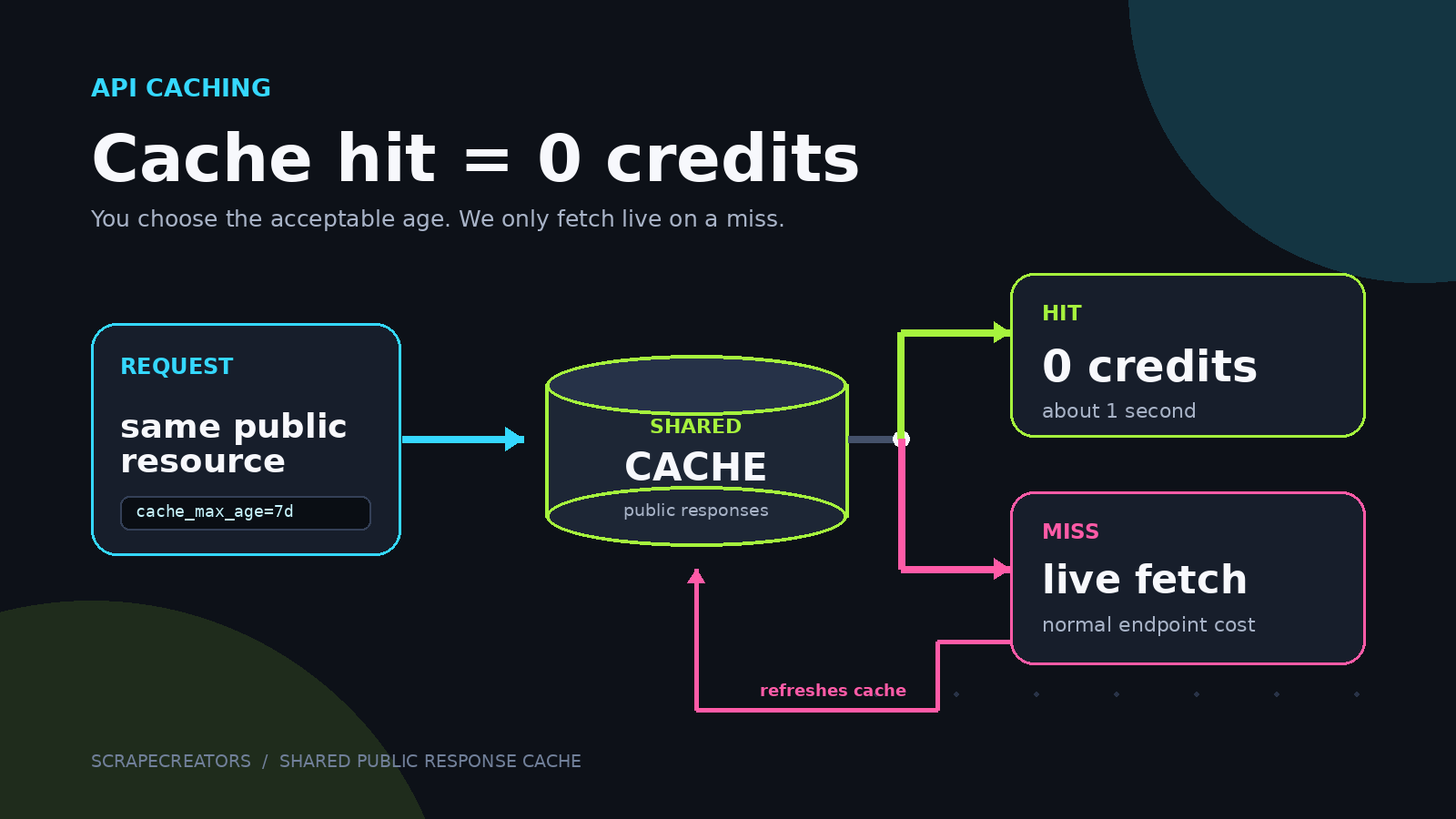
API caching usually gets sold as a speed feature. Ours also cuts your bill.
On supported ScrapeCreators endpoints, a cache hit costs 0 credits. If we already have the same public resource and it is recent enough for your request, we return it in about a second with "cached": true and "credits_charged": 0.
If the cache is empty or too old, we scrape the source live. That cache miss costs the endpoint’s normal price and refreshes the stored response for the next request.
How free cache hits work
The request flow is simple:
- You call a supported endpoint with
cache_max_age. - ScrapeCreators checks for a response for that public resource.
- If the cached copy is within your accepted age, we return it for 0 credits.
- If it is missing or stale, we fetch live and charge the normal endpoint cost.
- The successful live result refreshes the cache.
The cached copy may exist because you requested the resource earlier. It may also be warm because another customer recently requested the same public resource. You do not see who made that request. You only receive the public API response keyed to the resource you asked for.
This works especially well for public profiles, posts, videos, and transcripts that do not need to be scraped again every few minutes.
Make a cached API request
Add cache_max_age to a supported endpoint. The value tells us the oldest cached response you are willing to accept.
curl --request GET \
  --url 'https://api.scrapecreators.com/v1/tiktok/profile?handle=stoolpresidente&cache_max_age=7d' \
  --header 'x-api-key: YOUR_API_KEY'
Supported values are:
| Value | Maximum accepted age | Good fit |
|---|---|---|
1d | 1 day | Frequently changing profiles or posts |
3d | 3 days | Regular monitoring with some freshness tolerance |
7d | 7 days | Weekly research and enrichment |
14d | 14 days | Slower-moving reference datasets |
30d | 30 days | Stable posts, videos, or transcripts |
If you send another value, the API returns a 400 response with the allowed values. On endpoints that do not support caching, the parameter is ignored. The endpoint’s docs list cache_max_age when caching is available.
A longer window gives the cache more chances to hit. It also means you may receive older data. Pick the window based on the field you care about. A transcript does not change often. A follower count does.
What a cache hit returns
A cache hit includes fields that make the result easy to audit:
{
  "success": true,
  "cached": true,
  "cached_at": "2026-08-01T12:34:56.000Z",
  "credits_charged": 0,
  "data": {
    "...": "the cached public response"
  }
}
cached_at tells you when the public data was scraped. Check that timestamp before using the result in a report that depends on current counts.
The exact response body still depends on the endpoint. Caching changes where the result comes from and what it costs. It does not turn different endpoint schemas into one generic format.
What API caching does to cost
Suppose a one-credit endpoint receives 100 identical requests for the same resource. The first request is a cache miss and the next 99 are valid cache hits.
| Requests | Live misses | Cache hits | Total credits |
|---|---|---|---|
| 100 | 1 | 99 | 1 |
That example assumes the resource stays in cache, every later request accepts its age, and no request changes the resource-defining parameters.
The savings are less dramatic when every request targets a different profile or when you always need a fresh result. They can be substantial for repeated enrichment jobs, retries, shared customer lookups, dashboards, and development environments that request the same resources again and again.
This also changes how you estimate cost. Do not multiply total request count by endpoint price and stop there. Split the estimate into expected live misses and expected cache hits:
estimated credits = live misses x normal endpoint credit cost
Valid cache hits add zero credits.
How this compares with normal API pricing
The useful comparison is the billing rule, not a vendor logo table. Pricing pages change, and cache support can vary by product or endpoint.
| Pricing rule | Repeated request for the same resource |
|---|---|
| Every request is metered | You pay again even when the provider can reuse recent data |
| Monthly bundle | The repeat call consumes part of the bundle, and unused capacity may expire |
| ScrapeCreators cache hit | The call costs 0 credits when a valid cached response exists |
| ScrapeCreators cache miss | We fetch live and charge the endpoint’s normal credit cost |
ScrapeCreators is also pay as you go. There is no subscription requirement, purchased credits never expire, and there are no rate limits. Those rules matter when traffic is uneven. You can buy credits when you need them, keep unused credits, and avoid spending them on cache hits.
For a current company-by-company comparison, see our guide to the best social media APIs for developers. The cache policy itself is documented on the permanent free cached results page and in the API caching docs.
Cache keys, freshness, and opt-out
The cache is keyed by the endpoint and the parameters that identify the public resource. Different cache_max_age values read the same cached copy. The age value decides whether that copy is acceptable. It does not create a separate cache.
Extra or reordered query parameters do not fragment the cache. A successful request to a cacheable endpoint can refresh the stored response even when the caller did not ask to read from cache. That is why popular public resources can already be warm when you request them.
There are two separate controls to understand:
- Leave out
cache_max_agewhen you do not want to accept a cached response for that request. - A team owner can opt out of response storage from the API Keys page. When a team opts out,
cache_max_ageis ignored, requests fetch live, and that team’s responses are not stored in the cache. The setting applies to all API keys on the team.
The cache contains API responses for publicly available data. It is not a way to access private profiles, private posts, or another customer’s account data.
When to use a live request instead
Caching is a tradeoff between freshness, speed, and cost. Use a live request when:
- You are monitoring a count or field that may have changed recently.
- A decision depends on the source’s current state.
- You are verifying whether a post or profile is still public.
- The endpoint does not support
cache_max_age. - Your team’s policy requires responses not to be stored.
Use a cache window when a recent snapshot is good enough. Profiles used for enrichment, old posts, stable videos, and transcripts are common examples.
The best part is that you choose the freshness window. We do not quietly swap a live request for an old response. You tell us the maximum age you will accept, and the response tells you whether the cache was used.
Create an API key with 100 free credits, then check the endpoint docs for cache_max_age. If the first request misses, the next request to the same public resource may be free.


