

A TikTok video promoted as a paid ad—often via Spark Ads—signals the creative already worked organically. Brands only amplify videos that drove results.
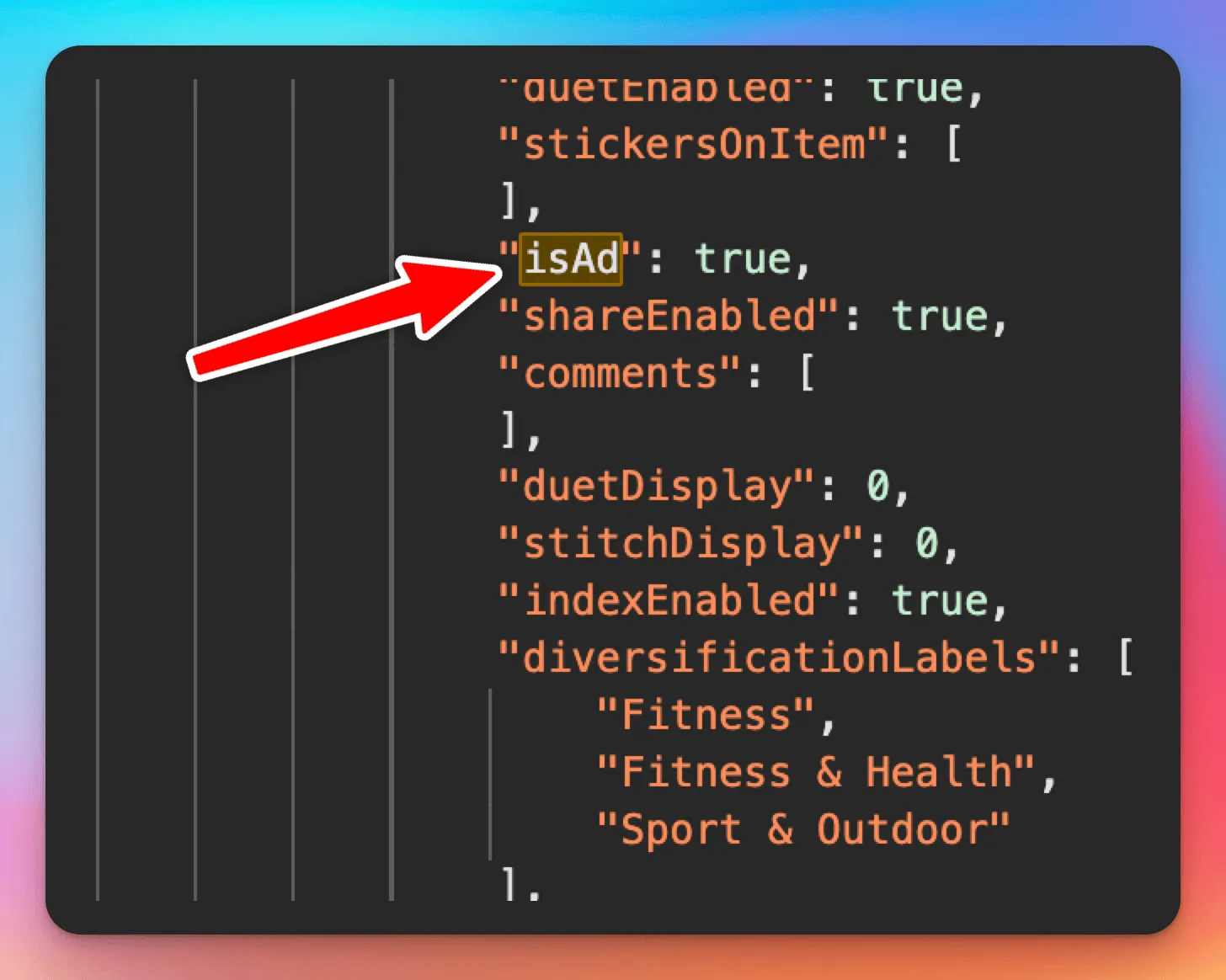
TikTok does not show ad status in the app UI. The page HTML hides an isAd flag in embedded JSON. Set to true, the video ran as paid promotion.
Marketers and researchers use that signal to:
- Find creators and formats worth partnering with
- Track brand spend before partnerships go public
- Reverse-engineer creatives that convert enough to get ad budget
In this guide, you’ll learn:
- Why ad status is a performance signal, not just a label
- How to find
isAdin a video page with browser DevTools - When to use an API instead of hand-inspecting HTML
- Related fields like
is_ad, affiliate flags, and carousel assets
Here’s where to find isAd in the page.
Why This Matters: Ad Status = Performance Signal
If a brand takes a creator’s TikTok and turns it into an ad, it’s a signal that the video performed well, and that the creator likely drove real results.
For marketers, influencer agencies, and competitive researchers, identifying which TikToks are ads can help you:
- Find high-performing creators worth working with
- Discover creative styles that resonate enough to get paid promotion
- Track brand partnerships before they’re obvious
- Reverse-engineer what’s converting across your industry
How To Check if a TikTok Video Is an Ad
TikTok doesn’t display ad status in the UI, but if you’re savvy you can still find it.
The raw HTML of a video page contains a field called isAd. If this is set to true, the video was promoted as a paid advertisement.
Here’s how to find it:
- Visit the TikTok video URL in a browser (e.g.,
https://www.tiktok.com/@noah.rolette/video/7376380452136914218) - Right-click and click
Inspect - Go to the
NetworkTab - Refresh the page
- Click on the first request, which should be the HTML document
- In the
Responsetab, search (Cmd+F or Ctrl+F) forisAd - You’ll see something like this inside a JSON blob:
Scrape Creators
If you don’t want to build and manage your own scrapers to get this information, consider using Scrape Creators, which makes is super simple to get this information with a simple API call.
(On Scrape Creators the field is actually is_ad.
In addition to is_ad you can also see if the video is an affiliate for a product, get the images if the tiktok is a photo carousel, get the raw video without the watermark, and much more.
And get access 100 other API’s for Instagram, LinkedIn, YouTube, Twitter, TruthSocial, etc.
All for a pay as you go plan, no monthly subscription required.
And if you don’t code, we also have integrations with n8n and Apify 🙌