
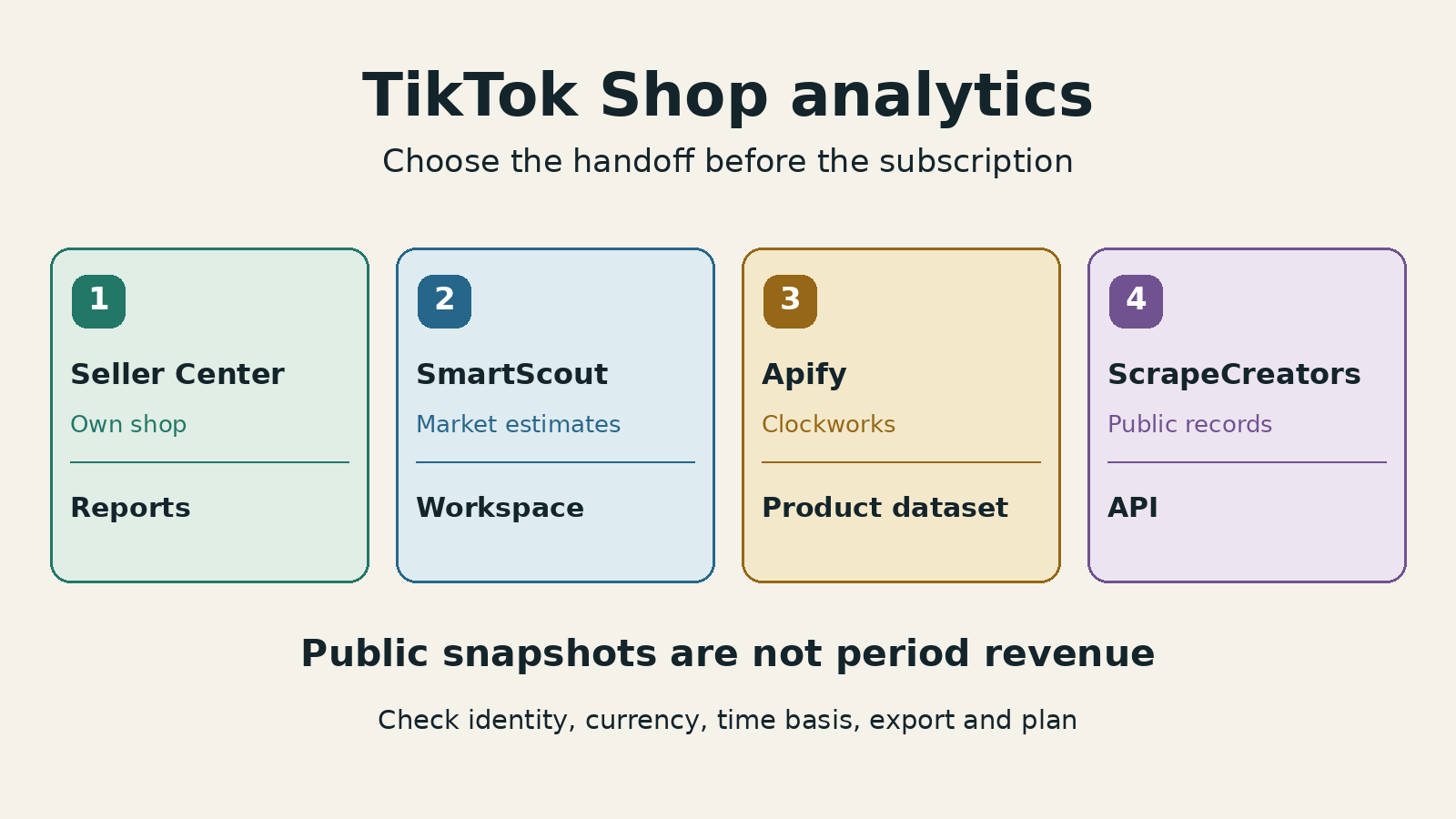
The right TikTok Shop analytics tool depends on the decision. Start with Seller Center for your own shop’s sales and conversion reports. Choose SmartScout for a ready-made market-research workspace, Apify’s Clockworks TikTok Shop Scraper for a downloadable product dataset, or ScrapeCreators for public records inside your own application.
The last two are collection tools. You still build the analysis. None of these public-data paths turns a competitor’s displayed sold count into their private order ledger, settled payout, or profit.
Disclosure: I build ScrapeCreators. This shortlist compares four different handoffs, not four interchangeable dashboards. I checked primary pages and pricing on November 21, 2026 and executed the ScrapeCreators example below. I did not run paid competitor jobs or connect a seller account.
Which TikTok Shop analytics tool should you choose?
| Tool | Choose it when | What you receive | Purchase or access unit | Main check |
|---|---|---|---|---|
| TikTok Seller Center | You manage the shop and need its actual operating reports | Authorized shop and product analytics | Access to the seller account | Read each metric’s period and refund definition |
| SmartScout | You want market research without building a collector | Product, shop and category research, depending on plan | Monthly subscription; Basic $49, Essentials $119, Business $299 | Category access and exports are not the same as entry-level access |
| Apify, Clockworks TikTok Shop Scraper | You want scheduled searches and downloadable datasets | US product records with prices, sold counts, sellers and variants | Product events; $30 per 1,000 on Free, lower rates on paid tiers | The advertised $13 rate belongs to Business; configure the product cap |
| ScrapeCreators | You want public product observations in your own software | JSON from search, shop catalogs and product details | $47 buys 25,000 credits; the example’s calls cost one credit each | You supply storage, deduplication and the report |
Do not buy a reporting subscription when you need an API. Do not buy a scraper expecting a finished market database with historical charts. Those mistakes can cost more time than the subscription saves.
If you need audience and content reporting for an account you manage, use the separate TikTok analytics comparison. For public account and content benchmarks, use the TikTok competitor-tool comparison. This page is about Shop commerce research and its data handoff, not general TikTok engagement reporting.
1. Seller Center for reports about your own shop
Start with TikTok’s Product Analytics guide when you own or manage the shop. It documents product and SKU performance, orders, units sold, traffic, conversion, pricing and inventory. The documented product view lets you choose a day or range within the past 90 days and export specified traffic charts and tables.
That is a different source from a third party estimating another shop’s performance. It is the right starting point for questions such as: which of my SKUs converted, where did product traffic come from, and which content contributed transactions?
Read the metric definition before comparing screenshots. TikTok’s current Shop Analytics navigation guide defines that view’s GMV by payment time and includes canceled and refunded orders. It separates advertising metrics into Shop Ads and commission-related metrics into the Affiliate Center.
GMV is not a bank payout, and a bank payout is not profit. If your question is margin, keep settlement adjustments, fees, product costs and the relevant reporting dates beside the sales report. A public product scraper cannot supply your private settlement records.
This distinction came up in a seller discussion about analytics and delayed settlements. That discussion is a useful buying question, not proof that a particular accounting product is accurate.
Choose another route when you need to research products or shops outside your authorized account. Seller Center’s product report is not a public API for every competitor’s orders.
2. SmartScout for a market-research workspace
SmartScout’s TikTok Shop product page describes shop revenue estimates, product momentum, category research and creator/content research. It is worth considering when a team wants to explore a market rather than collect every record itself, especially when Amazon research also matters.
Treat its revenue figures as vendor estimates, not TikTok settlement exports. I did not compare its estimates with a seller’s actual orders, so this is not an accuracy ranking.
The important purchasing detail is the research level. On the current pricing page, with Monthly explicitly selected:
- Basic is $49/month. Its TikTok Shop tooltip describes product, content and creator-level research.
- Essentials is $119/month. Its tooltip adds shop-level research.
- Business is $299/month. Its tooltip names category-level research.
The page also displays lower monthly equivalents under Yearly. Do not treat those as month-to-month prices. The Enterprise tooltip still says creator and content research is in the future, despite broader wording on the product page. Confirm the exact scope of a custom quote rather than assuming every advertised feature is included everywhere.
Exports need a separate check. The comparison grid explicitly lists 20,000 rows/month for Business’s Excel exports, while the lower-plan cells do not state an allowance. Ask whether the specific TikTok table you need can be exported on your plan. A general export label is not proof of a particular dataset entitlement or API access.
A SmartScout founder walkthrough and its comments raised exactly this question: can the account show the relevant products, creators and videos together? The recording described a narrower feature set than today’s product page. I used that as a reason to check current plan tooltips, not as current feature documentation.
Choose SmartScout if a usable research workspace is the deliverable. Choose a collector if you need control over each observation, raw response, join or refresh schedule.
3. Apify’s Clockworks Actor for a product dataset
Apify is a marketplace, so choose an exact Actor rather than buying the platform name. The Clockworks TikTok Shop Scraper is maintained by Apify and documents keyword searches, product IDs, seller information, prices, cumulative units sold, ratings and variant stock.
Its README currently specifies US-only collection. Inputs include keywords and productsPerSearch; the latter defaults to 10 per keyword. A small default is easy to mistake for a source limit. Inspect the run input before deciding that a category contains only ten products.
Results go to a dataset that can be downloaded as JSON, CSV, Excel, XML or HTML. This suits a team that wants hosted runs and a file handoff. It does not by itself supply a finished historical research dashboard. You still need repeated runs and a consistent observation model to compare changes.
The current Actor pricing tab lists these product-event rates:
| Apify plan | Price per 1,000 returned products | Monthly plan commitment |
|---|---|---|
| Free | $30 | $0; $5 monthly usage allowance |
| Starter | $20 | $19, including $19 spend |
| Scale | $15 | $199, including $199 spend |
| Business | $13 | $999, including $999 spend |
The tab states that platform costs are included. I have not added hypothetical compute or proxy surcharges. The headline $13 rate is not the Free-plan rate, and a product event is not equivalent to another provider’s request credit. Check Apify’s current platform terms and pricing for the purchase path you intend to use.
I did not execute this Actor. Before using it in production, run a representative keyword, inspect the returned product IDs and variant structure, and confirm that the dataset meets your needs. Pick an API instead if your application needs individual lookups rather than a hosted run and dataset lifecycle.
4. ScrapeCreators for a custom public-data pipeline
Choose ScrapeCreators’ TikTok Shop API when you want the records inside your own application. The relevant routes are keyword search, shop products and product details.
Search uses query, region and page. Shop catalogs use a store URL and returned cursor. Repeat your region and other chosen options on each request; a page number or cursor does not carry them forward. Product details currently supports US products. The search and catalog docs warn that non-US availability is unreliable, so this example stays in the US.
The pricing section lists $47 for 25,000 credits, without a monthly subscription. Search, shop-products and product-detail requests each charge one credit on successful retrieval. A successful empty page can still be charged. The three calls in the example below each charged one credit.
I would not buy this expecting ready-made competitor GMV history, private orders, payouts or a profit report. You choose the searches, store observations and build the analysis. For a broader integration walkthrough, see how to collect TikTok Shop products.
A bounded public evidence packet
This standard-library Python example fetches two US search pages and one matching product detail. Set SCRAPE_CREATORS_API_KEY in your environment. It saves the source bodies separately from a smaller observation file, retains missing sold counts as null, and checks the detail’s product identity.
import json
import os
from datetime import datetime, timezone
from pathlib import Path
from urllib.parse import urlencode
from urllib.request import Request, urlopen

OUT = Path("shop-evidence")
OUT.mkdir(exist_ok=True)
KEY = os.environ["SCRAPE_CREATORS_API_KEY"]
QUERY, REGION = "mascara", "US"
receipts = []


def get(path, params, name):
    request = Request(
        "https://api.scrapecreators.com" + path + "?" + urlencode(params),
        headers={"x-api-key": KEY},
    )
    with urlopen(request, timeout=60) as response:
        body = json.load(response)
        status = response.status
    observed = datetime.now(timezone.utc).isoformat()
    (OUT / (name + ".json")).write_text(json.dumps(body, indent=2))
    if status != 200 or body.get("success") is not True:
        raise RuntimeError("Request did not return a usable success")
    receipts.append({"path": path, "params": params, "http_status": status,
                     "observed_at_utc": observed,
                     "credits_charged": body.get("credits_charged")})
    return body


observations = []
page_counts = []
for page in (1, 2):
    body = get("/v1/tiktok/shop/search",
               {"query": QUERY, "region": REGION, "page": page}, f"search-{page}")
    products = body.get("products")
    if not isinstance(products, list) or not products:
        raise RuntimeError("Expected nonempty product rows")
    page_counts.append({"page": page, "returned_rows": len(products)})
    for row_index, product in enumerate(products):
        product_id = product.get("product_id")
        if not isinstance(product_id, str) or not product_id.isdigit():
            raise RuntimeError("Missing string product identity")
        price = product.get("product_price_info") or {}
        seller = product.get("seller_info") or {}
        sold = product.get("sold_info") or {}
        observations.append({
            "page": page, "row_index": row_index, "product_id": product_id,
            "title": product.get("title"), "seller_id": seller.get("seller_id"),
            "currency": price.get("currency_name"),
            "price_text": price.get("sale_price_decimal"),
            "sold_count": sold.get("sold_count"),
            "source_url": (product.get("seo_url") or {}).get("canonical_url"),
            "search_result_id": (product.get("search_meta") or {}).get("search_result_id"),
        })

selected_id = observations[0]["product_id"]
selected_url = observations[0]["source_url"]
if not selected_url:
    raise RuntimeError("The selected product has no source URL")
detail = get("/v1/tiktok/product", {"url": selected_url, "region": REGION}, "detail")
info = detail.get("product_info") or (detail.get("data") or {}).get("product_info")
if not isinstance(info, dict) or info.get("product_id") != selected_id:
    raise RuntimeError("Detail product identity does not match the search row")
packet = {"query": QUERY, "region": REGION, "requested_pages": [1, 2],
          "page_counts": page_counts, "observations": observations,
          "unique_product_ids": len({row["product_id"] for row in observations}),
          "detail_product_id": info["product_id"], "receipts": receipts,
          "scope": "Bounded public snapshot, not a full catalog or period revenue report"}
(OUT / "packet.json").write_text(json.dumps(packet, indent=2))
print(json.dumps({"page_counts": page_counts, "unique_product_ids": packet["unique_product_ids"],
                  "detail_product_id": info["product_id"], "receipts": receipts}, indent=2))
On November 21, the exact code returned 28 rows on page 1 and 15 on page 2. One product ID appeared on both pages: 43 returned observations, 42 distinct products. Two observation rows lacked a sold count. The selected product detail matched the requested product ID. All three calls returned HTTP 200 and charged three credits total.
Here is a projection of one saved observation, with other fields and rows omitted. These are observed values, not a fabricated sample or a claim that the price remains unchanged:
{
  "product_id": "1730890193353609874",
  "seller_id": "7495516049083828882",
  "currency": "USD",
  "price_text": "16.99",
  "sold_count": 666477,
  "source_url": "https://www.tiktok.com/shop/pdp/1730890193353609874"
}
An earlier exploratory search returned 30 rows on each page, with six overlapping product IDs. The changing page sizes and overlap are why the example preserves page identity and raw bodies. Neither capture is a full catalog export or a reliability benchmark.
A displayed sold count has no reporting-period boundary in this packet. Multiplying it by today’s price would not reconstruct historical GMV: earlier prices, variants, discounts and adjustments are missing. Likewise, an inventory decrease alone does not establish paid orders. If you need verified period sales for your own shop, return to authorized reports.
Check the handoff before buying
Use the same short acceptance test across candidates. This is a proposed evaluation checklist, not a claim that I ran every vendor through it.
| Check | What to ask for | Reject this shortcut |
|---|---|---|
| Identity | Product ID, seller ID, source URL and variant when relevant | Treating similarly named products as the same listing |
| Measurement | Whether a figure is a period report, modeled estimate or observed counter | Calling every sales-looking number revenue |
| Time | Date window, timezone, update time and history definition | Calling two current fetches a 30-day trend |
| Coverage | Returned rows, distinct IDs, skipped records and remaining pages | Treating a requested cap or public total as rows delivered |
| Handoff | A real file, report, dataset or API body from your selected tier | Assuming a dashboard subscription includes exports or an API |
If your job is creator recruitment or profit accounting, add that requirement explicitly. Product discovery, outreach and settlement reconciliation are different deliverables. Do not infer one from a screenshot of another.
FastMoss and Kalodata are additional candidates, not scored entries here. Their live primary pages and pricing were security-gated during this review, including in a browser. I have not copied old trial lengths, prices or limits into this comparison. That is a verification gap, not evidence that either product is unavailable or unreliable.
If the API handoff is the right fit, create a ScrapeCreators account and check a few representative US products before designing the report. If you need a finished workspace, start with that instead.
Frequently asked questions
What is the best TikTok Shop analytics tool?
Use Seller Center for your authorized shop’s operating reports, SmartScout for a market-research workspace, Apify’s Clockworks Actor for a product dataset, and ScrapeCreators for public records in your own application. Collectors require you to build the analysis.
Can TikTok Shop analytics tools show exact competitor revenue?
Do not treat public sold counts or vendor estimates as a competitor’s private order ledger. Verify the metric’s source, period, currency, variants and adjustments. Current price multiplied by a displayed sold count does not reconstruct historical GMV.
Do TikTok Shop analytics subscriptions include exports?
Not automatically. Confirm the exact table, file format, row allowance and plan. SmartScout’s current comparison explicitly lists 20,000 Excel-export rows per month on Business; its lower-plan cells do not state an allowance.
Can I build a TikTok Shop analytics dashboard with an API?
Yes, for the public observations the API actually returns. You must build storage, refreshes, deduplication and reporting. The example collects a bounded US product snapshot, not private orders, historical period revenue or settled profit.